Speed SUZUKI IGNIS 2022 Manual PDF
[x] Cancel search | Manufacturer: SUZUKI, Model Year: 2022, Model line: IGNIS, Model: SUZUKI IGNIS 2022Pages: 505, PDF Size: 8.36 MB
Page 267 of 505
5-12
OTHER CONTROLS AND EQUIPMENT
75RM4-01E
Frame hooksYour SUZUKI does not recommend you
use the frame hooks for towing another
vehicle. SUZUKI was originally designed to
tow your vehicle on the road emergency
towing.
If your vehicle needs to be towed in an
emergency, refer to “Towing” in the
“EMERGENCY SERVICE” section.
Front
75RM012
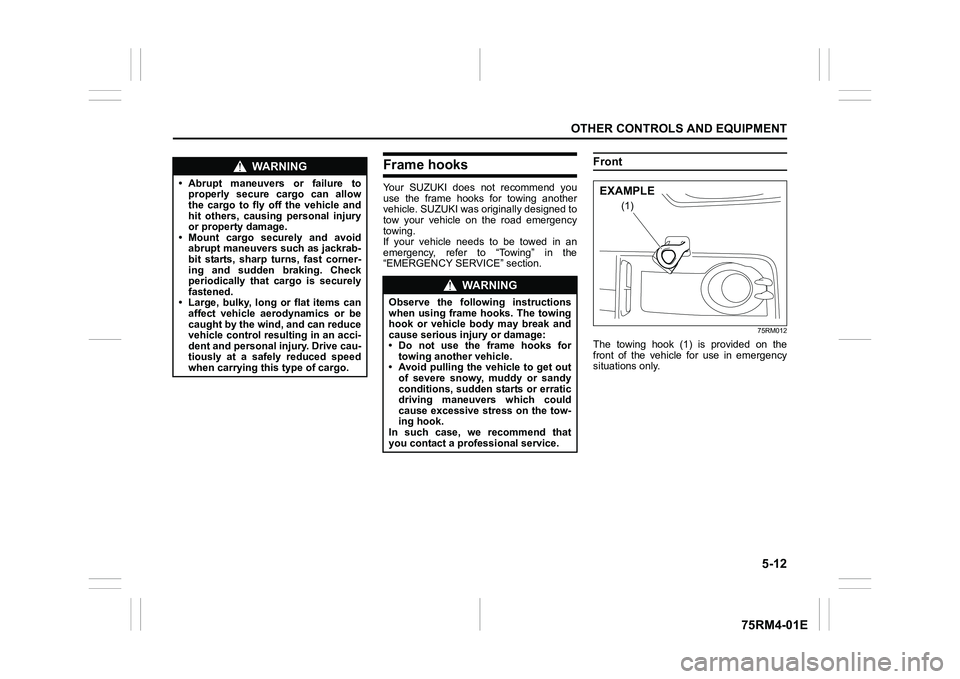
The towing hook (1) is provided on the
front of the vehicle for use in emergency
situations only.
WA R N I N G
• Abrupt maneuvers or failure toproperly secure cargo can allow
the cargo to fly off the vehicle and
hit others, causing personal injury
or property damage.
• Mount cargo securely and avoid abrupt maneuvers such as jackrab-
bit starts, sharp turns, fast corner-
ing and sudden braking. Check
periodically that cargo is securely
fastened.
• Large, bulky, long or flat items can affect vehicle aerodynamics or be
caught by the wind, and can reduce
vehicle control resulting in an acci-
dent and personal injury. Drive cau-
tiously at a safely reduced speed
when carrying this type of cargo.
WA R N I N G
Observe the following instructions
when using frame hooks. The towing
hook or vehicle body may break and
cause serious injury or damage:
• Do not use the frame hooks fortowing another vehicle.
• Avoid pulling the vehicle to get out
of severe snowy, muddy or sandy
conditions, sudden starts or erratic
driving maneuvers which could
cause excessive stress on the tow-
ing hook.
In such case, we recommend that
you contact a professional service.
(1)
EXAMPLE
Page 272 of 505
5-17OTHER CONTROLS AND EQUIPMENT
75RM4-01E
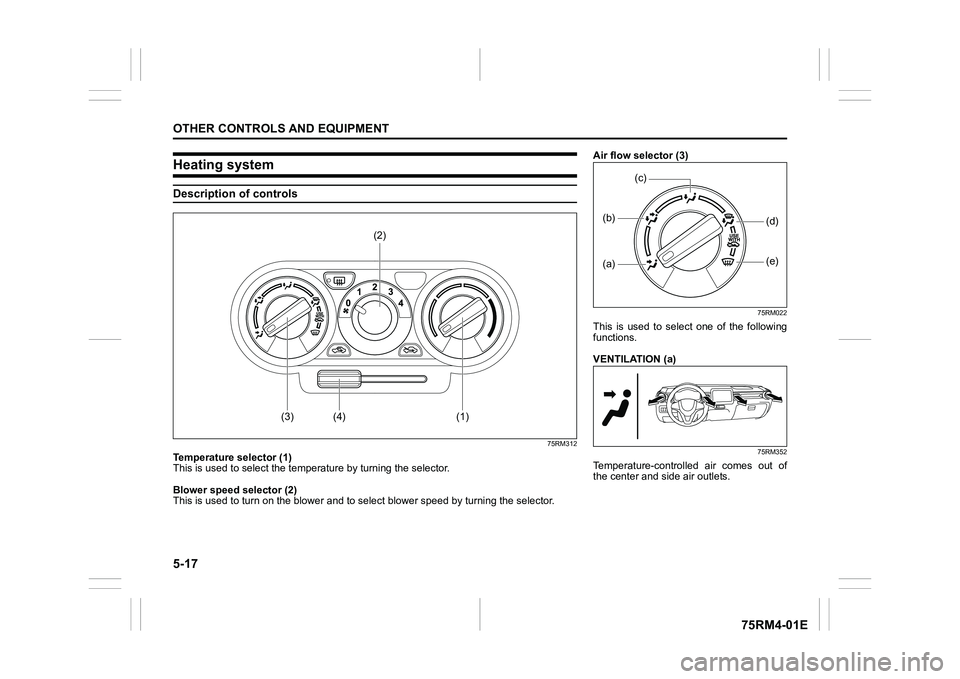
Heating systemDescription of controls
75RM312
Temperature selector (1)
This is used to select the temperature by turning the selector.
Blower speed selector (2)
This is used to turn on the blower and to s elect blower speed by turning the selector.
(3)
(1)
(4)
(2)
Air flow selector (3)
75RM022
This is used to select one of the following
functions.
VENTILATION (a)
75RM352
Temperature-controlled air comes out of
the center and side air outlets.(a)(b)
(e)
(d)
(c)
Page 274 of 505

5-19OTHER CONTROLS AND EQUIPMENT
75RM4-01E
75RM402
NOTE:
The mark of “USE WITH” (5)
To clear fog on the windshield and/or the
side windows quickly, set the air flow
selector (3) to “HEAT & DEFROST” or
“DEFROST” and air intake selector (4) to
“FRESH AIR”. These positioning will clear
the fogged windshield and/or the side win-
dows faster than the “RECIRCULATED
AIR”.
System operating instructionsNatural ventilation
Select VENTILATION and FRESH AIR, the
temperature selector to the desired tem-
perature position, and the blower speed
selector to off. Fresh air will flow through
the vehicle during driving.
Forced ventilation
The control settings are the same as for
natural ventilation except you set the
blower speed selector to a position other
than off.
Normal heating (using outside air)
Select HEAT and FRESH AIR, the tem-
perature selector to the desired tempera-
ture position and the blower speed selector
to the desired blower speed position. Set-
ting the blower speed selector to a higher
blower speed position increases heating
efficiency.
Quick heating (using recirculated air)
The control settings are the same as for
normal heating except you select RECIR-
CULATED AIR. If you use this heating
method for an extended period of time, the
air in the vehicle can become contami-
nated and the windows can become misty.
Therefore, use this method only for quick
heating and change to the normal heating
method as soon as possible. Head cooled/Feet warmed heating
Select BI-LEVEL and FRESH AIR, the
temperature selector to the desired tem-
perature position, and the blower speed
selector to the desired blower speed posi-
tion. Unless the temperature selector is in
the fully cold position or fully hot position,
the air that comes out of the center and
side outlets will be cooler than the air that
comes out of the floor outlets.
Defrosting/Feet warmed heating
Select HEAT & DEFROST and FRESH
AIR, the temperatur
e selector to the
desired temperature position, and the
blower speed selector to high. When the
windshield has become clear, set the
blower speed selector to the desired
blower speed position.
Defrosting
Select DEFROST and FRESH AIR, the
temperature selector to the desired tem-
perature position (higher temperature pro-
vides more efficient defrosting), and the
blower speed selector to high. When the
windshield has become clear, set the
blower speed selector to the desired
blower speed position.
(3)
(5)
Page 276 of 505
5-21OTHER CONTROLS AND EQUIPMENT
75RM4-01E
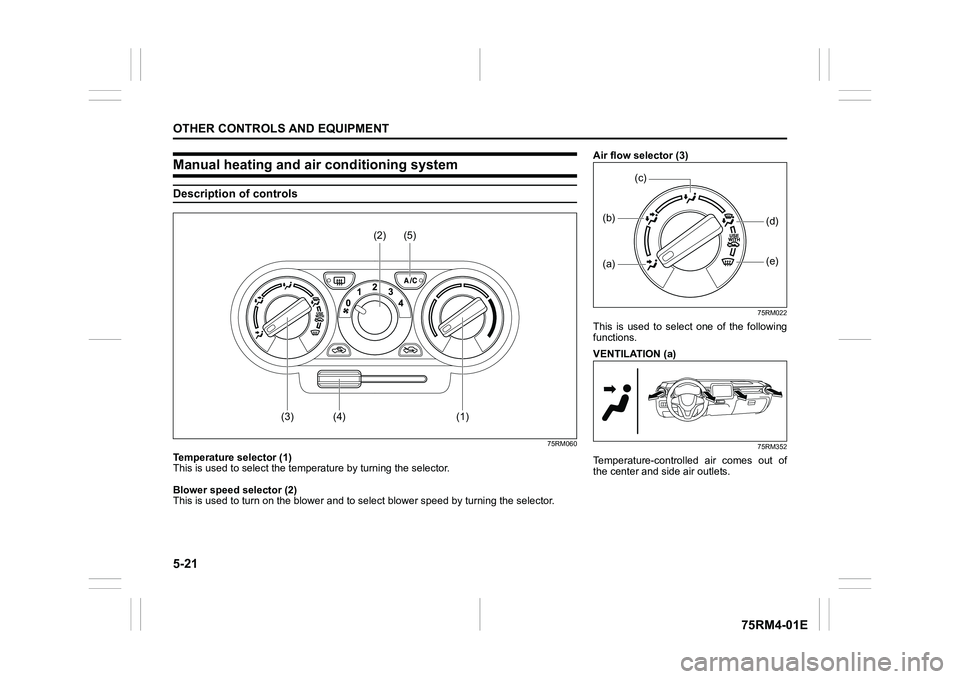
Manual heating and air conditioning systemDescription of controls
75RM060
Temperature selector (1)
This is used to select the temperature by turning the selector.
Blower speed selector (2)
This is used to turn on the blower and to s elect blower speed by turning the selector.
(3)
(1)
(4)
(2)
(5)
Air flow selector (3)
75RM022
This is used to select one of the following
functions.
VENTILATION (a)
75RM352
Temperature-controlled air comes out of
the center and side air outlets.(a)(b)
(e)
(d)
(c)
Page 278 of 505
5-23OTHER CONTROLS AND EQUIPMENT
75RM4-01E
75RM403
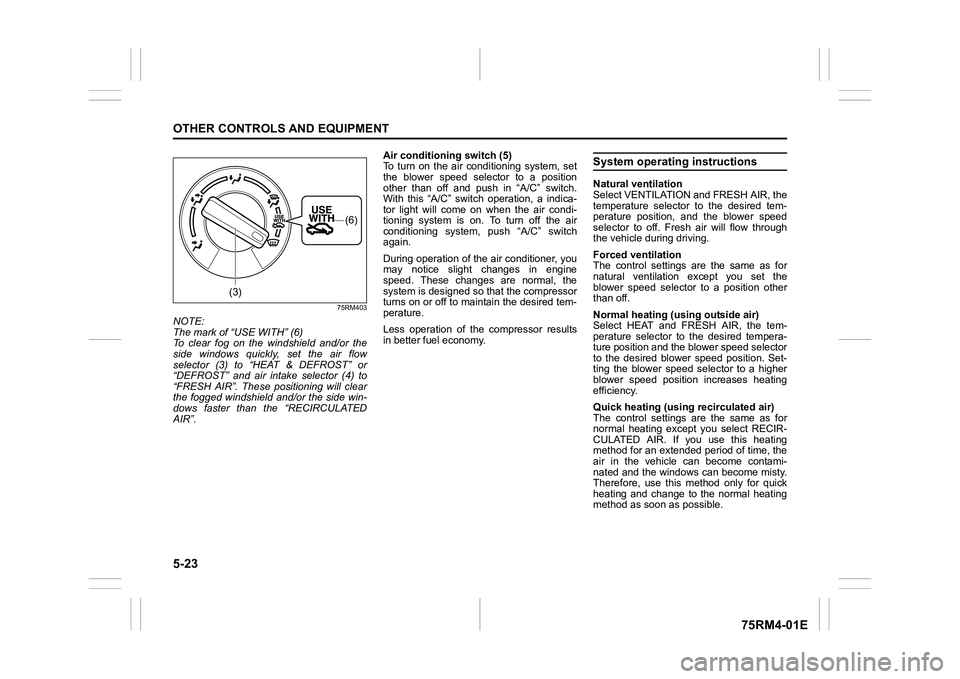
NOTE:
The mark of “USE WITH” (6)
To clear fog on the windshield and/or the
side windows quickly, set the air flow
selector (3) to “HEAT & DEFROST” or
“DEFROST” and air intake selector (4) to
“FRESH AIR”. These positioning will clear
the fogged windshield and/or the side win-
dows faster than the “RECIRCULATED
AIR”. Air conditioning switch (5)
To turn on the air conditioning system, set
the blower speed selector to a position
other than off and push in “A/C” switch.
With this “A/C” switch operation, a indica-
tor light will come on when the air condi-
tioning system is on. To turn off the air
conditioning system,
push “A/C” switch
again.
During operation of the air conditioner, you
may notice slight changes in engine
speed. These changes are normal, the
system is designed so that the compressor
turns on or off to maintain the desired tem-
perature.
Less operation of the compressor results
in better fuel economy.
System operating instructionsNatural ventilation
Select VENTILATION and FRESH AIR, the
temperature selector to the desired tem-
perature position, and the blower speed
selector to off. Fresh air will flow through
the vehicle during driving.
Forced ventilation
The control settings are the same as for
natural ventilation except you set the
blower speed selector to a position other
than off.
Normal heating (using outside air)
Select HEAT and FRESH AIR, the tem-
perature selector to the desired tempera-
ture position and the blower speed selector
to the desired blower speed position. Set-
ting the blower speed selector to a higher
blower speed position increases heating
efficiency.
Quick heating (using recirculated air)
The control settings are the same as for
normal heating except you select RECIR-
CULATED AIR. If you use this heating
method for an extended period of time, the
air in the vehicle can become contami-
nated and the windows can become misty.
Therefore, use this method only for quick
heating and change to the normal heating
method as soon as possible.
(3)
(6)
Page 279 of 505
5-24
OTHER CONTROLS AND EQUIPMENT
75RM4-01E
Head cooled/Feet warmed heating
Select BI-LEVEL and FRESH AIR, the
temperature selector to the desired tem-
perature position, and the blower speed
selector to the desired blower speed posi-
tion. Unless the temperature selector is in
the fully cold position or fully hot position,
the air that comes out of the center and
side outlets will be cooler than the air that
comes out of the floor outlets.
Normal cooling
Set the air flow selector to VENTILATION,
the temperature selector to the desired tem-
perature position and the blower speed
selector to the desired blower speed posi-
tion, and turn on “A/C” switch. Setting the
blower speed selector to a higher blower
speed position increases cooling efficiency.
You can switch the air intake selector to
either FRESH AIR or RECIRCULATED
AIR as you desire. Choosing RECIRCU-
LATED AIR increases cooling efficiency.
Quick cooling (using recirculated air)
The control settings a re the same as for
normal cooling except you select RECIR-
CULATED AIR and the highest blower
speed. NOTE:
• If you select RECIRCULATED AIR for an
extended period of time, the air in the
vehicle can become contaminated.
Therefore, you should occasionally
select FRESH AIR.
• If your vehicle has been left in the sun with the windows closed, it will cool
faster if you open the windows briefly
while you operate the air conditioner with
the air intake selector at FRESH AIR and
the blower at high speed.
Dehumidifying
Set the air flow selector to a desired air
flow selector position, the temperature
selector to the desired temperature posi-
tion and the blower speed selector to the
desired blower speed position. Also select
FRESH AIR and turn on “A/C” switch.
NOTE:
Because the air conditioner dehumidifies
the air, turning it on will help keep the win-
dows clear, even when blowing heated air
using DEFROST or HEAT & DEFROST
functions.
75RM357
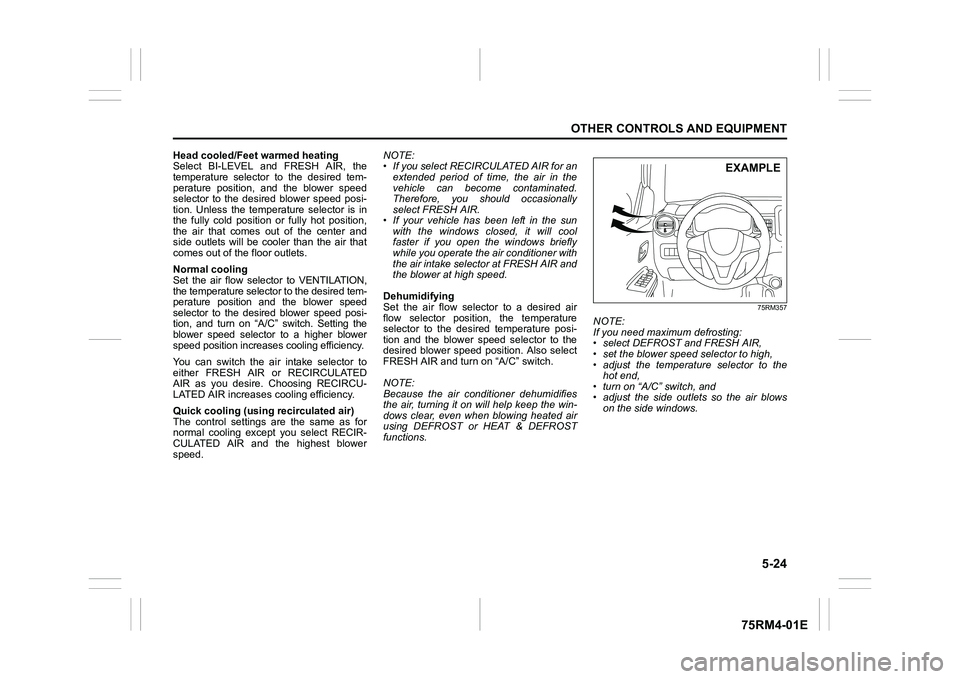
NOTE:
If you need maximum defrosting:
• select DEFROST and FRESH AIR,
• set the blower speed selector to high,
• adjust the temperature selector to the hot end,
• turn on “A/C” switch, and
• adjust the side outlets so the air blows
on the side windows.
EXAMPLE
Page 281 of 505
5-26
OTHER CONTROLS AND EQUIPMENT
75RM4-01E
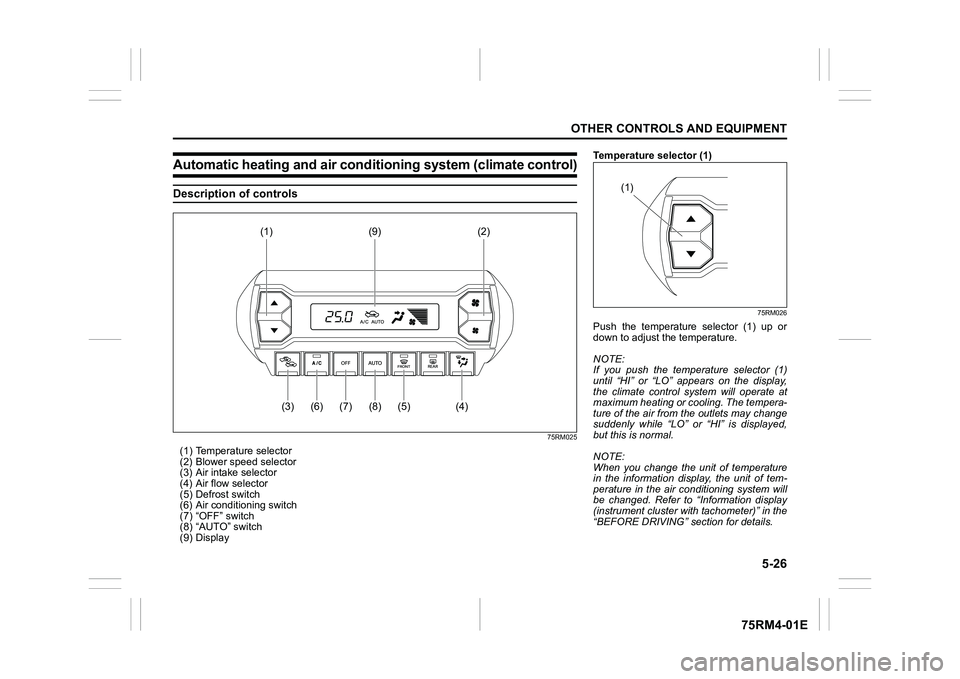
Automatic heating and air conditioning system (climate control)Description of controls
75RM025
(1) Temperature selector
(2) Blower speed selector
(3) Air intake selector
(4) Air flow selector
(5) Defrost switch
(6) Air conditioning switch
(7) “OFF” switch
(8) “AUTO” switch
(9) Display
(5)
(8)
(7)
(6)
(3)
(4)
(1) (9)
(2)
Temperature selector (1)
75RM026
Push the temperature selector (1) up or
down to adjust the temperature.
NOTE:
If you push the temperature selector (1)
until “HI” or “LO” appears on the display,
the climate control system will operate at
maximum heating or cooling. The tempera-
ture of the air from the outlets may change
suddenly while “LO” or “HI” is displayed,
but this is normal.
NOTE:
When you change the unit of temperature
in the information display, the unit of tem-
perature in the air conditioning system will
be changed. Refer to “Information display
(instrument cluster with tachometer)” in the
“BEFORE DRIVING” section for details.
(1)
Page 282 of 505
5-27OTHER CONTROLS AND EQUIPMENT
75RM4-01E
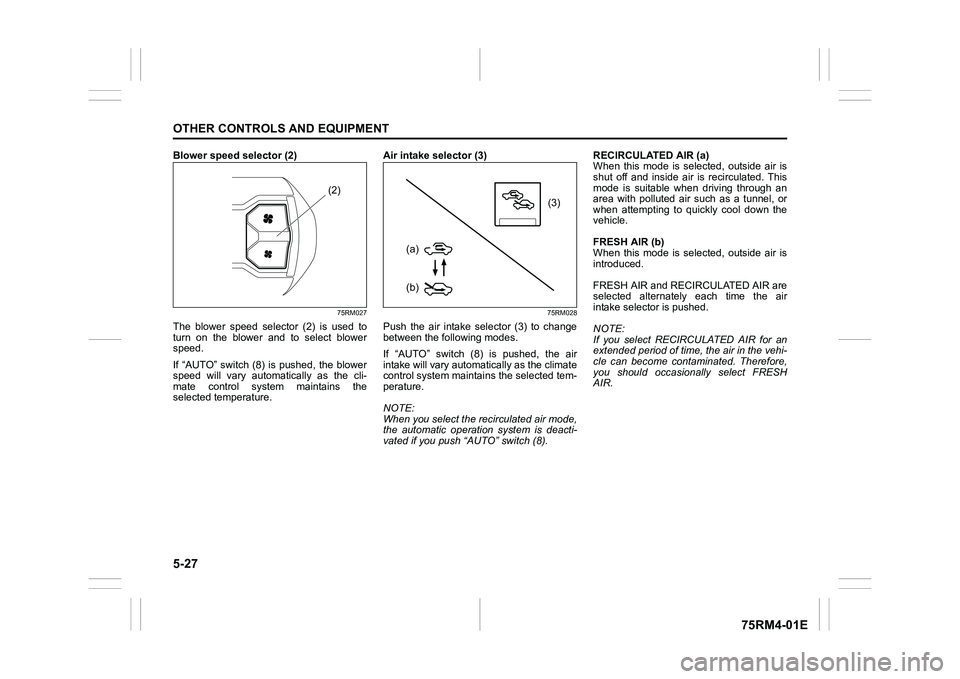
Blower speed selector (2)
75RM027
The blower speed selector (2) is used to
turn on the blower and to select blower
speed.
If “AUTO” switch (8) is pushed, the blower
speed will vary automatically as the cli-
mate control system maintains the
selected temperature. Air intake selector (3)
75RM028
Push the air intake selector (3) to change
between the following modes.
If “AUTO” switch (8) is pushed, the air
intake will vary automat
ically as the climate
control system maintai ns the selected tem-
perature.
NOTE:
When you select the recirculated air mode,
the automatic operation system is deacti-
vated if you push “AUTO” switch (8). RECIRCULATED AIR (a)
When this mode is selected, outside air is
shut off and inside air is recirculated. This
mode is suitable when driving through an
area with polluted air such as a tunnel, or
when attempting to quickly cool down the
vehicle.
FRESH AIR (b)
When this mode is selected, outside air is
introduced.
FRESH AIR and REC
IRCULATED AIR are
selected alternately each time the air
intake selector is pushed.
NOTE:
If you select RECIRCULATED AIR for an
extended period of time, the air in the vehi-
cle can become contam inated. Therefore,
you should occasio nally select FRESH
AIR.
(2)
(3)
(b)
(a)
Page 284 of 505
5-29OTHER CONTROLS AND EQUIPMENT
75RM4-01E
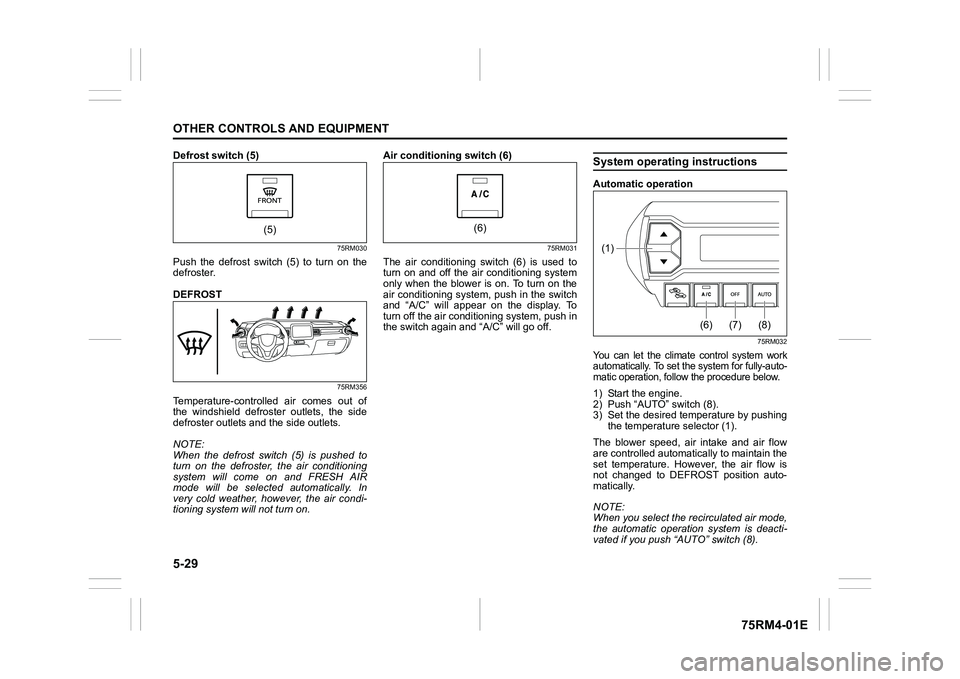
Defrost switch (5)
75RM030
Push the defrost switch (5) to turn on the
defroster.
DEFROST
75RM356
Temperature-controlled air comes out of
the windshield defroster outlets, the side
defroster outlets and the side outlets.
NOTE:
When the defrost switch (5) is pushed to
turn on the defroster, the air conditioning
system will come on and FRESH AIR
mode will be selected automatically. In
very cold weather, however, the air condi-
tioning system will not turn on. Air conditioning switch (6)
75RM031
The air conditioning switch (6) is used to
turn on and off the air conditioning system
only when the blower is on. To turn on the
air conditioning system, push in the switch
and “A/C” will appear on the display. To
turn off the air cond
itioning system, push in
the switch again and “A/C” will go off.
System operating instructionsAutomatic operation
75RM032
You can let the climate control system work
automatically. To set the system for fully-auto-
matic operation, follow the procedure below.1) Start the engine.
2) Push “AUTO” switch (8).
3) Set the desired te mperature by pushing
the temperature selector (1).
The blower speed, air intake and air flow
are controlled automatically to maintain the
set temperature. However, the air flow is
not changed to DEFROST position auto-
matically.
NOTE:
When you select the recirculated air mode,
the automatic operation system is deacti-
vated if you push “AUTO” switch (8).
(5)
(6)
(8)
(7)
(6)
(1)
Page 285 of 505
5-30
OTHER CONTROLS AND EQUIPMENT
75RM4-01E
You can use the air conditioning switch (6)
to manually turn the air conditioner on or off
according to your preference. When you
turn the air conditioning switch off, the cli-
mate control system cannot lower the inside
temperature below outside temperature.
To turn the climate control system off, push
“OFF” switch (7).
NOTE:
If “AUTO” on the display blinks, there is a
problem in the heating system and/or air
conditioning system. Yo u should have the
system inspected by an authorized
SUZUKI dealer.
NOTE:
• To find the temperature at which you are
most comfortable, start with the 22°C
(72°F) or 25°C (75°F) setting. (the tem-
perature vary depending on vehicle
specifications.).
• If you push the temperature selector (1) until “HI” or “LO” appears on the display,
the climate control system will operate at
maximum heating or cooling and the
blower will run at full speed.
• To avoid blowing cold air in cold weather or hot air in hot weather, the system will
delay turning on the blower until warmed
or chilled air is available.
• If your vehicle has been left in the sun with the windows closed, it will cool
faster if you open the windows briefly.
• Even under the automat ic operation, you
can set individual selectors to the manual mode. The manually selected functions
are maintained, and the other functions
remain under automatic operation.
• If the windshield and/or the front door windows are fogged, push the defrost
switch (5) to turn on the defroster, or
push the air flow selector (4) to change
the air flow to HEAT & DEFROST posi-
tion to defog the windows.
• To return the blower speed selector (2), air intake selector (3 ), and air flow selec-
tor (4) to automatic operation, push
“AUTO” switch (8).
75RM148
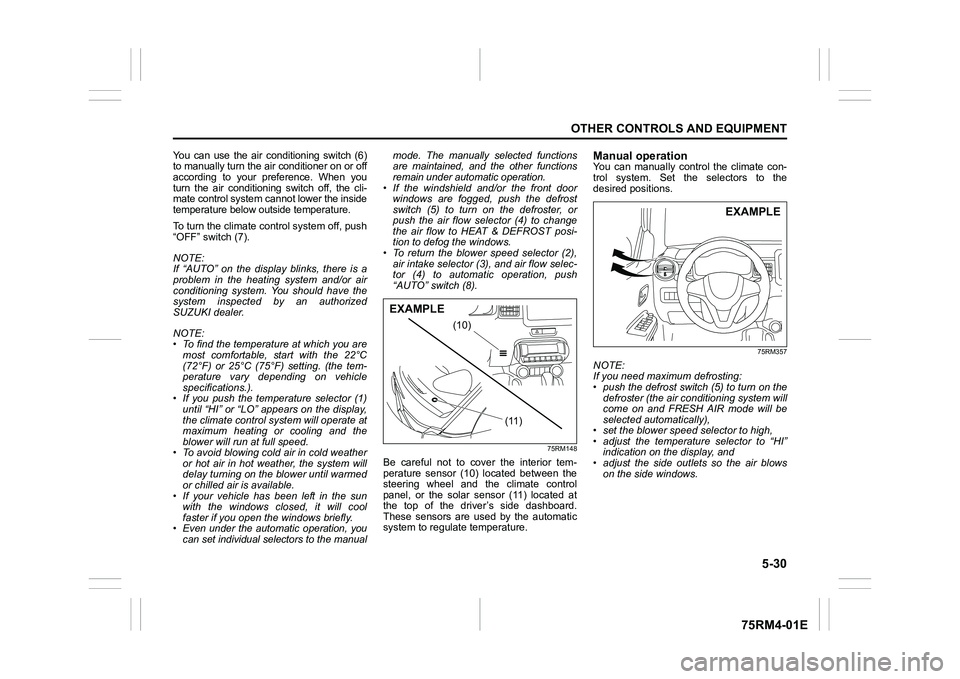
Be careful not to cover the interior tem-
perature sensor (10) located between the
steering wheel and the climate control
panel, or the solar sensor (11) located at
the top of the driver’s side dashboard.
These sensors are used by the automatic
system to regula te temperature.
Manual operationYou can manually control the climate con-
trol system. Set the selectors to the
desired positions.
75RM357
NOTE:
If you need maximum defrosting:
• push the defrost switch (5) to turn on the
defroster (the air conditioning system will
come on and FRESH AIR mode will be
selected automatically),
• set the blower speed selector to high,
• adjust the temperature selector to “HI” indication on the display, and
• adjust the side outlets so the air blows on the side windows.
(10)
(11)
EXAMPLE
EXAMPLE