drive SUZUKI JIMNY 2019 Repair Manual
[x] Cancel search | Manufacturer: SUZUKI, Model Year: 2019, Model line: JIMNY, Model: SUZUKI JIMNY 2019Pages: 421, PDF Size: 6.35 MB
Page 167 of 421

Transfer lever
(1) Transfer lever
Your vehicle is equipped with the "ALL GRIP PRO" system that consists of a transfer case with a synchronizer (between 2WD-high and 4WD-high positions) and the air locking hubs. With this feature, you can shift the drive mode between 2-wheel drive high range and 4-wheel drive high range by shifting the "2H" or "4H" position. Stop the vehicle or reduce the speed to less than 100 km/h (60 mph) with the front wheels in the straight ahead position. Do not shift the transfer lever without depressing the accelerator pedal. Do not activate the cruise control system when shifting the transfer lever.
Free axle mechanism
"FREE"
Fixed axle mechanism
"LOCK"
(1) Air locking hubs (2) Transfer case
54G266
54G267
OPERATING YOUR VEHICLE
NOTE: The air locking hubs are activated by the vacuum of the engine and changed to shift the front wheel drive. The air locking hubs are not shifted when the engine is stopping. Several seconds are required from the operation of the transfer lever to the activation of air locking hubs. When the front tyres receive a big shock during running in 2-whee/ drive position on the road surface of the big irregularity, etc, some noise may occur inside the air locking hubs afterwards. In this situation, stop the vehicle and then shift the transfer lever into "4H" position. After that, shift the transfer lever into "2H" position
again.
3-16
Page 169 of 421
OPERATING YOUR VEHICLE
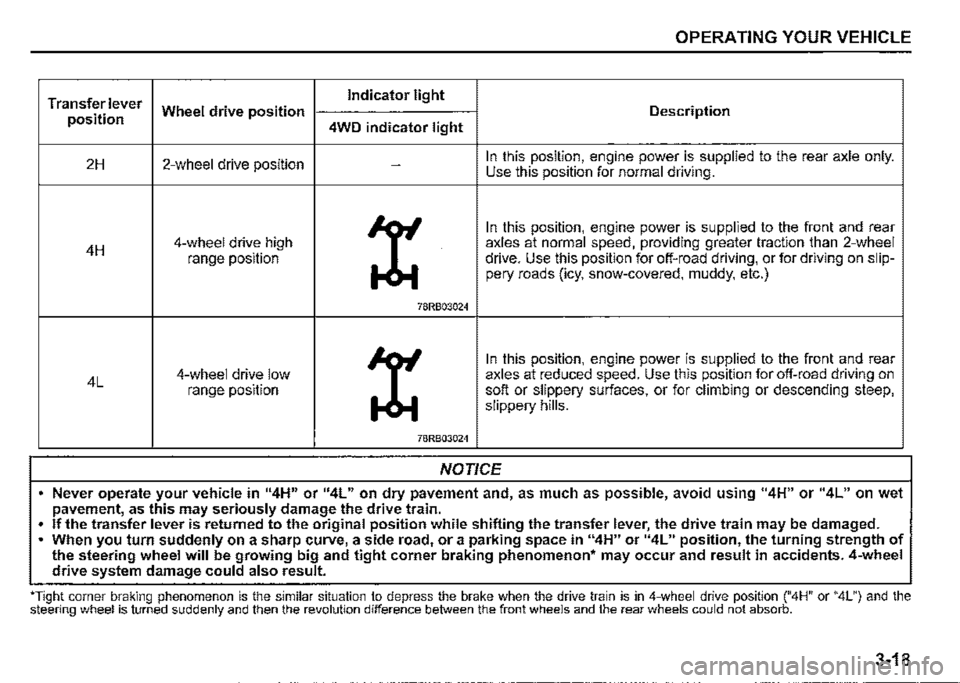
Transfer lever Indicator light
position Wheel drive position Description
4WD indicator light
2H 2-wheel drive position -In this position, engine power is supplied to the rear axle only. Use this position for normal driving.
X
In this position, engine power is supplied to the front and rear
4H 4-wheel drive high axles at normal speed, providing greater traction than 2-wheel
range position drive. Use this position for off-road driving, or for driving on slip-pery roads (icy, snow-covered, muddy, etc.)
78RB03024
X
In this position, engine power is supplied to the front and rear
4L 4-wheel drive low axles at reduced speed. Use this position for off-road driving on range position soft or slippery surfaces, or for climbing or descending steep, slippery hills.
78RB03024
NOTICE
• Never operate your vehicle in 114H" or 114L" on dry pavement and, as much as possible, avoid using "4H" or "4L" on wet pavement, as this may seriously damage the drive train.
• If the transfer lever is returned to the original position while shifting the transfer lever, the drive train may be damaged . . When you turn suddenly on a sharp curve, a side road, or a parking space in "4H" or 114L" position, the turning strength of the steering wheel will be growing big and tight corner braking phenomenon• may occur and result in accidents. 4-wheel drive system damage could also result.
''Tight corner braking phenomenon is the similar situation to depress the brake when the drive train is in 4-wheel drive position ("4H" or "4L") and the steering wheel is turned suddenly and then the revolution difference between the front wheels and the rear wheels could not absorb.
3-18
Page 170 of 421
OPERATING YOUR VEHICLE
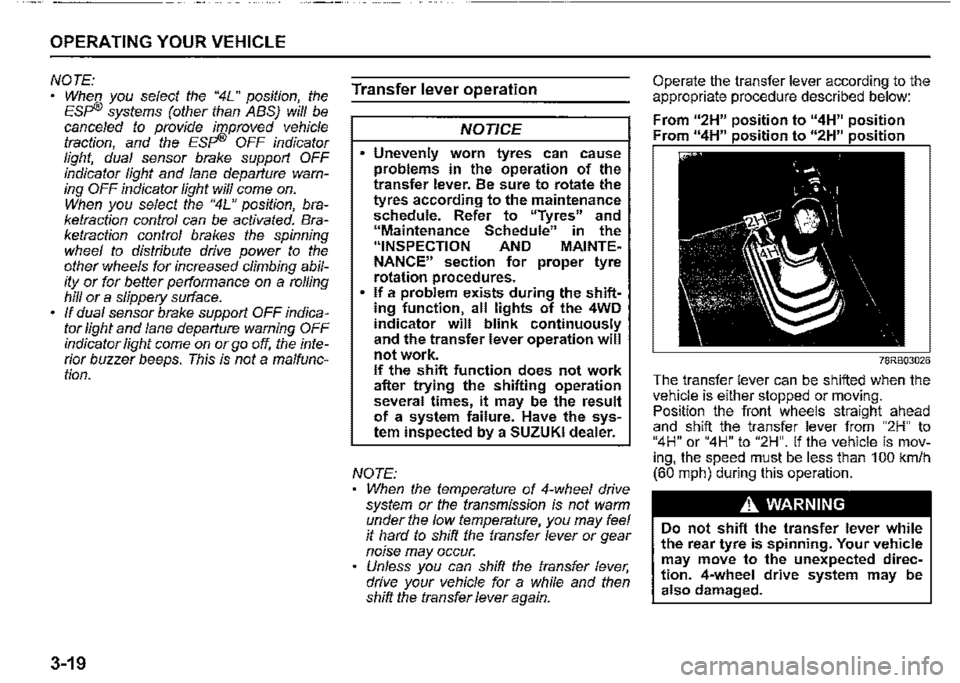
NOTE: When you select the "4L" position the ESF'® systems (other than ABS) w/11 be canceled to provide improved vehicle traction, and the ESF'® OFF indicator light, dual sensor brake support OFF indicator light and lane departure warning OFF indicator light will come on. When you select the "4L" position braketraction control can be activated'. Braketraction control brakes the spinning wheel to distribute drive power to the other wheels for increased climbing ability or for better performance on a rolling hill or a slippery surface. If dual sensor brake support OFF indicator light and lane departure warning OFF indicator light come on or go off, the intenor buzzer beeps. This is not a ma/function.
3-19
Transfer lever operation
NOTICE
Unevenly worn tyres can cause problems in the operation of the transfer lever. Be sure to rotate the tyres according to the maintenance schedule. Refer to "Tyres" and "Maintenance Schedule" in the "INSPECTION AND MAINTENANCE" section for proper tyre rotation procedures. If a problem exists during the shifting function, all lights of the 4WD indicator will blink continuously and the transfer lever operation will not work. If the shift function does not work after trying the shifting operation several times, it may be the result of a system failure. Have the system inspected by a SUZUKI dealer.
NOTE: When the temperature of 4-whee/ drive system or the transmission is not warm ':'nder the low temperature, you may feel ,t hard to shift the transfer lever or gear n01se may occur. Unless you can shift the transfer lever drive your vehicle for a while and the/2 shift the transfer lever again.
Operate the transfer lever according to the appropriate procedure described below:
From u2H" position to "4H" position Fr " 11 • • " " • •
78RB03026
The transfer lever can be shifted when the vehi_c_le is either stopped or moving. Pos1t1on the front wheels straight ahead and shift the transfer lever from "2H" to "4H" or "4H" to "2H". If the vehicle is moving, the speed must be less than 100 km/h (60 mph) during this operation.
A WARNING
Do not shift the transfer lever while the rear tyre is spinning. Your vehicle may move to the unexpected direction. 4-wheel drive system may be also damaged.
Page 171 of 421

NOTICE
Pay attention to shifting the transfer lever safely when driving your vehicle.
NOTE: After shifting the transfer lever from "2H'" to "4H", check that the 4WD indicator
light comes on. After shifting the transfer lever from "4H" to "2H", check that the 4WD indicator goes off. ·
When 4WD indicator fight is blinking after shifting the transfer fever to "4H" position, accelerate, slow down your vehicle or stop and reverse your vehicle a little to shift the transfer lever. Pay attention to the vehicles and the circumference toward or backward your vehicle when shifting the transfer fever. When you shift the transfer fever while turning the steering wheel or depressing the accelerator pedal, shifting the transfer fever may be difficult. Operate the transfer fever while driving at low speed if it may be difficult to shift the transfer fever from "2H" position to "4H" position when the vehicle is stopped.
Shift the transfer fever again after decelerating or stopping the vehicle if it may be difficult to shift the transfer fever from "2H" position to "4H" position while driving or when the gear noise occurs. There may be a case to operate the transfer fever heavily when shifting the transfer lever from "4H" position to "2H" P_Osition while driving. In this case, position the front wheels straight ahead and drive for a while and then operate shifting the transfer fever again. When the transfer lever is shifted from 2H" position to "4H" position or from "4H" position to 2H" position and the air locking hubs are activated, the air conditioning system may not be operated for several seconds. This is not a malfunction. When the ignition switch is turned "ON" after the transfer fever is shifted from 2H" position to "4H" position or from "4H" position to 2H" position while stopping the engine, 4WD indicator light may blink. This is not a malfunction.
OPERATING YOUR VEHICLE
78RB03027
Stop the vehicle completely, place the transmission in "N" (Neutral) or depress the clutch pedal fully (if equipped), then shift the transfer lever from "4H" position to "4L" position by pressing the transfer lever.
3-20
Page 172 of 421

OPERATING YOUR VEHICLE
A WARNING
When you turn off the engine while the transfer is not finished to shift into "4L" position, follow instructions below. 1) Depress the brake pedal* fully. 2) Turn the ignition switch to "OFF" position. • Depress the brake pedal until the engine is started again. Even though the gearshift lever is shifted into 1st gear or "R" (Reverse) gear for manual transmission vehicles or shifted into "P" (Park) position for automatic transmission vehicles, there may be a case that the wheels of the vehicle is not stationary. When you turn off the engine in this situation, start the engine again and move the vehicle forward or backward slowly.
3-21
A CAUTION
Do not operate the transfer lever while driving. Do not operate the transfer lever while making a left or right turn or while holding rear wheels slipped on icy, snow-covered, or muddy roads. Your vehicle may move to the unexpected direction. 4-wheel drive system may be also damaged.
NOTE: There may be a case that you will feel the difficulty to operate the transfer lever when shifting the transfer lever from "4H" position to "4L" position. Operate the transfer lever into "4L" position surely. When shifting the transfer lever from "4H" position to "4L" position, the buzzer will sound and the function of the ES?® system and the vehicle stability control system will be deactivated. There may be a case that shifting into "4L" position is not completed when the transfer system or the transmission is not warm in the cold weather. There may be a possibility of difficulty to shift especially for automatic transmission vehicles in the cold weather. Follow instructions below in this case and operate the transfer lever again. -Stop the vehicle completely. -Place the transmission in "N" (Neu-tral). -Depress the brake pedal* fully. -Release the parking brake. -Turn the ignition switch to "OFF" posi-tion. -Shift the transfer lever from "4H" position to "4L" position by pressing the transfer lever. -Check whether the vehicle can be moved by moving the vehicle forward or backward slowly. • Depress the brake pedal until the engine is started again.
Page 178 of 421
OPERATING YOUR VEHICLE
Cancelling speed limiter
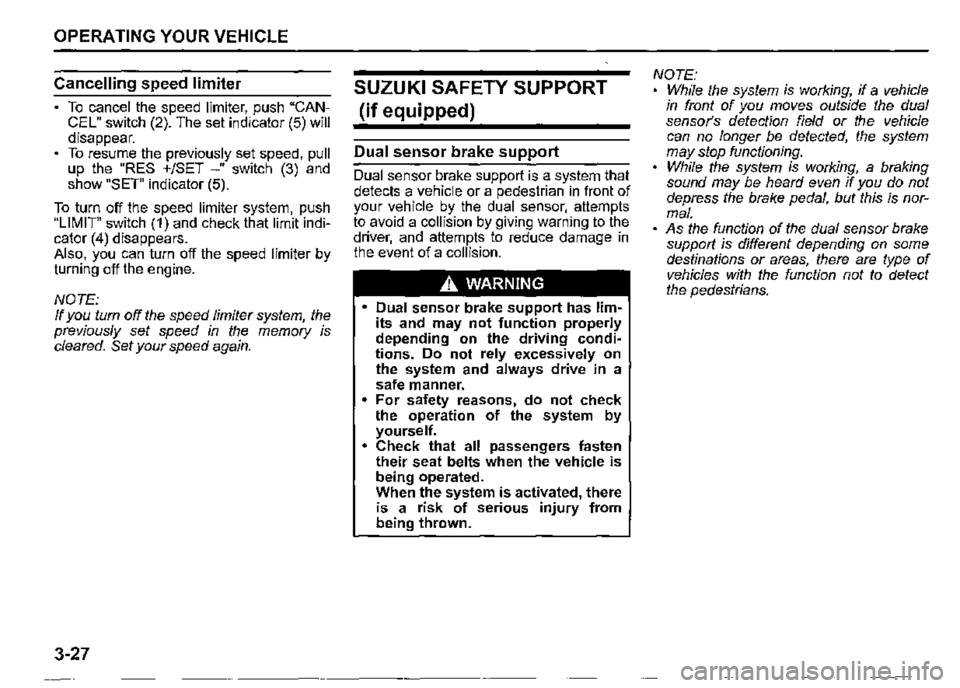
To cancel the speed limiter, push "CANCEL" switch (2). The set indicator (5) will disappear. To resume the previously set speed, pull up the "RES +/SET -" switch (3) and show "SET" indicator (5).
To turn off the speed limiter system, push "LIMIT" switch (1) and check that limit indicator (4) disappears. Also, you can turn off the speed limiter by turning off the engine.
NOTE: If you turn off the speed limiter system, the previously set speed in the memory is cleared. Set your speed again.
3-27
SUZUKI SAFETY SUPPORT
(if equipped)
Dual sensor brake support
Dual sensor brake support is a system that detects a vehicle or a pedestrian in front of your vehicle by the dual sensor, attempts to avoid a collision by giving warning to the driver, and attempts to reduce damage in the event of a collision.
A WARNING
• Dual sensor brake support has limits and may not function properly depending on the driving conditions. Do not rely excessively on the system and always drive in a safe manner. For safety reasons, do not check the operation of the system by yourself. Check that all passengers fasten their seat belts when the vehicle is being operated. When the system is activated, there is a risk of serious injury from being thrown.
NOTE: While the system is working, if a vehicle in front of you moves outside the dual sensor's detection field or the vehicle can no longer be detected, the system may stop functioning. While the system is working, a braking sound may be heard even if you do not depress the brake pedal, but this is normal. • As the function of the dual sensor brake support is different depending on some destinations or areas, there are type of vehicles with the function not to detect the pedestrians.
Page 181 of 421
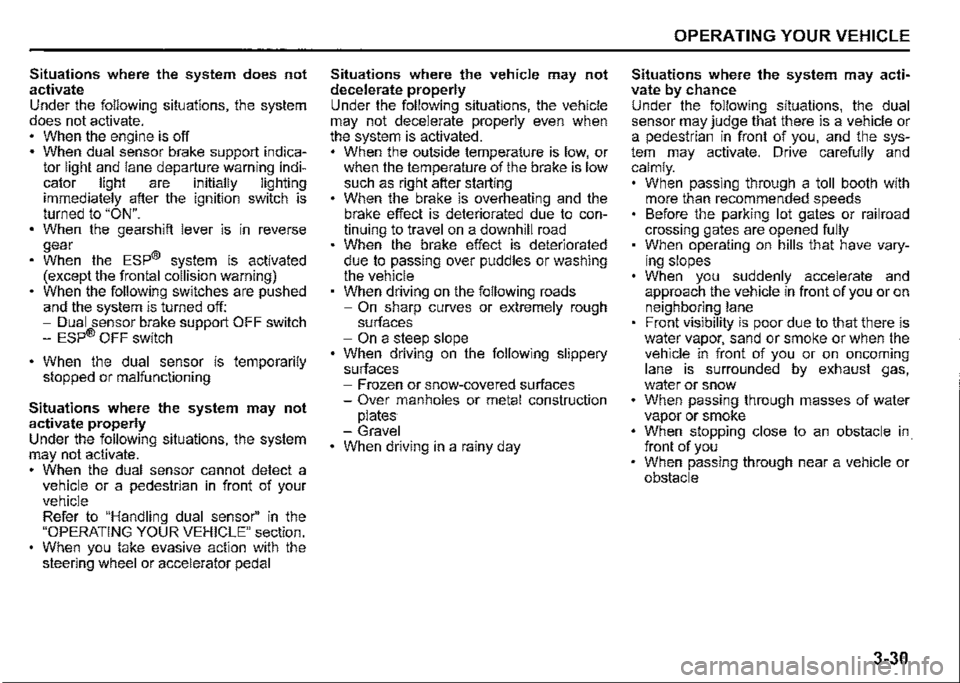
Situations where the system does not activate Under the following situations, the system does not activate. When the engine is off When dual sensor brake support indicator light and lane departure warning indicator light are initially lighting immediately after the ignition switch is turned to "ON". When the gearshift lever is in reverse gear When the ESP® system is activated (except the frontal collision warning) When the following switches are pushed and the system is turned off: -Dual sensor brake support OFF switch -ESP® OFF switch
When the dual sensor is temporarily stopped or malfunctioning
Situations where the system may not activate properly Under the following situations, the system may not activate. When the dual sensor cannot detect a vehicle or a pedestrian in front of your vehicle Refer to "Handling dual sensor" in the "OPERATING YOUR VEHICLE" section. When you take evasive action with the steering wheel or accelerator pedal
Situations where the vehicle may not decelerate properly Under the following situations, the vehicle may not decelerate properly even when the system is activated. When the outside temperature is low, or when the temperature of the brake is low such as right after starting When the brake is overheating and the brake effect is deteriorated due to continuing to travel on a downhill road When the brake effect is deteriorated due to passing over puddles or washing the vehicle When driving on the following roads -On sharp curves or extremely rough surfaces -On a steep slope When driving on the following slippery surfaces -Frozen or snow-covered surfaces -Over manholes or metal construction plates -Gravel When driving in a rainy day
OPERATING YOUR VEHICLE
Situations where the system may activate by chance Under the following situations, the dual sensor may judge that there is a vehicle or a pedestrian in front of you, and the system may activate. Drive carefully and calmly. When passing through a toll booth with more than recommended speeds Before the parking lot gates or railroad crossing gates are opened fully When operating on hills that have varying slopes When you suddenly accelerate and approach the vehicle in front of you or on neighboring lane Front visibility is poor due to that there is water vapor, sand or smoke or when the vehicle in front of you or on oncoming lane is surrounded by exhaust gas, water or snow When passing through masses of water vapor or smoke When stopping close to an obstacle in. front of you When passing through near a vehicle or obstacle
3-30
Page 184 of 421
OPERATING YOUR VEHICLE
Lane departure warning
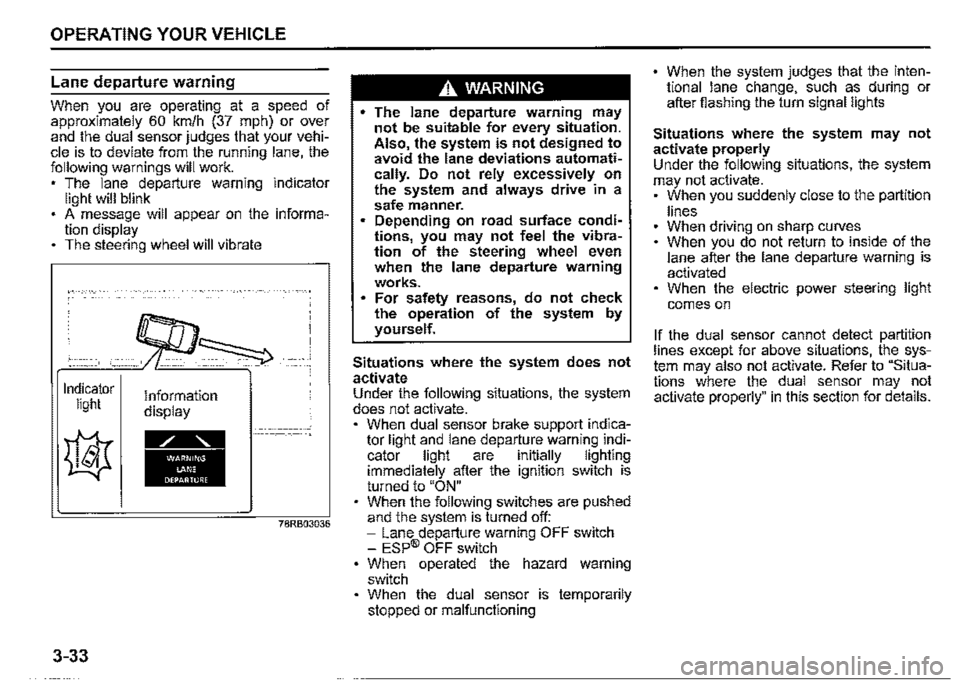
When you are operating at a speed of approximately 60 km/h (37 mph) or ov~r and the dual sensor judges that your vehicle is to deviate from the running lane, the following warnings will work. , The lane departure warning indicator light will blink . A message will appear on the information display The steering wheel will vibrate
Indicator light
3-33
Information display
78RB03036
A WARNING
• The lane departure warning may not be suitable for every situation. Also the system is not designed to avoid the lane deviations automati~ cally. Do not rely excessively on the system and always drive in a safe manner. Depending on road surface conditions, you may n~t feel the vibration of the steering wheel even when the lane departure warning works. For safety reasons, do not check the operation of the system by yourself.
Situations where the system does not activate Under the following situations, the system does not activate. , When dual sensor brake support indicator light and lane departu_re warni~g i~dicator light are 1nitially lighting immediately after the ignition switch is turned to "ON" When the following switches are pushed and the system is turned off: -Lane departure warning OFF switch -ESP® OFF switch When operated the hazard warning switch When the dual sensor is temporarily stopped or malfunctioning
When the system judges that the intentional lane change, such as during or after fiashing the turn signal lights
Situations where the system may not activate properly Under the following situations, the system may not activate. , When you suddenly close to the partition
lines When driving on sharp curves When you do not return to inside of th_e lane after the lane departure warning 1s activated When the electric power steering light
comes on
If the dual sensor cannot detect partition lines except for above situations, t~~ _system may also not activate. Refer to Situations where the dual sensor may not activate properly" in this section for details.
Page 185 of 421

Situations where the system may activate by chance Under the following situations, the system may activate. • When there are a lot of lines in the running lane When there is a shadow (for example, the shadow of the guardrail) parallel to the partition line When partition line is in the shadows When partition lines are drawn doubly When there is a liner paint on the road of a construction zone because the previous line has not been erased completely When there is repair marks on the road or a boundary between asphalt and snow When there is tyre marks on snow-covered or wet road When driving in the place without partition lines (such as a tailgate or checkpoint, or at an intersection, etc.) When driving on the road diverges, merges, etc. When driving on an unpaved or rough road
Vehicle swaying warning
When you are operating at a speed of approximately 60 km/h (37 mph) or over and the vehicle swaying warning judges that your vehicle is unsteadiness by detecting the meandering patterns or lane departure warning is activate_d in a s_hort period of time in a row following warnings will work. The lane departure warning indicator light will blink A message will appear on the information display The interior buzzer will intermittently beep
~CO)
A
Indicator Information light display
~
• 78RB03037
OPERATING YOUR VEHICLE
.A. WARNING
The vehicle swaying warning may not be suitable for every situation. Also, the system is not designed t? avoid the unsteadiness of the vehicle automatically. Do not rely excessively on the system and always drive in a safe manner. For safety reasons, do not check the operation of the system by yourself.
NOTE: Vehicle swaying warning by the meandering pattern of the vehicle in the lane is judged based on the driving data over the past several tens of minutes, so the system does not activate when right after swaying.
Situations where the system does not activate Under the following situations, the system does not activate. When dual sensor brake support indicator light and lane departure warning indicator light are initially lighting immediately after the ignition switch is turned to "ON". When the following switches are pushed and the system is turned off: -Lane departure warning OFF switch -ESP® OFF switch When the dual sensor is temporarily stopped or malfunctioning
3-34
Page 186 of 421
OPERATING YOUR VEHICLE
Situations where the system may not activate properly Under the following situations, the system may not activate. • Right after lane changing
If the dual sensor cannot detect partition lines except for above situations, the system may also not activate. Refer to "Situations where the dual sensor may not activate properly" in this section for details.
High beam assist
After the auto high beam switch operation, head light is turned ON with the lighting control lever on "Auto" position when the ambient becomes dark, the system is activated. When the high beam assist is activated, high beam assist indicator light (green) comes on.
Under the any of following situations, the low beam turns on. • When vehicle speed is approximately 35 km/h (21.7 mph) or under When the front of the vehicle is bright When the vehicle in front of you turned on the lights There are many street lamps in front of you
Under the all of the following conditions are met, the high beams (main beams) turns on.
3-35
When vehicle speed is approximately 40 km/h (24.9 mph) or over When the front of the vehicle is dark When the vehicle in front of you is driving without lights • There is few street lamps in front of you
A. WARNING
• High beam assist has limits and may not function properly depending on the surrou.nding environment. Always drive in a safe manner, switch manually to the low beams and high beams (main beams), if necessary. Switching of the low beams and high beams (main beams) it might not match the feeling of the driver.
NOTE: Light vehicle such as a bicycle might not detect. When the sudden acceleration, high beam assist might not operate for a few seconds, even if vehicle speed exceeds 40kmlh (24.9 mph).
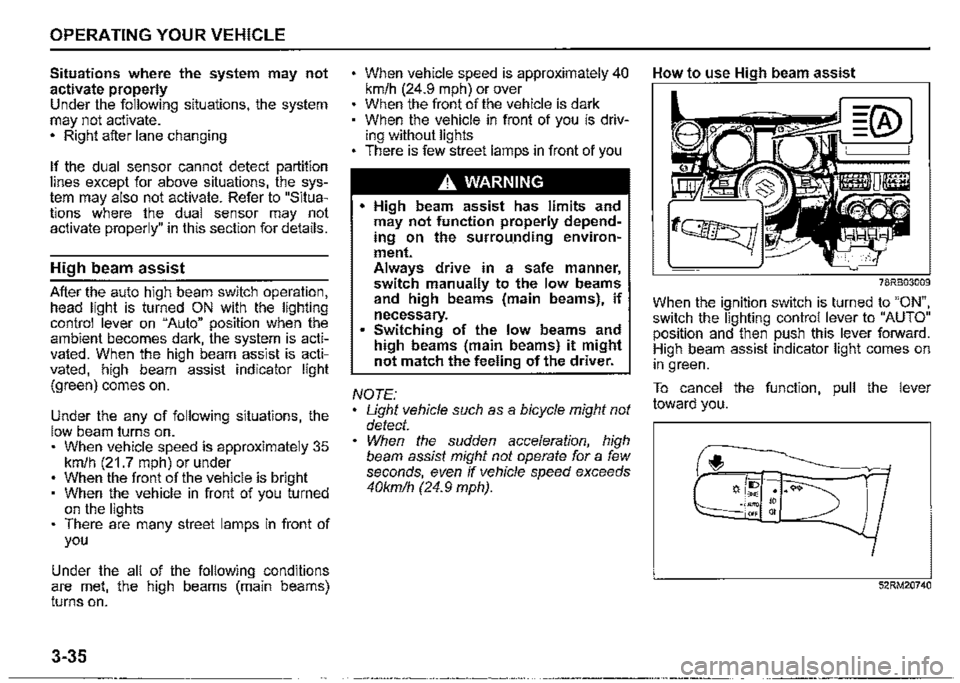
How to use High beam assist
78RB03009
When the ignition switch is turned to "ON", switch the lighting control lever to "AUTO" position and then push this lever forward. High beam assist indicator light comes on in green.
To cancel the function, pull the lever toward you.
f,
52RM20740