MAIN SUZUKI SX4 2006 1.G Service Workshop Manual
[x] Cancel search | Manufacturer: SUZUKI, Model Year: 2006, Model line: SX4, Model: SUZUKI SX4 2006 1.GPages: 1556, PDF Size: 37.31 MB
Page 922 of 1556

Downloaded from www.Manualslib.com manuals search engine 6C-42 Power Assisted Steering System:
5) Turn ON ignition switch without engine running and
select scan tool “Data List” mode due to checking
“Sensor (Main) Torque” and “Sensor (Sub) Torque”
displayed on scan tool when steering wheel turned
left and right (if used).
6) Check that characteristic of torque sensor (main and
sub) output voltage or scan tool data and steering
force is as following graph when steering wheel is
turned left and right. If sensor voltage or scan tool
data is out of specified value or does not vary linearly
as the following graph, check EPS control module
and its circuit referring to “Inspection of P/S Control
Module and Its Circuits”.
If they are OK, replace steering gear case assembly.P/S Motor and Its Circuit InspectionS6RW0D6306013
1) Check motor circuit referring to Step 2 to 3 of “DTC
C1141 / C1142 / C1143 / C1145: Motor Circuit
Failure”. If check result is not satisfactory, repair
motor circuit.
2) Disconnect motor connector from steering gear case
assembly with ignition switch turned OFF.
3) Check for resistance between terminals of motor
connector.
If check result is not as specified, check P/S motor
harness for continuity. If it is OK, replace steering
gear case assembly.
Motor circuit resistance
4) Check for insulation between each terminal of motor
connector and body ground.
If check result is not as specified, check P/S motor
harness for insulation. If it is OK, replace steering
gear case assembly.
Motor circuit resistance
5) Hoist vehicle
6) Check that steering wheel turns to left and right
smoothly. If steering wheel does not turn smoothly,
inspect and repair defective steering and suspension
parts.
7) Connect “E12” connector with ignition switch turned
OFF.
[A]: Main sensor
[B]: Sub sensor
[C]: Steering force at left turn
[D]: Steering force at right turn
[E]: Steering wheel at free
[F]: “Sensor (Main) Torque” in “Data List” displayed on scan tool
[G]: “Sensor (Sub) Torque” in “Data List” displayed on scan tool
0
[E][N.m]
MAX
MAX [D] [C]
[E][D] [C]
2.33 - 2.68[V] [F]
[G] [A]
[B]
66
1.65 - 1.9
(1.0 - 1.3)3.0 - 3.4 (3.7 - 4.0)
0 5
2.33 - 2.681.65 - 1.9
(1.0 - 1.3)3.0 - 3.4 (3.7 - 4.0)
0 5
0
[N.m]
MAX
MAX
[V]
6 11.76 11.7611.76 11.766
0 11.5
-12.00 -12.0
11.5
I7RW01632011-02
“E12-1” and “E12-2” (For motor) Approx. 1 Ω
Each terminal and body ground No continuity
[A]: Motor connector “E12” (viewed from harness side)
12
[A]
I6RW0C630012-02
Page 930 of 1556
Downloaded from www.Manualslib.com manuals search engine 7A-2 Heater and Ventilation:
Schematic and Routing Diagram
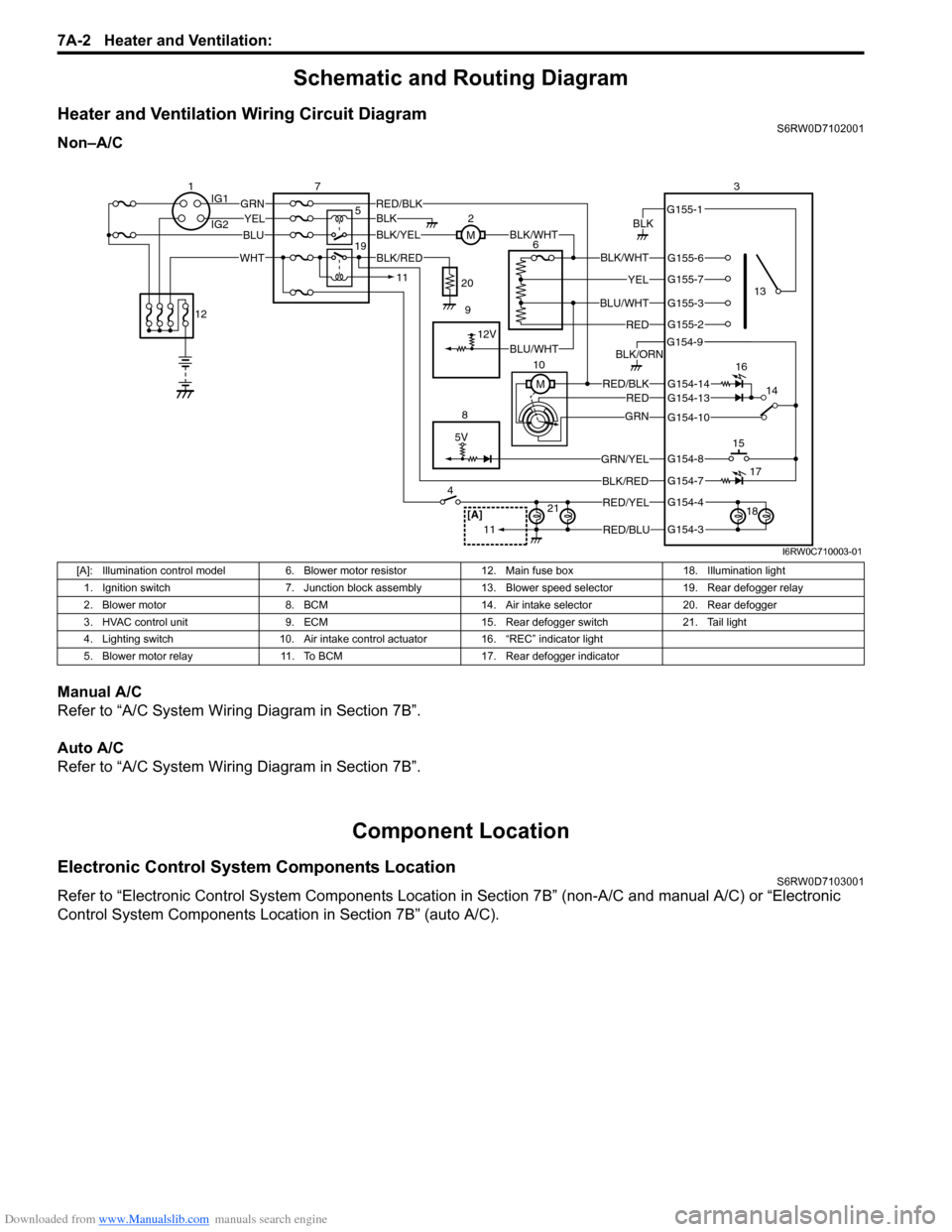
Heater and Ventilation Wiring Circuit DiagramS6RW0D7102001
Non–A/C
Manual A/C
Refer to “A/C System Wiring Diagram in Section 7B”.
Auto A/C
Refer to “A/C System Wiring Diagram in Section 7B”.
Component Location
Electronic Control System Components LocationS6RW0D7103001
Refer to “Electronic Control System Components Location in Section 7B” (non-A/C and manual A/C) or “Electronic
Control System Components Location in Section 7B” (auto A/C).
5V
BLK
RED/BLK3
5 72
G154-3
G154-4
G154-7
G154-8
G154-10
G154-13
G155-2
G155-3
G155-7
G155-6
G155-1
G154-9
G154-14
BLK/WHT
YEL
BLU/WHT
RED
RED/BLKRED
GRN
GRN/YEL
RED/YEL
RED/BLU
BLK/ORN
46
8
BLU
YELGRN
WHT
13
1514
[A]21
BLK/RED
12V
BLK/YELBLK/WHTM
BLK
1IG1
IG2
12
BLK/RED
M 10
11
11
BLU/WHT 19
16
17
18 9 20
I6RW0C710003-01
[A]: Illumination control model 6. Blower motor resistor 12. Main fuse box 18. Illumination light
1. Ignition switch 7. Junction block assembly 13. Blower speed selector 19. Rear defogger relay
2. Blower motor 8. BCM 14. Air intake selector 20. Rear defogger
3. HVAC control unit 9. ECM 15. Rear defogger switch 21. Tail light
4. Lighting switch 10. Air intake control actuator 16. “REC” indicator light
5. Blower motor relay 11. To BCM 17. Rear defogger indicator
Page 945 of 1556
![SUZUKI SX4 2006 1.G Service Workshop Manual Downloaded from www.Manualslib.com manuals search engine Air Conditioning System: Manual Type 7B-5
A/C System Wiring DiagramS6RW0D7212002
[A]
7
WHT
GRN5YELBLK
3
G154-3
G154-4
G154-7
G154-8
G154-10
G15](/img/20/7612/w960_7612-944.png "SUZUKI SX4 2006 1.G Service Workshop Manual Downloaded from www.Manualslib.com manuals search engine Air Conditioning System: Manual Type 7B-5
A/C System Wiring DiagramS6RW0D7212002
[A]
7
WHT
GRN5YELBLK
3
G154-3
G154-4
G154-7
G154-8
G154-10
G15")
Downloaded from www.Manualslib.com manuals search engine Air Conditioning System: Manual Type 7B-5
A/C System Wiring DiagramS6RW0D7212002
[A]
7
WHT
GRN5YELBLK
3
G154-3
G154-4
G154-7
G154-8
G154-10
G154-13
G154-5
G154-6
G155-5
G155-2
G155-3
G155-7
G155-6
G155-1
G154-9
G154-14
BLK/WHT
YEL
BLU/WHT
RED
BRN
GRN/WHT
RED/BLK
RED
GRN
GRN/YEL
RED/YEL
RED/BLU
20
21
23 22
BLK/RED
6 2
MBLK/WHTBLK/YEL
M
11
4RED/YEL 1
E01-49
12
E01-16
GRY 13
12V
BLU/WHTE01-3510
E01-48
18
19RED/BLK
BLK/RED
BLK/RED
BRN/WHTE01-60
E01-1
E01-29BLK/WHT
M
BLU/YELBLK/YEL
5V5V 5V
WHT/BLK
9
ORN
14E01-36
C01-12C01-14GRY/REDRED/BLU
E01-41
RED/BLK
RED
WHT
8
BLK
BLK/ORN
BLU IG1
IG2
5V
17
28
29
31
2726 2524
16
16
30
34
33E01-4 E01-19WHTRED
C01-50C01-49WHTRED
32
LT GRN
C01-57
C01-2415
GRY/BLU5V
I6RW0C721002-01
[A]: Illumination control model 9. A/C refrigerant pressure
sensor18. Condenser cooling fan relay 27. Illumination light
1. Ignition switch 10. ECM 19. Condenser cooling fan motor 28. Rear defogger relay
2. Blower motor 11. Air intake control actuator 20. Blower speed selector 29. Rear defogger
3. HVAC control unit 12. Compressor relay 21. A/C switch 30. Main relay
4. Lighting switch 13. Compressor 22. Air intake selector 31. Tail light
5. Blower motor relay 14. Evaporator temperature
sensor23. Rear defogger switch 32. TCM
6. Blower motor resistor 15. ECT sensor 24. “A/C” indicator light 33. To other control module and DLC
7. Junction block assembly 16. To BCM 25. “REC” indicator light 34. ABS control module
8. BCM 17. Main fuse box 26. Rear defogger indicator
Page 970 of 1556

Downloaded from www.Manualslib.com manuals search engine 7B-30 Air Conditioning System: Manual Type
A/C System Relay InspectionS6RW0D7216017
NOTE
Do not use blue relay for the substitute of
white relay because internal durability of a
blue relay is different from the durability of a
white relay.
1) Disconnect negative (–) cable from battery.
2) Remove compressor relay (1) or condenser cooling
fan relay (2) from main fuse box (3).
3) Check that there is no continuity between terminal
“c” and “d”. If there is continuity, replace relay.
4) Connect battery positive (+) terminal to terminal “b”
of relay and battery negative (–) terminal to terminal
“a” of relay, and then check continuity between
terminal “c” and “d”. If there is no continuity, replace
relay.
Compressor Drive Belt Inspection and
Adjustment
S6RW0D7216018
Inspection
• Check compressor drive belt (1) for wear, crack,
deformation and cleanliness. If any defect is found,
replace the belt with new one referring to
“Compressor Drive Belt Removal and Installation”.
• Check compressor drive belt tension by measuring
how much it deflects when pushed intermediate point
between magnet clutch pulley (6) and crankshaft
pulley (3) with about 100 N (10 kg) force after rotating
crankshaft pulley 360°. If belt tension is out of
specification, adjust belt tension referring to
“Adjustment”.
Compressor drive belt tension
“a”
: 7 – 8 mm (0.28 – 0.31 in.)
NOTE
When replacing drive belt, adjust drive belt
tension to the following specifications.
New compressor drive belt tension “a”
: 6 – 7 mm (0.24 – 0.28 in.)
Adjustment
1) Loosen tension pulley nut (4).
2) Adjust belt tension by tighten or loosen tension
pulley adjusting bolt (5).
3) Tighten tension pulley nut.
4) Rotate the crankshaft pulley 360°, and then recheck
belt tension.
3
1
2
“a”
“b”“c”
“d”
I5RW0B721023-01
2. Tension pulley
I5RW0A721033-01
Page 978 of 1556
Downloaded from www.Manualslib.com manuals search engine 7B-38 Air Conditioning System: Automatic Type
Automatic Type
Precautions
A/C System CautionS6RW0D7220001
Refer to “A/C System Caution”.
Precautions in Diagnosing TroubleS6RW0D7220002
• Do not disconnect couplers from HVAC control module, battery cable from battery, HVAC control module ground
wire harness from body or main fuse before confirming diagnostic information (diagnostic trouble code) stored in
HVAC control module memory.
• Diagnostic information (diagnostic trouble code) stored in HVAC control module can be checked by display of HVAC
control module. Also, it can be checked by using SUZUKI scan tool. Before checking diagnostic information
(diagnostic trouble code), read this manual and operator's manual for SUZUKI scan tool to know how to read
diagnostic information (diagnostic trouble code).
• When trouble is diagnosed using diagnostic information (diagnostic trouble code) on display of HVAC control
module, keep in your mind that each diagnostic information (diagnostic trouble code) has priority, and only
diagnostic information (diagnostic trouble code) which has the highest priority is indicated. Therefore, after
troubleshooting the malfunction, make sure if there exists any other diagnostic information (diagnostic trouble
code).
• Be sure to read “Air Bag Warning in Section 00” before inspection.
Precautions on Servicing A/C SystemS6RW0D7220003
Refer to “Precautions on Servicing A/C System”.
Page 983 of 1556
Downloaded from www.Manualslib.com manuals search engine Air Conditioning System: Automatic Type 7B-43
Component Location
A/C System Major Components LocationS6RW0D7223001
Refer to “A/C System Major Components Location”.
[A]: Illumination control model 10. Air intake actuator 22. Compressor 34. “A/C” indicator light
[B]: Junction block with BCM 11. Air flow control actuator 23. HVAC control module 35. Rear defogger switch
[C]: Junction block without BCM 12. Temperature control actuator 24. BCM 36. Rear defogger indicator
1. Main fuse box 13. Inside air temperature sensor 25. A/C refrigerant pressure sensor 37. To other control module
2. Ignition switch 14. Outside air temperature sensor 26. Condenser cooling fan relay 38. Indicator light, switch,
selector
3. CAN junction connector 15. Evaporator temperature sensor 27. Information display 39. “FRE” indicator light
4. Rear defogger relay 16. Sunload sensor 28. Lighting switch 40. “REC” indicator light
5. Rear defogger 17. Junction block assembly 29. A/C switch 41. Temperature selector
6. Blower motor relay 18. ECM 30. Air intake selector 42. Blower speed selector
7. Blower motor 19. ECT sensor 31. To BCM 43. MODE (air flow) selector
8. Blower motor controller 20. Condenser cooling fan motor 32. ABS control module 44. Tail light
9. DLC 21. Compressor relay 33. Illumination light 45. Main relay
Page 990 of 1556
Downloaded from www.Manualslib.com manuals search engine 7B-50 Air Conditioning System: Automatic Type
Not Using SUZUKI Scan Tool
NOTE
In case of malfunction of temperature
selector, blower speed selector and air flow
selector, DTC can not be checked by the
following procedure. Use SUZUKI scan tool
for DTC check.
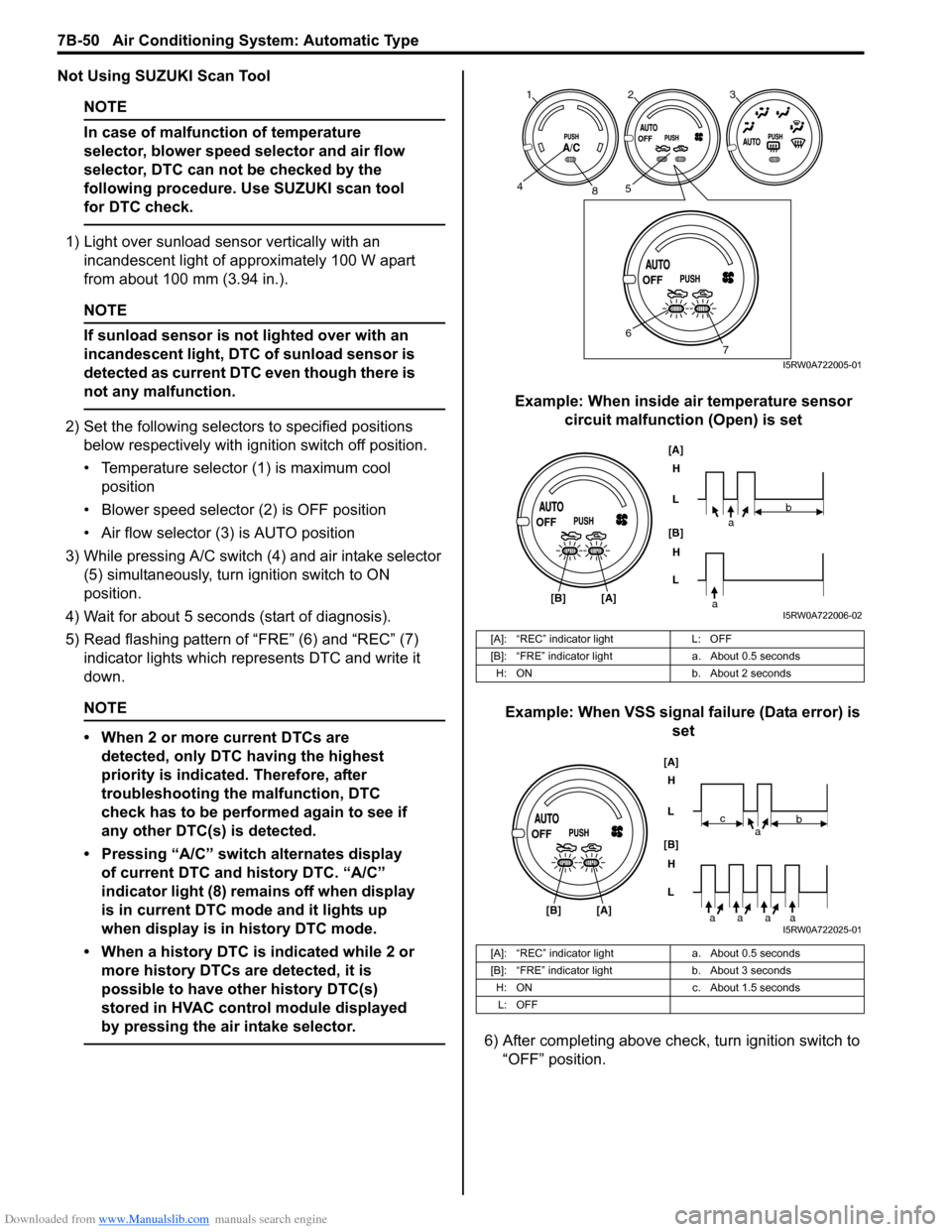
1) Light over sunload sensor vertically with an
incandescent light of approximately 100 W apart
from about 100 mm (3.94 in.).
NOTE
If sunload sensor is not lighted over with an
incandescent light, DTC of sunload sensor is
detected as current DTC even though there is
not any malfunction.
2) Set the following selectors to specified positions
below respectively with ignition switch off position.
• Temperature selector (1) is maximum cool
position
• Blower speed selector (2) is OFF position
• Air flow selector (3) is AUTO position
3) While pressing A/C switch (4) and air intake selector
(5) simultaneously, turn ignition switch to ON
position.
4) Wait for about 5 seconds (start of diagnosis).
5) Read flashing pattern of “FRE” (6) and “REC” (7)
indicator lights which represents DTC and write it
down.
NOTE
• When 2 or more current DTCs are
detected, only DTC having the highest
priority is indicated. Therefore, after
troubleshooting the malfunction, DTC
check has to be performed again to see if
any other DTC(s) is detected.
• Pressing “A/C” switch alternates display
of current DTC and history DTC. “A/C”
indicator light (8) remains off when display
is in current DTC mode and it lights up
when display is in history DTC mode.
• When a history DTC is indicated while 2 or
more history DTCs are detected, it is
possible to have other history DTC(s)
stored in HVAC control module displayed
by pressing the air intake selector.
Example: When inside air temperature sensor
circuit malfunction (Open) is set
Example: When VSS signal failure (Data error) is
set
6) After completing above check, turn ignition switch to
“OFF” position.
[A]: “REC” indicator light L: OFF
[B]: “FRE” indicator light a. About 0.5 seconds
H: ON b. About 2 seconds
[A]: “REC” indicator light a. About 0.5 seconds
[B]: “FRE” indicator light b. About 3 seconds
H: ON c. About 1.5 seconds
L: OFF
123
458
6
7I5RW0A722005-01
[A]
[B]H
L
H
L [B]
[A]
ab
aI5RW0A722006-02
[A]
[B]H
L
H
L [B]
[A]
ab
aaaa
c
I5RW0A722025-01
Page 994 of 1556
![SUZUKI SX4 2006 1.G Service Workshop Manual Downloaded from www.Manualslib.com manuals search engine 7B-54 Air Conditioning System: Automatic Type
DTC of A/C System detected by ECM
NOTE
When no DTC is detected, “FRE” [A] and “REC” [B] i](/img/20/7612/w960_7612-993.png "SUZUKI SX4 2006 1.G Service Workshop Manual Downloaded from www.Manualslib.com manuals search engine 7B-54 Air Conditioning System: Automatic Type
DTC of A/C System detected by ECM
NOTE
When no DTC is detected, “FRE” [A] and “REC” [B] i")
Downloaded from www.Manualslib.com manuals search engine 7B-54 Air Conditioning System: Automatic Type
DTC of A/C System detected by ECM
NOTE
When no DTC is detected, “FRE” [A] and “REC” [B] indicator lights on HVAC control module flash at
the same time in specific pattern.
Fail-Safe TableS6RW0D7224007
When any of the following malfunctions (DTCs) is detected, fail-safe mode is activated.
However, when HVAC control module detects normal operation of A/C system, fail-safe mode is canceled. DTC No. Detection itemDetecting condition
(DTC will set when detecting)MIL
P0481 Fan 2 Control Circuit
Refer to “Fail-Safe Table in Section 1A”. P0532A/C Refrigerant Pressure
Sensor Circuit Low
P0533A/C Refrigerant Pressure
Sensor Circuit High
H: ON a. About 3 seconds
L: OFF b. About 1 seconds
DTC No. Trouble AreaFail-Safe Operation
When ignition switch is turned ON
after malfunction is already detectedWhen malfunction is detected during
ignition switch is ON
) B1502Inside air temperature
sensor circuitHVAC control module maintains last
normal value.HVAC control module controls actuators
assuming that inside air temperature is
25 °C (77 °F).
) B1503A/C evaporator
temperature sensor
circuitHVAC control module assuming that
evaporator temperature is 0 °C (32 °F).• HVAC control module turns off A/C
switch signal.
• HVAC control module controls
actuators assuming that evaporator
temperature is 0 °C (32 °F).
) B1504 Sunload sensor circuitHVAC control module maintains last
normal value.HVAC control module controls actuators
assuming that amount of sunlight is 0 W/
m
2.
) B1520Temperature selector
malfunctionHVAC control module maintains last
normal value.HVAC control module controls actuators
assuming that setting of temperature
selector is 25 °C (77 °F) position.
) B1521Blower speed selector
malfunctionHVAC control module maintains last
normal value.HVAC control module controls actuators
assuming that setting of blower speed
selector is low (1st) position.
) B1522Air flow selector
malfunctionHVAC control module maintains last
normal value.HVAC control module controls actuators
assuming that setting of air flow selector
is DEF position.
[A]
[A]H
L
H
L [B]
[B]
baaba
baaba
I5RW0A722008-01
Page 995 of 1556
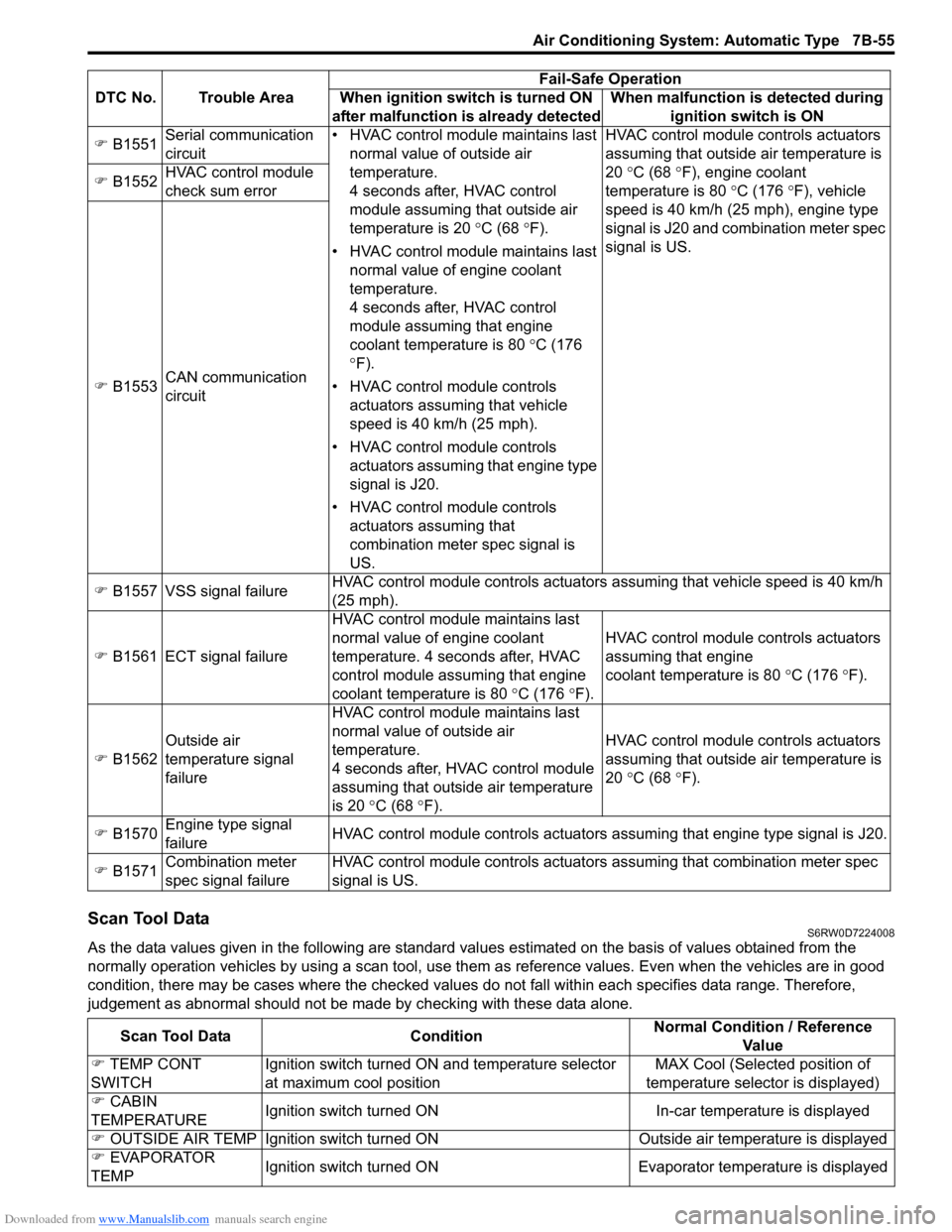
Downloaded from www.Manualslib.com manuals search engine Air Conditioning System: Automatic Type 7B-55
Scan Tool DataS6RW0D7224008
As the data values given in the following are standard values estimated on the basis of values obtained from the
normally operation vehicles by using a scan tool, use them as reference values. Even when the vehicles are in good
condition, there may be cases where the checked values do not fall within each specifies data range. Therefore,
judgement as abnormal should not be made by checking with these data alone. ) B1551Serial communication
circuit• HVAC control module maintains last
normal value of outside air
temperature.
4 seconds after, HVAC control
module assuming that outside air
temperature is 20 °C (68 °F).
• HVAC control module maintains last
normal value of engine coolant
temperature.
4 seconds after, HVAC control
module assuming that engine
coolant temperature is 80 °C (176
°F).
• HVAC control module controls
actuators assuming that vehicle
speed is 40 km/h (25 mph).
• HVAC control module controls
actuators assuming that engine type
signal is J20.
• HVAC control module controls
actuators assuming that
combination meter spec signal is
US.HVAC control module controls actuators
assuming that outside air temperature is
20 °C (68 °F), engine coolant
temperature is 80 °C (176 °F), vehicle
speed is 40 km/h (25 mph), engine type
signal is J20 and combination meter spec
signal is US. ) B1552HVAC control module
check sum error
) B1553CAN communication
circuit
) B1557 VSS signal failureHVAC control module controls actuators assuming that vehicle speed is 40 km/h
(25 mph).
) B1561 ECT signal failureHVAC control module maintains last
normal value of engine coolant
temperature. 4 seconds after, HVAC
control module assuming that engine
coolant temperature is 80 °C (176 °F).HVAC control module controls actuators
assuming that engine
coolant temperature is 80 °C (176 °F).
) B1562Outside air
temperature signal
failureHVAC control module maintains last
normal value of outside air
temperature.
4 seconds after, HVAC control module
assuming that outside air temperature
is 20 °C (68 °F).HVAC control module controls actuators
assuming that outside air temperature is
20 °C (68 °F).
) B1570Engine type signal
failureHVAC control module controls actuators assuming that engine type signal is J20.
) B1571Combination meter
spec signal failureHVAC control module controls actuators assuming that combination meter spec
signal is US. DTC No. Trouble AreaFail-Safe Operation
When ignition switch is turned ON
after malfunction is already detectedWhen malfunction is detected during
ignition switch is ON
Scan Tool Data ConditionNormal Condition / Reference
Va l u e
) TEMP CONT
SWITCHIgnition switch turned ON and temperature selector
at maximum cool positionMAX Cool (Selected position of
temperature selector is displayed)
) CABIN
TEMPERATUREIgnition switch turned ON In-car temperature is displayed
) OUTSIDE AIR TEMP Ignition switch turned ON Outside air temperature is displayed
) EVAPORATOR
TEMPIgnition switch turned ON Evaporator temperature is displayed
Page 1009 of 1556

Downloaded from www.Manualslib.com manuals search engine Air Conditioning System: Automatic Type 7B-69
DTC B1541: Back-Up Power Supply Circuit MalfunctionS6RW0D7224018
Wiring Diagram
DTC Detecting Condition and Trouble Area
NOTE
When checking DTC after connecting battery cable, be sure to turn ignition switch from OFF to ON and
from ON to OFF at least once, or DTC B1541 will be detected.
DTC Troubleshooting
12V5V
WHTG20-7 2
31G201 2 3 4 5 6 7 8 9 10 11 12 13 14
15 16 17 18 19 20 21 24 23 22 25 26 27 28 29 30WHT/RED [B]
I7RW01722011-01
[B]: Back-up power supply circuit 2. Main fuse
1. HVAC control module 3. Circuit fuse
DTC Detecting Condition Trouble Area
• Back-up power supply voltage is lower than specified value continuously.
• When connect battery with vehicle and then, turn ignition switch to ON
position for first time.• Battery voltage supply circuit
• HVAC control module
Step Action Yes No
1Was “Air Conditioning System Check” performed?Go to Step 2. Go to “Air Conditioning
System Check”.
2DTC check
1) Turn ignition switch to ON position for 20 sec. or more.
2) Ignition switch turned OFF and connect scan tool to
DLC.
3) Turn ON ignition switch and check DTC.
Is there DTC B1541?Go to Step 3. Intermittent trouble.
Check for intermittent
referring to “Intermittent
and Poor Connection
Inspection in Section
00”.
3Battery voltage supply circuit check
1) Disconnect connector from HVAC control module with
ignition switch turned OFF.
2) Check for proper connection to back-up power supply
circuit terminal of HVAC control module connector.
3) If OK, measure voltage between back-up power supply
circuit terminal of HVAC control module connector and
vehicle body ground.
Is voltage 10 – 14 V?Substitute a known-
good HVAC control
module and recheck.Back-up power supply
circuit is open or
shorted to ground.