Water SUZUKI SX4 2006 1.G Service Repair Manual
[x] Cancel search | Manufacturer: SUZUKI, Model Year: 2006, Model line: SX4, Model: SUZUKI SX4 2006 1.GPages: 1556, PDF Size: 37.31 MB
Page 824 of 1556
Downloaded from www.Manualslib.com manuals search engine 5B-12 Manual Transmission/Transaxle:
Manual Transaxle Unit Dismounting and
Remounting
S6RW0D5206010
Dismounting
1) Drain coolant.
2) Remove battery and tray with ECM.
3) Remove air cleaner case and resonator.
4) Remove clutch fluid pipe referring to “Clutch Fluid
Pipe Removal and Installation in Section 5C”.
5) Disconnect back up light switch coupler and undo
wiring harness clamps.
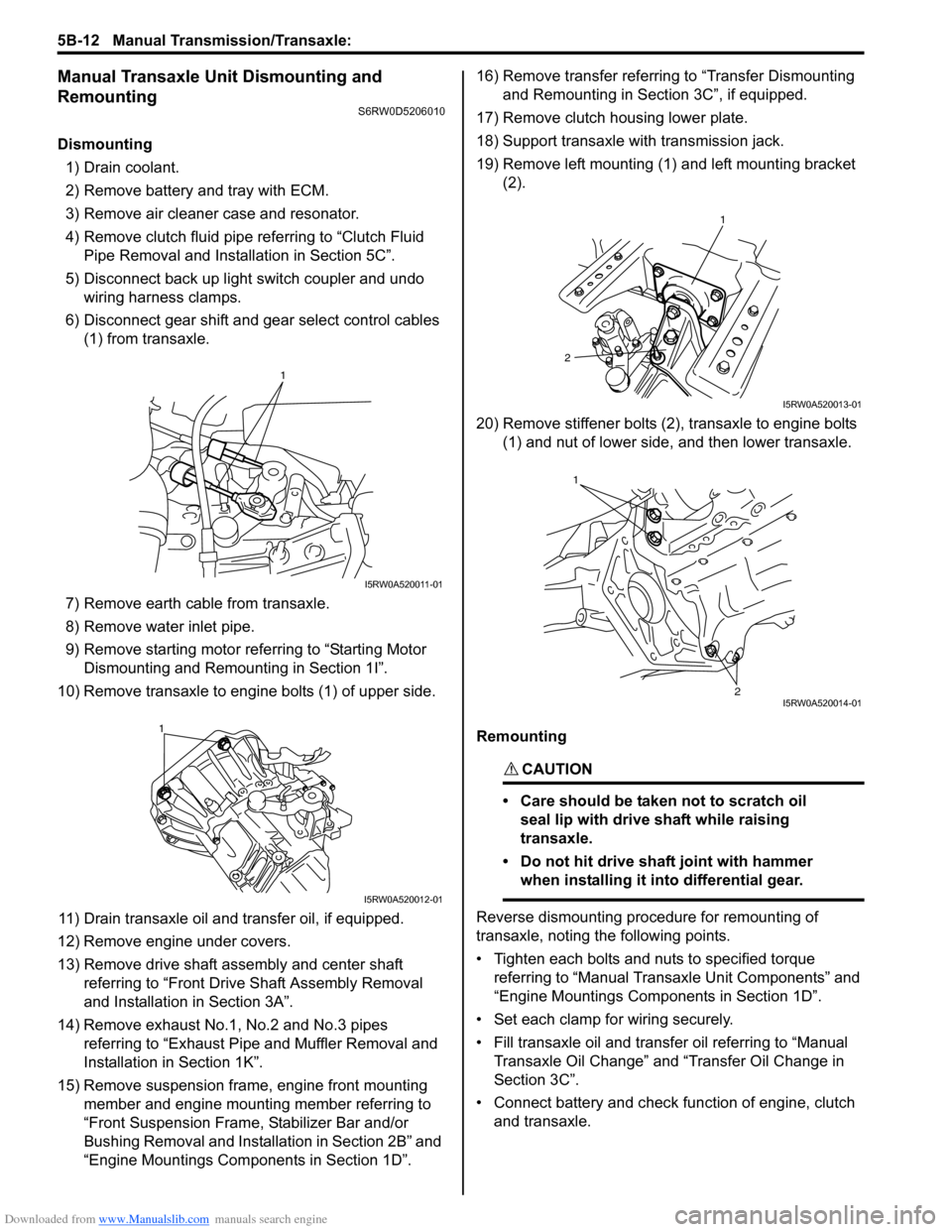
6) Disconnect gear shift and gear select control cables
(1) from transaxle.
7) Remove earth cable from transaxle.
8) Remove water inlet pipe.
9) Remove starting motor referring to “Starting Motor
Dismounting and Remounting in Section 1I”.
10) Remove transaxle to engine bolts (1) of upper side.
11) Drain transaxle oil and transfer oil, if equipped.
12) Remove engine under covers.
13) Remove drive shaft assembly and center shaft
referring to “Front Drive Shaft Assembly Removal
and Installation in Section 3A”.
14) Remove exhaust No.1, No.2 and No.3 pipes
referring to “Exhaust Pipe and Muffler Removal and
Installation in Section 1K”.
15) Remove suspension frame, engine front mounting
member and engine mounting member referring to
“Front Suspension Frame, Stabilizer Bar and/or
Bushing Removal and Installation in Section 2B” and
“Engine Mountings Components in Section 1D”.16) Remove transfer referring to “Transfer Dismounting
and Remounting in Section 3C”, if equipped.
17) Remove clutch housing lower plate.
18) Support transaxle with transmission jack.
19) Remove left mounting (1) and left mounting bracket
(2).
20) Remove stiffener bolts (2), transaxle to engine bolts
(1) and nut of lower side, and then lower transaxle.
Remounting
CAUTION!
• Care should be taken not to scratch oil
seal lip with drive shaft while raising
transaxle.
• Do not hit drive shaft joint with hammer
when installing it into differential gear.
Reverse dismounting procedure for remounting of
transaxle, noting the following points.
• Tighten each bolts and nuts to specified torque
referring to “Manual Transaxle Unit Components” and
“Engine Mountings Components in Section 1D”.
• Set each clamp for wiring securely.
• Fill transaxle oil and transfer oil referring to “Manual
Transaxle Oil Change” and “Transfer Oil Change in
Section 3C”.
• Connect battery and check function of engine, clutch
and transaxle.
1
I5RW0A520011-01
1
I5RW0A520012-01
1
2
I5RW0A520013-01
1
2I5RW0A520014-01
Page 918 of 1556
Downloaded from www.Manualslib.com manuals search engine 6C-38 Power Assisted Steering System:
2) Install steering gear case to vehicle, and then install
front suspension frame referring to “Front
Suspension Frame, Stabilizer Bar and/or Bushing
Removal and Installation in Section 2B”.
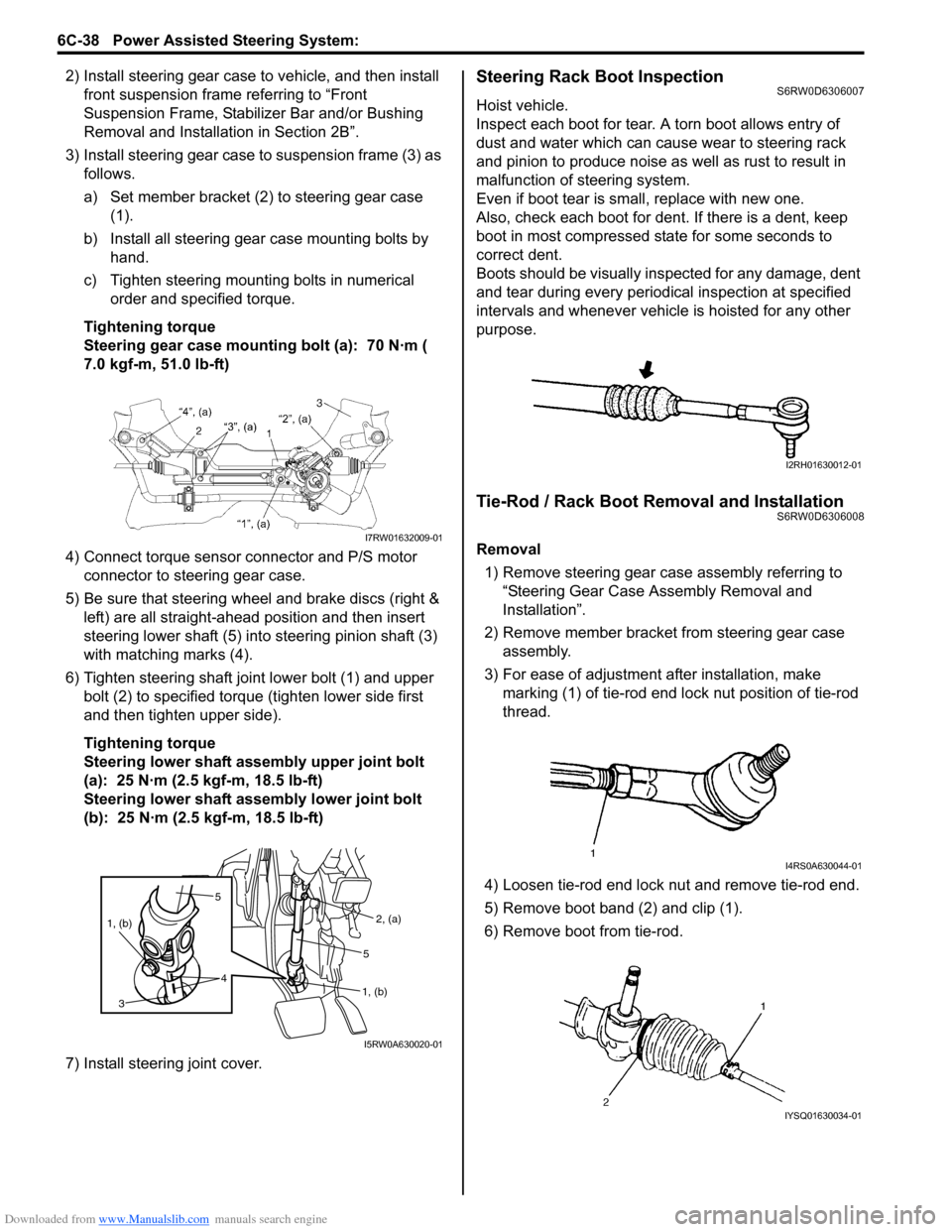
3) Install steering gear case to suspension frame (3) as
follows.
a) Set member bracket (2) to steering gear case
(1).
b) Install all steering gear case mounting bolts by
hand.
c) Tighten steering mounting bolts in numerical
order and specified torque.
Tightening torque
Steering gear case mounting bolt (a): 70 N·m (
7.0 kgf-m, 51.0 lb-ft)
4) Connect torque sensor connector and P/S motor
connector to steering gear case.
5) Be sure that steering wheel and brake discs (right &
left) are all straight-ahead position and then insert
steering lower shaft (5) into steering pinion shaft (3)
with matching marks (4).
6) Tighten steering shaft joint lower bolt (1) and upper
bolt (2) to specified torque (tighten lower side first
and then tighten upper side).
Tightening torque
Steering lower shaft assembly upper joint bolt
(a): 25 N·m (2.5 kgf-m, 18.5 lb-ft)
Steering lower shaft assembly lower joint bolt
(b): 25 N·m (2.5 kgf-m, 18.5 lb-ft)
7) Install steering joint cover.Steering Rack Boot InspectionS6RW0D6306007
Hoist vehicle.
Inspect each boot for tear. A torn boot allows entry of
dust and water which can cause wear to steering rack
and pinion to produce noise as well as rust to result in
malfunction of steering system.
Even if boot tear is small, replace with new one.
Also, check each boot for dent. If there is a dent, keep
boot in most compressed state for some seconds to
correct dent.
Boots should be visually inspected for any damage, dent
and tear during every periodical inspection at specified
intervals and whenever vehicle is hoisted for any other
purpose.
Tie-Rod / Rack Boot Removal and InstallationS6RW0D6306008
Removal
1) Remove steering gear case assembly referring to
“Steering Gear Case Assembly Removal and
Installation”.
2) Remove member bracket from steering gear case
assembly.
3) For ease of adjustment after installation, make
marking (1) of tie-rod end lock nut position of tie-rod
thread.
4) Loosen tie-rod end lock nut and remove tie-rod end.
5) Remove boot band (2) and clip (1).
6) Remove boot from tie-rod.I7RW01632009-01
5
4 1, (b)
3
2, (a)
1, (b)5
I5RW0A630020-01
I2RH01630012-01
I4RS0A630044-01
IYSQ01630034-01
Page 920 of 1556
Downloaded from www.Manualslib.com manuals search engine 6C-40 Power Assisted Steering System:
Steering Rack Plunger Removal and InstallationS6RW0D6306009
Removal
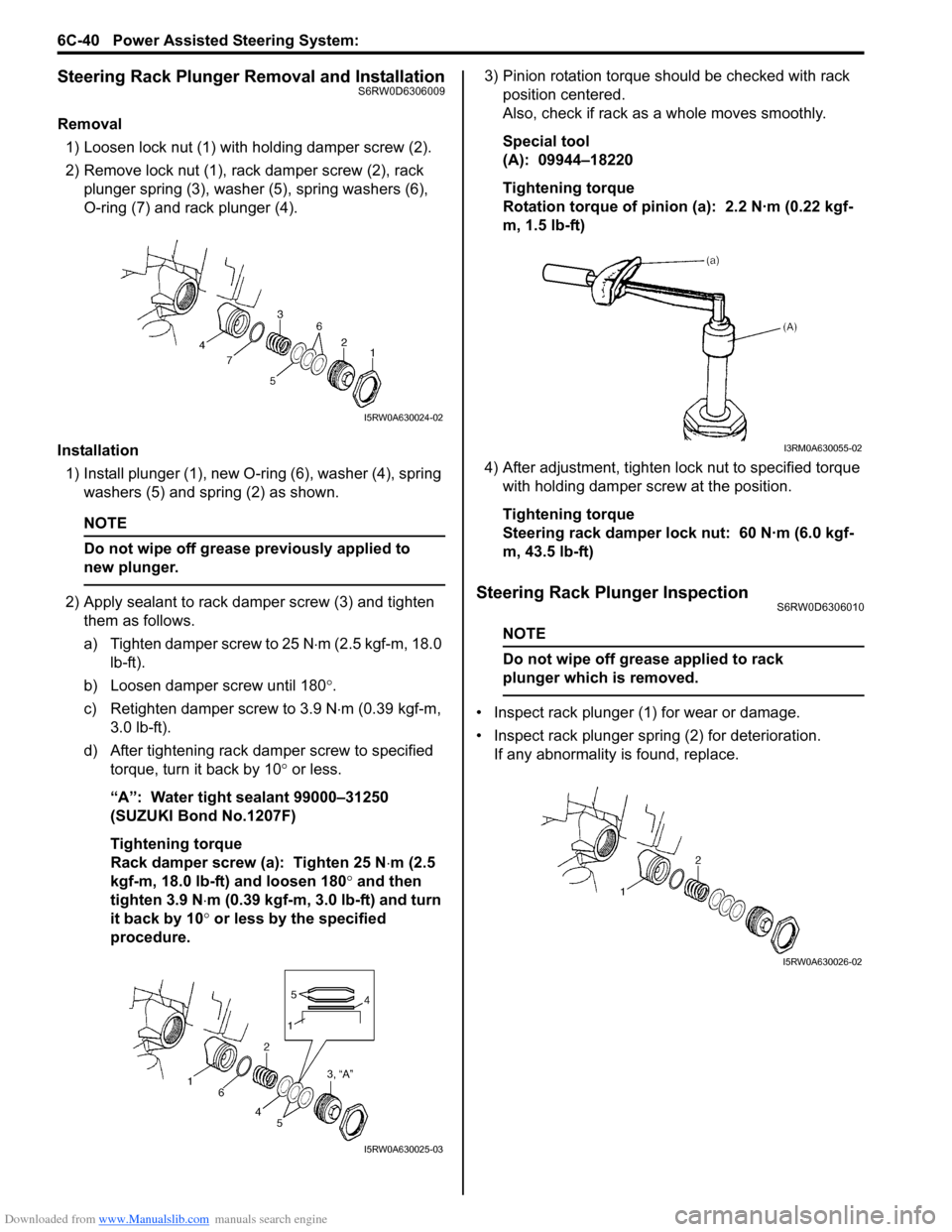
1) Loosen lock nut (1) with holding damper screw (2).
2) Remove lock nut (1), rack damper screw (2), rack
plunger spring (3), washer (5), spring washers (6),
O-ring (7) and rack plunger (4).
Installation
1) Install plunger (1), new O-ring (6), washer (4), spring
washers (5) and spring (2) as shown.
NOTE
Do not wipe off grease previously applied to
new plunger.
2) Apply sealant to rack damper screw (3) and tighten
them as follows.
a) Tighten damper screw to 25 N⋅m (2.5 kgf-m, 18.0
lb-ft).
b) Loosen damper screw until 180°.
c) Retighten damper screw to 3.9 N⋅m (0.39 kgf-m,
3.0 lb-ft).
d) After tightening rack damper screw to specified
torque, turn it back by 10° or less.
“A”: Water tight sealant 99000–31250
(SUZUKI Bond No.1207F)
Tightening torque
Rack damper screw (a): Tighten 25 N⋅m (2.5
kgf-m, 18.0 lb-ft) and loosen 180° and then
tighten 3.9 N⋅m (0.39 kgf-m, 3.0 lb-ft) and turn
it back by 10° or less by the specified
procedure.3) Pinion rotation torque should be checked with rack
position centered.
Also, check if rack as a whole moves smoothly.
Special tool
(A): 09944–18220
Tightening torque
Rotation torque of pinion (a): 2.2 N·m (0.22 kgf-
m, 1.5 lb-ft)
4) After adjustment, tighten lock nut to specified torque
with holding damper screw at the position.
Tightening torque
Steering rack damper lock nut: 60 N·m (6.0 kgf-
m, 43.5 lb-ft)Steering Rack Plunger InspectionS6RW0D6306010
NOTE
Do not wipe off grease applied to rack
plunger which is removed.
• Inspect rack plunger (1) for wear or damage.
• Inspect rack plunger spring (2) for deterioration.
If any abnormality is found, replace.
I5RW0A630024-02
I5RW0A630025-03
I3RM0A630055-02
I5RW0A630026-02
Page 924 of 1556

Downloaded from www.Manualslib.com manuals search engine 6C-44 Power Assisted Steering System:
Special Tools and Equipment
Recommended Service MaterialS6RW0D6308001
NOTE
Required service material is also described in the following.
“Steering Gear Case Assembly Components”
Special ToolS6RW0D6308002
Material SUZUKI recommended product or Specification Note
Grease SUZUKI Super Grease E P/No.: 99000–25050)
Water tight sealant SUZUKI Bond No.1207F P/No.: 99000–31250)
09944–18220 SUZUKI scan tool
Pinion torque checking
socket—
)This kit includes following
items. 1. Tech 2, 2. PCMCIA
card, 3. DLC cable, 4. SAE
16/19 adapter, 5. Cigarette
cable, 6. DLC loop back
adapter, 7. Battery power
cable, 8. RS232 cable, 9.
RS232 adapter, 10. RS232
loop back connector, 11.
Storage case, 12. ) / )
Page 929 of 1556
Downloaded from www.Manualslib.com manuals search engine Heater and Ventilation: 7A-1
HVAC
Heater and Ventilation
General Description
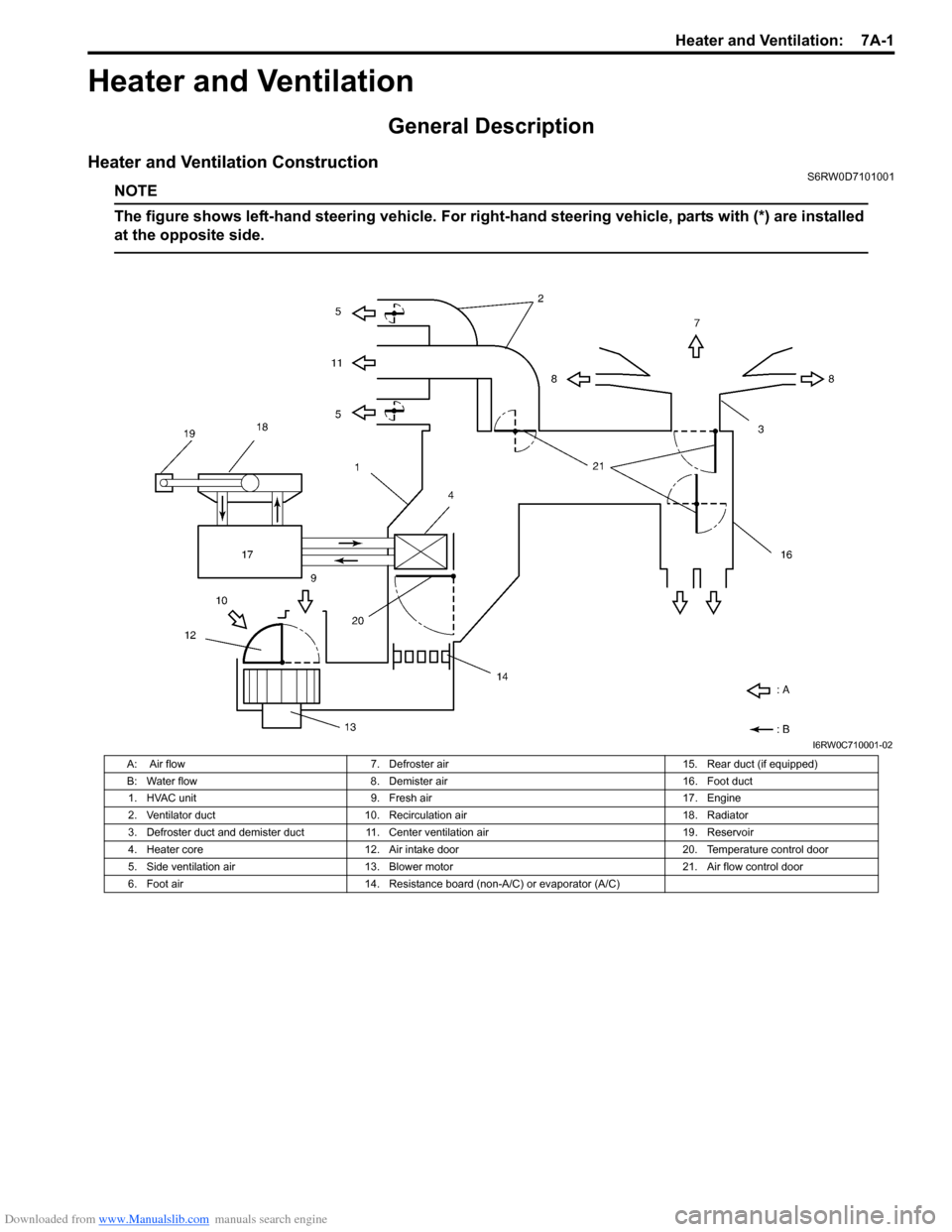
Heater and Ventilation ConstructionS6RW0D7101001
NOTE
The figure shows left-hand steering vehicle. For right-hand steering vehicle, parts with (*) are installed
at the opposite side.
I6RW0C710001-02
A: Air flow 7. Defroster air 15. Rear duct (if equipped)
B: Water flow 8. Demister air 16. Foot duct
1. HVAC unit 9. Fresh air 17. Engine
2. Ventilator duct 10. Recirculation air 18. Radiator
3. Defroster duct and demister duct 11. Center ventilation air 19. Reservoir
4. Heater core 12. Air intake door 20. Temperature control door
5. Side ventilation air 13. Blower motor 21. Air flow control door
6. Foot air 14. Resistance board (non-A/C) or evaporator (A/C)
Page 941 of 1556
Downloaded from www.Manualslib.com manuals search engine Air Conditioning System: Manual Type 7B-1
HVAC
Air Conditioning System
Manual Type
Precautions
A/C System CautionS6RW0D7210001
CAUTION!
The A/C system of this vehicle uses HFC-134a (R-134a) refrigerant, specified compressor oil and
specified parts.
Do not use CFC-12 (R-12) refrigerant, R-12 exclusive use compressor oil and R-12 exclusive parts in
this A/C system, do not attempt to use R-12 servicing equipment. Otherwise, use of it will result in
leakage of refrigerant, damage or other faulty condition of A/C system and damage or other faulty
condition of servicing equipment.
When replenishing or changing refrigerant and compressor oil and when replacing parts, make sure
that the material or the part to be used is appropriate to the A/C installed in the vehicle being serviced.
Use of incorrect one will result in leakage of refrigerant, damage in parts or other faulty condition.
Precautions on Servicing A/C SystemS6RW0D7210002
WARNING!
Should refrigerant HFC-134a (R-134a) is exposed to your eye(s), consult a doctor immediately.
• Do not reuse your hand to rub affected eye(s). Instead, use fresh cold water to splash it over
affected area to thus gradually raise its temperature above the freezing point.
• Obtain proper treatment as soon as possible from a doctor or eye specialist. Should liquid
refrigerant HFC-134a (R-134a) is exposed to your skin, such affected part should be treated in the
same manner as when skin is frostbitten or frozen.
Handling Refrigerant HFC-134a (R-134a)
• Always wear goggles to protect your eyes.
• Avoid direct contact to liquid refrigerant.
• Do not heat refrigerant container higher than 40 °C (104 °F).
• Do not discharge refrigerant into atmosphere.
• Do not expose bright metals to liquid refrigerant. Refrigerant combined with moisture is corrosive and tarnishes
surfaces of bright metals including chrome.
• Never use heat for bending pipes. When bending a pipe, try to make its bending angle as smooth as possible.
• Keep internal parts of air conditioning free from moisture and dirt. When disconnecting any line from system, install
a blind plug or cap to the fitting immediately.
• When handling recovery and recycling equipment, be sure to follow the instruction manual for the equipment.
• Check local governmental regulations regarding working with refrigerator systems and its tooling.
• When connecting hoses and pipes, apply a few drops of compressor oil (refrigerant oil) to O-ring.
• Replace O-ring with new one once hoses, pipes and parts disconnected.
• When tightening or loosening a fitting, use two wrenches, one for turning and the other for support.
• Route drain hose so that drained water does not make any contact to vehicle components.
• If pipes or hoses are replaced, replenish specified amount of compressor oil to compressor suction side referring to
“Replenishing Compressor Oil” in “Operation Procedure for Refrigerant Charge”.
Page 951 of 1556
Downloaded from www.Manualslib.com manuals search engine Air Conditioning System: Manual Type 7B-11
Thermometer at center ventilation louver
Trouble Diagnosis for Abnormal PressureS6RW0D7214002
NOTE
Normal pressure values on high side and low side in following table are measured when the ambient
temperature is 30 °C. As normal pressure values on high side and low side vary depending on the
ambient temperature, be sure to perform following steps first when diagnosing troubles.
1. Measure the ambient temperature and using that value, read the normal value from the graph given
in Step 10 of “A/C System Performance Inspection”.
2. Put that value in place of the normal pressure in following table.
Condition Possible cause Correction
Crossing point is higher
than acceptable range
(“E” area)Insufficient or excessive charge of refrigerant Check refrigerant pressure.
Dirty or bent A/C evaporator fins Clean or repair.
Air leakage from cooling (heater) unit or air duct Repair or replace.
Malfunctioning, switch over function of door in
cooling (heater) unitRepair or replace.
Compressor malfunction Check compressor.
Crossing point is lower
than acceptable range
(“F” area)Insufficient air volume from center duct (Heater
blower malfunction)Check blower motor and fan.
Compressor malfunction Check compressor.
Condition
Possible cause Correction Manifold gauge MPa (kgf/cm2) (psi)
Detail
Lo Hi
0.27 – 0.39
(2.7 – 3.9)
(38.8 – 56.0)1.13 – 1.56
(11.4 – 15.6)
(162.3 – 221.8)Normal condition
——
Negative pressure 0.5 – 0.6
(5 – 6)
(71.2 – 85.3)The low pressure side
reads a negative pressure,
and the high pressure side
reads an extremely low
pressure.
Presence of frost around
tubing to and from
receiver/dryer and
expansion valve.Dust particles or water
droplets are either
stuck or frozen inside
expansion valve,
preventing the
refrigerant from
flowing.Replace expansion
valve.
Replace desiccant and
cap with filter.
Evacuate the A/C
system and recharge
with fresh refrigerant.
Normal:
0.27 – 0.39
(2.7 – 3.9)
(38.8 – 56.0)
↑ ↓
Abnormal:
Negative pressureNormal:
1.13 – 1.56
(11.4 – 15.6)
(162.3 – 221.8)
↑ ↓
Abnormal:
0.7 – 1.0
(7 – 10)
(100 – 142)During A/C operation, the
low pressure side
sometimes indicates
negative pressure, and
sometimes normal
pressure. Also high
pressure side reading
fluctuates between the
abnormal and normal
pressure.Expansion valve is
frozen due to moisture
in the system, and
temporarily shuts off
the refrigeration cycle.Replace expansion
valve.
Replace desiccant and
cap with filter.
Evacuate A/C system
and recharge with
fresh refrigerant.
Page 957 of 1556
Downloaded from www.Manualslib.com manuals search engine Air Conditioning System: Manual Type 7B-17
Repair Instructions
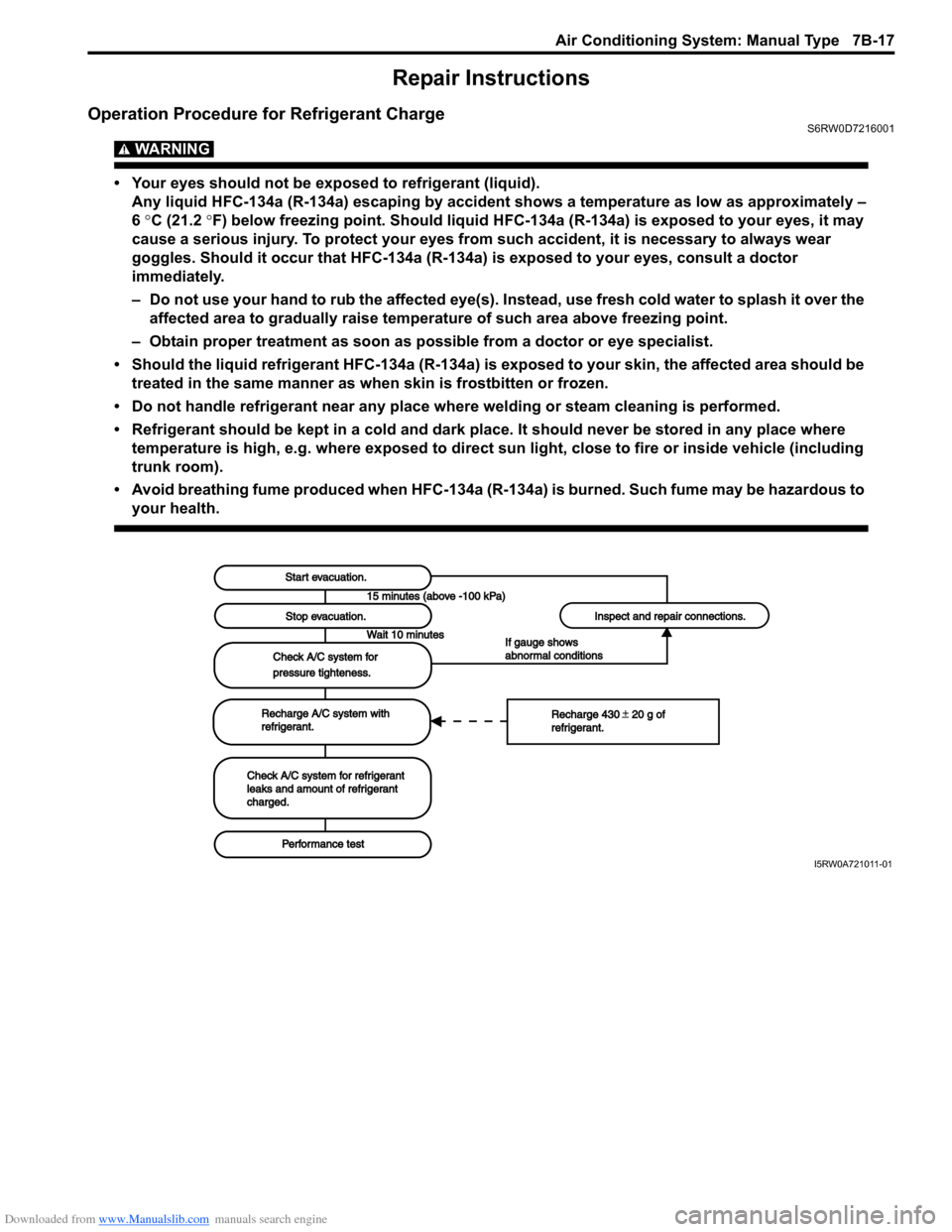
Operation Procedure for Refrigerant ChargeS6RW0D7216001
WARNING!
• Your eyes should not be exposed to refrigerant (liquid).
Any liquid HFC-134a (R-134a) escaping by accident shows a temperature as low as approximately –
6 °C (21.2 °F) below freezing point. Should liquid HFC-134a (R-134a) is exposed to your eyes, it may
cause a serious injury. To protect your eyes from such accident, it is necessary to always wear
goggles. Should it occur that HFC-134a (R-134a) is exposed to your eyes, consult a doctor
immediately.
– Do not use your hand to rub the affected eye(s). Instead, use fresh cold water to splash it over the
affected area to gradually raise temperature of such area above freezing point.
– Obtain proper treatment as soon as possible from a doctor or eye specialist.
• Should the liquid refrigerant HFC-134a (R-134a) is exposed to your skin, the affected area should be
treated in the same manner as when skin is frostbitten or frozen.
• Do not handle refrigerant near any place where welding or steam cleaning is performed.
• Refrigerant should be kept in a cold and dark place. It should never be stored in any place where
temperature is high, e.g. where exposed to direct sun light, close to fire or inside vehicle (including
trunk room).
• Avoid breathing fume produced when HFC-134a (R-134a) is burned. Such fume may be hazardous to
your health.
Start evacuation.Start evacuation.
Stop evacuation.Stop evacuation.
15 minutes (above -100 kPa)15 minutes (above -100 kPa)
Wait 10 minutesWait 10 minutes
Check A/C system forCheck A/C system for
pressure tighteness.pressure tighteness.
Recharge A/C system withRecharge A/C system withrefrigerant.refrigerant.
Check A/C system for refrigerantCheck A/C system for refrigerantleaks and amount of refrigerantleaks and amount of refrigerantcharged.charged.
Performance testPerformance test
Inspect and repair connections.Inspect and repair connections.
If gauge showsIf gauge showsabnormal conditionsabnormal conditions
Recharge 430 20 g ofRecharge 430 20 g ofrefrigerant.refrigerant.
I5RW0A721011-01
Page 963 of 1556
Downloaded from www.Manualslib.com manuals search engine Air Conditioning System: Manual Type 7B-23
Condenser Cooling Fan InspectionS6RW0D7216003
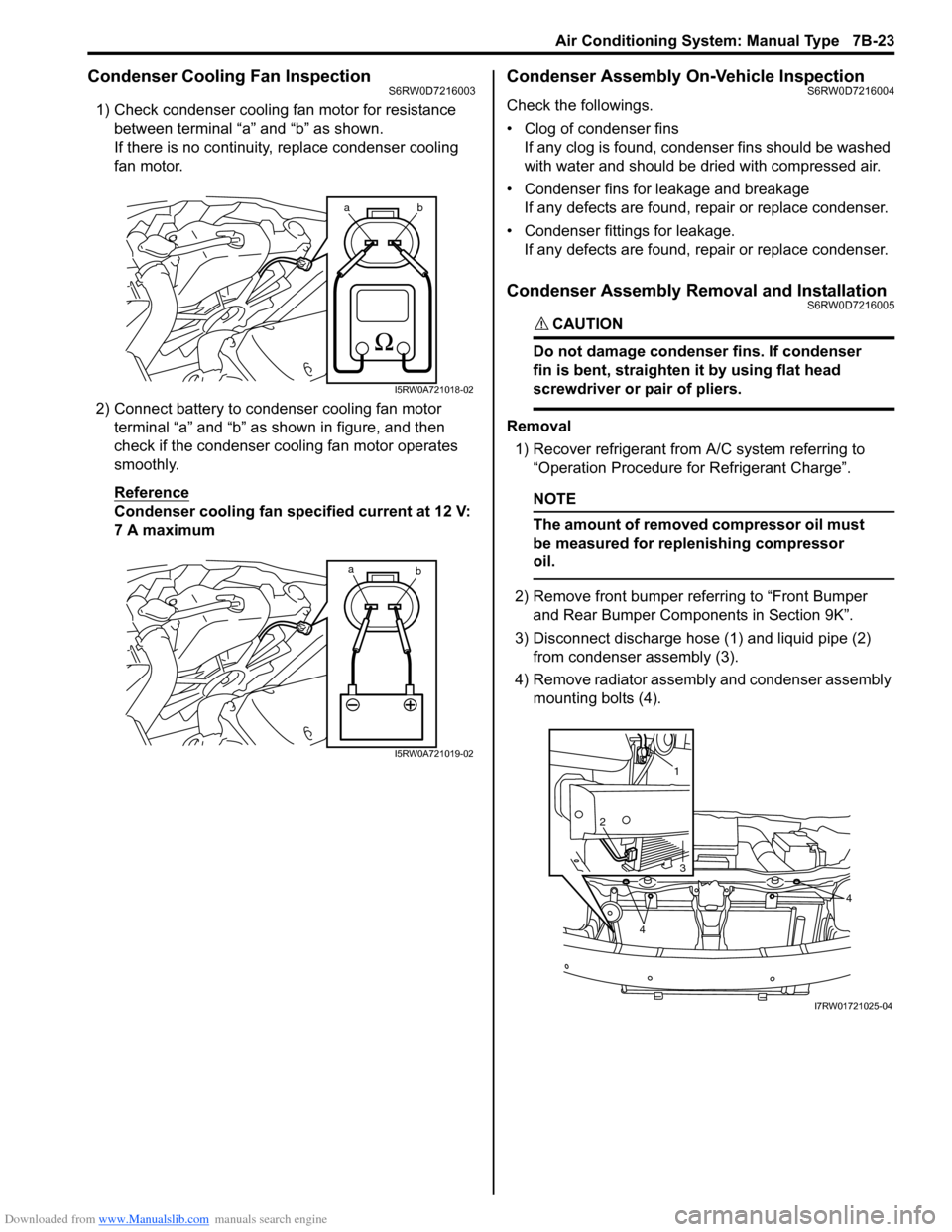
1) Check condenser cooling fan motor for resistance
between terminal “a” and “b” as shown.
If there is no continuity, replace condenser cooling
fan motor.
2) Connect battery to condenser cooling fan motor
terminal “a” and “b” as shown in figure, and then
check if the condenser cooling fan motor operates
smoothly.
Reference
Condenser cooling fan specified current at 12 V:
7 A maximum
Condenser Assembly On-Vehicle InspectionS6RW0D7216004
Check the followings.
• Clog of condenser fins
If any clog is found, condenser fins should be washed
with water and should be dried with compressed air.
• Condenser fins for leakage and breakage
If any defects are found, repair or replace condenser.
• Condenser fittings for leakage.
If any defects are found, repair or replace condenser.
Condenser Assembly Removal and InstallationS6RW0D7216005
CAUTION!
Do not damage condenser fins. If condenser
fin is bent, straighten it by using flat head
screwdriver or pair of pliers.
Removal
1) Recover refrigerant from A/C system referring to
“Operation Procedure for Refrigerant Charge”.
NOTE
The amount of removed compressor oil must
be measured for replenishing compressor
oil.
2) Remove front bumper referring to “Front Bumper
and Rear Bumper Components in Section 9K”.
3) Disconnect discharge hose (1) and liquid pipe (2)
from condenser assembly (3).
4) Remove radiator assembly and condenser assembly
mounting bolts (4).
ab
I5RW0A721018-02
a
b
I5RW0A721019-02
1
2
3
4
4
I7RW01721025-04
Page 967 of 1556
Downloaded from www.Manualslib.com manuals search engine Air Conditioning System: Manual Type 7B-27
Installation
Reverse removal procedure noting the following
instructions.
• Replenish specified amount of compressor oil to
compressor suction side referring to “Replenishing
Compressor Oil” in “Operation Procedure for
Refrigerant Charge”.
• Install the padding (1) to the installation hole
uniformly.
• Evacuate and charge the A/C system referring to
“Evacuation” and “Charge” in “Operation Procedure
for Refrigerant Charge”.
• Refill cooling system with coolant referring to “Cooling
System Flush and Refill in Section 1F”.
• Adjust control cables referring to “HVAC Control Unit
Removal and Installation in Section 7A”. (vehicle with
manual type A/C)
Evaporator InspectionS6RW0D7216009
Check the followings.
• Clog of A/C evaporator fins.
If any clogs are found, A/C evaporator fins should be
washed with water, and then should be dried with
compressed air.
• A/C evaporator fins for leakage and breakage.
If any defects are found, repair or replace A/C
evaporator.
• A/C evaporator fittings for leakage.
If any defects are found, repair or replace A/C
evaporator.
Evaporator Temperature Sensor Removal and
Installation
S6RW0D7216010
Removal
1) Remove HVAC unit from vehicle body referring to
“HVAC Unit Removal and Installation”.
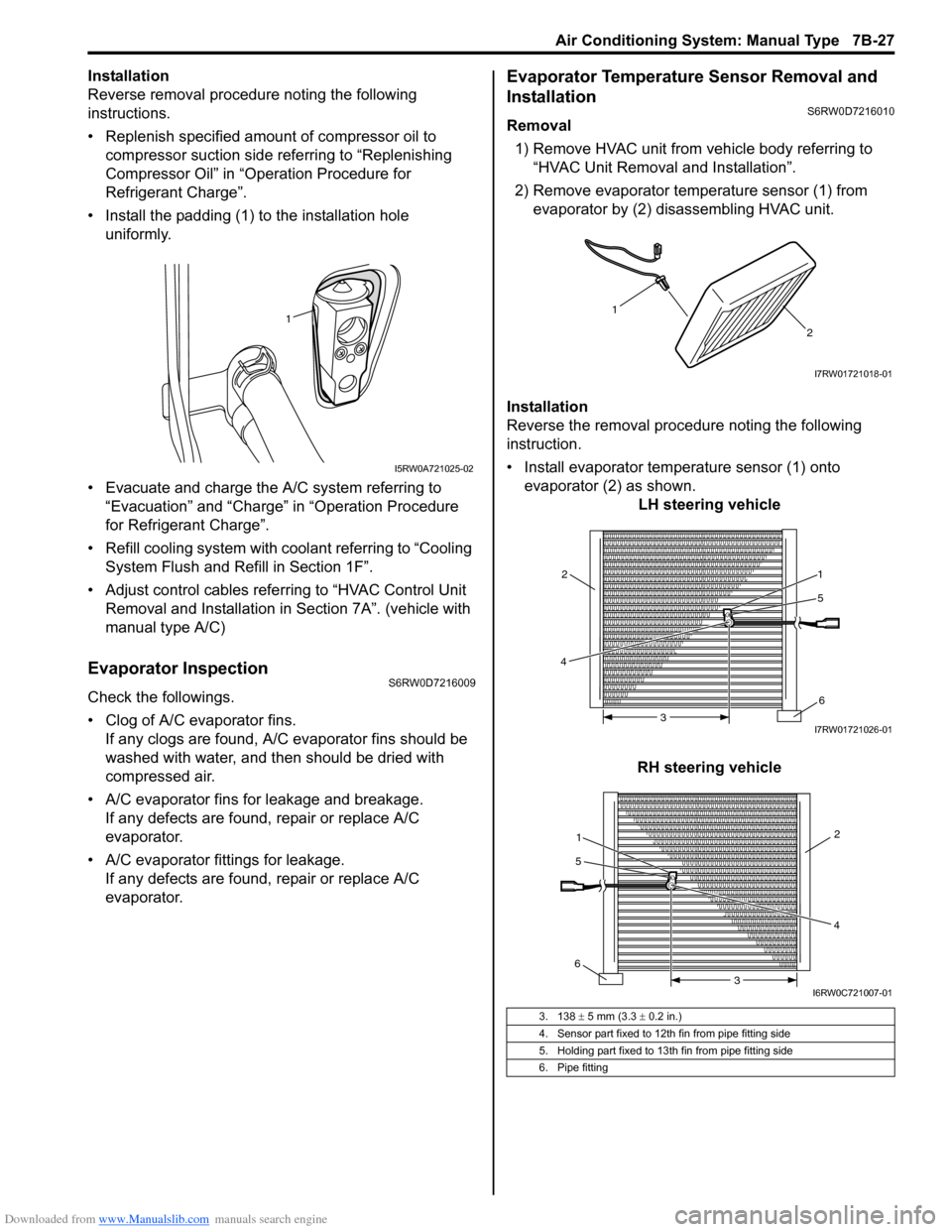
2) Remove evaporator temperature sensor (1) from
evaporator by (2) disassembling HVAC unit.
Installation
Reverse the removal procedure noting the following
instruction.
• Install evaporator temperature sensor (1) onto
evaporator (2) as shown.
LH steering vehicle
RH steering vehicle
1
I5RW0A721025-02
3. 138 ± 5 mm (3.3 ± 0.2 in.)
4. Sensor part fixed to 12th fin from pipe fitting side
5. Holding part fixed to 13th fin from pipe fitting side
6. Pipe fitting
1
2
I7RW01721018-01
5
4
6 1
2
3I7RW01721026-01
1
5
642
3
I6RW0C721007-01