Battery TESLA MODEL S 2014 (Europe) Owner's Guide
[x] Cancel search | Manufacturer: TESLA, Model Year: 2014, Model line: MODEL S, Model: TESLA MODEL S 2014Pages: 152, PDF Size: 17.5 MB
Page 94 of 152
Battery InformationBattery Information
6.4MODEL S OWNERS MANUAL
Battery InformationAbout the Battery
Model S has one of the most sophisticated
battery systems in the world. The most
important way to preserve the Battery is to
LEAVE YOUR MODEL S PLUGGED IN when you
are not using it. This is particularly important if
you are not planning to drive Model S for
several weeks. When plugged in, Model S wakes
up when needed to automatically maintain a
charge level that maximizes the lifetime of the
Battery.
There is no advantage to waiting until the
Battery’s level is low before charging. In fact,
the Battery performs best when charged
regularly.
Battery Care
Never allow the Battery to fully discharge. Even
when Model S is not being driven, its Battery
discharges very slowly to power the onboard
electronics. On average, the Battery discharges
at a rate of 1% per day. Situations can arise in
which you must leave Model S unplugged for an
extended period of time (for example, at an
airport when traveling). In these situations,
keep the 1% in mind to ensure that you leave the
Battery with a sufficient charge level. For
example, over a two week period (14 days), the
Battery discharges by approximately 14%.
Discharging the Battery to 0% may
permanently damage the Battery. To protect
against a complete discharge, Model S enters a
low-power consumption mode when the
charge level drops to 5%. In this mode, the
Battery stops supporting the onboard
electronics to slow the discharge rate to
approximately 4% per month. Once this
low-power consumption mode is active, it is
important to plug in Model S within two months
to avoid Battery damage.
NOTE: When the low-power consumption
mode is active, the auxiliary 12V battery is no
longer being charged and can completely
discharge within 12 hours. In the unlikely event
that this occurs, you may need to jump start or
replace the 12V battery before you can charge.
In this situation, contact Tesla.
Temperature Limits
Do not expose Model S to ambient
temperatures above 60° C or below -30° C for
more than 24 hours at a time.
Battery Warnings and Cautions
WARNING: The Battery has no parts that
an owner or a non-Tesla authorized
service technician can service. Under no
circumstances should you open or tamper with
the Battery. Always contact Tesla to arrange for
Battery servicing.
CAUTION: If the Battery’s charge level
falls to 0%, you must plug it in. If you leave
it unplugged for an extended period, it may not
be possible to charge Model S or use the
vehicle without jump starting or replacing the
12V battery. Leaving Model S unplugged for an
extended period can also result in permanent
Battery damage. If you are unable to charge
Model S, contact Tesla immediately.
CAUTION: The Battery requires no owner
maintenance. Do not remove the filler cap
and do not add fluid. If the instrument panel
warns you that the fluid level is low, contact
Tesla immediately.
At the end of its service life, the Battery
should be recycled. Contact Tesla for
recycling arrangements.
charging.fm Page 4 Monday, July 22, 2013 11:52 AM
Page 95 of 152
Charging Model S
CHARGING6.5
Charging Model SOpening the Charge Port
The charge port is located on the driver’s side
o f M o d e l S , b e h i n d a d o o r t h a t i s p a r t o f t h e r e a r
tail light assembly.
Park Model S so that the charge cable easily
reaches the charge port.
With Model S unlocked, or a recognized key
nearby, press and hold the button on a Tesla
charging cable.
If the cable you are using
does not have this
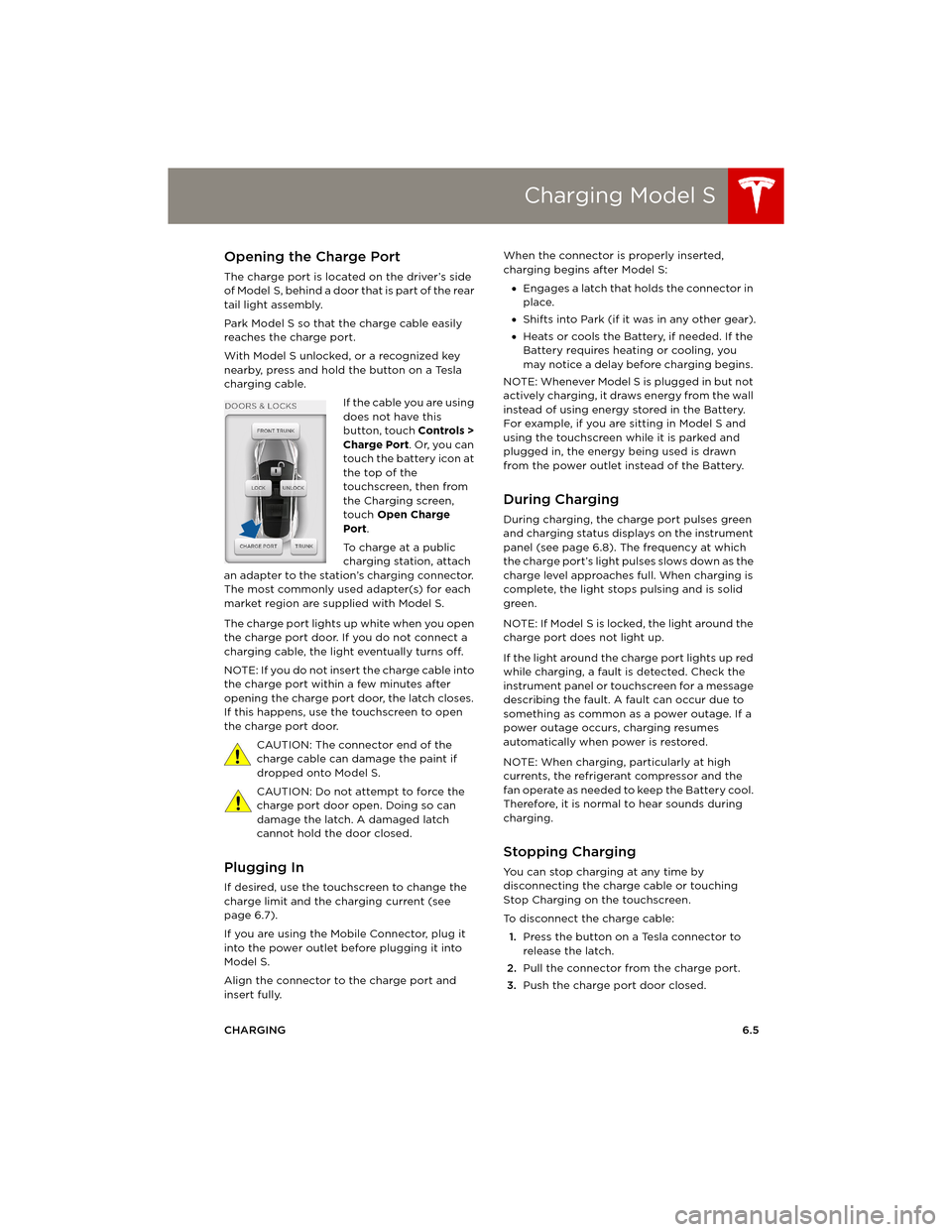
button, touch Controls >
Charge Port. Or, you can
touch the battery icon at
the top of the
touchscreen, then from
the Charging screen,
touch Open Charge
Port.
To charge at a public
charging station, attach
an adapter to the station’s charging connector.
The most commonly used adapter(s) for each
market region are supplied with Model S.
The charge port lights up white when you open
the charge port door. If you do not connect a
charging cable, the light eventually turns off.
NOTE: If you do not insert the charge cable into
the charge port within a few minutes after
opening the charge port door, the latch closes.
If this happens, use the touchscreen to open
the charge port door.
CAUTION: The connector end of the
charge cable can damage the paint if
dropped onto Model S.
CAUTION: Do not attempt to force the
charge port door open. Doing so can
damage the latch. A damaged latch
cannot hold the door closed.
Plugging In
If desired, use the touchscreen to change the
charge limit and the charging current (see
page 6.7).
If you are using the Mobile Connector, plug it
into the power outlet before plugging it into
Model S.
Align the connector to the charge port and
insert fully. When the connector is properly inserted,
charging begins after Model S:
•Engages a latch that holds the connector in
place.
•Shifts into Park (if it was in any other gear).
•Heats or cools the Battery, if needed. If the
Battery requires heating or cooling, you
may notice a delay before charging begins.
NOTE: Whenever Model S is plugged in but not
actively charging, it draws energy from the wall
instead of using energy stored in the Battery.
For example, if you are sitting in Model S and
using the touchscreen while it is parked and
plugged in, the energy being used is drawn
from the power outlet instead of the Battery.
During Charging
During charging, the charge port pulses green
and charging status displays on the instrument
panel (see page 6.8). The frequency at which
the charge port’s light pulses slows down as the
charge level approaches full. When charging is
complete, the light stops pulsing and is solid
green.
NOTE: If Model S is locked, the light around the
charge port does not light up.
If the light around the charge port lights up red
while charging, a fault is detected. Check the
instrument panel or touchscreen for a message
describing the fault. A fault can occur due to
something as common as a power outage. If a
power outage occurs, charging resumes
automatically when power is restored.
NOTE: When charging, particularly at high
currents, the refrigerant compressor and the
fan operate as needed to keep the Battery cool.
Therefore, it is normal to hear sounds during
charging.
Stopping Charging
You can stop charging at any time by
disconnecting the charge cable or touching
Stop Charging on the touchscreen.
To disconnect the charge cable:
1.Press the button on a Tesla connector to
release the latch.
2.Pull the connector from the charge port.
3.Push the charge port door closed.
book.book Page 5 Friday, July 19, 2013 12:53 PM
Page 96 of 152
Charging Model SCharging Model S
6.6MODEL S OWNERS MANUAL To prevent unauthorized unplugging of the
charging cable, Model S must be unlocked or
able to recognize a key before you can
disconnect the charging cable.
NOTE: Model S stops charging whenever you
double-click the key. If you do not unplug
within 60 seconds, charging resumes.
CAUTION: Tesla strongly recommends
leaving Model S plugged in when not in
use. This maintains the Battery at the
optimum level of charge.
Charge Port Light
White The charge port door is
open and charge mode
is initiated.
Green - pulsing Charging is in progress.
Green - solid Charging is complete.
Red - flashing A fault was detected
and charging has
stopped. Check the
instrument panel or
touchscreen for a
message describing
the fault.
book.book Page 6 Friday, July 19, 2013 12:53 PM
Page 97 of 152
Charging Model S
CHARGING6.7
Changing Charge Settings
The charge settings screen displays on the
touchscreen whenever the charge port door is
open.
To display charge settings at any time,
touch the Battery icon on the top of the
touchscreen, or touch Controls > Charging
(located in the upper right portion of the
Controls screen).
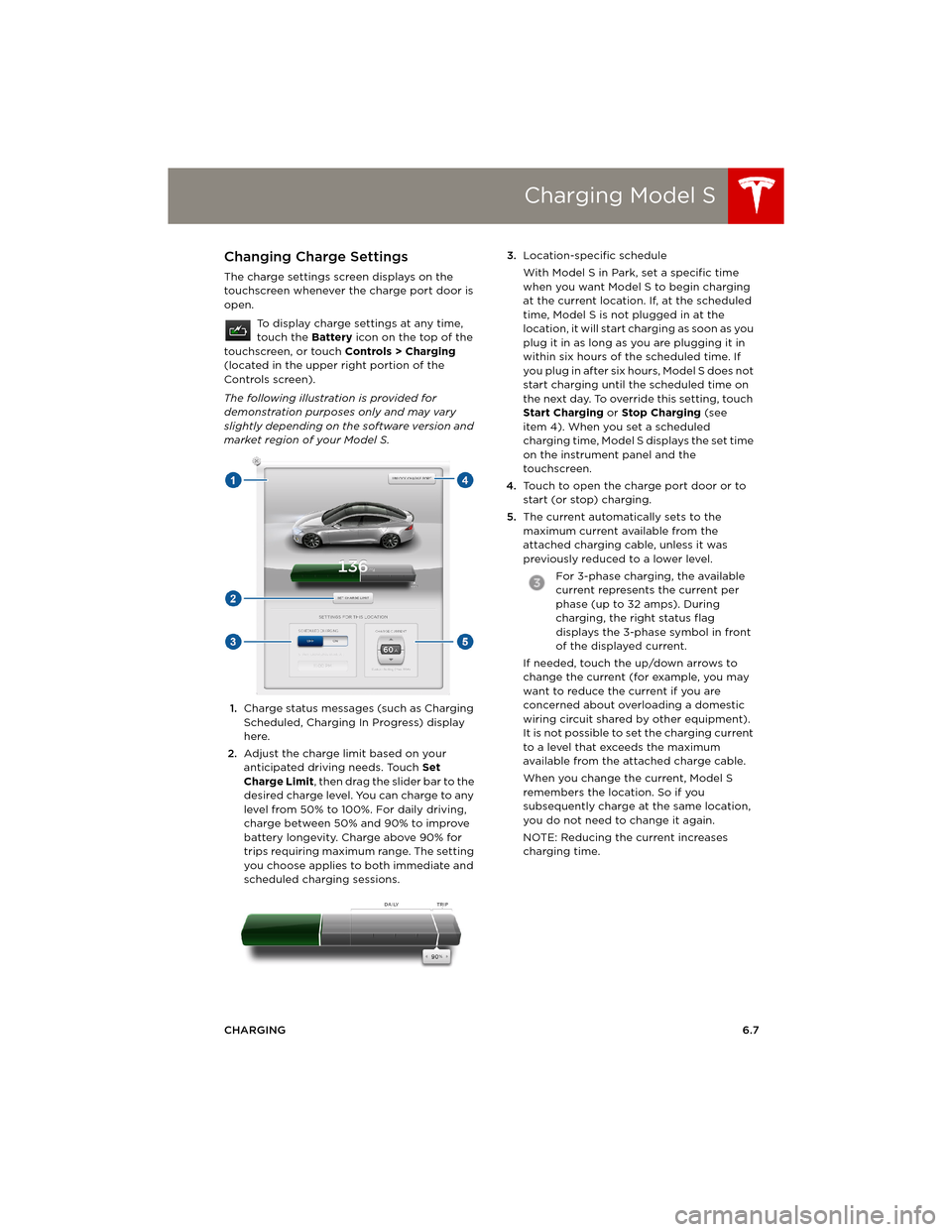
The following illustration is provided for
demonstration purposes only and may vary
slightly depending on the software version and
market region of your Model S.
1.Charge status messages (such as Charging
Scheduled, Charging In Progress) display
here.
2.Adjust the charge limit based on your
anticipated driving needs. Touch Set
Charge Limit, then drag the slider bar to the
desired charge level. You can charge to any
level from 50% to 100%. For daily driving,
charge between 50% and 90% to improve
battery longevity. Charge above 90% for
trips requiring maximum range. The setting
you choose applies to both immediate and
scheduled charging sessions.3.Location-specific schedule
With Model S in Park, set a specific time
when you want Model S to begin charging
at the current location. If, at the scheduled
time, Model S is not plugged in at the
location, it will start charging as soon as you
plug it in as long as you are plugging it in
within six hours of the scheduled time. If
you plug in after six hours, Model S does not
start charging until the scheduled time on
the next day. To override this setting, touch
Start Charging or Stop Charging (see
item 4). When you set a scheduled
charging time, Model S displays the set time
on the instrument panel and the
touchscreen.
4.Touch to open the charge port door or to
start (or stop) charging.
5.The current automatically sets to the
maximum current available from the
attached charging cable, unless it was
previously reduced to a lower level.
For 3-phase charging, the available
current represents the current per
phase (up to 32 amps). During
charging, the right status flag
displays the 3-phase symbol in front
of the displayed current.
If needed, touch the up/down arrows to
change the current (for example, you may
want to reduce the current if you are
concerned about overloading a domestic
wiring circuit shared by other equipment).
It is not possible to set the charging current
to a level that exceeds the maximum
available from the attached charge cable.
When you change the current, Model S
remembers the location. So if you
subsequently charge at the same location,
you do not need to change it again.
NOTE: Reducing the current increases
charging time.
book.book Page 7 Friday, July 19, 2013 12:53 PM
Page 99 of 152
7.1
MAINTENANCE
Maintenance Schedule
Service Intervals................................................ 7.2
Daily and Monthly Checks............................. 7.2
High Voltage Safety ........................................ 7.2
Tire Care and Maintenance
Maintaining Tire Pressures ............................ 7.3
Inspecting and Maintaining Tires .............. 7.4
Replacing Tires and Wheels ......................... 7.5
Using Tire Chains .............................................. 7.6
Tire Pressure Monitoring ............................... 7.6
Temporary Tire RepairTire Repair Kit .................................................... 7.8
Inflating with Sealant and Air ...................... 7.9
Inflating with Air Only................................... 7.10
Replacing the Sealant Canister .................. 7.11
Cleaning
Cleaning the Exterior .................................... 7.12
Cleaning the Interior ..................................... 7.13
Polishing, Touch Up, and Body Repair... 7.14
Using a Car Cover .......................................... 7.14
Floor Mats ......................................................... 7.14
Wiper Blades and Washer Jets
Checking and Replacing Wiper Blades.. 7.15
Cleaning Washer Jets ................................... 7.15
Fluid ReservoirsRemoving the Maintenance Panel ........... 7.16
Checking Battery Coolant........................... 7.16
Checking Brake Fluid .................................... 7.17
Topping Up Washer Fluid ........................... 7.18
Fuses
Fuse Box Locations ....................................... 7.19
Replacing a Fuse ............................................ 7.19
Fuse Box 1 ........................................................ 7.20
Fuse Box 2......................................................... 7.21
Fuse Box 3 ....................................................... 7.22
Fuse Box 4 ....................................................... 7.22
Jacking and Lifting
Jacking Procedure ........................................ 7.23
Parts and Accessories
Parts, Accessories, and Modifications ... 7.24
Body Repairs ................................................... 7.24
book.book Page 1 Friday, July 19, 2013 12:53 PM
Page 100 of 152
Maintenance ScheduleMaintenance Schedule
7.2MODEL S OWNERS MANUAL
MAINTENANCE
Maintenance ScheduleService Intervals
Regular maintenance is the key to ensuring the
continued reliability and efficiency of your
Model S.
Take Model S to Tesla at the regularly scheduled
maintenance intervals of every 12 months, or
every 20,000 kms, whichever comes first.
Model S must be serviced by Tesla-certified
technicians. Damages or failures caused by
maintenance or repairs performed by non-Tesla
certified technicians are not covered by the
warranty.
Fluid Replacement
Do not change or top up Battery coolant and
brake fluid yourself. Tesla service technicians
replace fluids at the regularly scheduled service
intervals:
•Brake fluid - every 2 years or 40,000 kms,
whichever comes first.
•Battery coolant - every 4 years or
80,000 kms, whichever comes first.
NOTE: Any damage from opening the Battery
coolant reservoir is excluded from the warranty.
Daily and Monthly Checks
In addition to the regularly scheduled
maintenance performed by Tesla, you should
carry out a few simple checks more frequently.
Daily Checks
•Check the Battery’s charge level, displayed
on the instrument panel.
•Check that all exterior lights, horn, turn
signals, and wipers and washers are
working.
•Check the operation of the brakes,
including the parking brake.
•Check the operation of the seat belts
(see page 3.5).
•Look for fluid deposits underneath Model S
that might indicate a leak. It is normal for a
small pool of water to form (caused by the
air conditioning system’s dehumidifying
process).
Monthly Checks
•Check the condition and pressure of each
tire (see page 7.3).
•Check washer fluid level and top up if
necessary (see page 7.18).
•Check that the air conditioning system is
operating (see page 5.9).
CAUTION: Contact Tesla immediately if
you notice any significant or sudden drop
in fluid levels or uneven tire wear.
High Voltage Safety
Your Model S has been designed and built with
safety as a priority. However, be aware of these
precautions to protect yourself from the risk of
injury inherent in all high-voltage systems:
•Read and follow all instructions provided on
the labels that are attached to Model S.
These labels are there for your safety.
•The high voltage system has no
user-serviceable parts. Do not disassemble,
remove or replace high voltage
components, cables or connectors. High
voltage cables are colored orange for easy
identification.
•If an accident occurs, do not touch any high
voltage wiring, connectors, or components
connected to the wiring.
•In the unlikely event that a fire occurs,
immediately contact your local fire
emergency responders.
WARNING: Always disconnect the charge
cable before working underneath
Model S, even if charging is not in progress.
WARNING: Keep your hands and clothing
away from cooling fans. Some fans
operate even when Model S is powered off.
WARNING: Some fluids (battery acid,
Battery coolant, brake fluid, windshield
washer additives, etc.) used in motor vehicles
are poisonous and should not be inhaled,
swallowed, or brought into contact with open
wounds. For your safety, always read and follow
instructions printed on fluid containers.
Dispose of used fluids and other
chemicals at authorized waste disposal
sites. It is illegal to pollute drains, waterways or
soil.
book.book Page 2 Friday, July 19, 2013 12:53 PM
Page 101 of 152
Tire Care and Maintenance
MAINTENANCE7.3
Tire Care and MaintenanceMaintaining Tire Pressures
Keep tires inflated to the pressures shown on
the Tire and Loading Information label located
on the driver’s door pillar (even if it differs from
the pressure printed on the tire itself).
The Tire Pressure indicator light on the
instrument panel alerts you if one or
more tires is under- or over-inflated.
The Tire Pressure indicator light does not
immediately turn off when you adjust tire
pressure. After inflating the tire to the
recommended pressure, you must drive over
40 km/h for more than 10 minutes to activate
the Tire Pressure Monitoring System (TPMS),
which turns off the Tire Pressure indicator light.
If the indicator light flashes for one minute
whenever you power on Model S, a fault with
the Tire Pressure Monitoring System (TPMS) is
detected (see page 7.6).
Checking and Adjusting Tire Pressures
Follow these steps when tires are cold and
Model S has been stationary for over three
hours:
1.Remove the valve cap.
2.Firmly press an accurate tire pressure
gauge onto the valve to measure pressure.
3.If required, add air to reach the
recommended pressure.
4.Re-check pressure by removing and
re-attaching the tire gauge.
5.If you added too much air, release air by
pressing the metal stem in the center of the
valve.
6.Recheck the pressure with the tire gauge
and adjust if necessary.
7.Replace the valve cap to prevent dirt from
entering. Periodically check the valve for
damage and leaks.
WARNING: Under-inflation is the most
common cause of tire failures. It can
cause a tire to overheat, resulting in severe tire
cracking, tread separation, or blowout, which
causes unexpected loss of vehicle control and
increased risk of injury. Under-inflation also
reduces Battery range and tire tread life.
WARNING: Check tire pressures using an
accurate pressure gauge when tires are
cold. It takes only one mile of driving to warm
up the tires sufficiently to affect tire pressures.
Parking the vehicle in direct sunlight or in hot
weather can also affect tire pressures. If you
must check warm tires, expect increased
pressures. Do not let air out of warm tires in an
attempt to match recommended cold tire
pressures. A hot tire at or below the
recommended cold tire inflation pressure is
dangerously under-inflated.
WARNING: Do not use any tire sealant
other than the type provided in a Tesla
tire repair kit. Other types can cause tire
pressure sensors to malfunction. If your
Model S did not include a tire repair kit, you can
purchase one from Tesla Motors.
book.book Page 3 Friday, July 19, 2013 12:53 PM
Page 112 of 152
CleaningCleaning
7.14MODEL S OWNERS MANUAL
Polishing, Touch Up, and Body
Repair
To preserve the cosmetic appearance of the
body, you can occasionally treat the paint
surfaces with an approved polish containing:
•Very mild abrasive to remove surface
contamination without removing or
damaging the paint.
•Filling compounds that fill scratches and
reduce their visibility.
•Wax to provide a protective coating
between the paint and environmental
elements.
Regularly inspect the exterior paint for
damage. Treat minor chips and scratches using
a paint touch up pen (available for purchase
from Tesla). Use the touch-up pen after
washing but before polishing or waxing.
Repair rock chips, fractures or scratches. Body
repairs should be performed only by a Tesla
approved body repair facility. Contact Tesla for
a list of approved facilities.
CAUTION: Do not use cutting pastes,
color restoration compounds, or polishes
containing harsh abrasives. These can
scour the surface and permanently damage the
paint.
CAUTION: Do not use chrome polish or
other abrasive cleaners.
Using a Car Cover
To preserve the cosmetic appearance of the
body when Model S is not being used, use a
genuine Tesla car cover. Car covers can be
purchased from Tesla.
CAUTION: Never use a non-Tesla car
cover when Model S is plugged in. Doing
so can prevent the Battery from being
adequately cooled during charging.
Floor Mats
To e x t e n d t h e l i f e o f y o u r c a r p e t a n d m a k e t h e m
easier to clean, use genuine Tesla floor mats.
Maintain mats by cleaning them regularly and
replacing them if they become excessively
worn.
WARNING: To avoid potential
interference with a foot pedal, ensure
that the driver’s floor mat is securely
fastened, and never place an additional floor
mat on top of it.
maintenance.fm Page 14 Thursday, July 25, 2013 12:49 PM
Page 114 of 152
Fluid ReservoirsFluid Reservoirs
7.16MODEL S OWNERS MANUAL
Fluid ReservoirsRemoving the Maintenance Panel
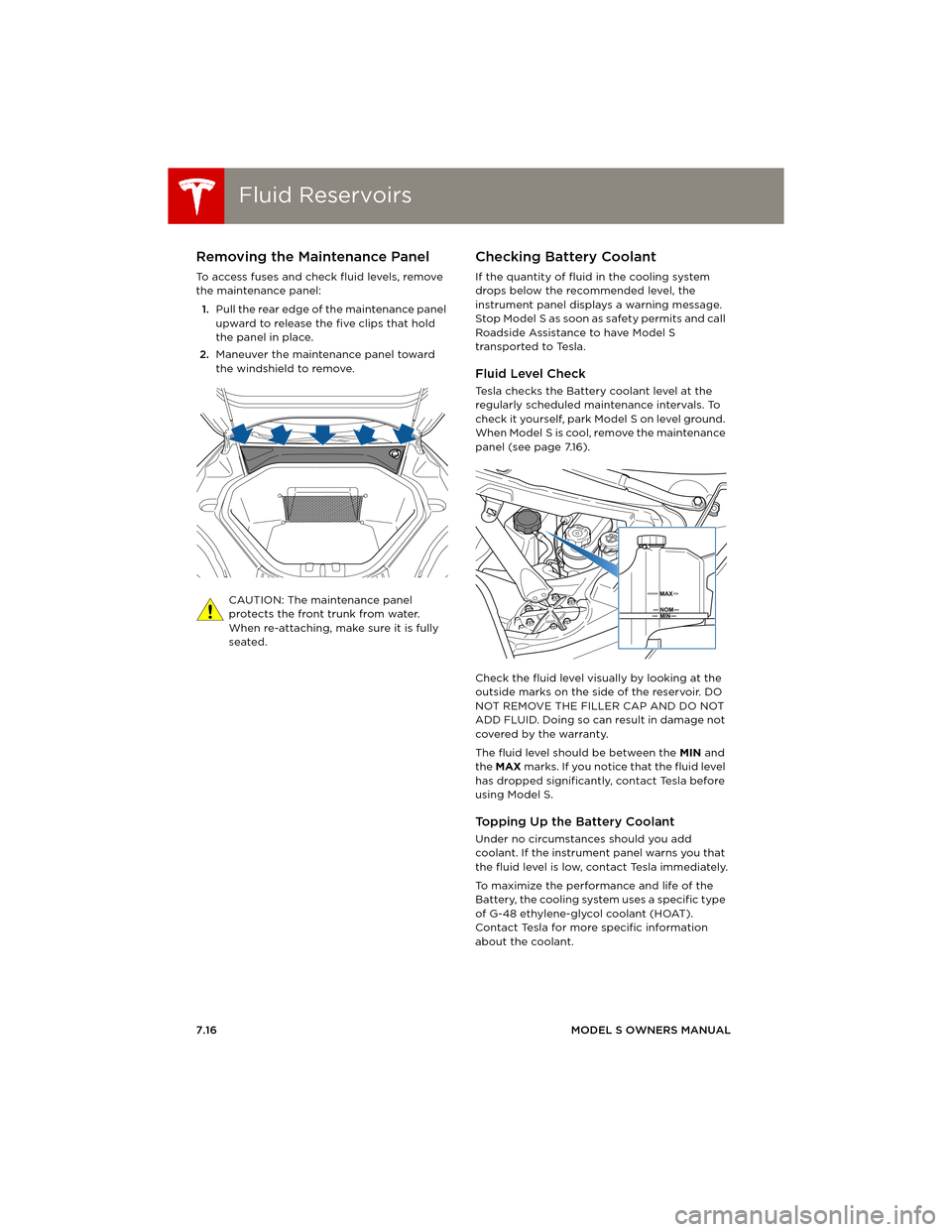
To access fuses and check fluid levels, remove
the maintenance panel:
1.Pull the rear edge of the maintenance panel
upward to release the five clips that hold
the panel in place.
2.Maneuver the maintenance panel toward
the windshield to remove.
CAUTION: The maintenance panel
protects the front trunk from water.
When re-attaching, make sure it is fully
seated.
Checking Battery Coolant
If the quantity of fluid in the cooling system
drops below the recommended level, the
instrument panel displays a warning message.
Stop Model S as soon as safety permits and call
Roadside Assistance to have Model S
transported to Tesla.
Fluid Level Check
Tesla checks the Battery coolant level at the
regularly scheduled maintenance intervals. To
check it yourself, park Model S on level ground.
When Model S is cool, remove the maintenance
panel (see page 7.16).
Check the fluid level visually by looking at the
outside marks on the side of the reservoir. DO
NOT REMOVE THE FILLER CAP AND DO NOT
ADD FLUID. Doing so can result in damage not
covered by the warranty.
The fluid level should be between the MIN and
the MAX marks. If you notice that the fluid level
has dropped significantly, contact Tesla before
using Model S.
To p p i n g U p t h e B a t t e r y C o o l a n t
Under no circumstances should you add
coolant. If the instrument panel warns you that
the fluid level is low, contact Tesla immediately.
To maximize the performance and life of the
Battery, the cooling system uses a specific type
of G-48 ethylene-glycol coolant (HOAT).
Contact Tesla for more specific information
about the coolant.
book.book Page 16 Friday, July 19, 2013 12:53 PM
Page 118 of 152
FusesFuses
7.20MODEL S OWNERS MANUAL
Fuse Box 1
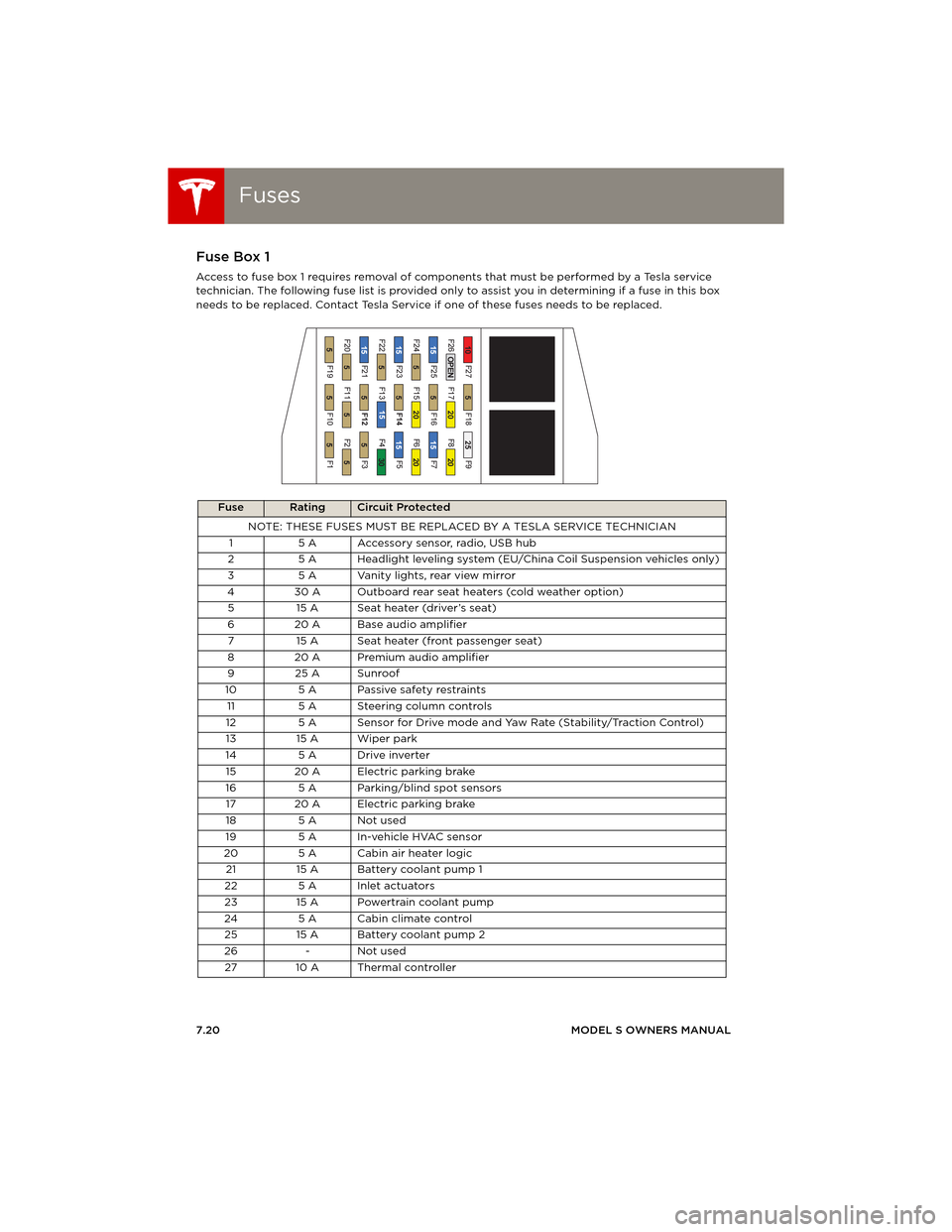
Access to fuse box 1 requires removal of components that must be performed by a Tesla service
technician. The following fuse list is provided only to assist you in determining if a fuse in this box
needs to be replaced. Contact Tesla Service if one of these fuses needs to be replaced.
Fuse RatingCircuit Protected
NOTE: THESE FUSES MUST BE REPLACED BY A TESLA SERVICE TECHNICIAN
1 5 A Accessory sensor, radio, USB hub
2 5 A Headlight leveling system (EU/China Coil Suspension vehicles only)
3 5 A Vanity lights, rear view mirror
4 30 A Outboard rear seat heaters (cold weather option)
5 15 A Seat heater (driver’s seat)
6 20 A Base audio amplifier
7 15 A Seat heater (front passenger seat)
820 APremium audio amplifier
9 25 A Sunroof
10 5 A Passive safety restraints
11 5 A Steering column controls
12 5 A Sensor for Drive mode and Yaw Rate (Stability/Traction Control)
13 15 A Wiper park
14 5 A Drive inverter
15 20 A Electric parking brake
16 5 A Parking/blind spot sensors
17 20 A Electric parking brake
18 5 A Not used
19 5 A In-vehicle HVAC sensor
20 5 A Cabin air heater logic
21 15 A Battery coolant pump 1
22 5 A Inlet actuators
23 15 A Powertrain coolant pump
24 5 A Cabin climate control
25 15 A Battery coolant pump 2
26 - Not used
27 10 A Thermal controller
book.book Page 20 Friday, July 19, 2013 12:53 PM