light TESLA MODEL S 2014 (Europe) Owner's Guide
[x] Cancel search | Manufacturer: TESLA, Model Year: 2014, Model line: MODEL S, Model: TESLA MODEL S 2014Pages: 152, PDF Size: 17.5 MB
Page 49 of 152
Instrument Panel
DRIVING4.9
Indicator Lights
Indicator lights flash on briefly when you press the brake pedal to prepare for driving. Unless an
indicator light applies to a current situation, they should turn off. If an indicator light fails to turn on
or off, contact Tesla.
In addition to indicator lights, alerts display on the top or bottom center of the instrument panel. If
alerts are in effect, an alert icon (exclamation mark) displays on the top of the touchscreen. Touch
this icon to display a description of the alert.
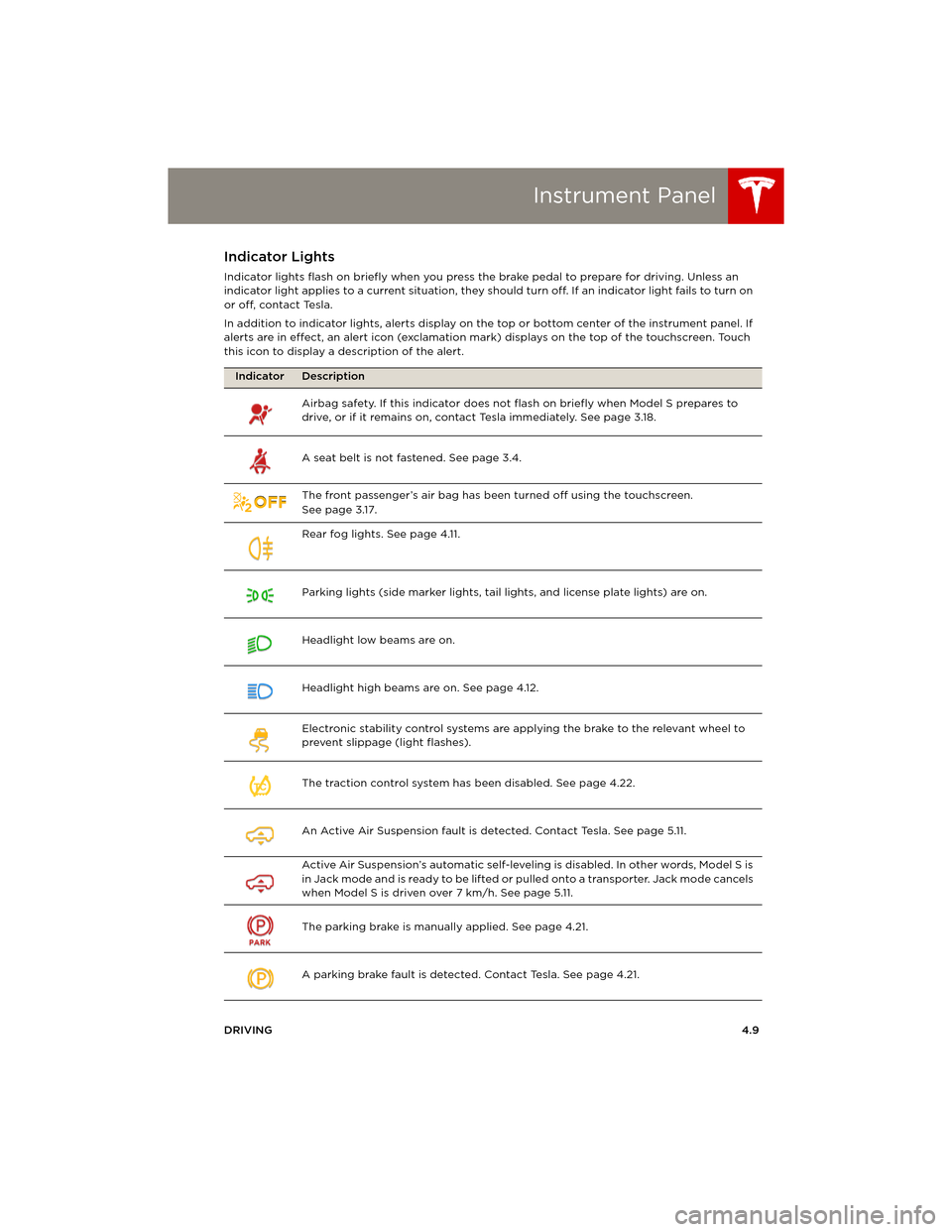
Indicator Description
Airbag safety. If this indicator does not flash on briefly when Model S prepares to
drive, or if it remains on, contact Tesla immediately. See page 3.18.
A seat belt is not fastened. See page 3.4.
The front passenger’s air bag has been turned off using the touchscreen.
Seepage3.17.
Rear fog lights. See page 4.11.
Parking lights (side marker lights, tail lights, and license plate lights) are on.
Headlight low beams are on.
Headlight high beams are on. See page 4.12.
Electronic stability control systems are applying the brake to the relevant wheel to
prevent slippage (light flashes).
The traction control system has been disabled. See page 4.22.
An Active Air Suspension fault is detected. Contact Tesla. See page 5.11.
Active Air Suspension’s automatic self-leveling is disabled. In other words, Model S is
i n J a c k m o d e a n d i s r e a d y t o b e l i f t e d o r pulled onto a transporter. Jack mode cancels
when Model S is driven over 7 km/h. See page 5.11.
The parking brake is manually applied. See page 4.21.
A parking brake fault is detected. Contact Tesla. See page 4.21.
TC
book.book Page 9 Friday, July 19, 2013 12:53 PM
Page 51 of 152
Lights
DRIVING4.11
Lights Controlling Lights
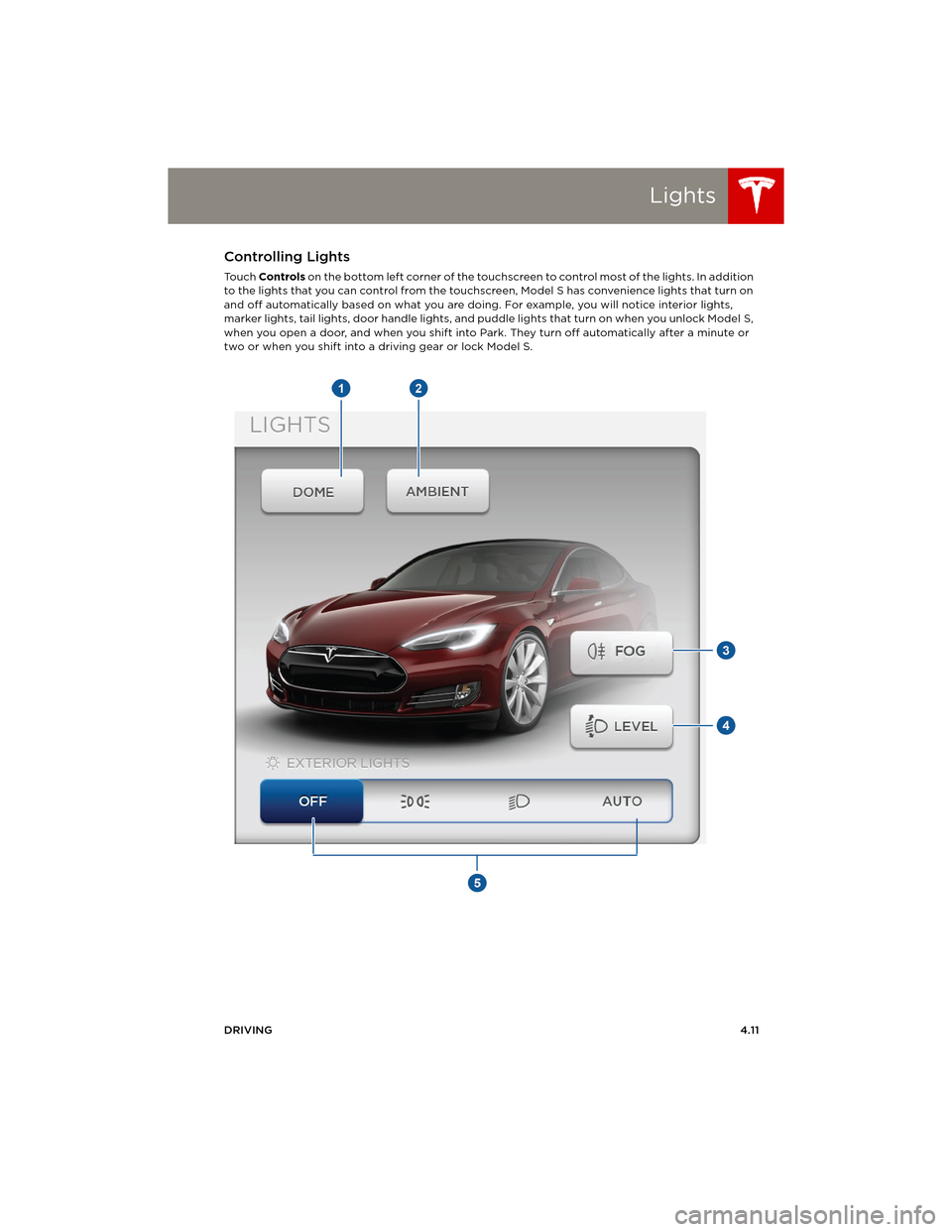
To u c h Controls on the bottom left corner of the touchscreen to control most of the lights. In addition
to the lights that you can control from the touchscreen, Model S has convenience lights that turn on
and off automatically based on what you are doing. For example, you will notice interior lights,
marker lights, tail lights, door handle lights, and puddle lights that turn on when you unlock Model S,
when you open a door, and when you shift into Park. They turn off automatically after a minute or
two or when you shift into a driving gear or lock Model S.
book.book Page 11 Friday, July 19, 2013 12:53 PM
Page 52 of 152
LightsLights
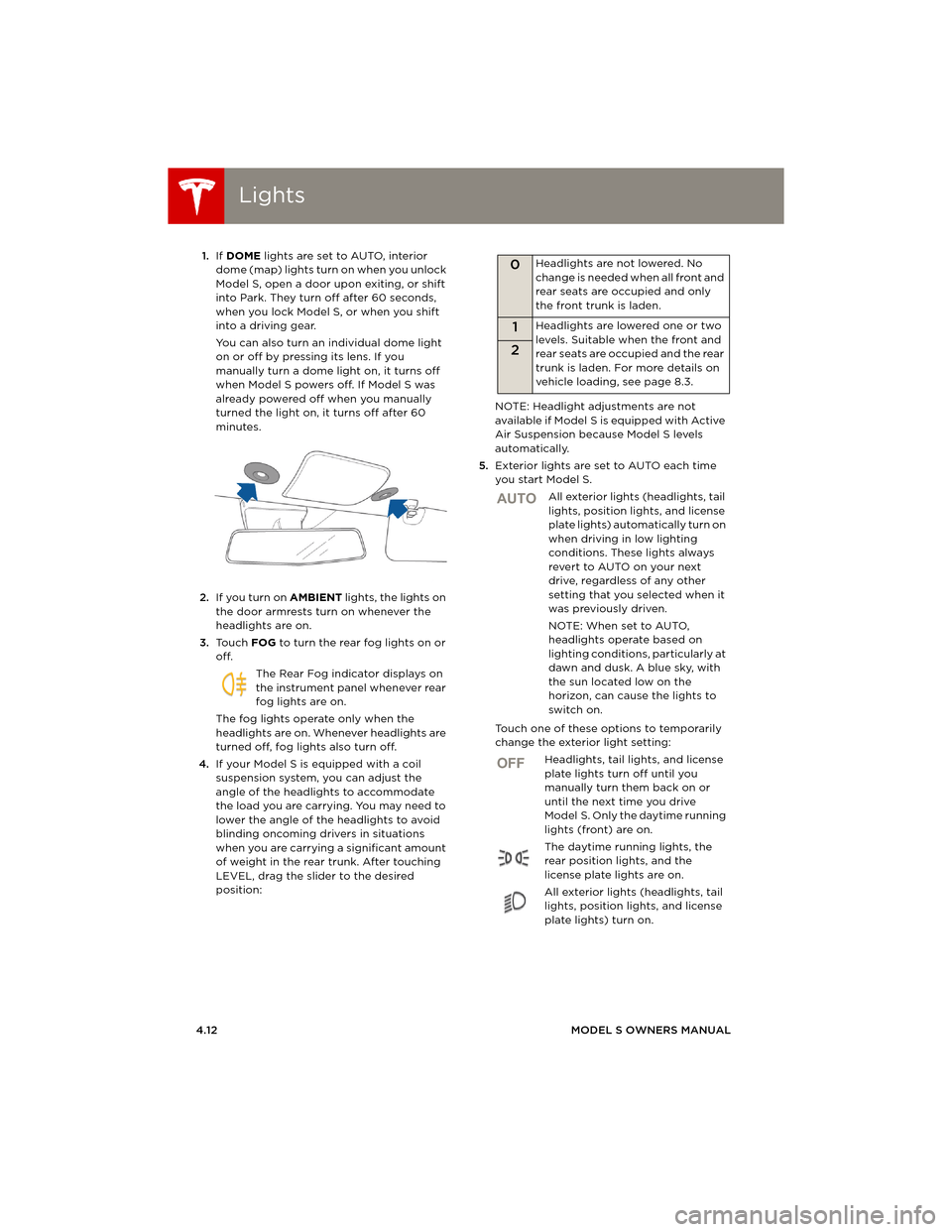
4.12MODEL S OWNERS MANUAL 1.If DOME lights are set to AUTO, interior
dome (map) lights turn on when you unlock
Model S, open a door upon exiting, or shift
into Park. They turn off after 60 seconds,
when you lock Model S, or when you shift
into a driving gear.
You can also turn an individual dome light
on or off by pressing its lens. If you
manually turn a dome light on, it turns off
when Model S powers off. If Model S was
already powered off when you manually
turned the light on, it turns off after 60
minutes.
2.If you turn on AMBIENT lights, the lights on
the door armrests turn on whenever the
headlights are on.
3.To u c h FOG to turn the rear fog lights on or
off.
The Rear Fog indicator displays on
the instrument panel whenever rear
fog lights are on.
The fog lights operate only when the
headlights are on. Whenever headlights are
turned off, fog lights also turn off.
4.If your Model S is equipped with a coil
suspension system, you can adjust the
angle of the headlights to accommodate
the load you are carrying. You may need to
lower the angle of the headlights to avoid
blinding oncoming drivers in situations
when you are carrying a significant amount
of weight in the rear trunk. After touching
LEVEL, drag the slider to the desired
position:NOTE: Headlight adjustments are not
available if Model S is equipped with Active
Air Suspension because Model S levels
automatically.
5.Exterior lights are set to AUTO each time
you start Model S.
All exterior lights (headlights, tail
lights, position lights, and license
plate lights) automatically turn on
when driving in low lighting
conditions. These lights always
revert to AUTO on your next
drive, regardless of any other
setting that you selected when it
was previously driven.
NOTE: When set to AUTO,
headlights operate based on
lighting conditions, particularly at
dawn and dusk. A blue sky, with
the sun located low on the
horizon, can cause the lights to
switch on.
Touch one of these options to temporarily
change the exterior light setting:
Headlights, tail lights, and license
plate lights turn off until you
manually turn them back on or
until the next time you drive
Model S. Only the daytime running
lights (front) are on.
The daytime running lights, the
rear position lights, and the
license plate lights are on.
All exterior lights (headlights, tail
lights, position lights, and license
plate lights) turn on.
0Headlights are not lowered. No
change is needed when all front and
rear seats are occupied and only
the front trunk is laden.
1Headlights are lowered one or two
levels. Suitable when the front and
rear seats are occupied and the rear
trunk is laden. For more details on
vehicle loading, see page 8.3.
2
AUTO
OFF
book.book Page 12 Friday, July 19, 2013 12:53 PM
Page 53 of 152
Lights
DRIVING4.13
Headlight High Beams
Push the left-hand steering column lever away
from you. To cancel, pull the lever toward you.
The high beam indicator displays on the
instrument panel whenever high beams
are on.
To flash the headlight high beams, pull the lever
fully toward you and release.
Headlights After Exit
When you stop driving and park Model S in low
lighting conditions, the exterior lights
automatically turn on. They automatically turn
off after two minutes or when you lock Model S.
You can turn this feature on and off using the
touchscreen. Touch Controls > Settings >
Vehicle > Headlights After Exit.
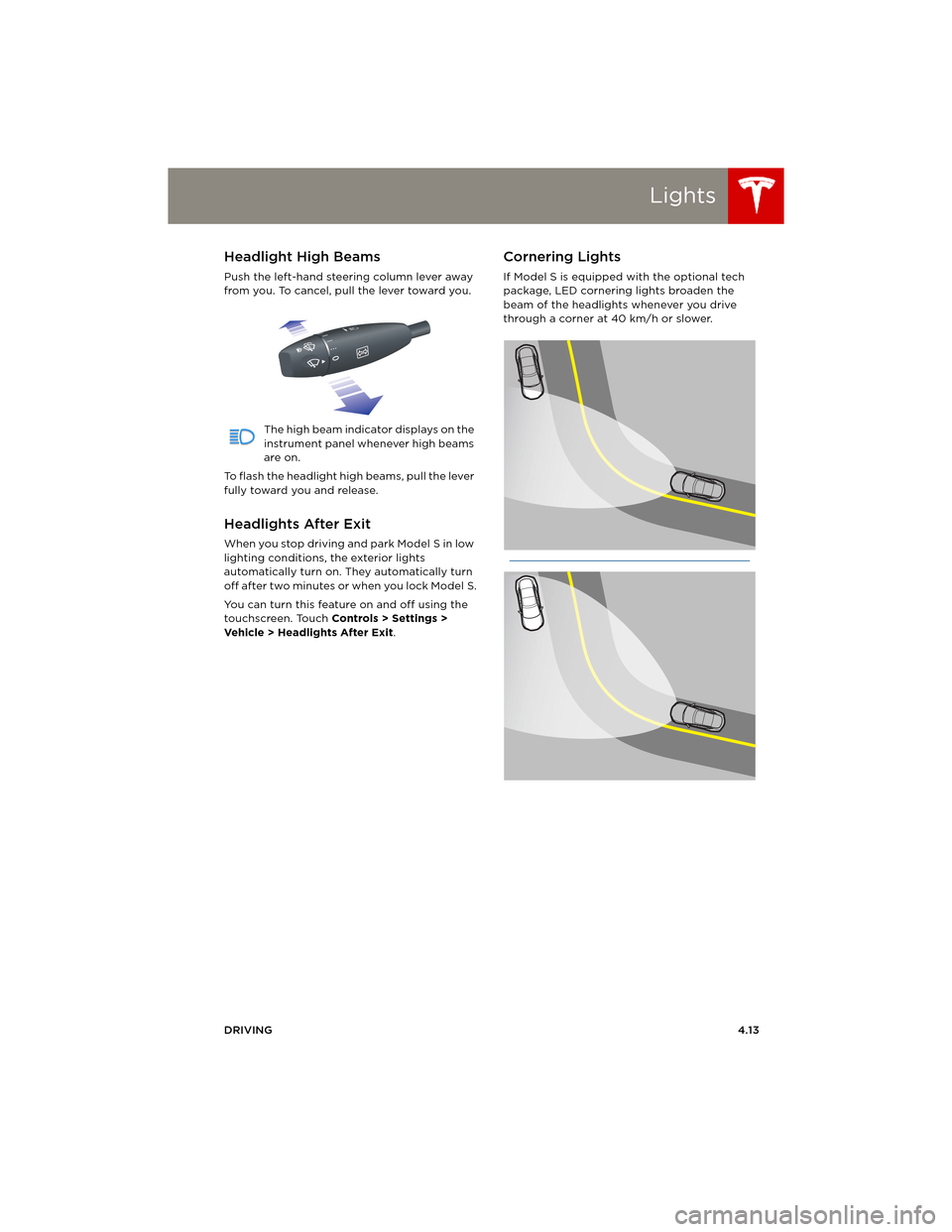
Cornering Lights
If Model S is equipped with the optional tech
package, LED cornering lights broaden the
beam of the headlights whenever you drive
through a corner at 40 km/h or slower.
book.book Page 13 Friday, July 19, 2013 12:53 PM
Page 54 of 152
LightsLights
4.14MODEL S OWNERS MANUAL
Turn Signals
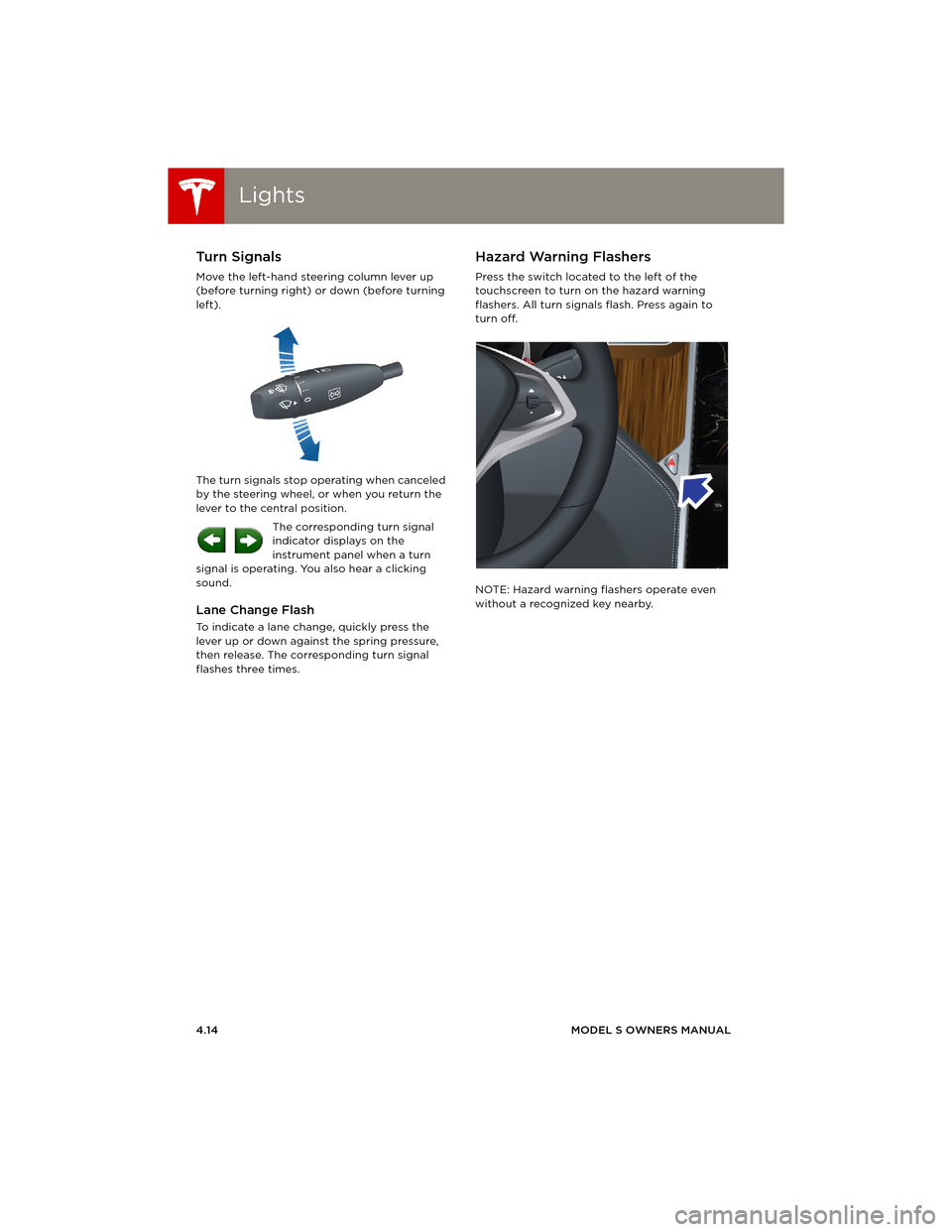
Move the left-hand steering column lever up
(before turning right) or down (before turning
left).
The turn signals stop operating when canceled
by the steering wheel, or when you return the
lever to the central position.
The corresponding turn signal
indicator displays on the
instrument panel when a turn
signal is operating. You also hear a clicking
sound.
Lane Change Flash
To indicate a lane change, quickly press the
lever up or down against the spring pressure,
then release. The corresponding turn signal
flashes three times.
Hazard Warning Flashers
Press the switch located to the left of the
touchscreen to turn on the hazard warning
flashers. All turn signals flash. Press again to
turn off.
NOTE: Hazard warning flashers operate even
without a recognized key nearby.
book.book Page 14 Friday, July 19, 2013 12:53 PM
Page 55 of 152
Wipers and Washers
DRIVING4.15
Wipers and WashersWipers
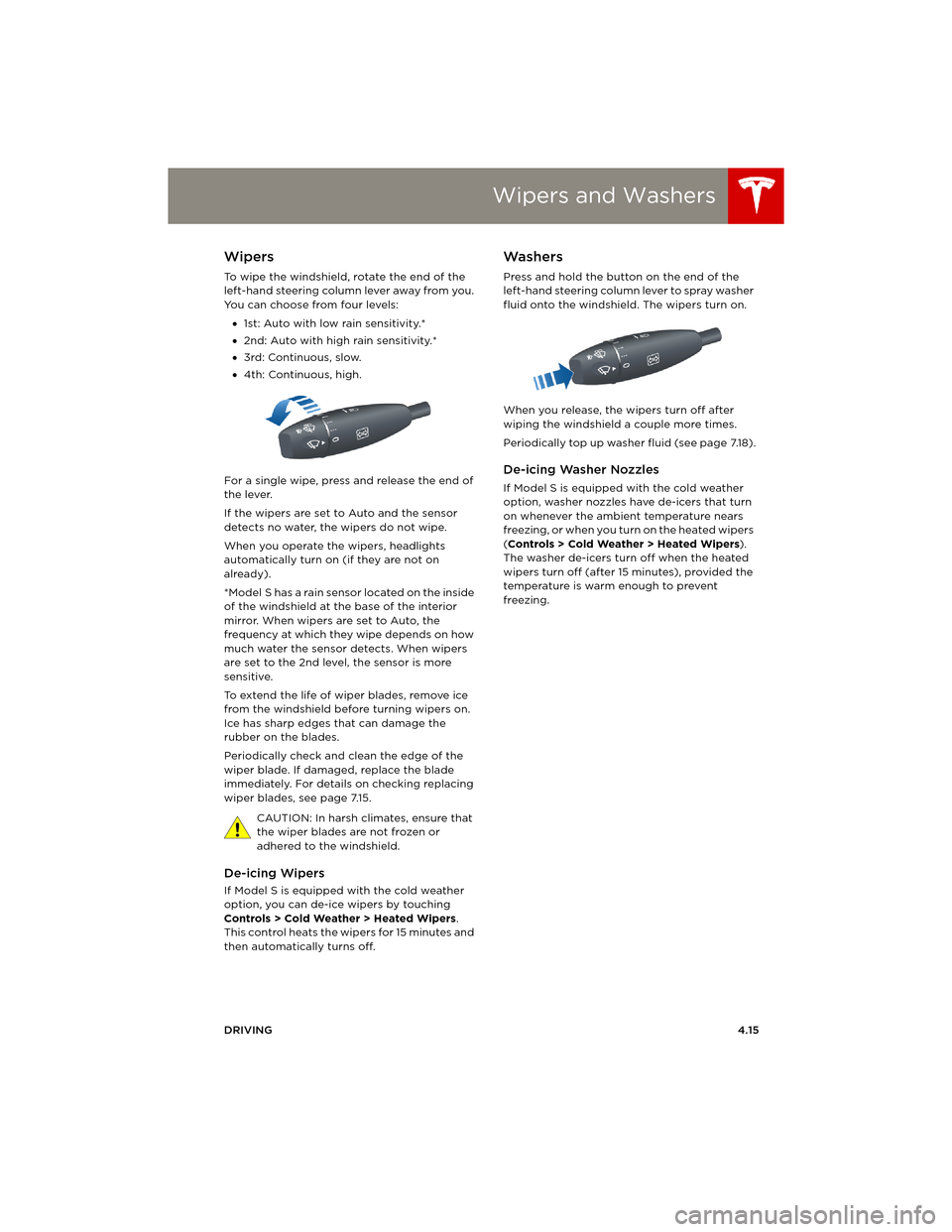
To wipe the windshield, rotate the end of the
left-hand steering column lever away from you.
You can choose from four levels:
•1st: Auto with low rain sensitivity.*
•2nd: Auto with high rain sensitivity.*
•3rd: Continuous, slow.
•4th: Continuous, high.
For a single wipe, press and release the end of
the lever.
If the wipers are set to Auto and the sensor
detects no water, the wipers do not wipe.
When you operate the wipers, headlights
automatically turn on (if they are not on
already).
*Model S has a rain sensor located on the inside
of the windshield at the base of the interior
mirror. When wipers are set to Auto, the
frequency at which they wipe depends on how
much water the sensor detects. When wipers
are set to the 2nd level, the sensor is more
sensitive.
To extend the life of wiper blades, remove ice
from the windshield before turning wipers on.
Ice has sharp edges that can damage the
rubber on the blades.
Periodically check and clean the edge of the
wiper blade. If damaged, replace the blade
immediately. For details on checking replacing
wiper blades, see page 7.15.
CAUTION: In harsh climates, ensure that
the wiper blades are not frozen or
adhered to the windshield.
De-icing Wipers
If Model S is equipped with the cold weather
option, you can de-ice wipers by touching
Controls > Cold Weather > Heated Wipers.
This control heats the wipers for 15 minutes and
then automatically turns off.
Washers
Press and hold the button on the end of the
left-hand steering column lever to spray washer
fluid onto the windshield. The wipers turn on.
When you release, the wipers turn off after
wiping the windshield a couple more times.
Periodically top up washer fluid (see page 7.18).
De-icing Washer Nozzles
If Model S is equipped with the cold weather
option, washer nozzles have de-icers that turn
on whenever the ambient temperature nears
freezing, or when you turn on the heated wipers
(Controls > Cold Weather > Heated Wipers).
The washer de-icers turn off when the heated
wipers turn off (after 15 minutes), provided the
temperature is warm enough to prevent
freezing.
book.book Page 15 Friday, July 19, 2013 12:53 PM
Page 59 of 152
Energy Usage
DRIVING4.19
Energy UsageDisplaying Energy Usage
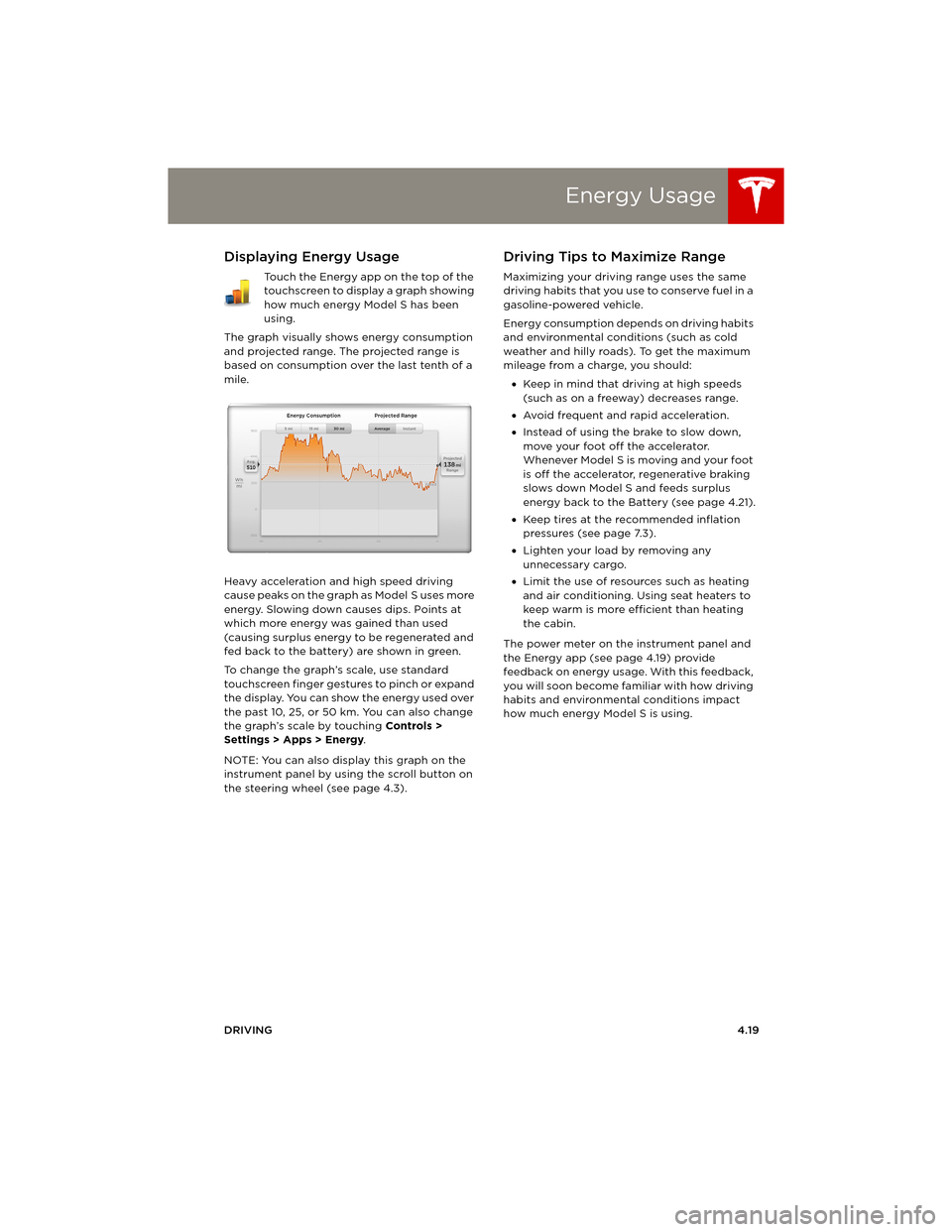
Touch the Energy app on the top of the
touchscreen to display a graph showing
how much energy Model S has been
using.
The graph visually shows energy consumption
and projected range. The projected range is
based on consumption over the last tenth of a
mile.
Heavy acceleration and high speed driving
cause peaks on the graph as Model S uses more
energy. Slowing down causes dips. Points at
which more energy was gained than used
(causing surplus energy to be regenerated and
fed back to the battery) are shown in green.
To change the graph’s scale, use standard
touchscreen finger gestures to pinch or expand
the display. You can show the energy used over
the past 10, 25, or 50 km. You can also change
the graph’s scale by touching Controls >
Settings > Apps > Energy.
NOTE: You can also display this graph on the
instrument panel by using the scroll button on
the steering wheel (see page 4.3).
Driving Tips to Maximize Range
Maximizing your driving range uses the same
driving habits that you use to conserve fuel in a
gasoline-powered vehicle.
Energy consumption depends on driving habits
and environmental conditions (such as cold
weather and hilly roads). To get the maximum
mileage from a charge, you should:
•Keep in mind that driving at high speeds
(such as on a freeway) decreases range.
•Avoid frequent and rapid acceleration.
•Instead of using the brake to slow down,
move your foot off the accelerator.
Whenever M odel S is moving and your foot
is off the accelerator, regenerative braking
slows down Model S and feeds surplus
energy back to the Battery (see page 4.21).
•Keep tires at the recommended inflation
pressures (see page 7.3).
•Lighten your load by removing any
unnecessary cargo.
•Limit the use of resources such as heating
and air conditioning. Using seat heaters to
keep warm is more efficient than heating
the cabin.
The power meter on the instrument panel and
the Energy app (see page 4.19) provide
feedback on energy usage. With this feedback,
you will soon become familiar with how driving
habits and environmental conditions impact
how much energy Model S is using.
book.book Page 19 Friday, July 19, 2013 12:53 PM
Page 61 of 152
Brakes
DRIVING4.21
Regenerative Braking
Whenever Model S is moving and your foot is
off the accelerator, regenerative braking slows
down Model S and feeds any surplus energy
back to the Battery.
By anticipating your stops and simply removing
your foot from the accelerator to slow down,
you can take advantage of regenerative
braking to increase driving range. Of course,
this is no substitute for regular braking when
needed for safety.
NOTE: If regenerative braking is aggressively
slowing Model S, such as on a steep descent,
brake lights turn on to alert other road users
that you are slowing down.
The power meter on the instrument panel
displays real-time feedback on the amount of
energy being gained by regenerative braking.
The amount of energy fed back to the Battery
using regenerative braking can depend on the
current state of the Battery and the charge
level setting that you are using. If regenerative
braking is limited, a dashed yellow line displays
on the power meter. For example, regenerative
braking may be limited if the Battery is
extremely hot or cold because the surplus
energy is used to cool or heat the Battery.
Regenerative braking is also limited if the
Battery is already fully charged.
To Set the Regenerative Braking Level
You can use the touchscreen to change the
level of regenerative braking:
1.Touch Controls.
2.Choose from two levels:
•Standard - provides the maximum
amount of regenerative braking. When
you release the accelerator, Model S slows
down faster, reducing the need to use the
brakes.
•Low - limits the amount of regenerative
braking. When you release the
accelerator, Model S takes longer to slow
down and coasts further.
NOTE: Regenerative braking resets to Standard
each time you start Model S.
Parking Brake
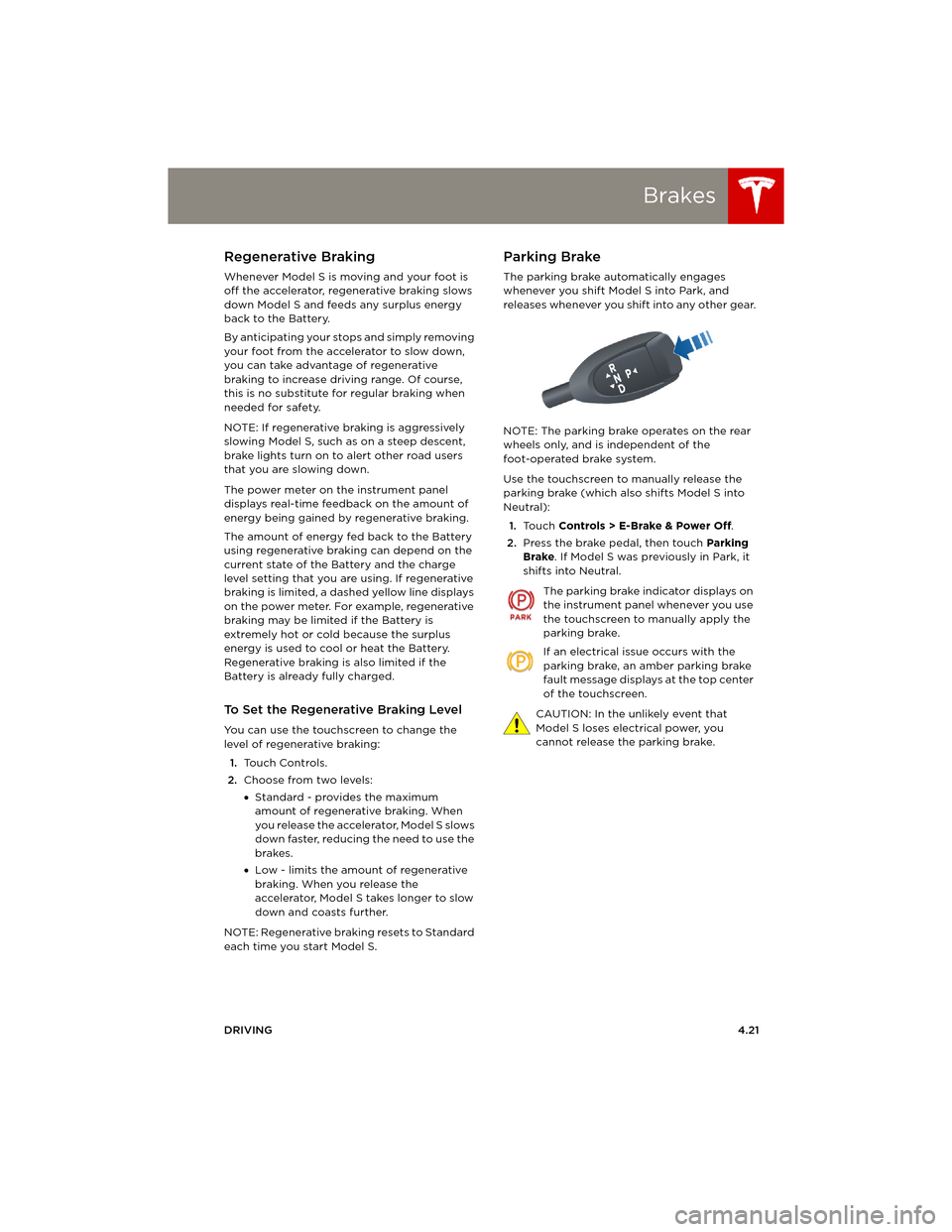
The parking brake automatically engages
whenever you shift Model S into Park, and
releases whenever you shift into any other gear.
NOTE: The parking brake operates on the rear
wheels only, and is independent of the
foot-operated brake system.
Use the touchscreen to manually release the
parking brake (which also shifts Model S into
Neutral):
1.Touch Controls > E-Brake & Power Off.
2.Press the brake pedal, then touch Parking
Brake. If Model S was previously in Park, it
shifts into Neutral.
The parking brake indicator displays on
the instrument panel whenever you use
the touchscreen to manually apply the
parking brake.
If an electrical issue occurs with the
parking brake, an amber parking brake
fault message displays at the top center
of the touchscreen.
CAUTION: In the unlikely event that
Model S loses electrical power, you
cannot release the parking brake.
book.book Page 21 Friday, July 19, 2013 12:53 PM
Page 63 of 152
Cruise Control
DRIVING4.23
Cruise ControlOperating Cruise Control
Cruise control makes it easy for you to maintain
a consistent speed without holding your foot
on the accelerator. This is useful when driving at
the same speed over a long distance.
You must be driving over 32 km/h to operate
cruise control.
WARNING: Do not use cruise control on
winding or slippery road surfaces, or
when traffic conditions make it unsafe to drive
at a consistent speed.
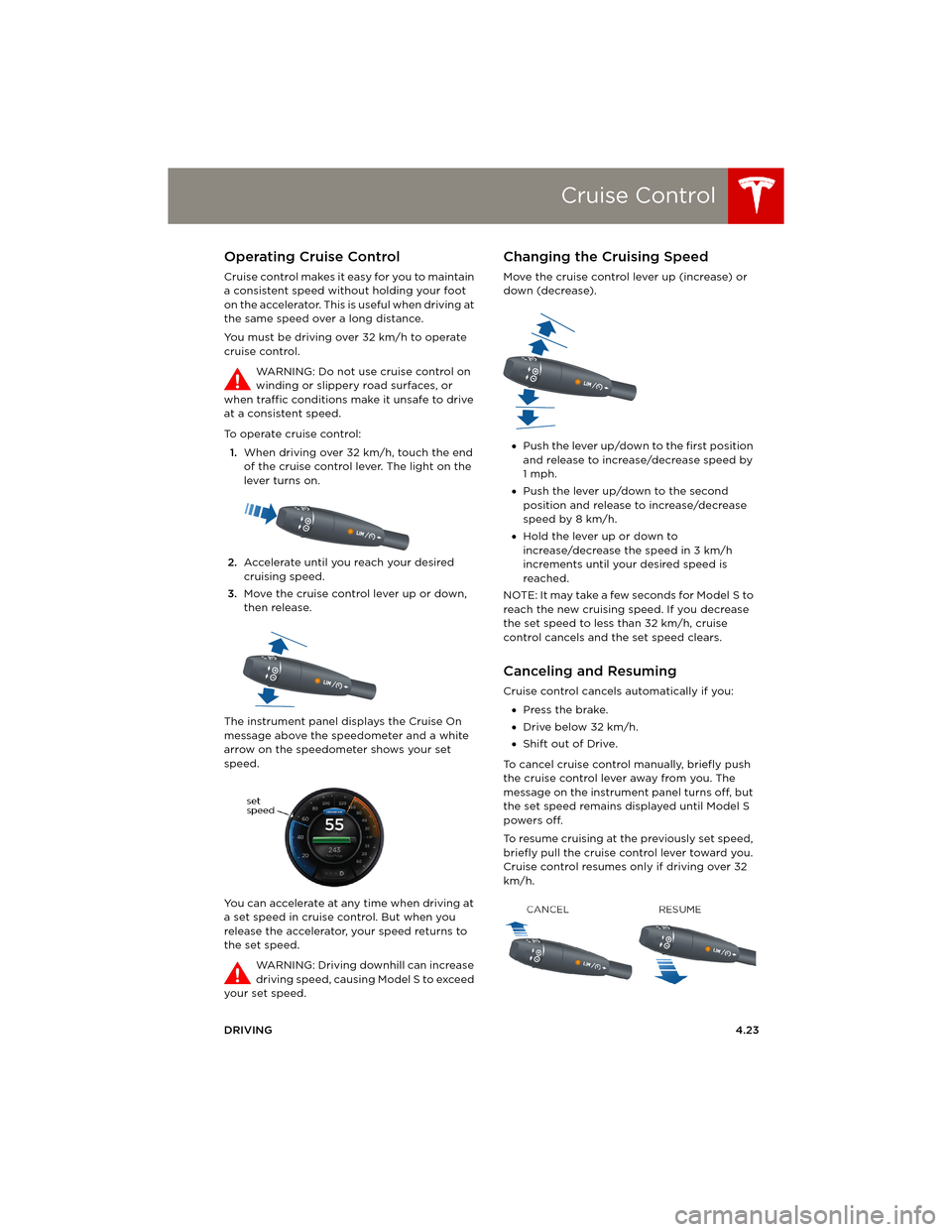
To operate cruise control:
1.When driving over 32 km/h, touch the end
of the cruise control lever. The light on the
lever turns on.
2.Accelerate until you reach your desired
cruising speed.
3.Move the cruise control lever up or down,
then release.
The instrument panel displays the Cruise On
message above the speedometer and a white
arrow on the speedometer shows your set
speed.
You can accelerate at any time when driving at
a set speed in cruise control. But when you
release the accelerator, your speed returns to
the set speed.
WARNING: Driving downhill can increase
driving speed, causing Model S to exceed
your set speed.
Changing the Cruising Speed
Move the cruise control lever up (increase) or
down (decrease).
•Push the lever up/down to the first position
and release to increase/decrease speed by
1mph.
•Push the lever up/down to the second
position and release to increase/decrease
speed by 8 km/h.
•Hold the lever up or down to
increase/decrease the speed in 3 km/h
increments until your desired speed is
reached.
NOTE: It may take a few seconds for Model S to
reach the new cruising speed. If you decrease
the set speed to less than 32 km/h, cruise
control cancels and the set speed clears.
Canceling and Resuming
Cruise control cancels automatically if you:
•Press the brake.
•Drive below 32 km/h.
•Shift out of Drive.
To cancel cruise control manually, briefly push
the cruise control lever away from you. The
message on the instrument panel turns off, but
the set speed remains displayed until Model S
powers off.
To resume cruising at the previously set speed,
briefly pull the cruise control lever toward you.
Cruise control resumes only if driving over 32
km/h.
book.book Page 23 Friday, July 19, 2013 12:53 PM
Page 66 of 152
Touchscreen OverviewTouchscreen Overview
5.2MODEL S OWNERS MANUAL
USING THE TOUCHSCREEN
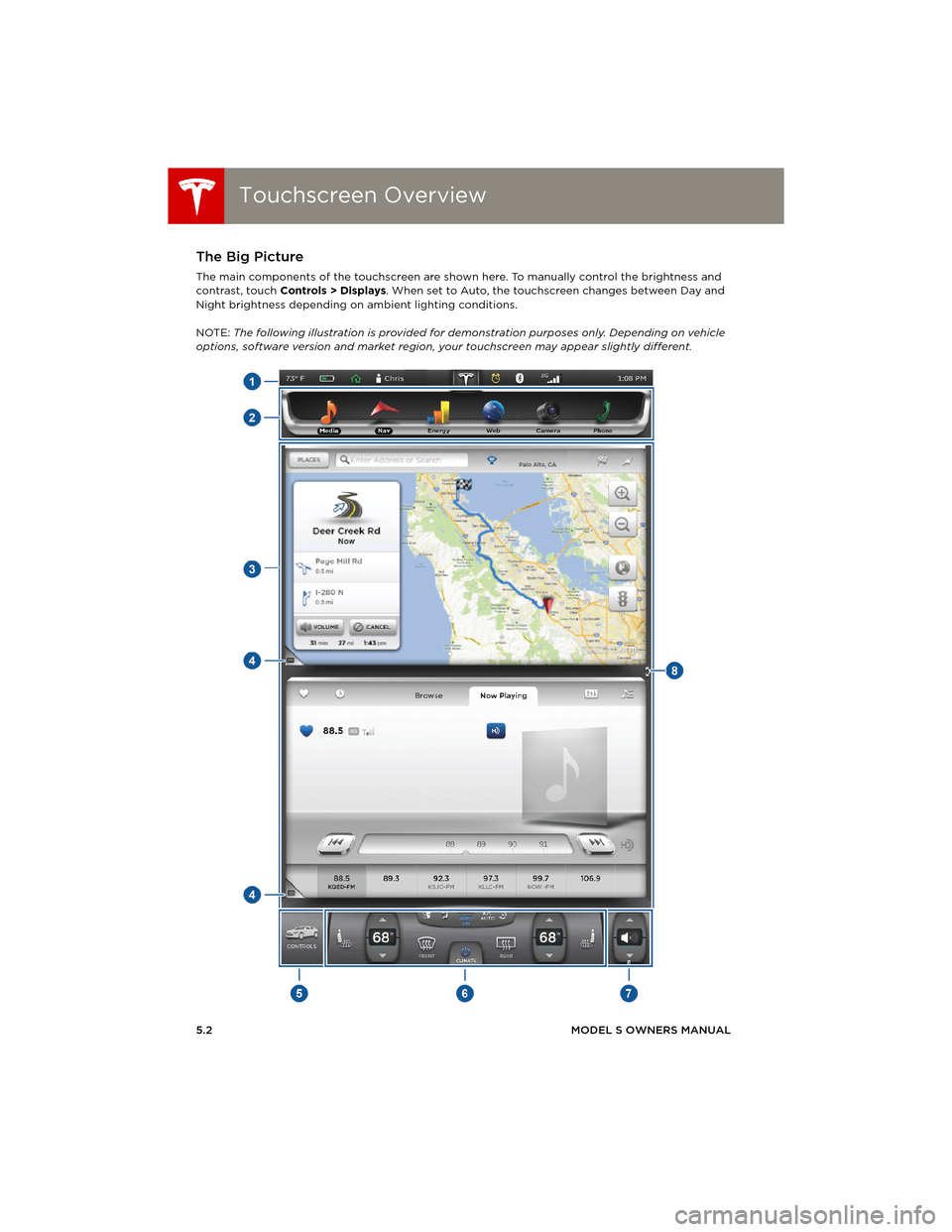
Touchscreen OverviewThe Big Picture
The main components of the touchscreen are shown here. To manually control the brightness and
contrast, touch Controls > Displays. When set to Auto, the touchscreen changes between Day and
Night brightness depending on ambient lighting conditions.
NOTE: The following illustration is provided for demonstration purposes only. Depending on vehicle
options, software version and market region, your touchscreen may appear slightly different.
book.book Page 2 Friday, July 19, 2013 12:53 PM