light TESLA MODEL S 2014 (Europe) Service Manual
[x] Cancel search | Manufacturer: TESLA, Model Year: 2014, Model line: MODEL S, Model: TESLA MODEL S 2014Pages: 152, PDF Size: 17.5 MB
Page 91 of 152
6.1
CHARGING
Electric Vehicle Components
High Voltage Components ........................... 6.2
Mobile Charging Equipment ....................... 6.3
High Power Wall Connector........................ 6.3
Battery Information
About the Battery ........................................... 6.4
Battery Care ...................................................... 6.4
Charging Model SOpening the Charge Port ............................. 6.5
Plugging In ......................................................... 6.5
During Charging............................................... 6.5
Stopping Charging.......................................... 6.5
Charge Port Light ............................................ 6.6
Changing Charge Settings ............................ 6.7
Charging Status ............................................... 6.8
book.book Page 1 Friday, July 19, 2013 12:53 PM
Page 95 of 152
Charging Model S
CHARGING6.5
Charging Model SOpening the Charge Port
The charge port is located on the driver’s side
o f M o d e l S , b e h i n d a d o o r t h a t i s p a r t o f t h e r e a r
tail light assembly.
Park Model S so that the charge cable easily
reaches the charge port.
With Model S unlocked, or a recognized key
nearby, press and hold the button on a Tesla
charging cable.
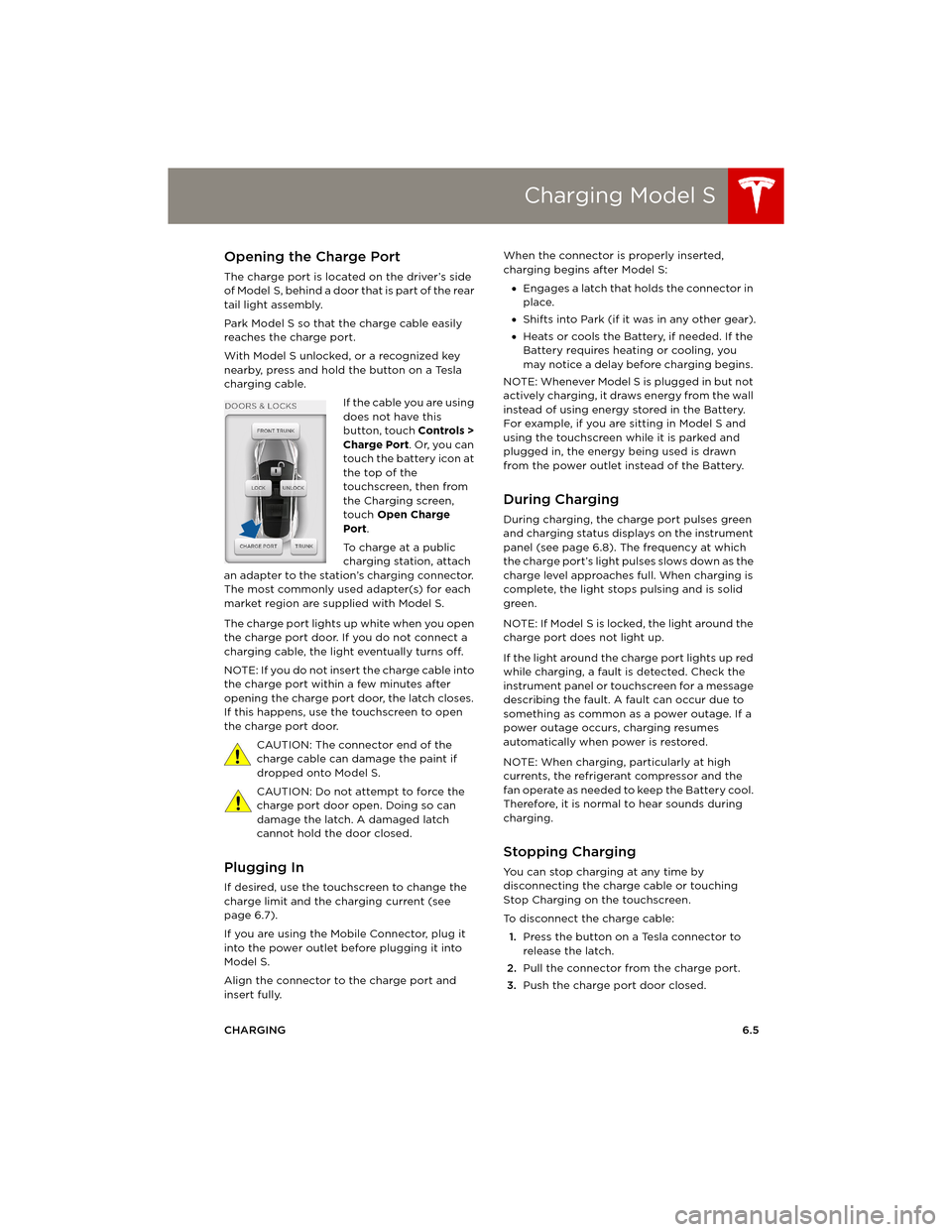
If the cable you are using
does not have this
button, touch Controls >
Charge Port. Or, you can
touch the battery icon at
the top of the
touchscreen, then from
the Charging screen,
touch Open Charge
Port.
To charge at a public
charging station, attach
an adapter to the station’s charging connector.
The most commonly used adapter(s) for each
market region are supplied with Model S.
The charge port lights up white when you open
the charge port door. If you do not connect a
charging cable, the light eventually turns off.
NOTE: If you do not insert the charge cable into
the charge port within a few minutes after
opening the charge port door, the latch closes.
If this happens, use the touchscreen to open
the charge port door.
CAUTION: The connector end of the
charge cable can damage the paint if
dropped onto Model S.
CAUTION: Do not attempt to force the
charge port door open. Doing so can
damage the latch. A damaged latch
cannot hold the door closed.
Plugging In
If desired, use the touchscreen to change the
charge limit and the charging current (see
page 6.7).
If you are using the Mobile Connector, plug it
into the power outlet before plugging it into
Model S.
Align the connector to the charge port and
insert fully. When the connector is properly inserted,
charging begins after Model S:
•Engages a latch that holds the connector in
place.
•Shifts into Park (if it was in any other gear).
•Heats or cools the Battery, if needed. If the
Battery requires heating or cooling, you
may notice a delay before charging begins.
NOTE: Whenever Model S is plugged in but not
actively charging, it draws energy from the wall
instead of using energy stored in the Battery.
For example, if you are sitting in Model S and
using the touchscreen while it is parked and
plugged in, the energy being used is drawn
from the power outlet instead of the Battery.
During Charging
During charging, the charge port pulses green
and charging status displays on the instrument
panel (see page 6.8). The frequency at which
the charge port’s light pulses slows down as the
charge level approaches full. When charging is
complete, the light stops pulsing and is solid
green.
NOTE: If Model S is locked, the light around the
charge port does not light up.
If the light around the charge port lights up red
while charging, a fault is detected. Check the
instrument panel or touchscreen for a message
describing the fault. A fault can occur due to
something as common as a power outage. If a
power outage occurs, charging resumes
automatically when power is restored.
NOTE: When charging, particularly at high
currents, the refrigerant compressor and the
fan operate as needed to keep the Battery cool.
Therefore, it is normal to hear sounds during
charging.
Stopping Charging
You can stop charging at any time by
disconnecting the charge cable or touching
Stop Charging on the touchscreen.
To disconnect the charge cable:
1.Press the button on a Tesla connector to
release the latch.
2.Pull the connector from the charge port.
3.Push the charge port door closed.
book.book Page 5 Friday, July 19, 2013 12:53 PM
Page 96 of 152
Charging Model SCharging Model S
6.6MODEL S OWNERS MANUAL To prevent unauthorized unplugging of the
charging cable, Model S must be unlocked or
able to recognize a key before you can
disconnect the charging cable.
NOTE: Model S stops charging whenever you
double-click the key. If you do not unplug
within 60 seconds, charging resumes.
CAUTION: Tesla strongly recommends
leaving Model S plugged in when not in
use. This maintains the Battery at the
optimum level of charge.
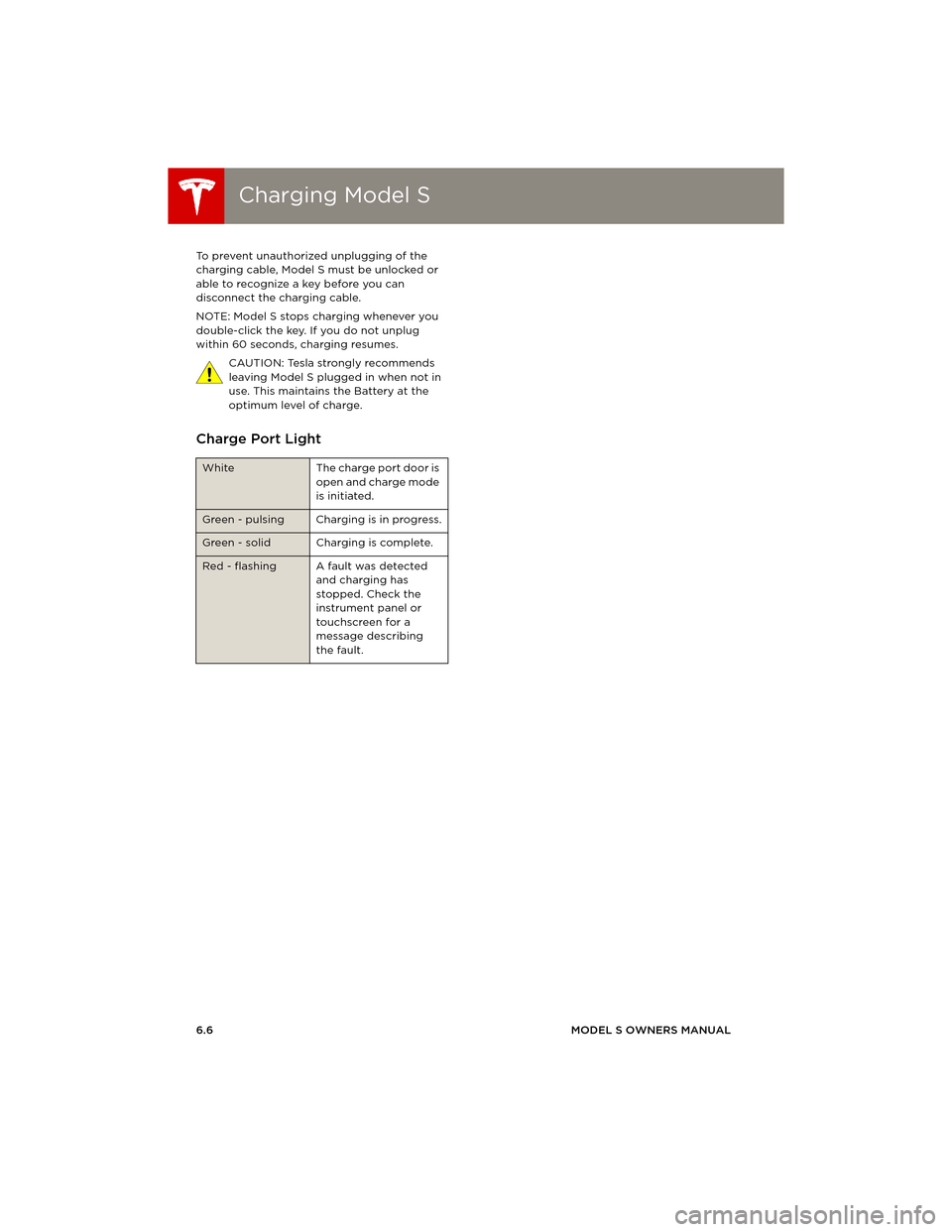
Charge Port Light
White The charge port door is
open and charge mode
is initiated.
Green - pulsing Charging is in progress.
Green - solid Charging is complete.
Red - flashing A fault was detected
and charging has
stopped. Check the
instrument panel or
touchscreen for a
message describing
the fault.
book.book Page 6 Friday, July 19, 2013 12:53 PM
Page 97 of 152
Charging Model S
CHARGING6.7
Changing Charge Settings
The charge settings screen displays on the
touchscreen whenever the charge port door is
open.
To display charge settings at any time,
touch the Battery icon on the top of the
touchscreen, or touch Controls > Charging
(located in the upper right portion of the
Controls screen).
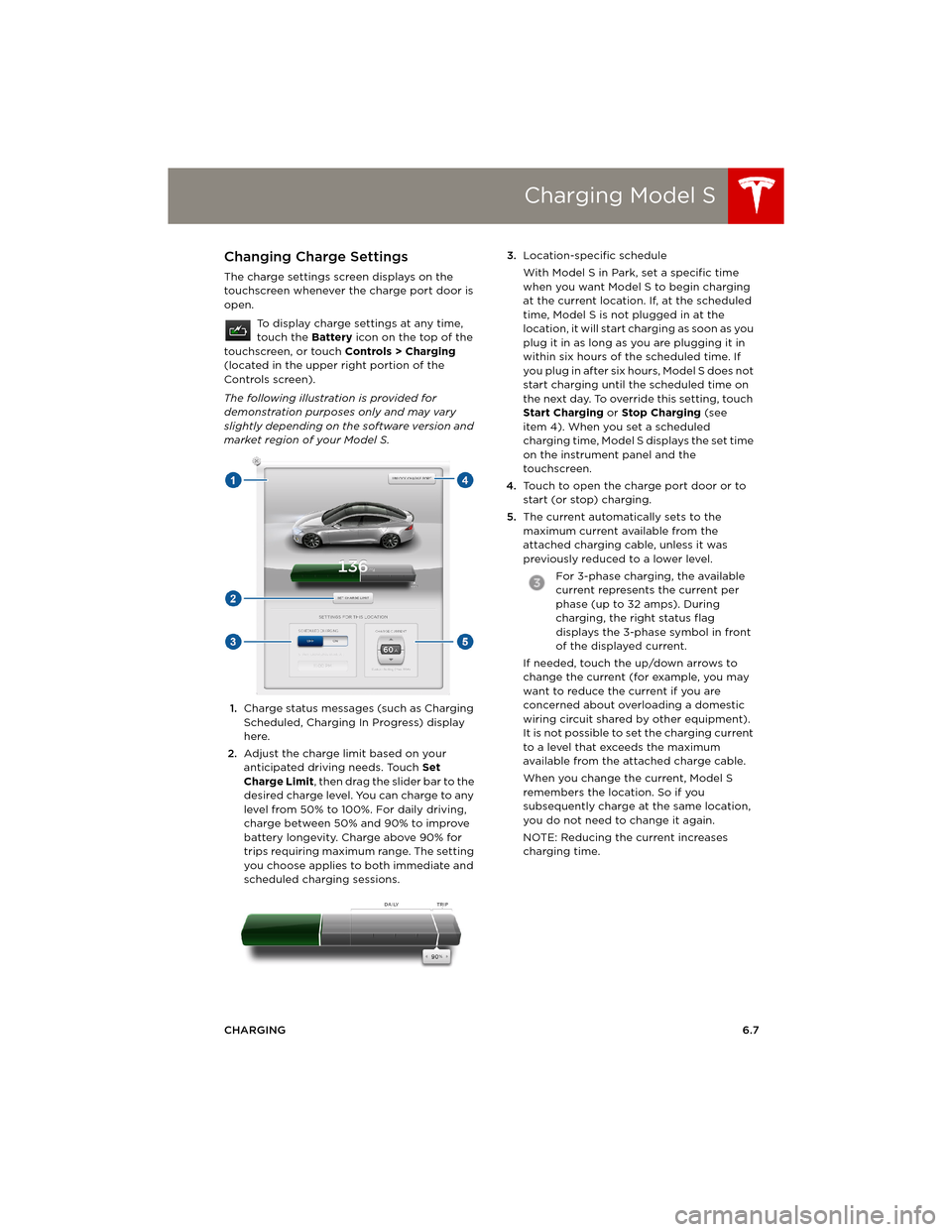
The following illustration is provided for
demonstration purposes only and may vary
slightly depending on the software version and
market region of your Model S.
1.Charge status messages (such as Charging
Scheduled, Charging In Progress) display
here.
2.Adjust the charge limit based on your
anticipated driving needs. Touch Set
Charge Limit, then drag the slider bar to the
desired charge level. You can charge to any
level from 50% to 100%. For daily driving,
charge between 50% and 90% to improve
battery longevity. Charge above 90% for
trips requiring maximum range. The setting
you choose applies to both immediate and
scheduled charging sessions.3.Location-specific schedule
With Model S in Park, set a specific time
when you want Model S to begin charging
at the current location. If, at the scheduled
time, Model S is not plugged in at the
location, it will start charging as soon as you
plug it in as long as you are plugging it in
within six hours of the scheduled time. If
you plug in after six hours, Model S does not
start charging until the scheduled time on
the next day. To override this setting, touch
Start Charging or Stop Charging (see
item 4). When you set a scheduled
charging time, Model S displays the set time
on the instrument panel and the
touchscreen.
4.Touch to open the charge port door or to
start (or stop) charging.
5.The current automatically sets to the
maximum current available from the
attached charging cable, unless it was
previously reduced to a lower level.
For 3-phase charging, the available
current represents the current per
phase (up to 32 amps). During
charging, the right status flag
displays the 3-phase symbol in front
of the displayed current.
If needed, touch the up/down arrows to
change the current (for example, you may
want to reduce the current if you are
concerned about overloading a domestic
wiring circuit shared by other equipment).
It is not possible to set the charging current
to a level that exceeds the maximum
available from the attached charge cable.
When you change the current, Model S
remembers the location. So if you
subsequently charge at the same location,
you do not need to change it again.
NOTE: Reducing the current increases
charging time.
book.book Page 7 Friday, July 19, 2013 12:53 PM
Page 98 of 152
Charging Model SCharging Model S
6.8MODEL S OWNERS MANUAL
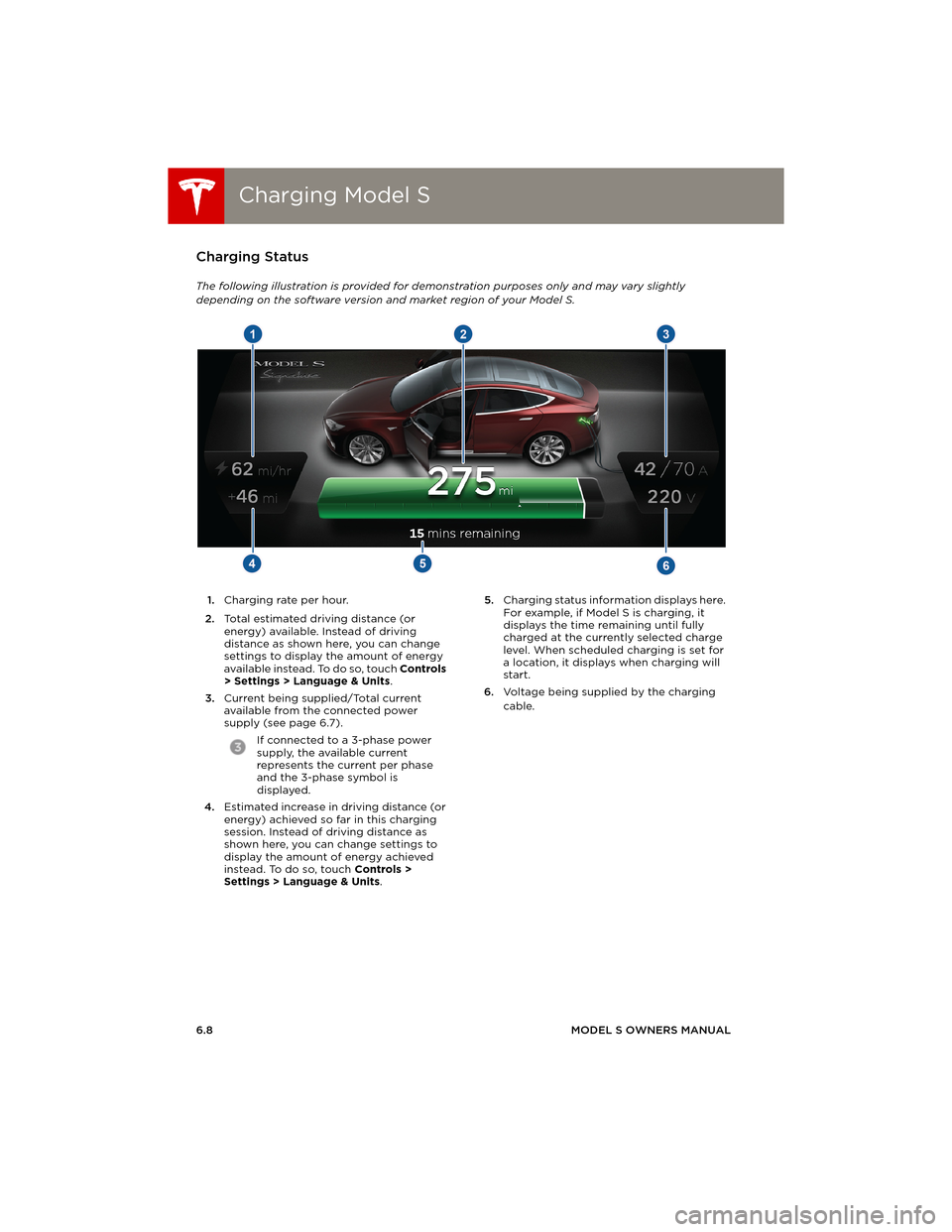
Charging Status
The following illustration is provided for demonstration purposes only and may vary slightly
depending on the software version and market region of your Model S.
1.Charging rate per hour.
2.Total estimated driving distance (or
energy) available. Instead of driving
distance as shown here, you can change
settings to display the amount of energy
available instead. To do so, touch Controls
> Settings > Language & Units.
3.Current being supplied/Total current
available from the connected power
supply (see page 6.7).
If connected to a 3-phase power
supply, the available current
represents the current per phase
and the 3-phase symbol is
displayed.
4.Estimated increase in driving distance (or
energy) achieved so far in this charging
session. Instead of driving distance as
shown here, you can change settings to
display the amount of energy achieved
instead. To do so, touch Controls >
Settings > Language & Units. 5.Charging status information displays here.
For example, if Model S is charging, it
displays the time remaining until fully
charged at the currently selected charge
level. When scheduled charging is set for
a location, it displays when charging will
start.
6.Voltage being supplied by the charging
cable.
book.book Page 8 Friday, July 19, 2013 12:53 PM
Page 100 of 152
Maintenance ScheduleMaintenance Schedule
7.2MODEL S OWNERS MANUAL
MAINTENANCE
Maintenance ScheduleService Intervals
Regular maintenance is the key to ensuring the
continued reliability and efficiency of your
Model S.
Take Model S to Tesla at the regularly scheduled
maintenance intervals of every 12 months, or
every 20,000 kms, whichever comes first.
Model S must be serviced by Tesla-certified
technicians. Damages or failures caused by
maintenance or repairs performed by non-Tesla
certified technicians are not covered by the
warranty.
Fluid Replacement
Do not change or top up Battery coolant and
brake fluid yourself. Tesla service technicians
replace fluids at the regularly scheduled service
intervals:
•Brake fluid - every 2 years or 40,000 kms,
whichever comes first.
•Battery coolant - every 4 years or
80,000 kms, whichever comes first.
NOTE: Any damage from opening the Battery
coolant reservoir is excluded from the warranty.
Daily and Monthly Checks
In addition to the regularly scheduled
maintenance performed by Tesla, you should
carry out a few simple checks more frequently.
Daily Checks
•Check the Battery’s charge level, displayed
on the instrument panel.
•Check that all exterior lights, horn, turn
signals, and wipers and washers are
working.
•Check the operation of the brakes,
including the parking brake.
•Check the operation of the seat belts
(see page 3.5).
•Look for fluid deposits underneath Model S
that might indicate a leak. It is normal for a
small pool of water to form (caused by the
air conditioning system’s dehumidifying
process).
Monthly Checks
•Check the condition and pressure of each
tire (see page 7.3).
•Check washer fluid level and top up if
necessary (see page 7.18).
•Check that the air conditioning system is
operating (see page 5.9).
CAUTION: Contact Tesla immediately if
you notice any significant or sudden drop
in fluid levels or uneven tire wear.
High Voltage Safety
Your Model S has been designed and built with
safety as a priority. However, be aware of these
precautions to protect yourself from the risk of
injury inherent in all high-voltage systems:
•Read and follow all instructions provided on
the labels that are attached to Model S.
These labels are there for your safety.
•The high voltage system has no
user-serviceable parts. Do not disassemble,
remove or replace high voltage
components, cables or connectors. High
voltage cables are colored orange for easy
identification.
•If an accident occurs, do not touch any high
voltage wiring, connectors, or components
connected to the wiring.
•In the unlikely event that a fire occurs,
immediately contact your local fire
emergency responders.
WARNING: Always disconnect the charge
cable before working underneath
Model S, even if charging is not in progress.
WARNING: Keep your hands and clothing
away from cooling fans. Some fans
operate even when Model S is powered off.
WARNING: Some fluids (battery acid,
Battery coolant, brake fluid, windshield
washer additives, etc.) used in motor vehicles
are poisonous and should not be inhaled,
swallowed, or brought into contact with open
wounds. For your safety, always read and follow
instructions printed on fluid containers.
Dispose of used fluids and other
chemicals at authorized waste disposal
sites. It is illegal to pollute drains, waterways or
soil.
book.book Page 2 Friday, July 19, 2013 12:53 PM
Page 101 of 152
Tire Care and Maintenance
MAINTENANCE7.3
Tire Care and MaintenanceMaintaining Tire Pressures
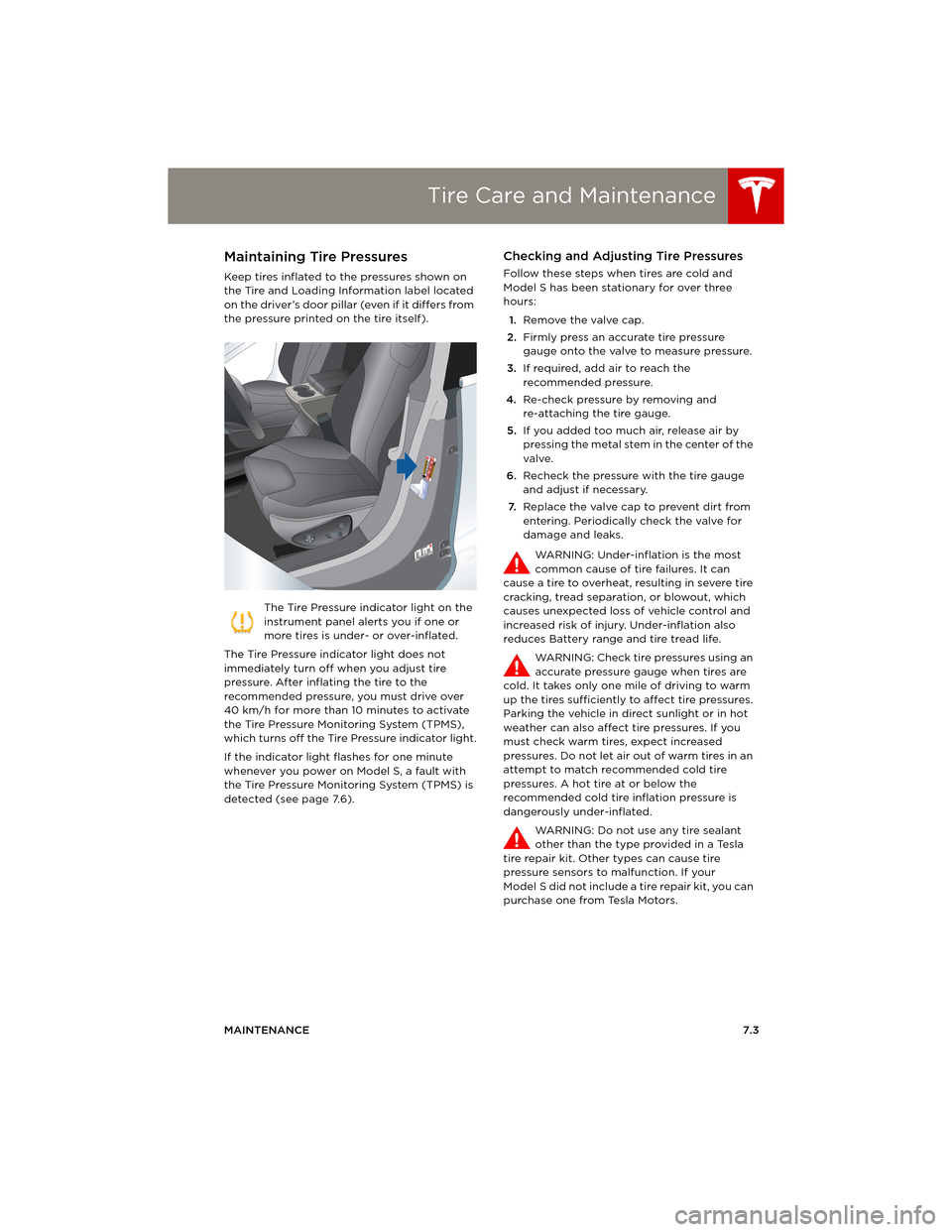
Keep tires inflated to the pressures shown on
the Tire and Loading Information label located
on the driver’s door pillar (even if it differs from
the pressure printed on the tire itself).
The Tire Pressure indicator light on the
instrument panel alerts you if one or
more tires is under- or over-inflated.
The Tire Pressure indicator light does not
immediately turn off when you adjust tire
pressure. After inflating the tire to the
recommended pressure, you must drive over
40 km/h for more than 10 minutes to activate
the Tire Pressure Monitoring System (TPMS),
which turns off the Tire Pressure indicator light.
If the indicator light flashes for one minute
whenever you power on Model S, a fault with
the Tire Pressure Monitoring System (TPMS) is
detected (see page 7.6).
Checking and Adjusting Tire Pressures
Follow these steps when tires are cold and
Model S has been stationary for over three
hours:
1.Remove the valve cap.
2.Firmly press an accurate tire pressure
gauge onto the valve to measure pressure.
3.If required, add air to reach the
recommended pressure.
4.Re-check pressure by removing and
re-attaching the tire gauge.
5.If you added too much air, release air by
pressing the metal stem in the center of the
valve.
6.Recheck the pressure with the tire gauge
and adjust if necessary.
7.Replace the valve cap to prevent dirt from
entering. Periodically check the valve for
damage and leaks.
WARNING: Under-inflation is the most
common cause of tire failures. It can
cause a tire to overheat, resulting in severe tire
cracking, tread separation, or blowout, which
causes unexpected loss of vehicle control and
increased risk of injury. Under-inflation also
reduces Battery range and tire tread life.
WARNING: Check tire pressures using an
accurate pressure gauge when tires are
cold. It takes only one mile of driving to warm
up the tires sufficiently to affect tire pressures.
Parking the vehicle in direct sunlight or in hot
weather can also affect tire pressures. If you
must check warm tires, expect increased
pressures. Do not let air out of warm tires in an
attempt to match recommended cold tire
pressures. A hot tire at or below the
recommended cold tire inflation pressure is
dangerously under-inflated.
WARNING: Do not use any tire sealant
other than the type provided in a Tesla
tire repair kit. Other types can cause tire
pressure sensors to malfunction. If your
Model S did not include a tire repair kit, you can
purchase one from Tesla Motors.
book.book Page 3 Friday, July 19, 2013 12:53 PM
Page 103 of 152
Tire Care and Maintenance
MAINTENANCE7.5
Improving Tire Mileage
To improve the mileage you get from your tires,
maintain tires at the recommended tire
pressures (see page 7.3), observe speed limits
and advisory speeds, and avoid:
•Pulling away quickly, or hard acceleration.
•Fast turns and heavy braking.
•Potholes and objects in the road.
•Hitting curbs when parking.
•Contaminating tires with fluids that can
cause damage.
Replacing Tires and Wheels
Tires degrade over time due to the effects of
ultraviolet light, extreme temperatures, high
loads, and environmental conditions. It is
recommended that tires are replaced every six
years, or sooner if required.
Wheel rims and tires are matched to suit the
handling characteristics of the vehicle.
Replacement tires must comply with the
original specification. If tires other than those
specified are used, ensure that the load and
speed ratings marked on the tire (see
page 8.10) equal or exceed those of the original
specification.
Ideally, you should replace all four tires at the
same time. If this is not possible, replace the
tires in pairs (both front or both rear). When
replacing tires, always re-balance and check
the alignment of wheels.
For the specification of the original wheels and
tires installed on Model S, see page 8.8.
WARNING: For your safety, use only tires
and wheels that match the original
specification. Tires that do not match the
original specification can affect the operation
of the Tire Pressure Monitoring System (TPMS).
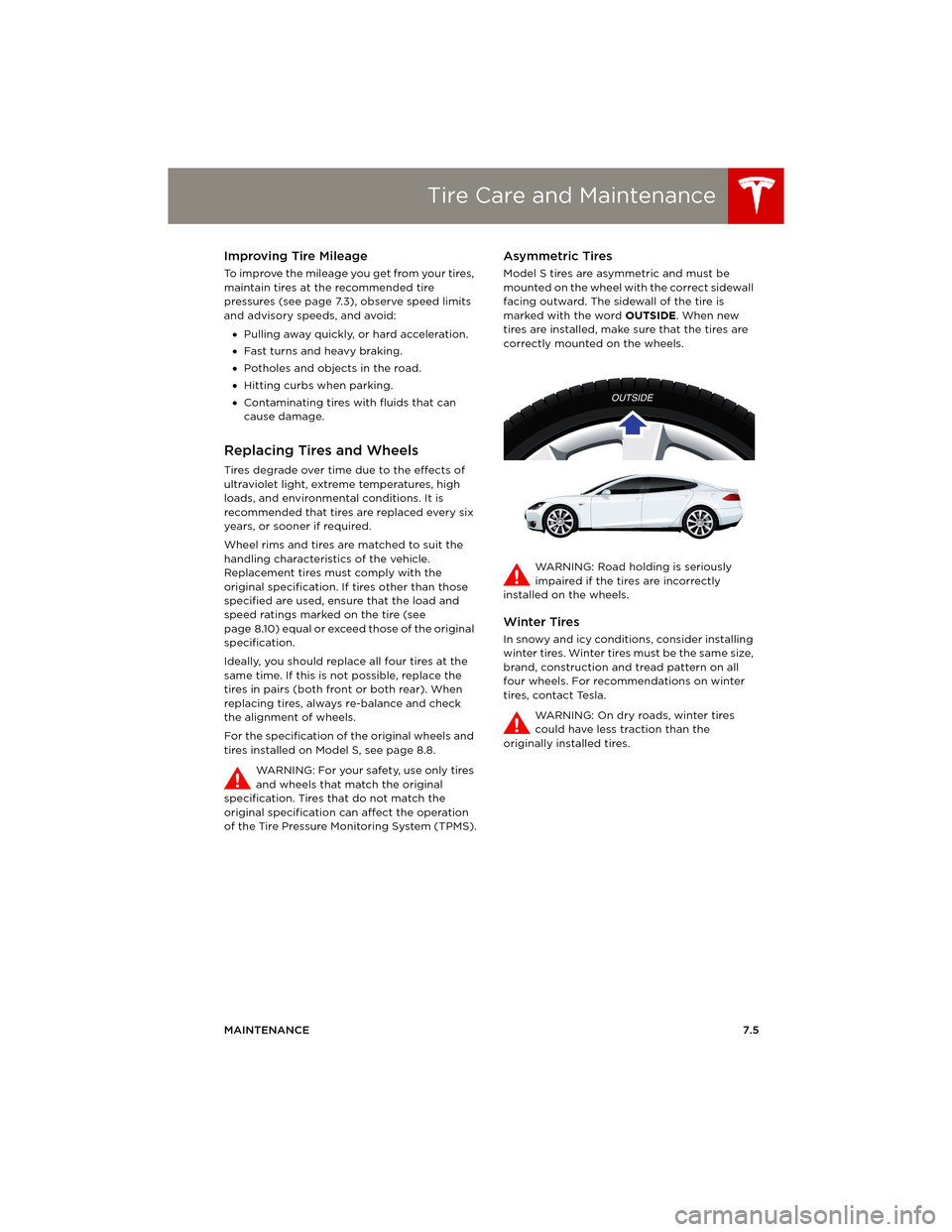
Asymmetric Tires
Model S tires are asymmetric and must be
mounted on the wheel with the correct sidewall
facing outward. The sidewall of the tire is
marked with the word OUTSIDE. When new
tires are installed, make sure that the tires are
correctly mounted on the wheels.
WARNING: Road holding is seriously
impaired if the tires are incorrectly
installed on the wheels.
Winter Tires
In snowy and icy conditions, consider installing
winter tires. Winter tires must be the same size,
brand, construction and tread pattern on all
four wheels. For recommendations on winter
tires, contact Tesla.
WARNING: On dry roads, winter tires
could have less traction than the
originally installed tires.
book.book Page 5 Friday, July 19, 2013 12:53 PM
Page 104 of 152
Tire Care and MaintenanceTire Care and Maintenance
7.6MODEL S OWNERS MANUAL
Using Tire Chains
Tesla has tested and approved Security Chain
Company (SCC) Model Z-563 chains for use on
the rear wheels. These chains must only be
used if your Model S has 245/45R19 rear tires
installed. Do not use chains on 21” tires.
When installing tire chains, follow the
instructions provided by the tire chain
manufacturer. Mount them as tightly as
possible.
When using tire chains:
•Drive slowly—do not exceed 48 km/h.
•Avoid heavily loading Model S (heavy loads
can reduce the clearance between the tires
and the body).
•Remove the tire chains as soon as
conditions allow.
NOTE: Tire chains are prohibited in some
jurisdictions. Check local laws before installing
tire chains.
CAUTION: Using non-recommended tire
chains, or using tire chains on other sized
tires, can damage the suspension, body,
wheels, and/or brake lines. Damage caused by
using non-recommended tire chains is not
covered by the warranty.
CAUTION: Ensure that tire chains cannot
touch suspension components or brake
lines. If you hear the chains making
unusual noises that would indicate contact with
Model S, stop and investigate immediately.
Tire Pressure Monitoring
Each tire should be checked monthly when
cold and inflated to the recommended
pressures that are printed on the Tire and
Loading Information label located on the
driver’s door pillar (see page 7.3). If your
vehicle has tires of a different size than the size
indicated on the vehicle placard or tire inflation
pressure label, determine the proper tire
inflation pressure for those tires.
As an added safety feature, your vehicle has
been equipped with a tire pressure monitoring
system (TPMS) that displays a low tire pressure
telltale (Tire Pressure Warning) on the
instrument panel when one or more of your
tires is significantly under-inflated. Accordingly,
when the Tire Pressure indicator light displays
on the instrument panel alerting you of low tire pressure, stop and check your tires as soon as
possible, and inflate them to the proper
pressure (see page 7.3). Driving on a
significantly under-inflated tire causes the tire
to overheat and can lead to tire failure.
Under-inflation also reduces fuel efficiency and
tire tread life, and may affect the vehicle's
handling and stopping ability.
If Model S detects a fault with the Tire
Pressure Monitoring System (TPMS),
this indicator flashes for one minute
whenever you power on Model S.
NOTE: Installing accessories that are not
approved by Tesla can interfere with the TPMS
system.
WARNING: The TPMS is not a substitute
for proper tire maintenance, including
manually checking tire pressures and regularly
inspecting the condition of tires. It is the
driver's responsibility to maintain correct tire
pressure, even if under-inflation has not
reached the level for the TPMS to trigger the
Tire Pressure Warning on the instrument panel.
TPMS Malfunction
Model S has also been equipped with a TPMS
malfunction indicator to indicate when the
system is not operating properly.
The TPMS malfunction indicator is combined
with the low tire pressure indicator light. When
the system detects a malfunction, the indicator
light flashes for approximately one minute after
Model S powers on, and then remains
continuously lit. This sequence continues upon
subsequent vehicle start-ups as long as the
malfunction exists.
When the TPMS malfunction indicator is on, the
system might not be able to detect or signal
low tire pressure as intended. TPMS
malfunctions can occur for a variety of reasons,
including installing replacement or alternate
tires or wheels on the vehicle that prevent the
TPMS from functioning properly. Always check
the TPMS malfunction indicator light after
replacing one or more tires or wheels on your
vehicle to ensure that the replacement or
alternate tires and wheels allow the TPMS to
continue to function properly.
NOTE: If a tire has been replaced or repaired
using a different tire sealant than the one
available from Tesla, and a low tire pressure is
book.book Page 6 Friday, July 19, 2013 12:53 PM
Page 110 of 152
CleaningCleaning
7.12MODEL S OWNERS MANUAL
CleaningCleaning the Exterior
To prevent damage to the paint, immediately
remove corrosive substances (bird droppings,
tree resin, dead insects, tar spots, road salt,
industrial fallout, etc). Do not wait until Model S
is due for a complete wash. If necessary, use
denatured alcohol to remove tar spots and
stubborn grease stains, then immediately wash
the area with water and a mild, non-detergent
soap to remove the alcohol.
Follow these steps when washing the exterior
of Model S:
1.Rinse Thoroughly
Before washing, flush grime and grit from
the bodywork using a hose. Flush away
accumulations of mud in areas where debris
easily collects (such as wheel arches and
panel seams). If salt has been used on the
highways (such as during winter months),
thoroughly rinse all traces of road salt from
the underside of the vehicle.
2.Hand Wash
Hand wash Model S using a soft cloth and
cold or lukewarm water containing a mild,
good quality car shampoo.
3.Rinse with Clean Water
After washing, rinse with clean water to
prevent soap from drying on the surfaces.
4.Dry Thoroughly and Clean Exterior Glass
After washing and rinsing, dry thoroughly
with a chamois.
Clean windows and mirrors using an
automotive glass cleaner. Do not scrape, or
use any abrasive cleaning fluid on glass or
mirrored surfaces.
Cautions for Exterior Cleaning
CAUTION: Do not use hot water and
detergents.
CAUTION: In hot weather, do not wash in
direct sunlight.
CAUTION: If using a pressure washer,
maintain a distance of at least 30 cm
between the nozzle and the surface of
Model S. Keep the nozzle moving and do
not concentrate the water jet on any one
area.
CAUTION: Do not aim water hoses
d i r e c t l y a t w i n d o w, d o o r o r h o o d s e a l s , o r
through wheel apertures onto brake
components.
CAUTION: Avoid using tight-napped or
rough cloths, such as washing mitts.
CAUTION: If washing in an automatic car
wash, use Touchless car washes only.
These car washes have no parts (brushes,
etc.) that touch the surfaces of Model S.
Using any other type of car wash could
cause damage that is not covered by the
warranty.
CAUTION: Do not used chemical based
wheel cleaners. These can damage the
finish on the wheels.
CAUTION: Avoid using a high pressure
power washer on the rear view camera or
parking sensors (if equipped) and do not
clean a sensor or camera lens with a
sharp or abrasive object that can scratch
or damage its surface.
Some cleaning products contain
chemicals that are hazardous to the
environment. Always take precautions to
prevent spilling. It is illegal to pollute
drains, rivers and waterways. Used toxic
chemicals must be disposed of at
authorized waste disposal sites only.
book.book Page 12 Friday, July 19, 2013 12:53 PM