light TESLA MODEL S 2014 (Europe) Owner's Guide
[x] Cancel search | Manufacturer: TESLA, Model Year: 2014, Model line: MODEL S, Model: TESLA MODEL S 2014Pages: 152, PDF Size: 17.5 MB
Page 67 of 152
Touchscreen Overview
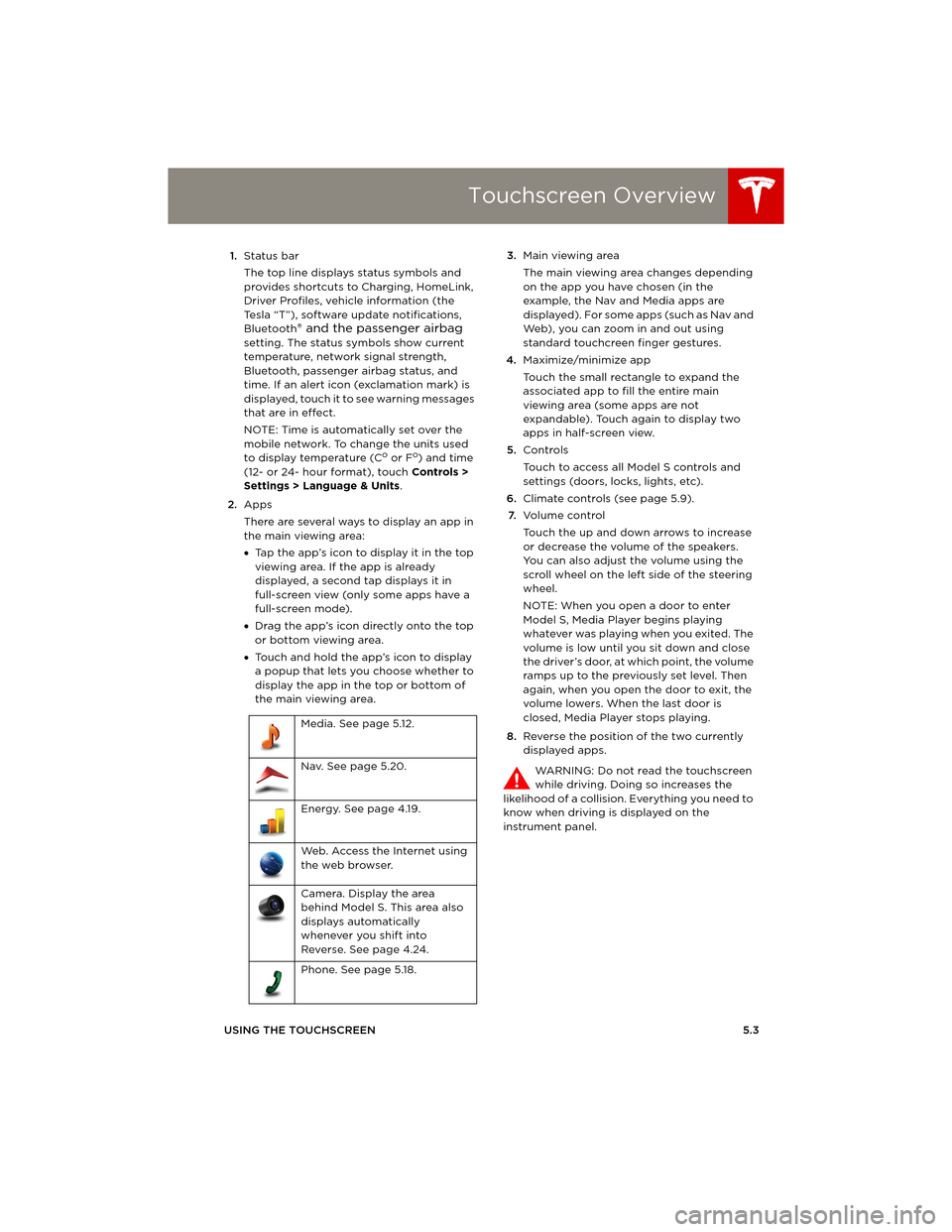
USING THE TOUCHSCREEN5.3 1.Status bar
The top line displays status symbols and
provides shortcuts to Charging, HomeLink,
Driver Profiles, vehicle information (the
Tesla “T”), software update notifications,
Bluetooth
® and the passenger airbag
setting. The status symbols show current
temperature, network signal strength,
Bluetooth, passenger airbag status, and
time. If an alert icon (exclamation mark) is
displayed, touch it to see warning messages
that are in effect.
NOTE: Time is automatically set over the
mobile network. To change the units used
to display temperature (C
o or Fo) and time
(12- or 24- hour format), touch Controls >
Settings > Language & Units.
2.Apps
There are several ways to display an app in
the main viewing area:
•Tap the app’s icon to display it in the top
viewing area. If the app is already
displayed, a second tap displays it in
full-screen view (only some apps have a
full-screen mode).
•Drag the app’s icon directly onto the top
or bottom viewing area.
•Touch and hold the app’s icon to display
a popup that lets you choose whether to
display the app in the top or bottom of
the main viewing area. 3.Main viewing area
The main viewing area changes depending
on the app you have chosen (in the
example, the Nav and Media apps are
displayed). For some apps (such as Nav and
Web), you can zoom in and out using
standard touchcreen finger gestures.
4.Maximize/minimize app
Touch the small rectangle to expand the
associated app to fill the entire main
viewing area (some apps are not
expandable). Touch again to display two
apps in half-screen view.
5.Controls
Touch to access all Model S controls and
settings (doors, locks, lights, etc).
6.Climate controls (see page 5.9).
7.Vo l u m e co n t r o l
Touch the up and down arrows to increase
or decrease the volume of the speakers.
You can also adjust the volume using the
scroll wheel on the left side of the steering
wheel.
NOTE: When you open a door to enter
Model S, Media Player begins playing
whatever was playing when you exited. The
volume is low until you sit down and close
the driver’s door, at which point, the volume
ramps up to the previously set level. Then
again, when you open the door to exit, the
volume lowers. When the last door is
closed, Media Player stops playing.
8.Reverse the position of the two currently
displayed apps.
WARNING: Do not read the touchscreen
while driving. Doing so increases the
likelihood of a collision. Everything you need to
know when driving is displayed on the
instrument panel. Media. See page 5.12.
Nav. See page 5.20.
Energy. See page 4.19.
Web. Access the Internet using
the web browser.
Camera. Display the area
behind Model S. This area also
displays automatically
whenever you shift into
Reverse. See page 4.24.
Phone. See page 5.18.
book.book Page 3 Friday, July 19, 2013 12:53 PM
Page 68 of 152
Touchscreen - ControlsTouchscreen - Controls
5.4MODEL S OWNERS MANUAL
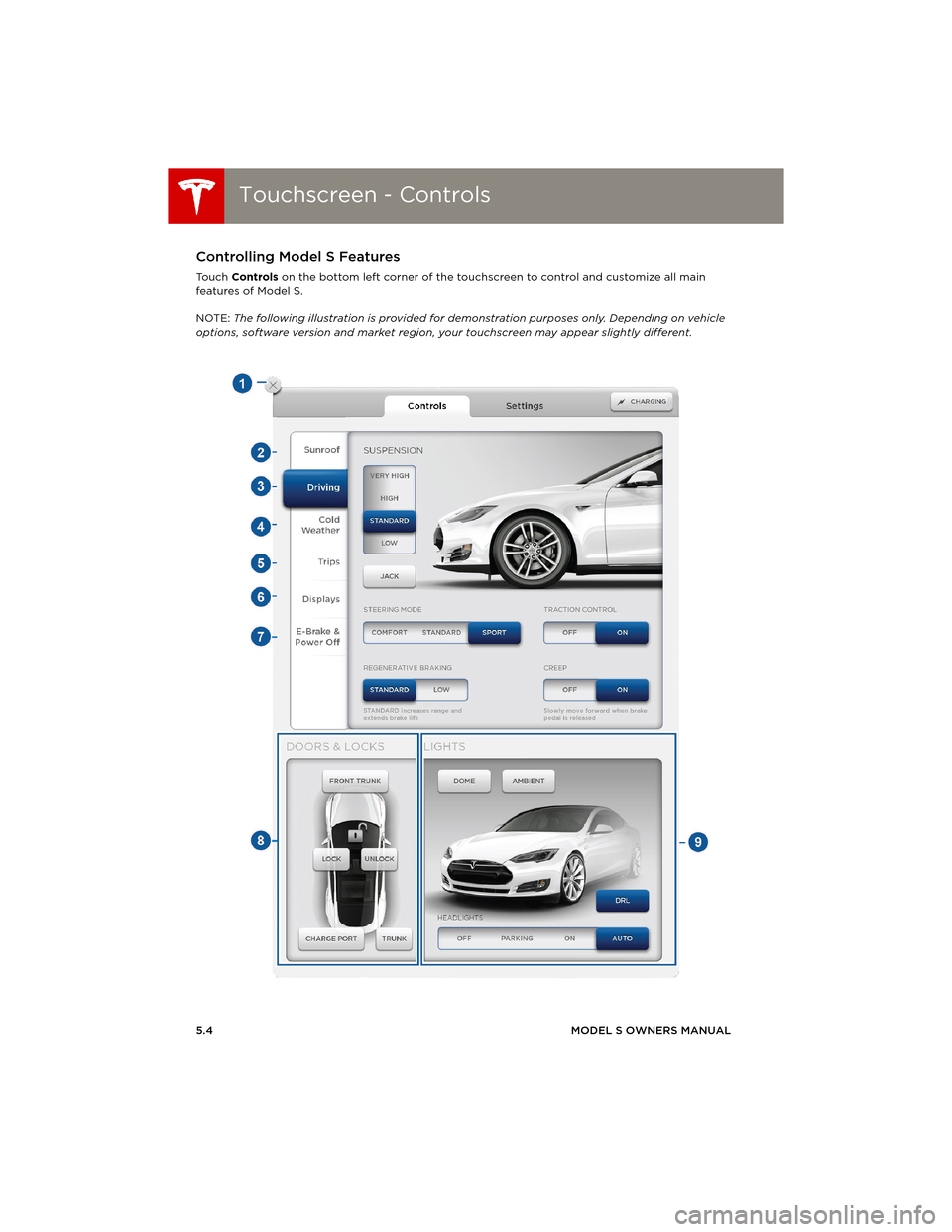
Touchscreen - ControlsControlling Model S Features
To u c h Controls on the bottom left corner of the touchscreen to control and customize all main
features of Model S.
NOTE: The following illustration is provided for demonstration purposes only. Depending on vehicle
options, software version and market region, your touchscreen may appear slightly different.
book.book Page 4 Friday, July 19, 2013 12:53 PM
Page 69 of 152
Touchscreen - Controls
USING THE TOUCHSCREEN5.5 1.Close
Touch the circled X in the top left of a
window to close it. You can also touch
anywhere outside the window to close it.
2.Sunroof
If Model S is equipped with a sunroof, touch
to adjust its position (see page 2.12).
3.Driving
•Suspension
If Model S is equipped with Active Air
Suspension, touch to manually raise or
lower Model S (see page 5.11). You must
press the brake pedal before you can
change suspension settings. Active Air
Suspension causes Model S to self-level,
even when powered off. Therefore, when
lifting or towing, you must disable
self-leveling (see pages 7.23 and 9.3).
•Steering mode
Adjust the amount of effort required to
turn the steering wheel. Sport feels more
responsive whereas Comfort feels easier
to drive and park (see page 4.3).
•Regenerative braking
When you release the accelerator when
driving, regenerative braking slows
Model S and feeds any surplus energy
b a c k t o t h e B a t t e r y. I f s e t t o L o w, M o d e l S
does not slow down as quickly, but you
may experience less range (see
page 4.21).
NOTE: Regardless of the setting, the
energy gained by regenerative braking is
reduced if the Battery is full, or if it is
extremely cold or hot (the surplus energy
is used to heat or cool the Battery).
•Tr a c t i o n C o n t r o l
If you turn off Traction Control, a warning
message displays on the instrument
panel. The off setting stays in effect for
the current drive only (see page 4.22).
•Creep
When on, Model S slowly moves forward
when in Drive and backward in Reverse
when you release the brake (similar to a
conventional vehicle with an automatic
transmission). You can only adjust this
setting when Model S is in Park.4.Cold Weather
If Model S is equipped with the cold
weather option, you can control all seat
heaters and the heated wipers. Note that
you can also control the front driver and
passenger seats using the main climate
control panel located on the bottom of the
touchscreen (see page 5.8).
5.Tr i p s
View and reset the trip meters that
summarize how far you have driven (see
page 4.18).
6.Displays
Manually control the touchscreen’s
brightness and control its day (light
background) or night (dark background)
setting. When set to Auto, the touchscreen
automatically changes between Day and
Night brightness depending on the ambient
lighting conditions.
7.E-Brake & Power Off
You can manually:
•Apply and release the parking brake
(page 4.20).
•Power off (see page 4.6).
•Keep Model S in Neutral by activating
Tow Mode (see page 9.3).
8.Doors & locks (see page 2.4)
9.Control lights (see page 4.11)
WARNING: Do not read the touchscreen
while driving. Doing so increases the
likelihood of a collision. Everything you need to
know when driving is displayed on the
instrument panel.
book.book Page 5 Friday, July 19, 2013 12:53 PM
Page 70 of 152
Touchscreen - SettingsTouchscreen - Settings
5.6MODEL S OWNERS MANUAL
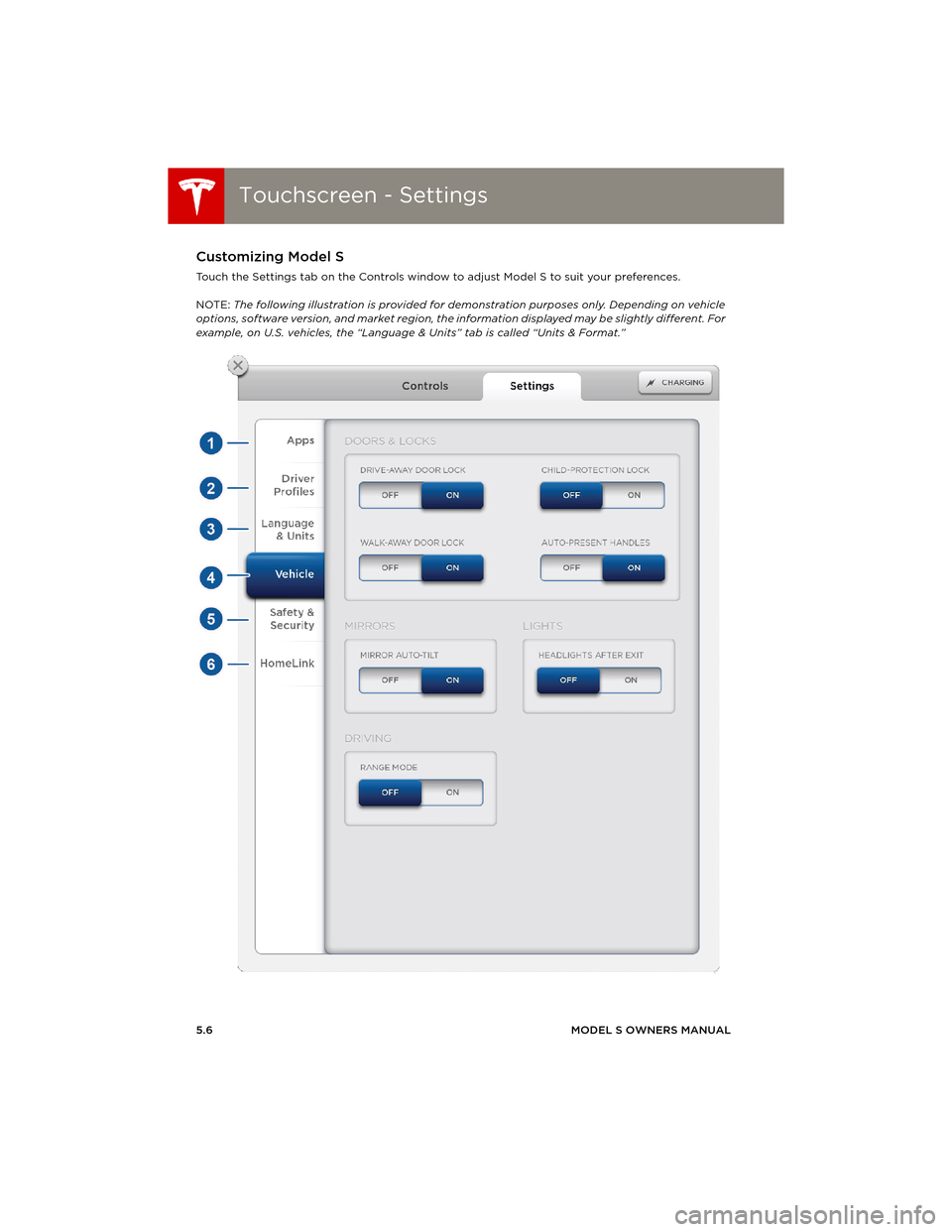
Touchscreen - SettingsCustomizing Model S
Touch the Settings tab on the Controls window to adjust Model S to suit your preferences.
NOTE: The following illustration is provided for demonstration purposes only. Depending on vehicle
options, software version, and market region, the information displayed may be slightly different. For
example, on U.S. vehicles, the “Language & Units” tab is called “Units & Format.”
book.book Page 6 Friday, July 19, 2013 12:53 PM
Page 71 of 152
Touchscreen - Settings
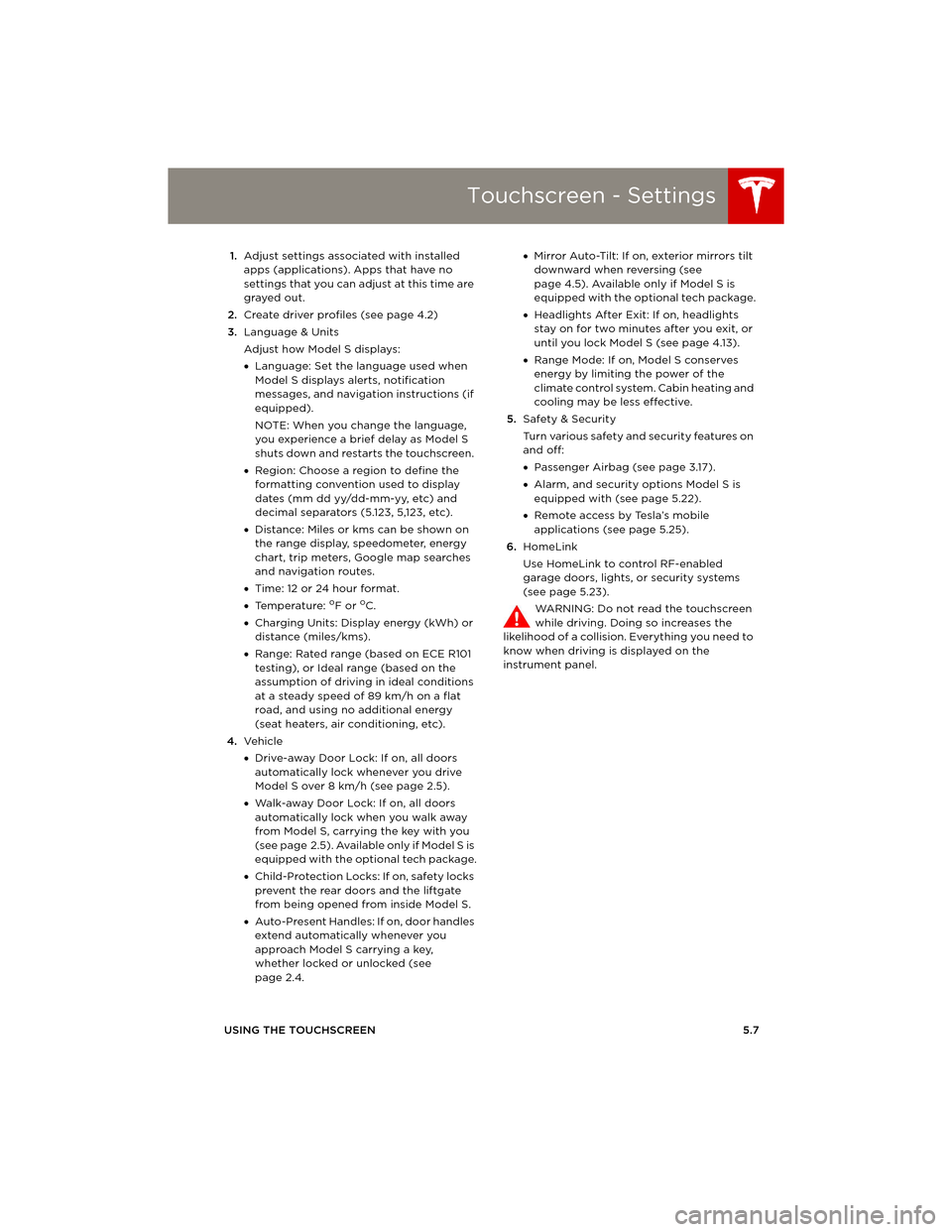
USING THE TOUCHSCREEN5.7 1.Adjust settings associated with installed
apps (applications). Apps that have no
settings that you can adjust at this time are
grayed out.
2.Create driver profiles (see page 4.2)
3.Language & Units
Adjust how Model S displays:
•Language: Set the language used when
Model S displays alerts, notification
messages, and navigation instructions (if
equipped).
NOTE: When you change the language,
you experience a brief delay as Model S
shuts down and restarts the touchscreen.
•Region: Choose a region to define the
formatting convention used to display
dates (mm dd yy/dd-mm-yy, etc) and
decimal separators (5.123, 5,123, etc).
•Distance: Miles or kms can be shown on
the range display, speedometer, energy
chart, trip meters, Google map searches
and navigation routes.
•Time: 12 or 24 hour format.
•Temperature:
oF or oC.
•Charging Units: Display energy (kWh) or
distance (miles/kms).
•Range: Rated range (based on ECE R101
testing), or Ideal range (based on the
assumption of driving in ideal conditions
at a steady speed of 89 km/h on a flat
road, and using no additional energy
(seat heaters, air conditioning, etc).
4.Ve h i c l e
•Drive-away Door Lock: If on, all doors
automatically lock whenever you drive
Model S over 8 km/h (see page 2.5).
•Walk-away Door Lock: If on, all doors
automatically lock when you walk away
from Model S, carrying the key with you
(see page 2.5). Available only if Model S is
equipped with the optional tech package.
•Child-Protection Locks: If on, safety locks
prevent the rear doors and the liftgate
from being opened from inside Model S.
•Auto-Present Handles: If on, door handles
extend automatically whenever you
approach Model S carrying a key,
whether locked or unlocked (see
page 2.4.•Mirror Auto-Tilt: If on, exterior mirrors tilt
downward when reversing (see
page 4.5). Available only if Model S is
equipped with the optional tech package.
•Headlights After Exit: If on, headlights
stay on for two minutes after you exit, or
until you lock Model S (see page 4.13).
•Range Mode: If on, Model S conserves
energy by limiting the power of the
climate control system. Cabin heating and
cooling may be less effective.
5.Safety & Security
Turn various safety and security features on
and off:
•Passenger Airbag (see page 3.17).
•Alarm, and security options Model S is
equipped with (see page 5.22).
•Remote access by Tesla’s mobile
applications (see page 5.25).
6.HomeLink
Use HomeLink to control RF-enabled
garage doors, lights, or security systems
(see page 5.23).
WARNING: Do not read the touchscreen
while driving. Doing so increases the
likelihood of a collision. Everything you need to
know when driving is displayed on the
instrument panel.
book.book Page 7 Friday, July 19, 2013 12:53 PM
Page 72 of 152
Climate ControlsClimate Controls
5.8MODEL S OWNERS MANUAL
Climate ControlsOverview of Climate Controls
The climate controls are always available at the bottom of the touchscreen. By default, climate
control is set to Auto On, which maintains optimum comfort in all but the most severe weather
conditions. When you adjust the temperature, the system automatically adjusts the heating, air
conditioning, air distribution, air circulation, and fan speed to maintain your selected temperature.
To override these settings, touch Auto On (see page 5.9).
The fan, heating, and air conditioning systems are powered by the Battery. Therefore, prolonged use
decreases driving range.
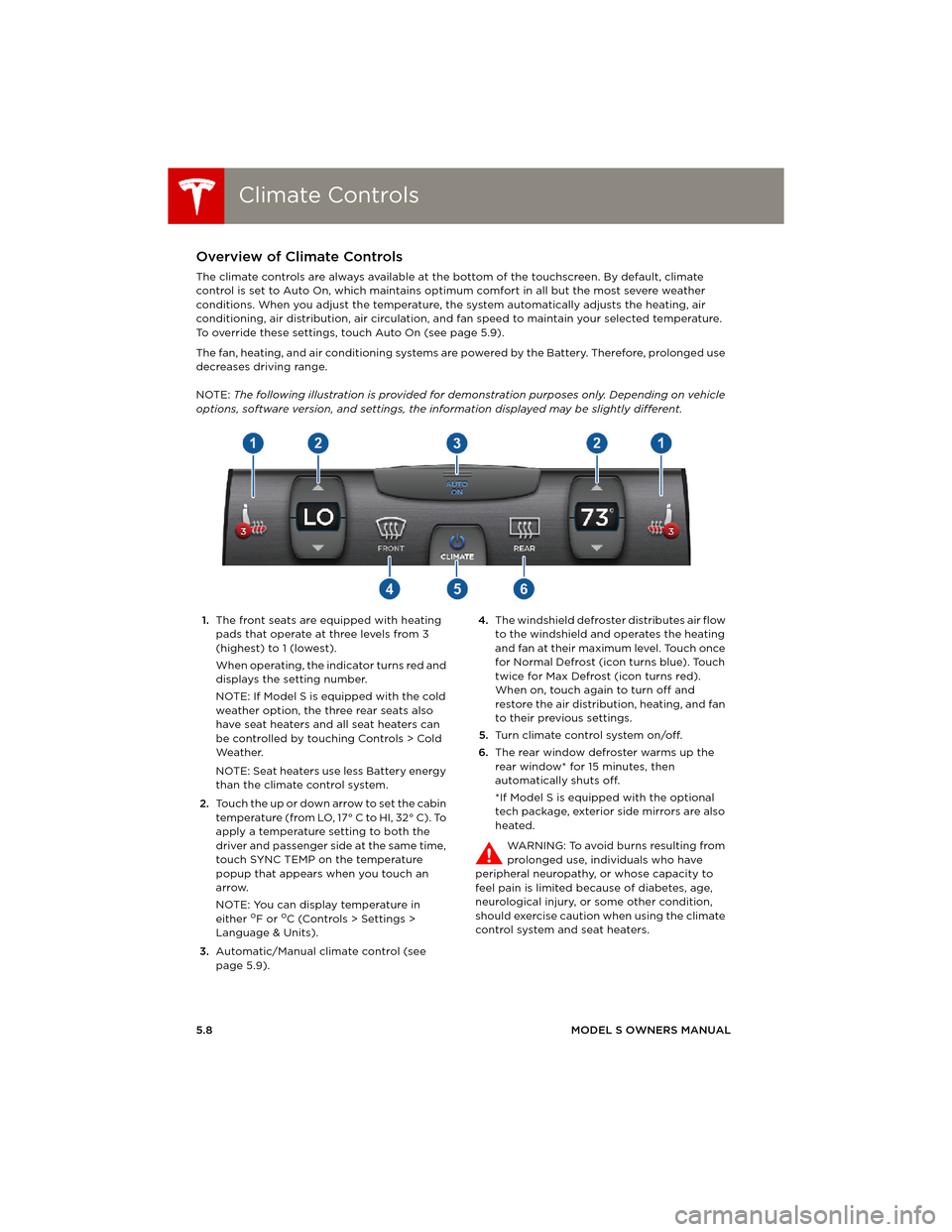
NOTE: The following illustration is provided for demonstration purposes only. Depending on vehicle
options, software version, and settings, the information displayed may be slightly different.
1.The front seats are equipped with heating
pads that operate at three levels from 3
(highest) to 1 (lowest).
When operating, the indicator turns red and
displays the setting number.
NOTE: If Model S is equipped with the cold
weather option, the three rear seats also
have seat heaters and all seat heaters can
be controlled by touching Controls > Cold
We a t h e r.
NOTE: Seat heaters use less Battery energy
than the climate control system.
2.Touch the up or down arrow to set the cabin
temperature (from LO, 17° C to HI, 32° C). To
apply a temperature setting to both the
driver and passenger side at the same time,
touch SYNC TEMP on the temperature
popup that appears when you touch an
arrow.
NOTE: You can display temperature in
either
oF or oC (Controls > Settings >
Language & Units).
3.Automatic/Manual climate control (see
page 5.9).4.The windshield defroster distributes air flow
to the windshield and operates the heating
and fan at their maximum level. Touch once
for Normal Defrost (icon turns blue). Touch
twice for Max Defrost (icon turns red).
When on, touch again to turn off and
restore the air distribution, heating, and fan
to their previous settings.
5.Turn climate control system on/off.
6.The rear window defroster warms up the
rear window* for 15 minutes, then
automatically shuts off.
*If Model S is equipped with the optional
tech package, exterior side mirrors are also
heated.
WARNING: To avoid burns resulting from
prolonged use, individuals who have
peripheral neuropathy, or whose capacity to
feel pain is limited because of diabetes, age,
neurological injury, or some other condition,
should exercise caution when using the climate
control system and seat heaters.
book.book Page 8 Friday, July 19, 2013 12:53 PM
Page 74 of 152
Climate ControlsClimate Controls
5.10MODEL S OWNERS MANUAL
Ventilation
Outside air is drawn into Model S through the
grill in front of the windshield. Keep the grill
clear of obstructions such as leaves and snow.
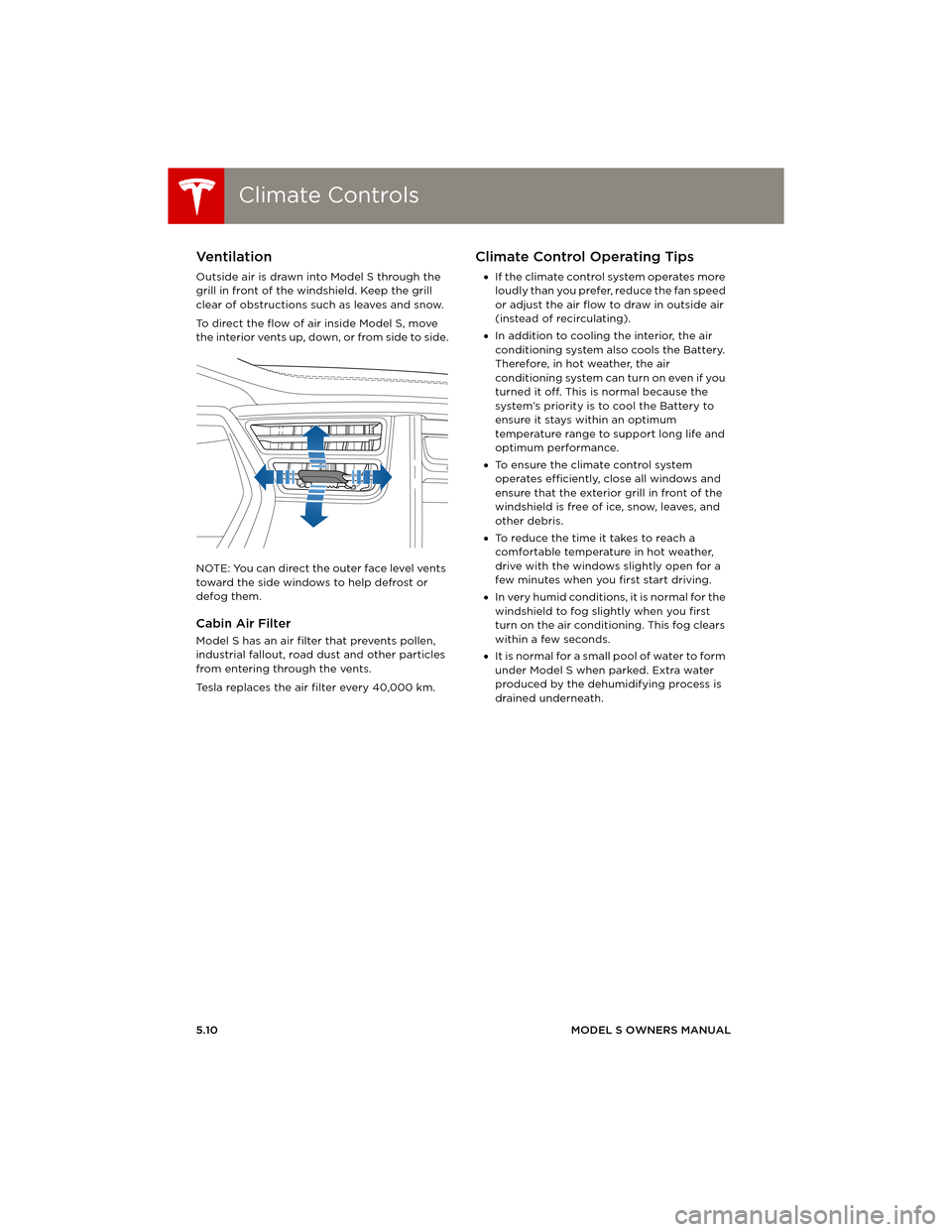
To direct the flow of air inside Model S, move
the interior vents up, down, or from side to side.
NOTE: You can direct the outer face level vents
toward the side windows to help defrost or
defog them.
Cabin Air Filter
Model S has an air filter that prevents pollen,
industrial fallout, road dust and other particles
from entering through the vents.
Tesla replaces the air filter every 40,000 km.
Climate Control Operating Tips
•If the climate control system operates more
loudly than you prefer, reduce the fan speed
or adjust the air flow to draw in outside air
(instead of recirculating).
•In addition to cooling the interior, the air
conditioning system also cools the Battery.
Therefore, in hot weather, the air
conditioning system can turn on even if you
turned it off. This is normal because the
system’s priority is to cool the Battery to
ensure it stays within an optimum
temperature range to support long life and
optimum performance.
•To ensure the climate control system
operates efficiently, close all windows and
ensure that the exterior grill in front of the
windshield is free of ice, snow, leaves, and
other debris.
•To reduce the time it takes to reach a
comfortable temperature in hot weather,
drive with the windows slightly open for a
few minutes when you first start driving.
•In very humid conditions, it is normal for the
windshield to fog slightly when you first
turn on the air conditioning. This fog clears
within a few seconds.
•It is normal for a small pool of water to form
under Model S when parked. Extra water
produced by the dehumidifying process is
drained underneath.
book.book Page 10 Friday, July 19, 2013 12:53 PM
Page 86 of 152
Security SettingsSecurity Settings
5.22MODEL S OWNERS MANUAL
Security SettingsAbout the Security System
If Model S does not detect a key nearby and a
locked door or trunk is opened, the horn beeps
and headlights and turn signals flash. To
deactivate the alarm, press any button on the
key.
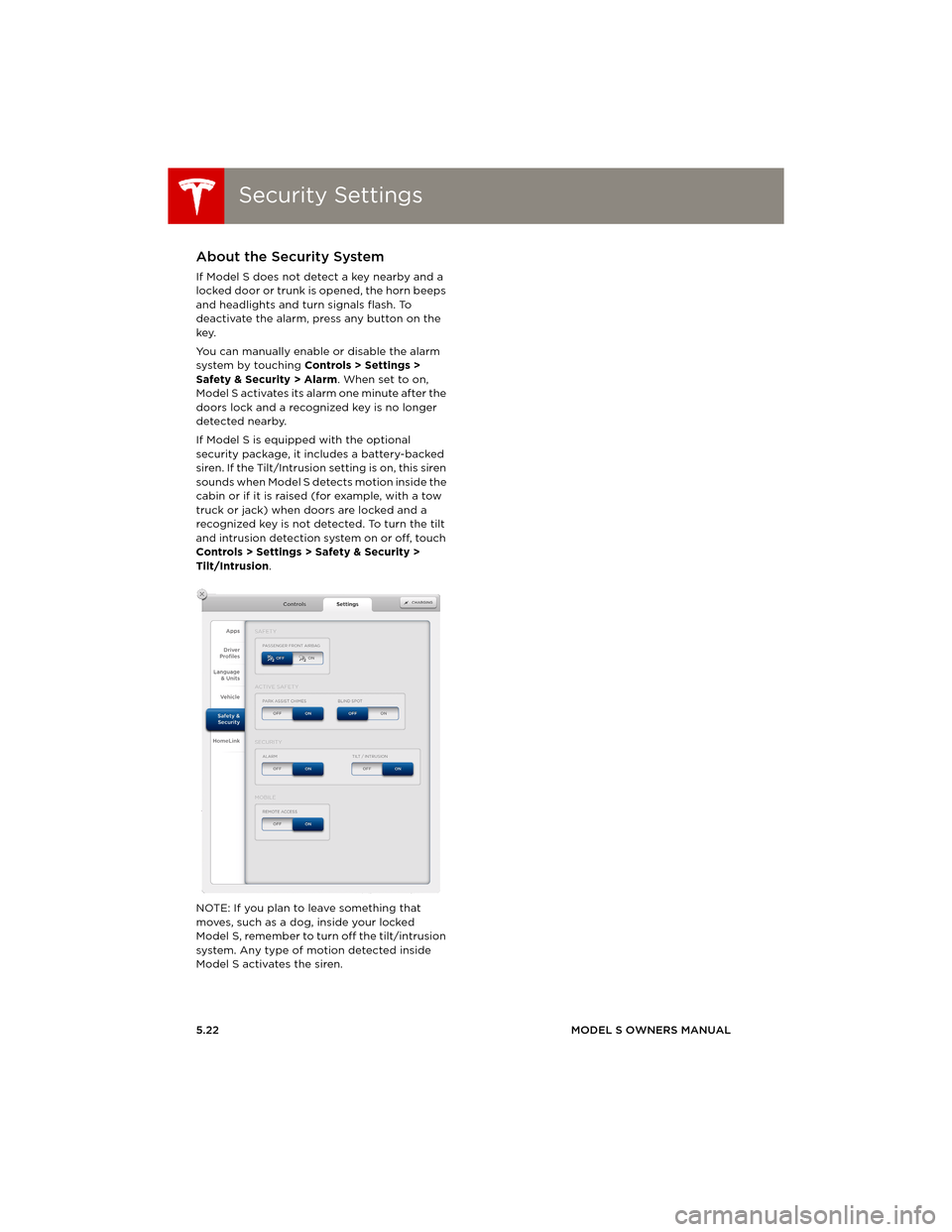
You can manually enable or disable the alarm
system by touching Controls > Settings >
Safety & Security > Alarm. When set to on,
Model S activates its alarm one minute after the
doors lock and a recognized key is no longer
detected nearby.
If Model S is equipped with the optional
security package, it includes a battery-backed
siren. If the Tilt/Intrusion setting is on, this siren
sounds when Model S detects motion inside the
cabin or if it is raised (for example, with a tow
truck or jack) when doors are locked and a
recognized key is not detected. To turn the tilt
and intrusion detection system on or off, touch
Controls > Settings > Safety & Security >
Tilt/Intrusion.
NOTE: If you plan to leave something that
moves, such as a dog, inside your locked
Model S, remember to turn off the tilt/intrusion
system. Any type of motion detected inside
Model S activates the siren.
book.book Page 22 Friday, July 19, 2013 12:53 PM
Page 87 of 152
HomeLink® Universal Transceiver
USING THE TOUCHSCREEN5.23
HomeLink® Universal TransceiverAbout HomeLink®
If Model S is equipped with the optional
tech package, you can program the
HomeLink® Universal Transceiver to operate up
to three garage doors, gates, lights, and
security systems that can transmit Radio
Frequency (RF) signals.
Programming HomeLink
1.Park in front of the device you want to
program, and have the device’s remote
control ready.
2.To u c h Controls > Settings > HomeLink on
the touchscreen.
3.To u c h Enter Name, then use the onscreen
keyboard to enter a name for your
HomeLink device.
4.To u c h Create HomeLink.
5.Follow the onscreen instructions.
Once programmed, you can operate the device
by touching its corresponding HomeLink icon
on the touchscreen’s status bar. HomeLink
remembers the location of your programmed
devices. When you approach a known location,
the HomeLink control on the touchscreen
automatically drops down. When you drive
away, it disappears.
NOTE: For security reasons, erase your
HomeLink settings if you sell Model S.
WARNING: Your device might open or
close during programming. Before
programming, make sure that the device
is clear of any people or objects.
WARNING: Do not use the HomeLink
Universal Transceiver with a garage door
that does not meet federal safety
standards. A garage door opener that
cannot detect an object in its path and
then automatically stop and reverse,
does not meet these standards. Using a
garage door opener without these
features increases the risk of injury or
death.
book.book Page 23 Friday, July 19, 2013 12:53 PM
Page 89 of 152
Mobile App
USING THE TOUCHSCREEN5.25
Mobile AppModel S Mobile App
The Tesla Model S mobile app allows you to
communicate with Model S remotely using your
iPhone
® or Android™ phone. With this app, you
can check charging progress, start and stop
charging, heat or cool Model S, locate Model S
or track its movement, flash lights, honk the
horn, lock and unlock, and more.
Simply download the app to your phone and
enter your login credentials. You must also
ensure that Model S is ready to communicate
with the mobile app by turning on its remote
access setting. Touch Controls > Settings >
Safety & Security > Remote Access > On.
book.book Page 25 Friday, July 19, 2013 12:53 PM