Battery TESLA MODEL S 2014 Owner's manual (Europe)
[x] Cancel search | Manufacturer: TESLA, Model Year: 2014, Model line: MODEL S, Model: TESLA MODEL S 2014Pages: 152, PDF Size: 17.5 MB
Page 3 of 152
P/N: 1028871-07-A REV: 1i
TABLE OF CONTENTS
OVERVIEWInterior Overview............................................... 1.2
Exterior Overview ............................................. 1.3
OPENING AND CLOSING
Doors ..................................................................... 2.2
Windows .............................................................. 2.7
Rear Trunk........................................................... 2.8
Front Trunk ....................................................... 2.10
Sunroof ............................................................... 2.12
Glove Box .......................................................... 2.13
Cup Holders ...................................................... 2.14
SEATING AND SAFETY
RESTRAINTS
Front and Rear Seats ...................................... 3.2
Seat Belts............................................................ 3.4
Child Safety Seats ............................................ 3.7
Tesla Built In Rear Facing Child Seats..... 3.11
Airbags ............................................................... 3.15
DRIVINGDriver Profiles ................................................... 4.2
Steering Wheel ................................................. 4.3
Mirrors .................................................................. 4.5
Starting and Powering Off ........................... 4.6
Gears .................................................................... 4.7
Instrument Panel.............................................. 4.8
Lights ................................................................... 4.11
Wipers and Washers ..................................... 4.15
Park Assist......................................................... 4.16
Trip Information .............................................. 4.18
Energy Usage................................................... 4.19
Brakes ................................................................ 4.20
Traction Control............................................. 4.22
Cruise Control ................................................. 4.23
Rear View Camera ........................................ 4.24
USING THE TOUCHSCREEN
Touchscreen Overview.................................. 5.2
Touchscreen - Controls................................. 5.4
Touchscreen - Settings................................. 5.6
Climate Controls ............................................... 5.8
Active Air Suspension ................................... 5.11
Media and Audio............................................. 5.12
Phone .................................................................. 5.17Maps ..................................................................... 5.19
Navigation ....................................................... 5.20
Security Settings ............................................ 5.22
HomeLink® Universal Transceiver............ 5.23
Software Updates .......................................... 5.24
Mobile App ....................................................... 5.25
CHARGING
Electric Vehicle Components ...................... 6.2
Battery Information ........................................ 6.4
Charging Model S ............................................ 6.5
MAINTENANCE
Maintenance Schedule ................................... 7.2
Tire Care and Maintenance .......................... 7.3
Temporary Tire Repair................................... 7.8
Cleaning.............................................................. 7.12
Wiper Blades and Washer Jets ................. 7.15
Fluid Reservoirs ............................................... 7.16
Fuses.................................................................... 7.19
Jacking and Lifting ........................................ 7.23
Parts and Accessories .................................. 7.24
SPECIFICATIONS
Identification Labels ....................................... 8.2
Vehicle Loading ................................................ 8.3
Dimensions and Weights .............................. 8.5
Subsystems ........................................................ 8.6
Wheels and Tires.............................................. 8.8
ROADSIDE ASSISTANCE
About Roadside Assistance......................... 9.2
Instructions for Transporters ...................... 9.3
CONSUMER INFORMATIONDisclaimers ....................................................... 10.2
Reporting Concerns ...................................... 10.3
book.book Page i Friday, July 19, 2013 12:53 PM
Page 9 of 152
2.1
OPENING AND CLOSING
Doors
Keyless Locking and Unlocking .................. 2.2
Using the Key ..................................................... 2.2
Using Exterior Door Handles ...................... 2.4
Using Interior Door Handles ........................ 2.4
Interior Locking and Unlocking.................. 2.4
Child-protection Locks................................... 2.5
Drive-away Locking......................................... 2.5
Walk-away Locking ......................................... 2.5
Unlocking with a Dead Key Battery .......... 2.5
Opening Interior Doors with No Power ... 2.6
Windows
Opening from the Exterior ........................... 2.7
Opening and Closing from the Interior .... 2.7
Locking Rear Windows .................................. 2.7
Rear Trunk
Opening................................................................ 2.8
Closing .................................................................. 2.8
Adjusting the Opening Height .................... 2.8
Interior Release ................................................. 2.9
Opening with No Power ................................ 2.9
Front Trunk
Opening.............................................................. 2.10
Closing ................................................................ 2.10
Interior Emergency Release ........................ 2.11
Opening with No Power ............................... 2.11
SunroofOpening and Closing .................................... 2.12
Glove Box
Opening and Closing .................................... 2.13
Cup Holders
Opening and Closing .................................... 2.14
book.book Page 1 Friday, July 19, 2013 12:53 PM
Page 10 of 152
DoorsDoors
2.2MODEL S OWNERS MANUAL
OPENING AND CLOSING
DoorsKeyless Locking and Unlocking
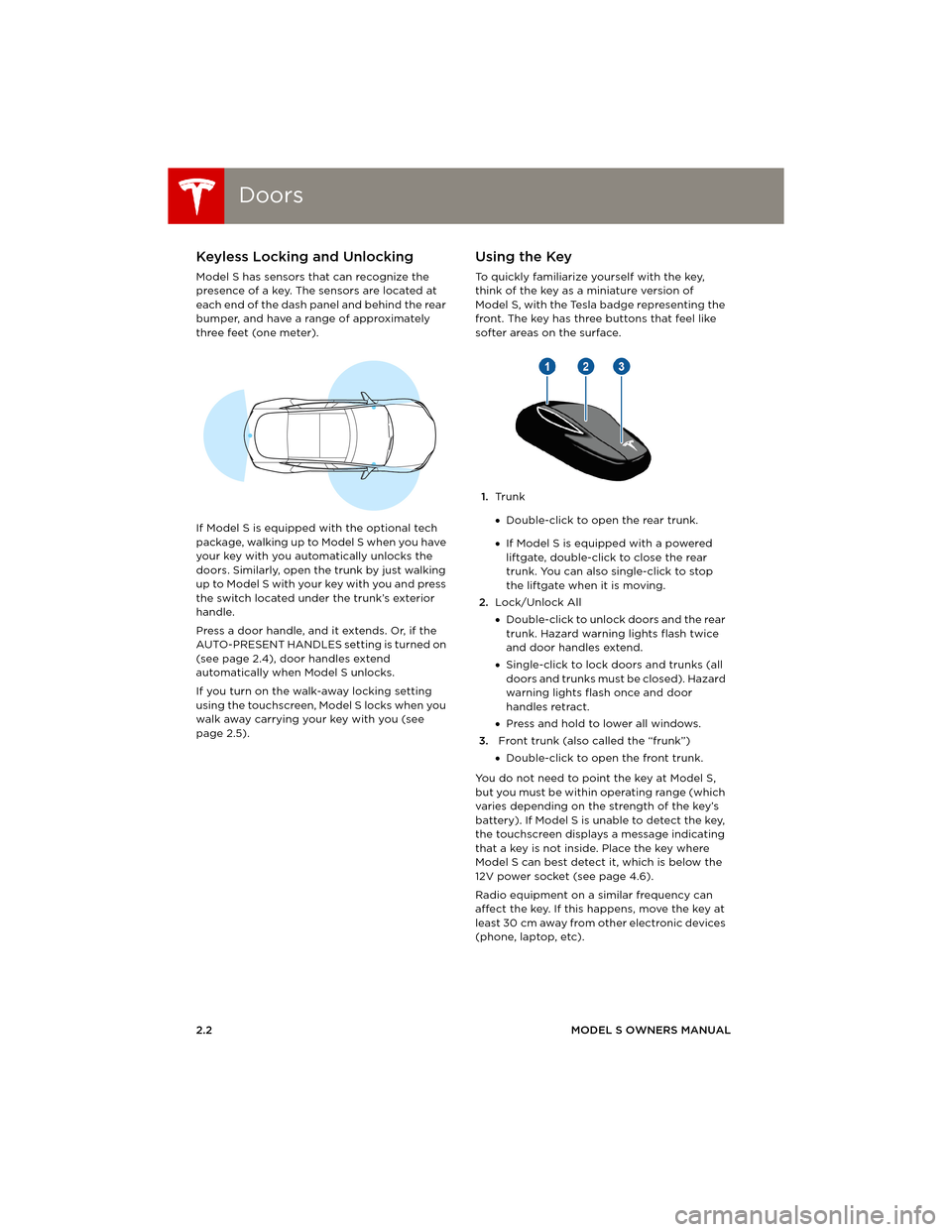
Model S has sensors that can recognize the
presence of a key. The sensors are located at
each end of the dash panel and behind the rear
bumper, and have a range of approximately
three feet (one meter).
If Model S is equipped with the optional tech
package, walking up to Model S when you have
your key with you automatically unlocks the
doors. Similarly, open the trunk by just walking
u p to M o de l S w it h yo ur key w i t h yo u an d p re ss
the switch located under the trunk’s exterior
handle.
Press a door handle, and it extends. Or, if the
AUTO-PRESENT HANDLES setting is turned on
(see page 2.4), door handles extend
automatically when Model S unlocks.
If you turn on the walk-away locking setting
using the touchscreen, Model S locks when you
walk away carrying your key with you (see
page 2.5).
Using the Key
To quickly familiarize yourself with the key,
think of the key as a miniature version of
Model S, with the Tesla badge representing the
front. The key has three buttons that feel like
softer areas on the surface.
1.Tr u n k
•Double-click to open the rear trunk.
•If Model S is equipped with a powered
liftgate, double-click to close the rear
trunk. You can also single-click to stop
the liftgate when it is moving.
2.Lock/Unlock All
•Double-click to unlock doors and the rear
trunk. Hazard warning lights flash twice
and door handles extend.
•Single-click to lock doors and trunks (all
d o o r s a n d t r u n k s m u s t b e c l o s e d ) . H a z a r d
warning lights flash once and door
handles retract.
•Press and hold to lower all windows.
3. Front trunk (also called the “frunk”)
•Double-click to open the front trunk.
You do not need to point the key at Model S,
but you must be within operating range (which
varies depending on the strength of the key’s
battery). If Model S is unable to detect the key,
the touchscreen displays a message indicating
that a key is not inside. Place the key where
Model S can best detect it, which is below the
12V power socket (see page 4.6).
Radio equipment on a similar frequency can
affect the key. If this happens, move the key at
least 30 cm away from other electronic devices
(phone, laptop, etc).
book.book Page 2 Friday, July 19, 2013 12:53 PM
Page 11 of 152
Doors
OPENING AND CLOSING2.3 If the key does not work, you may need to
change its battery. if the key’s battery is
discharged, you can open Model S by following
the unlocking procedure described on
page 2.5.
CAUTION: Remember to bring the key
with you when you drive. Although you
can drive Model S away from its key, you
will be unable to power it back on after it
powers off.
CAUTION: Protect the key from impact,
water damage and high temperatures.
Avoid contact with solvents, waxes and
abrasive cleaners.
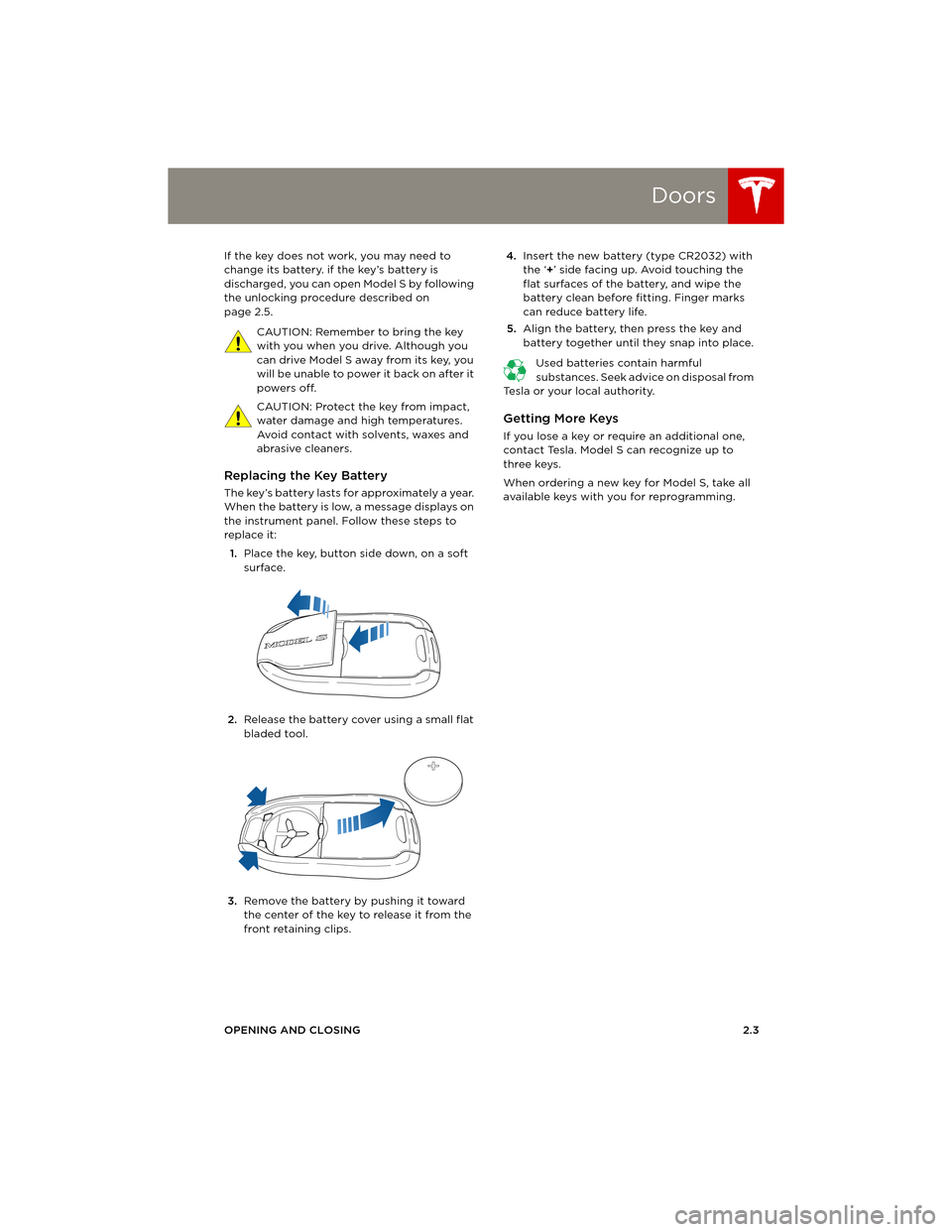
Replacing the Key Battery
The key’s battery lasts for approximately a year.
When the battery is low, a message displays on
the instrument panel. Follow these steps to
replace it:
1.Place the key, button side down, on a soft
surface.
2.Release the battery cover using a small flat
bladed tool.
3.Remove the battery by pushing it toward
the center of the key to release it from the
front retaining clips. 4.Insert the new battery (type CR2032) with
the ‘+’ side facing up. Avoid touching the
flat surfaces of the battery, and wipe the
battery clean before fitting. Finger marks
can reduce battery life.
5.Align the battery, then press the key and
battery together until they snap into place.
Used batteries contain harmful
substances. Seek advice on disposal from
Tesla or your local authority.
Getting More Keys
If you lose a key or require an additional one,
contact Tesla. Model S can recognize up to
three keys.
When ordering a new key for Model S, take all
available keys with you for reprogramming.
book.book Page 3 Friday, July 19, 2013 12:53 PM
Page 12 of 152
DoorsDoors
2.4MODEL S OWNERS MANUAL
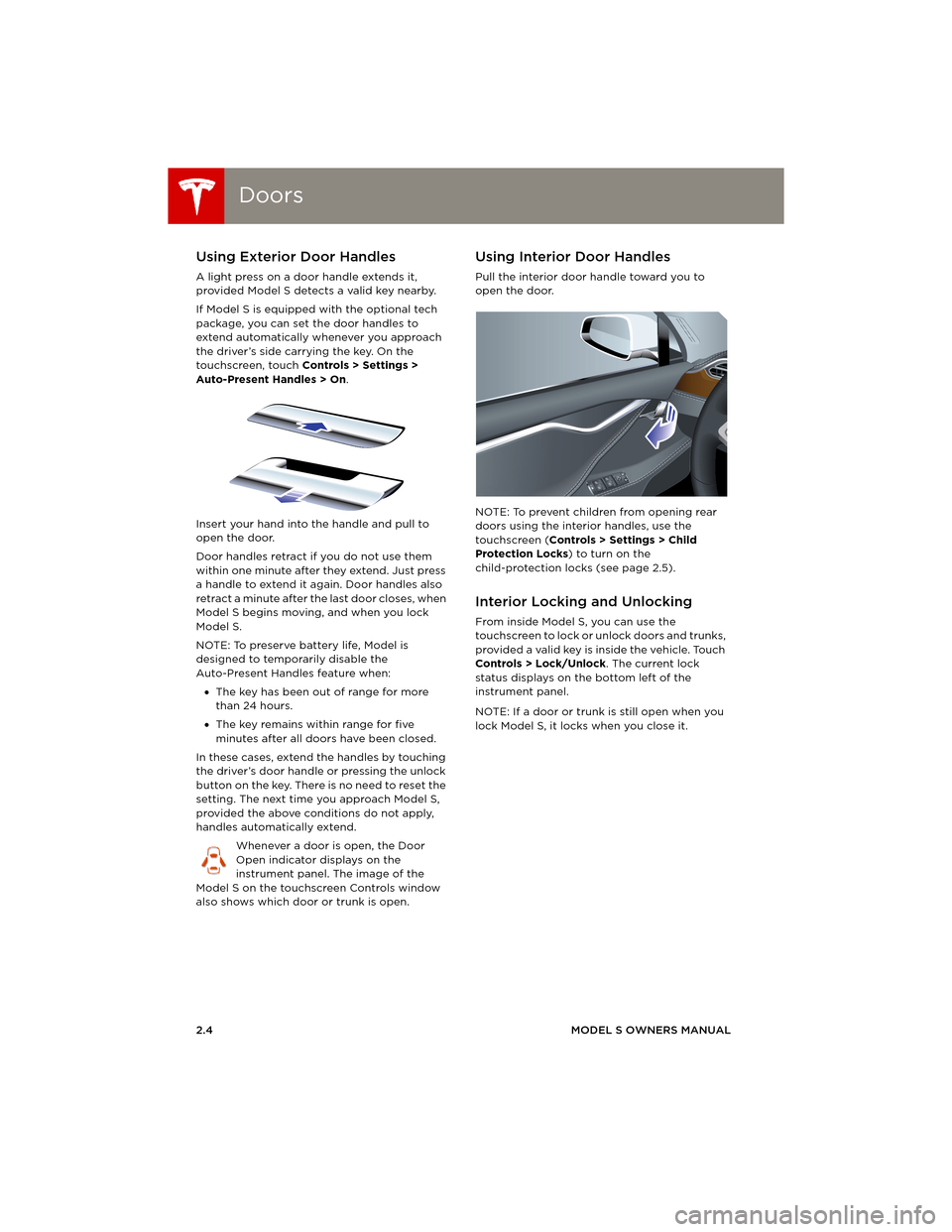
Using Exterior Door Handles
A light press on a door handle extends it,
provided Model S detects a valid key nearby.
If Model S is equipped with the optional tech
package, you can set the door handles to
extend automatically whenever you approach
the driver’s side carrying the key. On the
touchscreen, touch Controls > Settings >
Auto-Present Handles > On.
Insert your hand into the handle and pull to
open the door.
Door handles retract if you do not use them
within one minute after they extend. Just press
a handle to extend it again. Door handles also
retract a minute after the last door closes, when
Model S begins moving, and when you lock
Model S.
NOTE: To preserve battery life, Model is
designed to temporarily disable the
Auto-Present Handles feature when:
•The key has been out of range for more
than 24 hours.
•The key remains within range for five
minutes after all doors have been closed.
In these cases, extend the handles by touching
the driver’s door handle or pressing the unlock
button on the key. There is no need to reset the
setting. The next time you approach Model S,
provided the above conditions do not apply,
handles automatically extend.
Whenever a door is open, the Door
Open indicator displays on the
instrument panel. The image of the
Model S on the touchscreen Controls window
also shows which door or trunk is open.
Using Interior Door Handles
Pull the interior door handle toward you to
open the door.
NOTE: To prevent children from opening rear
doors using the interior handles, use the
touchscreen (Controls > Settings > Child
Protection Locks) to turn on the
child-protection locks (see page 2.5).
Interior Locking and Unlocking
From inside Model S, you can use the
touchscreen to lock or unlock doors and trunks,
provided a valid key is inside the vehicle. Touch
Controls > Lock/Unlock. The current lock
status displays on the bottom left of the
instrument panel.
NOTE: If a door or trunk is still open when you
lock Model S, it locks when you close it.
opening & closing.fm Page 4 Friday, July 26, 2013 2:01 PM
Page 13 of 152
Doors
OPENING AND CLOSING2.5
Child-protection Locks
Model S has child-protection locks on the rear
doors and liftgate to prevent them from being
opened using interior handles. Use the
touchscreen to turn child protection locks on or
off. Touch Controls > Settings > Child
Protection Locks.
NOTE: It is recommended that you turn
child-protection locks on whenever children are
seated in the rear seats.
Drive-away Locking
Model S can automatically lock all doors
(including the trunks) whenever your driving
speed exceeds 8 km/h. To turn this feature on
or off, touch Controls > Settings > Drive-Away
Door Lock.
Walk-away Locking
If Model S is equipped with the optional tech
package, Model S doors and trunks can
automatically lock whenever you walk away
carrying the key.
To turn this feature on or off, touch Controls >
Settings > Walk-Away Door Lock.
NOTE: If all doors are closed and you
double-click the key to unlock Model S,
walk-away locking is temporarily suspended
until the next time you use the key to lock
Model S. This allows you to keep Model S
unlocked in your garage.
Unlocking with a Dead Key Battery
If Model S does not unlock when you walk up to
it, or when you press the unlock button on your
key, the key’s battery may be dead. If this is the
case, you can still unlock and drive Model S.
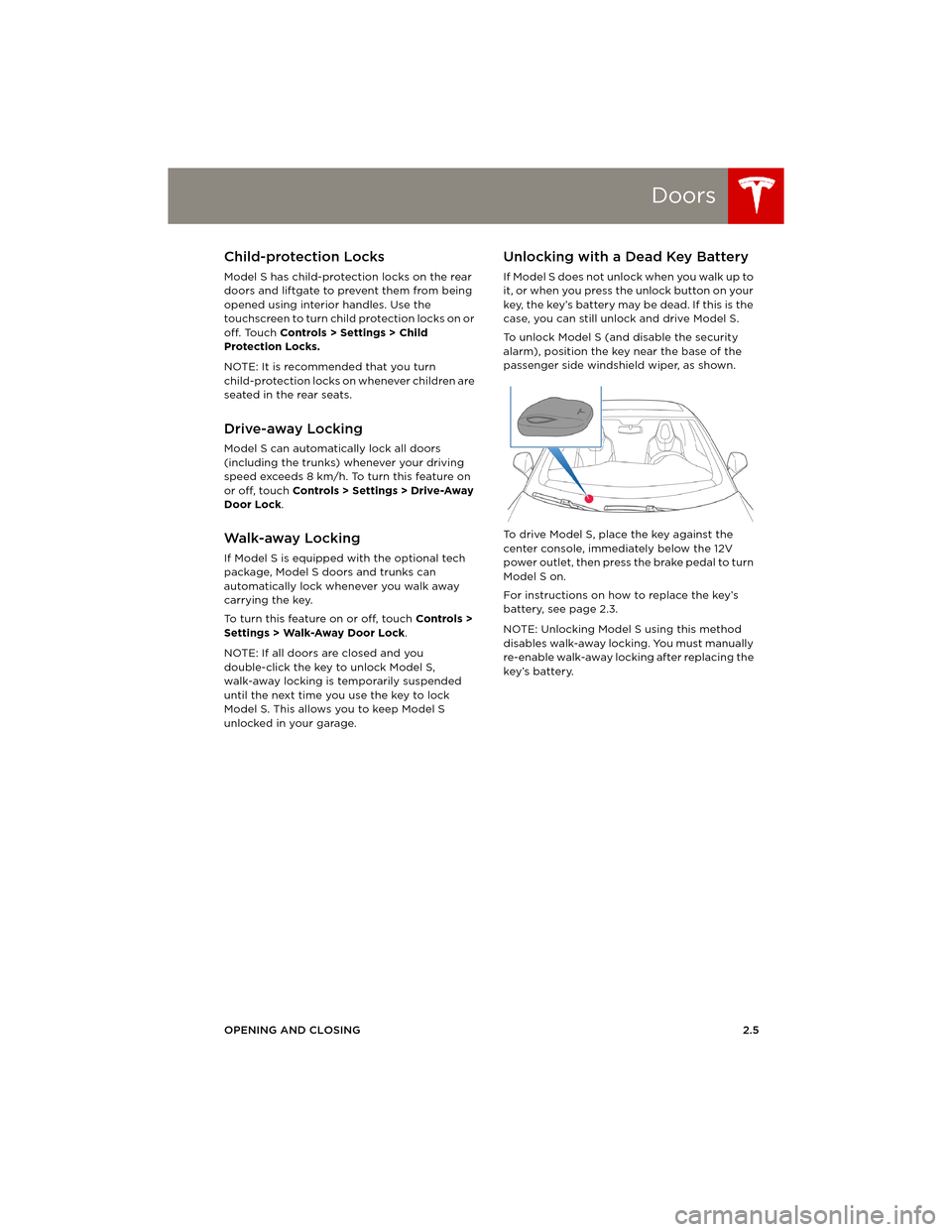
To unlock Model S (and disable the security
alarm), position the key near the base of the
passenger side windshield wiper, as shown.
To drive Model S, place the key against the
center console, immediately below the 12V
power outlet, then press the brake pedal to turn
Model S on.
For instructions on how to replace the key’s
battery, see page 2.3.
NOTE: Unlocking Model S using this method
disables walk-away locking. You must manually
re-enable walk-away locking after replacing the
key’s battery.
book.book Page 5 Friday, July 19, 2013 12:53 PM
Page 40 of 152
AirbagsAirbags
3.18MODEL S OWNERS MANUAL
Inflation Effects
When airbags inflate, a fine powder is released.
This powder can irritate the skin and should be
thoroughly flushed from the eyes and from any
cuts or abrasions.
After inflation, the airbags deflate to provide a
gradual cushioning effect for the occupants
and to ensure the driver’s forward vision is not
obscured.
If airbags have inflated, or if your vehicle has
been in an accident, always have the airbags,
seat belt pre-tensioners and any associated
components checked and, if necessary,
replaced by Tesla.
In a collision, in addition to the airbags inflating:
•Doors unlock and the door handles extend.
•Hazard warning lights turn on.
•Interior lights turn on.
•High voltage is disabled.
To restore Battery power, use the touchscreen
to manually power off Model S (see page 4.6),
then press the brake to power it back on again.
Airbag Warning Indicator
The airbag indicator on the instrument
panel remains lit if the airbag system is
malfunctioning. The only time this
indicator should light up is briefly when
Model S first starts up, in which case it turns off
within a few seconds. If it remains lit, contact
Tesla immediately and do not drive.
Airbag Warnings
All occupants, including the driver,
should always wear their seat belts
whether or not an airbag is also provided at
their seating position to minimize the risk of
severe injury or death in the event of a crash.
Front seat occupants should not place
their arms over the airbag module, as an
inflating bag can cause fractures or other
injuries.
WARNING: Do not use seat covers on
Model S. Doing so could restrict
deployment of the side air bags if an
accident occurs. It can also reduce the
accuracy of the occupant detection system.
WARNING: Airbags inflate with
considerable speed and force, which can
cause injury. To limit injuries, ensure that
occupants are wearing seat belts and are
correctly seated, with the seat positioned as far
back as possible.
WARNING: Do not use a child safety seat
or seat young children on a seat with an
operational airbag in front of it. Doing so can
cause injury or death if the airbag inflates.
WARNING: To ensure correct inflation of
the side airbags, maintain an
unobstructed gap between an occupant’s torso
and the side of Model S.
WARNING: Passengers should not lean
their heads against the doors. Doing so
can cause injury if a curtain airbag inflates.
WARNING: Do not allow passengers to
obstruct the operation of an airbag by
placing feet, knees or any other part of the
body on or near an airbag.
WARNING: Do not attach or place objects
on or near the front airbags, the side of
the front seats, the headliner at the side of the
vehicle, or any other airbag cover that could
interfere with inflation of an airbag. Objects can
cause serious injury if the vehicle is in a crash
severe enough to cause the airbag to inflate.
WARNING: Following inflation, some
airbag components are hot. Do not touch
until they have cooled.
book.book Page 18 Friday, July 19, 2013 12:53 PM
Page 46 of 152
Starting and Powering OffStarting and Powering Off
4.6MODEL S OWNERS MANUAL
Starting and Powering OffStarting Model S
When you open a door, Model S powers on the
instrument panel and touchscreen. The center
circle on the instrument panel displays the
status of doors and the charge level, and you
can operate all controls.
To d r i v e :
•PRESS THE BRAKE - the center circle on
the instrument panel changes to display the
speedometer, power meter, charge level,
and selected gear (P, R, N, or D)
•SELECT A GEAR - all the way down for
Drive and all the way up for Reverse,
Everything you need to know when driving
Model S displays on the instrument panel.
Key Not Inside
If Model S does not detect a key when you
press the brake, the instrument panel displays a
message telling you that a key was not
detected.
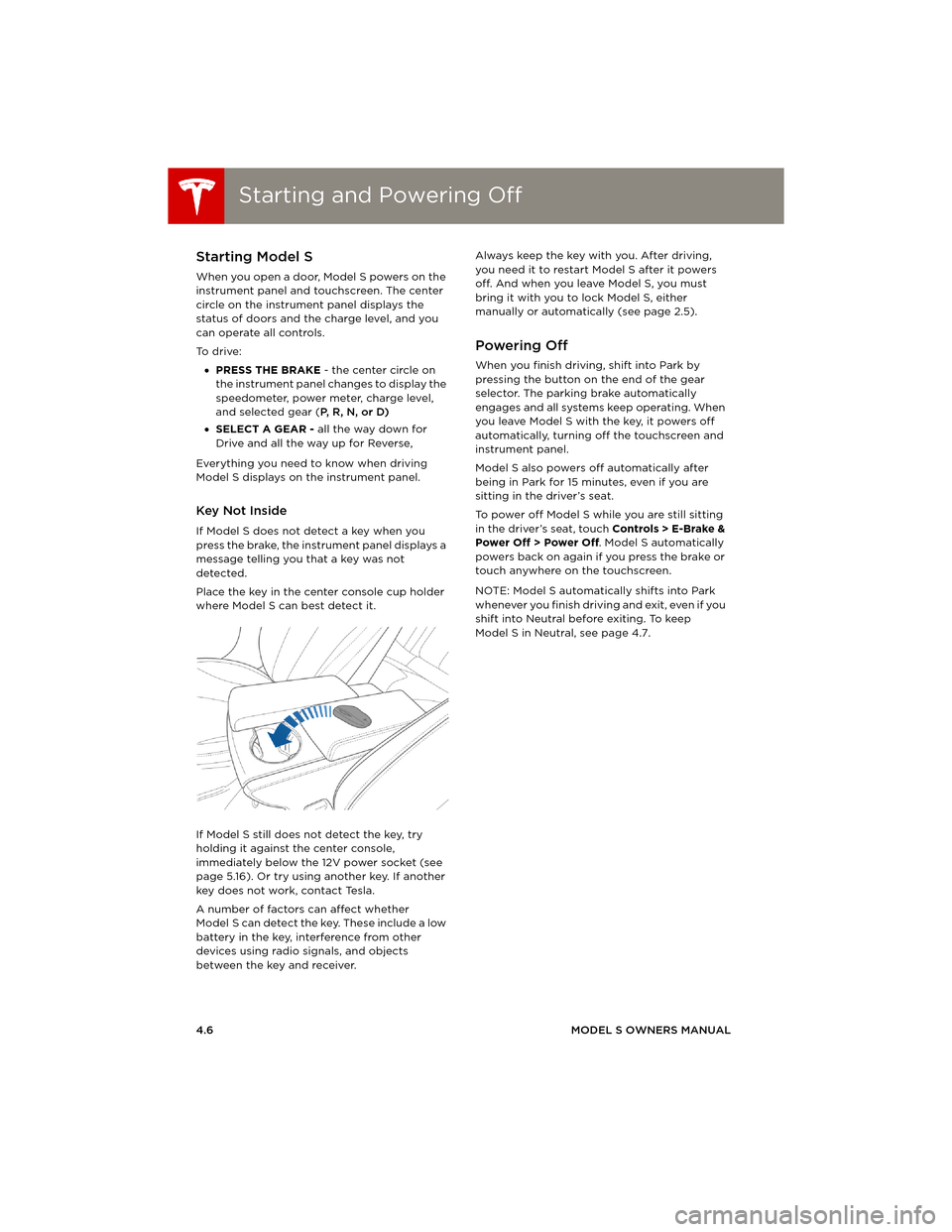
Place the key in the center console cup holder
where Model S can best detect it.
If Model S still does not detect the key, try
holding it against the center console,
immediately below the 12V power socket (see
page 5.16). Or try using another key. If another
key does not work, contact Tesla.
A number of factors can affect whether
Model S can detect the key. These include a low
battery in the key, interference from other
devices using radio signals, and objects
between the key and receiver.Always keep the key with you. After driving,
you need it to restart Model S after it powers
off. And when you leave Model S, you must
bring it with you to lock Model S, either
manually or automatically (see page 2.5).
Powering Off
When you finish driving, shift into Park by
pressing the button on the end of the gear
selector. The parking brake automatically
engages and all systems keep operating. When
you leave Model S with the key, it powers off
automatically, turning off the touchscreen and
instrument panel.
Model S also powers off automatically after
being in Park for 15 minutes, even if you are
sitting in the driver’s seat.
To power off Model S while you are still sitting
in the driver’s seat, touch Controls > E-Brake &
Power Off > Power Off. Model S automatically
powers back on again if you press the brake or
touch anywhere on the touchscreen.
NOTE: Model S automatically shifts into Park
whenever you finish driving and exit, even if you
shift into Neutral before exiting. To keep
Model S in Neutral, see page 4.7.
book.book Page 6 Friday, July 19, 2013 12:53 PM
Page 48 of 152
Instrument PanelInstrument Panel
4.8MODEL S OWNERS MANUAL
Instrument PanelInstrument Panel Overview
NOTE: The following illustration is provided for demonstration purposes only. Depending on vehicle
options, software version, and market region, the information displayed may be slightly different.
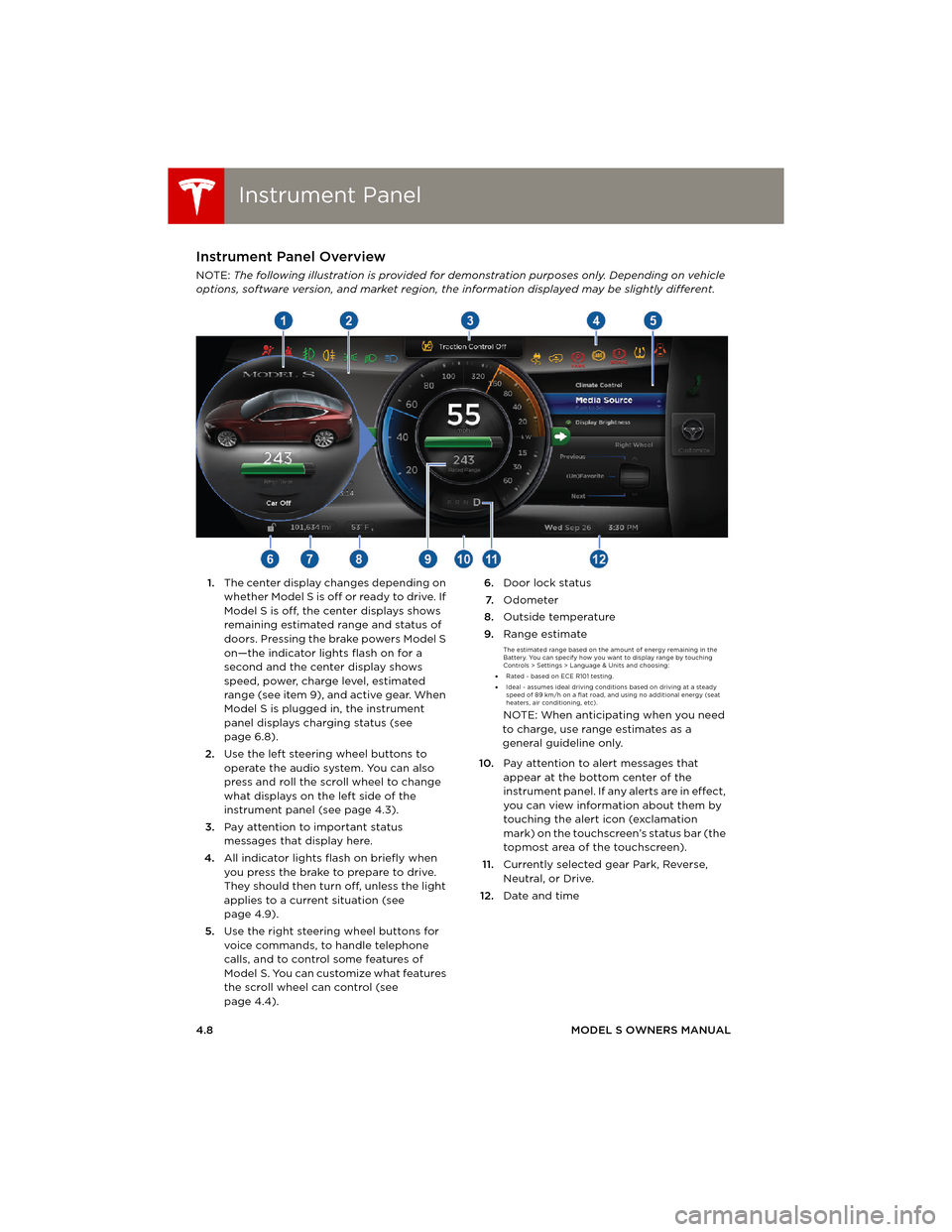
1.The center display changes depending on
whether Model S is off or ready to drive. If
Model S is off, the center displays shows
remaining estimated range and status of
doors. Pressing the brake powers Model S
on—the indicator lights flash on for a
second and the center display shows
speed, power, charge level, estimated
range (see item 9), and active gear. When
Model S is plugged in, the instrument
panel displays charging status (see
page 6.8).
2.Use the left steering wheel buttons to
operate the audio system. You can also
press and roll the scroll wheel to change
what displays on the left side of the
instrument panel (see page 4.3).
3.Pay attention to important status
messages that display here.
4.All indicator lights flash on briefly when
you press the brake to prepare to drive.
They should then turn off, unless the light
applies to a current situation (see
page 4.9).
5.Use the right steering wheel buttons for
voice commands, to handle telephone
calls, and to control some features of
Model S. You can customize what features
the scroll wheel can control (see
page 4.4).6.Door lock status
7.Odometer
8.Outside temperature
9.Range estimate
The estimated range based on the amount of energy remaining in the
Battery. You can specify how you want to display range by touching
Controls > Settings > Language & Units and choosing:
•Rated - based on ECE R101 testing.
•Ideal - assumes ideal driving conditions based on driving at a steady
speed of 89 km/h on a flat road, and using no additional energy (seat
heaters, air conditioning, etc).
NOTE: When anticipating when you need
to charge, use range estimates as a
general guideline only.
10.Pay attention to alert messages that
appear at the bottom center of the
instrument panel. If any alerts are in effect,
you can view information about them by
touching the alert icon (exclamation
mark) on the touchscreen’s status bar (the
topmost area of the touchscreen).
11.Currently selected gear Park, Reverse,
Neutral, or Drive.
12.Date and time
book.book Page 8 Friday, July 19, 2013 12:53 PM
Page 59 of 152
Energy Usage
DRIVING4.19
Energy UsageDisplaying Energy Usage
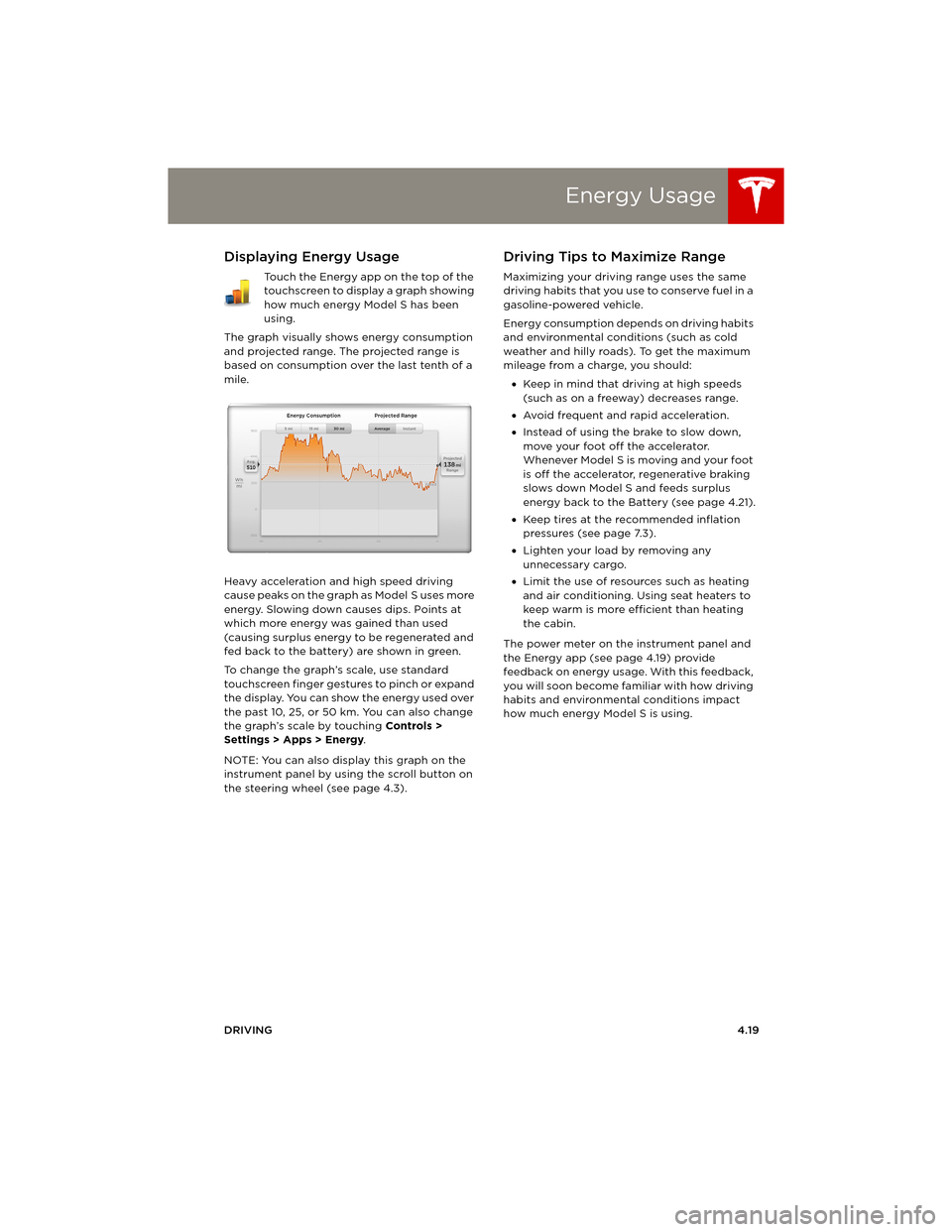
Touch the Energy app on the top of the
touchscreen to display a graph showing
how much energy Model S has been
using.
The graph visually shows energy consumption
and projected range. The projected range is
based on consumption over the last tenth of a
mile.
Heavy acceleration and high speed driving
cause peaks on the graph as Model S uses more
energy. Slowing down causes dips. Points at
which more energy was gained than used
(causing surplus energy to be regenerated and
fed back to the battery) are shown in green.
To change the graph’s scale, use standard
touchscreen finger gestures to pinch or expand
the display. You can show the energy used over
the past 10, 25, or 50 km. You can also change
the graph’s scale by touching Controls >
Settings > Apps > Energy.
NOTE: You can also display this graph on the
instrument panel by using the scroll button on
the steering wheel (see page 4.3).
Driving Tips to Maximize Range
Maximizing your driving range uses the same
driving habits that you use to conserve fuel in a
gasoline-powered vehicle.
Energy consumption depends on driving habits
and environmental conditions (such as cold
weather and hilly roads). To get the maximum
mileage from a charge, you should:
•Keep in mind that driving at high speeds
(such as on a freeway) decreases range.
•Avoid frequent and rapid acceleration.
•Instead of using the brake to slow down,
move your foot off the accelerator.
Whenever M odel S is moving and your foot
is off the accelerator, regenerative braking
slows down Model S and feeds surplus
energy back to the Battery (see page 4.21).
•Keep tires at the recommended inflation
pressures (see page 7.3).
•Lighten your load by removing any
unnecessary cargo.
•Limit the use of resources such as heating
and air conditioning. Using seat heaters to
keep warm is more efficient than heating
the cabin.
The power meter on the instrument panel and
the Energy app (see page 4.19) provide
feedback on energy usage. With this feedback,
you will soon become familiar with how driving
habits and environmental conditions impact
how much energy Model S is using.
book.book Page 19 Friday, July 19, 2013 12:53 PM