display TESLA MODEL S 2014 (North America) Workshop Manual
[x] Cancel search | Manufacturer: TESLA, Model Year: 2014, Model line: MODEL S, Model: TESLA MODEL S 2014Pages: 159, PDF Size: 6.14 MB
Page 105 of 159
Using Tire ChainsTesla has tested and approved Security Chain
Company (SCC) Model Z-563 chains for use
on the rear wheels. These chains must only be used if your Model S has 245/45R19 rear tiresinstalled. Do not use chains on 21 inch tires.
When installing tire chains, follow the instructions provided by the tire chainmanufacturer. Mount them as tightly as
possible.
When using tire chains:
• Drive slowly. Do not exceed 30 mph (48 km/h).
• Avoid heavily loading Model S (heavy loads can reduce the clearance between
the tires and the body).
• Remove the tire chains as soon as conditions allow.
Note: Tire chains are prohibited in some
jurisdictions. Check local laws before installing
tire chains.Caution: Using non-recommended tire
chains, or using tire chains on other sized tires, can damage the suspension, body,wheels, and/or brake lines. Damagecaused by using non-recommended tire
chains is not covered by the warranty.Caution: Ensure that tire chains cannot
touch suspension components or brake
lines. If you hear the chains making
unusual noises that would indicate
contact with Model S, stop and
investigate immediately.
Tire Pressure Monitoring
Each tire should be checked monthly when
cold and inflated to the recommended pressures that are printed on the Tire and
Loading Information label located on the
driver’s door pillar (see Maintaining Tire
Pressures on page 100). If your vehicle has
tires of a different size than the size indicated
on the vehicle placard or tire inflation pressure
label, determine the proper tire inflation
pressure for those tires.
As an added safety feature, your vehicle has
been equipped with a tire pressure monitoring
system (TPMS) that displays a tire pressure
telltale (Tire Pressure Warning) on the
instrument panel when one or more of your
tires is significantly under- or over-inflated.
Accordingly, when the Tire Pressure indicator light displays on the instrument panel alerting
of tire pressure, stop and check your tires as
soon as possible, and inflate them to the
proper pressure (see Maintaining Tire
Pressures on page 100). Driving on a
significantly under-inflated tire causes the tire
to overheat and can lead to tire failure. Under- inflation also reduces fuel efficiency and tire
tread life, and may affect the vehicle's
handling and stopping ability.If Model S detects a fault with the
Tire Pressure Monitoring System
(TPMS), this indicator flashes for one
minute whenever you power on
Model S.
Note: Installing accessories that are not
approved by Tesla can interfere with the TPMS system.
Warning: The TPMS is not a substitute for
proper tire maintenance, including
manually checking tire pressures and
regularly inspecting the condition of tires.
It is the driver's responsibility to maintain
correct tire pressure, even if under- or
over-inflation has not reached the level
for the TPMS to trigger the Tire Pressure Warning on the instrument panel.
Resetting the TPMS Sensors
After replacing one or more wheels, the TPMS sensors must be reset to ensure tire pressurewarnings are accurate. However, note that theTPMS sensors do not need to be reset after
replacing a tire or rotating wheels.
Note: When changing to 21" wheels
(Performance Plus models), the TPMS may
generate false tire pressure warnings. Bring
Model S to a Tesla Service center for further
adjustment.
Note: Do not reset the TPMS sensors in an
attempt to clear tire pressure warnings.
Tire Care and Maintenance
Maintenance103
Page 106 of 159
To reset TPMS sensors:
1. Inflate all tires to their recommend
pressures, as indicated on the Tire and
Loading Information label located on the
driver’s door pillar.
2. Get ready to drive for ten minutes, then,
on the Model S touchscreen, touch
Controls > Settings > Vehicle > Tire
Pressure Monitor > Reset Sensors .
3. Follow the onscreen instructions.
Replacing a Tire Sensor
If the Tire Pressure warning indicator displays
frequently, contact Tesla to determine if a tire
sensor needs to be replaced. Tire sensors
must be replaced by a Tesla service technician
who can perform a brief setup procedure. If a
non-Tesla service center repairs or replaces a
tire, the tire sensor will not work until Tesla
performs the setup procedure.
TPMS Malfunction
Model S has also been equipped with a TPMS
malfunction indicator to indicate when the
system is not operating properly.The TPMS malfunction indicator is
combined with the tire pressure
indicator light. When the system
detects a malfunction, the indicator
flashes for approximately one
minute after Model S powers on, and
then remains continuously lit. This
sequence continues upon
subsequent vehicle start-ups as long
as the malfunction exists. When the
TPMS malfunction indicator is on,
the system might not be able to
detect or signal under- and over-
inflated tires as intended.
TPMS malfunctions can occur for a variety of
reasons, including installing replacement oralternate tires or wheels on the vehicle thatprevent the TPMS from functioning properly.Always check the TPMS malfunction indicator
light after replacing one or more tires or
wheels on your vehicle to ensure that the replacement or alternate tires and wheels
allow the TPMS to continue to function
properly.
Note: If a tire has been replaced or repaired
using a different tire sealant than the one
available from Tesla, and a low tire pressure is
detected, it is possible that the tire sensor has
been damaged. Contact Tesla to have the
fault repaired as soon as possible.
Tire Care and Maintenance
104Model S Owner's Manual
Page 112 of 159
Cleaning the InteriorFrequently inspect and clean the interior to
maintain its appearance and to prevent premature wear. If possible, immediately wipe
up spills and remove marks. For general
cleaning, wipe interior surfaces using a soft cloth (such as micro fiber) dampened with amixture of warm water and mild non-detergent cleaner (test all cleaners on a
concealed area before use). To avoid streaks,
dry immediately with a soft lint-free cloth.
Interior Glass
Do not scrape, or use any abrasive cleaning
fluid on glass or mirrored surfaces. This can
damage the reflective surface of the mirror
and the heating elements in the rear window.
Airbags
Do not allow any substance to enter an airbag
cover. This could affect correct operation.
Dashboard and Plastic Surfaces
Do not polish the upper surfaces of the
dashboard. Polished surfaces are reflective
and could interfere with your driving view.
Leather Seats
Leather is prone to dye-transfer which can cause discoloration, particularly on light
colored leather. White and tan leather is
coated with an anti-soiling treatment. Wipe
spills as soon as possible using a soft cloth
moistened with warm water and non-
detergent soap. Wipe gently in a circular
motion. Then wipe dry using a soft, lint-free
cloth. Using detergents or commercially
available leather cleaners and conditioners is
not recommended because they can discolor or dry out the leather.
Cloth Seats
Wipe spills as soon as possible using a soft cloth moistened with warm water and non-
detergent soap. Wipe gently in a circular motion. Then wipe dry using a soft, lint-free
cloth. Vacuum the seats as needed to remove
any loose dirt.
Carpets
Avoid over-wetting carpets. For heavily soiled
areas, use a diluted upholstery cleaner.Seat Belts
Extend the belts to wipe. Do not use any type
of detergent or chemical cleaning agent. Allow the belts to dry naturally while
extended, preferably away from direct sunlight.
Tesla Built-In Rear Facing Child Seats
Vacuum the seats to remove any loose dirt.
Wipe the seats with a soft cloth dampened
with warm water. You can also use an
upholstery cleaner designer for automotive use. Extend the belts to wipe. Allow the belts
to dry naturally, preferably away from direct
sunlight.
Touchscreen and Instrument Panel
Clean the touchscreen and instrument panel using a soft lint-free cloth specificallydesigned to clean monitors and displays. Donot use cleaners (such as a glass cleaner) and
do not use a wet wipe or a dry statically- charged cloth (such as a recently washed
microfiber). To wipe the touchscreen without
activating buttons and changing settings, you
can enter screen cleaning mode. Touch
Controls > Displays > Enter Screen Cleaning .
The display darkens to make it easy to see
dust and smudges.
Chrome and Metal Surfaces
Polish, abrasive cleaners or hard cloths can
damage the finish on chrome and metal surfaces.
Cautions for Interior CleaningWarning: If you notice any damage on an
airbag or seat belt, contact Tesla
immediately.Warning: Do not allow any water,
cleaners, or fabric to enter a seat belt
mechanism.Caution: Using solvents (including
alcohol), bleach, citrus, naphtha, or
silicone based products or additives on
interior components can cause damage.
Cleaning
110Model S Owner's Manual
Page 116 of 159
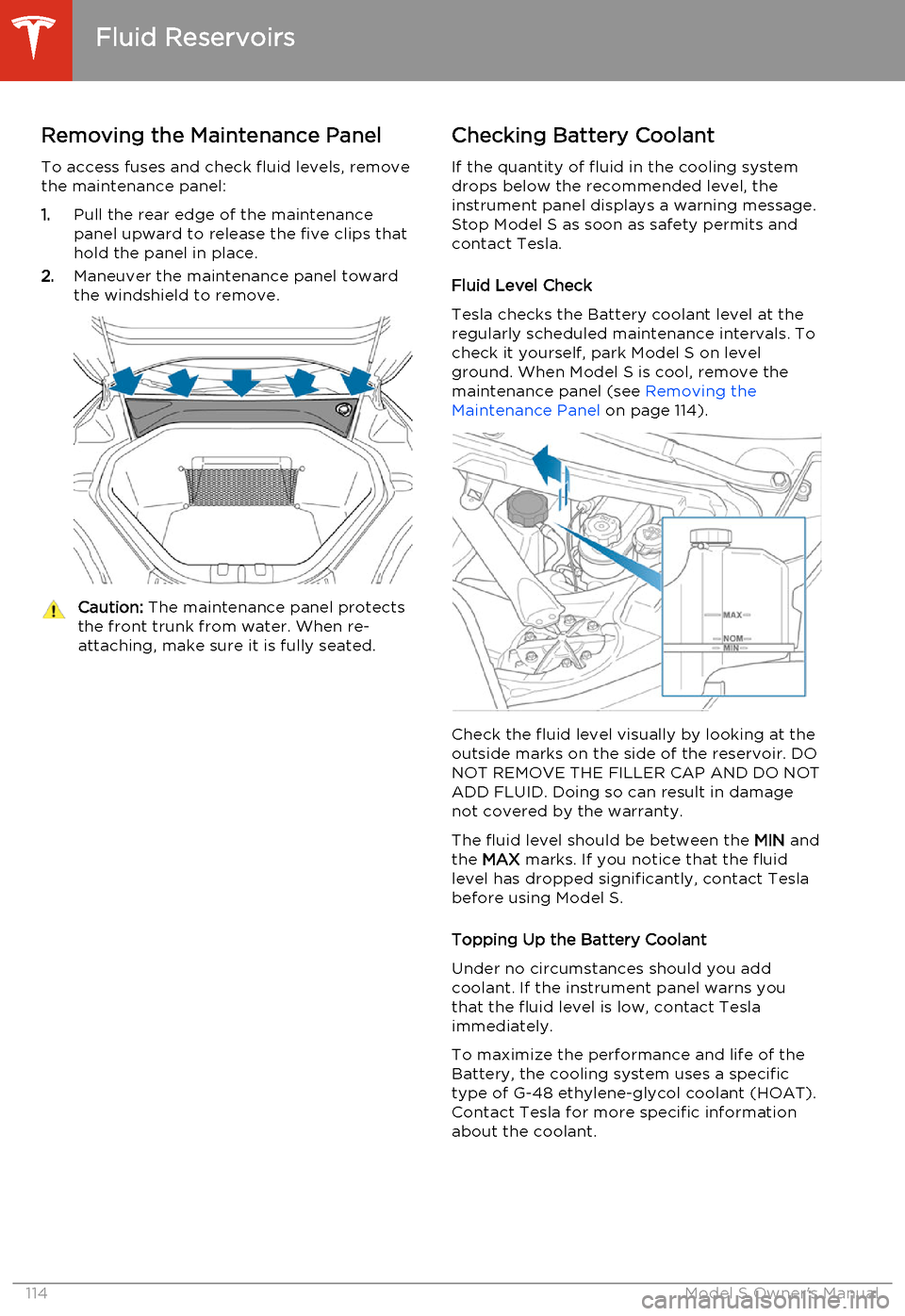
Removing the Maintenance Panel
To access fuses and check fluid levels, remove the maintenance panel:
1. Pull the rear edge of the maintenance
panel upward to release the five clips that
hold the panel in place.
2. Maneuver the maintenance panel toward
the windshield to remove.Caution: The maintenance panel protects
the front trunk from water. When re- attaching, make sure it is fully seated.Checking Battery Coolant
If the quantity of fluid in the cooling system
drops below the recommended level, the
instrument panel displays a warning message.
Stop Model S as soon as safety permits and
contact Tesla.
Fluid Level Check
Tesla checks the Battery coolant level at the
regularly scheduled maintenance intervals. To
check it yourself, park Model S on level
ground. When Model S is cool, remove the
maintenance panel (see Removing the
Maintenance Panel on page 114).
Check the fluid level visually by looking at the
outside marks on the side of the reservoir. DO
NOT REMOVE THE FILLER CAP AND DO NOT ADD FLUID. Doing so can result in damage
not covered by the warranty.
The fluid level should be between the MIN and
the MAX marks. If you notice that the fluid
level has dropped significantly, contact Tesla before using Model S.
Topping Up the Battery Coolant
Under no circumstances should you add coolant. If the instrument panel warns youthat the fluid level is low, contact Teslaimmediately.
To maximize the performance and life of the Battery, the cooling system uses a specific
type of G-48 ethylene-glycol coolant (HOAT).
Contact Tesla for more specific information
about the coolant.
Fluid Reservoirs
114Model S Owner's Manual
Page 117 of 159
Checking Brake FluidWarning: Contact Tesla immediately if
you notice increased movement of the
brake pedal or a significant loss of brake
fluid. Driving under these conditions can result in extended stopping distances orcomplete brake failure.The Brake indicator on the
instrument panel alerts you if the
quantity of fluid in the brake
reservoir drops below the
recommended level. If it displays
while driving, stop as soon as safety
permits by gently applying the
brakes. Do not continue driving.
Contact Tesla immediately.
Fluid Level Check
Tesla checks the brake fluid level at the
regularly scheduled maintenance intervals. To check it yourself, park Model S on level
ground. When Model S is cool, remove the maintenance panel (see Removing the
Maintenance Panel on page 114.
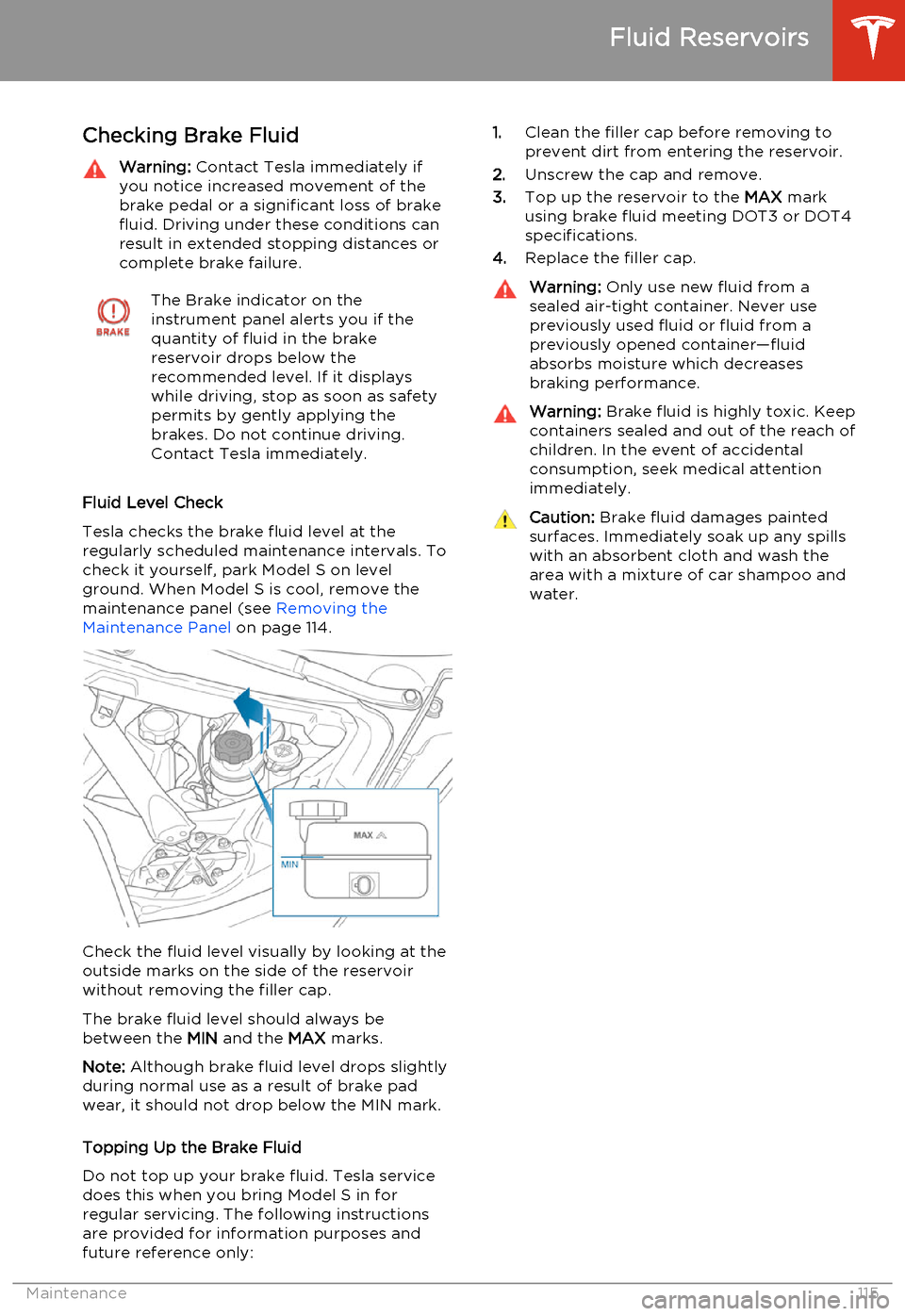
Check the fluid level visually by looking at the
outside marks on the side of the reservoir
without removing the filler cap.
The brake fluid level should always be
between the MIN and the MAX marks.
Note: Although brake fluid level drops slightly
during normal use as a result of brake pad wear, it should not drop below the MIN mark.
Topping Up the Brake Fluid
Do not top up your brake fluid. Tesla service does this when you bring Model S in for
regular servicing. The following instructions are provided for information purposes andfuture reference only:
1. Clean the filler cap before removing to
prevent dirt from entering the reservoir.
2. Unscrew the cap and remove.
3. Top up the reservoir to the MAX mark
using brake fluid meeting DOT3 or DOT4 specifications.
4. Replace the filler cap.Warning: Only use new fluid from a
sealed air-tight container. Never use previously used fluid or fluid from apreviously opened container—fluid
absorbs moisture which decreases
braking performance.Warning: Brake fluid is highly toxic. Keep
containers sealed and out of the reach of children. In the event of accidentalconsumption, seek medical attention
immediately.Caution: Brake fluid damages painted
surfaces. Immediately soak up any spills
with an absorbent cloth and wash the
area with a mixture of car shampoo and
water.
Fluid Reservoirs
Maintenance115
Page 118 of 159
Topping Up Washer Fluid
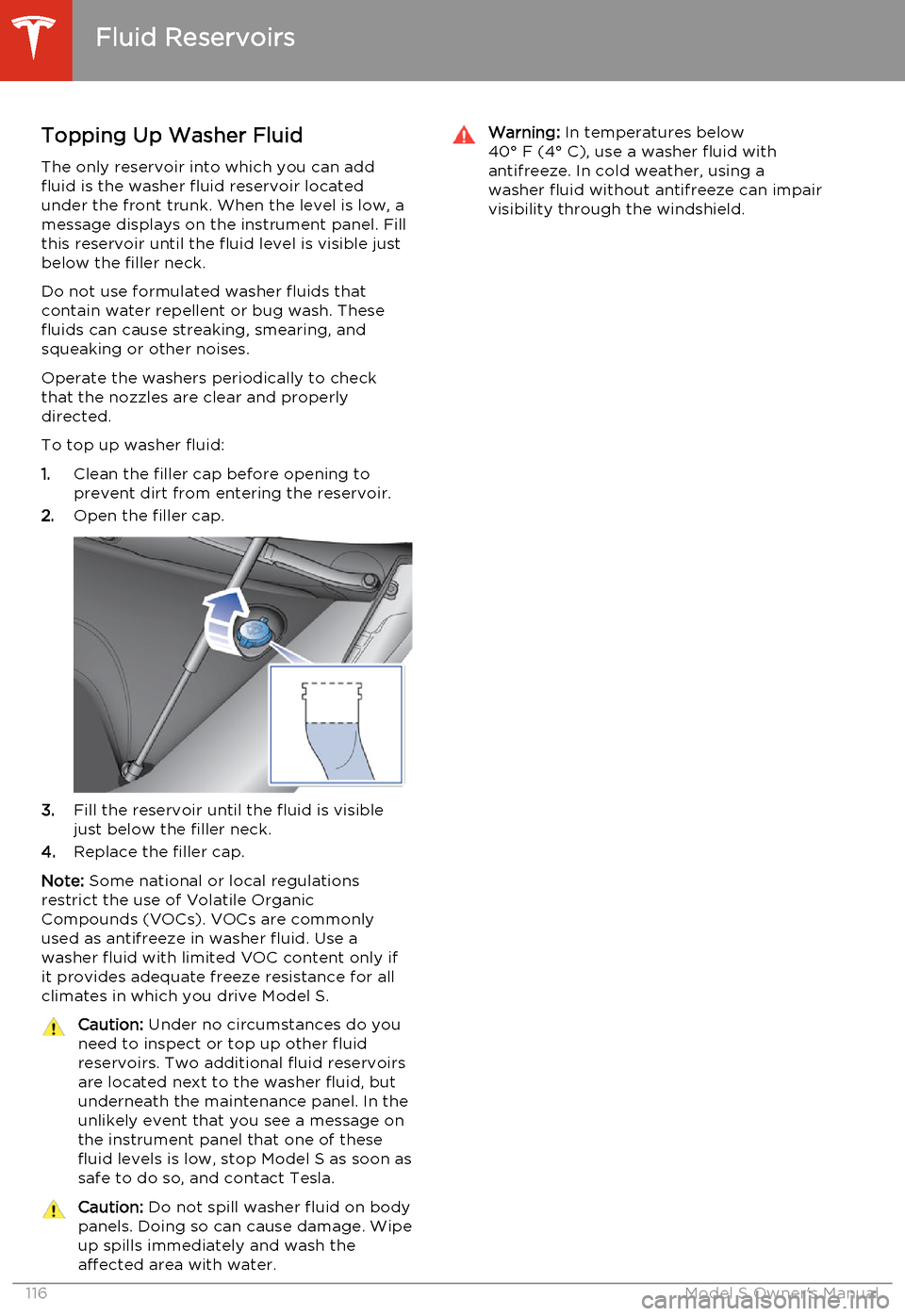
The only reservoir into which you can add
fluid is the washer fluid reservoir located
under the front trunk. When the level is low, a
message displays on the instrument panel. Fill
this reservoir until the fluid level is visible just
below the filler neck.
Do not use formulated washer fluids that contain water repellent or bug wash. These
fluids can cause streaking, smearing, and squeaking or other noises.
Operate the washers periodically to check
that the nozzles are clear and properly
directed.
To top up washer fluid:
1. Clean the filler cap before opening to
prevent dirt from entering the reservoir.
2. Open the filler cap.
3.Fill the reservoir until the fluid is visible
just below the filler neck.
4. Replace the filler cap.
Note: Some national or local regulations
restrict the use of Volatile Organic
Compounds (VOCs). VOCs are commonly used as antifreeze in washer fluid. Use a
washer fluid with limited VOC content only if
it provides adequate freeze resistance for all climates in which you drive Model S.
Caution: Under no circumstances do you
need to inspect or top up other fluid
reservoirs. Two additional fluid reservoirs
are located next to the washer fluid, but underneath the maintenance panel. In the
unlikely event that you see a message on the instrument panel that one of these
fluid levels is low, stop Model S as soon as safe to do so, and contact Tesla.Caution: Do not spill washer fluid on body
panels. Doing so can cause damage. Wipe
up spills immediately and wash the
affected area with water.Warning: In temperatures below
40° F (4° C), use a washer fluid with
antifreeze. In cold weather, using a
washer fluid without antifreeze can impair
visibility through the windshield.
Fluid Reservoirs
116Model S Owner's Manual
Page 126 of 159
Jacking Procedure
Follow the steps below to lift Model S. Ensure that any non-Tesla repair facility is aware of
these lifting points.
1. Position Model S centrally between the lift
posts.
2. If your Model S is equipped with Smart Air
Suspension, it automatically self-levels,even when power is off. Use thetouchscreen to set the suspension as
follows:
• Touch Controls > Driving .
• Press the brake pedal, then touch Very High to maximize the height of
the suspension.
• Touch Jack to disable self-leveling.When Jack mode is active,
Model S displays this indicator
light on the instrument panel,
along with a message telling
you that active suspension is
disabled.
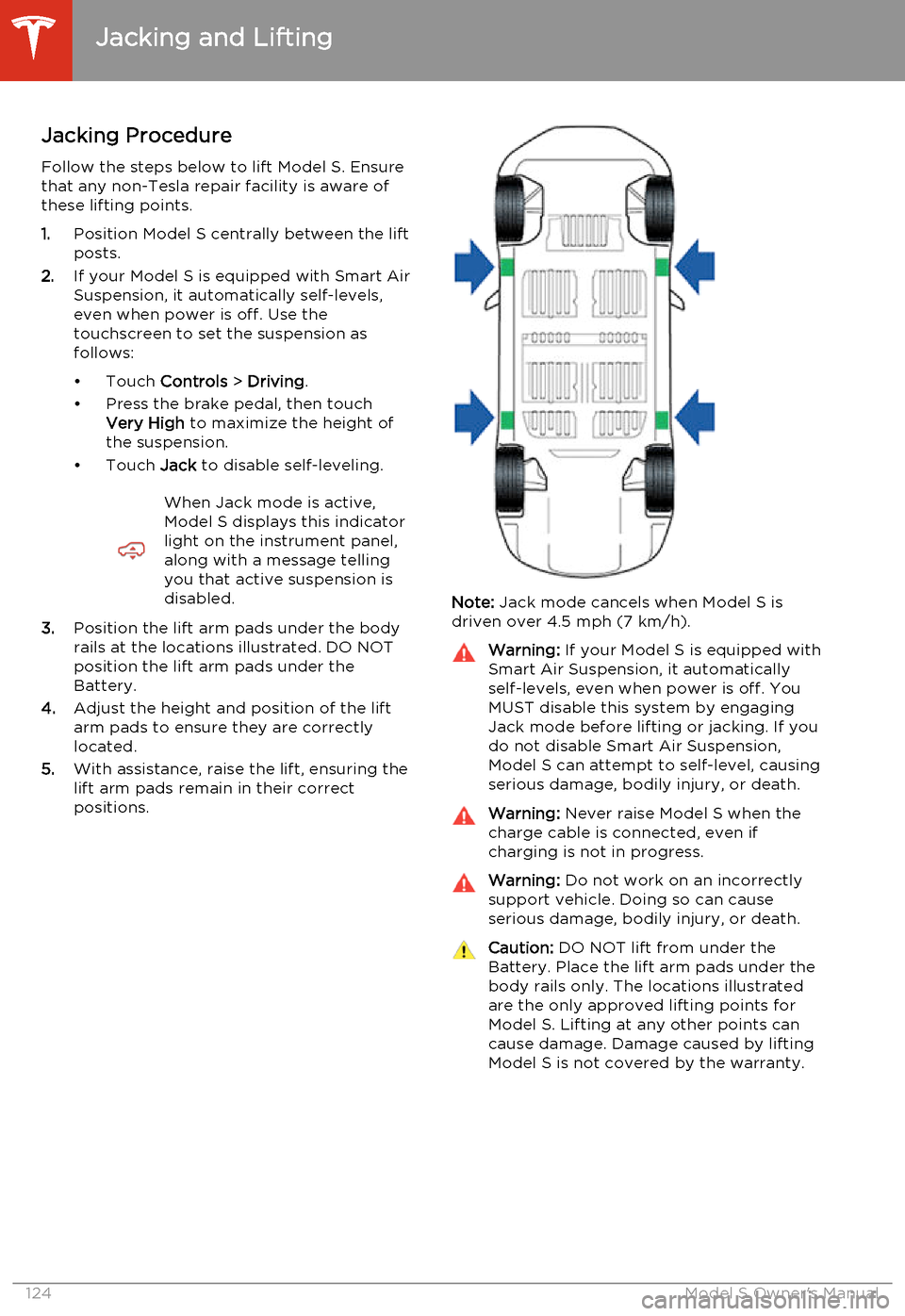
3. Position the lift arm pads under the body
rails at the locations illustrated. DO NOT
position the lift arm pads under the
Battery.
4. Adjust the height and position of the lift
arm pads to ensure they are correctly
located.
5. With assistance, raise the lift, ensuring the
lift arm pads remain in their correct
positions.
Note: Jack mode cancels when Model S is
driven over 4.5 mph (7 km/h).
Warning: If your Model S is equipped with
Smart Air Suspension, it automatically
self-levels, even when power is off. You
MUST disable this system by engaging
Jack mode before lifting or jacking. If you do not disable Smart Air Suspension,
Model S can attempt to self-level, causing serious damage, bodily injury, or death.Warning: Never raise Model S when the
charge cable is connected, even if
charging is not in progress.Warning: Do not work on an incorrectly
support vehicle. Doing so can cause
serious damage, bodily injury, or death.Caution: DO NOT lift from under the
Battery. Place the lift arm pads under the body rails only. The locations illustratedare the only approved lifting points forModel S. Lifting at any other points can
cause damage. Damage caused by lifting Model S is not covered by the warranty.
Jacking and Lifting
124Model S Owner's Manual
Page 144 of 159
Use a Flatbed Only
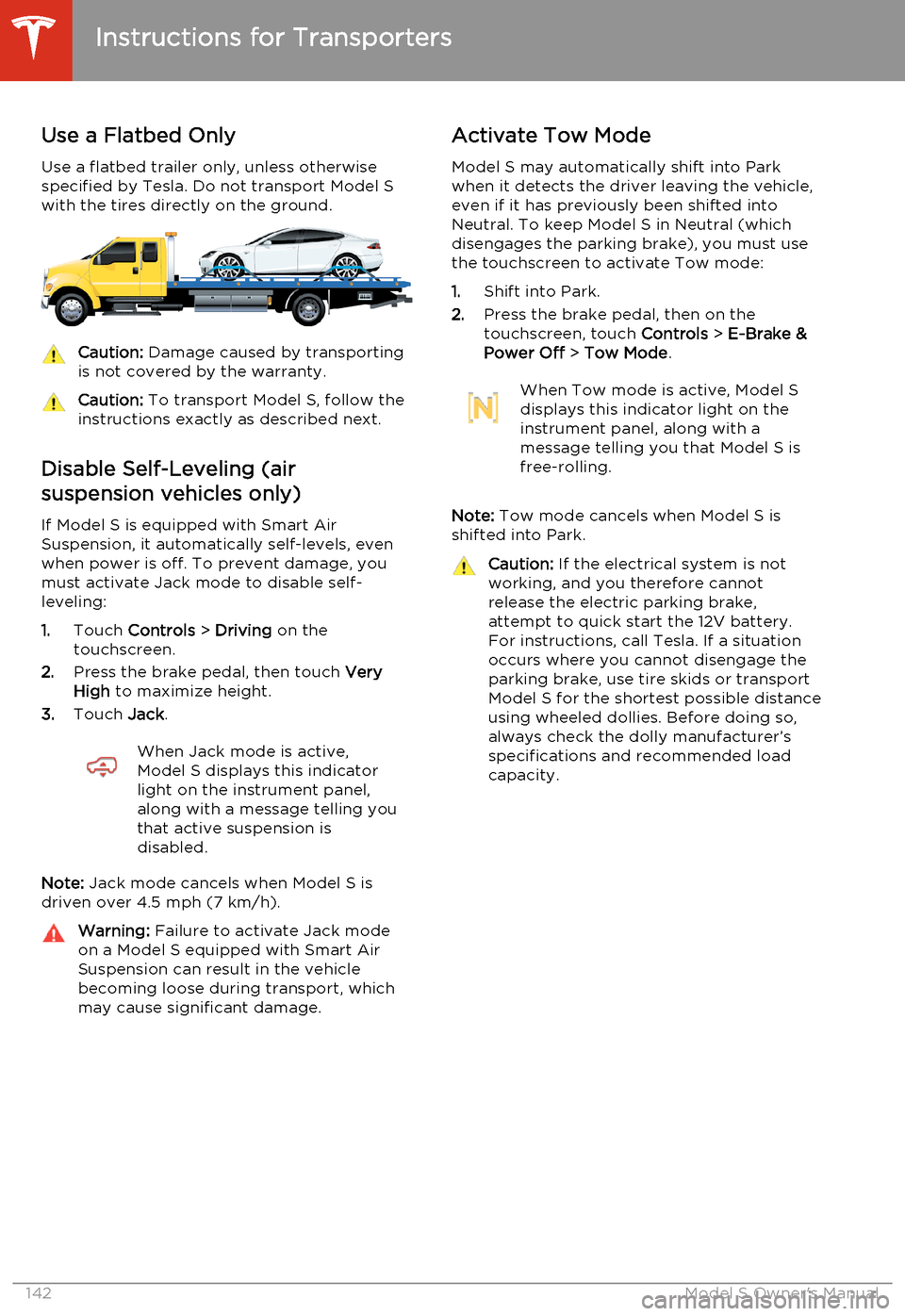
Use a flatbed trailer only, unless otherwise
specified by Tesla. Do not transport Model S with the tires directly on the ground.Caution: Damage caused by transporting
is not covered by the warranty.Caution: To transport Model S, follow the
instructions exactly as described next.
Disable Self-Leveling (air
suspension vehicles only)
If Model S is equipped with Smart Air
Suspension, it automatically self-levels, even when power is off. To prevent damage, you
must activate Jack mode to disable self- leveling:
1. Touch Controls > Driving on the
touchscreen.
2. Press the brake pedal, then touch Very
High to maximize height.
3. Touch Jack.
When Jack mode is active,
Model S displays this indicator
light on the instrument panel,
along with a message telling you
that active suspension is
disabled.
Note: Jack mode cancels when Model S is
driven over 4.5 mph (7 km/h).
Warning: Failure to activate Jack mode
on a Model S equipped with Smart Air
Suspension can result in the vehicle becoming loose during transport, which
may cause significant damage.Activate Tow Mode
Model S may automatically shift into Park
when it detects the driver leaving the vehicle, even if it has previously been shifted into
Neutral. To keep Model S in Neutral (which disengages the parking brake), you must use
the touchscreen to activate Tow mode:
1. Shift into Park.
2. Press the brake pedal, then on the
touchscreen, touch Controls > E-Brake &
Power Off > Tow Mode .When Tow mode is active, Model S
displays this indicator light on the
instrument panel, along with a
message telling you that Model S is
free-rolling.
Note: Tow mode cancels when Model S is
shifted into Park.
Caution: If the electrical system is not
working, and you therefore cannot
release the electric parking brake,
attempt to quick start the 12V battery.
For instructions, call Tesla. If a situation
occurs where you cannot disengage the
parking brake, use tire skids or transport
Model S for the shortest possible distance
using wheeled dollies. Before doing so,
always check the dolly manufacturer’s specifications and recommended load
capacity.
Instructions for Transporters
142Model S Owner's Manual
Page 147 of 159
Illustrations
Illustrations are provided for demonstration
purposes only. Depending on vehicle options,
software version, region of purchase, and
specific vehicle settings, your Model S may
appear slightly different.
Although the owner information is applicable
to both right-hand drive and and left-hand
drive vehicles, many illustrations show only
left-hand drive vehicles. However, the
essential information that the illustrations are
providing is correct.
Errors or Inaccuracies
All specifications and descriptions are known
to be accurate at time of publishing. However, because continuous improvement is a goal atTesla, we reserve the right to make product
modifications at any time. To communicate any inaccuracies or omissions, or to provide
general feedback or suggestions regarding
the quality of this owner information, send an
email to:
[email protected]
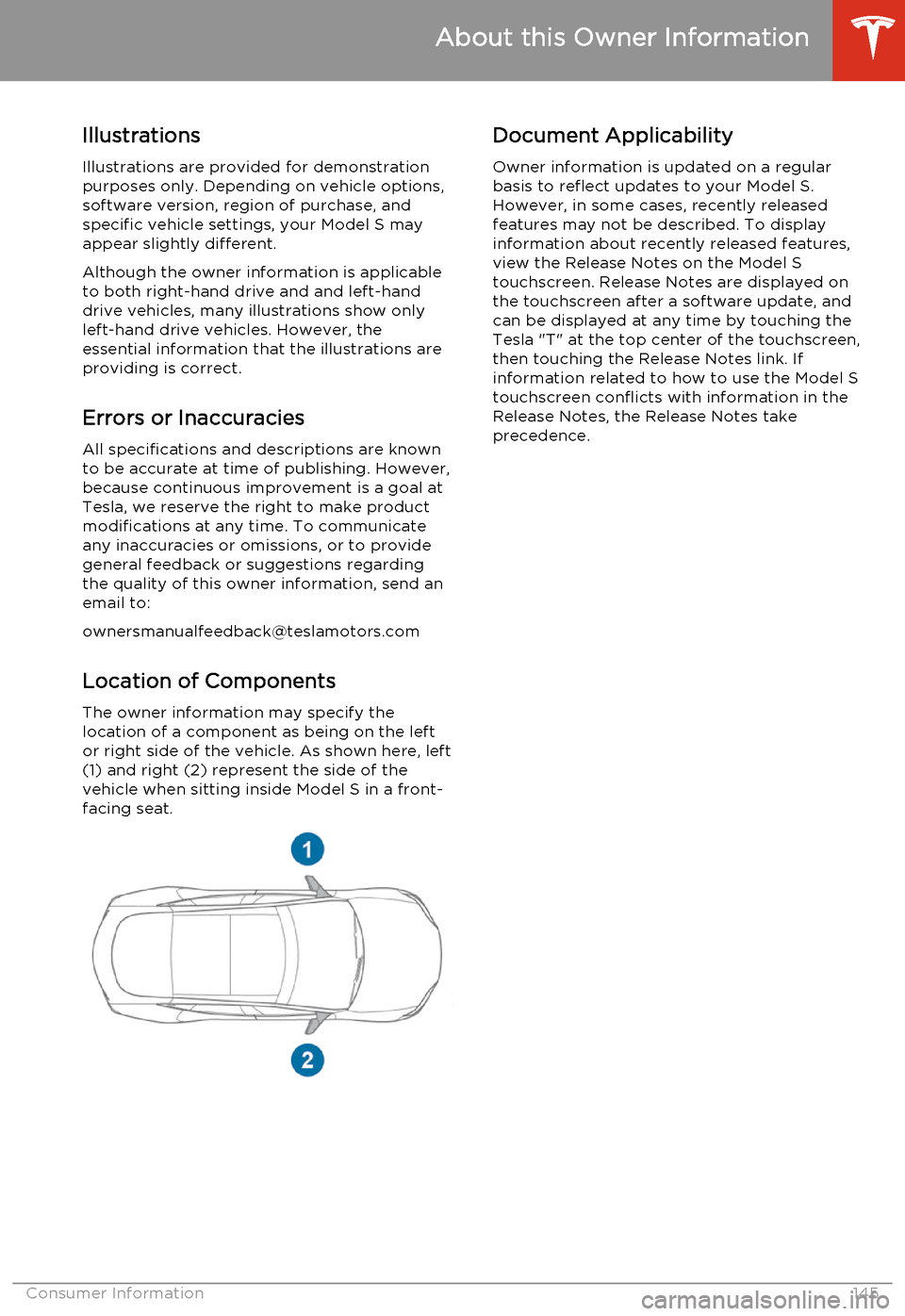
Location of ComponentsThe owner information may specify the
location of a component as being on the left
or right side of the vehicle. As shown here, left
(1) and right (2) represent the side of the vehicle when sitting inside Model S in a front-
facing seat.Document Applicability
Owner information is updated on a regular
basis to reflect updates to your Model S. However, in some cases, recently releasedfeatures may not be described. To displayinformation about recently released features,
view the Release Notes on the Model S
touchscreen. Release Notes are displayed on
the touchscreen after a software update, and
can be displayed at any time by touching the
Tesla "T" at the top center of the touchscreen,
then touching the Release Notes link. If information related to how to use the Model S
touchscreen conflicts with information in the
Release Notes, the Release Notes take
precedence.
About this Owner Information
Consumer Information145
Page 148 of 159
Copyrights and Trademarks
All information in this document and all
Model S ®
software is subject to copyright and
other intellectual property rights of Tesla
Motors, Inc. and its licensors. This material may not be modified, reproduced or copied, in
whole or in part, without the prior written permission of Tesla Motors, Inc. and its
licensors. Additional information is available upon request. The following are trademarks orregistered trademarks of Tesla Motors, Inc. in
the United States and other countries:
All other trademarks contained in this
document are the property of their respective owners and their use herein does not implysponsorship or endorsement of their products
or services. The unauthorized use of any
trademark displayed in this document or on the vehicle is strictly prohibited.
About this Owner Information
146Model S Owner's Manual