instrument panel TESLA MODEL S 2015 Workshop Manual
[x] Cancel search | Manufacturer: TESLA, Model Year: 2015, Model line: MODEL S, Model: TESLA MODEL S 2015Pages: 164, PDF Size: 4.78 MB
Page 124 of 164

Checking Brake FluidWarning: Contact Tesla immediately if
you notice increased movement of the
brake pedal or a significant loss of brake
fluid. Driving under these conditions can result in extended stopping distances orcomplete brake failure.The Brake indicator on the
instrument panel alerts you if the
quantity of fluid in the brake
reservoir drops below the
recommended level. If it displays
while driving, stop as soon as safety
permits by gently applying the
brakes. Do not continue driving.
Contact Tesla immediately.
Fluid Level Check
Tesla checks the brake fluid level at the
regularly scheduled maintenance intervals. To check it yourself, park Model S on level
ground. When Model S is cool, remove the maintenance panel (see Removing the
Maintenance Panel on page 123).
Check the fluid level visually by looking at the
outside marks on the side of the reservoir
without removing the filler cap.
The brake fluid level should always be
between the MIN and the MAX marks.
Note: Although brake fluid level drops slightly
during normal use as a result of brake pad wear, it should not drop below the MIN mark.
Topping Up the Brake Fluid
Do not top up your brake fluid. Tesla service does this when you bring Model S in for
regular servicing. The following instructions are provided for information purposes andfuture reference only:
1. Clean the filler cap before removing to
prevent dirt from entering the reservoir.
2. Unscrew the cap and remove.
3. Top up the reservoir to the MAX mark
using brake fluid meeting DOT3 or DOT4 specifications.
4. Replace the filler cap.Warning: Only use new fluid from a
sealed air-tight container. Never use previously used fluid or fluid from apreviously opened container—fluid
absorbs moisture which decreases
braking performance.Warning: Brake fluid is highly toxic. Keep
containers sealed and out of the reach of children. In the event of accidentalconsumption, seek medical attention
immediately.Caution: Brake fluid damages painted
surfaces. Immediately soak up any spills
with an absorbent cloth and wash the
area with a mixture of car shampoo and
water.
Fluid Reservoirs
124Model S Owner's Manual
Page 125 of 164
Topping Up Washer Fluid
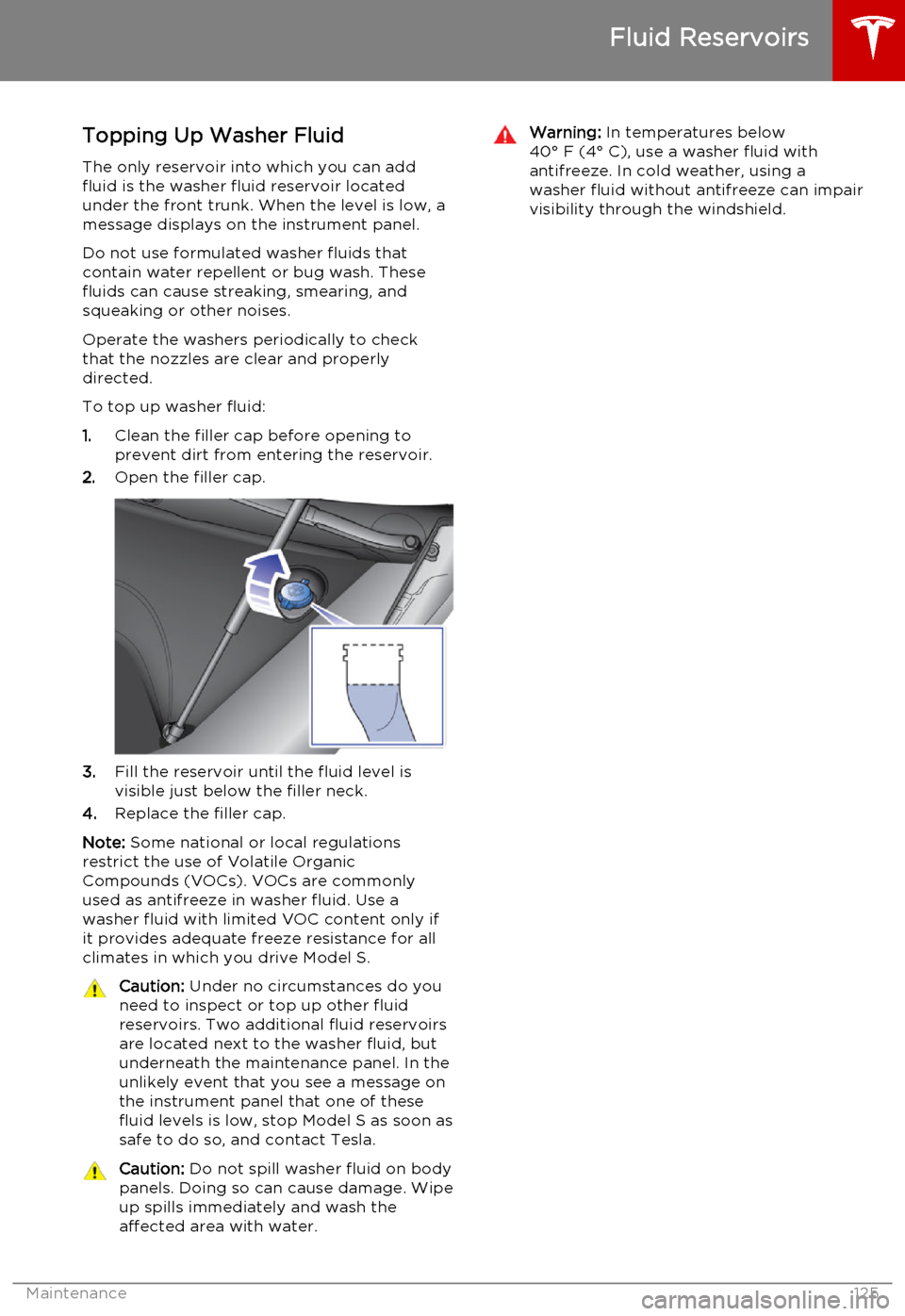
The only reservoir into which you can add
fluid is the washer fluid reservoir located
under the front trunk. When the level is low, a
message displays on the instrument panel.
Do not use formulated washer fluids that contain water repellent or bug wash. These
fluids can cause streaking, smearing, and squeaking or other noises.
Operate the washers periodically to check
that the nozzles are clear and properly
directed.
To top up washer fluid:
1. Clean the filler cap before opening to
prevent dirt from entering the reservoir.
2. Open the filler cap.
3.Fill the reservoir until the fluid level is
visible just below the filler neck.
4. Replace the filler cap.
Note: Some national or local regulations
restrict the use of Volatile Organic
Compounds (VOCs). VOCs are commonly used as antifreeze in washer fluid. Use a
washer fluid with limited VOC content only if
it provides adequate freeze resistance for all climates in which you drive Model S.
Caution: Under no circumstances do you
need to inspect or top up other fluid
reservoirs. Two additional fluid reservoirs
are located next to the washer fluid, but underneath the maintenance panel. In the
unlikely event that you see a message on the instrument panel that one of these
fluid levels is low, stop Model S as soon as safe to do so, and contact Tesla.Caution: Do not spill washer fluid on body
panels. Doing so can cause damage. Wipe
up spills immediately and wash the
affected area with water.Warning: In temperatures below
40° F (4° C), use a washer fluid with
antifreeze. In cold weather, using a
washer fluid without antifreeze can impair
visibility through the windshield.
Fluid Reservoirs
Maintenance125
Page 130 of 164

FuseRatingCircuit Protected495 AInstrument Panel505 ASiren, Intrusion/Tilt Sensor (Europe Only)5120 ATouchscreen5230 AHeated Rear Window535 ABattery Management System5415 AWiper De-Icer5530 ALeft Front Electric Seat5630 ARight Front Electric Seat5730 ACabin Fan5830 A12V Outlet/Forward Camera Sub.5930 AHVAC2 Power
Fuses
130Model S Owner's Manual
Page 132 of 164
Jacking Procedure
Follow the steps below to lift Model S. Ensure that any non-Tesla repair facility is aware of
these lifting points.
1. Position Model S centrally between the lift
posts.
2. If your Model S is equipped with Smart Air
Suspension, it automatically self-levels,even when power is off. Use thetouchscreen to set the suspension as
follows:
• Touch Controls > Suspension .
• Press the brake pedal, then touch Very High to maximize the height of
the suspension.
• Touch Jack to disable self-leveling.When Jack mode is active,
Model S displays this indicator
light on the instrument panel,
along with a message telling
you that active suspension is
disabled.
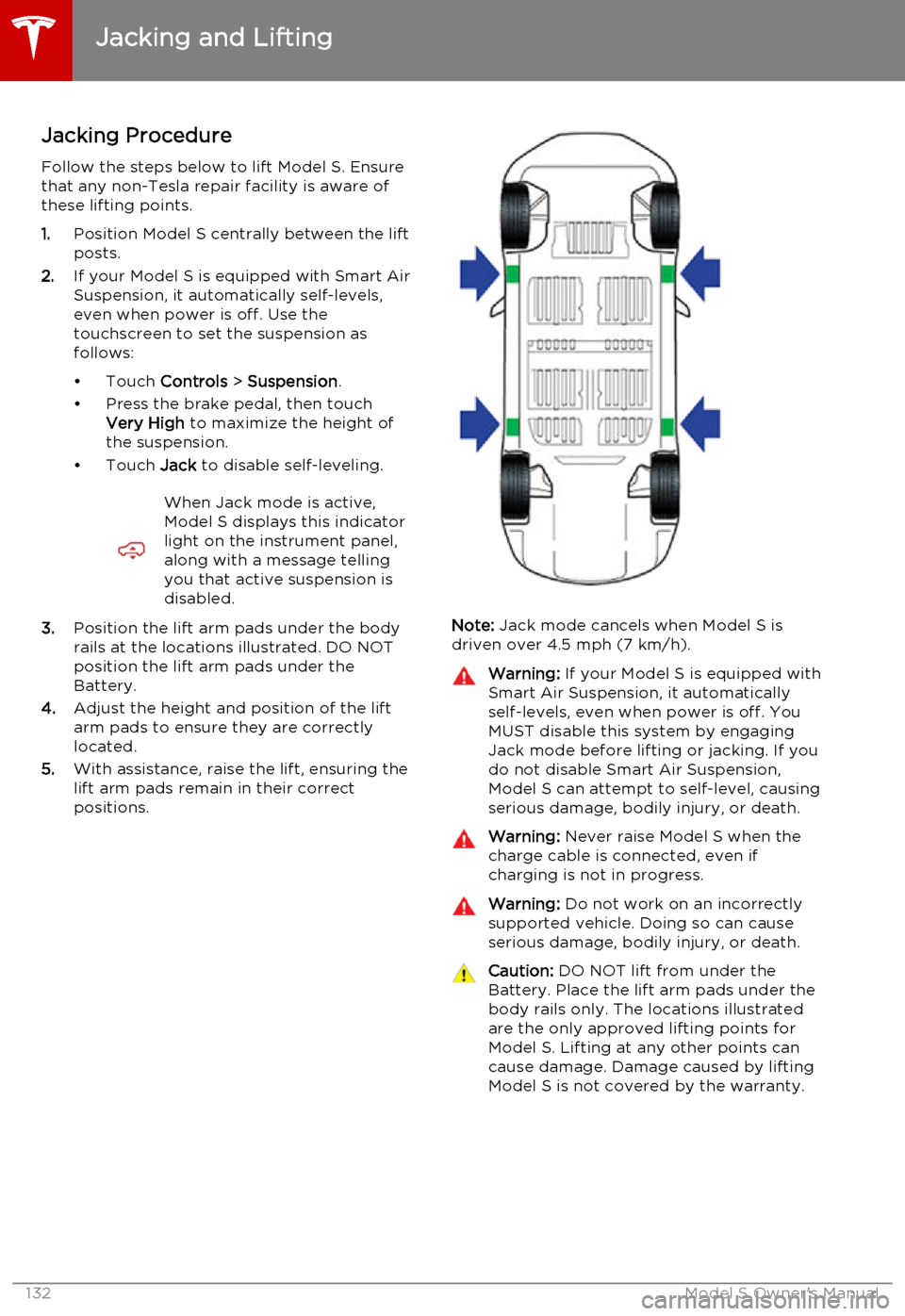
3. Position the lift arm pads under the body
rails at the locations illustrated. DO NOT
position the lift arm pads under the
Battery.
4. Adjust the height and position of the lift
arm pads to ensure they are correctly
located.
5. With assistance, raise the lift, ensuring the
lift arm pads remain in their correct
positions.Note: Jack mode cancels when Model S is
driven over 4.5 mph (7 km/h).
Warning: If your Model S is equipped with
Smart Air Suspension, it automatically
self-levels, even when power is off. You
MUST disable this system by engaging
Jack mode before lifting or jacking. If you do not disable Smart Air Suspension,
Model S can attempt to self-level, causing serious damage, bodily injury, or death.Warning: Never raise Model S when the
charge cable is connected, even if
charging is not in progress.Warning: Do not work on an incorrectly
supported vehicle. Doing so can cause
serious damage, bodily injury, or death.Caution: DO NOT lift from under the
Battery. Place the lift arm pads under the body rails only. The locations illustratedare the only approved lifting points forModel S. Lifting at any other points can
cause damage. Damage caused by lifting Model S is not covered by the warranty.
Jacking and Lifting
132Model S Owner's Manual
Page 150 of 164
Use a Flatbed Only
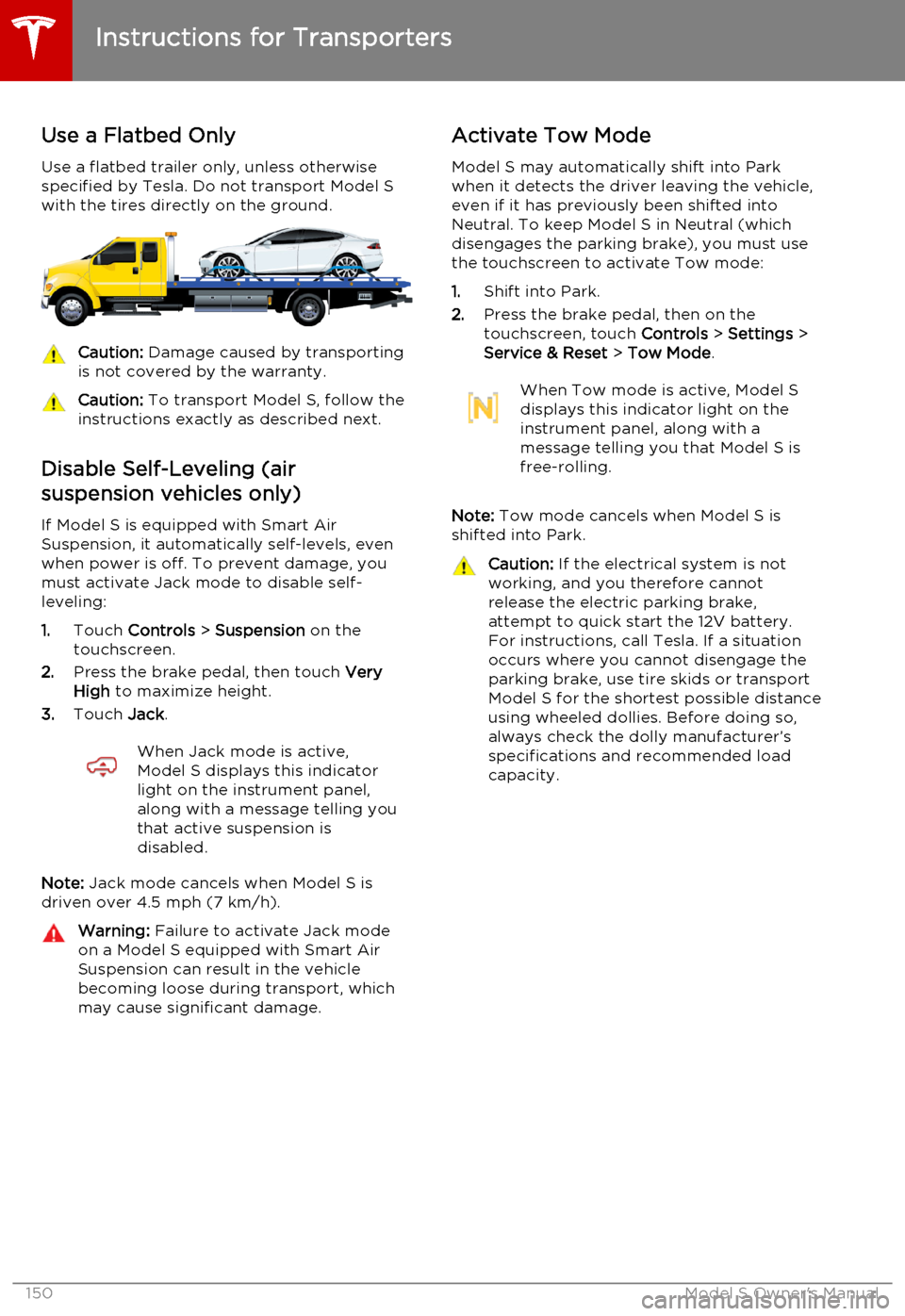
Use a flatbed trailer only, unless otherwise
specified by Tesla. Do not transport Model S with the tires directly on the ground.Caution: Damage caused by transporting
is not covered by the warranty.Caution: To transport Model S, follow the
instructions exactly as described next.
Disable Self-Leveling (air
suspension vehicles only)
If Model S is equipped with Smart Air
Suspension, it automatically self-levels, even when power is off. To prevent damage, you
must activate Jack mode to disable self- leveling:
1. Touch Controls > Suspension on the
touchscreen.
2. Press the brake pedal, then touch Very
High to maximize height.
3. Touch Jack.
When Jack mode is active,
Model S displays this indicator
light on the instrument panel,
along with a message telling you
that active suspension is
disabled.
Note: Jack mode cancels when Model S is
driven over 4.5 mph (7 km/h).
Warning: Failure to activate Jack mode
on a Model S equipped with Smart Air
Suspension can result in the vehicle becoming loose during transport, which
may cause significant damage.Activate Tow Mode
Model S may automatically shift into Park
when it detects the driver leaving the vehicle, even if it has previously been shifted into
Neutral. To keep Model S in Neutral (which disengages the parking brake), you must use
the touchscreen to activate Tow mode:
1. Shift into Park.
2. Press the brake pedal, then on the
touchscreen, touch Controls > Settings >
Service & Reset > Tow Mode .When Tow mode is active, Model S
displays this indicator light on the
instrument panel, along with a
message telling you that Model S is
free-rolling.
Note: Tow mode cancels when Model S is
shifted into Park.
Caution: If the electrical system is not
working, and you therefore cannot
release the electric parking brake,
attempt to quick start the 12V battery.
For instructions, call Tesla. If a situation
occurs where you cannot disengage the
parking brake, use tire skids or transport
Model S for the shortest possible distance
using wheeled dollies. Before doing so,
always check the dolly manufacturer’s specifications and recommended load
capacity.
Instructions for Transporters
150Model S Owner's Manual
Page 156 of 164

Contacting Tesla
For detailed information about your Model S,
go to www.teslamotors.com, click the
MY TESLA link, then enter your login credentials (or sign up to get these
credentials).
If you have any questions or concerns about
your Model S, call 1-877-79TESLA
(1-877 ‑798-3752).
Note: You can also use voice commands to
provide feedback to Tesla. Say "Note", "Report", "Bug note", or "Bug report" followed
by your brief comments. Model S takes a
snapshot of its systems, including screen
captures of the touchscreen and instrument
panel. Tesla periodically reviews these notes
and uses them to continue improving Model S. For details, see Using Voice Commands on
page 38.
Reporting Safety Defects - USIf you believe that Model S has a defect which
could cause a crash or could cause injury or
death, you should immediately inform the
National Highway Traffic Safety
Administration (NHTSA) in addition to notifying Tesla Motors.
If NHTSA receives similar complaints, it may open an investigation. If it finds that a safety
defect exists in a group of vehicles, it may order a recall and remedy campaign.
However, NHTSA cannot become involved in
individual problems between you, your dealer,
or Tesla Motors.
To contact NHTSA, you may call the Vehicle
Safety Hotline toll-free at 1-888-327-4236 (TTY: 1-800-424-9153); go to http://
www.safercar.gov; or write to: Administrator, National Highway Traffic Safety, 1200 New
Jersey Avenue SE., Washington, DC 20590.
You can also obtain other information about
motor vehicle safety from http://
www.safercar.gov.
Reporting Safety Defects - Canada
If you believe that your Model S has a defect
which could cause a crash or could cause injury or death, you should immediatelyinform Transport Canada, in addition tonotifying Tesla. To contact Transport Canada,call their toll-free number: 1-800-333-0510.
Reporting Concerns
156Model S Owner's Manual
Page 162 of 164
FCC certification 159
programming and using 96
hood 12
horn 39
I IC certifications 157
Ideal range 77
identification labels 134
indicator lights, summary of 44
Insane setting (dual motor) 74instrument panelcharging status 107
cleaning 119
overview of 43interiorcleaning 119
lights 47
overview 2
temperature control 80
Internet radio 85
intrusion detection 95
ionizer 77
J
J1772 102
Jack mode 84
jacking Model S 132
K
keyFCC and IC certifications 157
how to use 4
key not inside 41
ordering extras 5
replacing battery 5
keyless entry 4
L
labelTire and Loading Information 135
vehicle certification 136
lane assist 57
lane change flash 50
lane departure warning 57
language setting 77
LATCH child seats, installing 26
liftgateadjust opening height 10
opening 10
lifting Model S 132
lightscornering lights 50
hazard warning 50
headlights after exit 50
turn signals 50
load limits 135
location-based suspension 83
lock/unlock status 43
locking and unlocking doors 4
lumbar support 17
M
maintenancebrake fluid, checking 124
cleaning 118
daily and monthly checks 108
fluid replacement intervals 108
panel, removing 123
replacing fuses 126
replacing wiper blades 121
service intervals 108
tires 109
washer fluid, topping up 125
washer jets, cleaning 121
maps 90
mats 120
media 85
mileage upon delivery 155
mirrors 40
mobile app 100
Mobile Connectordescription 102
using 104
modifications 133
motor specifications 140
N
naming Model S 79
navigation 90
NCC certifications 157
Neutral gear 42
NHTSA, contacting 156
night mode 77
O occupancy sensor 34
odometeron instrument panel 43
resetting trip odometer 69
overhang dimensions 138
overtake acceleration 60
Owner Information, about 153, 154
Index
162Model S Owner's Manual
Page 163 of 164
PPark Assist 66
Park gear 42
parking brake 53
parts replacement 133
passenger detection 34
passenger front airbag 34
personal data, erasing 79phonesteering wheel controls for 38
using 88
power management 70
power socket 87
power windows 9
powering on and off 41
preferences, setting 77
Proposition 65 155
public charging stations 102
R radio 85
radio frequency, FCC information 159
rain sensor 51
rangedisplayed on instrument panel 43
driving tips to maximize 70
regenerative braking 53
range mode 70
Range Mode 74
Rated range 77
rear seats, folding and raising 18
rear view camera 71
rear window switches, disabling 9
regenerative braking 53
region format 77
release notes 99
Reverse gear 42
roadside assistance 149
roof racks 137
rotating tires 110
S
safety defectsreporting (Canada) 156
reporting (U.S.) 156safety informationairbags 35
child seats 27
rear facing child seats 30
seat belts 21seat beltscleaning 119
in a collision 21
overview of 20
pre-tensioners 21
wearing when pregnant 20
seat covers 19
seat heaters 80
seating capacity 135seatsadjusting 17
heaters 80
Tesla built-in rear facing 28
security settings 95
service data recording 155
service intervals 108
Settings 77
Settings, erasing 79
shifting gears 42
Slacker 85
slip start 54
Smart Preconditioning 77
software reset 79
software updates 99
specificationsdimensions 138
exterior 138
subsystems 140
tires 144
weights 139
wheels 143
stability control 54
starting Model S 41
steering specifications 140
steering wheel 37
summer tires 111
sunroof 15
suspension 84
suspension specifications 141
T
telematics 155
telephonesteering wheel controls for 38
using 88temperatureBattery (high voltage), limits 103
cabin, controls for 80
outside 43
tires 147
tie-down straps 152
tilt detection 95
Tire and Loading Information label 135
tire noise 112
Tire Pressure Monitoring SystemFCC certification 158
overview of 112
tire pressures, checking 109
Index
Index163