wheel TESLA MODEL Y 2023 Owners Manual
[x] Cancel search | Manufacturer: TESLA, Model Year: 2023, Model line: MODEL Y, Model: TESLA MODEL Y 2023Pages: 298, PDF Size: 10.28 MB
Page 3 of 298

Overview................................................................3
Exterior Overview............................................................................3
Interior Overview.............................................................................4
Touchscreen Overview..................................................................5
Opening and Closing.......................................10
Keys.....................................................................................................10
Doors..................................................................................................14
Windows............................................................................................17
Rear Trunk.........................................................................................18
Front Trunk......................................................................................20
Interior Storage and Electronics..............................................23
Seating and Safety Restraints.....................27
Front and Rear Seats...................................................................27
Seat Belts.........................................................................................33
Child Safety Seats.........................................................................36
Airbags..............................................................................................43
Driving..................................................................50
Driver Profiles.................................................................................50
Steering Wheel...............................................................................52
Mirrors...............................................................................................54
Starting and Powering Off.........................................................55
Shifting..............................................................................................56
Lights.................................................................................................58
Car Status..........................................................................................61
Wipers and Washers....................................................................64
Braking and Stopping..................................................................65
Traction Control.............................................................................69
Park Assist.......................................................................................70
Vehicle Hold....................................................................................72
Acceleration Modes......................................................................73
Track Mode......................................................................................74
Trip Information.............................................................................76
Rear Facing Camera(s)...............................................................77
Pedestrian Warning System......................................................78
Towing and Accessories.............................................................79
Cold Weather Best Practices....................................................85
Autopilot..............................................................88
About Autopilot.............................................................................88
Traffic-Aware Cruise Control.....................................................91
Autosteer.........................................................................................96
Navigate on Autopilot................................................................101
Traffic Light and Stop Sign Control.....................................104
Autopark...........................................................................................111
Summon...........................................................................................113
Smart Summon..............................................................................116
Active Safety Features...................................119
Lane Assist......................................................................................119
Collision Avoidance Assist........................................................122
Speed Assist..................................................................................125
Cabin Camera................................................................................126
Using the Touchscreen..................................127
Climate Controls...........................................................................127
Phone, Calendar, and Web Conferencing...........................133
Voice Commands.........................................................................136
Safety & Security Settings.......................................................138
Dashcam.........................................................................................140
Sentry Mode..................................................................................142
USB Drive Requirements for Recording Videos..............144
Smart Garage Connectivity.....................................................145
Connecting to Wi-Fi...................................................................148
Software Updates........................................................................149
Mobile App......................................................................................151
Navigation and Entertainment...................153
Maps and Navigation..................................................................153
Media................................................................................................159
Theater, Arcade, and Toybox...................................................162
Charging and Energy Consumption........165
Electric Vehicle Components..................................................165
High Voltage Battery Information.........................................167
Charging Instructions.................................................................169
Scheduled Charging and Scheduled Departure..............174
Getting Maximum Range..........................................................175
Maintenance......................................................177
Maintenance Service Intervals................................................177
Tire Care and Maintenance......................................................184
Cleaning...........................................................................................191
Windshield Wiper Blades, Jets and Fluid...........................195
Jacking and Lifting......................................................................197
Parts and Accessories................................................................198
Do It Yourself Maintenance....................................................206
Specifications..................................................207
Identification Labels..................................................................207
Vehicle Loading..........................................................................208
Dimensions.....................................................................................210
Subsystems....................................................................................213
Wheels and Tires..........................................................................215
Roadside Assistance.....................................222
Contacting Tesla Roadside Assistance...............................222
Instructions for Transporters..................................................223
Running Out of Range..............................................................226
Jump Starting...............................................................................227
Troubleshooting.............................................229
Troubleshooting Alerts.............................................................229
Contents
Page 5 of 298
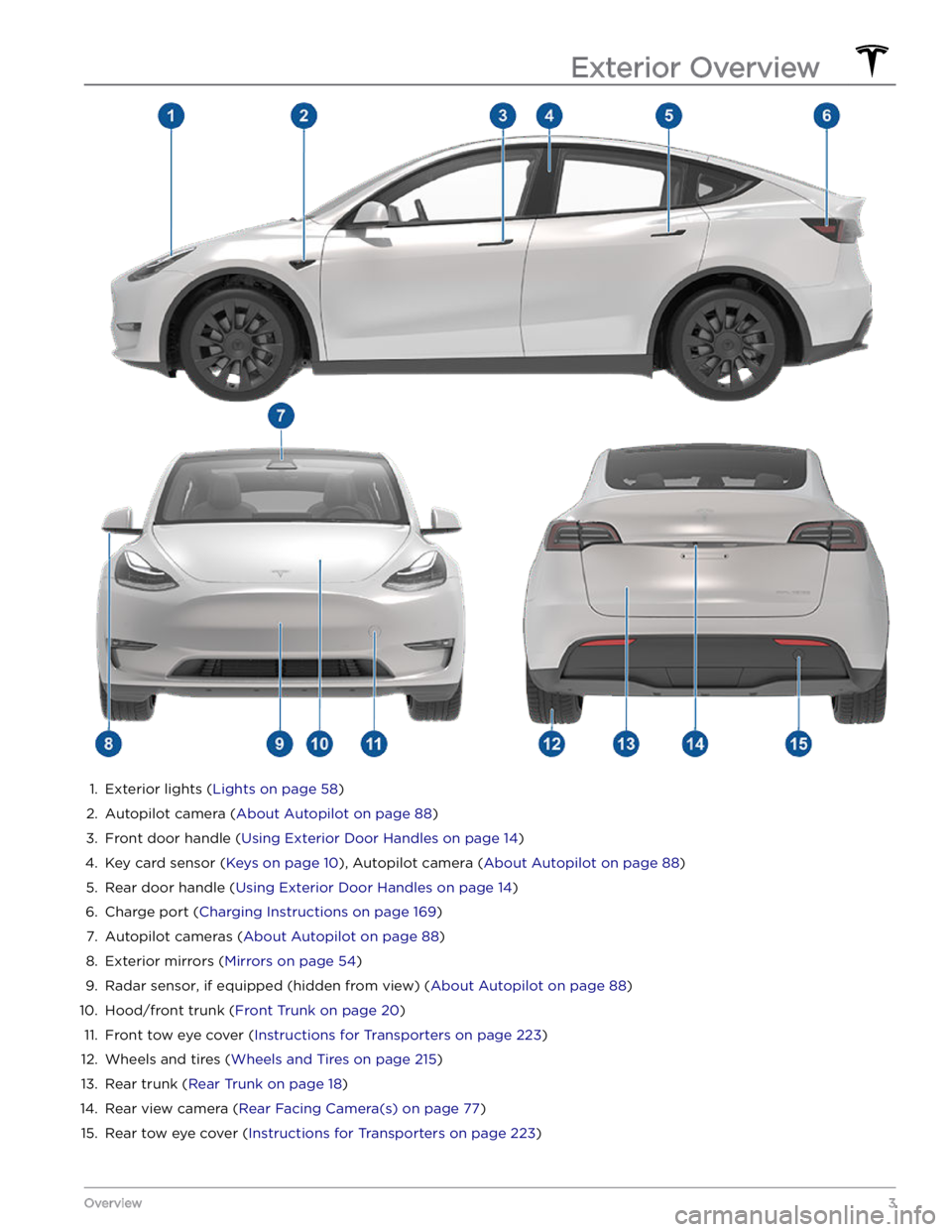
1.
Exterior lights (Lights on page 58)
2.
Autopilot camera (About Autopilot on page 88)
3.
Front door handle (Using Exterior Door Handles on page 14)
4.
Key card sensor (Keys on page 10), Autopilot camera (About Autopilot on page 88)
5.
Rear door handle (Using Exterior Door Handles on page 14)
6.
Charge port (Charging Instructions on page 169)
7.
Autopilot cameras (About Autopilot on page 88)
8.
Exterior mirrors (Mirrors on page 54)
9.
Radar sensor, if equipped (hidden from view) (About Autopilot on page 88)
10.
Hood/front trunk (Front Trunk on page 20)
11.
Front tow eye cover (Instructions for Transporters on page 223)
12.
Wheels and tires (Wheels and Tires on page 215)
13.
Rear trunk (Rear Trunk on page 18)
14.
Rear view camera (Rear Facing Camera(s) on page 77)
15.
Rear tow eye cover (Instructions for Transporters on page 223)
Exterior Overview
3Overview
Page 21 of 298
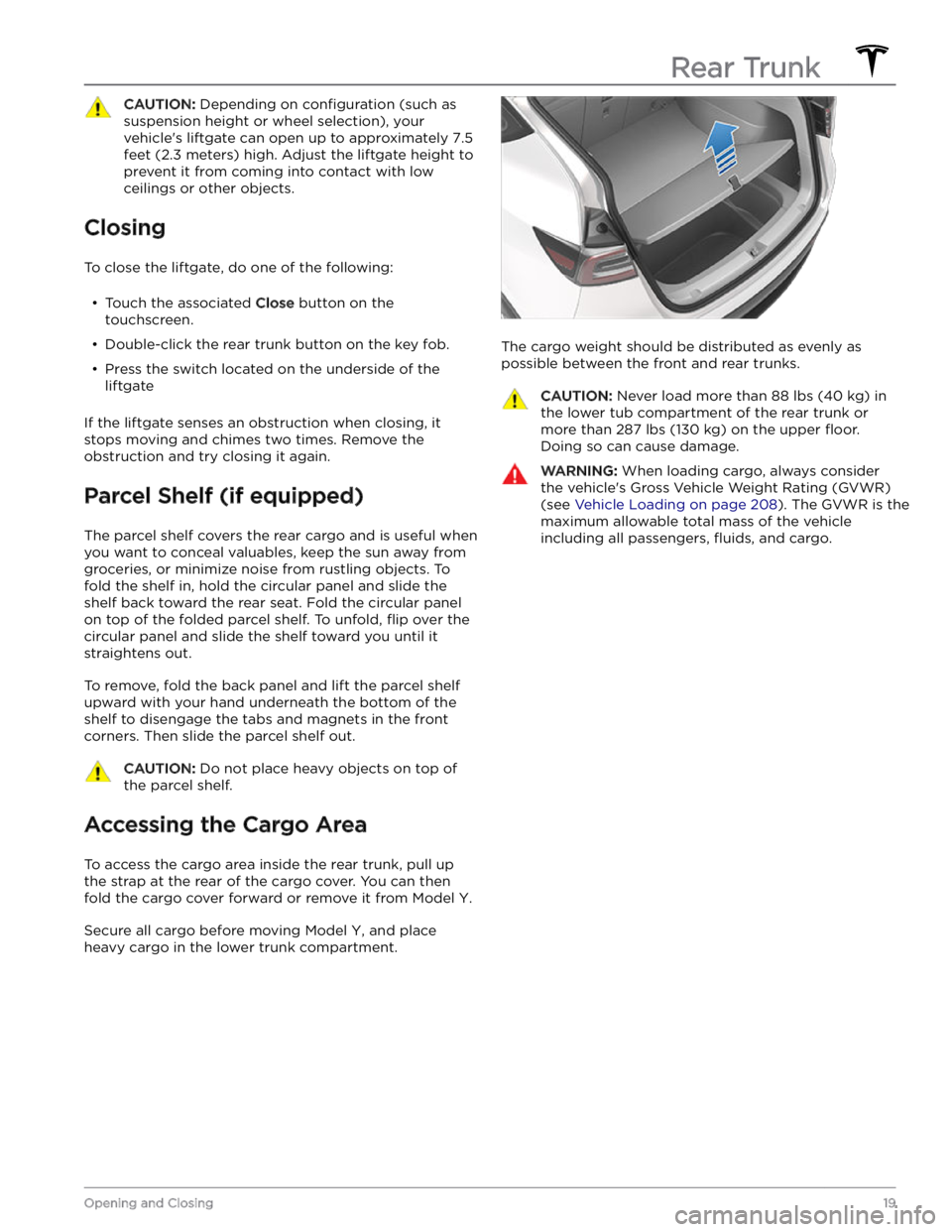
CAUTION: Depending on configuration (such as
suspension height or wheel selection), your
vehicle
Page 29 of 298

Correct Driving Position
The seat, head support, seat belt and airbags work
together to maximize your safety. Using these correctly ensures greater protection.
Position the seat so you can wear the seat belt correctly, while being as far away from the front airbag as possible:
1.
Sit upright with both feet on the floor and the seat
back reclined no more than 30 degrees.
2.
Make sure you can easily reach the pedals and that your arms are slightly bent when holding the steering wheel. Your chest should be at least
10 inches
(25 cm) from the center of the airbag cover.
3.
Place the shoulder section of the seat belt mid-way between your neck and your shoulder. Fit the lap section of the belt tightly across your hips, not across your stomach.
Model Y seats include integrated head supports in the
front that cannot be adjusted or removed.
Adjusting the Front Seats1.
Move seat forward/backward and adjust the seat
Page 53 of 298

NOTE: Model Y supports up to 10 driver profiles. You can
link multiple keys to a driver
profile, but you cannot link
multiple driver
profiles to a single key.
Easy Entry
You can define an Easy Entry setting that moves the
steering wheel and driver
Page 54 of 298

Adjusting the Steering Wheel
Position
To adjust the steering wheel, touch Controls and touch
the
Steering icon.
Use the left scroll button on the steering wheel to move
the
steering wheel to the desired position:
Page 55 of 298

Heated Steering Wheel
To warm up the steering wheel, touch the fan icon on the touchscreen to display climate controls (see
Adjusting Climate Control Settings on page 127), then
touch the steering wheel icon. When on, radiant heat keeps the steering wheel at a comfortable temperature.
NOTE: Depending on date of manufacture, your Model Y
may not be equipped with a heated steering wheel.
Horn
To sound the horn, press and hold the center pad on the
steering wheel.
Steering Wheel
53Driving
Page 56 of 298

Adjusting Exterior Mirrors
Adjust the exterior mirrors by touching Controls >
Mirrors. Press the left scroll button on the steering wheel
to choose whether you are adjusting the Left or Right
mirror. Then use the left scroll button as follows to adjust
the selected mirror to its desired position:
Page 62 of 298
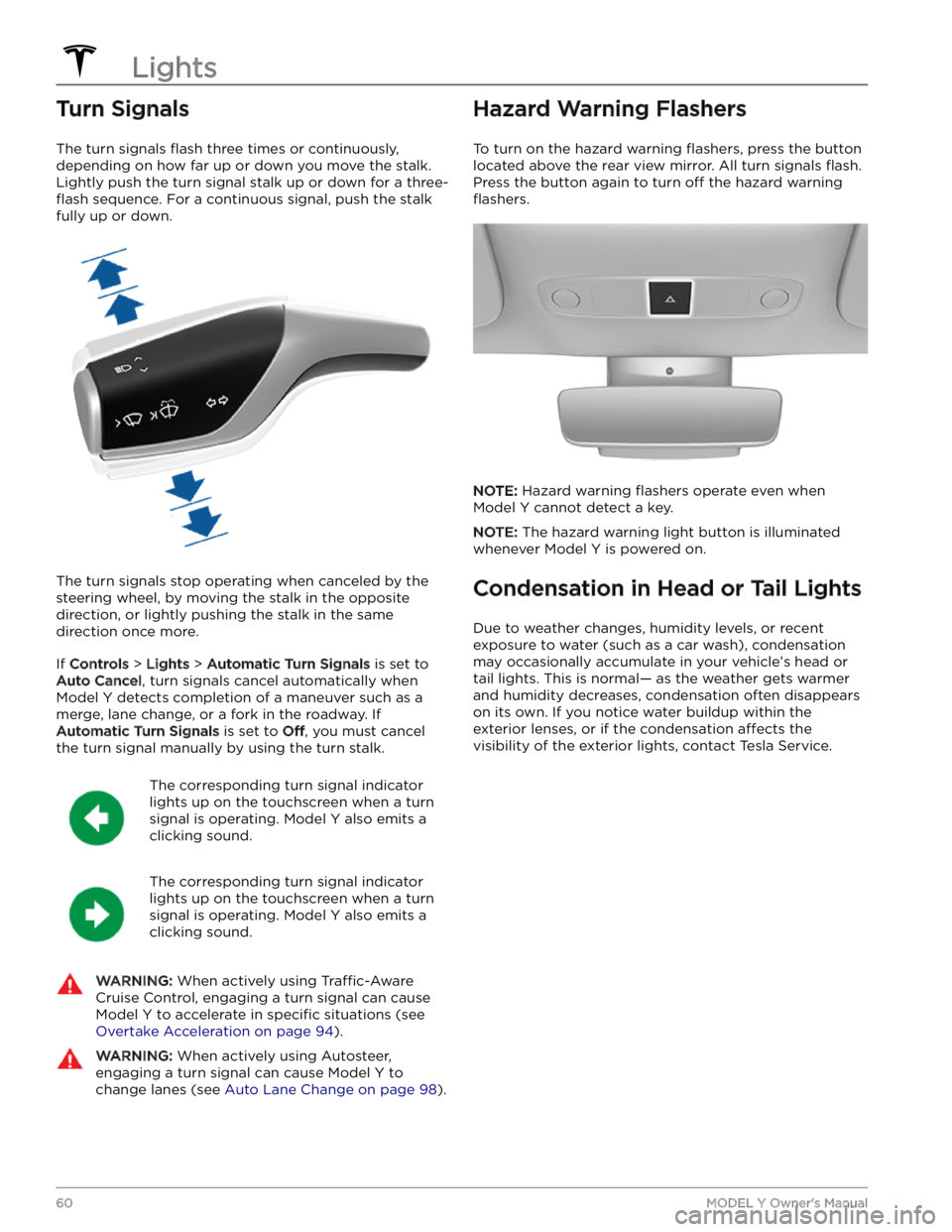
Turn Signals
The turn signals flash three times or continuously,
depending on how far up or down you move the stalk.
Lightly push the turn signal stalk up or down for a
three-
flash sequence. For a continuous signal, push the stalk
fully up or down.
The turn signals stop operating when canceled by the steering wheel, by moving the stalk in the opposite direction, or lightly pushing the stalk in the same
direction once more.
If Controls > Lights > Automatic Turn Signals is set to
Auto Cancel, turn signals cancel automatically when
Model Y detects completion of a maneuver such as a
merge, lane change, or a fork in the roadway. If
Automatic Turn Signals is set to Off, you must cancel
the turn signal manually by using the turn stalk.
The corresponding turn signal indicator
lights up on the touchscreen when a turn
signal is operating.
Model Y also emits a
clicking sound.
The corresponding turn signal indicator
lights up on the touchscreen when a turn
signal is operating.
Model Y also emits a
clicking sound.
WARNING: When actively using Traffic-Aware
Cruise Control, engaging a turn signal can cause
Model Y to accelerate in specific situations (see
Overtake Acceleration on page 94).
WARNING: When actively using Autosteer,
engaging a turn signal can cause Model Y to
change lanes (see Auto Lane Change on page 98).
Hazard Warning Flashers
To turn on the hazard warning flashers, press the button
located above the rear view mirror. All turn signals
flash.
Press the button again to turn off the hazard warning
flashers.
NOTE: Hazard warning flashers operate even when
Model Y cannot detect a key.
NOTE: The hazard warning light button is illuminated
whenever
Model Y is powered on.
Condensation in Head or Tail Lights
Due to weather changes, humidity levels, or recent exposure to water (such as a car wash), condensation may occasionally accumulate in your vehicle
Page 64 of 298
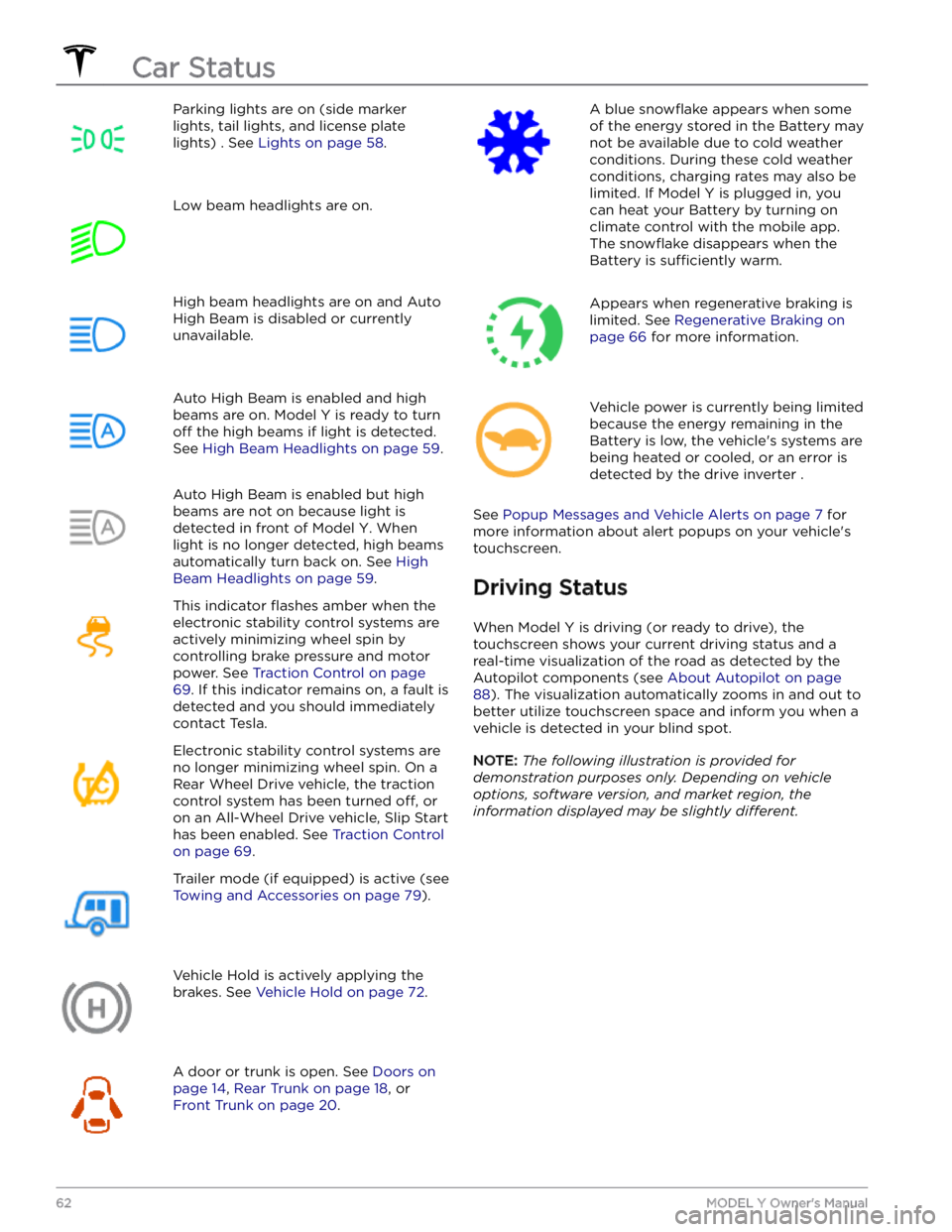
Parking lights are on (side marker
lights, tail lights, and license plate lights) . See
Lights on page 58.
Low beam headlights are on.High beam headlights are on and Auto
High Beam is disabled or currently
unavailable.Auto High Beam is enabled and high
beams are on.
Model Y is ready to turn
off the high beams if light is detected.
See
High Beam Headlights on page 59.
Auto High Beam is enabled but high beams are not on because light is
detected in front of
Model Y. When
light is no longer detected, high beams
automatically turn back on. See
High
Beam Headlights on page 59.
This indicator flashes amber when the
electronic stability control systems are actively minimizing wheel spin by
controlling brake pressure and motor
power. See
Traction Control on page
69. If this indicator remains on, a fault is
detected and you should immediately contact Tesla.
Electronic stability control systems are no longer minimizing wheel spin. On a
Rear Wheel Drive vehicle, the traction
control system has been turned
off, or
on an All-Wheel Drive vehicle, Slip Start has been enabled. See
Traction Control
on page 69.
Trailer mode (if equipped) is active (see
Towing and Accessories on page 79).
Vehicle Hold is actively applying the brakes. See
Vehicle Hold on page 72.
A door or trunk is open. See Doors on
page 14, Rear Trunk on page 18, or
Front Trunk on page 20.
A blue snowflake appears when some
of the energy stored in the Battery may not be available due to cold weather conditions. During these cold weather
conditions, charging rates may also be limited. If
Model Y is plugged in, you
can heat your Battery by turning on climate control with the mobile app. The
snowflake disappears when the
Battery is
sufficiently warm.
Appears when regenerative braking is limited. See
Regenerative Braking on
page 66 for more information.
Vehicle power is currently being limited
because the energy remaining in the
Battery is low, the vehicle