engine TOYOTA 4RUNNER 2009 N280 / 5.G User Guide
[x] Cancel search | Manufacturer: TOYOTA, Model Year: 2009, Model line: 4RUNNER, Model: TOYOTA 4RUNNER 2009 N280 / 5.GPages: 520, PDF Size: 10.74 MB
Page 59 of 520
59
1-3. Adjustable components (s
eats, mirrors, steering wheel)
1
Before driving
■Retained accessory power
Each memorized position can be activated within 30 seconds after the
driver’s door is opened, even if the key is not in the engine switch.
■ If any position memory button is pushed while the adjustments are
being made
The operation will stop. To reactivate the system, push the button (“1” or “2”)
again.
■ If the battery is disconnected
The memorized positions must be reset because the computer’s memory is
erased when the battery is disconnected.
CAUTION
■Seat adjustment caution
Take care during seat adjustment that the seat does not strike the rear pas-
senger or squeeze your body against the steering wheel.
If this happens, you can stop the movement by pressing another seat posi-
tion memory button.
Page 71 of 520
71
1-3. Adjustable components (s
eats, mirrors, steering wheel)
1
Before driving
■To prevent sensor error (vehicles with auto anti-glare inside rear view
mirror)
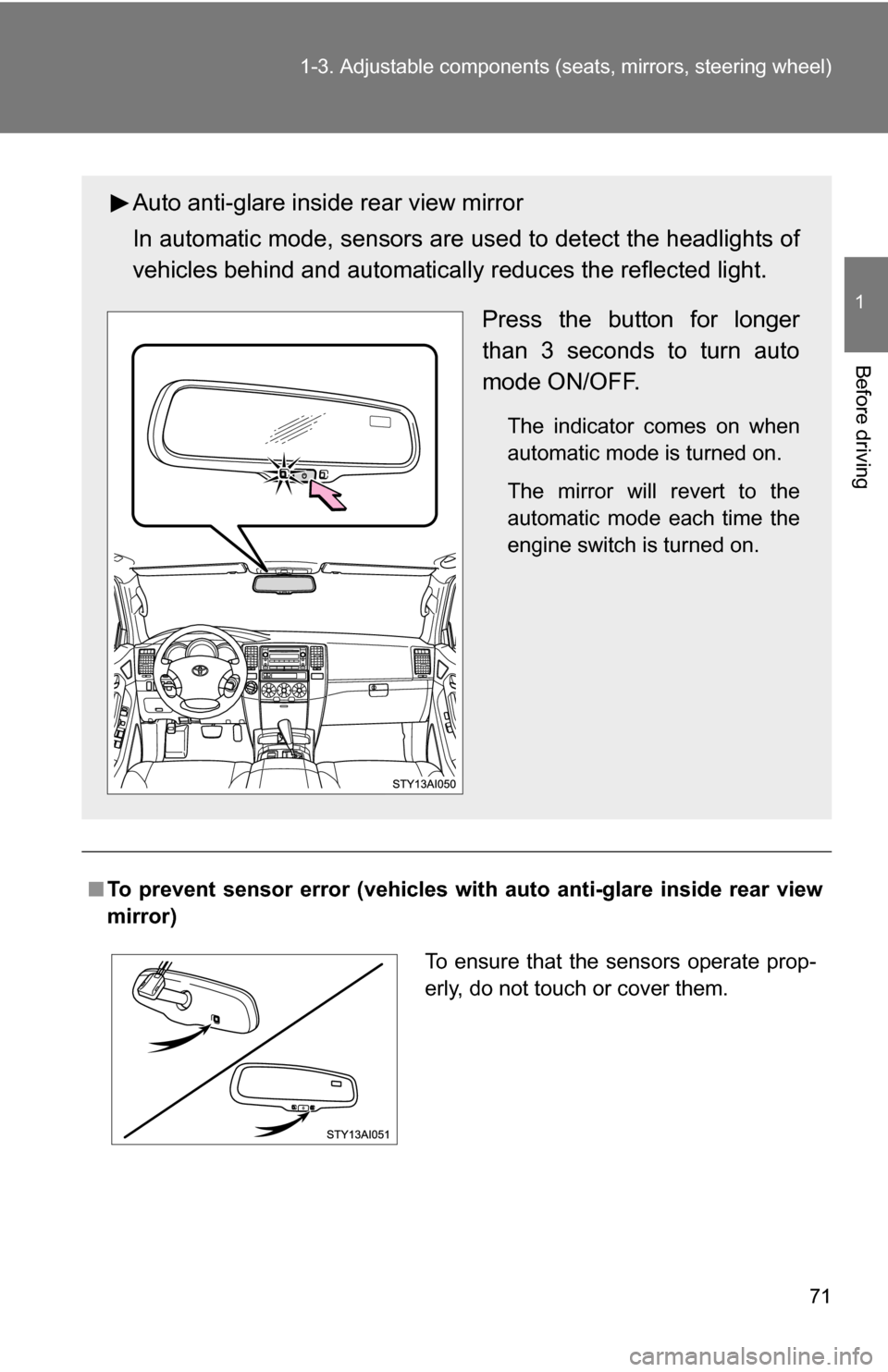
Auto anti-glare inside rear view mirror
In automatic mode, sensors are used to detect the headlights of
vehicles behind and automatical ly reduces the reflected light.
Press the button for longer
than 3 seconds to turn auto
mode ON/OFF.
The indicator comes on when
automatic mode is turned on.
The mirror will revert to the
automatic mode each time the
engine switch is turned on.
To ensure that the sensors operate prop-
erly, do not touch or cover them.
Page 74 of 520
74 1-3. Adjustable components (seats, mirrors, steering wheel)
■Mirror operating conditions
The engine switch is in the ACC or ON position.
■ When the mirrors are fogged up (veh icles with outside rear view mirror
defoggers)
Turn on the mirror defoggers to defog the mirrors. ( P. 240)
■ Rain clearing mirrors
The rain clearing mirrors have been coated to spread the raindrops evenly
into a thin film (hydrophilic effect) when they adhere to the mirror surface,
clearing the driver’s rear view.
■ In the following cases, the rain clear ing effect will be reduced tempo-
rarily, but will recover by exposing the mirrors to bright direct sunlight
for 1 or 2 days
● After wiping dirt off the mirrors
● When the mirrors fog up
● After waxing your vehicle in an automatic car wash
● After your vehicle has been parked for a long period in a place with no
direct sunlight, such as under ground parking lots
CAUTION
■When driving the vehicle
Observe the following precautions while driving.
Failing to do so may result in loss of control of the vehicle and cause an acci-
dent, resulting in death or serious injury.
●Do not adjust the mirrors while driving.
● Do not drive with the mirrors folded back.
● Both the driver and passenger side mirrors must be extended and properly
adjusted before driving.
■ When a mirror is moving
To avoid personal injury and mirror malfunction, be careful not to get your
hand caught by the moving mirror.
Page 77 of 520
77
1-4. Opening and closing the windows and moon roof
1
Before driving
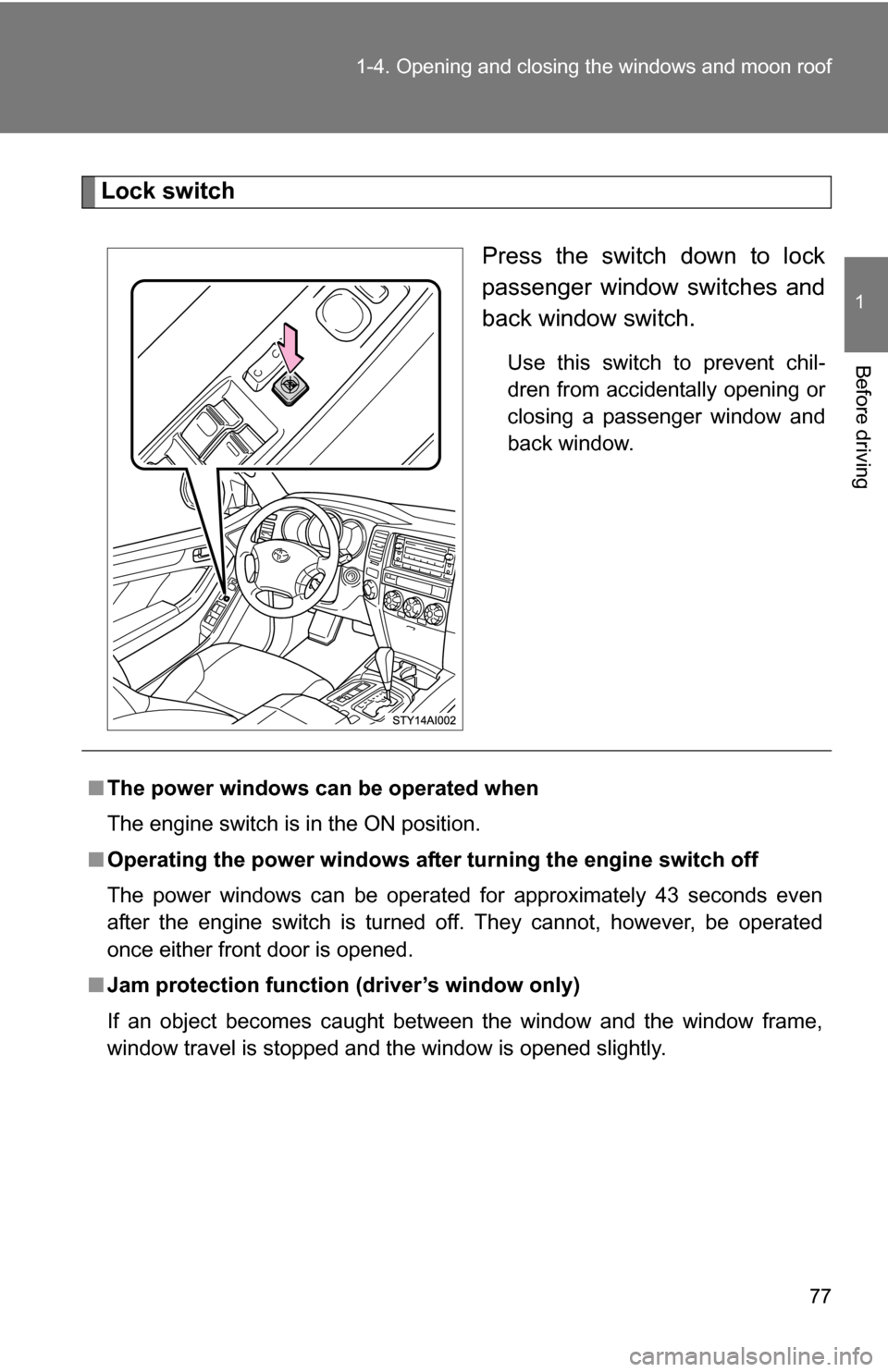
Lock switch
Press the switch down to lock
passenger window switches and
back window switch.
Use this switch to prevent chil-
dren from accidentally opening or
closing a passenger window and
back window.
■The power windows can be operated when
The engine switch is in the ON position.
■ Operating the power windows after turning the engine switch off
The power windows can be operated for approximately 43 seconds even
after the engine switch is turned off. They cannot, however, be operated
once either front door is opened.
■ Jam protection function (driver’s window only)
If an object becomes caught between the window and the window frame,
window travel is stopped and the window is opened slightly.
Page 80 of 520
80 1-4. Opening and closing the windows and moon roof
■The power back window can be operated when
●The engine switch is in the ON position.
● The power back window can be opened when the rear window wiper is
working. At that time, the wiper stops working until the window is closed
again.
If the rear window is not fully closed, the rear window wiper, washer, and
defogger will not work.
■ Operating the power back window after turning th e engine switch off
The power back window can be operated for approximately 43 seconds
even after the engine switch is turned off. It cannot, however, be operated
once either front door is opened.
■ Jam protection function
If an object becomes caught between the window and the window frame,
window travel is stopped and the window is opened slightly.
■ When the battery is disconnected
The power windows must be initializ ed in order to ensure proper operation.
Open the window halfway.
Fully close the window by pulling the switch up and continue hold-
ing the switch for 1 second.
■ Customization that can be co nfigured at Toyota dealer
Settings (e.g. wireless remote control linked operation) can be changed.
(Customizable features P. 495)
Page 83 of 520
83
1-4. Opening and closing the windows and moon roof
1
Before driving
■
The moon roof can be operated when
The engine switch is in the ON position.
■ Operating the moon roof after turning the engine switch off
The moon roof can be operated for approximately 43 seconds even after the
engine switch is turned off. It cannot, however, be operated once either front
door is opened.
■ Jam protection function
●If an object is detected between the moon roof and the frame while clos-
ing, travel is stopped and the moon roof opens slightly.
● If an object is detected between the moon roof and the frame while tilti\
ng
down, travel is stopped and the moon roof opens fully.
■ Sunshade
The sunshade can be opened and closed manually. However, the sunshade
will open automatically when the moon roof is opened.
■ When the battery is disconnected
The moon roof must be initialized in order to ensure proper operation
Push and hold the switch on the TILT UP side until the moon roof
tilts all the way up and then tilts down a little automatically.
To ensure the initialization is complete, make sure automatic open-
ing and closing functions work properly.
Page 85 of 520
85
1
Before driving
1-5. Refueling
Opening the fuel tank cap
Perform the following steps to open the fuel tank cap.
■Before refueling the vehicle
Turn the engine switch off and ensure that all the doors and win-
dows are closed.
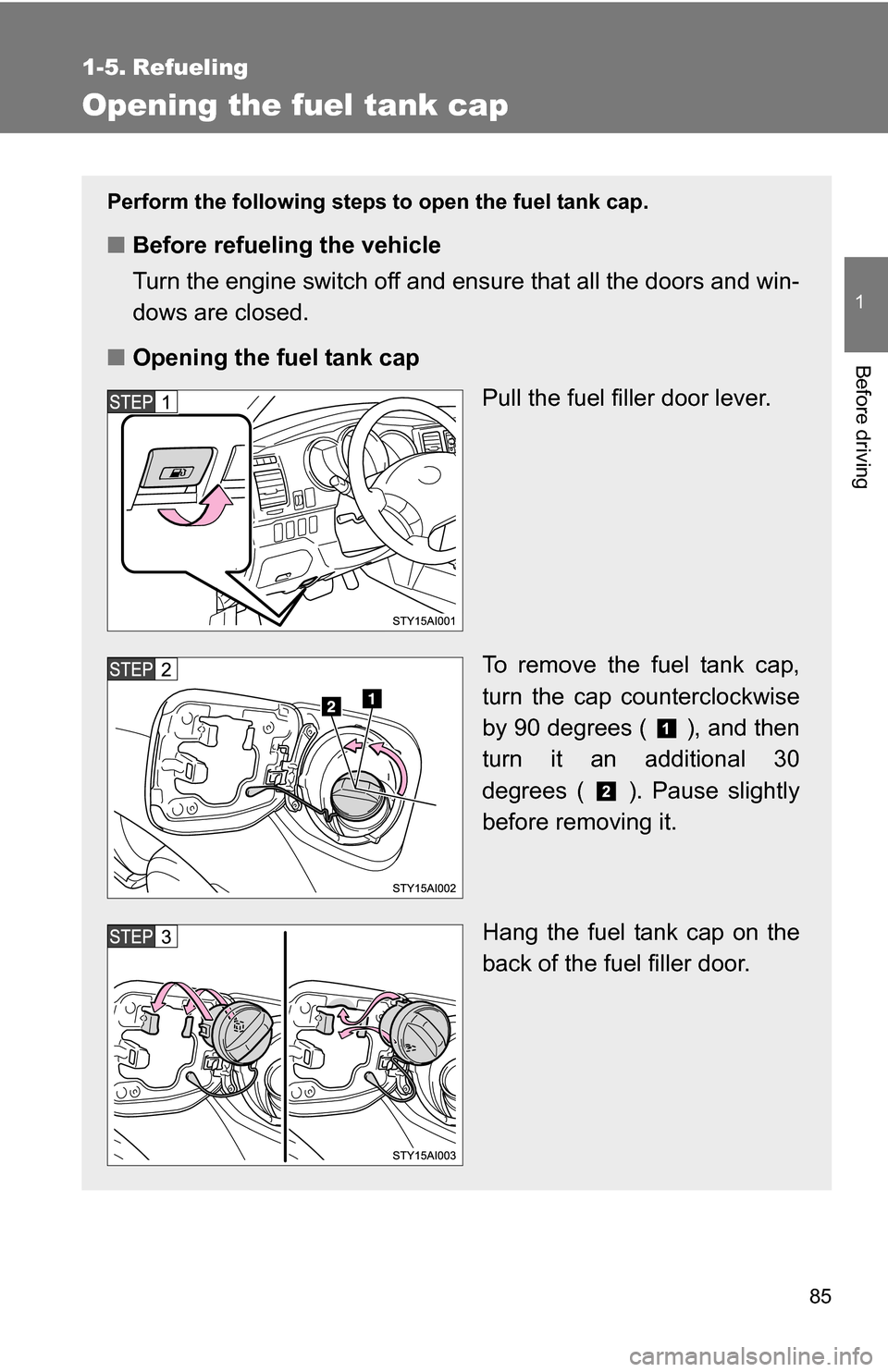
■ Opening the fuel tank cap
Pull the fuel filler door lever.
To remove the fuel tank cap,
turn the cap counterclockwise
by 90 degrees ( ), and then
turn it an additional 30
degrees ( ). Pause slightly
before removing it.
Hang the fuel tank cap on the
back of the fuel filler door.
Page 88 of 520
88
1-6. Theft deterrent system
Engine immobilizer system
■System maintenance
The vehicle has a maintenance-free type of engine immobilizer system.
■ Conditions that may cause the system to malfunction
●If the key is in contact with a metallic object
● If the key is in close proximity to or touching a key to the security system
(key with a built-in transponder chip) of another vehicle
■ Certifications for the en gine immobilizer system
For vehicles sold in U.S.A.
This device complies with Part 15 of the FCC Rules. Operation is subject to
the following two conditions: (1) this device may not cause harmful interfer-
ence, and (2) this device must accept any interference received, including
interference that may cause undesired operation.
FCC WARNING:
Changes or modifications not expressly approved by the party responsible
for compliance could void the user’s authority to operate the equipment.
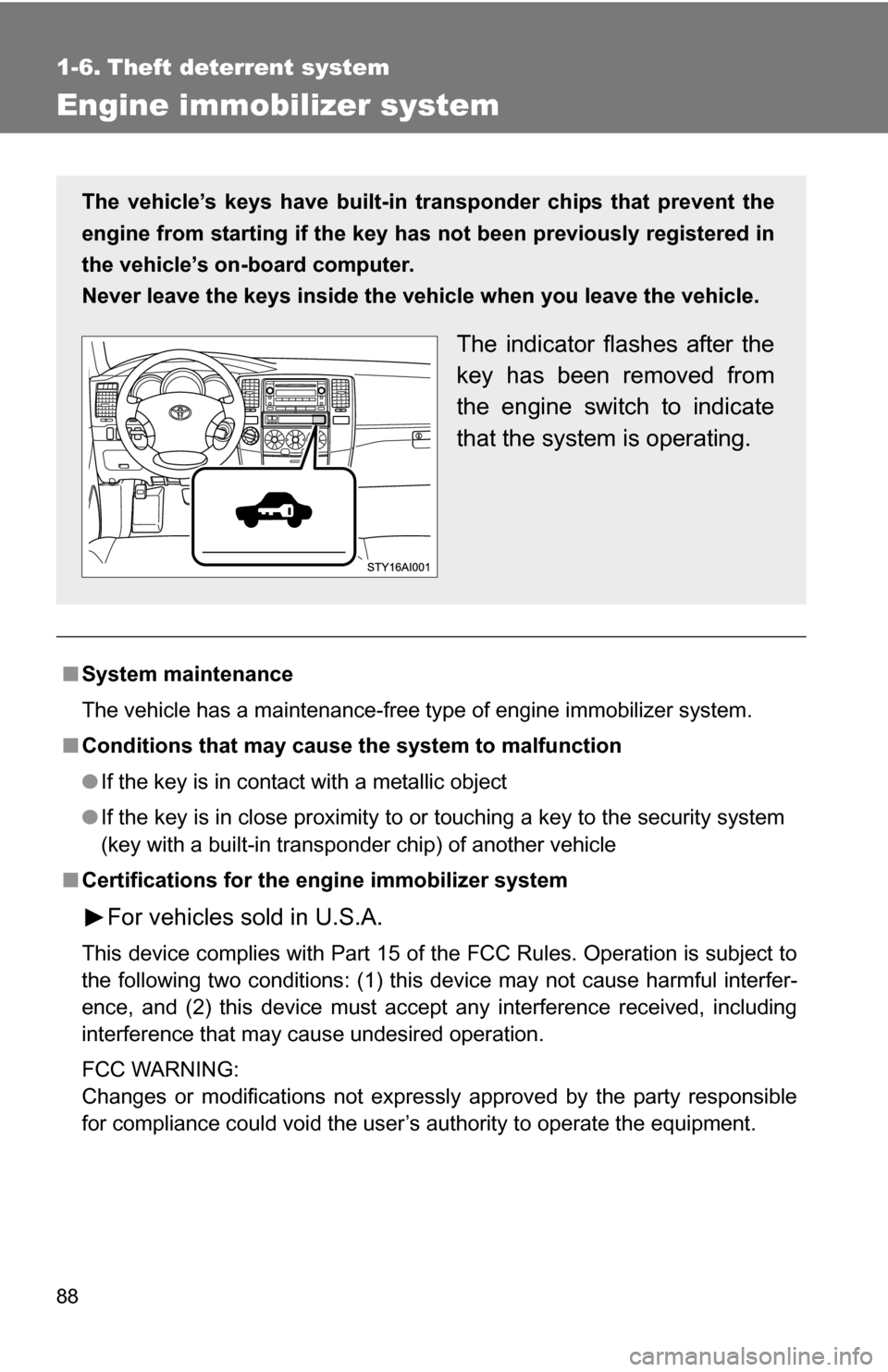
The vehicle’s keys have built-in tr ansponder chips that prevent the
engine from starting if the key has not been previously registered in
the vehicle’s on-board computer.
Never leave the keys inside the vehicle when you leave the vehicle.
The indicator flashes after the
key has been removed from
the engine switch to indicate
that the system is operating.
Page 89 of 520
89
1-6. Theft deterrent system
1
Before driving
For vehicles sold in Canada
This device complies with RSS-210 of Industry Canada.
Operation is subject to the following two conditions: (1) this device may not
cause interference, and (2) this device must accept any interference, includ-
ing interference that may cause undesired operation of the device.
NOTICE
■
To prevent damage to the key
Do not modify, remove or disable the engine immobilizer system. If any
unauthorized changes or modifications are made, the proper operation of
the system cannot be guaranteed.
Page 90 of 520
90
1-6. Theft deterrent system
Alarm (if equipped)
The system sounds the alarm and flashes lights when forcible entry
is detected.
■ Triggering of the alarm
The alarm is triggered in the following situations.
●A locked door is unlocked or opened in any way other than
using the wireless remote control door lock function or key.
The doors will lock again automatically.
● The hood is opened while t he vehicle is locked.
● The battery is reconnected.
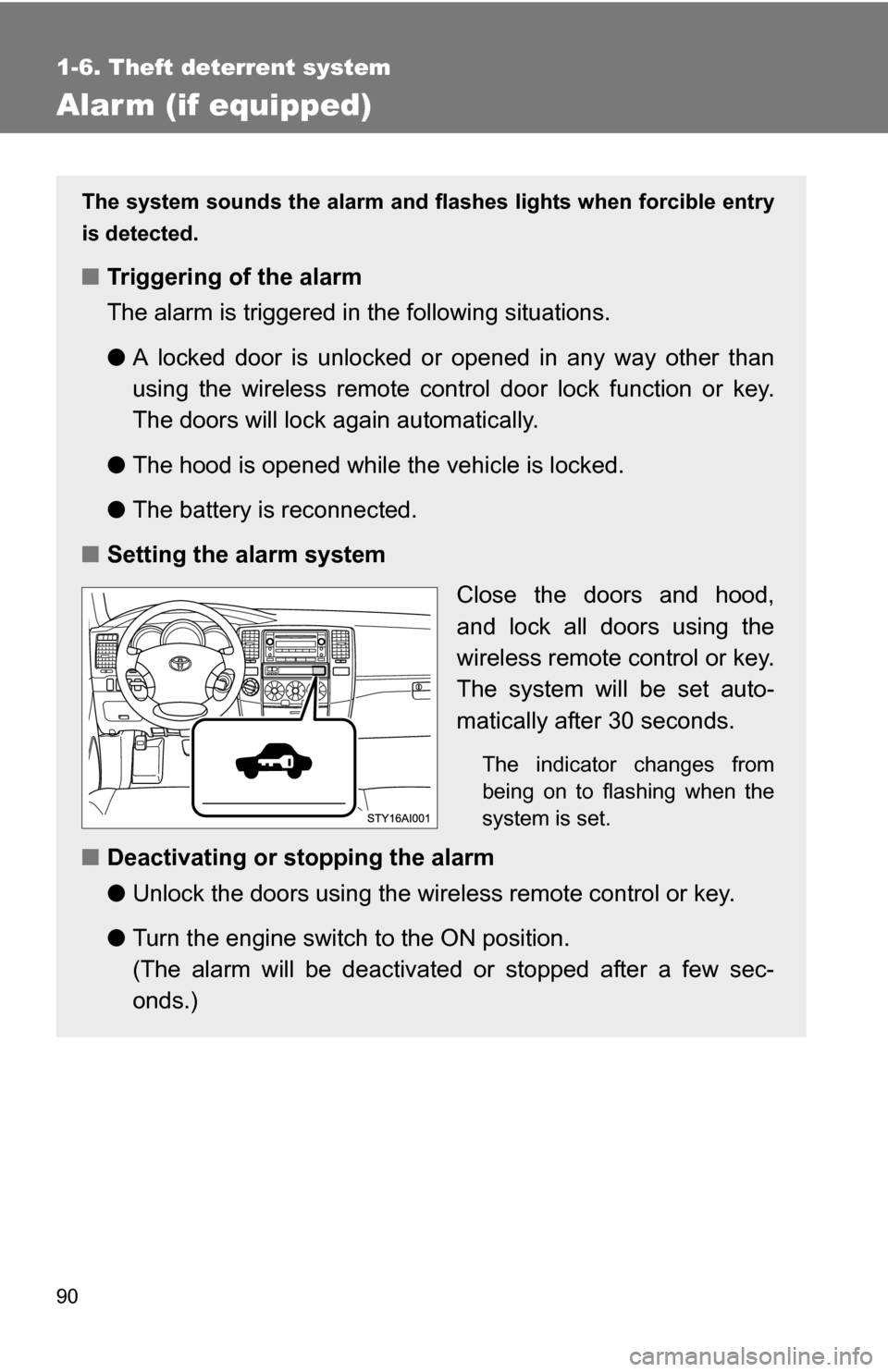
■ Setting the alarm system
Close the doors and hood,
and lock all doors using the
wireless remote control or key.
The system will be set auto-
matically after 30 seconds.
The indicator changes from
being on to flashing when the
system is set.
■Deactivating or stopping the alarm
●Unlock the doors using the wire less remote control or key.
● Turn the engine switch to the ON position.
(The alarm will be deactivated or stopped after a few sec-
onds.)