display TOYOTA 4RUNNER 2013 N280 / 5.G Owner's Manual
[x] Cancel search | Manufacturer: TOYOTA, Model Year: 2013, Model line: 4RUNNER, Model: TOYOTA 4RUNNER 2013 N280 / 5.GPages: 704, PDF Size: 11.56 MB
Page 230 of 704
230 2-4. Using other driving systems
4RUNNER_U
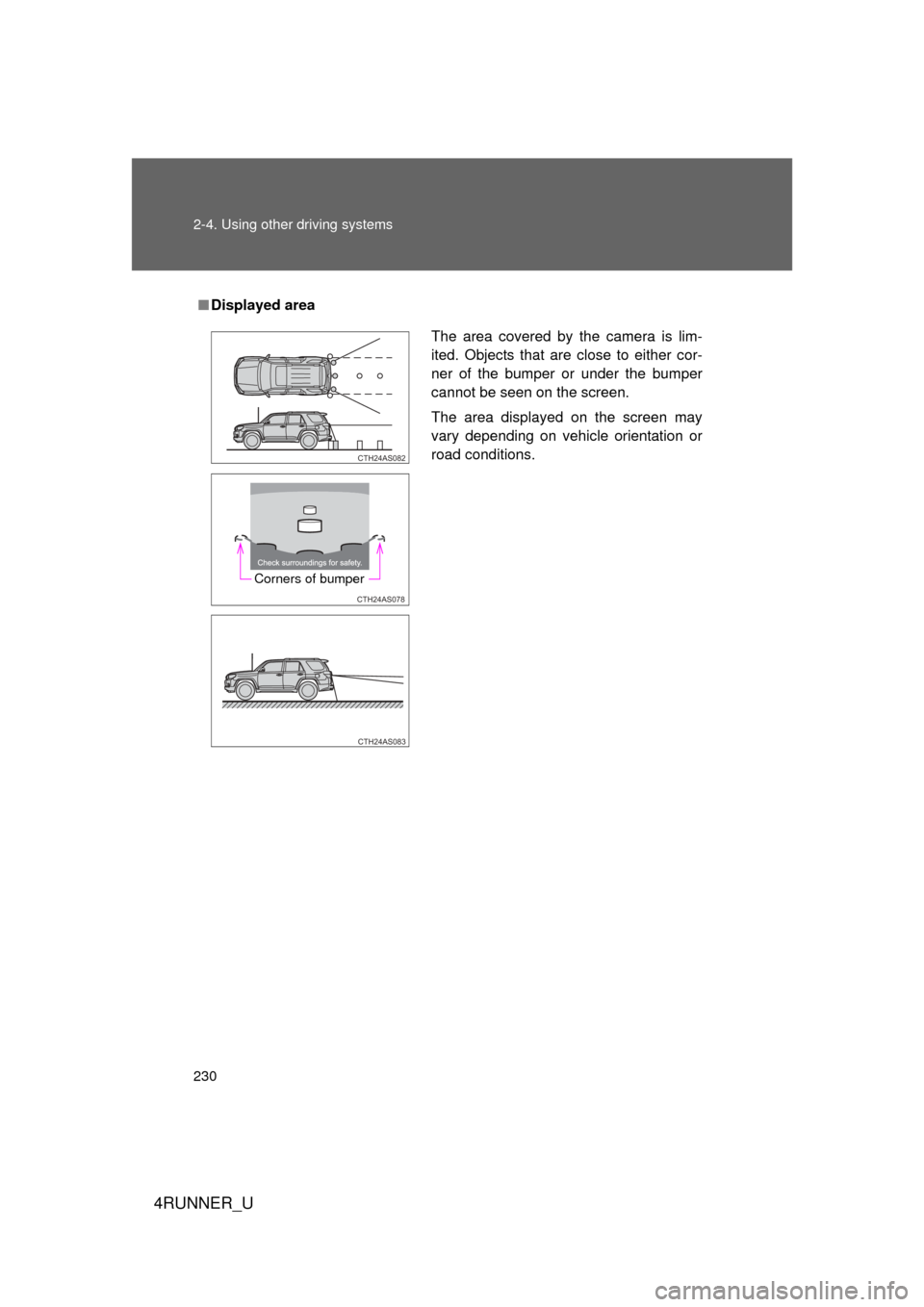
■Displayed area
The area covered by the camera is lim-
ited. Objects that are close to either cor-
ner of the bumper or under the bumper
cannot be seen on the screen.
The area displayed on the screen may
vary depending on vehicle orientation or
road conditions.
CTH24AS082
CTH24AS078
Corners of bumper
CTH24AS083
Page 234 of 704

234 2-4. Using other driving systems
4RUNNER_U
CAUTION
■When using the rear view monitor system
Observe the following precautions to avoid an accident that could result in
death or serious injuries:
● Never depend solely on the monitor system when reversing.
● Always check visually and with the mirrors to confirm your intended path is
clear.
● Use your own eyes to confirm the vehicle’s surroundings, as the displayed
image may become faint or dark, and moving images will be distorted, or
not entirely visible when the outside temperature is low. When backing up,
be sure to check behind and all around the vehicle visually and with the
mirrors before proceeding.
● Always check the vehicle surroundi ng area, because the guide lines are
ancillary lines.
● The guide lines are ancillary lines and do not change even if the steeri\
ng
wheel is turned.
● Depicted distances between objects and flat surfaces differ from actual
distances.
● Do not use the system if the back door is open.
■ Conditions which may affect the rear view monitor system
● If the back of the vehicle has been hit, the camera’s position and mounting
angle may have changed. Have the vehicle inspected by your Toyota
dealer.
● Rapid temperature changes, such as when hot water is poured on the
vehicle in cold weather, may cause the system to function abnormally.
● If the camera lens is dirty, it cannot transmit a clear image. Rinse with
water and wipe with a soft cloth. If the camera lens is extremely dirty, wash
with a mild cleanser and rinse.
● The displayed image may be darker and moving images may be slightly
distorted when the system is cold.
■ Caution while driving in reverse
Do not change modes while the vehicle is moving.
Page 235 of 704

235
2-4. Using other
driving systems
2
When driving
4RUNNER_U
NOTICE
■Camera precautions
● As the camera has a water proof construction, do not detach, disassemble
or modify it. This may cause incorrect operation.
● Do not subject the camera to a strong impact.
● If the camera lens becomes dirty, it cannot transmit a clear image. If water
droplets, snow, or mud adhere to the lens, rinse with water and wipe with a
soft cloth. If the lens is extremely dirty, wash it with a mild cleanser and
rinse. Do not rub hard.
● Do not allow organic solvent, car wax, window cleaner or glass coat to
adhere to the camera. If this happens, wipe it off as soon as possible.
● When replacing tires, please consult your Toyota dealer. If you replace the
tires, the area displayed on the screen may change.
Page 260 of 704
260
2-4. Using other driving systems
4RUNNER_U
Multi-terrain Select
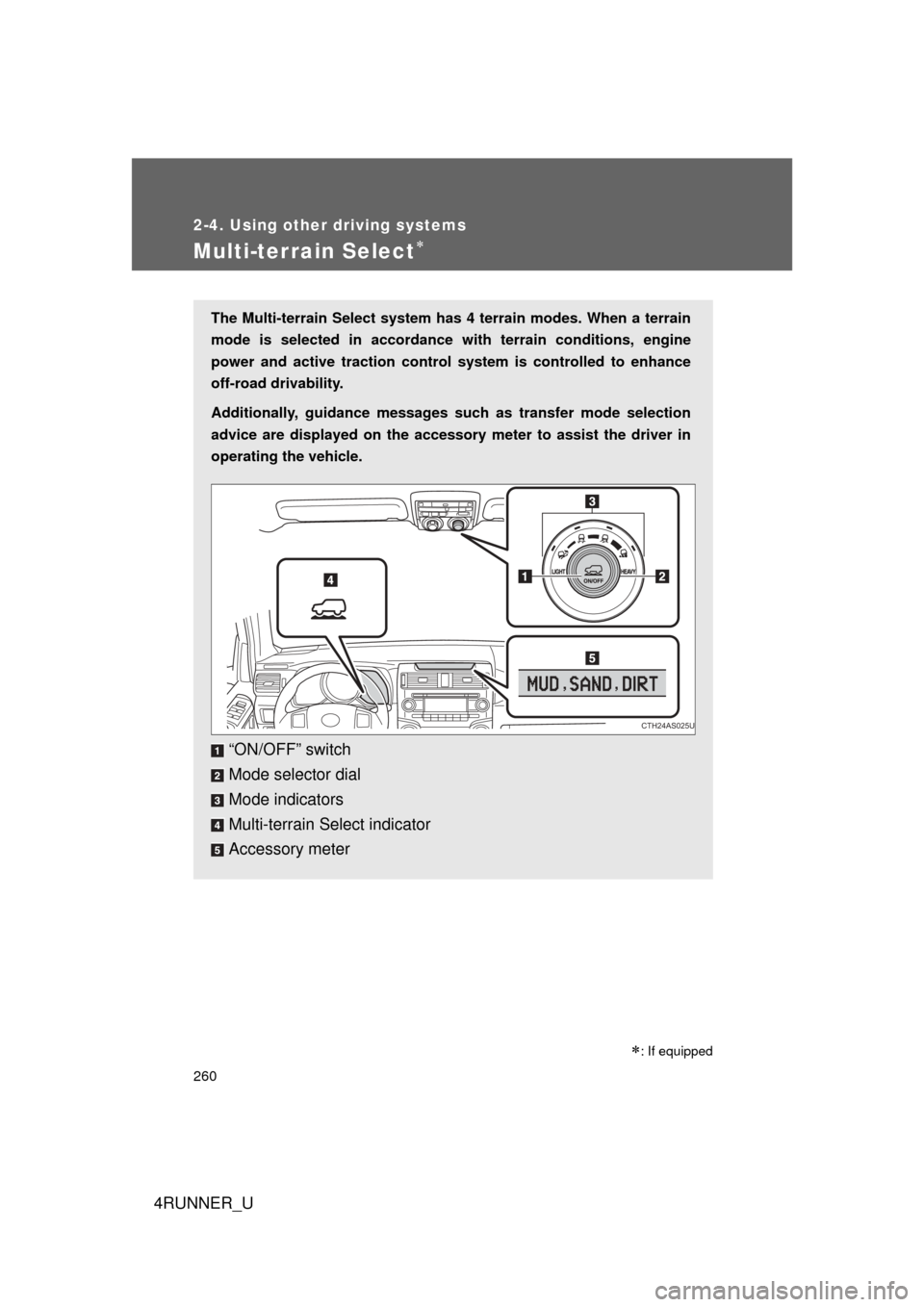
The Multi-terrain Select system has 4 terrain modes. When a terrain
mode is selected in accordance wi th terrain conditions, engine
power and active traction control system is controlled to enhance
off-road drivability.
Additionally, guidance messages such as transfer mode selection
advice are displayed on the accessory meter to assist the driver in
operating the vehicle.
“ON/OFF” switch
Mode selector dial
Mode indicators
Multi-terrain Select indicator
Accessory meter
CTH24AS025U
: If equipped
Page 263 of 704
263
2-4. Using other
driving systems
2
When driving
4RUNNER_U
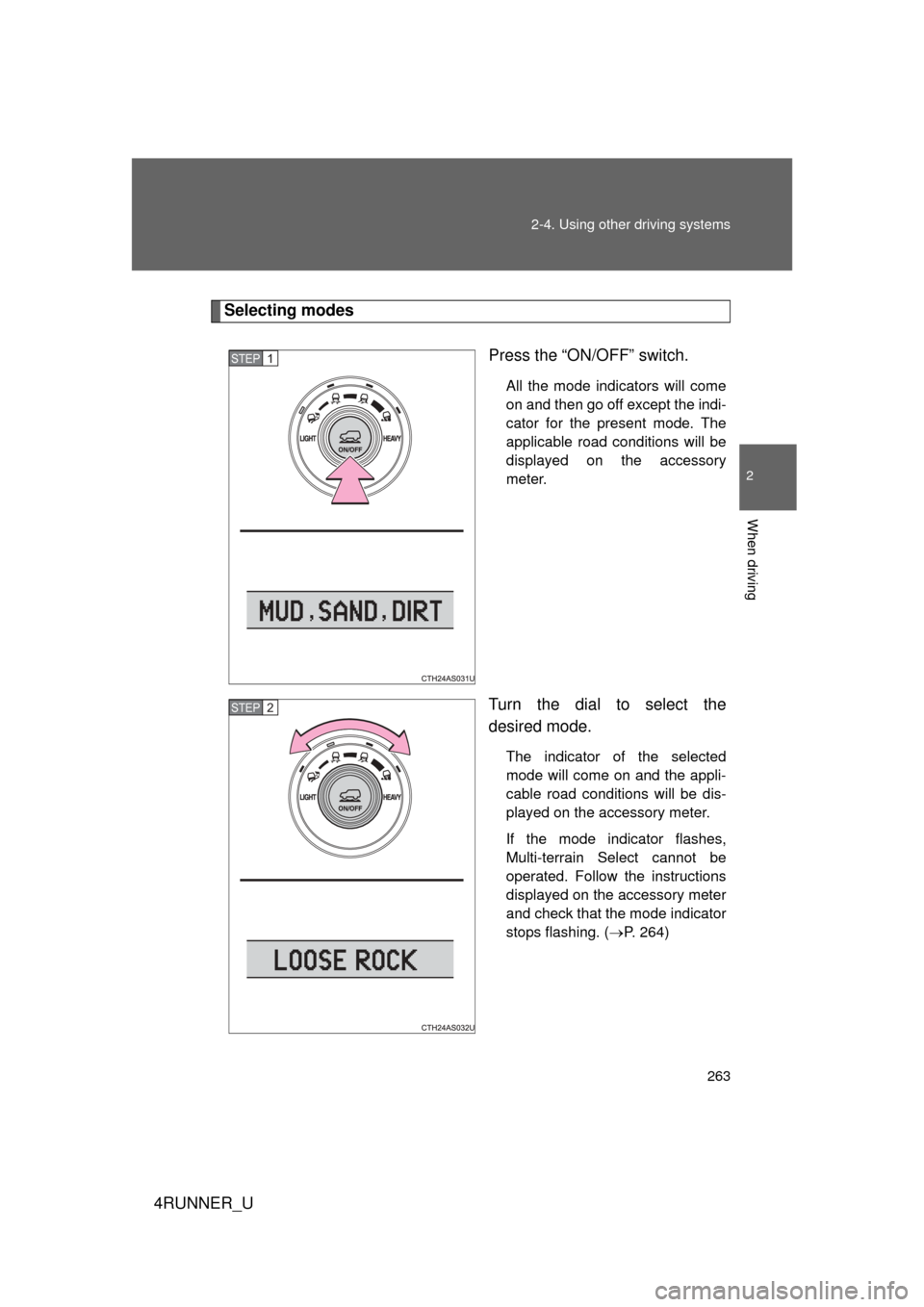
Selecting modes
Press the “ON/OFF” switch.
All the mode indicators will come
on and then go off except the indi-
cator for the present mode. The
applicable road conditions will be
displayed on the accessory
meter.
Turn the dial to select the
desired mode.
The indicator of the selected
mode will come on and the appli-
cable road conditions will be dis-
played on the accessory meter.
If the mode indicator flashes,
Multi-terrain Select cannot be
operated. Follow the instructions
displayed on the accessory meter
and check that the mode indicator
stops flashing. (P. 264)
STEP 1
STEP 2
Page 264 of 704
264 2-4. Using other driving systems
4RUNNER_U
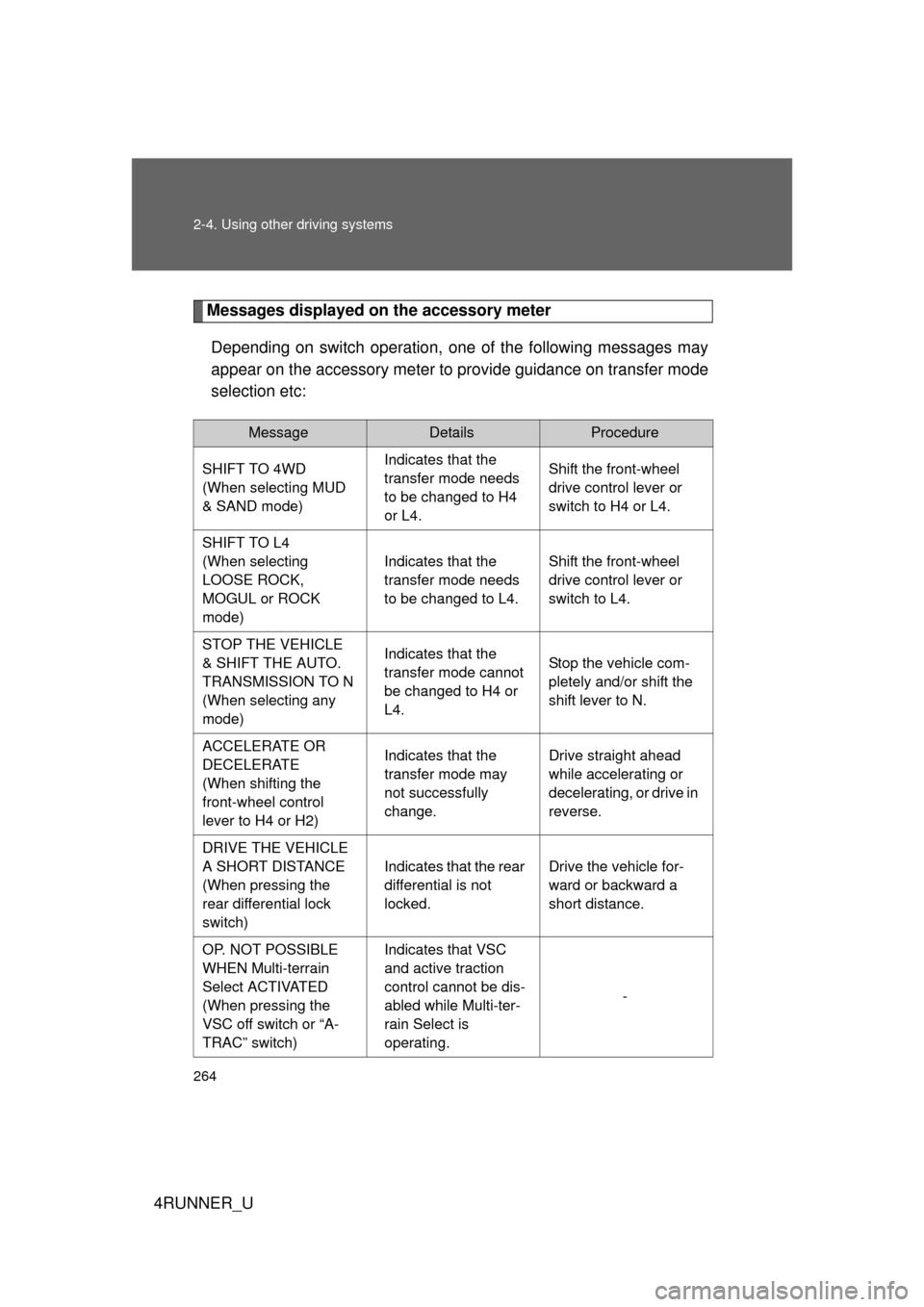
Messages displayed on the accessory meterDepending on switch operation, one of the following messages may
appear on the accessory meter to provide guidance on transfer mode
selection etc:
MessageDetailsProcedure
SHIFT TO 4WD
(When selecting MUD
& SAND mode) Indicates that the
transfer mode needs
to be changed to H4
or L4.Shift the front-wheel
drive control lever or
switch to H4 or L4.
SHIFT TO L4
(When selecting
LOOSE ROCK,
MOGUL or ROCK
mode) Indicates that the
transfer mode needs
to be changed to L4.
Shift the front-wheel
drive control lever or
switch to L4.
STOP THE VEHICLE
& SHIFT THE AUTO.
TRANSMISSION TO N
(When selecting any
mode) Indicates that the
transfer mode cannot
be changed to H4 or
L4.
Stop the vehicle com-
pletely and/or shift the
shift lever to N.
ACCELERATE OR
DECELERATE
(When shifting the
front-wheel control
lever to H4 or H2) Indicates that the
transfer mode may
not successfully
change.
Drive straight ahead
while accelerating or
decelerating, or drive in
reverse.
DRIVE THE VEHICLE
A SHORT DISTANCE
(When pressing the
rear differential lock
switch) Indicates that the rear
differential is not
locked.
Drive the vehicle for-
ward or backward a
short distance.
OP. NOT POSSIBLE
WHEN Multi-terrain
Select ACTIVATED
(When pressing the
VSC off switch or “A-
TRAC” switch) Indicates that VSC
and active traction
control cannot be dis-
abled while Multi-ter-
rain Select is
operating.
-
Page 315 of 704
Interior features3
315
4RUNNER_U
3-3. Using the Bluetooth®
audio system
Bluetooth
® audio
system ........................... 391
Using the Bluetooth
®
audio system.................. 394
Operating a Bluetooth
®
enabled portable
player ............................. 399
Setting up a Bluetooth
®
enabled portable
player ............................. 401
Bluetooth
® audio system
setup .............................. 406
3-4. Using the hands-free phone system
(for cellular phone)
Hands-free phone system (for cellular phone)
features .......................... 407
Using the hands-free phone system
(for cellular phone) ......... 412
Making a phone call ......... 420
Setting a cellular phone ............................. 424
Security and system setup .............................. 429
Using the phone book ...... 433
3-5. Using the interior lights Interior lights list ............... 441
• Interior lights .................. 442
• Personal lights ............... 442 3-6. Using the storage features
List of storage features .... 444
• Glove box....................... 445
• Console box ................... 446
• Coin holder .................... 447
• Tissue pocket ................. 448
• Pen holder ..................... 449
• Auxiliary box .................. 450
• Cup holders ................... 452
• Bottle holders ................. 455
3-7. Other interior features Sun visors ........................ 457
Vanity mirrors ................... 458
Clock ................................ 459
Outside temperature display............................ 461
Power outlets (12 V DC) ....................... 464
Power outlets (120 V AC) ..................... 467
Seat heaters..................... 474
Armrest ............................ 476
Assist grips....................... 477
Floor mat .......................... 478
Compass .......................... 480
Luggage compartment features .......................... 486
Garage door opener......... 492
Safety Connect ................ 499
Page 322 of 704
322
3-1. Using the air conditioning system and defogger
4RUNNER_U
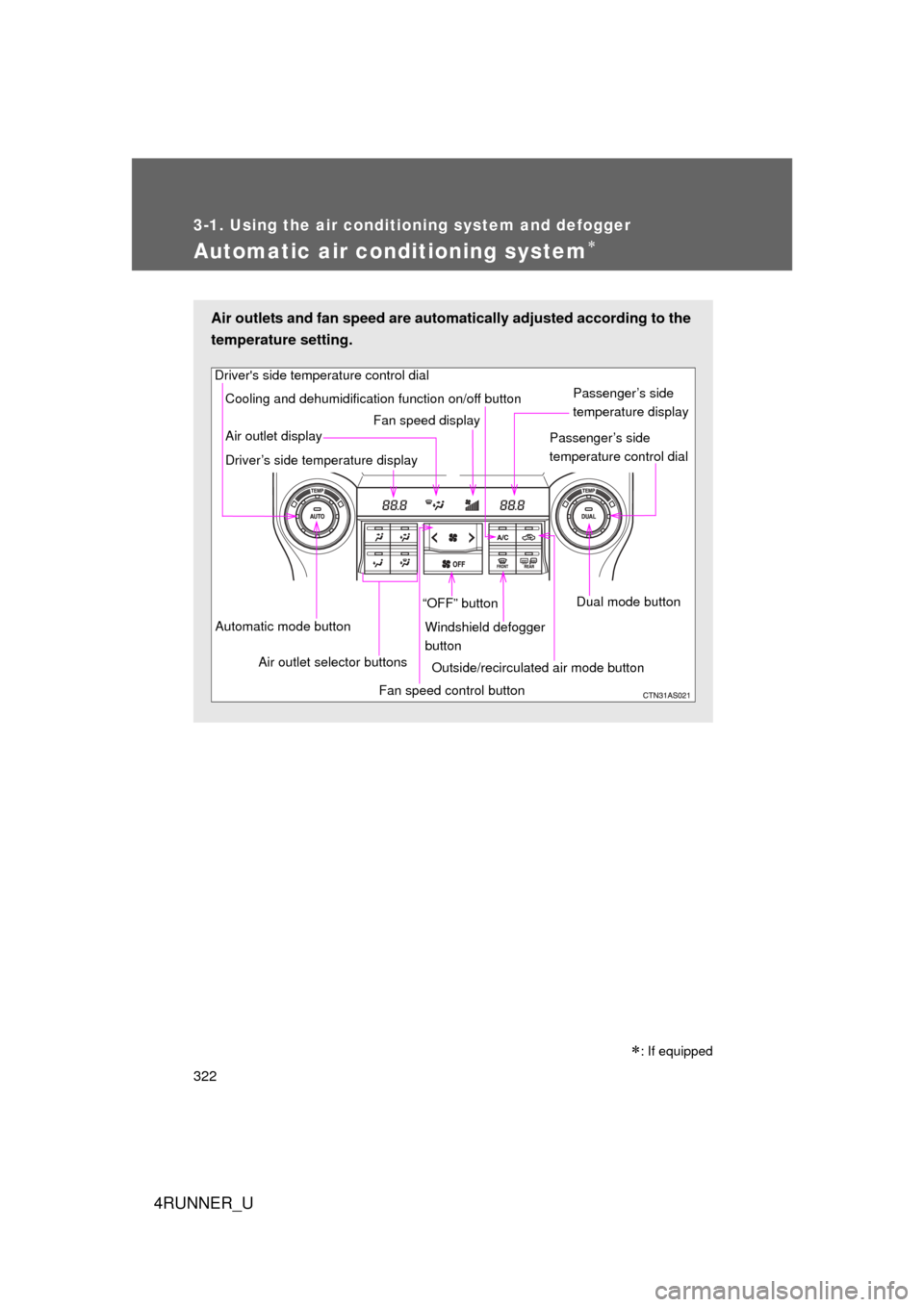
Automatic air conditioning system
Air outlets and fan speed are automatically adjusted according to the
temperature setting.
Driver's side temperature control dial
Air outlet display
Driver’s side temperature display Fan speed display
Passenger’s side
temperature display
Passenger’s side
temperature control dial
Automatic mode button Air outlet selector buttons “OFF” button
Cooling and dehumidification function on/off button
Fan speed control buttonWindshield defogger
button
Outside/recirculated air mode button Dual mode button
: If equipped
Page 324 of 704
324 3-1. Using the air conditioning system and defogger
4RUNNER_U
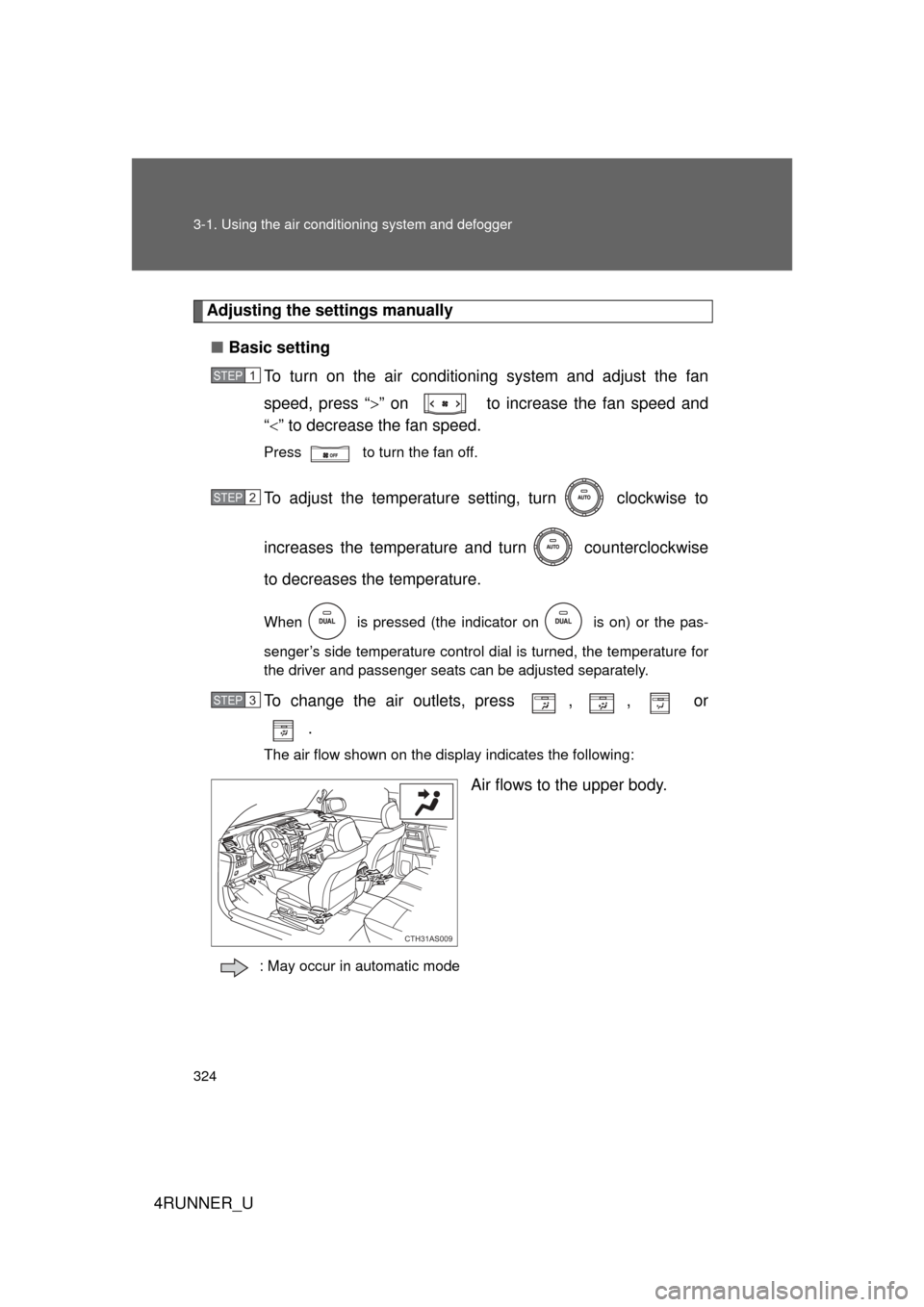
Adjusting the settings manually
■ Basic setting
To turn on the air conditioning system and adjust the fan
speed, press “ ” on to increase the fan speed and
“ ” to decrease the fan speed.
Press to turn the fan off.
To adjust the temperature setting, turn clockwise to
increases the temperature a nd turn counterclockwise
to decreases the temperature.
When is pressed (the indicator on is on) or the pas-
senger’s side temperature control dial is turned, the temperature for
the driver and passenger seats can be adjusted separately.
To change the air outlets, press , , or .
The air flow shown on the display indicates the following:
Air flows to the upper body.
: May occur in automatic mode
STEP 1
STEP 2
STEP 3
CTH31AS009
Page 334 of 704
334
4RUNNER_U
3-2. Using the audio system
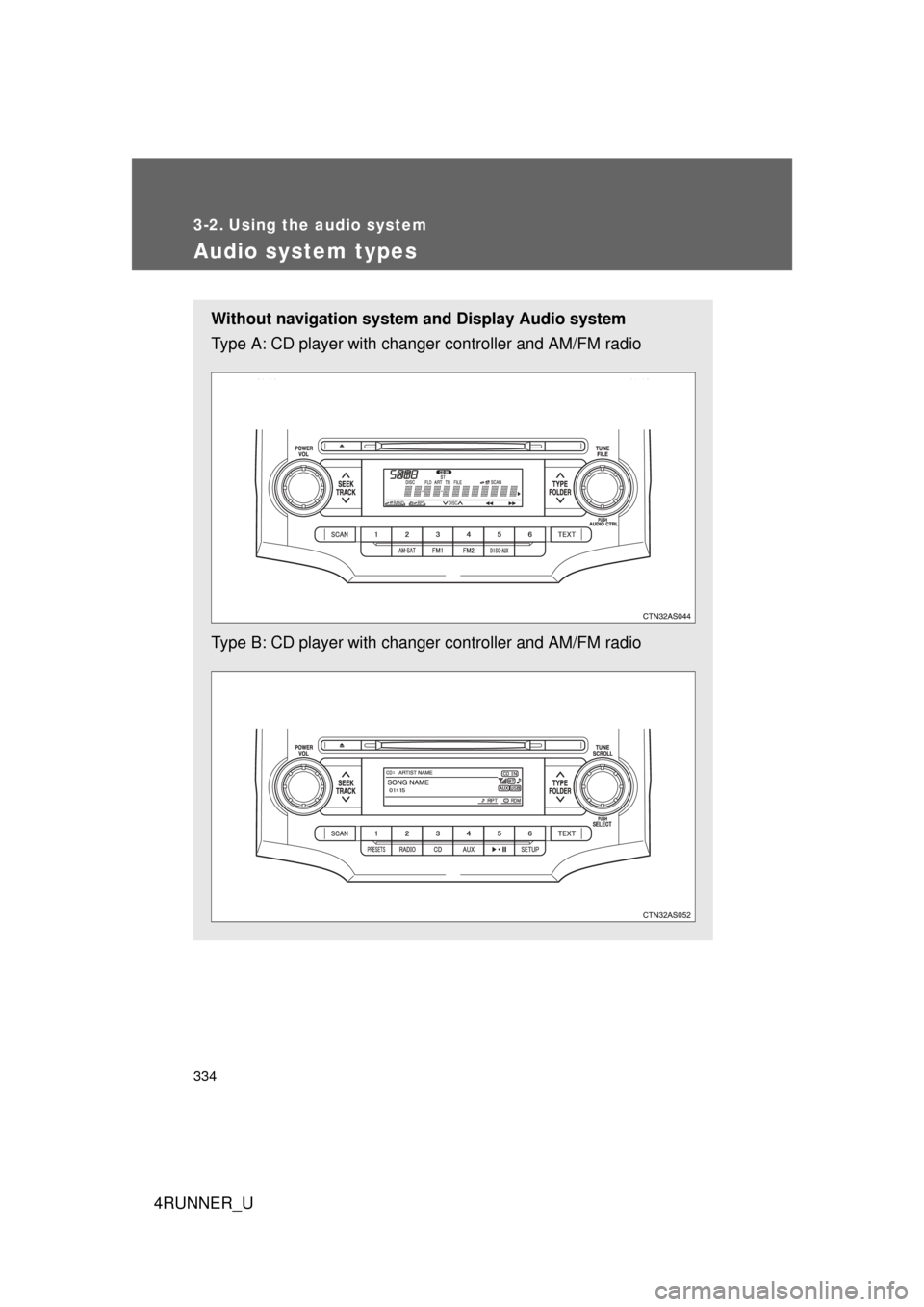
Audio system types
Without navigation system and Display Audio system
Type A: CD player with changer controller and AM/FM radio
Type B: CD player with changer controller and AM/FM radio