light TOYOTA 86 2017 Workshop Manual
[x] Cancel search | Manufacturer: TOYOTA, Model Year: 2017, Model line: 86, Model: TOYOTA 86 2017Pages: 428, PDF Size: 5.25 MB
Page 174 of 428
1742-3. Operating the light s and windshield wipers
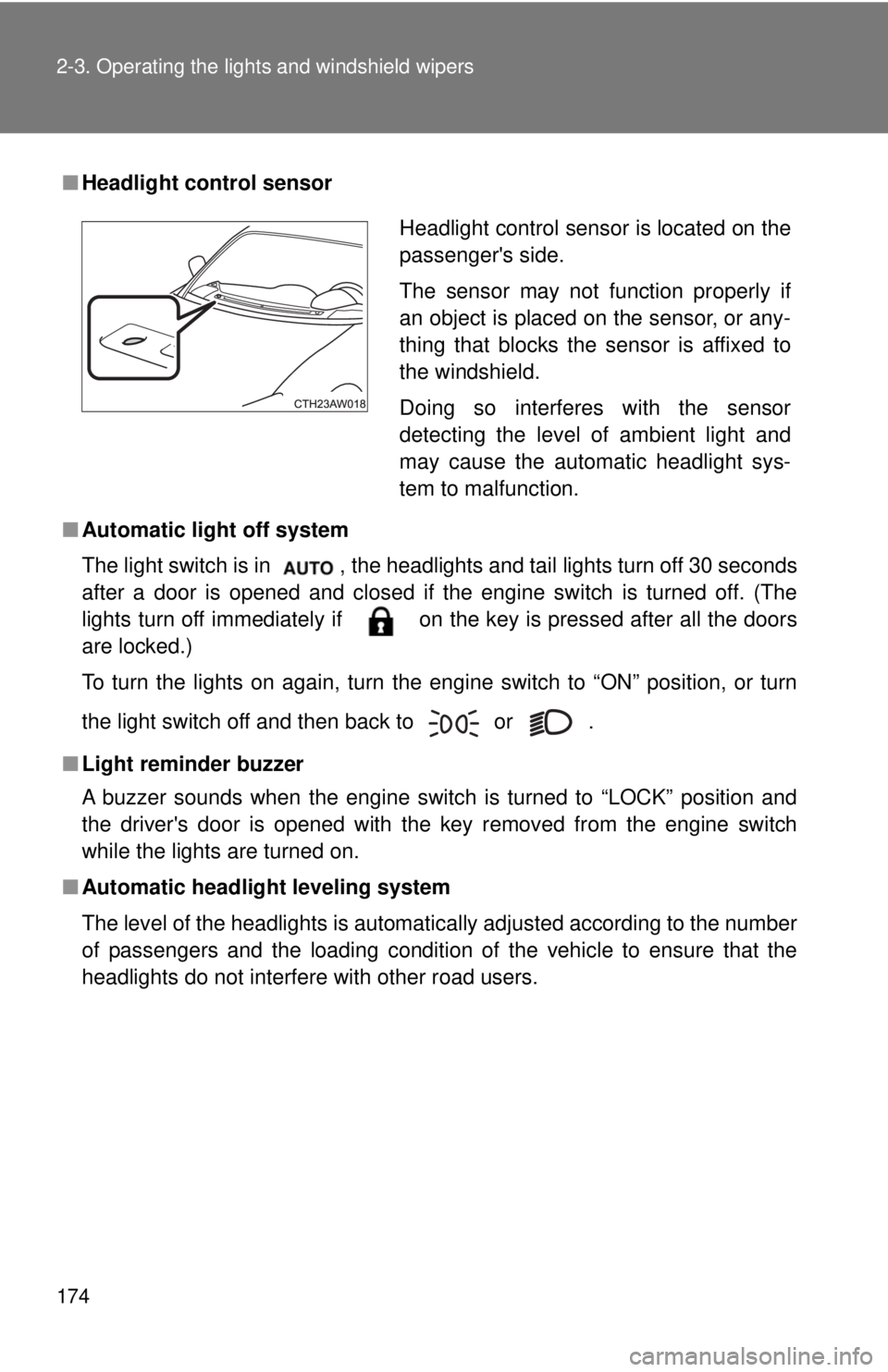
■ Headlight control sensor
■ Automatic light off system
The light switch is in , the headlights and tail lights turn off 30 seconds
after a door is opened and closed if the engine switch is turned off. (The
lights turn off immediately if on the key is pressed after all the doors
are locked.)
To turn the lights on again, turn the engine switch to “ON” position, or turn
the light switch off and then back to
or .
■ Light reminder buzzer
A buzzer sounds when the engine switch is turned to “LOCK” position and
the driver's door is opened with the key removed from the engine switch
while the lights are turned on.
■ Automatic headlight leveling system
The level of the headlights is automatically adjusted according to the number
of passengers and the loading condition of the vehicle to ensure that the
headlights do not interfere with other road users. Headlight control sensor is located on the
passenger's side.
The sensor may not function properly if
an object is placed on the sensor, or any-
thing that blocks the sensor is affixed to
the windshield.
Doing so interferes with the sensor
detecting the level of ambient light and
may cause the automatic headlight sys-
tem to malfunction.
Page 175 of 428
1752-3. Operating the lights and windshield wipers
2
When driving ■ Battery-saving function
In the following conditions, the headlights and the other remaining lights will
go off automatically after 20 minutes in order to prevent the vehicle battery
from being discharged:
● The headlights and/or tail lights are on.
● The engine switch is turned off.
● The light switch is in or .
This function will be canceled in any of the following situations:
● When the engine switch is turned to the “ON” position
● When the light switch is operated
● When the door is opened or closed
■ Customization that can be configured at your Toyota dealer
Settings of the light sensor sensitivity can be changed.
(Customizable features → P. 383)
NOTICE■ To prevent battery discharge
Do not leave the lights on longer than necessary when the engine is not run-
ning.
Page 176 of 428
1762-3. Operating the lights and windshield wipers
Windshield wipers and washer When intermittent windshield wiper operation is selected, the wiper
interval can be adjusted.
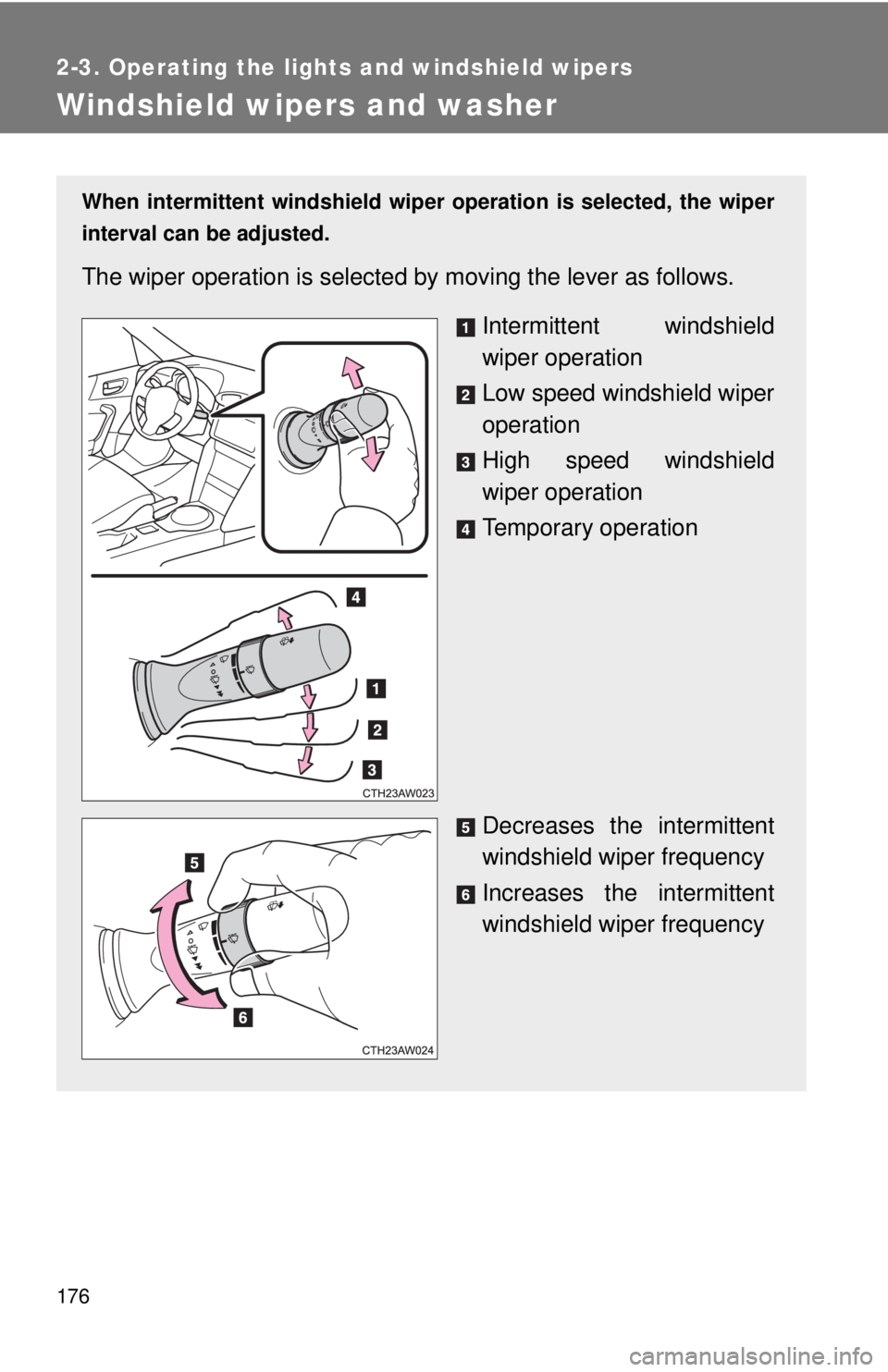
The wiper operation is selected by moving the lever as follows.
Intermittent windshield
wiper operation
Low speed windshield wiper
operation
High speed windshield
wiper operation
Temporary operation
Decreases the intermittent
windshield wiper frequency
Increases the intermittent
windshield wiper frequency
Page 177 of 428
1772-3. Operating the lights and windshield wipers
2
When driving
■ The windshield wipers and washer can be operated when
The engine switch is in the “ON” position.
■ If no windshield washer fluid sprays
Check that the washer nozzles are not blocked if there is washer fluid in the
windshield washer fluid tank.
WARNING■ Caution regarding the use of washer fluid
When it is cold, do not use the washer fluid until the windshield becomes
warm. The fluid may freeze on the windshield and cause low visibility. This
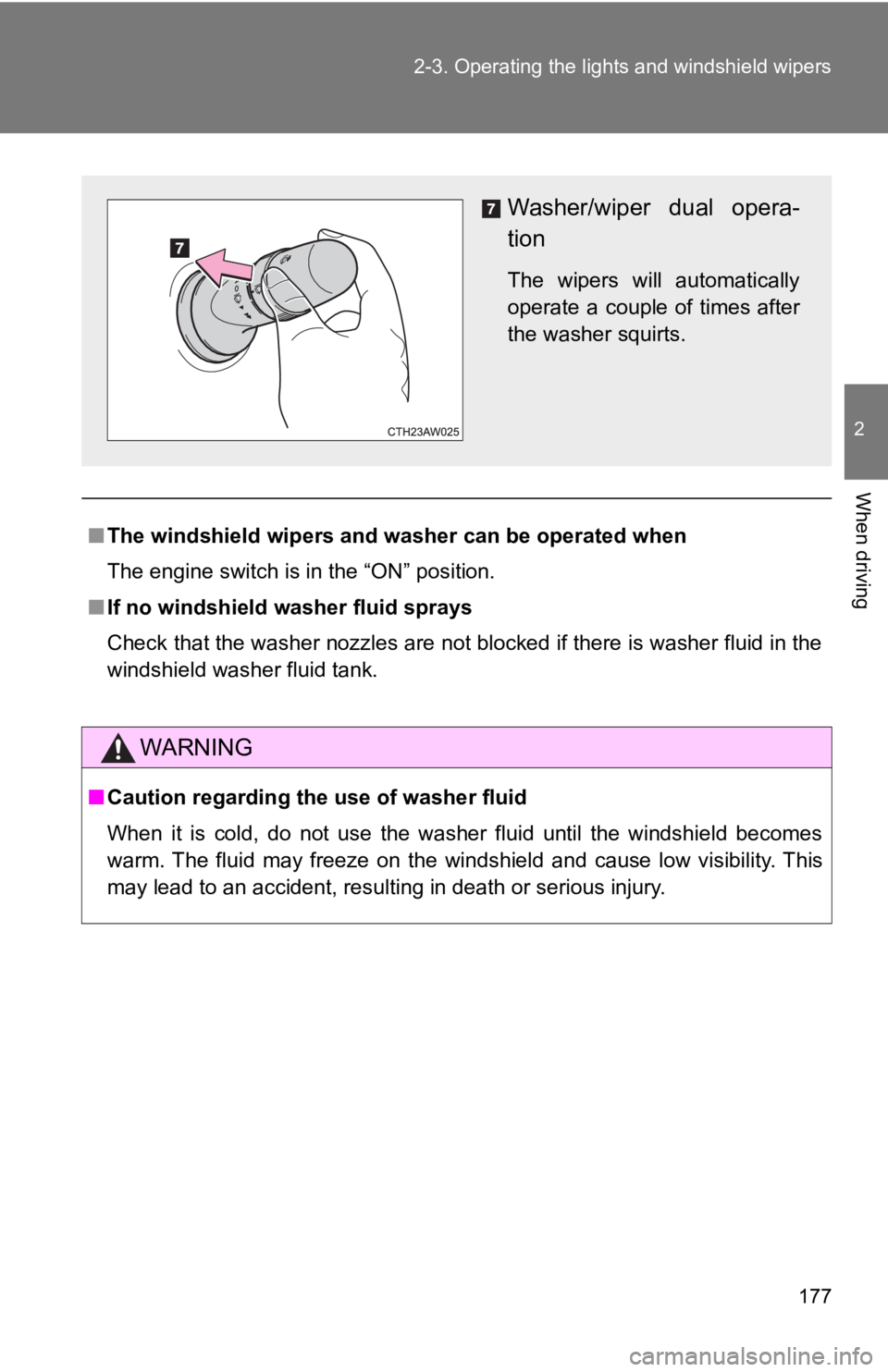
may lead to an accident, resulting in death or serious injury. Washer/wiper dual opera-
tion The wipers will automatically
operate a couple of times after
the washer squirts.
Page 178 of 428

1782-3. Operating the lights and windshield wipers
NOTICE■ When the windshield is dry
Do not use the wipers, as they may damage the windshield.
■ When the washer fluid tank is empty
Do not operate the switch continually as the washer fluid pump may over-
heat.
■ When a nozzle becomes blocked
In this case, contact your Toyota dealer.
Do not try to clear it with a pin or other object. The nozzle will be damaged.
Page 182 of 428

1822-4. Using other driving systems
■ Accelerating after setting the vehicle speed
● The vehicle can be accelerated normally. After acceleration, the set
speed resumes.
● Even without canceling the cruise control, the set speed can be
increased by first accelerating the vehicle to the desired speed and then
pushing the lever down to set the new speed.
■ Automatic cruise control cancelation
Cruise control will stop maintaining the vehicle speed in any of the following
situations.
● Actual vehicle speed is below approximately 20 mph (30 km/h).
● VSC is activated.
■ The system may be malfunctioning when
In the following situations, the system may be malfunctioning. Have the vehi-
cle inspected by your Toyota dealer.
● The cruise control indicator light comes on in yellow.
● The cruise control indicator does not come on even when the “ON-OFF”
button is pressed while the engine is running.
Page 185 of 428
1852-4. Using other driving systems
2
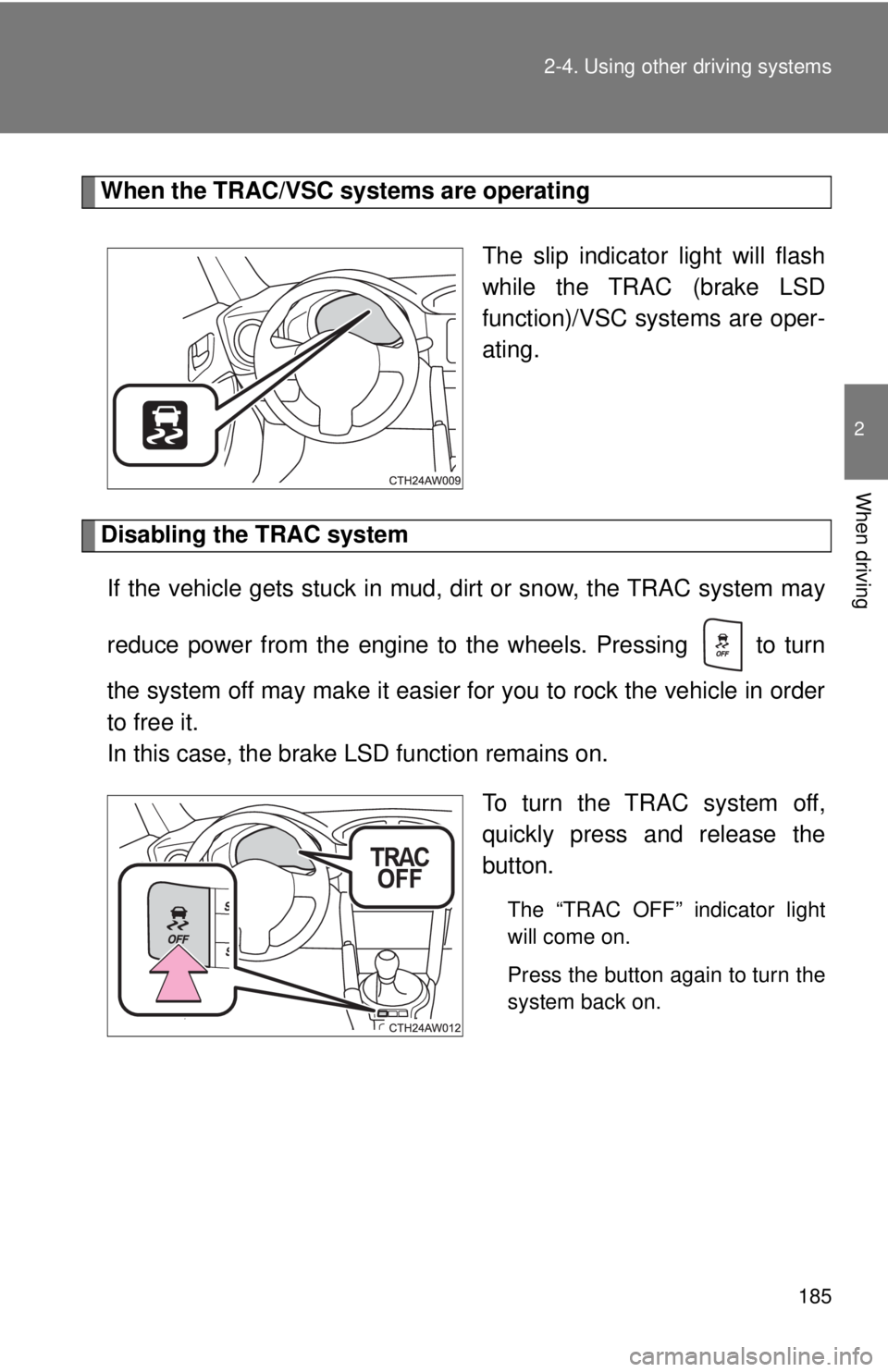
When driving When the TRAC/VSC systems are operating
The slip indicator light will flash
while the TRAC (brake LSD
function)/VSC systems are oper-
ating.
Disabling the TRAC system
If the vehicle gets stuck in mud, dirt or snow, the TRAC system may
reduce power from the engine to the wheels. Pressing to turn
the system off may make it easier for you to rock the vehicle in order
to free it.
In this case, the brake LSD function remains on.
To turn the TRAC system off,
quickly press and release the
button. The “TRAC OFF” indicator light
will come on.
Press the button again to turn the
system back on.
Page 186 of 428
1862-4. Using other driving systems
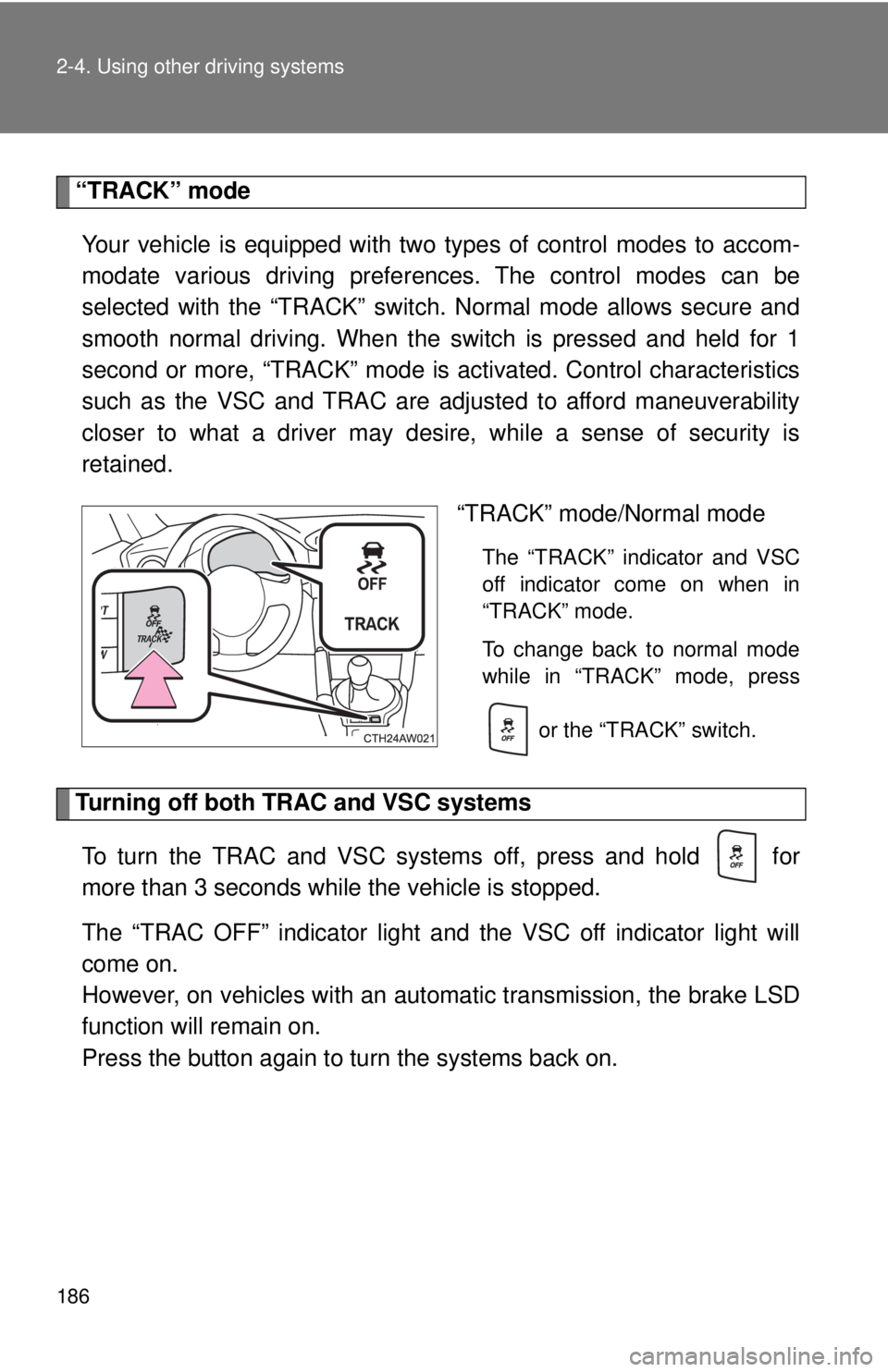
“TRACK” mode
Your vehicle is equipped with two types of control modes to accom-
modate various driving prefer ences. The control modes can be
selected with the “TRACK” switch. Normal mode allows secure and
smooth normal driving. When t he switch is pressed and held for 1
second or more, “TRACK” mode is activated. Contro l characteristics
such as the VSC and TRAC are adj usted to afford maneuverability
closer to what a driver may desire, while a sense of security is
retained.
“TRACK” mode/Normal mode The “TRACK” indicator and VSC
off indicator come on when in
“TRACK” mode.
To change back to normal mode
while in “TRACK” mode, press
or the “TRACK” switch.
Turning off both TRAC and VSC systems
To turn the TRAC and VSC systems off, press and hold for
more than 3 seconds while the vehicle is stopped.
The “TRAC OFF” indicator light and the VSC off indicator light will
come on.
However, on vehicles with an aut omatic transmission, the brake LSD
function will remain on.
Press the button again to tu rn the systems back on.
Page 187 of 428
1872-4. Using other driving systems
2
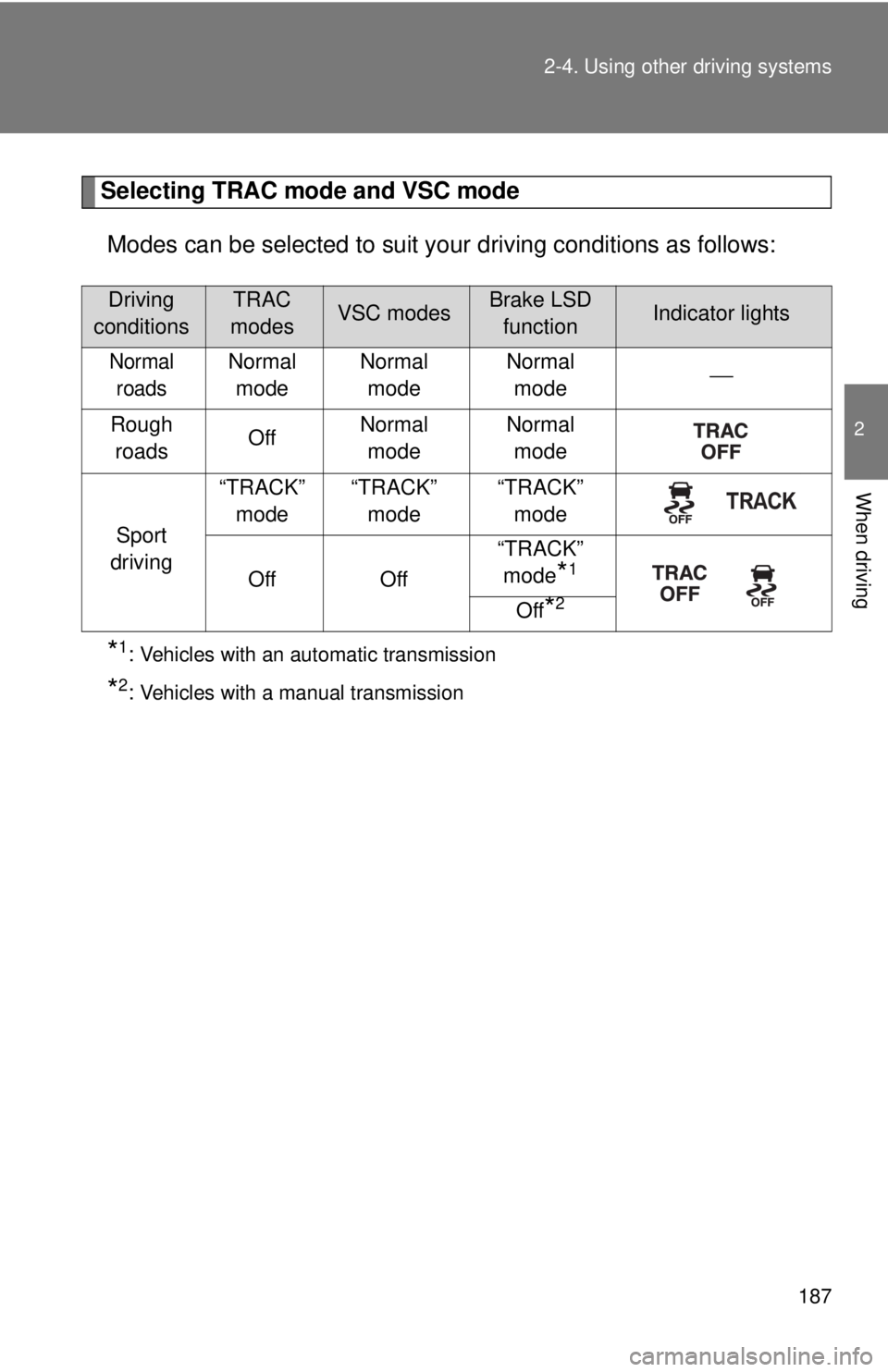
When driving Selecting TRAC mode and VSC mode
Modes can be selected to suit your driving conditions as follows:
* 1
: Vehicles with an automatic transmission
* 2
: Vehicles with a manual transmissionDriving
conditions TRAC
modes VSC modes Brake LSD
function Indicator lights
Normal
roads Normal
mode Normal
mode Normal
mode ⎯
Rough
roads Off Normal
mode Normal
mode
Sport
driving “TRACK”
mode “TRACK”
mode “TRACK”
mode
Off Off “TRACK”
mode
* 1
Off
* 2
Page 188 of 428

1882-4. Using other driving systems
■ Sounds and vibrations caused by the ABS, brake assist, TRAC and
VSC systems
● A sound may be heard from the engine compartment when the brake
pedal is depressed repeatedly, when the engine is started or just after the
vehicle begins to move. This sound does not indicate that a malfunction
has occurred in any of these systems.
● Any of the following conditions may occur when the above systems are
operating. None of these indicates that a malfunction has occurred.
• Vibrations may be felt through the vehicle body and steering.
• A motor sound may be heard after the vehicle comes to a stop.
• The brake pedal may pulsate slightly after the ABS is activated.
• The brake pedal may move down slightly after the ABS is activated.
■ EPS operation sound
When the steering wheel is operated, a motor sound (whirring sound) may
be heard. This does not indicate a malfunction.
■ Automatic reactivation of TRAC and VSC systems
After turning the TRAC and VSC systems off, the systems will be automati-
cally reactivated in the following situations:
● When the engine switch is turned to “LOCK” position
● If only the TRAC system is turned off, the TRAC will turn on when vehicle
speed is more than approximately 31 mph (50 km/h).
If both the TRAC and VSC systems are turned off, automatic reactivation
will not occur when vehicle speed increases.