lights TOYOTA AVALON 2019 (in English) Owner's Manual
[x] Cancel search | Manufacturer: TOYOTA, Model Year: 2019, Model line: AVALON, Model: TOYOTA AVALON 2019Pages: 536, PDF Size: 9.43 MB
Page 113 of 536
1133-1. Key information
3
Operation of each component
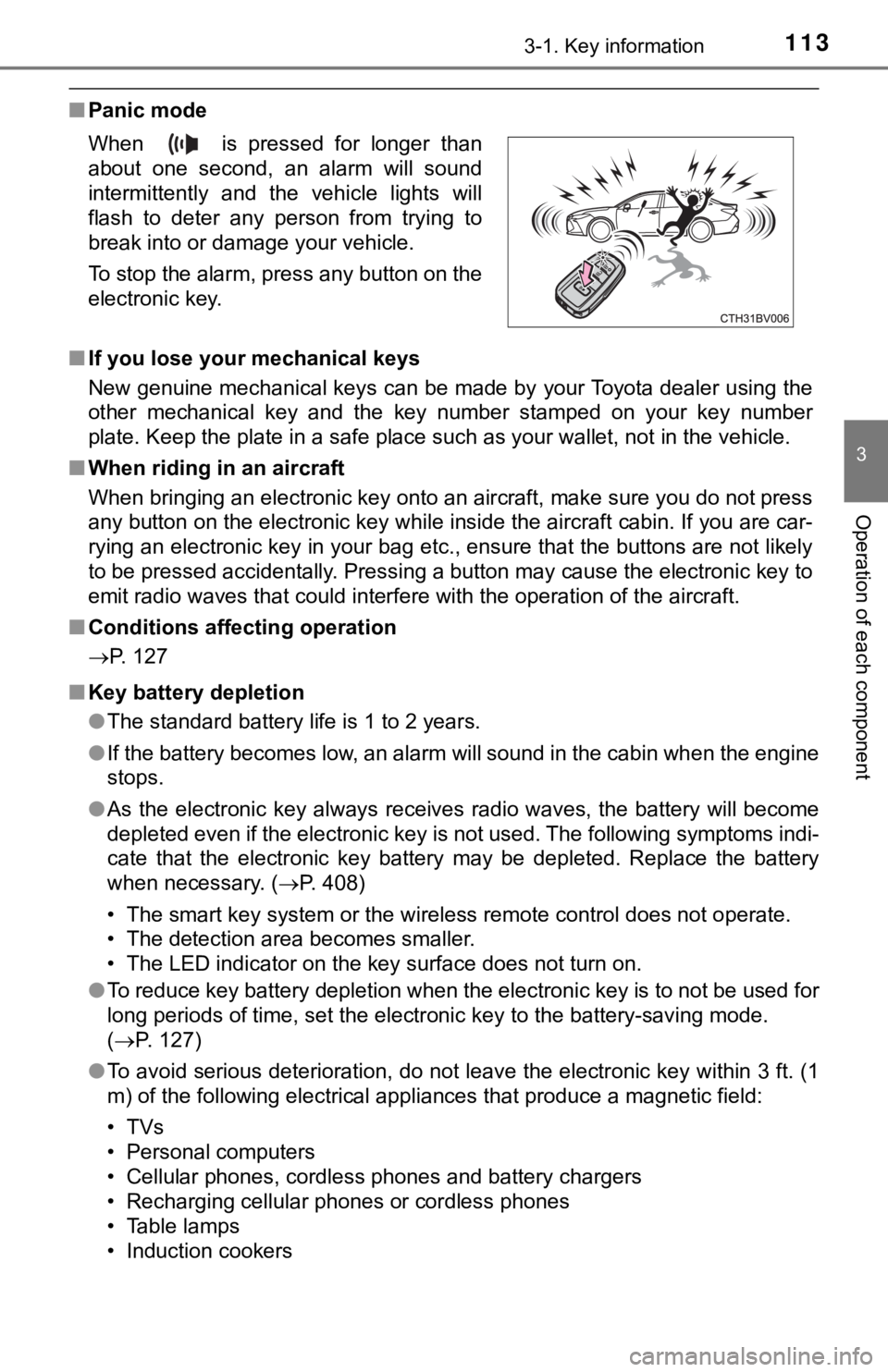
■Panic mode
■ If you lose your mechanical keys
New genuine mechanical keys can be made by your Toyota dealer u sing the
other mechanical key and the key number stamped on your key num ber
plate. Keep the plate in a safe place such as your wallet, not in the vehicle.
■ When riding in an aircraft
When bringing an electronic key onto an aircraft, make sure you do not press
any button on the electronic key while inside the aircraft cabi n. If you are car-
rying an electronic key in your bag etc., ensure that the butto ns are not likely
to be pressed accidentally. Pressing a button may cause the electronic key to
emit radio waves that could interfere with the operation of the aircraft.
■ Conditions affecting operation
P. 127
■ Key battery depletion
●The standard battery life is 1 to 2 years.
● If the battery becomes low, an alarm will sound in the cabin wh en the engine
stops.
● As the electronic key always receives radio waves, the battery will become
depleted even if the electronic key is not used. The following symptoms indi-
cate that the electronic key battery may be depleted. Replace the battery
when necessary. ( P. 408)
• The smart key system or the wireless remote control does not o perate.
• The detection area becomes smaller.
• The LED indicator on the key surface does not turn on.
● To reduce key battery depletion when the electronic key is to not be used for
long periods of time, set the electronic key to the battery-sav ing mode.
( P. 127)
● To avoid serious deterioration, do not leave the electronic key within 3 ft. (1
m) of the following electrical appliances that produce a magnet ic field:
•TVs
• Personal computers
• Cellular phones, cordless phones and battery chargers
• Recharging cellular phones or cordless phones
• Table lamps
• Induction cookers
When is pressed for longer than
about one second, an alarm will sound
intermittently and the vehicle lights will
flash to deter any person from trying to
break into or damage your vehicle.
To stop the alarm, press any button on the
electronic key.
Page 145 of 536
1453-4. Adjusting the steering wheel and mirrors
3
Operation of each component
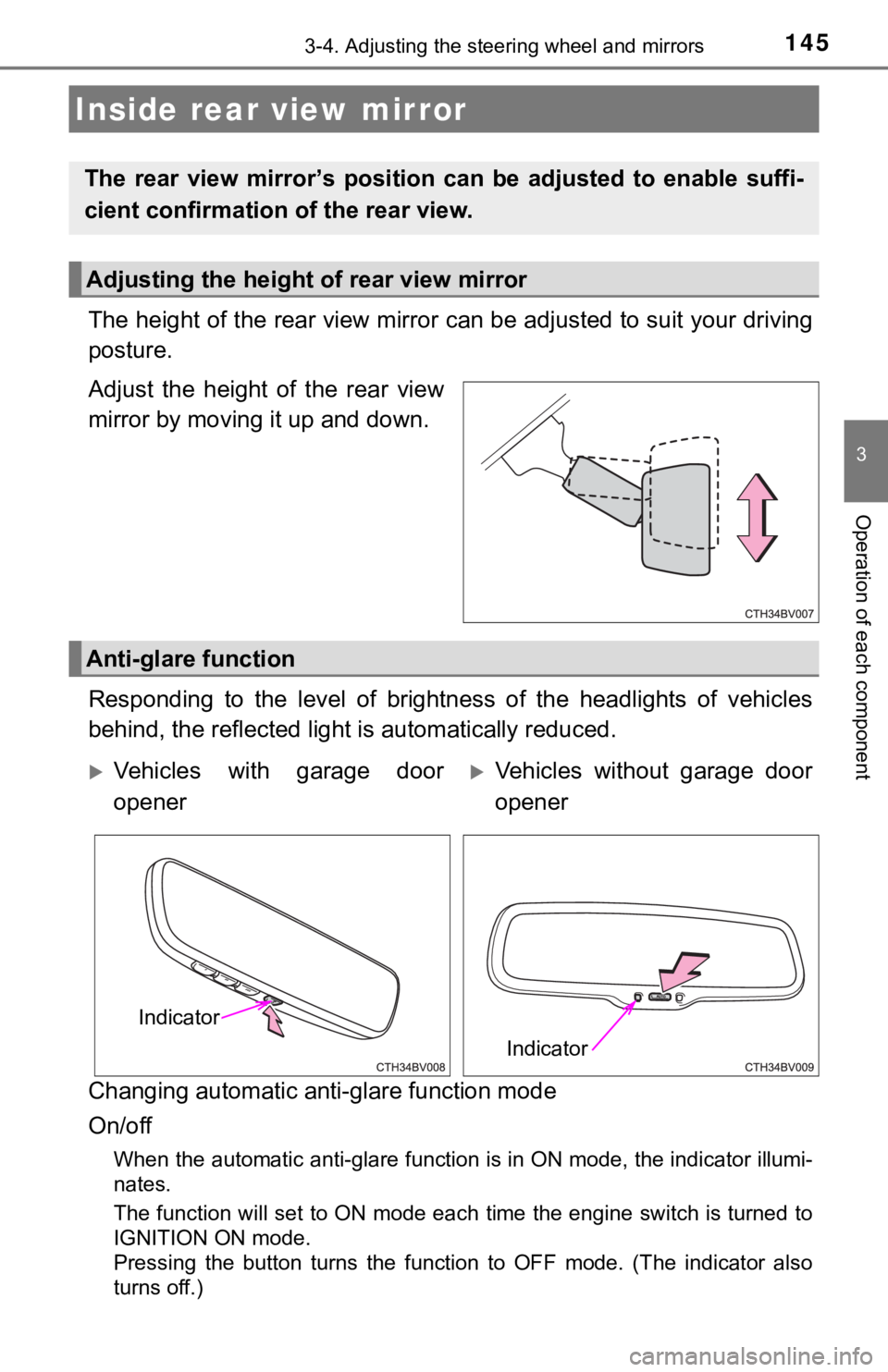
The height of the rear view mirror can be adjusted to suit your driving
posture.
Adjust the height of the rear view
mirror by moving it up and down.
Responding to the level of brightness of the headlights of vehi cles
behind, the reflected light is automatically reduced.
Changing automatic anti- glare function mode
On/off
When the automatic anti-glare function is in ON mode, the indic ator illumi-
nates.
The function will set to ON mode each time the engine switch is turned to
IGNITION ON mode.
Pressing the button turns the function to OFF mode. (The indica tor also
turns off.)
Inside rear view mirror
The rear view mirror’s position ca n be adjusted to enable suffi-
cient confirmation of the rear view.
Adjusting the height of rear view mirror
Anti-glare function
Vehicles with garage door
openerVehicles without garage door
opener
Indicator
Indicator
Page 159 of 536

159
4Driving
4-1. Before drivingDriving the vehicle ............. 160
Cargo and luggage ........... 168
Vehicle load limits ............. 171
Trailer towing..................... 172
Dinghy towing ................... 173
4-2. Driving procedures Engine (ignition) switch .............................. 174
Automatic transmission .................... 179
Turn signal lever................ 185
Parking brake .................... 186
Brake Hold ........................ 190
4-3. Operating the lights and wipers
Headlight switch ................ 192
Automatic High Beam ....... 196
Windshield wipers and washer ............................ 200
4-4. Refueling Opening the fuel tank cap .......................... 204 4-5. Using the driving
support systems
Toyota Safety Sense P ..... 208
PCS (Pre-Collision System) .... 216
LDA (Lane Departure Alert with steering
control) ............................ 228
Dynamic radar cruise control with full-speed
range............................... 238
BSM (Blind Spot Monitor) ........ 251
• BSM function ................ 255
• RCTA function .............. 257
Rear Camera Detection function ........................... 262
Intuitive parking assist....... 266
Intelligent Clearance Sonar (ICS) ..................... 274
Driving mode select switches .......................... 295
Driving assist systems ...... 299
4-6. Driving tips Winter driving tips ............. 305
Page 185 of 536
1854-2. Driving procedures
4
Driving
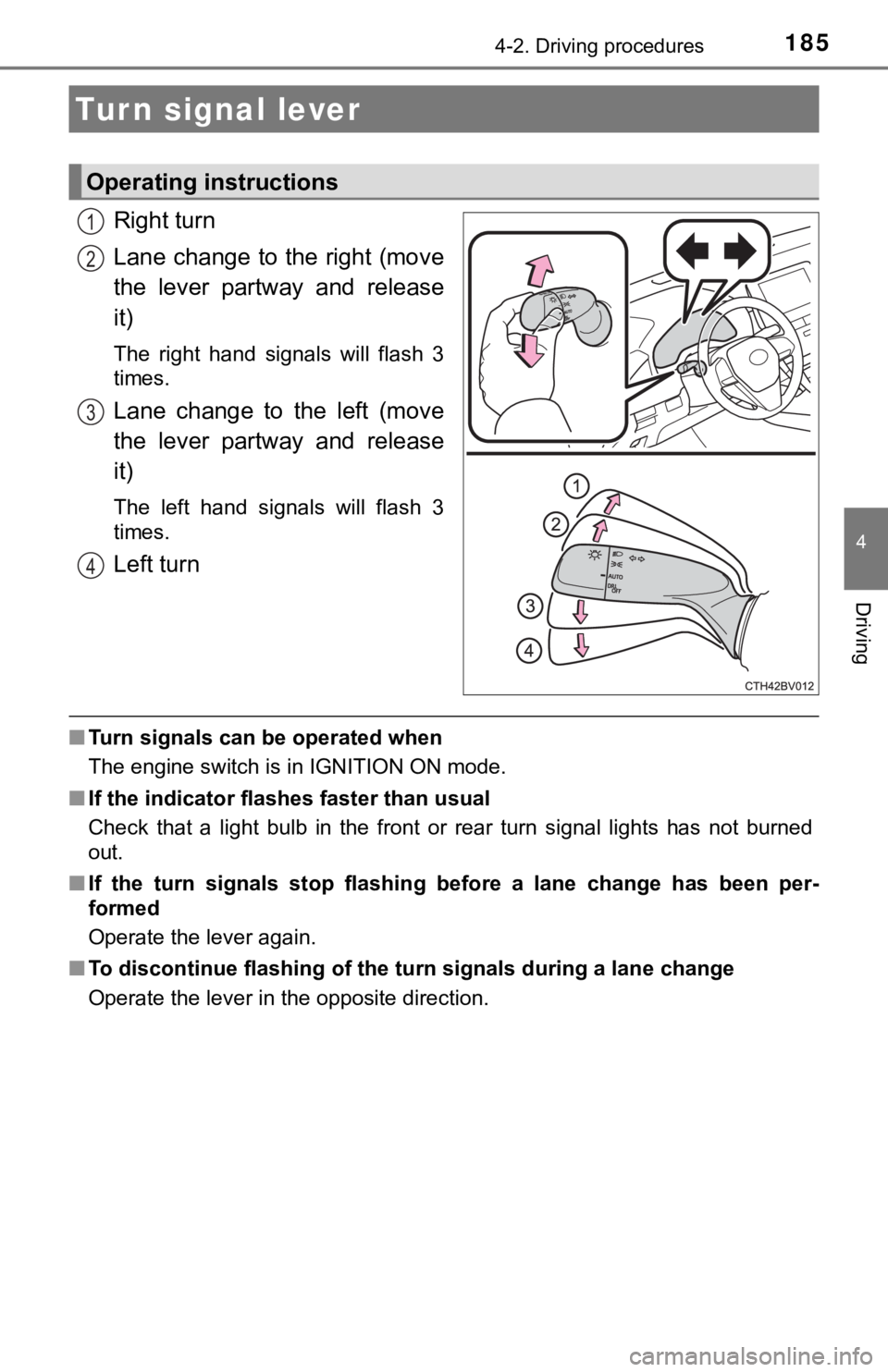
Right turn
Lane change to the right (move
the lever partway and release
it)
The right hand signals will flash 3
times.
Lane change to the left (move
the lever partway and release
it)
The left hand signals will flash 3
times.
Left turn
■Turn signals can be operated when
The engine switch is in IGNITION ON mode.
■ If the indicator flashes faster than usual
Check that a light bulb in the front or rear turn signal lights has not burned
out.
■ If the turn signals stop flashing before a lane change has been per-
formed
Operate the lever again.
■ To discontinue flashing of the turn signals during a lane chang e
Operate the lever in the opposite direction.
Turn signal lever
Operating instructions
1
2
3
4
Page 192 of 536
1924-3. Operating the lights and wipers
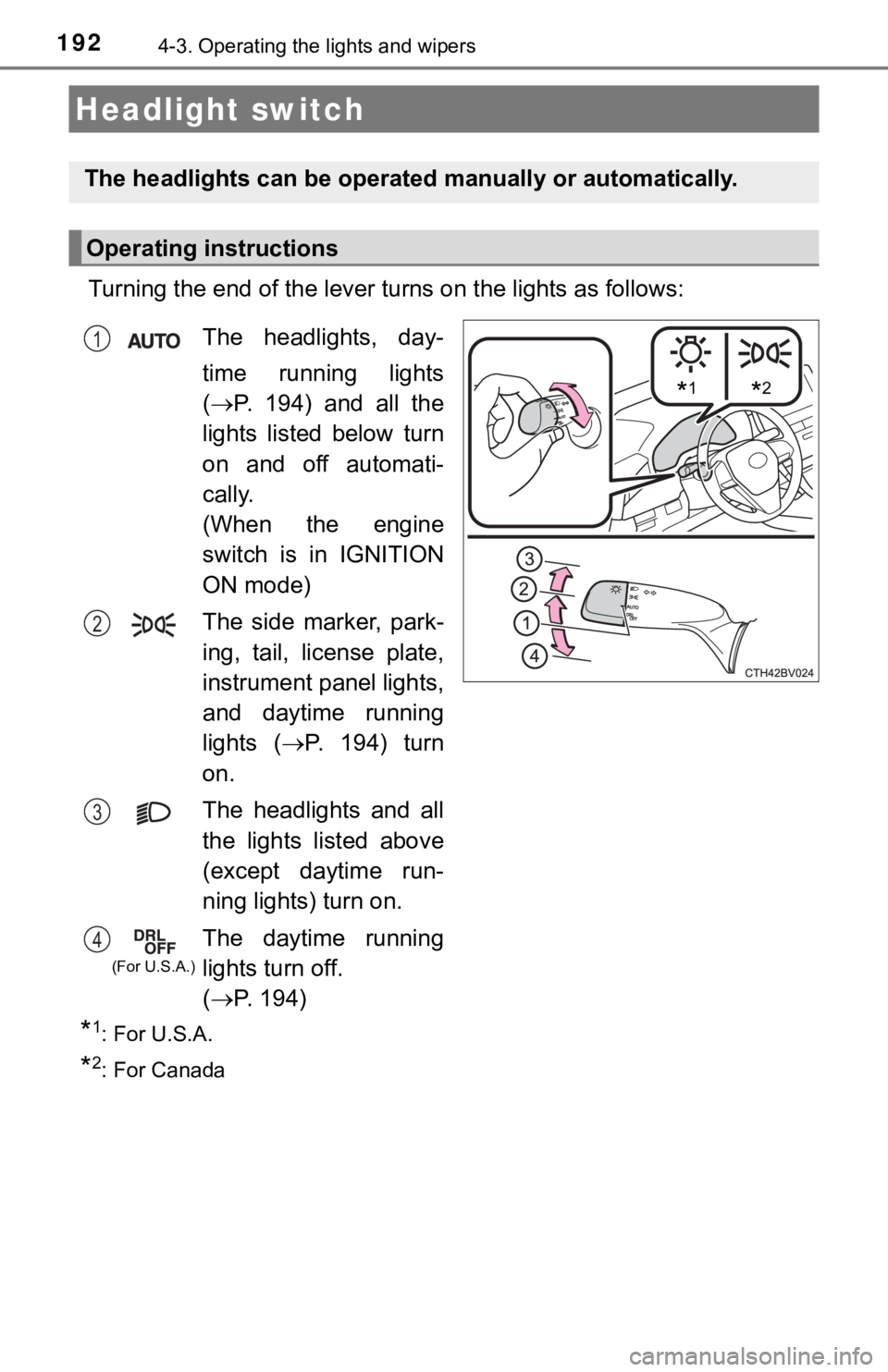
Turning the end of the lever turns on the lights as follows:
*1: For U.S.A.
*2: For Canada
Headlight switch
The headlights can be operated manually or automatically.
Operating instructions
*1*2
The headlights, day-
time running lights
( P. 194) and all the
lights listed below turn
on and off automati-
cally.
(When the engine
switch is in IGNITION
ON mode)
The side marker, park-
ing, tail, license plate,
instrument panel lights,
and daytime running
lights ( P. 194) turn
on.
The headlights and all
the lights listed above
(except daytime run-
ning lights) turn on.
The daytime running
lights turn off.
( P. 1 9 4 )1
2
3
4
(For U.S.A.)
Page 193 of 536
1934-3. Operating the lights and wipers
4
Driving
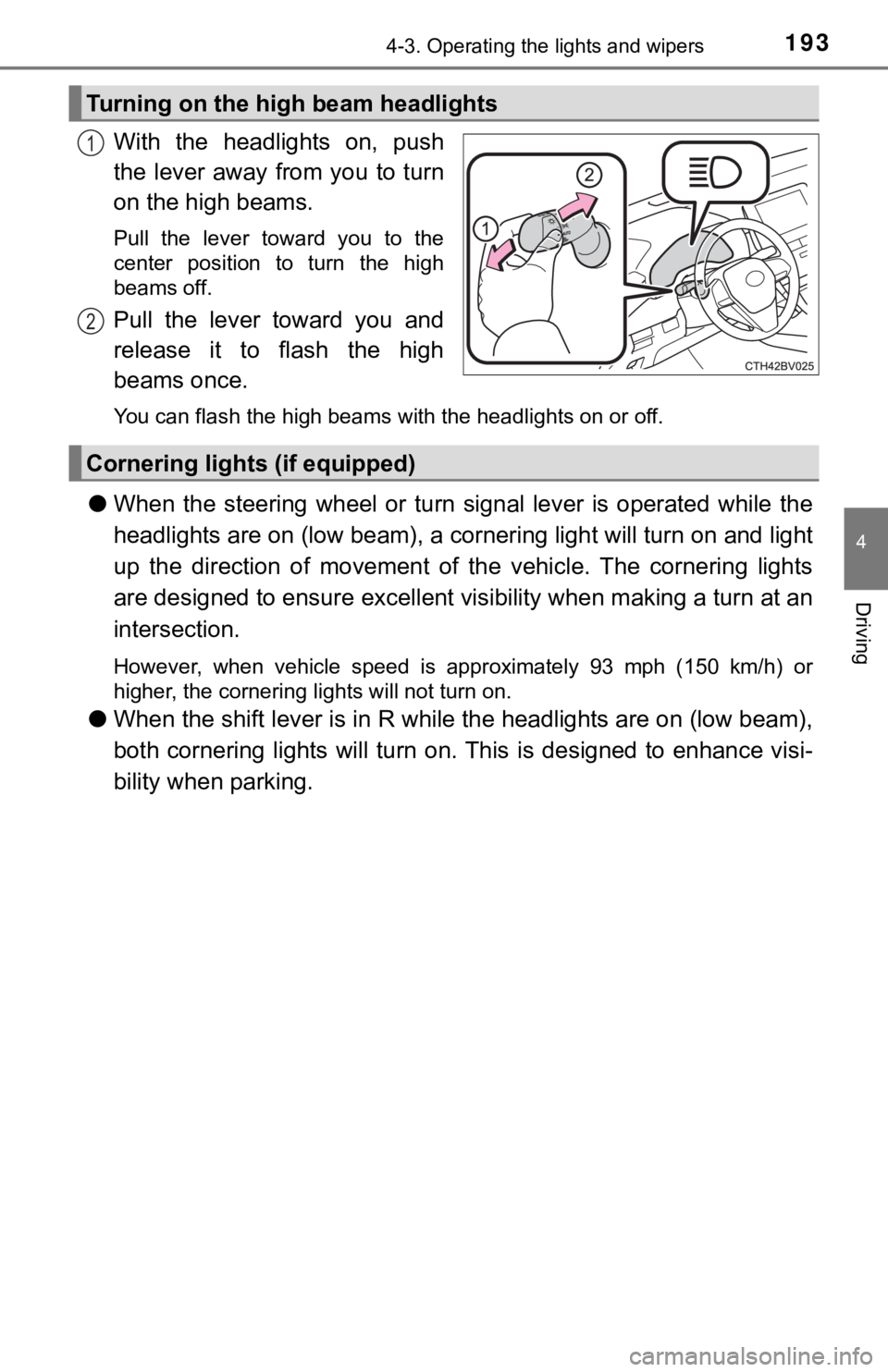
With the headlights on, push
the lever away from you to turn
on the high beams.
Pull the lever toward you to the
center position to turn the high
beams off.
Pull the lever toward you and
release it to flash the high
beams once.
You can flash the high beams with the headlights on or off.
●When the steering wheel or turn signal lever is operated while the
headlights are on (lo w beam), a cornering light will turn on and light
up the direction of movement of the vehicle. The cornering ligh ts
are designed to ensur e excellent visibility when making a turn at an
intersection.
However, when vehicle speed is approximately 93 mph (150 km/h) or
higher, the cornering lights will not turn on.
● When the shift lever is in R while the headlights are on (low b eam),
both cornering lights will turn on. This is designed to enhance visi-
bility when parking.
Turning on the high beam headlights
1
2
Cornering light s (if equipped)
Page 194 of 536
1944-3. Operating the lights and wipers
■Daytime running light system
●Type A:
The daytime running lights illuminate using the same lights as the low beam
headlights and illuminate dimmer than the low beam headlights.
Type B:
The daytime running lights illuminate using the same lights as the parking
lights and illuminate brighter than the parking lights.
● To make your vehicle more visible to other drivers during dayti me driving,
the daytime running lights turn on automatically when all of the following
conditions are met. (The daytime running lights are not designe d for use at
night.)
• The engine is running
• The parking brake is released
• The headlight switch is in the or
* position
*: When the surroundings are bright
The daytime running lights remain on after they illuminate, even if the parking
brake is set again.
● For U.S.A.: Daytime running lights can be turned off by operati ng the switch.
● Compared to turning on the headlights, the daytime running ligh t system
offers greater durability and consumes less electricity, so it can help improve
fuel economy.
■ Cornering lights (if equipped)
When the cornering lights are on for more than 30 minutes, they will turn off
automatically.
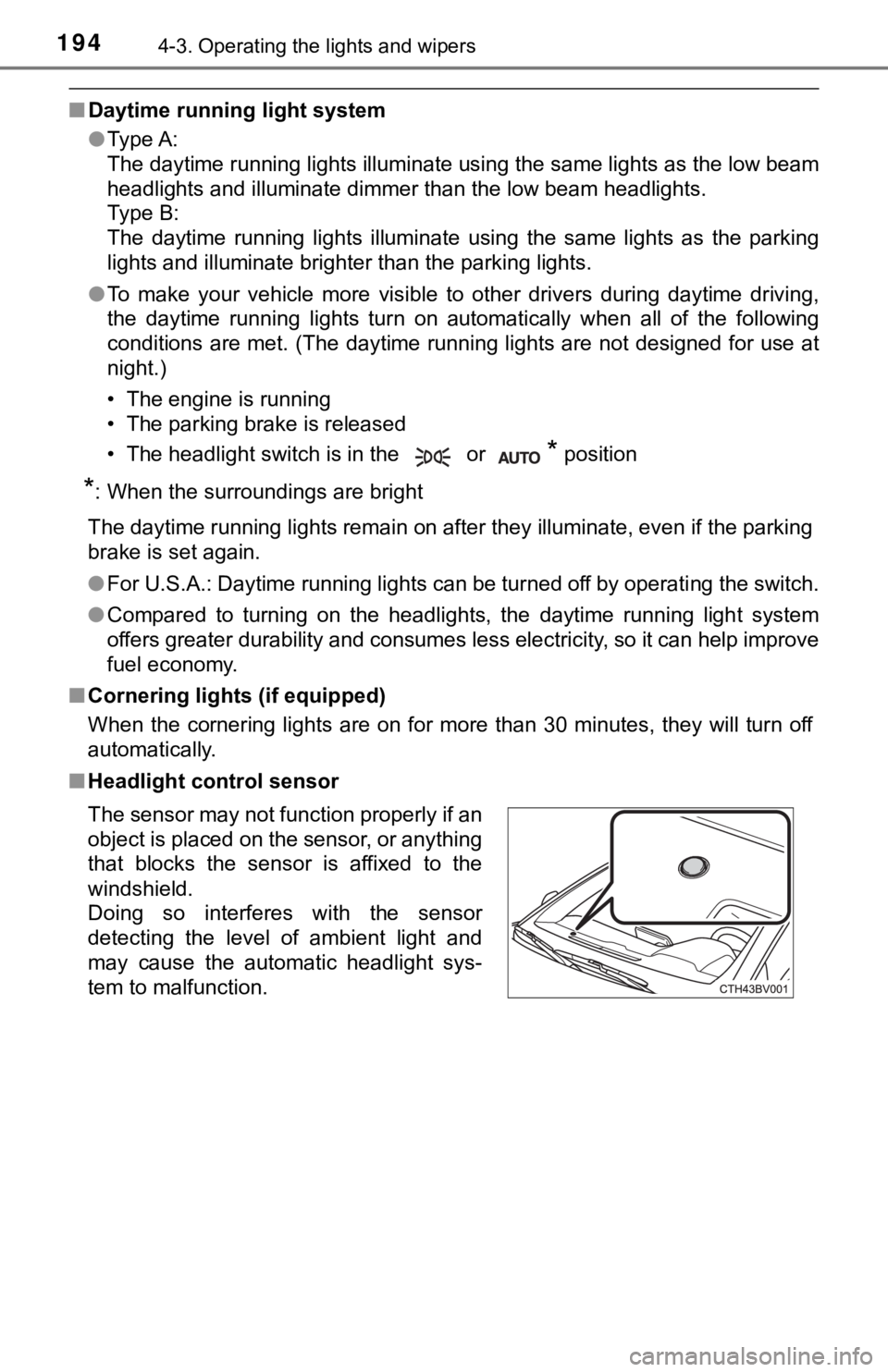
■ Headlight control sensor
The sensor may not function properly if an
object is placed on the sensor, or anything
that blocks the sensor is affixed to the
windshield.
Doing so interferes with the sensor
detecting the level of ambient light and
may cause the automatic headlight sys-
tem to malfunction.
Page 195 of 536
1954-3. Operating the lights and wipers
4
Driving
■Automatic light off system
●When the headlights are on: The headlights and tail lights turn off 30 sec-
onds after the engine switch is turned to ACCESSORY mode or tur ned off
and a door is opened and closed. (The lights turn off immediate ly if
on the key is pressed twice after all the doors are closed.)
● When only the tail lights are on: The tail lights turn off automatically if the
engine switch is turned to ACCESSORY mode or turned off and the driver’s
door is opened.
To turn the lights on again, turn the engine switch to IGNITION ON mode, or
turn the light switch off once and then back to or .
If any of the doors or trunk lid is kept open, the lights automatically turn off
after 20 minutes.
■ Light reminder buzzer (except when the light switch is in )
A buzzer sounds when the engine switch is turned off or turned to ACCES-
SORY mode and the driver's door is opened while the lights are turned on.
■ Windshield wiper linked h eadlight illumination
When driving during daytime with the headlight switch turned to , if the
windshield wipers are used, the headlights will turn on automat ically after
several seconds to help enhance the visibility of your vehicle.
■ Battery-saving function
In the following conditions, the remaining lights will go off a utomatically after
20 minutes in order to prevent the vehicle battery from being d ischarged:
● The headlights and/or tail lights are on.
● The engine switch is in ACCESSORY mode or turned off.
This function will be canceled in any of the following situatio ns:
● When the engine switch is turned to IGNITION ON mode.
● When the light switch is operated
● When a door or the trunk is opened or closed
■ Welcome lighting
If the headlight switch is turned to and the surrounding area is dark,
unlocking the doors using the smart key system or wireless remo te control
will turn the parking lights and tail lights on automatically.
■ Customization
Some functions can be customized. ( P. 491)
NOTICE
■To prevent battery discharge
Do not leave the lights on longer than necessary when the engin e is not
running.
Page 196 of 536
1964-3. Operating the lights and wipers
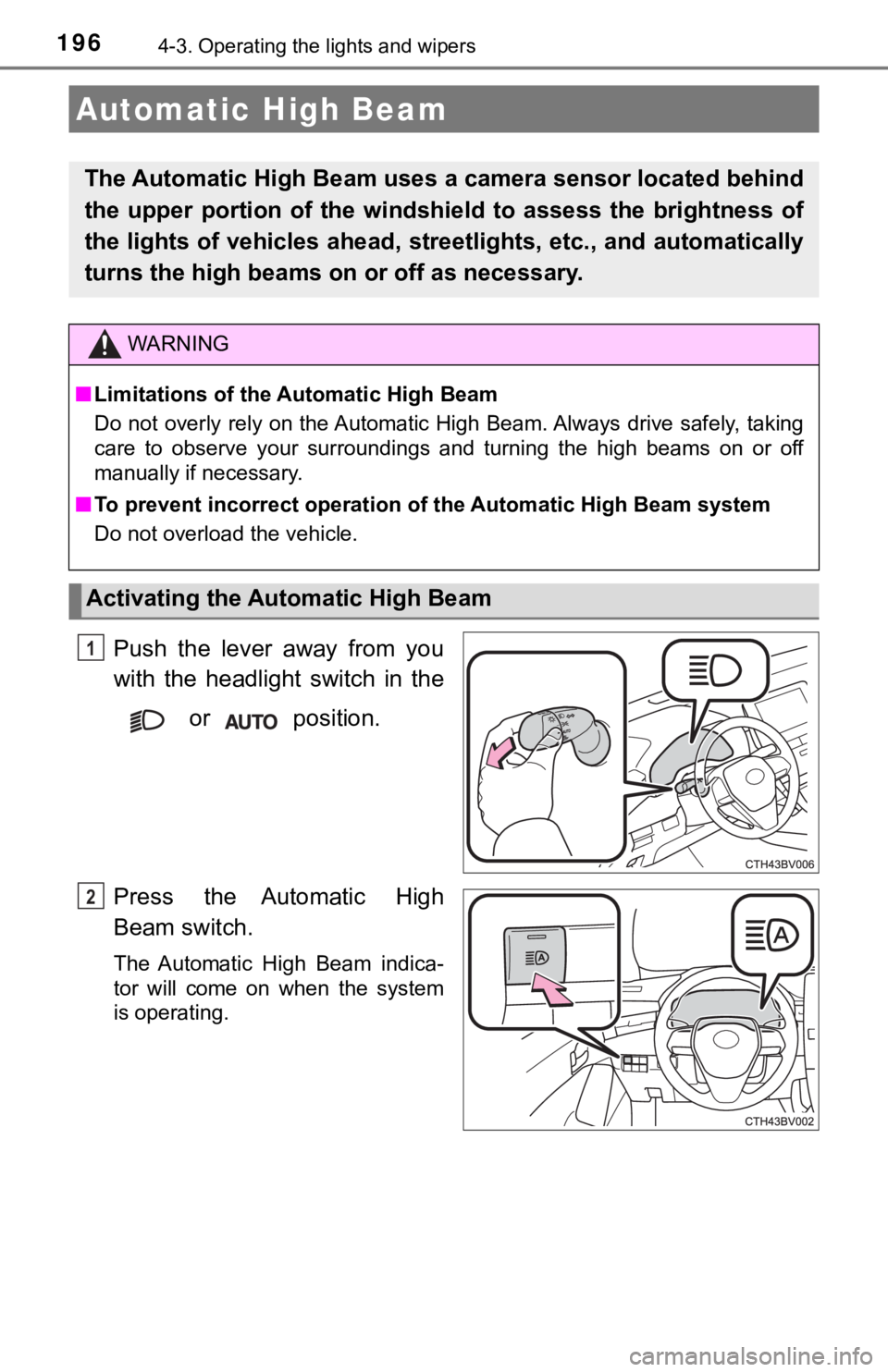
Push the lever away from you
with the headlight switch in the or position.
Press the Automatic High
Beam switch.
The Automatic High Beam indica-
tor will come on when the system
is operating.
Automatic High Beam
The Automatic High Beam uses a camera sensor located behind
the upper portion of the windshi eld to assess the brightness of
the lights of vehicles ahead, streetlights, etc., and automatic ally
turns the high beams on or off as necessary.
WARNING
■Limitations of the Automatic High Beam
Do not overly rely on the Automatic High Beam. Always drive saf ely, taking
care to observe your surroundings and turning the high beams on or off
manually if necessary.
■ To prevent incorrect operation o f the Automatic High Beam syste m
Do not overload the vehicle.
Activating the Automatic High Beam
1
2
Page 197 of 536
1974-3. Operating the lights and wipers
4
Driving
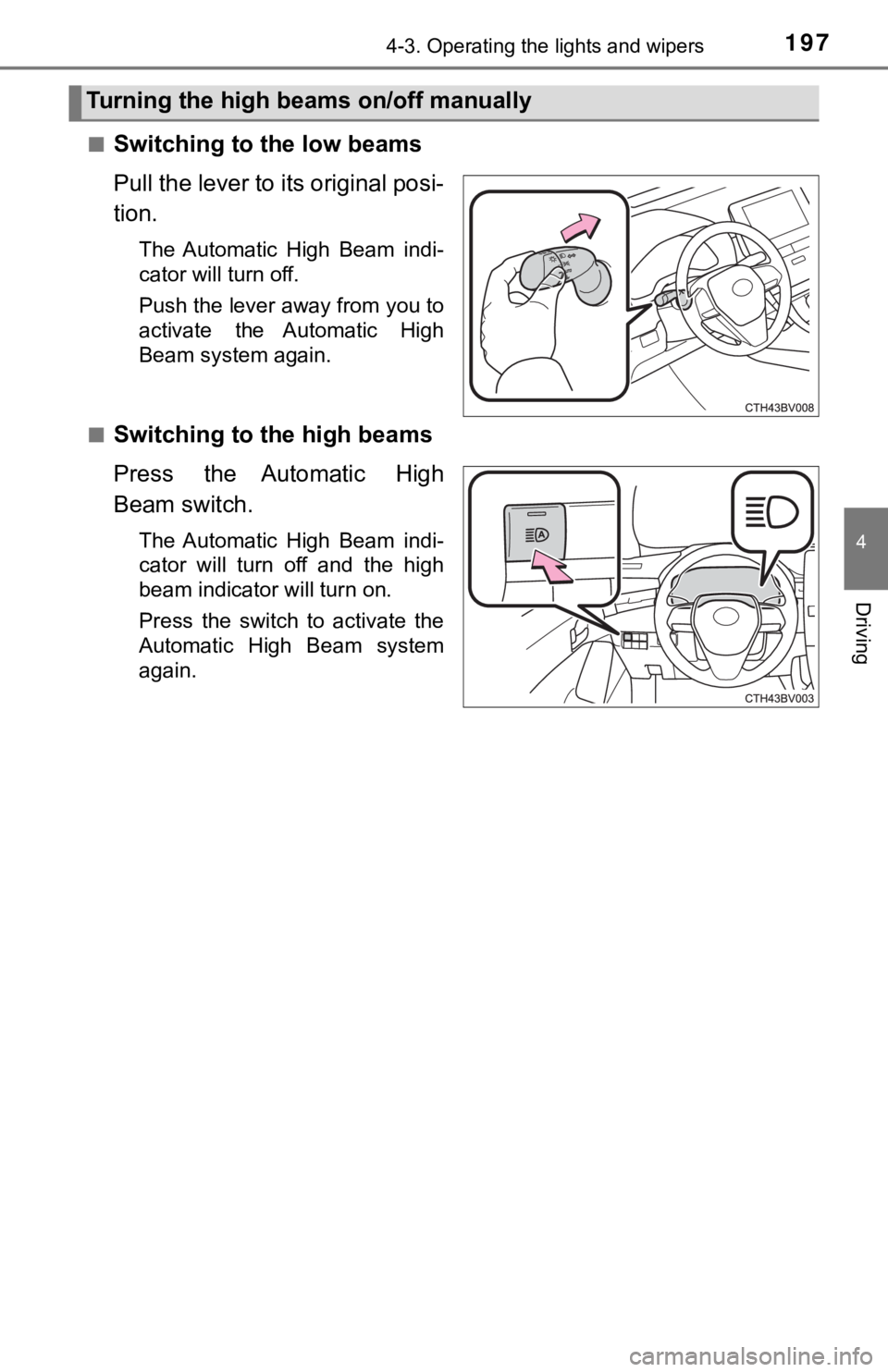
■Switching to the low beams
Pull the lever to its original posi-
tion.
The Automatic High Beam indi-
cator will turn off.
Push the lever away from you to
activate the Automatic High
Beam system again.
■
Switching to the high beams
Press the Automatic High
Beam switch.
The Automatic High Beam indi-
cator will turn off and the high
beam indicator will turn on.
Press the switch to activate the
Automatic High Beam system
again.
Turning the high beams on/off manually