lights TOYOTA AVALON 2019 (in English) Service Manual
[x] Cancel search | Manufacturer: TOYOTA, Model Year: 2019, Model line: AVALON, Model: TOYOTA AVALON 2019Pages: 536, PDF Size: 9.43 MB
Page 236 of 536

2364-5. Using the driving support systems
■Conditions in which function s may not operate properly
In the following situations, the camera sensor may not detect w hite (yellow)
lines and various functions may not operate normally.
● There are shadows on the road that run parallel with, or cover, the white
(yellow) lines.
● The vehicle is driven in an area without white (yellow) lines, such as in front
of a tollgate or checkpoint, or at an intersection, etc.
● The white (yellow) lines are cracked, “Botts’ dots”, “Raised pa vement
marker” or stones are present.
● The white (yellow) lines cannot be seen or are difficult to see due to sand,
etc.
● The vehicle is driven on a road surface that is wet due to rain , puddles, etc.
● The traffic lines are yellow (which may be more difficult to re cognize than
lines that are white).
● The white (yellow) lines cross over a curb, etc.
● The vehicle is driven on a bright surface, such as concrete.
● The vehicle is driven on a surface that is bright due to reflec ted light, etc.
● The vehicle is driven in an area where the brightness changes s uddenly,
such as at the entrances and exits of tunnels, etc.
● Light from the headlights of an oncoming vehicle, the sun, etc. enters the
camera.
● The vehicle is driven where the road diverges, merges, etc.
● The vehicle is driven on a slope.
● The vehicle is driven on a road which tilts left or right, or a winding road.
● The vehicle is driven on an unpaved or rough road.
● The vehicle is driven around a sharp curve.
● The traffic lane is excessively narrow or wide.
● The vehicle is extremely tilted due to carrying heavy luggage or having
improper tire pressure.
● The distance to the preceding vehicle is extremely short.
● The vehicle is moving up and down a large amount due to road co nditions
during driving (poor roads or road seams).
● The headlight lenses are dirty and emit a faint amount of light at night, or the
beam axis has deviated.
● The vehicle is struck by a crosswind.
● The vehicle has just changed lanes or crossed an intersection.
● Snow tires, etc. are equipped.
Page 241 of 536
2414-5. Using the driving support systems
4
Driving
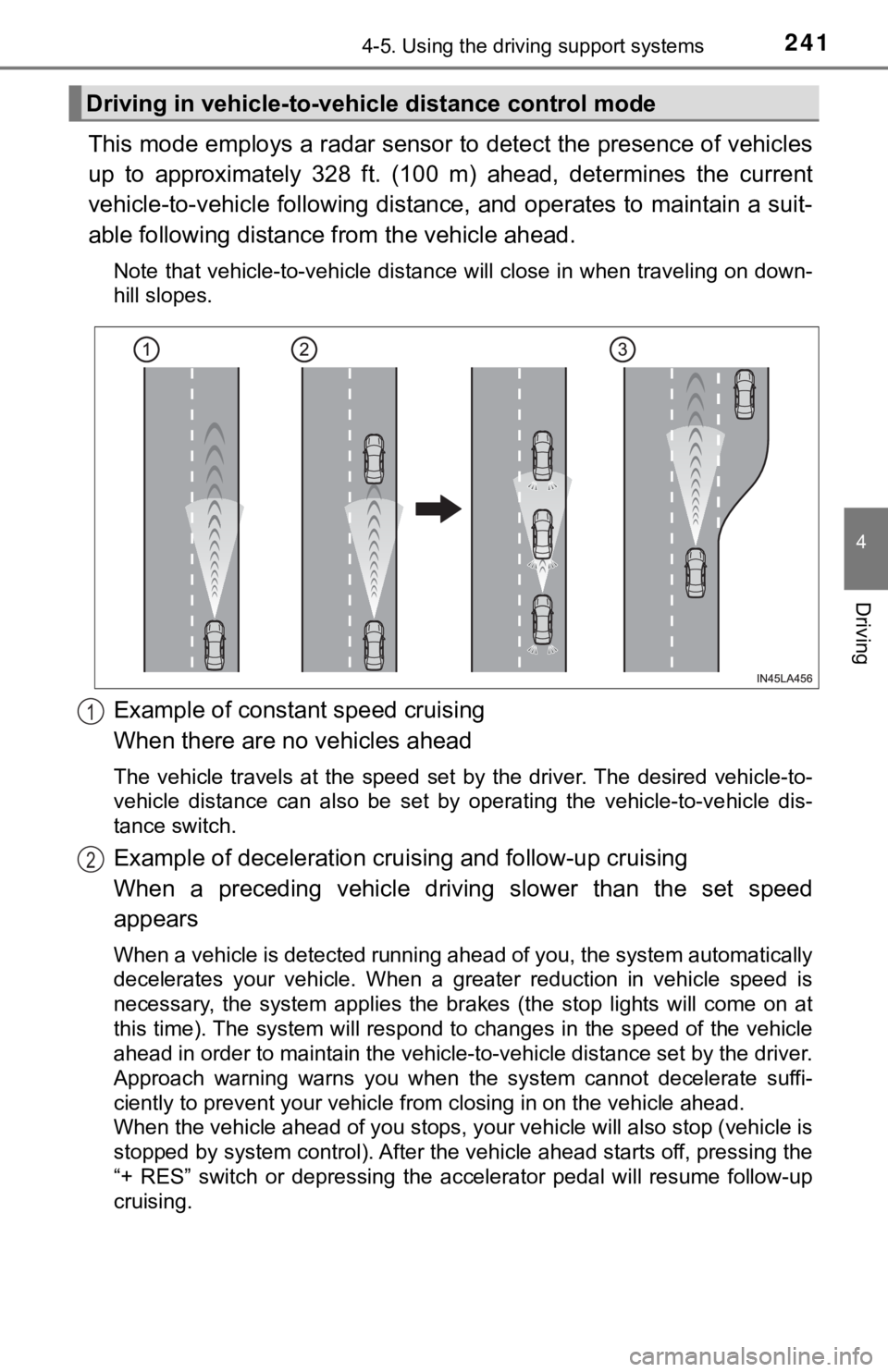
This mode employs a radar sensor to detect the presence of vehicles
up to approximately 328 ft. (100 m) ahead, determines the curre nt
vehicle-to-vehicle following distance, and operates to maintain a suit-
able following distance from the vehicle ahead.
Note that vehicle-to-vehicle distance will close in when travel ing on down-
hill slopes.
Example of constant speed cruising
When there are no vehicles ahead
The vehicle travels at the speed set by the driver. The desired vehicle-to-
vehicle distance can also be set by operating the vehicle-to-ve hicle dis-
tance switch.
Example of deceleration crui sing and follow-up cruising
When a preceding vehicle driving slower than the set speed
appears
When a vehicle is detected running ahead of you, the system automatically
decelerates your vehicle. When a greater reduction in vehicle s peed is
necessary, the system applies the brakes (the stop lights will come on at
this time). The system will respond to changes in the speed of the vehicle
ahead in order to maintain the vehicle-to-vehicle distance set by the driver.
Approach warning warns you when the system cannot decelerate su ffi-
ciently to prevent your vehicle from closing in on the vehicle ahead.
When the vehicle ahead of you stops, your vehicle will also stop (vehicle is
stopped by system control). After the vehicle ahead starts off, pressing the
“+ RES” switch or depressing the accelerator pedal will resume follow-up
cruising.
Driving in vehicle-to-vehi cle distance control mode
1
2
Page 264 of 536

2644-5. Using the driving support systems
■If “Clean dirt from lens” is dis played on the audio system screen
A rear camera lens may be dirty or covered with snow or ice. In such cases, if
it is removed from the rear camera lens, the system should retu rn to normal.
(It may be necessary to drive the vehicle for some time before the system
returns to normal.)
■ If “RCD unavailable” is displ ayed on the audio system screen
● If this message is displayed after the battery has been disconnected and
reconnected, fully turn the steering wheel to the left and then the right on
level ground.
● If this message is displayed only when the R shift position is selected, the
rear camera lens may be dirty. Clean the rear camera lens.
■ Situations in which the syst em may not operate properly
● Some pedestrians, such as the following, may not be detected by the rear
camera detection function, preventing the function from operati ng properly:
• Pedestrians who are squatting
• Pedestrians who are lying down
• Pedestrians who are running
• Pedestrians who suddenly enter the detection area
• Pedestrians riding a bicycle, skateboard, or other light vehic le
• Pedestrians wearing unusual clothing, such as a costume
• Pedestrians whose body is partially hidden by a cart or other object
• Pedestrians which are obscured by darkness, such as at night
● In some situations, such as the following, pedestrians may not be detected
by the rear camera detection function, preventing the function from operat-
ing properly:
• When backing up in inclement weather (rain, snow, fog, etc.)
• When the rear camera is obscured (dirt, snow, ice, etc. are at tached) or
scratched
• When a very bright light, such as the sun, or the headlights o f another
vehicle, shines directly into the rear camera
• When backing up in a place where the surrounding brightness ch anges
suddenly, such as at the entrance or exit of a garage or underg round
parking lot
Page 283 of 536
2834-5. Using the driving support systems
4
Driving
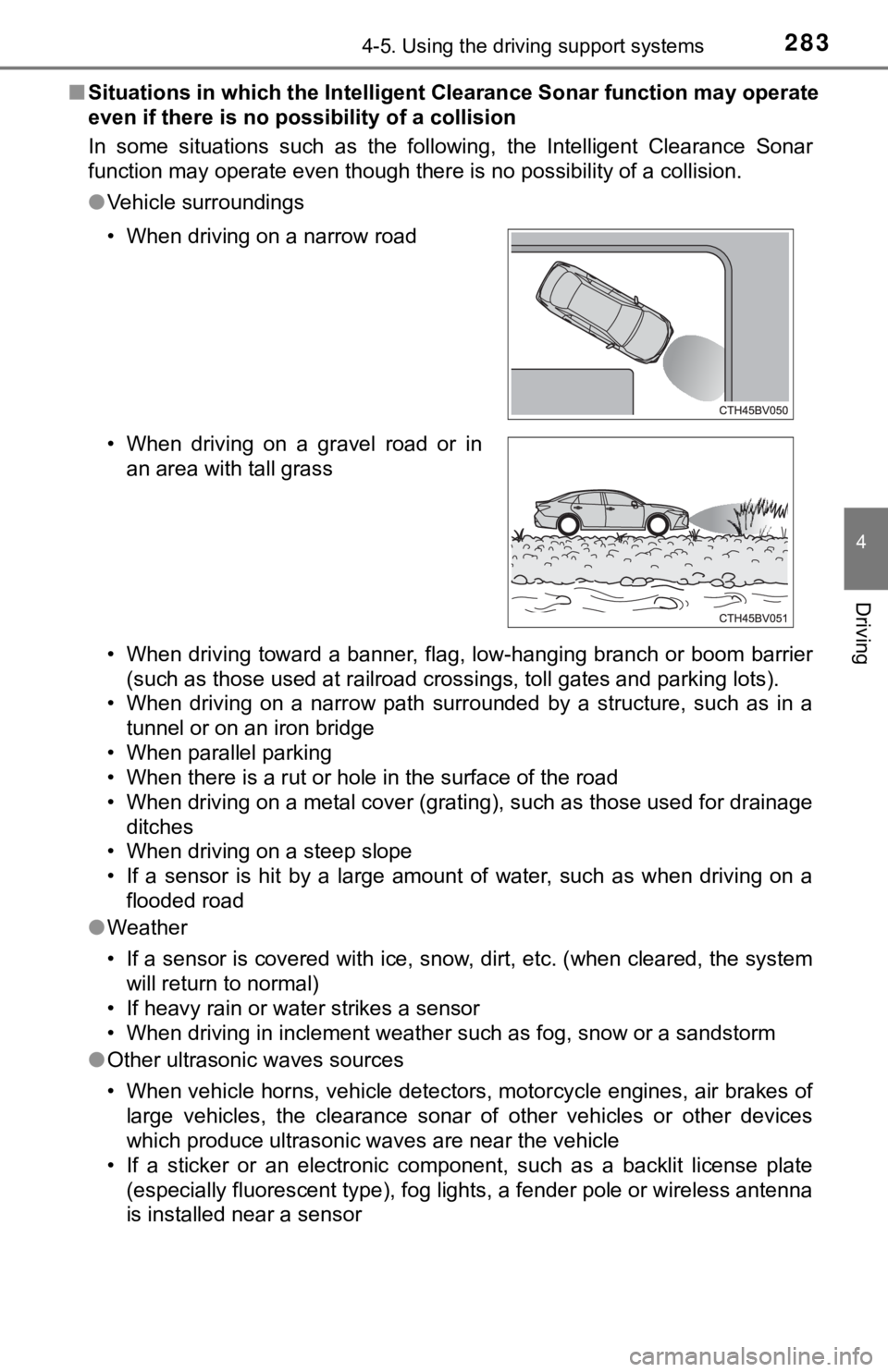
■Situations in which the Intellige nt Clearance Sonar function ma y operate
even if there is no possibility of a collision
In some situations such as the following, the Intelligent Clear ance Sonar
function may operate even though there is no possibility of a c ollision.
● Vehicle surroundings
• When driving toward a banner, flag, low-hanging branch or boom barrier
(such as those used at railroad crossings, toll gates and parki ng lots).
• When driving on a narrow path surrounded by a structure, such as in a
tunnel or on an iron bridge
• When parallel parking
• When there is a rut or hole in the surface of the road
• When driving on a metal cover (grating), such as those used fo r drainage
ditches
• When driving on a steep slope
• If a sensor is hit by a large amount of water, such as when driving on a flooded road
● Weather
• If a sensor is covered with ice, snow, dirt, etc. (when cleared, the system
will return to normal)
• If heavy rain or water strikes a sensor
• When driving in inclement weather such as fog, snow or a sands torm
● Other ultrasonic waves sources
• When vehicle horns, vehicle detectors, motorcycle engines, air brakes of
large vehicles, the clearance sonar of other vehicles or other devices
which produce ultrasonic waves are near the vehicle
• If a sticker or an electronic component, such as a backlit license plate (especially fluorescent type), fog lights, a fender pole or wir eless antenna
is installed near a sensor
• When driving on a narrow road
• When driving on a gravel road or in
an area with tall grass
Page 285 of 536

2854-5. Using the driving support systems
4
Driving
●Other ultrasonic waves sources
• When vehicle horns, vehicle detectors, motorcycle engines, air brakes of
large vehicles, the clearance sonar of other vehicles or other devices
which produce ultrasonic waves are near the vehicle
• If a sticker or an electronic component, such as a backlit license plate
(especially fluorescent type), fog lights, a fender pole or wir eless antenna
is installed near a sensor
● Changes in the vehicle posture
• If the vehicle is significantly tilted
• If the front of the vehicle is raised or lowered due to the ca rried load
• If the orientation of a sensor has been changed due to a collision or other impact
■ If a battery terminal has been disconnected and reconnected
The system needs to be initialized.
To initialize the system, drive the vehicle straight ahead for 5 seconds or more
at a speed of approximately 22 mph (35 km/h) or more.
■ If “ICS Unavailable” is displayed on the multi-information display and
the ICS OFF indicator is flashing
● A sensor may be covered with ice, snow, dirt, etc. Remove the ice, snow,
dirt, etc., from the sensor to return the system to normal.
Also, due to ice forming on a sensor at low temperatures, a war ning mes-
sage may be displayed or the sensor may not be able to detect an object.
Once the ice melts, the system will return to normal.
● If this message continues to be displayed even after cleaning the sensor, or
is displayed even though the sensor is clean, have the vehicle inspected by
your Toyota dealer.
● Initialization may not have been performed after a battery term inal was dis-
connected and reconnected. Initialize the system. ( P. 285)
Page 293 of 536
2934-5. Using the driving support systems
4
Driving
■Situations in which the Rear Cross Traffic Auto Brake function may not
operate properly
In some situations such as the following, this function may not operate prop-
erly.
● Objects and vehicles which the radar sensors are not designed t o detect
• Stationary objects
• Vehicles which are moving away from your vehicle
• Pedestrians, motorcycles, bicycles, etc.
*
• Objects which are extremely close to a radar sensor
• Vehicles which are approaching from the right or left at the r ear of the
vehicle at a traveling speed of less than approximately 5 mph ( 8 km/h)
• Vehicles which are approaching from the right or left at the r ear of the
vehicle at a traveling speed of more than approximately 15 mph (24 km/h)
*: Depending on conditions, detection of a vehicle and/or object may occur.
● Situations in which the radar sensors may not be able to detect an object
• When a sensor or the area around a sensor is extremely hot or cold
• If the rear bumper is covered with ice, snow, dirt, etc.
• If heavy rain or water strikes the vehicle
• When the detection area of a radar sensor is obstructed by an adjacent
vehicle
• If the vehicle is significantly tilted
• When equipment that may obstruct a sensor is installed, such a s a towing
eyelet, bumper protector (an additional trim strip, etc.), bicy cle carrier, or
snow plow
• If the suspension has been modified or tires of a size other than specified
are installed
• If the front of the vehicle is raised or lowered due to the ca rried load
• If a sticker or an electronic component, such as a backlit license plate
(especially fluorescent type), fog lights, a fender pole or wir eless antenna
is installed near a radar sensor
• If the orientation of a radar sensor has been changed due to a collision or
other impact or removal and installation
• When multiple vehicles are approaching with only a small gap between each vehicle
• When a vehicle is approaching at high speed
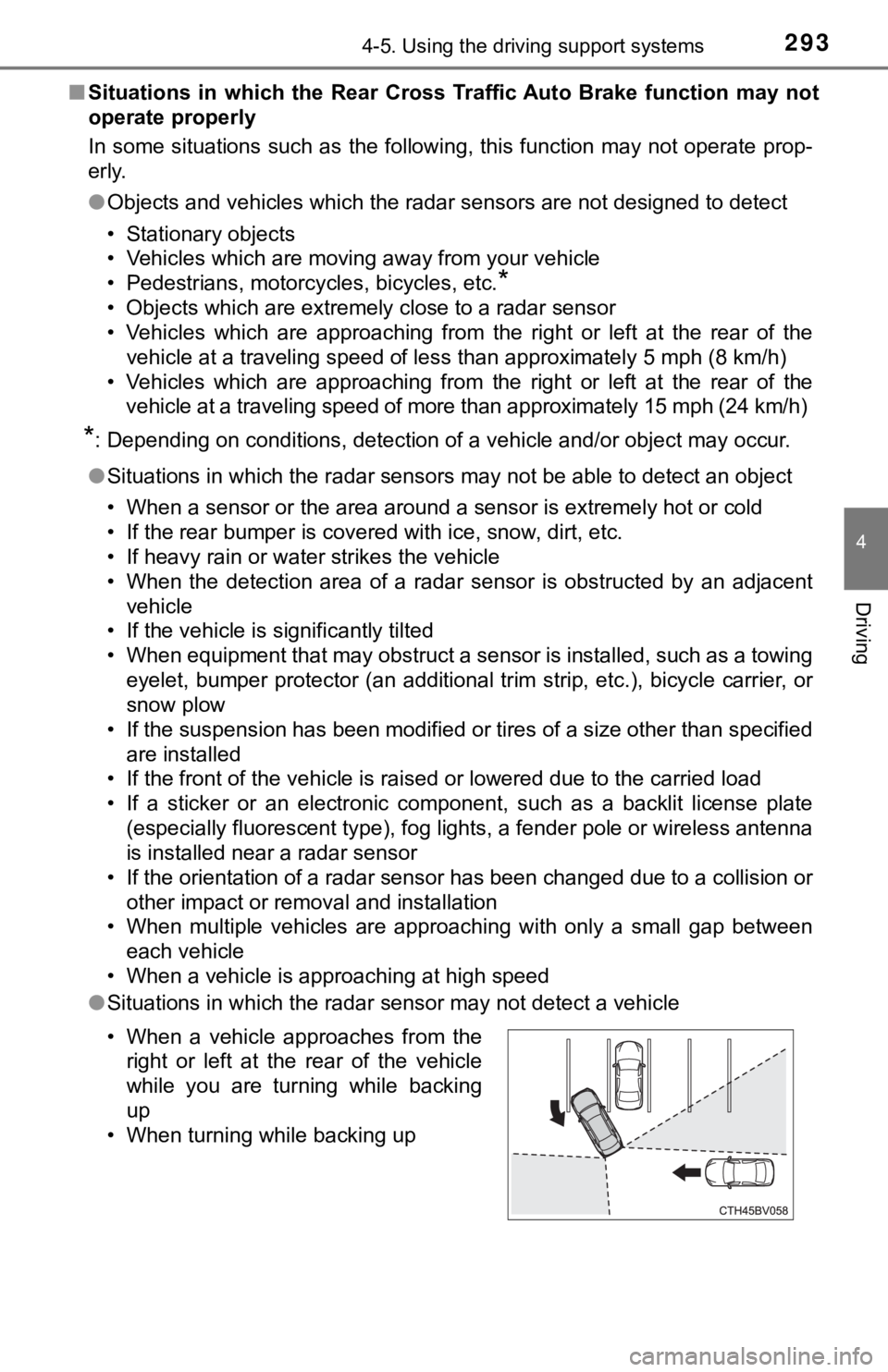
● Situations in which the radar sensor may not detect a vehicle
• When a vehicle approaches from the
right or left at the rear of the vehicle
while you are turning while backing
up
• When turning while backing up
Page 299 of 536
2994-5. Using the driving support systems
4
Driving
◆ABS (Anti-lock Brake System)
Helps to prevent wheel lock when the brakes are applied suddenl y,
or if the brakes are applied while driving on a slippery road surface
◆Brake assist
Generates an increased level of braking force after the brake p edal
is depressed when the system de tects a panic stop situation
◆VSC (Vehicle Stability Control)
Helps the driver to control skidding when swerving suddenly or
turning on slippery road surfaces.
◆Enhanced VSC (Enhanced Vehicle Stability Control)
Provides cooperative control of the ABS, TRAC, VSC and EPS.
Helps to maintain directional stability when swerving on slippe ry
road surfaces by controlling steering performance.
◆Secondary Collision Brake
When the airbag sensor detects a collision, the brakes and brak e
lights are automatically control led to reduce the vehicle speed and
that helps reduce the possibilit y of further damage due to a se cond-
ary collision
◆TRAC (Traction Control)
Helps to maintain drive power and prevent the drive wheels from
spinning when starting the vehicl e or accelerating on slippery roads
◆Hill-start assist control
Helps to reduce the backward movement of the vehicle when start -
ing on an uphill
Driving assist systems
To keep driving safety and perf ormance, the following systems
operate automatically in respon se to various driving situations.
Be aware, however, that these systems are supplementary and
should not be relied upon too heav ily when operating the vehi-
cle.
Page 305 of 536
305
4
Driving
4-6. Driving tips
●Use fluids that are appropriate t o the prevailing outside tempera-
tures. • Engine oil
• Engine coolant
• Washer fluid
● Have a service technician inspec t the condition of the battery.
● Have the vehicle fitted with four snow tires or purchase a set of tire
chains for the front tires.
*
Ensure that all tires are the same size and brand, and that cha ins match
the size of the tires.
*: Tire chains cannot be mounted on vehicles with 18 and 19-inch tires.
Perform the following according to the driving conditions:
● Do not try to forcibly open a window or move a wiper that is fr ozen.
Pour warm water over the frozen area to melt the ice. Wipe away
the water immediately to p revent it from freezing.
● To ensure proper operation of the climate control system fan,
remove any snow that has accumulated on the air inlet vents in
front of the windshield.
● Check for and remove any excess ic e or snow that may have accu-
mulated on the exterior lights, vehicle’s roof, chassis, around the
tires or on the brakes.
● Remove any snow or mud from the bottom of your shoes before
getting in the vehicle.
Winter driving tips
Carry out the necessary preparations and inspections before
driving the vehicle in winter. Always drive the vehicle in a ma n-
ner appropriate to the prevailing weather conditions.
Preparation for winter
Before driving the vehicle
Page 309 of 536

309
5Interior features
5-1. Using the air conditioning system
and defogger
Automatic air conditioning system............................. 310
Heated steering wheel/ seat heaters/
seat ventilators ................ 317
5-2. Using the interior lights Interior lights list ................ 320
• Interior light ................... 321
• Personal lights .............. 321
• Ambient lights ............... 322
5-3. Using the storage features
List of storage features ..... 323
• Glove box...................... 324
• Console box .................. 324
• Bottle holders ................ 325
• Cup holders .................. 326
• Auxiliary boxes.............. 327
• Open tray ...................... 328
Trunk features ................... 329 5-4. Other interior features
Other interior features ....... 330
• Sun visors ..................... 330
• Vanity mirrors................ 330
• Power outlet .................. 331
• USB charging ports....... 332
• Wireless charger ........... 334
• Armrest ......................... 343
• Assist grips ................... 343
• Coat hooks.................... 344
Garage door opener.......... 345
Safety Connect ................. 352
Page 318 of 536
3185-1. Using the air conditioning system and defogger
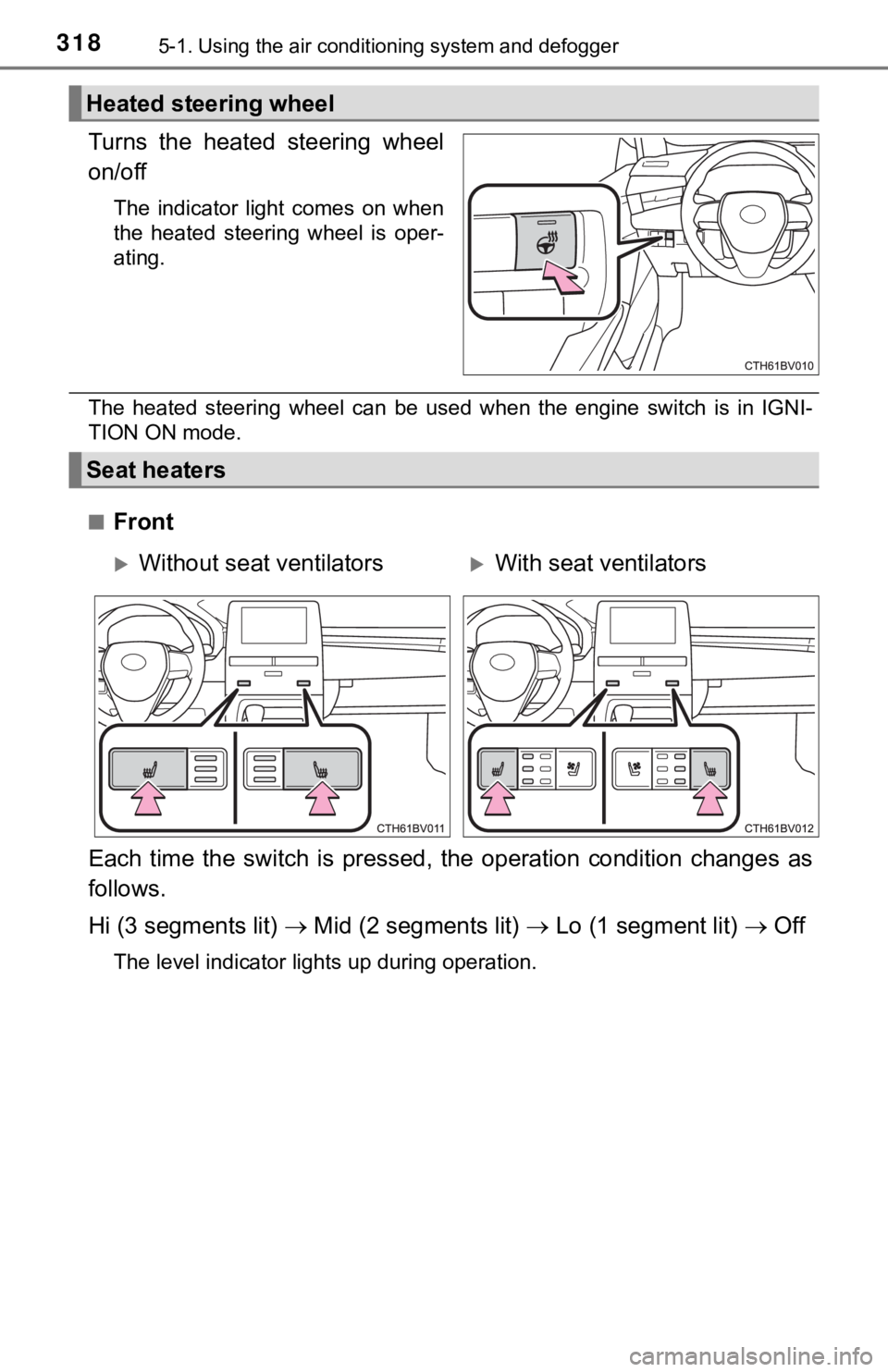
Turns the heated steering wheel
on/off
The indicator light comes on when
the heated steering wheel is oper-
ating.
The heated steering wheel can be used when the engine switch is in IGNI-
TION ON mode.
■
Front
Each time the switch is pressed, the operation condition change s as
follows.
Hi (3 segments lit) Mid (2 segments lit) Lo (1 segment lit) Off
The level indicator lights up during operation.
Heated steering wheel
Seat heaters
Without seat ventilatorsWith seat ventilators