USB port TOYOTA AVALON 2019 Owners Manual (in English)
[x] Cancel search | Manufacturer: TOYOTA, Model Year: 2019, Model line: AVALON, Model: TOYOTA AVALON 2019Pages: 536, PDF Size: 9.43 MB
Page 5 of 536
5
1
8 7 5 4
3
2
9
6
5-4. Other interior featuresOther interior features ....... 330
• Sun visors ..................... 330
• Vanity mirrors................ 330
• Power outlet .................. 331
• USB charging ports....... 332
• Wireless charger ........... 334
• Armrest ......................... 343
• Assist grips ................... 343
• Coat hooks.................... 344
Garage door opener .......... 345
Safety Connect.................. 352 6-1. Maintenance and care
Cleaning and protecting the vehicle exterior .......... 360
Cleaning and protecting the vehicle interior ........... 363
6-2. Maintenance Maintenance requirements ................... 366
General maintenance ........ 368
Emission inspection and maintenance (I/M)
programs ......................... 372
6-3. Do-it-yourself maintenance
Do-it-yourself service precautions ...................... 373
Hood .................................. 375
Positioning a floor jack....... 376
Engine compartment ......... 377
Tires................................... 387
Tire inflation pressure ........ 401
Wheels............................... 404
Air conditioning filter .......... 406
Electronic key battery ........ 408
Checking and replacing fuses ................................ 410
Light bulbs ......................... 4136Maintenance and care
Page 309 of 536

309
5Interior features
5-1. Using the air conditioning system
and defogger
Automatic air conditioning system............................. 310
Heated steering wheel/ seat heaters/
seat ventilators ................ 317
5-2. Using the interior lights Interior lights list ................ 320
• Interior light ................... 321
• Personal lights .............. 321
• Ambient lights ............... 322
5-3. Using the storage features
List of storage features ..... 323
• Glove box...................... 324
• Console box .................. 324
• Bottle holders ................ 325
• Cup holders .................. 326
• Auxiliary boxes.............. 327
• Open tray ...................... 328
Trunk features ................... 329 5-4. Other interior features
Other interior features ....... 330
• Sun visors ..................... 330
• Vanity mirrors................ 330
• Power outlet .................. 331
• USB charging ports....... 332
• Wireless charger ........... 334
• Armrest ......................... 343
• Assist grips ................... 343
• Coat hooks.................... 344
Garage door opener.......... 345
Safety Connect ................. 352
Page 332 of 536
3325-4. Other interior features
The USB charging ports are used to supply 2.1 A of electricity at 5 V
to external devices (power consumption of 10.5 W).
The USB charging ports are for charging only. They are not desi gned
for data transfer or other purposes.
Depending on the external device, it may not charge properly. R efer to
the manual included with the dev ice before using a USB charging
port.
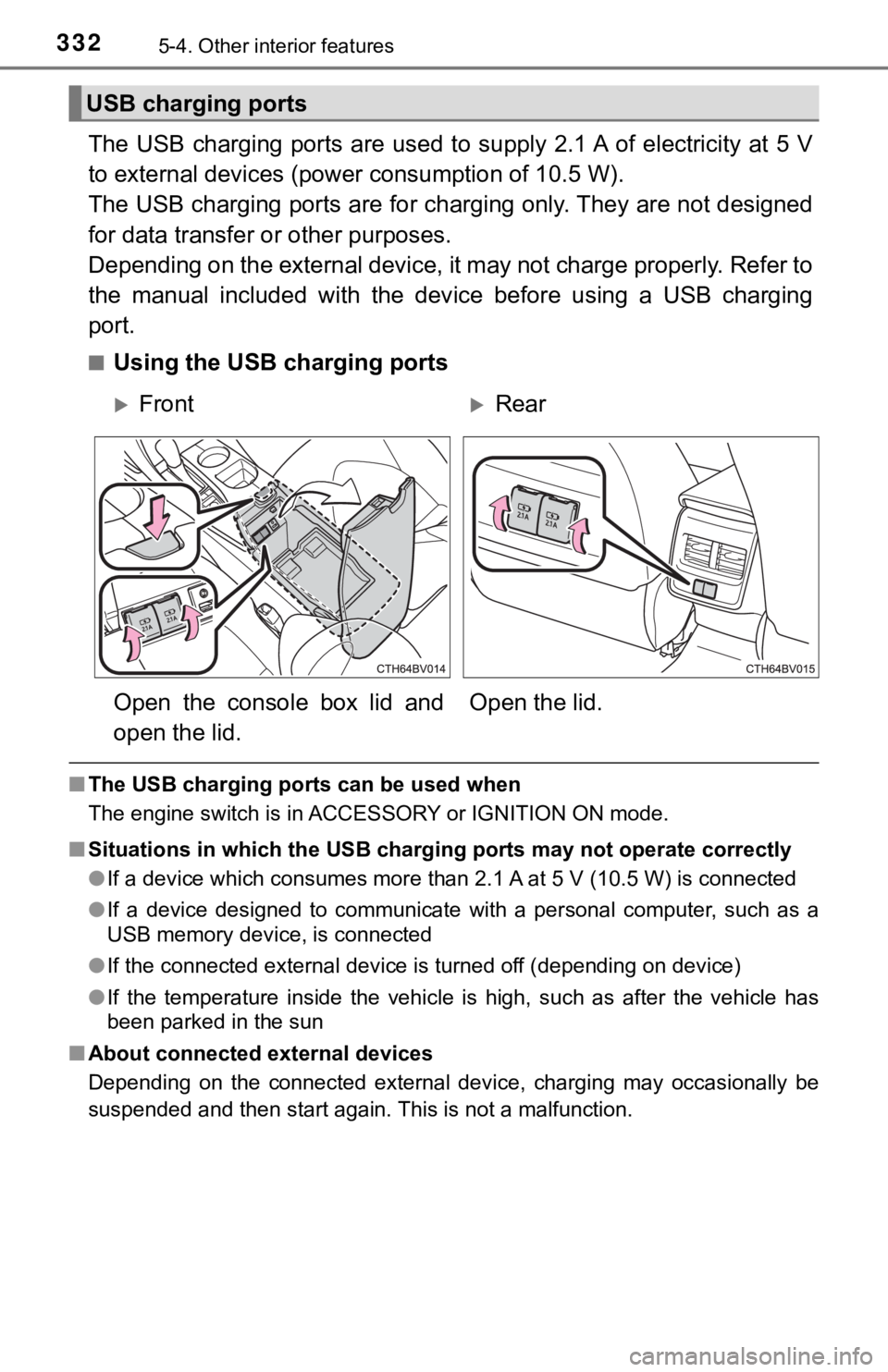
■Using the USB charging ports
■ The USB charging ports can be used when
The engine switch is in ACCESSORY or IGNITION ON mode.
■ Situations in which the USB charg ing ports may not operate correctly
● If a device which consumes more than 2.1 A at 5 V (10.5 W) is connected
● If a device designed to communicate with a personal computer, s uch as a
USB memory device, is connected
● If the connected external device is turned off (depending on de vice)
● If the temperature inside the vehicle is high, such as after the vehicle has
been parked in the sun
■ About connected external devices
Depending on the connected external device, charging may occasi onally be
suspended and then start again. This is not a malfunction.
USB charging ports
FrontRear
Open the console box lid and
open the lid. Open the lid.
Page 333 of 536
3335-4. Other interior features
5
Interior features
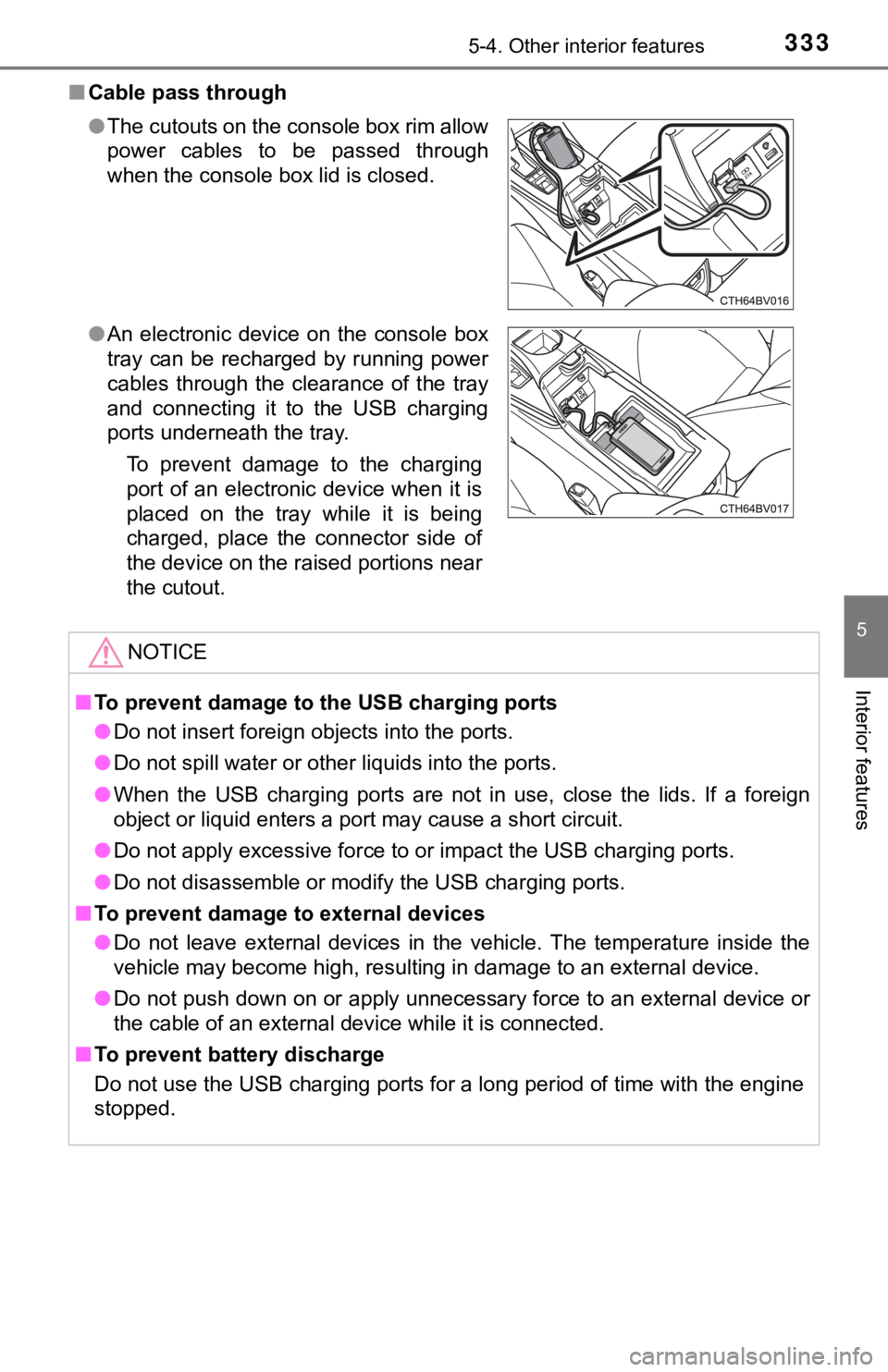
■Cable pass through
●The cutouts on the console box rim allow
power cables to be passed through
when the console box lid is closed.
● An electronic device on the console box
tray can be recharged by running power
cables through the clearance of the tray
and connecting it to the USB charging
ports underneath the tray.
To prevent damage to the charging
port of an electronic device when it is
placed on the tray while it is being
charged, place the connector side of
the device on the raised portions near
the cutout.
NOTICE
■To prevent damage to the USB charging ports
● Do not insert foreign objects into the ports.
● Do not spill water or other liquids into the ports.
● When the USB charging ports are not in use, close the lids. If a foreign
object or liquid enters a port may cause a short circuit.
● Do not apply excessive force to or impact the USB charging port s.
● Do not disassemble or modify the USB charging ports.
■ To prevent damage to external devices
● Do not leave external devices in the vehicle. The temperature i nside the
vehicle may become high, resulting in damage to an external dev ice.
● Do not push down on or apply unnecessary force to an external device or
the cable of an external device while it is connected.
■ To prevent battery discharge
Do not use the USB charging ports for a long period of time wit h the engine
stopped.
Page 534 of 536
534Alphabetical index
USB charging port ................... 332
Vanity lights ............................. 330Wattage ................................ 474
Vanity mirrors .......................... 330 Vanity lights .......................... 330
Vehicle data recording ................ 9
Vehicle identification number ................................... 467
Vehicle Stability Control (VSC) ...................................... 299
VSC
(Vehicle Stability Control) .... 299
Warning buzzers Approach warning ................. 246
Brake system ....... ................. 423
Downshifting ......................... 182
Electric power steering system ......... ....................... 425
Intuitive parking assist .......... 269
Lane departure alert function ............................... 229
Light reminder ....................... 195
Open door ............................. 119
Open hood ............................ 375
Open moon roof .................... 156
Open trunk ............................ 122
Parking brake........................ 425
Pre-collision warning............. 216
Seat belt reminder ................ 426
Vehicle sway warning ........... 230 Warning lights ........................... 77
ABS ...................................... 424
Brake hold operated indicator.............................. 425
Brake Override System ........ 424
Brake system ....... ................. 423
Charging system................... 423
Drive-Start Control ................ 424
Driver’s seat belt reminder ............................. 426
Electric power steering ......... 425
Front passenger’s seat belt reminder ...................... 426
High coolant temperature ..... 423
ICS OFF indicator ................. 426
LDA indicator ........................ 425
Low engine oil pressure........ 423
Low fuel level ........................ 426
Malfunction indicator lamp .... 424
Master warning light ............. 426
Parking brake indicator ......... 425
PCS warning light ................. 425
Rear passengers’ seat belt reminder light ..................... 426
Seat belt reminder light......... 426
Slip indicator ......................... 426
SRS ...................................... 424
Tire pressure ........................ 427
Warning messages.................. 433
Washer ..................................... 200 Checking............................... 386
Preparing and checking
before winter ...................... 305
Switch ................................... 200
U
V
W