ECO mode TOYOTA AVALON 2022 Owner's Manual
[x] Cancel search | Manufacturer: TOYOTA, Model Year: 2022, Model line: AVALON, Model: TOYOTA AVALON 2022Pages: 572, PDF Size: 9.42 MB
Page 189 of 572

1894-2. Driving procedures
4
Driving
■Steering lock motor overheating prevention
To prevent the steering lock motor from overheating, the motor may be sus-
pended if the engine is turned on and off repeatedly in a short period of time.
In this case, refrain from operating the engine. After about 10 seconds, the
steering lock motor will resume functioning.
■ When a message requesting the smart key system be inspected is dis-
played on the multi-information display
The system may be malfunctioning. Have the vehicle inspected by your
Toyota dealer immediately.
■ If the electronic key battery is depleted
P. 435
■ Operation of the engine switch
●If the switch is not pressed shortly and firmly, the engine swi tch mode may
not change or the engine may not start.
● If attempting to restart the engine immediately after turning t he engine
switch off, the engine may not start in some cases. After turning the engine
switch off, wait a few seconds before restarting the engine.
■ If the smart key system has been d eactivated in a customized setting
P. 484
WARNING
■ When starting the engine
Always start the engine while sitting in the driver’s seat. Do not depress the
accelerator pedal while starting the engine under any circumstances.
Doing so may cause an accident resulting in death or serious in jury.
■ Caution while driving
If engine failure occurs while the vehicle is moving, do not lock or open the
doors until the vehicle reaches a safe and complete stop. Activation of the
steering lock in this circumstance may lead to an accident, res ulting in
death or serious injury.
■ Stopping the engine in an emergency
● If you want to stop the engine in an emergency while driving th e vehicle,
press and hold the engine switch for more than 2 seconds, or press it
briefly 3 times or more in succession. ( P. 445)
However, do not touch the engine switch while driving except in an emer-
gency. Turning the engine off while driving will not cause loss of steering
or braking control, but the power assist to these systems will be lost. This
will make it more difficult to steer and brake, so you should pull over and
stop the vehicle as soon as it is safe to do so.
● If the engine switch is operated while the vehicle is running, a warning
message will be shown on the multi-information display and a buzzer
sounds.
● When restarting the engine after it was turned off while drivin g, shift the
shift lever to N and press the engine switch.
Page 190 of 572

1904-2. Driving procedures
WARNING
■When parking
Exhaust gases include harmful carbon monoxide (CO), which is co lorless
and odorless. Observe the following precautions.
Failure to do so may cause exhaust gases to enter the vehicle a nd may
lead to an accident caused by light-headedness, or may lead to death or a
serious health hazard.
● If the vehicle is in a poorly ventilated area or a closed area, such as a
garage, stop the engine.
● Do not leave the vehicle with the engine running for a long time. If such a
situation cannot be avoided, park the vehicle in an open space and ensure
that exhaust fumes do not enter the vehicle interior.
● Do not leave the engine running in an area with snow build-up, or where it
is snowing. If snowbanks build up around the vehicle while the engine is
running, exhaust gases may collect and enter the vehicle.
NOTICE
■ To prevent battery discharge
● Do not leave the engine switch in ACCESSORY or IGNITION ON mode
for long periods of time without the engine running.
● If “ACCESSORY” or “IGNITION ON” is displayed on the multi-information
display, the engine switch is not off. Exit the vehicle after t urning the
engine switch off.
● Do not stop the engine when the shift lever is in a position ot her than P. If
the engine is stopped in another shift lever position, the engine switch will
not be turned off but instead be turned to ACCESSORY mode. If t he vehi-
cle is left in ACCESSORY mode, battery discharge may occur.
■ When starting the engine
● Do not race a cold engine.
● If the engine becomes difficult to start or stalls frequently, have your vehi-
cle checked by your Toyota dealer immediately.
■ Symptoms indicating a malfunction with the engine switch
If the engine switch seems to be operating somewhat differently than usual,
such as the switch sticking slightly, there may be a malfunction. Contact
your Toyota dealer immediately.
Page 192 of 572
1924-2. Driving procedures
*1: Shifting to the D position allows the system to select a gear suitable for the
driving conditions. Setting the shift lever to the D position is recommended
for normal driving.
*2: Selecting shift ranges using S mode restricts the upper limit of the possible
gear ranges, controls engine braking force, and prevents unnece ssary
upshifting.
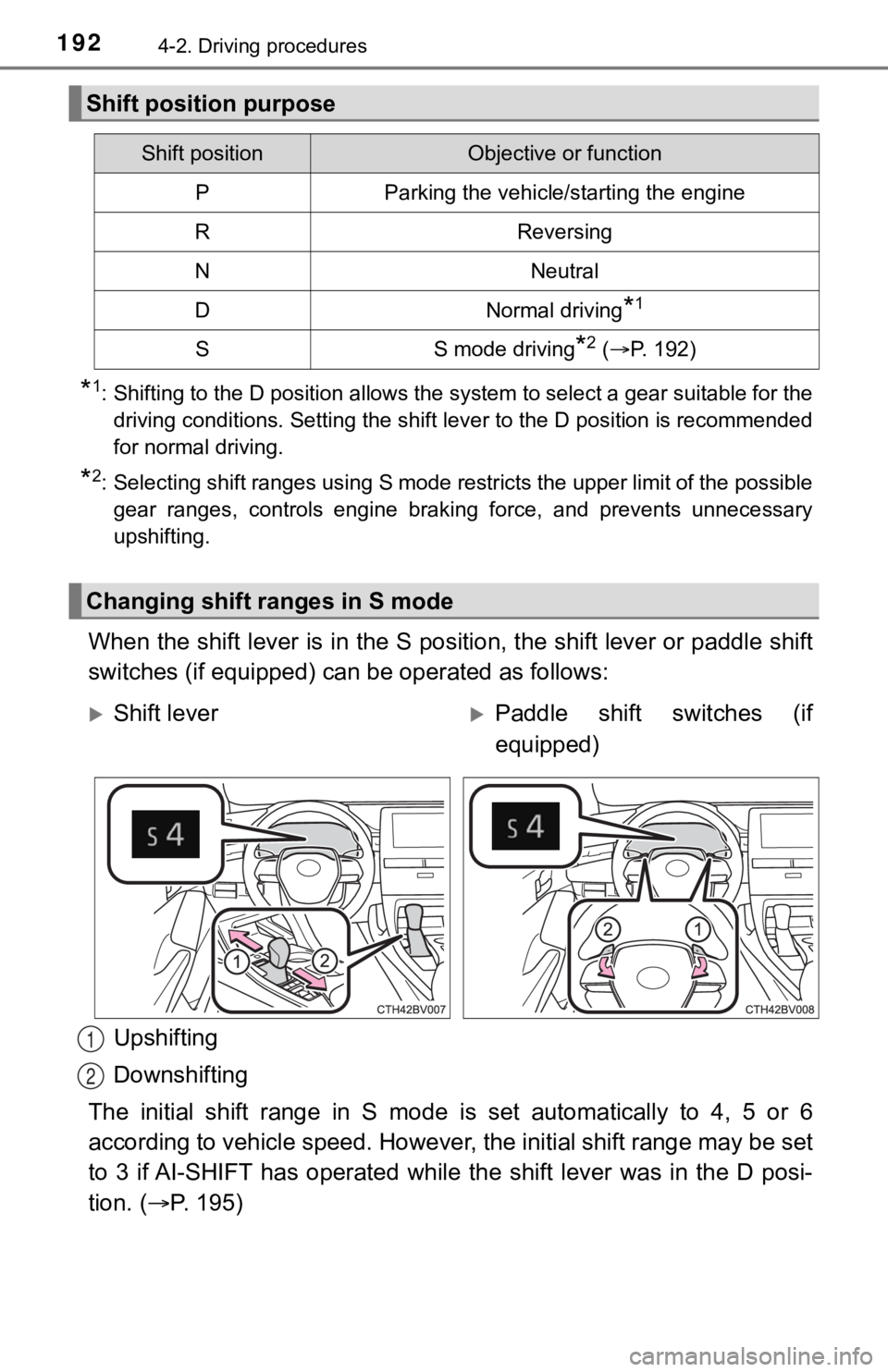
When the shift lever is in the S position, the shift lever or p addle shift
switches (if equipped) can be operated as follows:
Upshifting
Downshifting
The initial shift range in S mode is set automatically to 4, 5 or 6
according to vehicle speed. However, the initial shift range may be set
to 3 if AI-SHIFT has operated while the shift lever was in the D posi-
tion. ( P. 195)
Shift position purpose
Shift positionObjective or function
PParking the vehicle/starting the engine
RReversing
NNeutral
DNormal driving*1
SS mode driving*2 (P. 192)
Changing shift ranges in S mode
Shift leverPaddle shift switches (if
equipped)
1
2
Page 200 of 572

2004-2. Driving procedures
■Parking the vehicle
P. 172
■ Parking brake operation
●When the engine switch is not in IGNITION ON mode, the parking brake
cannot be released using the parking brake switch.
● When the engine switch is not in IGNITION ON mode, automatic mode
(automatic brake setting and releasing) is not available.
■ Automatic release function
The parking brake is automatica lly released when slowly depress the acceler-
ator pedal.
The parking brake will be released automatically under the foll owing condi-
tions:
● The driver’s door is closed.
● The driver’s seat belt is fastened.
● Shift the shift lever is in a forward or reverse position.
● The malfunction indicator lamp or brake system warning light is not illumi-
nated.
If the automatic release function does not operate, manually re lease the park-
ing brake.
■ If “Parking Brake Temporarily Un available” is displayed on the multi-
information display
If the parking brake is operated repeatedly over a short period of time, the
system may restrict operation to prevent overheating. If this happens, refrain
from operating the parking brake. Normal operation will return after about 1
minute.
■ If “Parking Brake Unavailable” is displayed on the multi-information dis-
play
Operate the parking brake switch. If the message does not disappear after
operating the switch several times, the system may be malfuncti oning. Have
the vehicle inspected by your Toyota dealer immediately.
■ Parking brake operation sound
When the parking brake operates, a motor sound (whirring sound) may be
heard. This does not indicate a malfunction.
■ Parking brake indicator light and parking brake light
●Depending on the engine switch mode, the parking brake indicato r light and
parking brake light will turn on and stay on as described below:
IGNITION ON mode: Comes on until the parking brake is released.
Not in IGNITION ON mode: Stays on for approximately 15 seconds.
● When the engine switch is turned off with the parking brake set, the parking
brake indicator light and parking brake light will stay on for about 15 sec-
onds. This does not indicate a malfunction.
Page 207 of 572
2074-3. Operating the lights and wipers
4
Driving
■Automatic light off system
●When the headlights are on: The headlights and tail lights turn off 30 sec-
onds after the engine switch is turned to ACCESSORY mode or turned off
and a door is opened and closed. (The lights turn off immediately if
on the key is pressed twice after all the doors are closed.)
● When only the tail lights are on: The tail lights turn off automatically if the
engine switch is turned to ACCESSORY mode or turned off and the driver’s
door is opened.
To turn the lights on again, turn the engine switch to IGNITION ON mode, or
turn the light switch off once and then back to or .
If any of the doors or trunk lid is kept open, the lights automatically turn off
after 20 minutes.
■ Light reminder buzzer (except when the light switch is in )
A buzzer sounds when the engine switch is turned off or turned to ACCES-
SORY mode and the driver's door is opened while the lights are turned on.
■ Windshield wiper linked headlight illumination
When driving during daytime with the headlight switch turned to , if the
windshield wipers are used, the headlights will turn on automatically after
several seconds to help enhance the visibility of your vehicle.
■ Battery-saving function
In the following conditions, the remaining lights will go off automatically after
20 minutes in order to prevent the vehicle battery from being discharged:
●The headlights and/or tail lights are on.
● The engine switch is in ACCESSORY mode or turned off.
This function will be canceled in any of the following situations:
● When the engine switch is turned to IGNITION ON mode.
● When the light switch is operated
● When a door or the trunk is opened or closed
■ Welcome lighting
If the headlight switch is turned to and the surrounding area is dark,
unlocking the doors using the smart key system or wireless remote control
will turn the parking lights and tail lights on automatically.
■ Customization
Some functions can be customized. ( P. 525)
NOTICE
■To prevent battery discharge
Do not leave the lights on longer than necessary when the engin e is not
running.
Page 211 of 572

2114-3. Operating the lights and wipers
4
Driving
• When the windshield is obscured by fog, mist, ice, dirt, etc.
• When the windshield is cracked or damaged
• When the camera sensor is deformed or dirty
• When the temperature of the camera sensor is extremely high
• When the surrounding brightness level is equal to that of head lights, tail
lights or fog lights
• When headlights or tail lights of vehicles ahead are turned off, dirty, changing color, or not aimed properly
• When the vehicle is hit by water, snow, dust, etc. from a prec eding vehi-
cle
• When driving through an area of intermittently changing brightness and
darkness
• When frequently and repeatedly driving ascending/descending roads, or roads with rough, bumpy or uneven surfaces (such as stone-paved
roads, gravel roads, etc.)
• When frequently and repeatedly taking curves or driving on a w inding
road
• When there is a highly reflective object ahead of the vehicle, such as a sign or mirror
• When the back of a preceding vehicle is highly reflective, such as a con-
tainer on a truck
• When the vehicle's headlights are damaged or dirty, or are not aimed
properly
• When the vehicle is listing or titling due to a flat tire, a trailer being towed, etc.
• When the headlights are changed between the high beams and low
beams repeatedly in an abnormal manner
• When the driver believes that the high beams may be flashing or dazzling pedestrians or other drivers
■ Temporarily lowering sensor sensitivity
The sensitivity of the sensor can be temporarily lowered.
Turn the engine switch off while the following conditions are m et.
• The headlight switch is in the or position.
• The headlight switch lever is in the original position.
• Automatic High Beam switch is on.
Turn the engine switch to the IGNITION ON mode.
Within 60 seconds after , repeat pushing the headlight switch lever to the
high beam position then pulling it to the original position qui ckly 10 times,
then leave the lever in the original position.
If the sensitivity is changed, the Automatic High Beam indicato r is turn on
and off 3 times.
1
2
32
4
Page 213 of 572
2134-3. Operating the lights and wipers
4
Driving
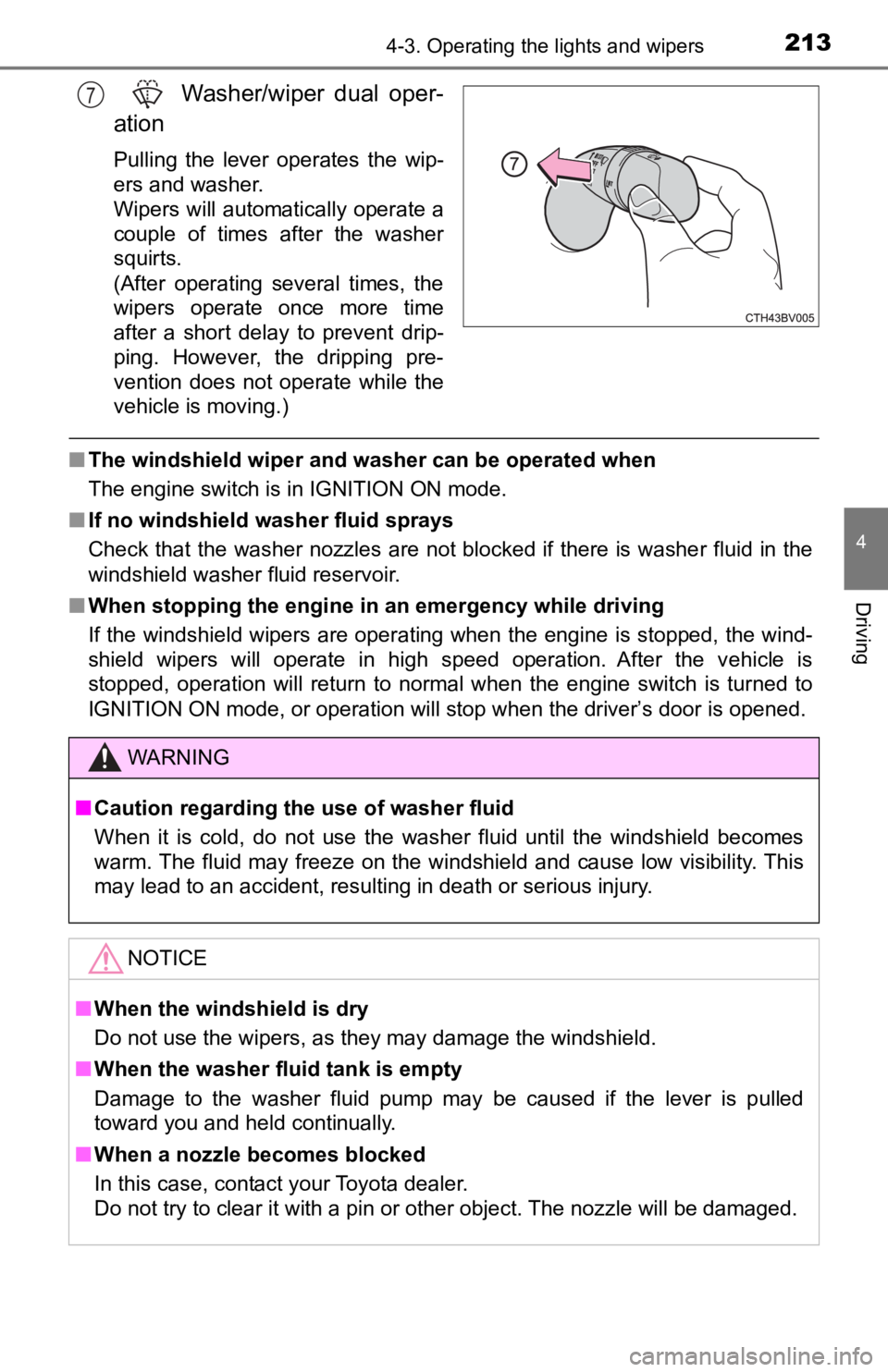
Washer/wiper dual oper-
ation
Pulling the lever operates the wip-
ers and washer.
Wipers will automatically operate a
couple of times after the washer
squirts.
(After operating several times, the
wipers operate once more time
after a short delay to prevent drip-
ping. However, the dripping pre-
vention does not operate while the
vehicle is moving.)
■ The windshield wiper and washer can be operated when
The engine switch is in IGNITION ON mode.
■ If no windshield washer fluid sprays
Check that the washer nozzles are not blocked if there is washe r fluid in the
windshield washer fluid reservoir.
■ When stopping the engine in an emergency while driving
If the windshield wipers are operating when the engine is stopped, the wind-
shield wipers will operate in high speed operation. After the v ehicle is
stopped, operation will return to normal when the engine switch is turned to
IGNITION ON mode, or operation will stop when the driver’s door is opened.
7
WARNING
■ Caution regarding the use of washer fluid
When it is cold, do not use the washer fluid until the windshie ld becomes
warm. The fluid may freeze on the windshield and cause low visi bility. This
may lead to an accident, resulting in death or serious injury.
NOTICE
■ When the windshield is dry
Do not use the wipers, as they may damage the windshield.
■ When the washer fluid tank is empty
Damage to the washer fluid pump may be caused if the lever is p ulled
toward you and held continually.
■ When a nozzle becomes blocked
In this case, contact your Toyota dealer.
Do not try to clear it with a pin or other object. The nozzle will be damaged.
Page 267 of 572
2674-5. Using the driving support systems
4
Driving
This mode employs a radar to detect the presence of vehicles up to
approximately 328 ft. (100 m) ahead, determines the current veh icle-
to-vehicle following distance, and operates to maintain a suita ble fol-
lowing distance from the vehicle ahead. The desired vehicle-to- vehi-
cle distance can also be set by operating the vehicle-to-vehicl e
distance switch.
When driving on downhill slopes, the vehicle-to-vehicle distance may
become shorter.
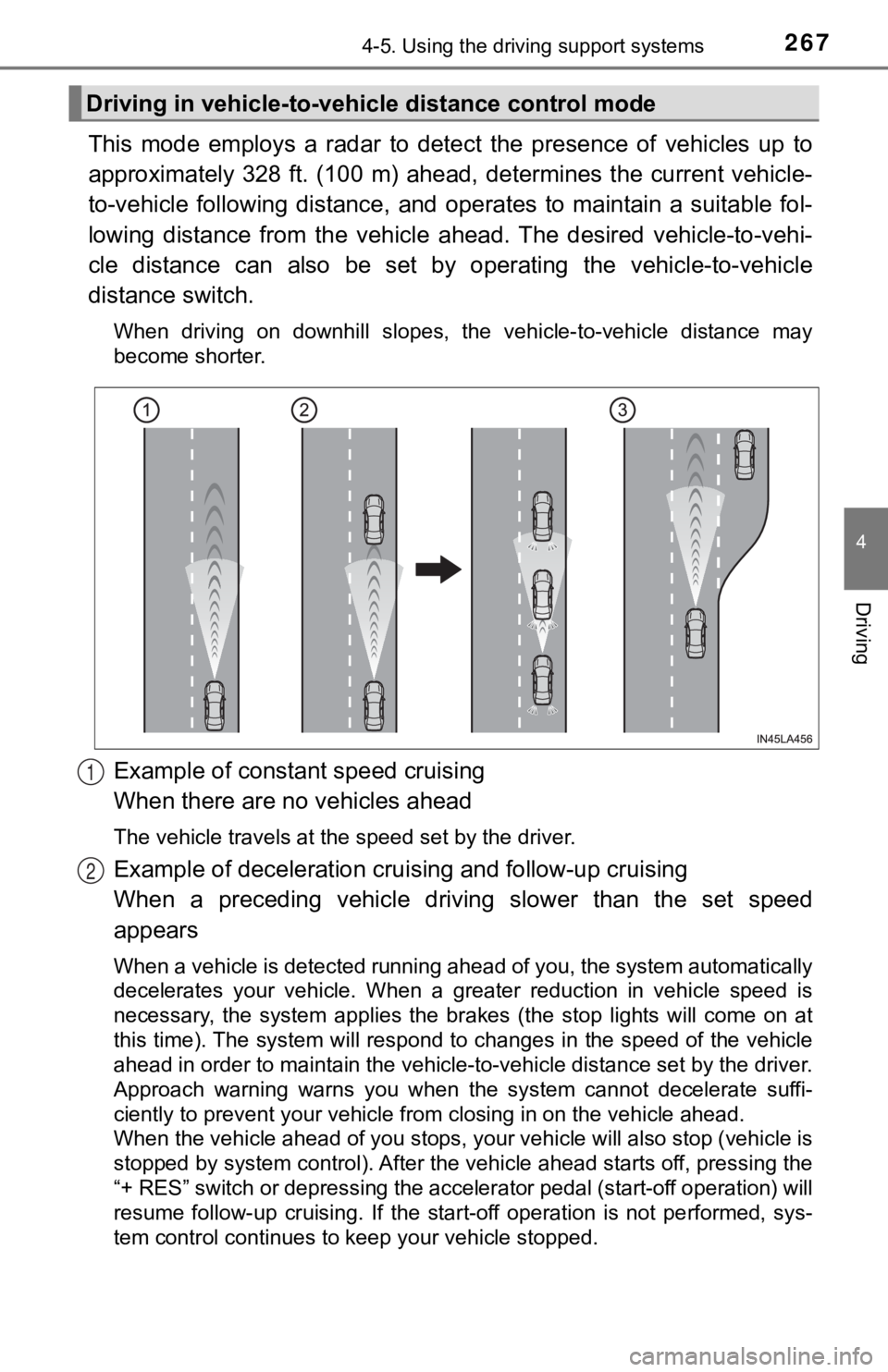
Example of constant speed cruising
When there are no vehicles ahead
The vehicle travels at the speed set by the driver.
Example of deceleration crui sing and follow-up cruising
When a preceding vehicle driving slower than the set speed
appears
When a vehicle is detected running ahead of you, the system automatically
decelerates your vehicle. When a greater reduction in vehicle s peed is
necessary, the system applies the brakes (the stop lights will come on at
this time). The system will respond to changes in the speed of the vehicle
ahead in order to maintain the vehicle-to-vehicle distance set by the driver.
Approach warning warns you when the system cannot decelerate su ffi-
ciently to prevent your vehicle from closing in on the vehicle ahead.
When the vehicle ahead of you stops, your vehicle will also stop (vehicle is
stopped by system control). After the vehicle ahead starts off, pressing the
“+ RES” switch or depressing the accelerator pedal (start-off o peration) will
resume follow-up cruising. If the start-off operation is not pe rformed, sys-
tem control continues to keep your vehicle stopped.
Driving in vehicle-to-vehi cle distance control mode
1
2
Page 268 of 572
2684-5. Using the driving support systems
When the turn signal lever is operated and your vehicle moves to an over-
taking lane while driving at 50 mph (80 km/h) or more, the vehi cle will
accelerate to help to overtake a passing vehicle.
The system’s identification of what is an overtaking lane may b e deter-
mined solely based on the location of the steering wheel in the vehicle (left
side driver position versus right side driver position.) If the vehicle is driven
to a region where the overtaking lane is on a different side fr om where the
vehicle is normally driven, the vehicle may accelerate when the turn signal
lever is operated in the opposite direction to the overtaking l ane (e.g., if the
driver normally operates the vehicle in a region where the overtaking lane
is to the right but then drives to a region where the overtaking lane is to the
left, the vehicle may accelerate when the right turn signal is activated).
Example of acceleration
When there are no longer any preceding vehicles driving slower
than the set speed
The system accelerates until the set speed is reached. The syst em then
returns to constant speed cruising.
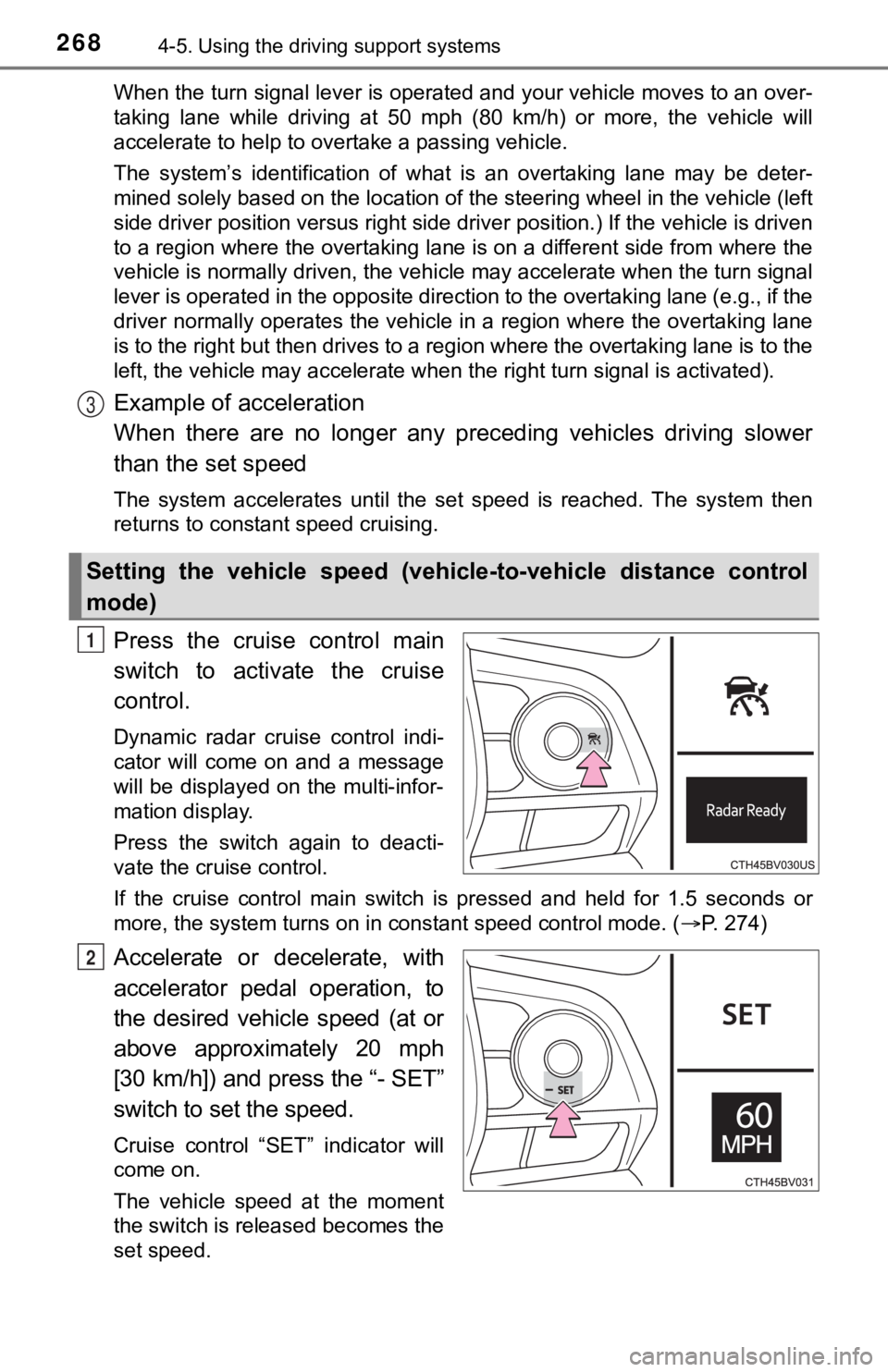
Press the cruise control main
switch to activate the cruise
control.
Dynamic radar cruise control indi-
cator will come on and a message
will be displayed on the multi-infor-
mation display.
Press the switch again to deacti-
vate the cruise control.
If the cruise control main switch is pressed and held for 1.5 seconds or
more, the system turns on in constant speed control mode. ( P. 274)
Accelerate or decelerate, with
accelerator pedal operation, to
the desired vehicle speed (at or
above approximately 20 mph
[30 km/h]) and press the “- SET”
switch to set the speed.
Cruise control “SET” indicator will
come on.
The vehicle speed at the moment
the switch is released becomes the
set speed.
Setting the vehicle speed (vehicle-to-vehicle distance control
mode)
3
1
2
Page 274 of 572
2744-5. Using the driving support systems
When constant speed control mode is selected, your vehicle will main-
tain a set speed without controllin g the vehicle-to-vehicle distance.
Select this mode only when vehic le-to-vehicle distance control mode
does not function correctly due to a dirty radar, etc.
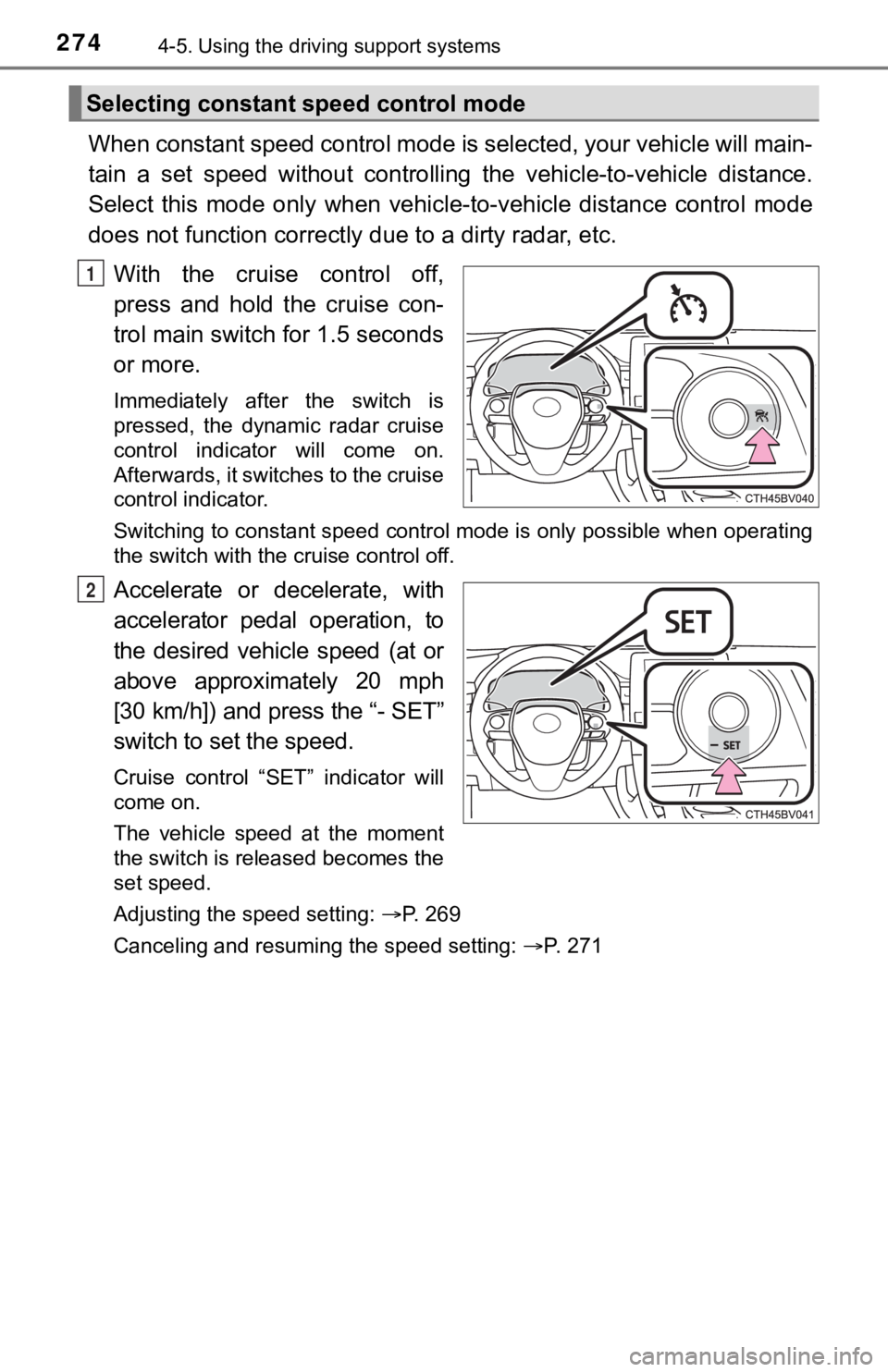
With the cruise control off,
press and hold the cruise con-
trol main switch for 1.5 seconds
or more.
Immediately after the switch is
pressed, the dynamic radar cruise
control indicator will come on.
Afterwards, it switches to the cruise
control indicator.
Switching to constant speed control mode is only possible when operating
the switch with the cruise control off.
Accelerate or decelerate, with
accelerator pedal operation, to
the desired vehicle speed (at or
above approximately 20 mph
[30 km/h]) and press the “- SET”
switch to se t the speed.
Cruise control “SET” indicator will
come on.
The vehicle speed at the moment
the switch is released becomes the
set speed.
Adjusting the speed setting: P. 269
Canceling and resuming the speed setting: P. 271
Selecting constant speed control mode
1
2