ECO mode TOYOTA AVALON 2022 Service Manual
[x] Cancel search | Manufacturer: TOYOTA, Model Year: 2022, Model line: AVALON, Model: TOYOTA AVALON 2022Pages: 572, PDF Size: 9.42 MB
Page 354 of 572
3545-2. Using the interior lights
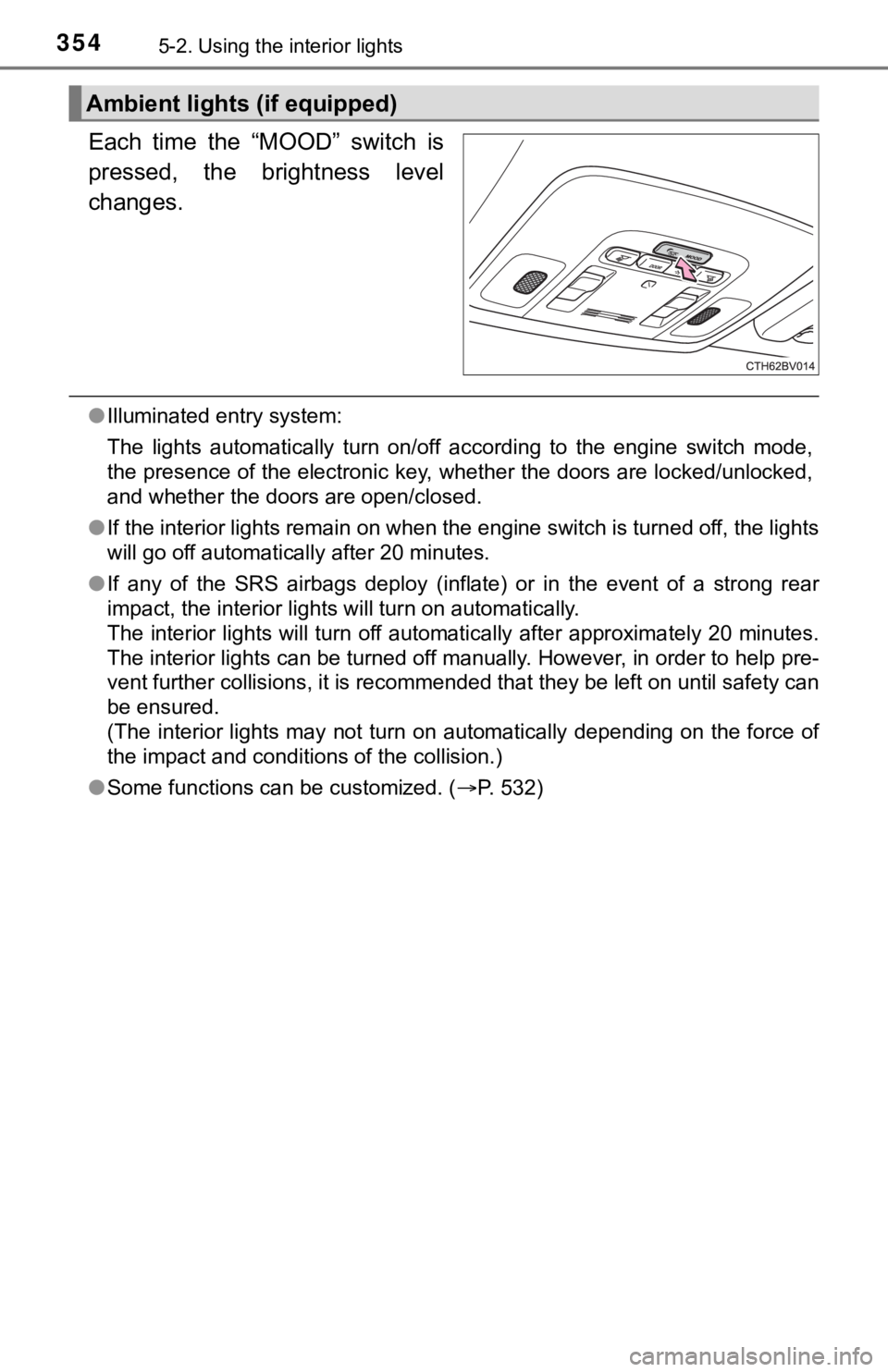
Each time the “MOOD” switch is
pressed, the brightness level
changes.
●Illuminated entry system:
The lights automatically turn on/off according to the engine switch mode,
the presence of the electronic key, whether the doors are locke d/unlocked,
and whether the doors are open/closed.
● If the interior lights remain on when the engine switch is turned off, the lights
will go off automatically after 20 minutes.
● If any of the SRS airbags deploy (inflate) or in the event of a strong rear
impact, the interior lights will turn on automatically.
The interior lights will turn off automatically after approxima tely 20 minutes.
The interior lights can be turned off manually. However, in ord er to help pre-
vent further collisions, it is recommended that they be left on until safety can
be ensured.
(The interior lights may not turn on automatically depending on the force of
the impact and conditions of the collision.)
● Some functions can be customized. ( P. 532)
Ambient lights (if equipped)
Page 369 of 572

3695-4. Other interior features
5
Interior features
■The wireless charger can be operated when
The engine switch is in ACCESSORY or IGNITION ON mode.
■ Portable devices that can be charged
●Portable devices compatible with the Qi wireless charging stand ard can be
charged by the wireless charger. However, compatibility with all devices
which meet the Qi wireless charging standard is not guaranteed.
● The wireless charger is designed to supply low power electricit y (5 W or
less) to a cellular phone, smartphone, or other portable device .
■ If a cover or accessory is attach ed to the portable device
Do not charge a portable device if a cover or accessory which i s not Qi com-
patible is attached. Depending on the type of cover and/or acce ssory
attached, it may not be possible to charge the portable device. If the portable
device is placed on the charging area and does not charge, remo ve the cover
and/or accessories.
■ If interference is heard in AM ra dio broadcasts while charging
Turn off the wireless charger and check if the noise is reduced. If noise is
reduced, press and hold the power supply switch of the wireless charger for 2
seconds. The frequency of the wireless charger is changed and n oise may be
reduced. When the frequency is changed, the operation indicator light will
blink (orange) 2 times.
■ Charging precautions
●If the electronic key cannot be detected in the cabin, charging cannot be
performed. When a door is opened and closed, charging may be te mporarily
suspended.
● While charging, the wireless charger and the portable device wi ll become
warm. This is not a malfunction.
If a portable device becomes warm while charging and charging stops due
to the protection function of the portable device, wait until the portable
device cools down and charge it again.
■ Sound generated during operation
When the power supply switch is turned on or while a portable d evice is being
identified, operation sounds may be heard. This is not a malfunction.
■ Cleaning the wireless charger
P. 390
Page 386 of 572
3866-1. Maintenance and care
●Working from top to bottom, liberally apply water to the vehicl e
body, wheel wells and underside of the vehicle to remove any di rt
and dust.
● Wash the vehicle body using a sponge or soft cloth, such as a
chamois.
● For hard-to-remove marks, use car wash soap and rinse thoroughl y
with water.
● Wipe away any water.
● Wax the vehicle when the wate rproof coating deteriorates.
If water does not bead on a clean surface, apply wax when the vehicle
body is cool.
■Automatic car washes
●Fold the mirrors before washing the vehicle. Start washing from the front of
the vehicle. Make sure to extend the mirrors before driving.
● Brushes used in automatic car washes may scratch the vehicle su rface,
parts (wheel, etc.) and harm your vehicle's paint.
● Vehicles with a rear spoiler: In certain automatic car washes, the rear spoiler
may interfere with machine operation. This may prevent the vehicle from
being cleaned properly or result in damage to the rear spoiler.
■ High pressure car washes
As water may enter the cabin, do not bring the nozzle tip near the gaps
around the doors or perimeter of the windows, or spray these ar eas continu-
ously.
■ When using a car wash
If the door handle becomes wet while the electronic key is within the effective
range, the door may lock and unlock repeatedly. In that case, f ollow the fol-
lowing correction procedures to wash the vehicle:
● Place the key in a position 6 ft. (2 m) or more separate from t he vehicle
while the vehicle is being washed. (Take care to ensure that th e key is not
stolen.)
● Set the electronic key to battery-saving mode to disable the sm art key sys-
tem. ( P. 139)
Cleaning and prot ecting the vehicle
exterior
Perform the following to protect the vehicle and maintain it in
prime condition:
Page 400 of 572
4006-3. Do-it-yourself maintenance
WARNING
The engine compartment contains many mechanisms and fluids that may
move suddenly, become hot, or become electrically energized. To avoid death
or serious injury, observe the following precautions.
■ When working on the engine compartment
● Keep hands, clothing and tools away from the moving fan and engine
drive belt.
● Be careful not to touch the engine, radiator, exhaust manifold, etc. right
after driving as they may be hot. Oil and other fluids may also be hot.
● Do not leave anything that may burn easily, such as paper and r ags, in the
engine compartment.
● Do not smoke, cause sparks or expose an open flame to fuel or t he bat-
tery. Fuel and battery fumes are flammable.
● Be extremely cautious when working on the battery. It contains poisonous
and corrosive sulfuric acid.
■ When working near the electric cooling fan or radiator grille
Be sure the engine switch is off. With the engine switch in IGNITION ON
mode, the electric cooling fan may automatically start to run if the air condi-
tioning is on and/or the coolant temperature is high. ( P. 409)
■ Safety glasses
Wear safety glasses to prevent flying or falling material, fluid spray, etc.
from getting in your eyes.
NOTICE
■If you remove the air cleaner filter
Driving with the air cleaner filter removed may cause excessive engine wear
due to dirt in the air.
Page 411 of 572
4116-3. Do-it-yourself maintenance
6
Maintenance and care
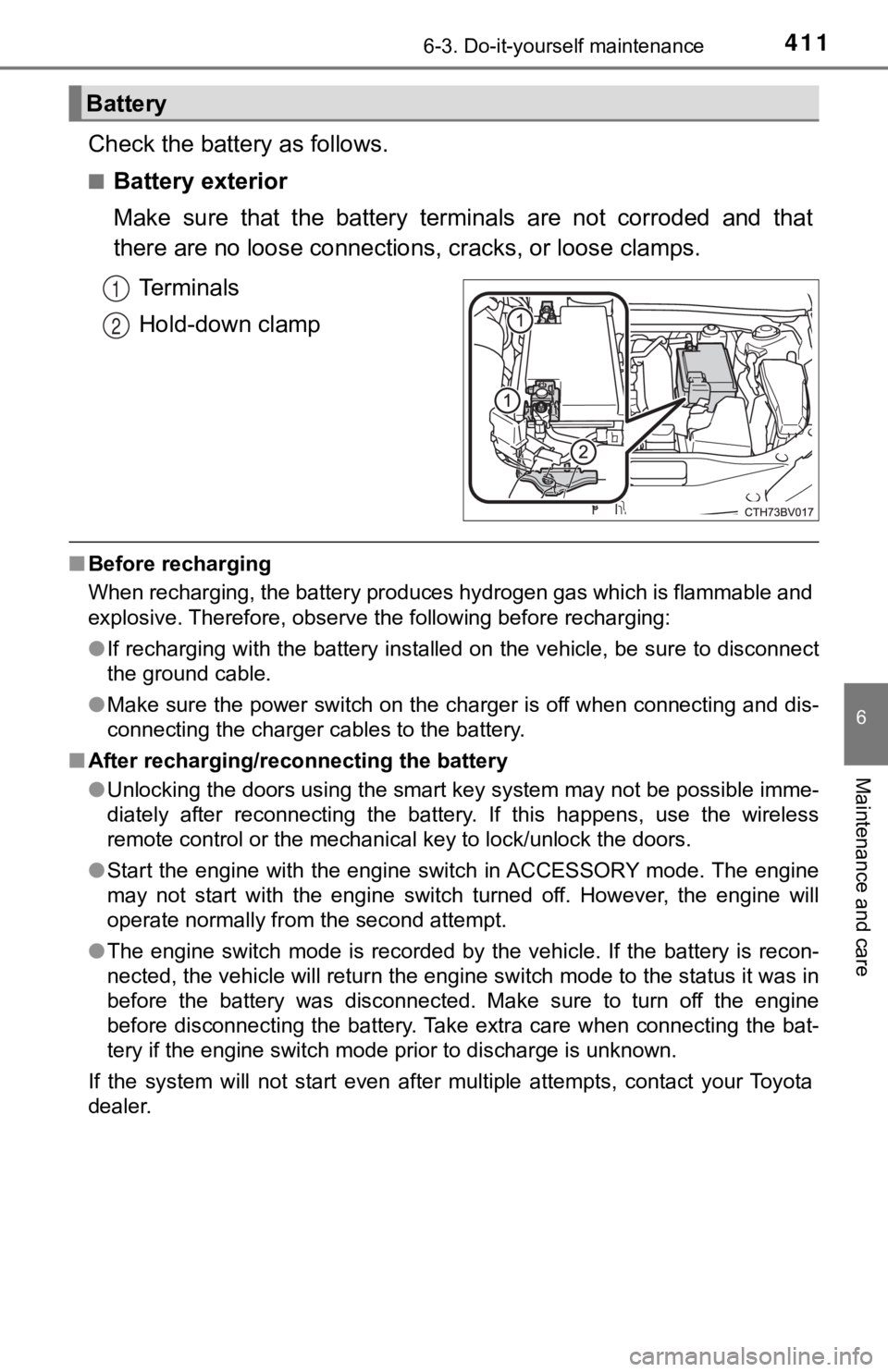
Check the battery as follows.
■Battery exterior
Make sure that the battery terminals are not corroded and that
there are no loose connections, cracks, or loose clamps.
Terminals
Hold-down clamp
■ Before recharging
When recharging, the battery produces hydrogen gas which is flammable and
explosive. Therefore, observe the following before recharging:
●If recharging with the battery installed on the vehicle, be sur e to disconnect
the ground cable.
● Make sure the power switch on the charger is off when connectin g and dis-
connecting the charger cables to the battery.
■ After recharging/reconnecting the battery
●Unlocking the doors using the smart key system may not be possi ble imme-
diately after reconnecting the battery. If this happens, use the wireless
remote control or the mechanical key to lock/unlock the doors.
● Start the engine with the engine switch in ACCESSORY mode. The engine
may not start with the engine switch turned off. However, the e ngine will
operate normally from the second attempt.
● The engine switch mode is recorded by the vehicle. If the batte ry is recon-
nected, the vehicle will return the engine switch mode to the s tatus it was in
before the battery was disconnected. Make sure to turn off the engine
before disconnecting the battery. Take extra care when connecti ng the bat-
tery if the engine switch mode prior to discharge is unknown.
If the system will not start even after multiple attempts, contact your Toyota
dealer.
Battery
1
2
Page 426 of 572

4266-3. Do-it-yourself maintenance
WARNING
■When inspecting or replacing tires
Observe the following precautions to prevent accidents.
Failure to do so may cause damage to parts of the drive train as well as
dangerous handling characteristics, which may lead to an accide nt
resulting in death o r serious injury.
●Do not mix tires of different ma kes, models or tread patterns.
Also, do not mix tires of remarkably different treadwear.
●Do not use tire sizes other th an those recommended by Toyota.
●Do not mix differently constructed tires (radial, bias-belted o r bias-ply
tires).
●Do not mix summer, all season and snow tires.
●Do not use tires that have been used on another vehicle.
Do not use tires if you do not kn ow how they were used previously.
■When initializing the tire pressure warning system
Do not initialize the tire press ure warning system without firs t adjusting
the tire inflation pressure to t he specified level. Otherwise, the tire pres-
sure warning light may not come on even if the tire inflation p ressure is
low, or it may come on when the tire inflation pressure is actu ally nor-
mal.
Page 448 of 572
4487-2. Steps to take in an emergency
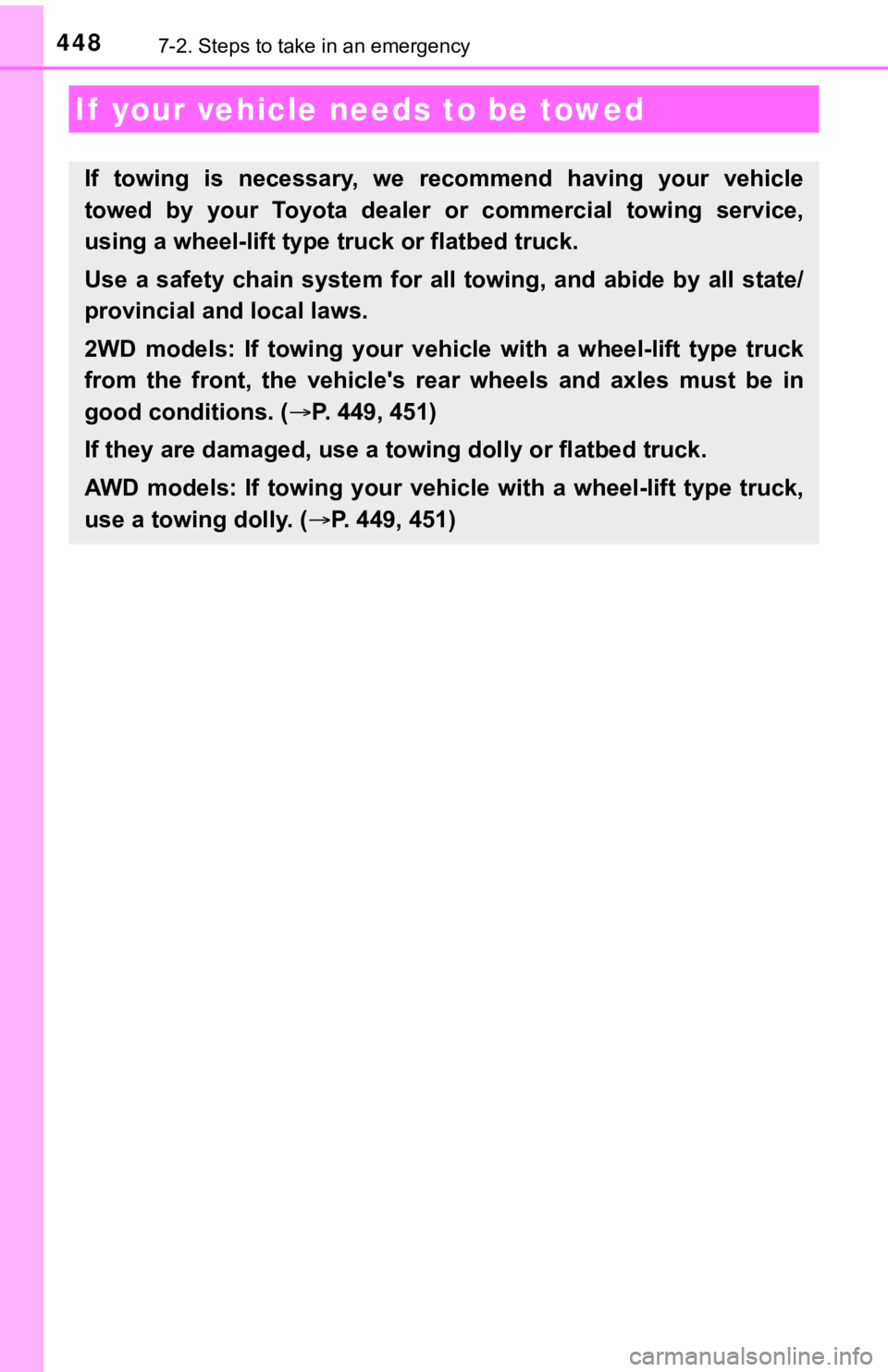
If your vehicle needs to be towed
If towing is necessary, we recommend having your vehicle
towed by your Toyota dealer or commercial towing service,
using a wheel-lift type t ruck or flatbed truck.
Use a safety chain system for all towing, and abide by all stat e/
provincial and local laws.
2WD models: If towing your vehic le with a wheel-lift type truck
from the front, the vehicle's rear wheels and axles must be in
good conditions. ( P. 449, 451)
If they are damaged, use a to wing dolly or flatbed truck.
AWD models: If towing your vehicle with a wheel-lift type truck ,
use a towing dolly. ( P. 449, 451)
Page 449 of 572
4497-2. Steps to take in an emergency
7
When trouble arises
WARNING
Observe the following precautions.
Failure to do so may result in death or serious injury.
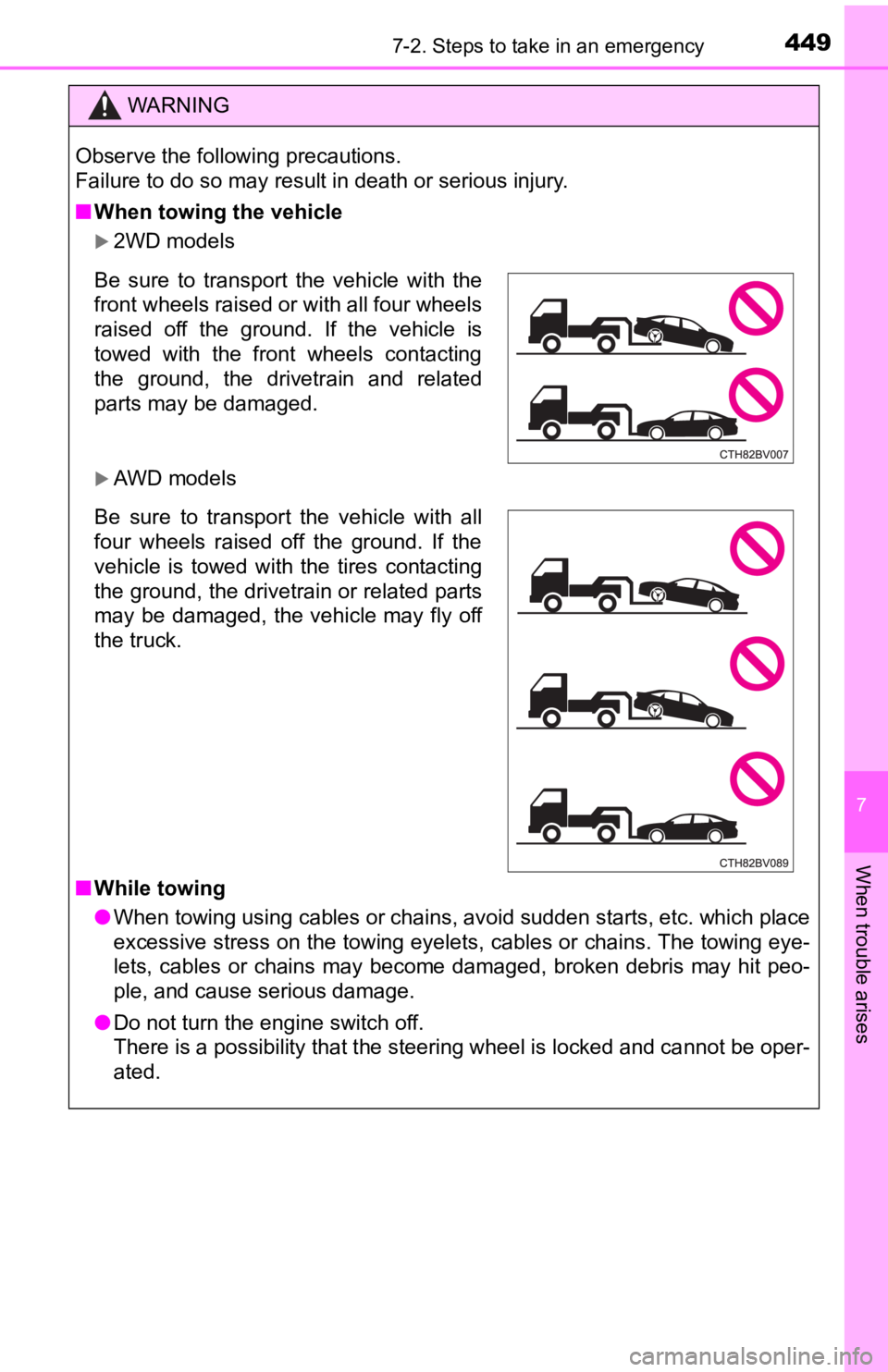
■When towing the vehicle
2WD models
AWD models
■ While towing
● When towing using cables or chains, avoid sudden starts, etc. w hich place
excessive stress on the towing eyelets, cables or chains. The t owing eye-
lets, cables or chains may become damaged, broken debris may hit peo-
ple, and cause serious damage.
● Do not turn the engine switch off.
There is a possibility that the steering wheel is locked and ca nnot be oper-
ated.
Be sure to transport the vehicle with the
front wheels raised or with all four wheels
raised off the ground. If the vehicle is
towed with the front wheels contacting
the ground, the drivetrain and related
parts may be damaged.
Be sure to transport the vehicle with all
four wheels raised off the ground. If the
vehicle is towed with the tires contacting
the ground, the drivetrain or related parts
may be damaged, the vehicle may fly off
the truck.
Page 458 of 572
4587-2. Steps to take in an emergency
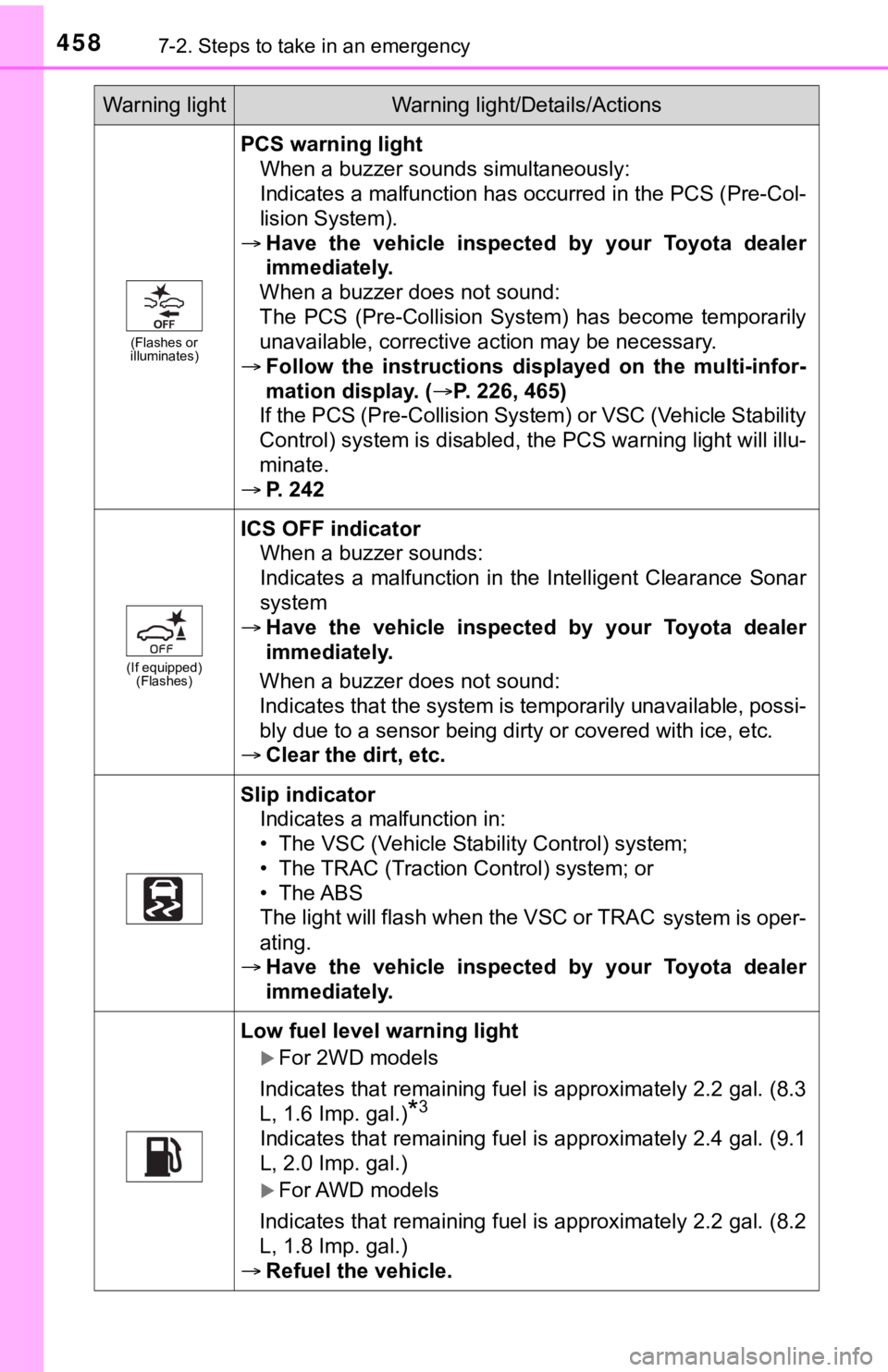
(Flashes or
illuminates)
PCS warning light
When a buzzer sounds simultaneously:
Indicates a malfunction has occurred in the PCS (Pre-Col-
lision System).
Have the vehicle inspected by your Toyota dealer
immediately.
When a buzzer does not sound:
The PCS (Pre-Collision System) has become temporarily
unavailable, corrective action may be necessary.
Follow the instructions displayed on the multi-infor-
mation display. (P. 226, 465)
If the PCS (Pre-Collision System) or VSC (Vehicle Stability
Control) system is disabled, the PCS warning light will illu-
minate.
P. 242
(If equipped)
(Flashes)
ICS OFF indicator
When a buzzer sounds:
Indicates a malfunction in the Intelligent Clearance Sonar
system
Have the vehicle inspected by your Toyota dealer
immediately.
When a buzzer does not sound:
Indicates that the system is temporarily unavailable, possi-
bly due to a sensor being dirty or covered with ice, etc.
Clear the dirt, etc.
Slip indicator
Indicates a malfunction in:
• The VSC (Vehicle Stability Control) system;
• The TRAC (Traction Control) system; or
• The ABS
The light will flash when the VSC or TRAC
system is oper-
ating.
Have the vehicle inspected by your Toyota dealer
immediately.
Low fuel level warning light
For 2WD models
Indicates that remaining fuel is approximately 2.2 gal. (8.3
L, 1.6 Imp. gal.)
*3
Indicates that remaining fuel is approximately 2.4 gal. (9.1
L, 2.0 Imp. gal.)
For AWD models
Indicates that remaining fuel is approximately 2.2 gal. (8.2
L, 1.8 Imp. gal.)
Refuel the vehicle.
Warning lightWarning light/Details/Actions
Page 483 of 572
4837-2. Steps to take in an emergency
7
When trouble arises
One of the following may be the cause of the problem:
● One or both of the battery t erminals may be disconnected.
● The battery may be discharged. ( P. 487)
● There may be a malfunction i n the steering lock system.
Contact your Toyota dealer if the problem cannot be repaired, o r if repair
procedures are unknown.
When the engine does not start, the following steps can be used as an
interim measure to start the engine if the engine switch is fun ctioning
normally:
Set the parking brake.
Shift the shift lever to P.
Turn the engine switch to ACCESSORY mode.
Press and hold the engine switch for about 15 seconds while
depressing the brake pedal firmly.
Even if the engine can be start ed using the above steps, the sy stem
may be malfunctioning. Have the vehicle inspected by your Toyot a
dealer.
The starter motor does not turn over, the interior lights and h ead-
lights do not turn on, o r the horn does not sound.
Emergency start function
1
2
3
4