ECO mode TOYOTA AVALON 2022 Owner's Guide
[x] Cancel search | Manufacturer: TOYOTA, Model Year: 2022, Model line: AVALON, Model: TOYOTA AVALON 2022Pages: 572, PDF Size: 9.42 MB
Page 275 of 572

2754-5. Using the driving support systems
4
Driving
■Dynamic radar cruise control wi th full-speed range can be set when
● The shift lever is in D.
● The desired set speed can be set when the vehicle speed is approximately
20 mph (30 km/h) or more.
(However, when the vehicle speed is set while driving at below approxi-
mately 20 mph [30 km/h], the set speed will be set to approximately 20 mph
[30 km/h].)
■ Accelerating after setting the vehicle speed
The vehicle can accelerate by operating the accelerator pedal. After acceler-
ating, the set speed resumes. However, during vehicle-to-vehicl e distance
control mode, the vehicle speed may decrease below the set spee d in order
to maintain the distance to the preceding vehicle.
■ When the vehicle stops while follow-up cruising
●Pressing the “+ RES” switch while the vehicle ahead stops will resume fol-
low-up cruising if the vehicle ahead starts off within approxim ately 3 sec-
onds after the switch is pressed.
● If the vehicle ahead starts off within 3 seconds after your vehicle stops, fol-
low-up cruising will be resumed.
■ Automatic cancelation of vehicle-to-vehicle distance control mo de
Vehicle-to-vehicle distance control mode is automatically cance led in the fol-
lowing situations.
● VSC is activated.
● TRAC is activated for a period of time.
● When the VSC or TRAC system is turned off.
● The sensor cannot detect correctly because it is covered in some way.
● When the brake control or output restriction control of a driving support sys-
tem operates. (For example: Pre -Collision System, Drive-Start Control)
● The parking brake is operated.
● The vehicle is stopped by system control on a steep incline.
● The following are detected when the vehicle has been stopped by system
control:
• The driver is not wearing a seat belt.
• The driver’s door is opened.
• The vehicle has been stopped for about 3 minutes
If vehicle-to-vehicle distance control mode is automatically ca nceled for any
reasons other than the above, there may be a malfunction in the system.
Contact your Toyota dealer.
Page 292 of 572
2924-5. Using the driving support systems
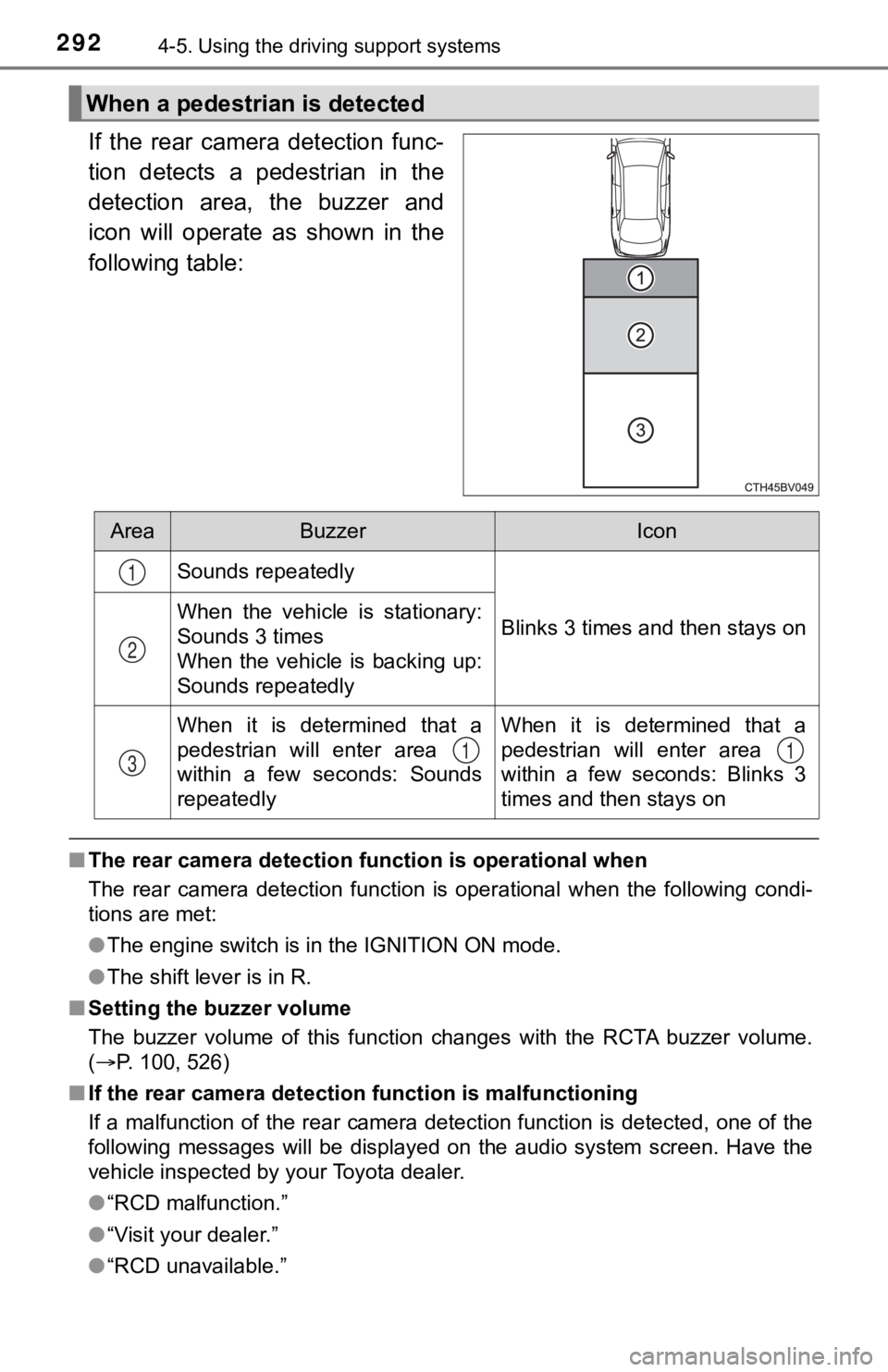
If the rear camera detection func-
tion detects a pedestrian in the
detection area, the buzzer and
icon will operate as shown in the
following table:
■The rear camera detection function is operational when
The rear camera detection function is operational when the foll owing condi-
tions are met:
● The engine switch is in the IGNITION ON mode.
● The shift lever is in R.
■ Setting the buzzer volume
The buzzer volume of this function changes with the RCTA buzzer volume.
( P. 100, 526)
■ If the rear camera detection function is malfunctioning
If a malfunction of the rear camera detection function is detec ted, one of the
following messages will be displayed on the audio system screen. Have the
vehicle inspected by your Toyota dealer.
● “RCD malfunction.”
● “Visit your dealer.”
● “RCD unavailable.”
When a pedestrian is detected
AreaBuzzerIcon
Sounds repeatedly
Blinks 3 times and then stays onWhen the vehicle is stationary:
Sounds 3 times
When the vehicle is backing up:
Sounds repeatedly
When it is determined that a
pedestrian will enter area
within a few seconds: Sounds
repeatedlyWhen it is determined that a
pedestrian will enter area
within a few seconds: Blinks 3
times and then stays on
1
2
311
Page 299 of 572

2994-5. Using the driving support systems
4
Driving
■The intuitive parking assist can be operated when
●Front corner sensors:
• The engine switch is in IGNITION ON mode.
• The shift lever is in other than P.
• The vehicle speed is less than about 6 mph (10 km/h).
● Front center sensors:
• The engine switch is in IGNITION ON mode.
• The shift lever is in other than P or R.
• The vehicle speed is less than about 6 mph (10 km/h).
● Rear corner and rear center sensors:
• The engine switch is in IGNITION ON mode.
• The shift lever is in R.
• The vehicle speed is less than about 6 mph (10 km/h).
■ Intuitive parking assist display
When an object is detected while the Toyota parking assist moni tor or pan-
oramic view monitor is in use, the warning indicator will appea r in the upper
part of the screen even if the display setting has been set to off.
■ Sensor detection information
●The sensor’s detection areas are limited to the areas around th e vehicle’s
bumper.
● Depending on the shape of the object and other factors, the det ection dis-
tance may shorten, or detection may be impossible.
● Objects may not be detected if they are too close to the sensor .
● There will be a short delay between object detection and displa y. Even at
slow speeds, there is a possibility that the object will come w ithin the sen-
sor’s detection areas before the display is shown and the buzze r sounds.
● Thin posts or objects lower than the sensor may not be detected when
approached, even if they have been detected once.
● It might be difficult to hear beeps due to the volume of audio system or air
flow noise of the air conditioning system.
■ If a battery terminal has been disconnected and reconnected
The system needs to be initialized.
To initialize the system, drive the vehicle straight ahead for 5 seconds or more
at a speed of approximately 22 mph (35 km/h) or more.
■ If “Parking Assist Unavailable Clean Parking Assist Sensor” is displayed
on the multi-information display
A sensor may be dirty or covered with snow or ice. In such case s, if it is
removed from the sensor, the system should return to normal.
Also, due to the sensor being frozen at low temperatures, a mal function dis-
play may appear or an object may not be detected. If the sensor thaws out,
the system should return to normal.
Page 311 of 572

3114-5. Using the driving support systems
4
Driving
■Re-enabling the Intellig ent Clearance Sonar system
To re-enable the Intelligent Clearance Sonar system when it is disabled due
to operation of the Intelligent Clearance Sonar function, either enable the sys-
tem again (P. 306), or turn the engine switch off and then back to IGNITIO N
ON mode.
Additionally, if the object becomes no longer in the traveling direction of the
vehicle or if the traveling direction of the vehicle changes (such as changing
from moving forward to backing up, or from backing up to moving forward),
the system will be re-enabled automatically.
■ Objects that the Intelligent Clearance Sonar function may not d etect
The sensors may not be able to detect certain objects, such as the following.
● Cotton cloth, snow, and other materials that are poor reflector s of ultrasonic
waves.
(People may also not be detected depending on the type of cloth ing they are
wearing.)
● Objects which are not perpendicular to the ground, are not perp endicular to
the traveling direction of the vehicle, are uneven or are wavin g.
● Low objects
● Thin objects such as wires, fences, ropes and signposts
● Objects that are extremely close to the bumper
■ Situations in which the Intelligent Clearance Sonar may not ope rate
properly
When the shift lever is in N
■ Intuitive parking assist buzzer
Regardless of whether the intuitive parking assist system is en abled or not
( P. 295), if the Intelligent Clearance Sonar system is enabled ( P. 306),
the front or rear sensors detect an object and brake control is performed, the
intuitive parking assist buzzer will sound to notify the driver of the approxi-
mate distance to the object.
Page 324 of 572
3244-5. Using the driving support systems
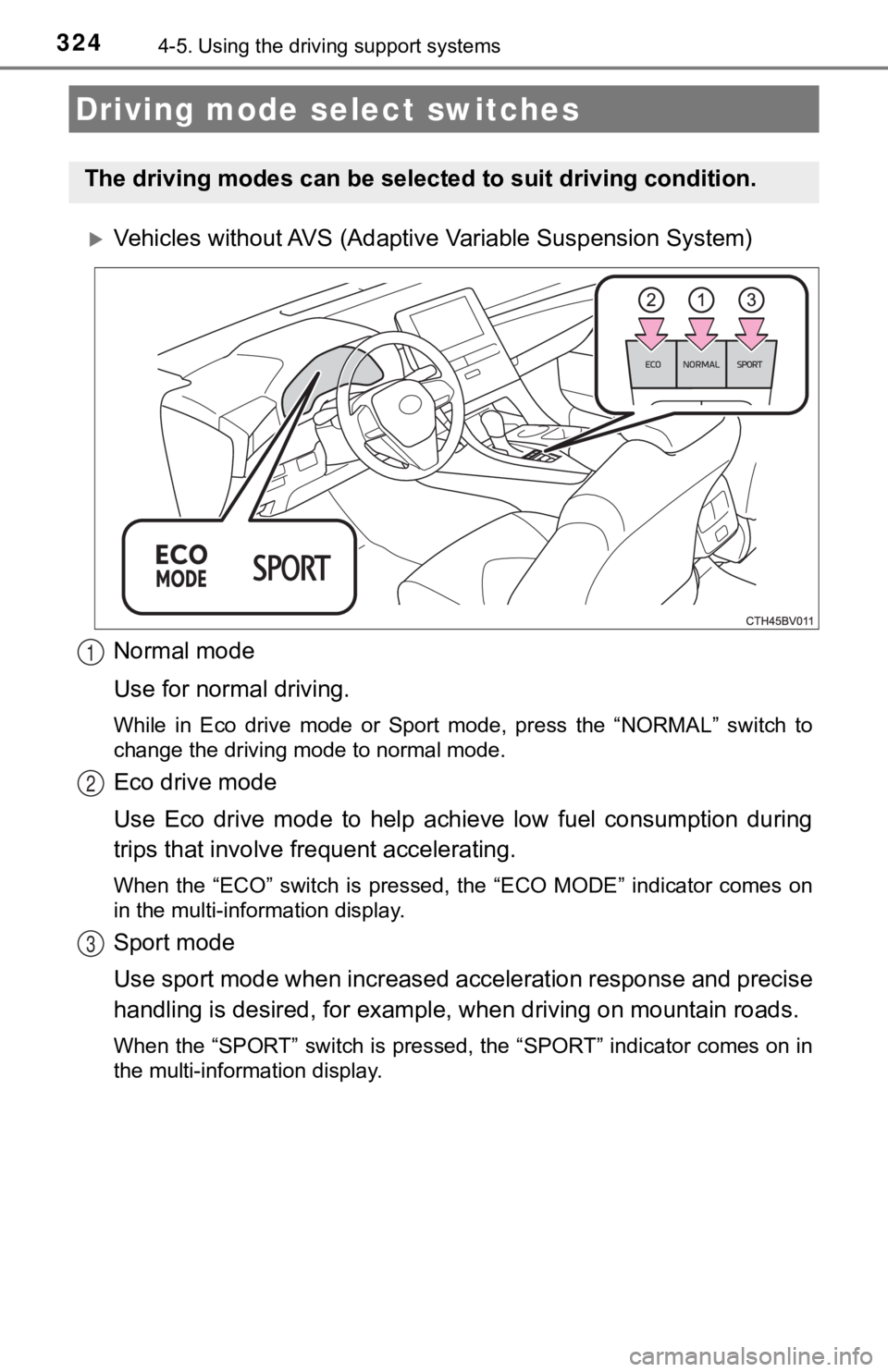
Vehicles without AVS (Adaptive Variable Suspension System)
Normal mode
Use for normal driving.
While in Eco drive mode or Sport mode, press the “NORMAL” switch to
change the driving mode to normal mode.
Eco drive mode
Use Eco drive mode to help achieve low fuel consumption during
trips that involve frequent accelerating.
When the “ECO” switch is pressed, the “ECO MODE” indicator comes on
in the multi-information display.
Sport mode
Use sport mode when increased acceleration response and precise
handling is desired, for exampl e, when driving on mountain road s.
When the “SPORT” switch is pressed, the “SPORT” indicator comes on in
the multi-information display.
Driving mode select switches
The driving modes can be select ed to suit driving condition.
1
2
3
Page 325 of 572
3254-5. Using the driving support systems
4
Driving
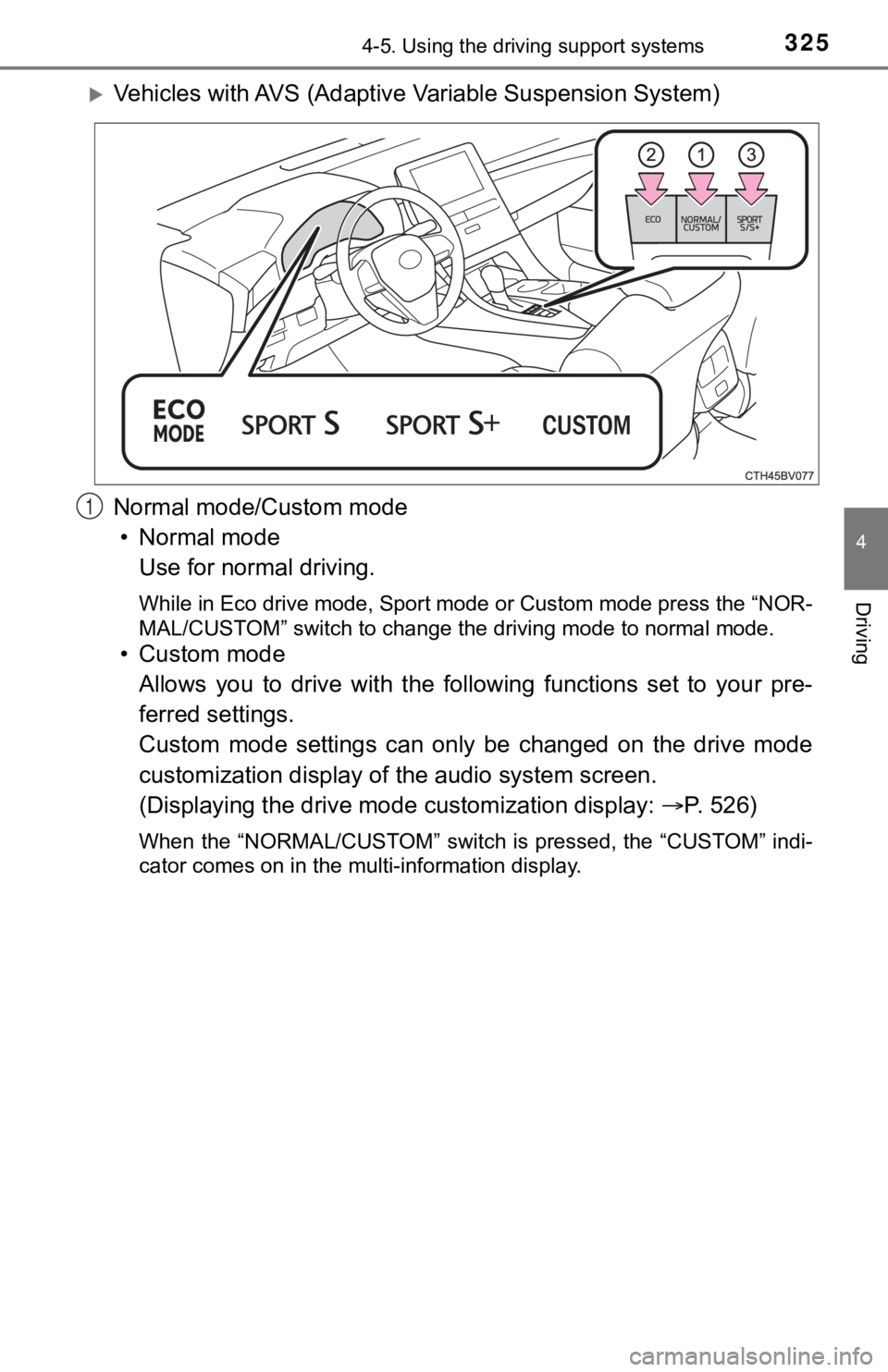
Vehicles with AVS (Adaptive Variable Suspension System)
Normal mode/Custom mode • Normal mode Use for normal driving.
While in Eco drive mode, Sport mode or Custom mode press the “N OR-
MAL/CUSTOM” switch to change the driving mode to normal mode.
• Custom mode
Allows you to drive with the following functions set to your pr e-
ferred settings.
Custom mode settings can only be changed on the drive mode
customization display of the audio system screen.
(Displaying the drive mode customization display: P. 5 2 6 )
When the “NORMAL/CUSTOM” switch is pressed, the “CUSTOM” indi-
cator comes on in the multi-information display.
1
Page 326 of 572
3264-5. Using the driving support systems
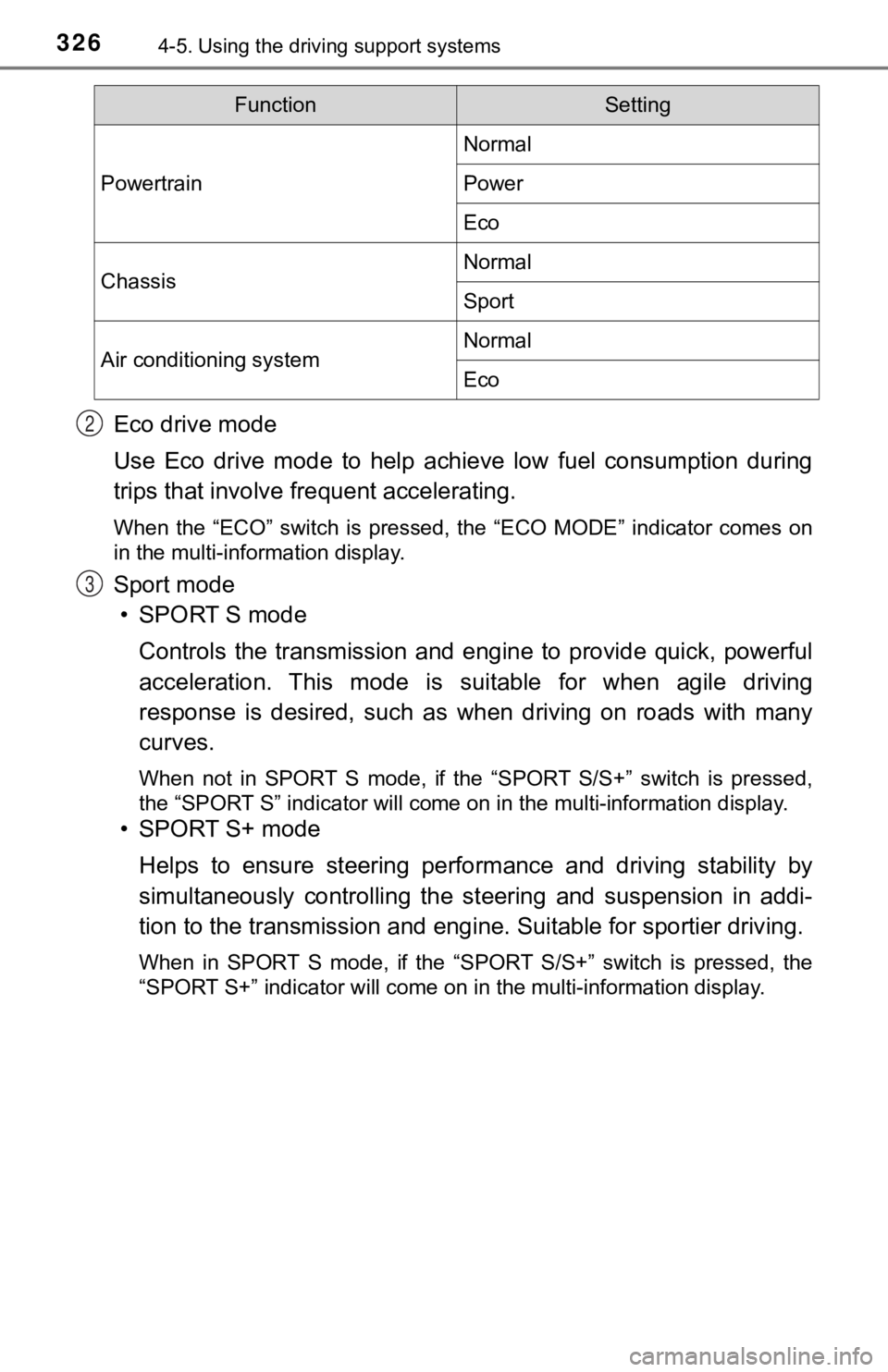
Eco drive mode
Use Eco drive mode to help achieve low fuel consumption during
trips that involve frequent accelerating.
When the “ECO” switch is pressed, the “ECO MODE” indicator comes on
in the multi-information display.
Sport mode
• SPORT S mode
Controls the transmission and eng ine to provide quick, powerful
acceleration. This mode is suitable for when agile driving
response is desired, such as when driving on roads with many
curves.
When not in SPORT S mode, if the “SPORT S/S+” switch is pressed ,
the “SPORT S” indicator will come on in the multi-information d isplay.
• SPORT S+ mode
Helps to ensure steering perfo rmance and driving stability by
simultaneously controlling the steering and suspension in addi-
tion to the transmission and engi ne. Suitable for sportier driving.
When in SPORT S mode, if the “SPORT S/S+” switch is pressed, th e
“SPORT S+” indicator will come on in the multi-information disp lay.
FunctionSetting
Powertrain
Normal
Power
Eco
ChassisNormal
Sport
Air conditioning systemNormal
Eco
2
3
Page 327 of 572

3274-5. Using the driving support systems
4
Driving
■Operation of the air conditioning system in Eco drive mode
Eco drive mode controls the heating/cooling operations and fan speed of the
air conditioning system to enhance fuel efficiency ( P. 342). To improve air
conditioning performance, adjust the fan speed or turn off Eco drive mode.
■ Automatic deactivation of sport mode and custom mode
If the engine switch is turned off after driving in sport mode or custom mode,
the drive mode will be changed to normal mode.
Page 333 of 572

3334-5. Using the driving support systems
4
Driving
■Secondary Collision Brake automatic cancellation
The system is automatically canceled in any of the following si tuations.
● The vehicle speed drops below approximately 6 mph (10 km/h)
● A certain amount of time elapses during operation
● The accelerator pedal is depressed a large amount
■ Reduced effectiveness of the EPS system
The effectiveness of the EPS system is reduced to prevent the s ystem from
overheating when there is frequent steering input over an exten ded period of
time. The steering wheel may feel heavy as a result.
Should this occur, refrain from excessive steering input or sto p the vehicle
and turn the engine off. The EPS system should return to normal within 10
minutes.
■ If a message about AWD is shown on the multi-information display
Perform the following actions.
MessageDetails/Actions
“AWD System Overheated
Switching to 2WD Mode”
AWD system is overheating.
Perform the following actions.
• Reduce the vehicle speed until the mes- sage disappears.
• Stop the vehicle in a safe place and let
the engine idle.
Once the display message on the multi-
information display turns off, there is no
problem continuing to drive.
If the message does not disappear, have
your vehicle checked by your Toyota dealer
immediately.
“AWD System Overheated
2WD Mode Engaged”
The vehicle switched from all-wheel drive
(AWD) to front wheel drive due to overheat-
ing.
Perform the following actions.
• Reduce the vehicle speed until the mes-
sage disappears.
• Stop the vehicle in a safe place and let the engine idle.
Once the display message on the multi-
information display turns off, the AWD sys-
tem returns to normal.
If the message does not disappear, have
your vehicle checked by your Toyota dealer
immediately.
“AWD System Malfunction
2WD Mode Engaged
Visit Your Dealer” A malfunction occurred in the AWD system.
Have your vehicle checked by your
Toyota dealer immediately.
Page 346 of 572
3465-1. Using the air conditioning system and defogger
■When driving on dusty roads
Close all windows. If dust thrown up by the vehicle is still drawn into the vehi-
cle after closing the windows, it is recommended that the air i ntake mode be
set to outside air mode and the fan speed to any setting except off.
■ Outside/recirculated air mode
●Setting to the recirculated air mode temporarily is recommended in prevent-
ing dirty air from entering the vehicle interior and helping to cool the vehicle
when the outside air temperature is high.
● Outside/recirculated air mode may automatically switch dependin g on the
temperature setting or the inside temperature.
■ When the outside temperature exceeds 75°F (24°C) and the air co ndition-
ing system is on
● In order to reduce the air conditioning power consumption, the air condition-
ing system may switch to recirculated air mode automatically. This may also
reduce fuel consumption.
● Recirculated air mode is selected as a default mode when the en gine switch
is turned to IGNITION ON mode.
● It is possible to switch to outside air mode at any time by pre ssing .
■ When the outside t emperature is low
The dehumidification function may not operate even when is pre ssed.
■ Operation of the air conditioning system in Eco drive mode
●In the Eco drive mode, “ECO” is displayed on the air conditioni ng screen
and the air conditioning system is controlled as follows to pri oritize fuel effi-
ciency:
• Engine speed and compressor operation controlled to restrict h eating/
cooling capacity
• Fan speed restricted when automatic mode is selected
● To improve air conditioning performance, perform the following operations:
• Adjust the fan speed
• Turn off Eco drive mode
■ Ventilation and air conditioning odors
●To let fresh air in, set the air conditioning system to the out side air mode.
● During use, various odors from inside and outside the vehicle m ay enter into
and accumulate in the air conditioning system. This may then ca use odor to
be emitted from the vents.
● To reduce potential odors from occurring:
• It is recommended that the air conditioning system be set to o utside air
mode prior to turning the vehicle off.
• The start timing of the blower may be delayed for a short peri od of time
immediately after the air conditioning system is started in aut omatic
mode.