ECO mode TOYOTA AVALON 2022 User Guide
[x] Cancel search | Manufacturer: TOYOTA, Model Year: 2022, Model line: AVALON, Model: TOYOTA AVALON 2022Pages: 572, PDF Size: 9.42 MB
Page 140 of 572

1403-2. Opening, closing and locking the doors
■Note for the entry function
●Even when the electronic key is within the effective range (detection areas),
the system may not operate properly in the following cases:
• The electronic key is too close to the window or outside door handle, near
the ground, or in a high place when the doors are locked or unl ocked.
• The electronic key is near the ground or in a high place, or t oo close to
the rear bumper center when the trunk is opened.
• The electronic key is on the instrument panel, rear package tray or floor, or in the door pockets or glove box when the engine is started or engine
switch modes are changed.
● Do not leave the electronic key on top of the instrument panel or near the
door pockets when exiting the vehicle. Depending on the radio w ave recep-
tion conditions, it may be detected by the antenna outside the cabin and the
door will become lockable from the outside, possibly trapping the electronic
key inside the vehicle.
● As long as the electronic key is within the effective range, th e doors may be
locked or unlocked by anyone. However, only the doors detecting the elec-
tronic key can be used to unlock the vehicle.
● Even if the electronic key is not inside the vehicle, it may be possible to start
the engine if the electronic key is near the window.
● The doors may unlock or lock if a large amount of water splashes on the
door handle, such as in the rain or in a car wash, when the electronic key is
within the effective range. (The doors will automatically be lo cked after
approximately 60 seconds if the doors are not opened and closed.)
● If the wireless remote control is used to lock the doors when t he electronic
key is near the vehicle, there is a possibility that the door m ay not be
unlocked by the entry function. (Use the wireless remote contro l to unlock
the doors.)
● Touching the door lock sensor while wearing gloves may delay or prevent
lock operation. Remove the gloves and touch the lock sensor aga in.
● When the lock operation is performed using the lock sensor, rec ognition sig-
nals will be shown up to two consecutive times. After this, no recognition
signals will be given.
*
● If the door handle becomes wet while the electronic key is with in the effec-
tive range, the door may lock and unlock repeatedly. In this case, follow the
following correction procedures to wash the vehicle:
• Place the electronic key in a location 6 ft. (2 m) or more awa y from the
vehicle. (Take care to ensure that the key is not stolen.)
• Set the electronic key to battery-saving mode to disable the s mart key
system. ( P. 139)
● If the electronic key is inside the vehicle and a door handle b ecomes wet
during a car wash, a message may be shown on the multi-informat ion dis-
play and a buzzer will sound outside the vehicle. To turn off t he alarm, lock
all the doors.
Page 149 of 572
1493-3. Adjusting the seats
3
Operation of each component
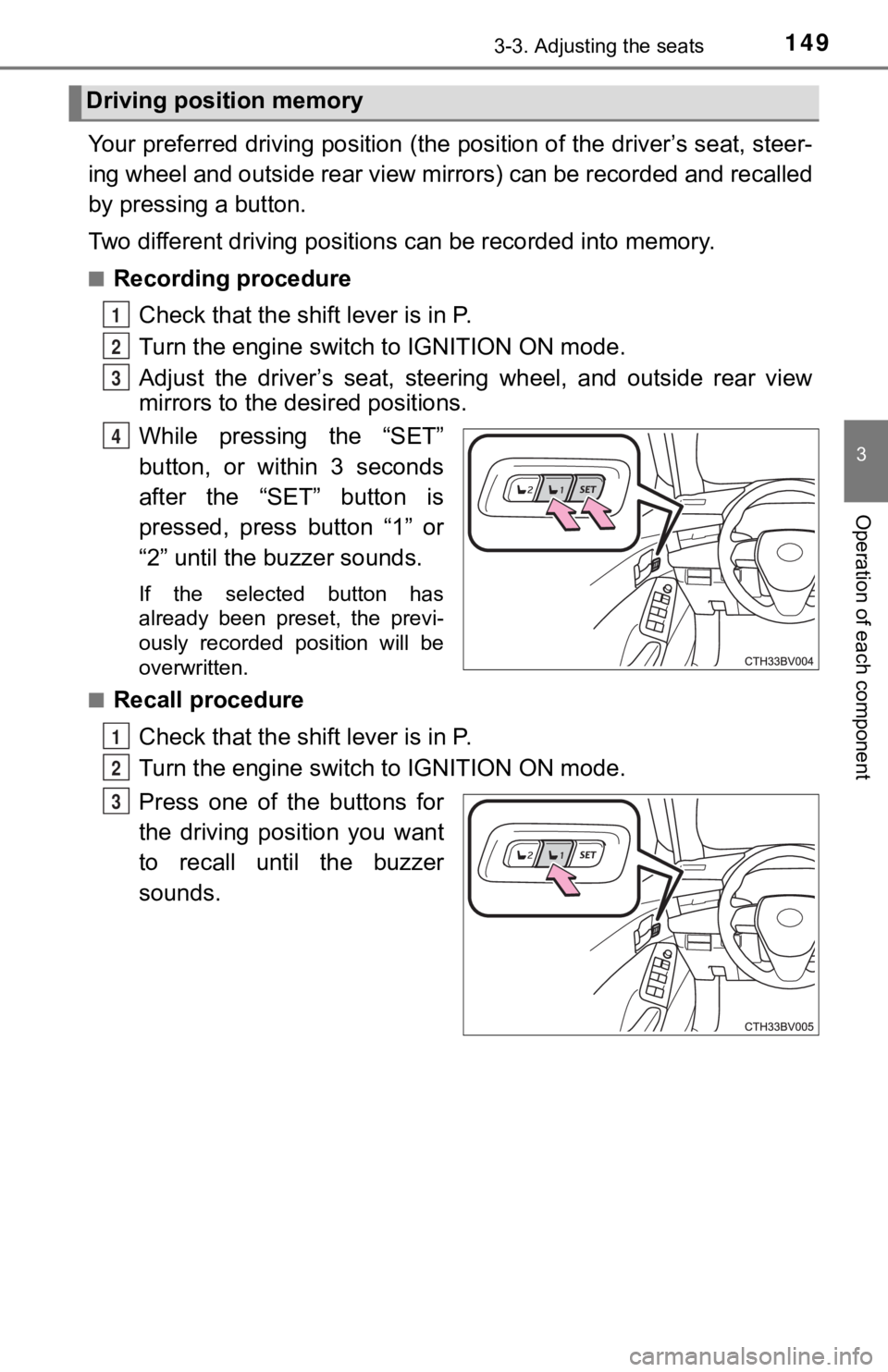
Your preferred driving position (the position of the driver’s seat, steer-
ing wheel and outside rear view mirrors) can be recorded and re called
by pressing a button.
Two different driving positions can be recorded into memory.
■Recording procedure
Check that the shift lever is in P.
Turn the engine switch to IGNITION ON mode.
Adjust the driver’s seat, steerin g wheel, and outside rear view
mirrors to the desired positions.
While pressing the “SET”
button, or within 3 seconds
after the “SET” button is
pressed, press button “1” or
“2” until the buzzer sounds.
If the selected button has
already been preset, the previ-
ously recorded position will be
overwritten.
■
Recall procedure
Check that the shift lever is in P.
Turn the engine switch to IGNITION ON mode.
Press one of the buttons for
the driving position you want
to recall until the buzzer
sounds.
Driving position memory
1
2
3
4
1
2
3
Page 151 of 572
1513-3. Adjusting the seats
3
Operation of each component
Each electronic key can be registered to recall your preferred driving
position.
■Registering procedure
Record your driving position to button 1 or 2 before performing the
following:
Carry only the key you want to register, and then close the dri ver’s
door.
If 2 or more keys are in the vehicle, the driving position cann ot be
recorded properly.
Check that the shift lever is in P.
Turn the engine switch to IGNITION ON mode.
Recall the driving position that you want to record.
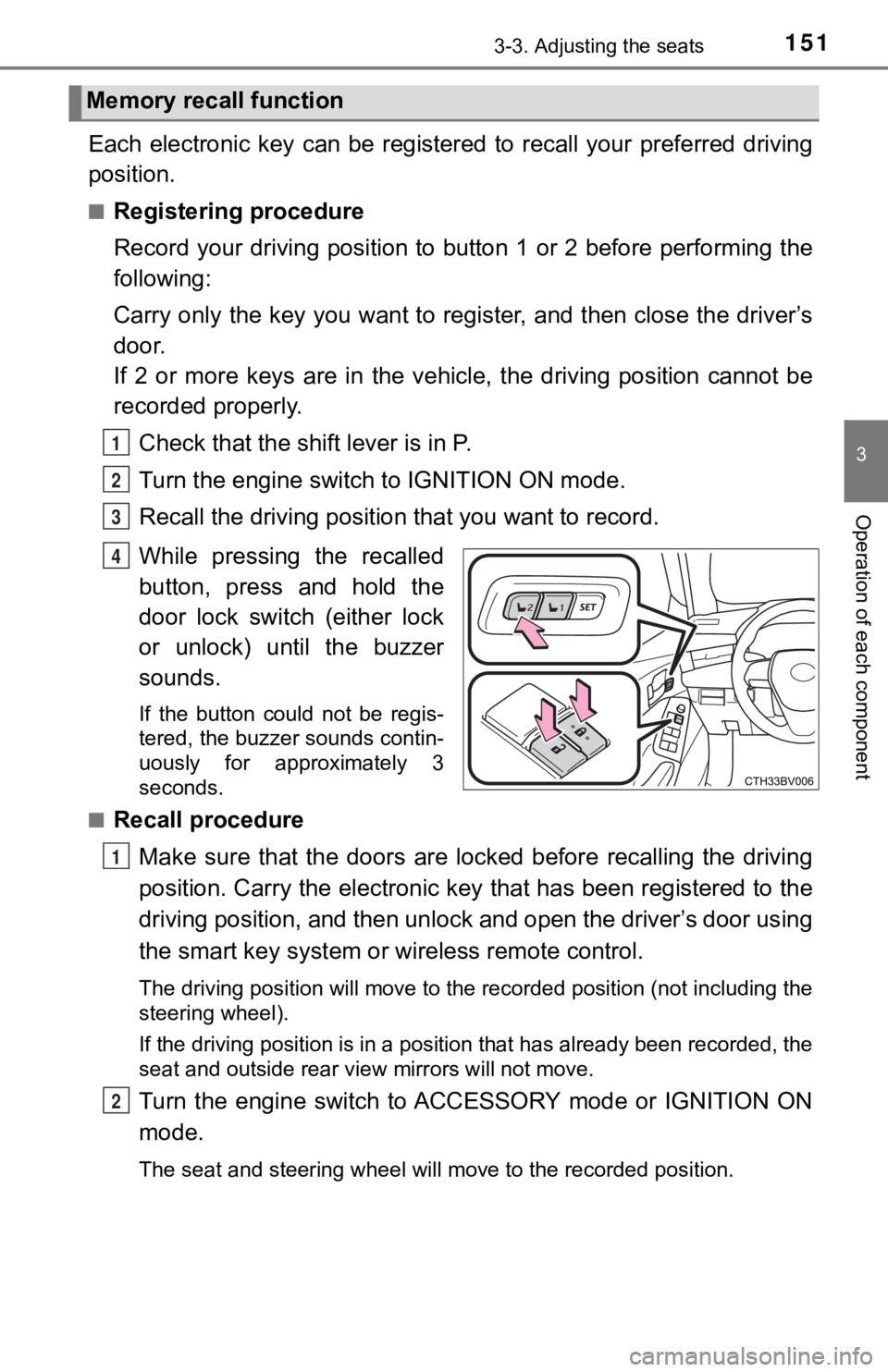
While pressing the recalled
button, press and hold the
door lock switch (either lock
or unlock) until the buzzer
sounds.
If the button could not be regis-
tered, the buzzer sounds contin-
uously for approximately 3
seconds.
■
Recall procedure
Make sure that the doors are locked before recalling the drivin g
position. Carry the electronic ke y that has been registered to the
driving position, and then unlock and open the driver’s door using
the smart key system or wireless remote control.
The driving position will move to the recorded position (not in cluding the
steering wheel).
If the driving position is in a position that has already been recorded, the
seat and outside rear view mirrors will not move.
Turn the engine switch to ACCESSORY mode or IGNITION ON
mode.
The seat and steering wheel will move to the recorded position.
Memory recall function
1
2
3
4
1
2
Page 152 of 572

1523-3. Adjusting the seats
■Cancelation procedure
Carry only the key you want to cancel and then close the driver’s
door.
If 2 or more keys are in the vehicle, the driving position cann ot be
canceled properly.
Turn the engine switch to IGNITION ON mode.
While pressing the “SET” button, press and hold the door lock
switch (either lock or unlock) until the buzzer sounds twice.
If it button could not be canceled, the buzzer sounds continuously for
approximately 3 seconds.
■Recalling the driving position u sing the memory recall function
● Different driving positions can be registered for each electronic key. There-
fore, the driving position that is recalled may be different de pending on the
key being carried.
● If a door other than the driver’s door is unlocked with the smart key system,
the driving position cannot be recalled. In this case, press the driving posi-
tion button which has been set.
■ Customization
Some functions can be customized. ( P. 525)
WARNING
■ Seat adjustment caution
Take care during seat adjustment so that the seat does not stri ke the rear
passenger or squeeze your body against the steering wheel.
1
2
Page 162 of 572
1623-5. Opening and closing the windows
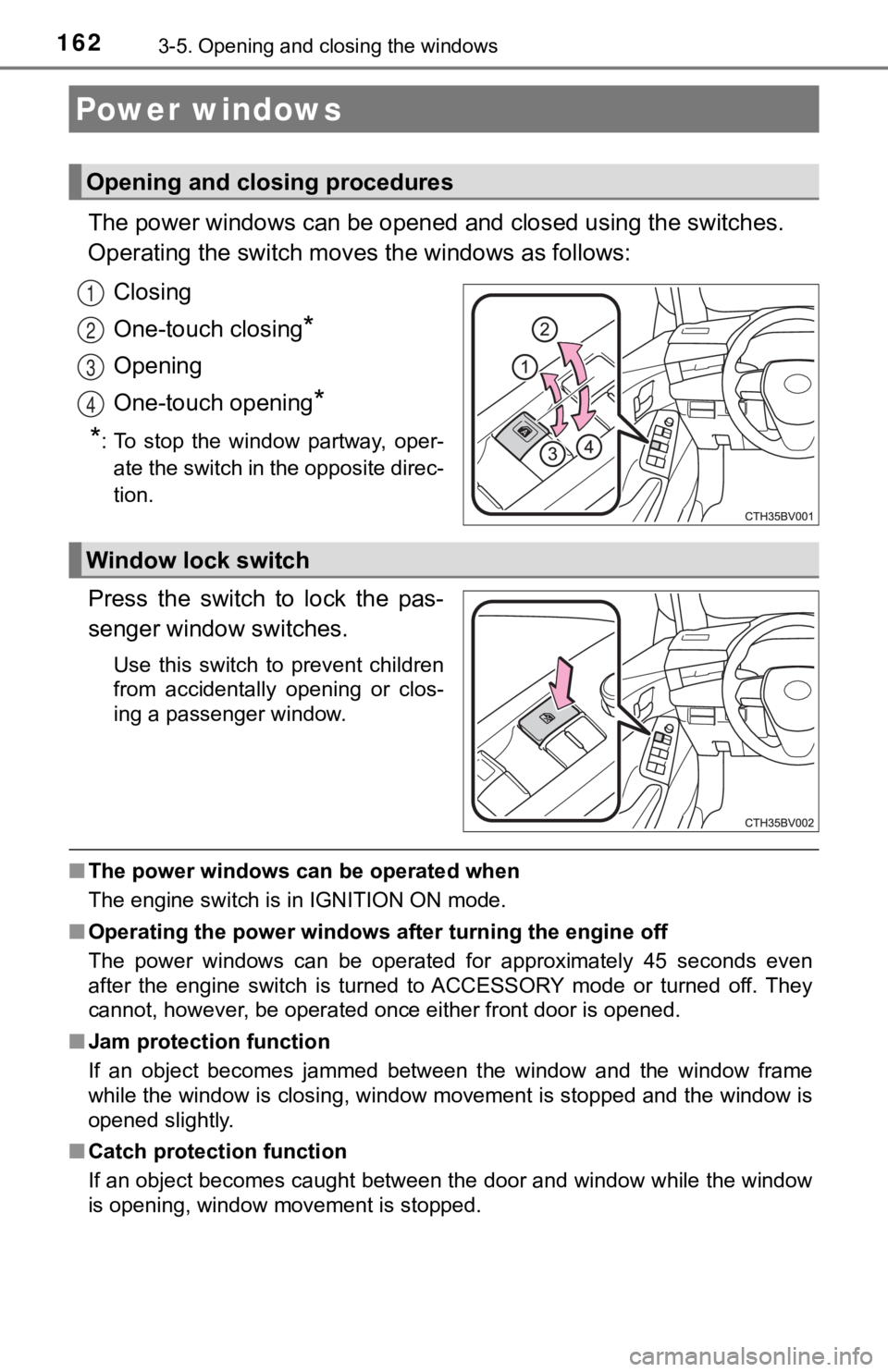
The power windows can be opened and closed using the switches.
Operating the switch moves the windows as follows:
Closing
One-touch closing
*
Opening
One-touch opening
*
*
: To stop the window partway, oper- ate the switch in the opposite direc-
tion.
Press the switch to lock the pas-
senger window switches.
Use this switch to prevent children
from accidentally opening or clos-
ing a passenger window.
■ The power windows can be operated when
The engine switch is in IGNITION ON mode.
■ Operating the power windows after turning the engine off
The power windows can be operated for approximately 45 seconds even
after the engine switch is turned to ACCESSORY mode or turned o ff. They
cannot, however, be operated once either front door is opened.
■ Jam protection function
If an object becomes jammed between the window and the window f rame
while the window is closing, window movement is stopped and the window is
opened slightly.
■ Catch protection function
If an object becomes caught between the door and window while the window
is opening, window movement is stopped.
Power windows
Opening and closing procedures
1
2
3
4
Window lock switch
Page 163 of 572

1633-5. Opening and closing the windows
3
Operation of each component
■When the window cannot be opened or closed
When the jam protection function or catch protection function o perates
unusually and the door window cannot be opened or closed, perfo rm the fol-
lowing operations with the power window switch of that door.
● Stop the vehicle. With the engine switch in IGNITION ON mode, w ithin 4
seconds of the jam protection function or catch protection func tion activat-
ing, continuously operate the power window switch in the one-to uch closing
direction or one-touch opening direction so that the door windo w can be
opened and closed.
● If the door window cannot be opened and closed even when perfor ming the
above operations, perform the foll owing procedure for function initialization.
Turn the engine switch to IGNITION ON mode.
Pull and hold the power window switch in the one-touch closing direction
and completely close the door window.
Release the power window switch for a moment, resume pulling the
switch in the one-touch closing direction, and hold it there for approxi-
mately 6 seconds or more.
Press and hold the power window switch in the one-touch opening direc-
tion. After the door window is completely opened, continue hold ing the
switch for an additional 1 second or more.
Release the power window switch for a moment, resume pushing th e
switch in the one-touch opening direction, and hold it there fo r approxi-
mately 4 seconds or more.
Pull and hold the power window switch in the one-touch closing direction
again. After the door window is completely closed, continue holding the
switch for a further 1 second or more.
If you release the switch while the window is moving, start aga in from the
beginning.
If the window reverses and cannot be fully closed or opened, have the vehicle
inspected by your Toyota dealer.
1
2
3
4
5
6
Page 167 of 572

1673-5. Opening and closing the windows
3
Operation of each component
■The moon roof can be operated when
The engine switch is in IGNITION ON mode.
■ Operating the moon roof after turning the engine off
The moon roof can be operated for approximately 45 seconds afte r the
engine switch is turned to ACCESSORY mode or turned off. It can not, how-
ever, be operated once either front door is opened.
■ Jam protection function
If an object is detected between the moon roof and the frame wh ile the moon
roof is closing or tilting down, travel is stopped and the moon roof opens
slightly.
■ Sunshade
The sunshade can be opened and closed manually. However, the su nshade
will open automatically when the moon roof is opened.
■ Door lock linked moon roof operation
●The moon roof can be opened and closed using the mechanical key .
*
(P. 484)
● The moon roof can be opened using the wireless remote control.
*
(P. 127)
*: These settings must be customized at your Toyota dealer.
Page 175 of 572

1754-1. Before driving
4
Driving
WARNING
Observe the following precautions.
Failure to do so may result in death or serious injury.
■When starting the vehicle
Always keep your foot on the brake pedal while stopped with the engine
running. This prevents the vehicle from creeping.
■ When driving the vehicle
● Do not drive if you are unfamiliar with the location of the brake and accel-
erator pedals to avoid depressing the wrong pedal.
• Accidentally depressing the accelerator pedal instead of the b rake
pedal will result in sudden acceleration that may lead to an accident.
• When backing up, you may twist your body around, leading to a diffi-
culty in operating the pedals. Make sure to operate the pedals properly.
• Make sure to keep a correct driving posture even when moving t he
vehicle only slightly. This allows you to depress the brake and accelera-
tor pedals properly.
• Depress the brake pedal using your right foot. Depressing the brake
pedal using your left foot may delay response in an emergency, result-
ing in an accident.
● Do not drive the vehicle over or stop the vehicle near flammable materials.
The exhaust system and exhaust gases can be extremely hot. Thes e hot
parts may cause a fire if there is any flammable material nearby.
● During normal driving, do not turn off the engine. Turning the engine off
while driving will not cause loss of steering or braking control, but the
power assist to these systems will be lost. This will make it more difficult to
steer and brake, so you should pull over and stop the vehicle as soon as it
is safe to do so.
However, in the event of an emergency, such as if it becomes im possible
to stop the vehicle in the normal way: P. 445
● Use engine braking (downshift) to maintain a safe speed when driving
down a steep hill.
Using the brakes continuously may cause the brakes to overheat and lose
effectiveness. ( P. 192)
● Do not adjust the display, the positions of the steering wheel, the seat, or
the inside or outside rear view mirrors while driving.
Doing so may result in a loss of vehicle control.
● Always check that all passengers’ arms, heads or other parts of their body
are not outside the vehicle.
● AWD models: Do not drive the vehicle off-road.
This is not an AWD vehicle designed for off-road driving. Proceed with all
due caution if it becomes unavoidable to drive off-road.
Page 178 of 572

1784-1. Before driving
WARNING
Observe the following precautions.
Failure to do so may result in death or serious injury.● Do not leave a door or window open if the curved glass is coated with a
metallized film such as a silver-colored one. Reflected sunligh t may cause
the glass to act as a lens, causing a fire.
■ When the vehicle is parked
● Always apply the parking brake, shift the shift lever to P, stop the engine
and lock the vehicle.
Do not leave the vehicle unattended while the engine is running.
If the vehicle is parked with the shift lever in P but the park ing brake is not
set, the vehicle may start to move, possibly leading to an accident.
● Do not touch the exhaust pipes while the engine is running or i mmediately
after turning the engine off.
Doing so may cause burns.
■ When taking a nap in the vehicle
Always turn the engine off. Otherwise, if you accidentally move the shift
lever or depress the accelerator pedal, this could cause an acc ident or fire
due to engine overheating. Additionally, if the vehicle is parked in a poorly
ventilated area, exhaust gases may collect and enter the vehicl e, leading to
death or a serious health hazard.
■ When braking
● When the brakes are wet, drive more cautiously.
Braking distance increases when the brakes are wet, and this may cause
one side of the vehicle to brake differently than the other side. Also, the
parking brake may not securely hold the vehicle.
● If the brake booster device does not operate, do not follow oth er vehicles
closely and avoid hills or shar p turns that require braking.
In this case, braking is still possible, but the brake pedal should be
depressed more firmly than usual. Also, the braking distance will increase.
Have your brakes fixed immediately.
● Do not pump the brake pedal if the engine stalls.
Each push on the brake pedal uses up the reserve for the power-assisted
brakes.
● The brake system consists of 2 individual hydraulic systems; if one of the
systems fails, the other will still operate. In this case, the brake pedal
should be depressed more firmly than usual and the braking dist ance will
increase.
Have your brakes fixed immediately.
■ If the vehicle becomes stuck (AWD models)
Do not spin the wheels excessively when any of the tires is up in the air, or
the vehicle is stuck in sand, mud, etc. This may damage the driveline com-
ponents or propel the vehicle forward or backward, causing an accident.
Page 186 of 572
1864-2. Driving procedures
Check that the parking brake is set.
Check that the shift lever is in P.
Firmly depress the brake pedal.
and a message will be displayed on the multi-information displ ay.
If it is not displayed, the engine cannot be started.
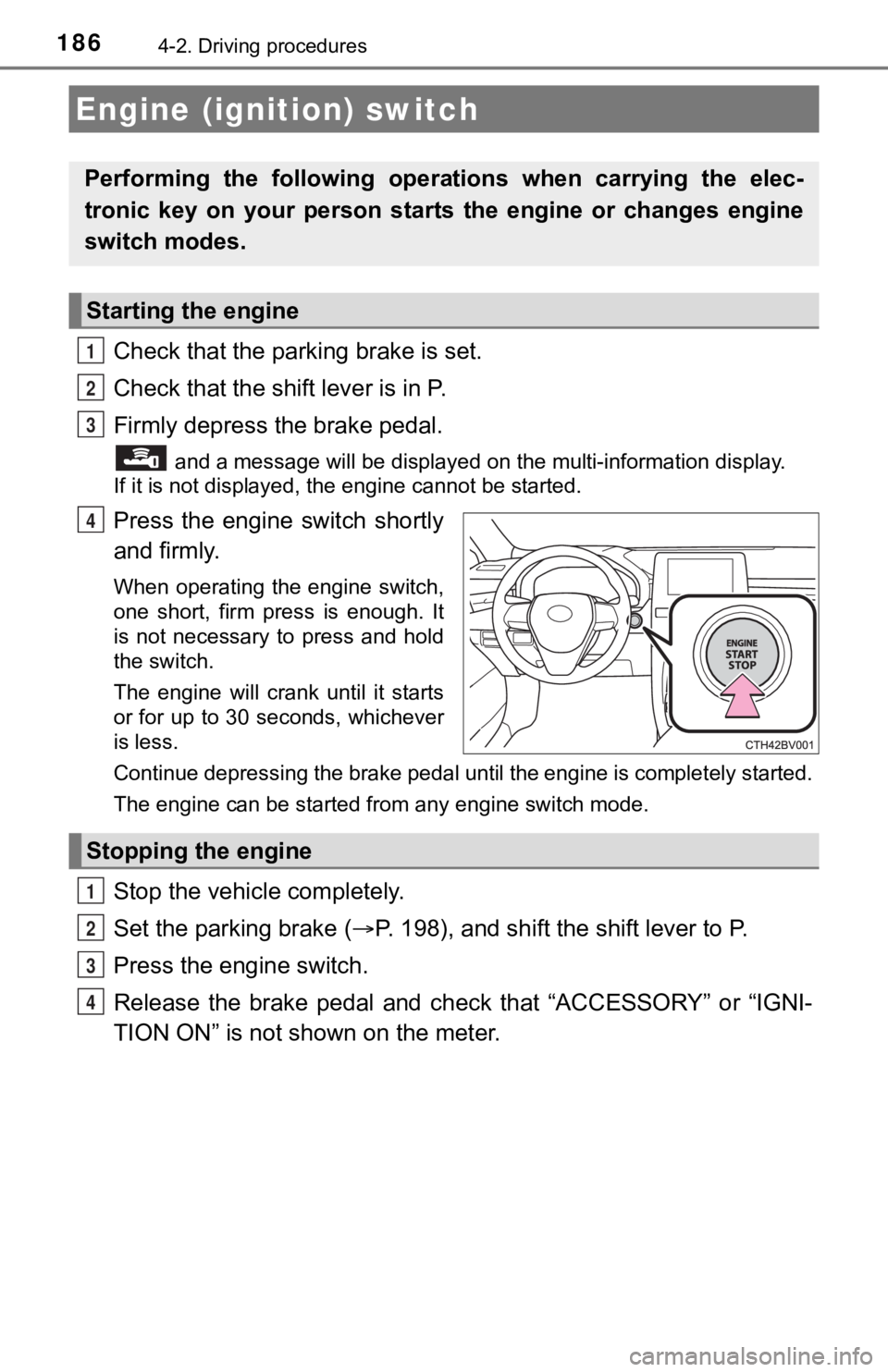
Press the engine switch shortly
and firmly.
When operating the engine switch,
one short, firm press is enough. It
is not necessary to press and hold
the switch.
The engine will crank until it starts
or for up to 30 seconds, whichever
is less.
Continue depressing the brake pedal until the engine is complet ely started.
The engine can be started from any engine switch mode.
Stop the vehicl e completely.
Set the parking brake ( P. 198), and shift the shift lever to P.
Press the engine switch.
Release the brake pedal and check that “ACCESSORY” or “IGNI-
TION ON” is not shown on the meter.
Engine (ignition) switch
Performing the following opera tions when carrying the elec-
tronic key on your person starts the engine or changes engine
switch modes.
Starting the engine
1
2
3
4
Stopping the engine
1
2
3
4