TOYOTA AVENSIS 2011 Workshop Manual
AVENSIS 2011
TOYOTA
TOYOTA
https://www.carmanualsonline.info/img/14/59673/w960_59673-0.png
TOYOTA AVENSIS 2011 Workshop Manual
Page 394 of 772
394 3-2. Using the audio system
AVENSIS_EE (OM20B44E)
Using the station list
Updating the station list
Press (type A and B) or (type C).
The station list will be displayed.
Press [UPDATE] to update the list.
“Updating” is displayed while the searching is in process, and then
available stations will be listed on the display.
To cancel the updating process, press (type A and B) or
[BACK] (type C).
Selecting a station from the station list
Press (type A and B) or (type C).
The station list will be displayed.
Turn to select a station.
Press to tune in the station.
To return to the previous display, press (type A and B) or
[BACK] (type C).
STEP1
STEP2
STEP1
STEP2
STEP3
Page 398 of 772
398
3-2. Using the audio system
AVENSIS_EE (OM20B44E)
Using the CD player
: If equipped
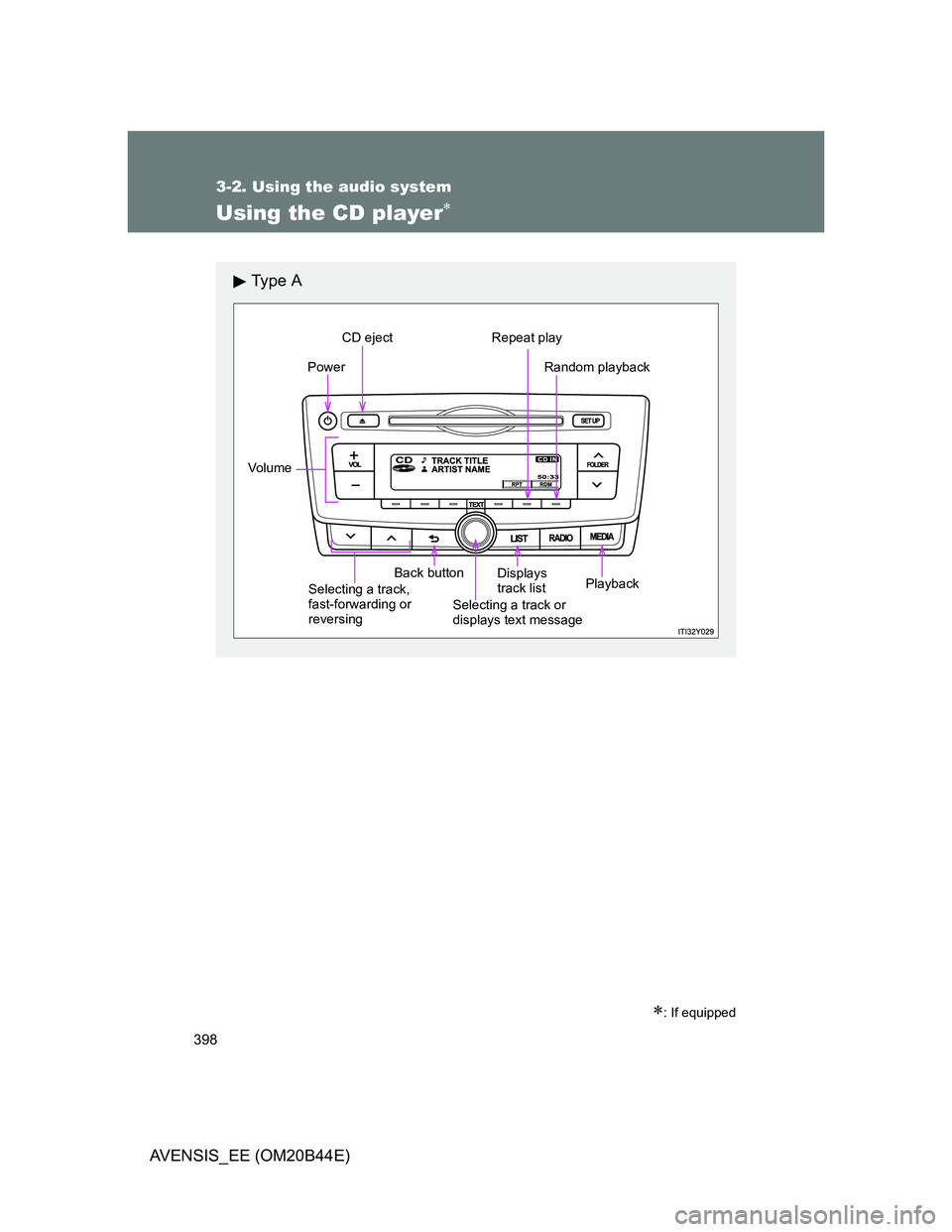
Ty p e A
Power
Vo lu m e
Selecting a track,
fast-forwarding or
reversingBack button
Selecting a track or
displays text message
CD eject Repeat play
Random playback
Playback Displays
track list
Page 399 of 772
399 3-2. Using the audio system
3
Interior features
AVENSIS_EE (OM20B44E)
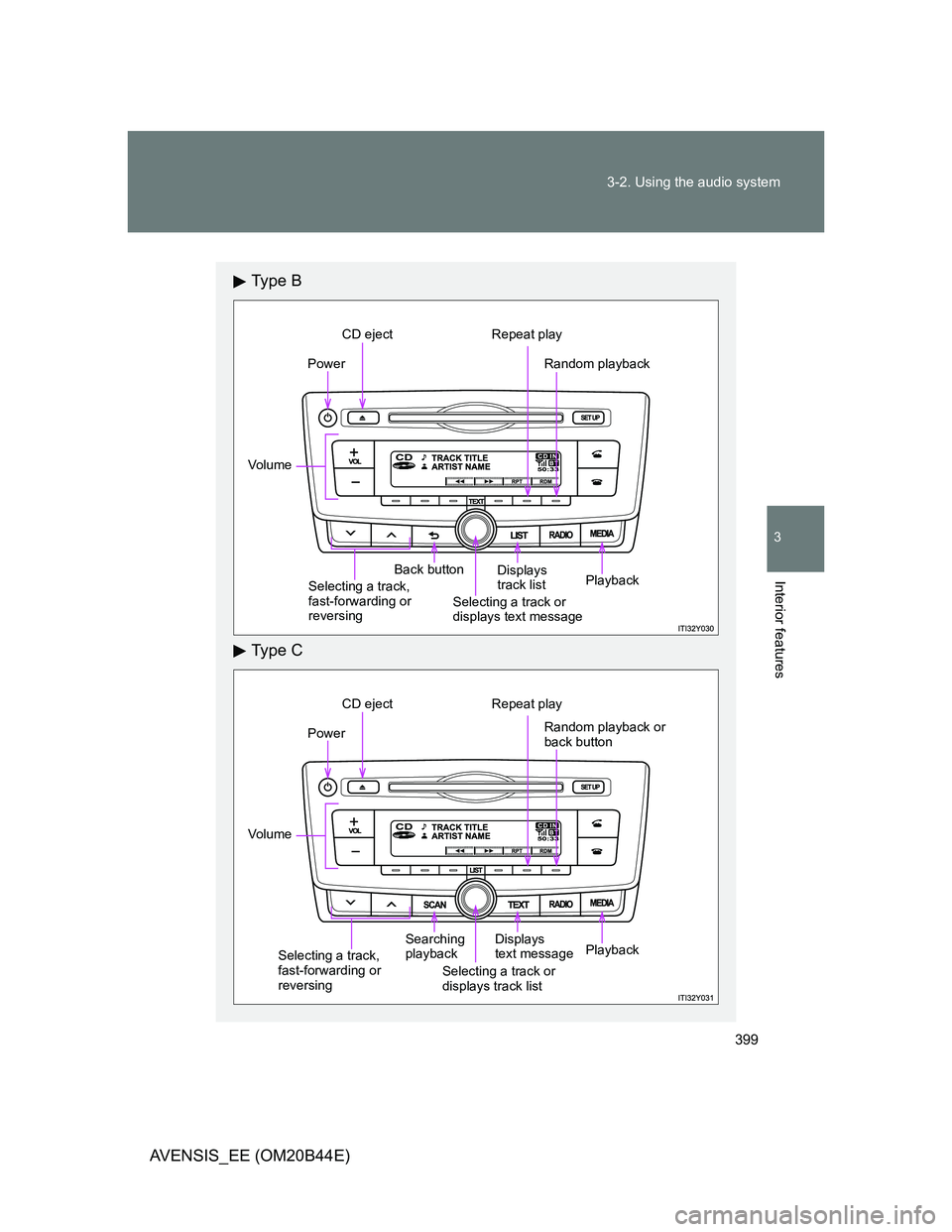
Ty p e B
Ty p e C
Power
Vo lu m e
Back button
CD eject Repeat play
Random playback
Selecting a track,
fast-forwarding or
reversingSelecting a track or
displays text messageDisplays
track listPlayback
Power
Vo lu m e
Searching
playback
Selecting a track or
displays track listDisplays
text message
CD eject Repeat play
Random playback or
back button
Selecting a track,
fast-forwarding or
reversingPlayback
Page 400 of 772
400 3-2. Using the audio system
AVENSIS_EE (OM20B44E)
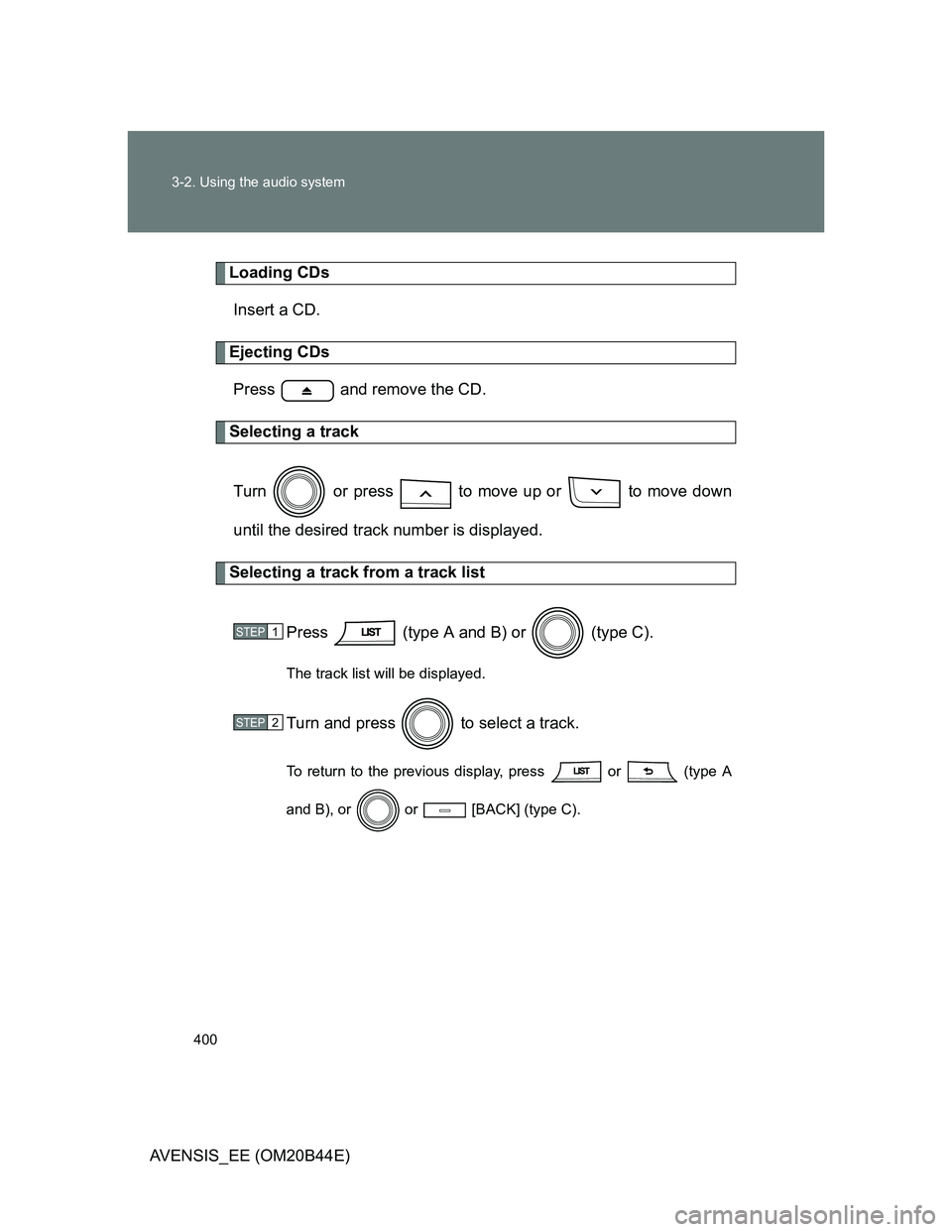
Loading CDs
Insert a CD.
Ejecting CDs
Press and remove the CD.
Selecting a track
Turn or press to move up or to move down
until the desired track number is displayed.
Selecting a track from a track list
Press (type A and B) or (type C).
The track list will be displayed.
Turn and press to select a track.
To return to the previous display, press or (type A
and B), or or [BACK] (type C).
STEP1
STEP2
Page 402 of 772
402 3-2. Using the audio system
AVENSIS_EE (OM20B44E)
Switching the display
Press (type A and B) or (type C).
Track title, Artist name and CD title are shown on the display.
To return to the previous display, press
or (type A and B),
or [BACK] (type C).
Display
Up to 24 characters can be displayed.
Depending on the contents recorded, the characters may not be displayed
properly or may not be displayed at all.
Error messages
“ERROR”: This indicates a problem either in the CD or inside the player.
“CD CHECK”: The CD may be dirty, damaged or inserted up-side down.
“WAIT”: Operation has stopped due to a high temperature inside the
player. Wait for a while and then press . If the CD still
cannot be played back, contact any authorized Toyota dealer
or repairer, or another duly qualified and equipped profes-
sional.
Page 406 of 772
406
3-2. Using the audio system
AVENSIS_EE (OM20B44E)
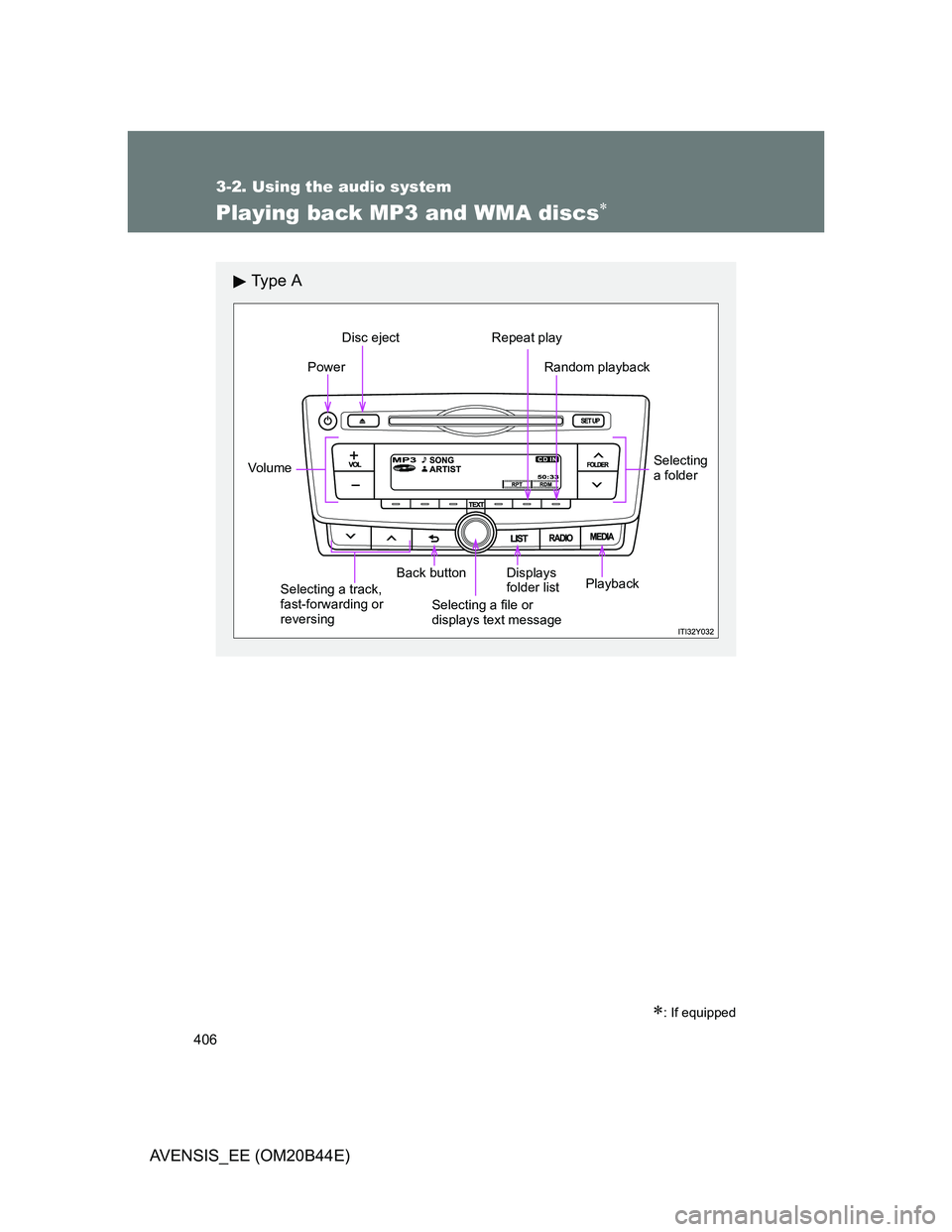
Playing back MP3 and WMA discs
: If equipped
Ty p e A
Power
Vo lu m e
Selecting a track,
fast-forwarding or
reversingBack button
Selecting a file or
displays text messageDisplays
folder list
Disc eject Repeat play
Random playback
Selecting
a folder
Playback
Page 407 of 772
407 3-2. Using the audio system
3
Interior features
AVENSIS_EE (OM20B44E)
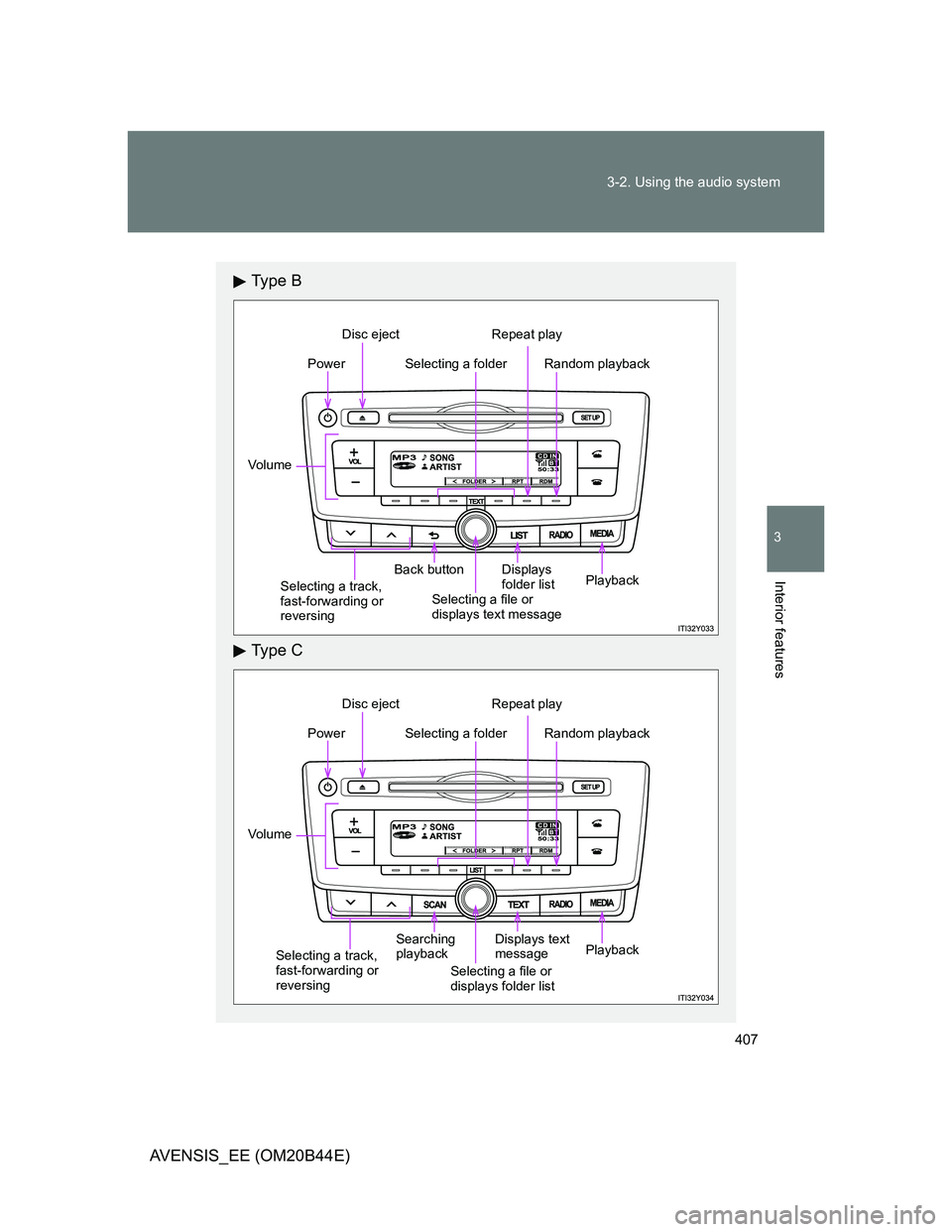
Ty p e B
Ty p e C
Selecting a folderPower
Vo lu m e
Selecting a track,
fast-forwarding or
reversingBack button
Selecting a file or
displays text messageDisplays
folder list
Disc eject Repeat play
Random playback
Playback
Selecting a folderPower
Vo lu m e
Selecting a track,
fast-forwarding or
reversingSearching
playback
Selecting a file or
displays folder listDisplays text
message
Disc eject Repeat play
Random playback
Playback
Page 408 of 772
408 3-2. Using the audio system
AVENSIS_EE (OM20B44E)
Loading and ejecting MP3 and WMA discs
P. 398
Selecting a folder
Selecting folders one at a time
Press or (type A), [<] or [>] (type
B and C) to select the desired folder.
Selecting a folder and file from folder list
Press (type A and B) or (type C).
The folder list will be displayed.
Turn and press to select a folder and a file.
To return to the previous display, press (type A and B) or
[BACK] (type C).
To exit, press (type A and B) or (type C).
Returning to the first folder
Press and hold (type A) or [<] (type B and C) until
you hear a beep.
STEP1
STEP2
Page 410 of 772
410 3-2. Using the audio system
AVENSIS_EE (OM20B44E)
Random playback
Pressing [RDM] changes modes in the following order:
Folder randomDisc randomOff
Repeat play
Pressing [RPT] changes modes in the following order:
File repeatFolder repeat
*Off
*: Available except when RDM (random playback) is selected
Switching the display
Press (type A and B) or (type C).
Track title, Artist name and Album title (MP3 only) are shown on the dis-
play.
To return to the previous display, press or (type A and B),
or or [BACK] (type C).
Page 411 of 772
411 3-2. Using the audio system
3
Interior features
AVENSIS_EE (OM20B44E)
Display
P. 402
Error messages
“ERROR”: This indicates a problem either in the CD or inside the
player.
“CD CHECK”: The CD may be dirty, damaged or inserted up-side down.
“NO SUPPORT”: This indicates that the MP3/WMA file is not included in the
CD.
Discs that can be used
Discs with the marks shown below can be used.
Playback may not be possible depending on recording format or disc fea-
tures, or due to scratches, dirt or deterioration.
CD player protection feature
To protect the internal components, playback is automatically stopped when
a problem is detected while the CD player is being used.
If a CD is left inside the CD player or in the ejected position for
extended periods
The CD may be damaged and may not play properly.
Lens cleaners
Do not use lens cleaners. Doing so may damage the CD player.
![TOYOTA AVENSIS 2011 Workshop Manual 394 3-2. Using the audio system
AVENSIS_EE (OM20B44E)
Using the station list
Updating the station list
Press (type A and B) or (type C).
The station list will be displayed.
Press [UPDATE] to](/img/14/59673/w960_59673-393.png "TOYOTA AVENSIS 2011 Workshop Manual 394 3-2. Using the audio system
AVENSIS_EE (OM20B44E)
Using the station list
Updating the station list
Press (type A and B) or (type C).
The station list will be displayed.
Press [UPDATE] to")
![TOYOTA AVENSIS 2011 Workshop Manual 408 3-2. Using the audio system
AVENSIS_EE (OM20B44E)
Loading and ejecting MP3 and WMA discs
P. 398
Selecting a folder
Selecting folders one at a time
Press or (type A), [<] or [>] (type](/img/14/59673/w960_59673-407.png "TOYOTA AVENSIS 2011 Workshop Manual 408 3-2. Using the audio system
AVENSIS_EE (OM20B44E)
Loading and ejecting MP3 and WMA discs
P. 398
Selecting a folder
Selecting folders one at a time
Press or (type A), [<] or [>] (type")
![TOYOTA AVENSIS 2011 Workshop Manual 410 3-2. Using the audio system
AVENSIS_EE (OM20B44E)
Random playback
Pressing [RDM] changes modes in the following order:
Folder randomDisc randomOff
Repeat play
Pressing [RPT] changes mode](/img/14/59673/w960_59673-409.png "TOYOTA AVENSIS 2011 Workshop Manual 410 3-2. Using the audio system
AVENSIS_EE (OM20B44E)
Random playback
Pressing [RDM] changes modes in the following order:
Folder randomDisc randomOff
Repeat play
Pressing [RPT] changes mode")