light TOYOTA AVENSIS 2015 Owners Manual
[x] Cancel search | Manufacturer: TOYOTA, Model Year: 2015, Model line: AVENSIS, Model: TOYOTA AVENSIS 2015Pages: 648, PDF Size: 39.64 MB
Page 301 of 648
3014-6. Using the driving support systems
4
Driving
AVENSIS_OM_OM20C20E_(EE)
WARNING
Any of the following conditions may result in an accident which could cause
death or serious injury:
■ The ABS does not operate effectively when
●The limits of tire gripping performance have been exceeded (such as
excessively worn tires on a snow covered road).
● The vehicle hydroplanes while driving at high speed on wet or slick roads.
■ Stopping distance when the ABS is operating may exceed that of nor-
mal conditions
The ABS is not designed to shorten t he vehicle’s stopping distance. Always
maintain a safe distance from the vehicle in front of you, especially in the
following situations:
● When driving on dirt, gravel or snow-covered roads
● When driving with tire chains
● When driving over bumps in the road
● When driving over roads with potholes or uneven surfaces
■ TRC may not operate effectively when
Directional control and power may not be achievable while driving on slip-
pery road surfaces, even if the TRC system is operating.
Drive the vehicle carefully in conditions where stability and power may be
lost.
■ Hill- start assist control does not operate effectively when
●Do not overly rely on the hill-start assist control. The hill-start assist control
may not operate effectively on steep inclines and roads covered with ice.
● Unlike the parking brake, hill-start assist control is not intended to hold the
vehicle stationary for an extended period of time. Do not attempt to use
hill-start assist control to hold the vehicle on an incline, as doing so may
lead to an accident.
■ When the VSC is activated
The slip indicator light flashes. Always drive carefully.
Reckless driving may cause an accident. Exercise particular care when the
indicator light flashes.
■ When the TRC/VSC systems are turned off
Be especially careful and drive at a speed appropriate to the road condi-
tions. As these are systems to help ensure vehicle stability and driving
force, do not turn the TRC/VSC systems off unless necessary.
AVENSIS_OM_OM20C20E_(EE).book Page 301 Thursday, January 29, 2015 1:47 PM
Page 303 of 648
303
4
4-7. Driving tips
Driving
AVENSIS_OM_OM20C20E_(EE)
Winter driving tips
●Use fluids that are appropriate to the prevailing outside tempera-
tures.
• Engine oil
• Engine coolant
• Washer fluid
● Have a service technician inspect the condition of the battery.
● Have the vehicle fitted with four snow tires or purchase a set of tire
chains for the front tires.
Ensure that all tires are the same size and brand, and that chains match
the size of the tires.
Perform the following according to the driving conditions.
●Do not try to forcibly open a window or move a wiper that is frozen.
Pour warm water over the frozen area to melt the ice. Wipe away
the water immediately to prevent it from freezing.
● To ensure proper operation of the climate control system fan,
remove any snow that has accumulated on the air inlet vents in
front of the windshield.
● Check for and remove any excess ice or snow that may have accu-
mulated on the exterior lights, vehicle’s roof, chassis, around the
tires or on the brakes.
● Remove any snow or mud from the bottom of your shoes before
getting in the vehicle.
Carry out the necessary preparations and inspections before
driving the vehicle in winter. Always drive the vehicle in a man-
ner appropriate to the prevailing weather conditions.
Preparation for winter
Before driving the vehicle
AVENSIS_OM_OM20C20E_(EE).book Page 303 Thursday, January 29, 2015 1:47 PM
Page 331 of 648
3315-4. Playing an audio CD and MP3/WMA discs
5
Audio system
AVENSIS_OM_OM20C20E_(EE)NOTICE
■
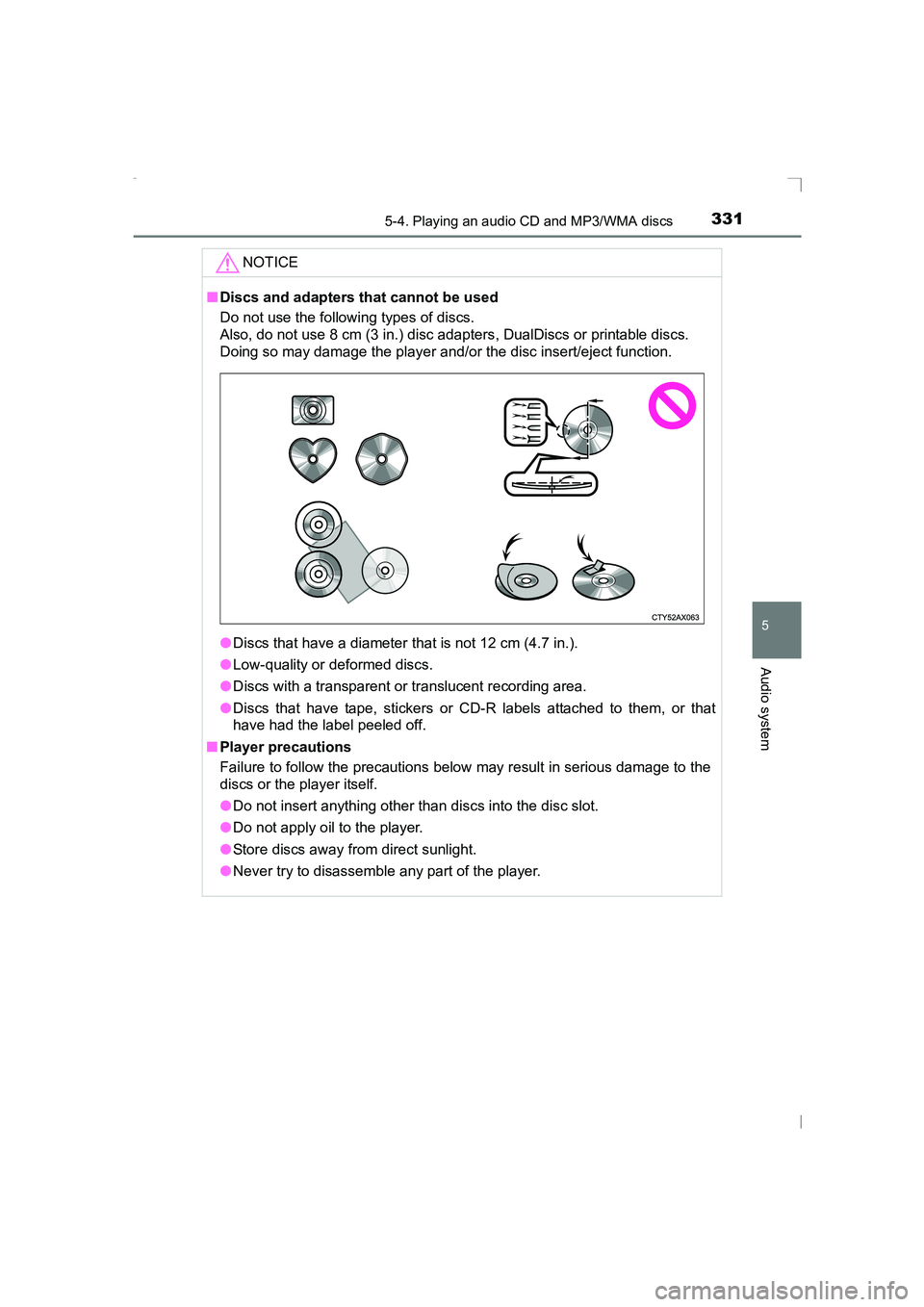
Discs and adapters that cannot be used
Do not use the following types of discs.
Also, do not use 8 cm (3 in.) disc adapters, DualDiscs or printable discs.
Doing so may damage the player and/or the disc insert/eject function.
●Discs that have a diameter that is not 12 cm (4.7 in.).
● Low-quality or deformed discs.
● Discs with a transparent or translucent recording area.
● Discs that have tape, stickers or CD-R labels attached to them, or that
have had the label peeled off.
■ Player precautions
Failure to follow the precautions below may result in serious damage to the
discs or the player itself.
●Do not insert anything other than discs into the disc slot.
● Do not apply oil to the player.
● Store discs away from direct sunlight.
● Never try to disassemble any part of the player.
AVENSIS_OM_OM20C20E_(EE).book Page 331 Thursday, January 29, 2015 1:47 PM
Page 373 of 648
373
5
5-10. Bluetooth®
Audio system
AVENSIS_OM_OM20C20E_(EE)
Bluetooth®
■When using the Bluetooth® audio/phone
● In the following situations, the system may not function.
• The portable player does not support Bluetooth
®
• The cellular phone is located outside the service area
• The Bluetooth® device is switched off
• The Bluetooth® device has a low battery
• The Bluetooth® device is not connected to the system
• The Bluetooth® device is behind the seat or in the glove box or
console box, or metal material covers or touches the device
● There may be a delay if a cellular phone connection is made dur-
ing Bluetooth
® audio play.
● Depending on the type of portable audio player that is connected
to the system, operation may differ slightly and certain functions
may not be available.
■When transferring ownership of the vehicle
Be sure to initialize the system to prevent personal data from being
improperly accessed. ( →P. 360)
AVENSIS_OM_OM20C20E_(EE).book Page 373 Thursday, January 29, 2015 1:47 PM
Page 381 of 648
381
6Interior features
AVENSIS_OM_OM20C20E_(EE)6-1. Using the air conditioning
system and defogger
Manual air conditioning system ............................. 382
Automatic air conditioning system ............................. 388
Power heater ..................... 395
Seat heaters ...................... 397
6-2. Using the interior lights Interior lights list................. 399
• Personal/interior light main switch.................... 400
• Personal/interior lights .............................. 400
• Personal lights ............... 400 6-3. Using the storage features
List of storage features ...... 402
• Glove box ...................... 403
• Console box .................. 404
• Overhead console ......... 404
• Cup holders/bottle holders........................... 405
• Coin box ........................ 407
Trunk features (sedan) ...... 408
Luggage compartment features (wagon).............. 410
6-4. Using the other interior features
Other interior features ........ 417
• Sun visors...................... 417
• Vanity mirror .................. 417
• Power outlet .................. 418
• Armrest .......................... 419
• Trunk/luggage compartment
storage extension .......... 420
• Panoramic roof shade (wagon) ......................... 421
• Coat hooks .................... 423
• Assist grips .................... 423
AVENSIS_OM_OM20C20E_(EE).book Page 381 Thursday, January 29, 2015 1:47 PM
Page 395 of 648
3956-1. Using the air conditioning system and defogger
AVENSIS_OM_OM20C20E_(EE)
6
Interior features
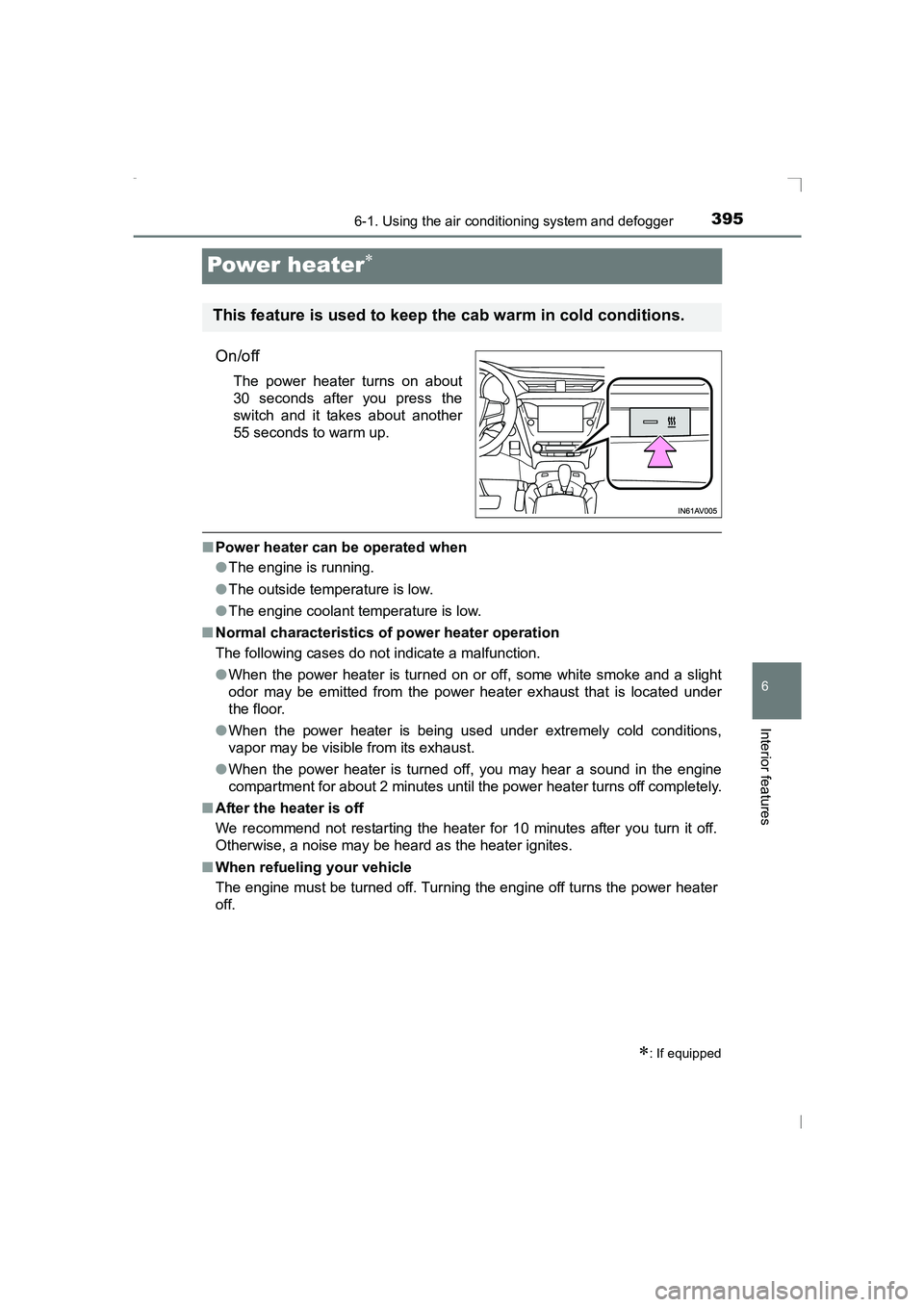
Power heater∗
On/off
The power heater turns on about
30 seconds after you press the
switch and it takes about another
55 seconds to warm up.
■Power heater can be operated when
●The engine is running.
● The outside temperature is low.
● The engine coolant temperature is low.
■ Normal characteristics of power heater operation
The following cases do not indicate a malfunction.
●When the power heater is turned on or off, some white smoke and a slight
odor may be emitted from the power heater exhaust that is located under
the floor.
● When the power heater is being used under extremely cold conditions,
vapor may be visible from its exhaust.
● When the power heater is turned off, you may hear a sound in the engine
compartment for about 2 minutes until the power heater turns off completely.
■ After the heater is off
We recommend not restarting the heater for 10 minutes after you turn it off.
Otherwise, a noise may be heard as the heater ignites.
■ When refueling your vehicle
The engine must be turned off. Turning the engine off turns the power heater
off.
∗: If equipped
This feature is used to keep the cab warm in cold conditions.
AVENSIS_OM_OM20C20E_(EE).book Page 395 Thursday, January 29, 2015 1:47 PM
Page 397 of 648
3976-1. Using the air conditioning system and defogger
AVENSIS_OM_OM20C20E_(EE)
6
Interior features
Seat heaters∗
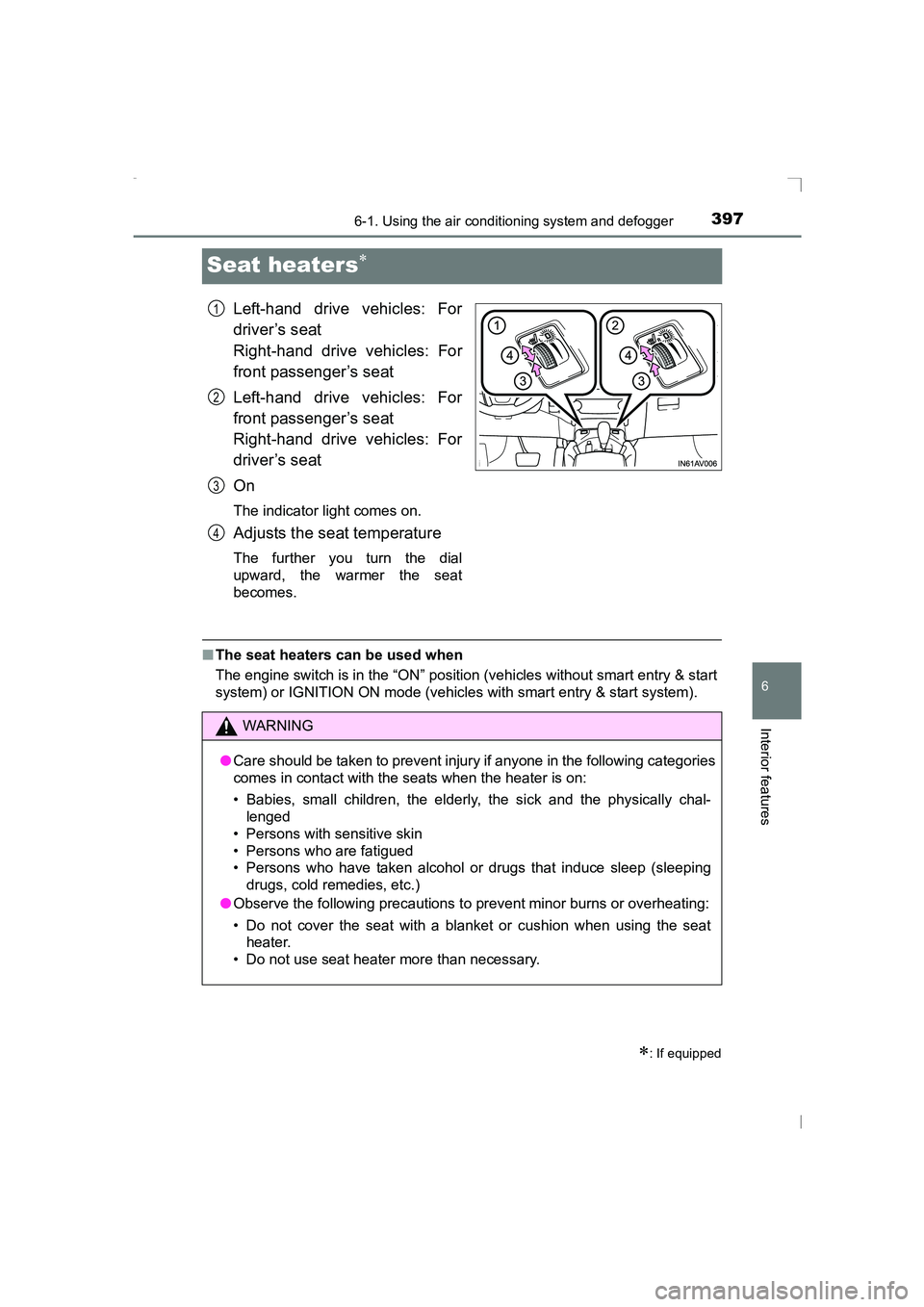
Left-hand drive vehicles: For
driver’s seat
Right-hand drive vehicles: For
front passenger’s seat
Left-hand drive vehicles: For
front passenger’s seat
Right-hand drive vehicles: For
driver’s seat
On
The indicator light comes on.
Adjusts the seat temperature
The further you turn the dial
upward, the warmer the seat
becomes.
■The seat heaters can be used when
The engine switch is in the “ON” position (vehicles without smart entry & start
system) or IGNITION ON mode (vehicles with smart entry & start system).
∗: If equipped
1
2
3
4
WARNING
● Care should be taken to prevent injury if anyone in the following categories
comes in contact with the seats when the heater is on:
• Babies, small children, the elderly, the sick and the physically chal-
lenged
• Persons with sensitive skin
• Persons who are fatigued
• Persons who have taken alcohol or drugs that induce sleep (sleeping drugs, cold remedies, etc.)
● Observe the following precautions to prevent minor burns or overheating:
• Do not cover the seat with a blanket or cushion when using the seat heater.
• Do not use seat heater more than necessary.
AVENSIS_OM_OM20C20E_(EE).book Page 397 Thursday, January 29, 2015 1:47 PM
Page 399 of 648
3996-2. Using the interior lights
AVENSIS_OM_OM20C20E_(EE)
6
Interior features
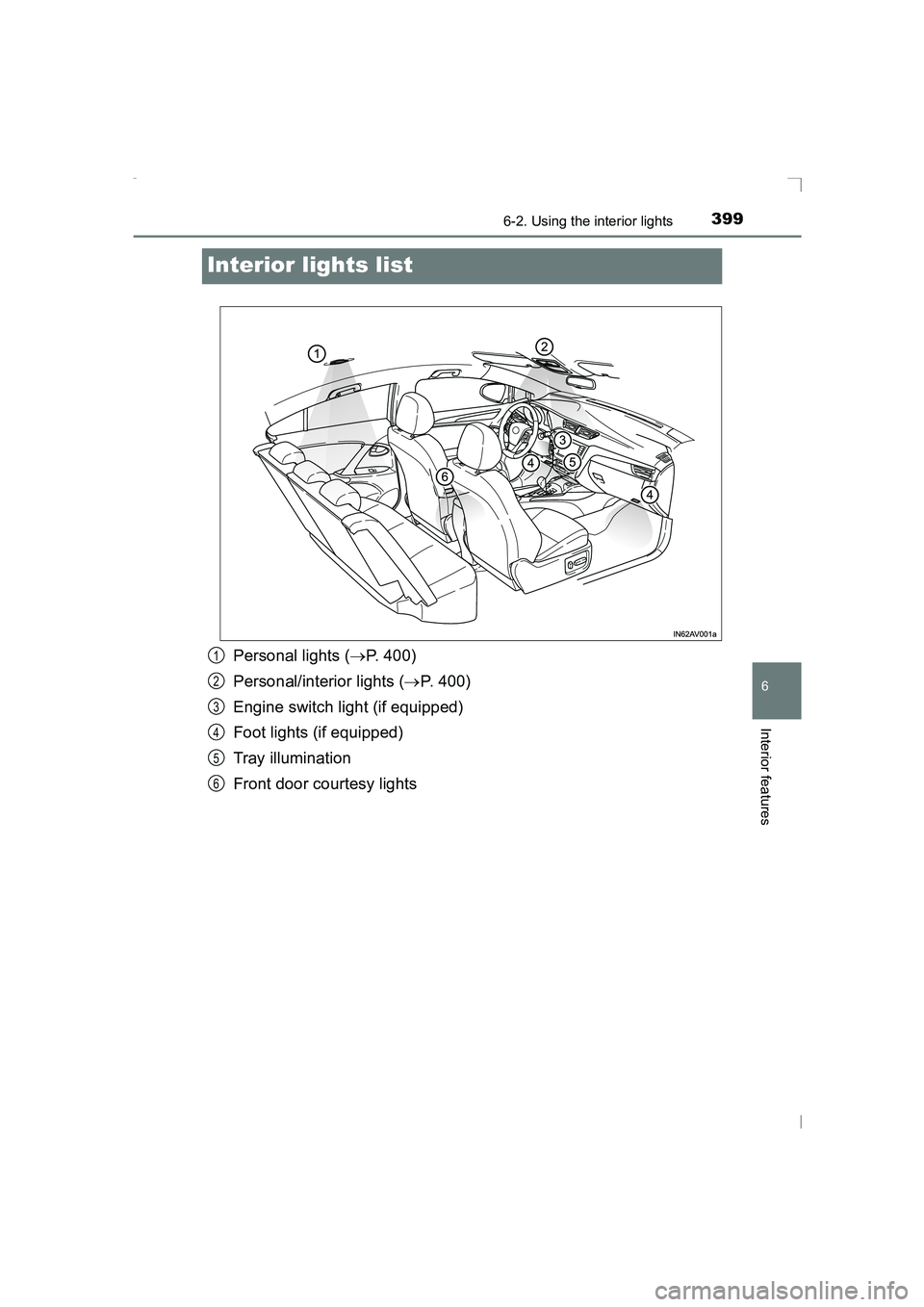
Interior lights list
Personal lights (→P. 400)
Personal/interior lights ( →P. 400)
Engine switch light (if equipped)
Foot lights (if equipped)
Tray illumination
Front door courtesy lights1
2
3
4
5
6
AVENSIS_OM_OM20C20E_(EE).book Page 399 Thursday, January 29, 2015 1:47 PM
Page 400 of 648
4006-2. Using the interior lights
AVENSIS_OM_OM20C20E_(EE)
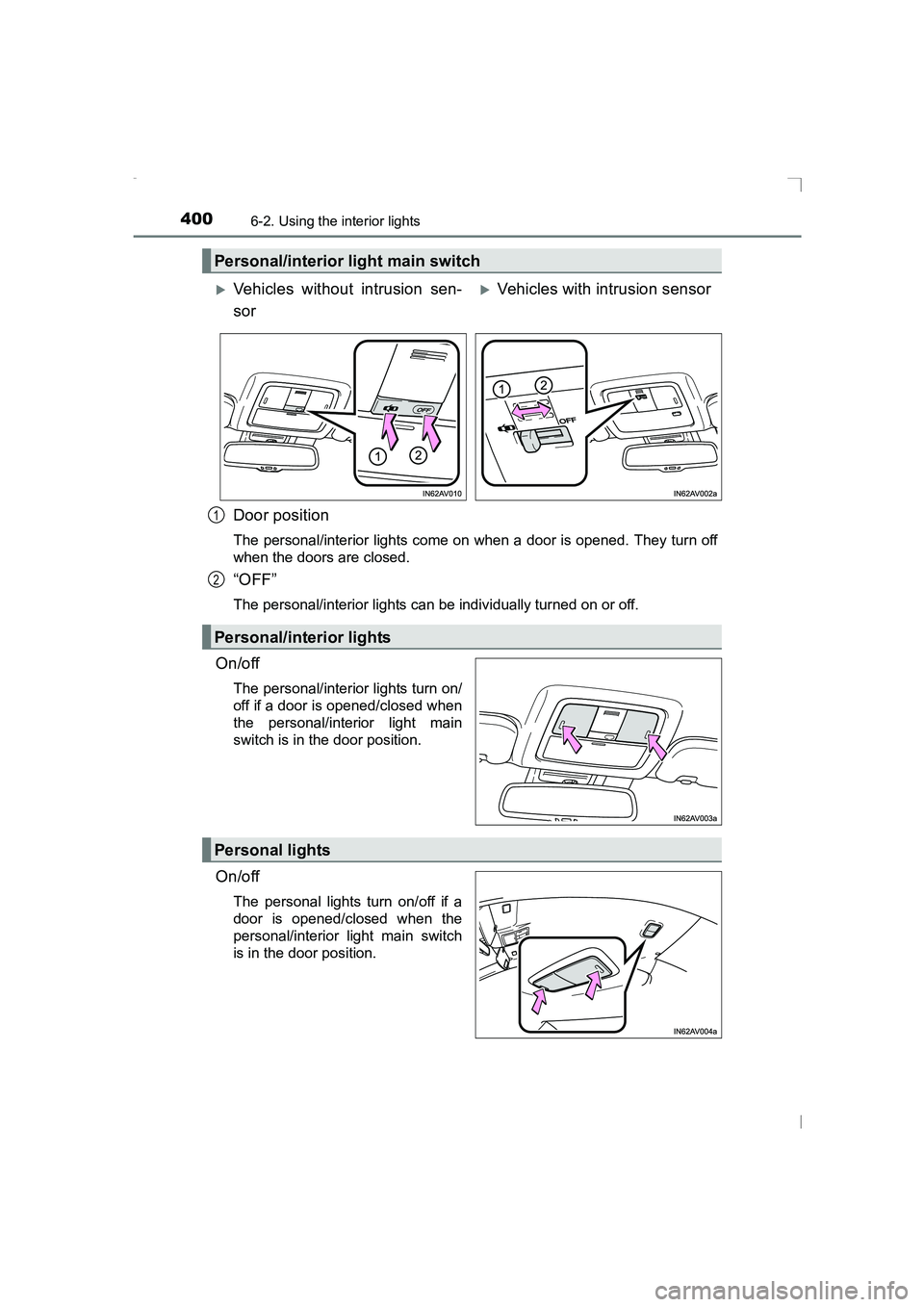
Door position
The personal/interior lights come on when a door is opened. They turn off
when the doors are closed.
“OFF”
The personal/interior lights can be individually turned on or off.
On/off
The personal/interior lights turn on/
off if a door is opened/closed when
the personal/interior light main
switch is in the door position.
On/off
The personal lights turn on/off if a
door is opened/closed when the
personal/interior light main switch
is in the door position.
Personal/interior light main switch
XVehicles without intrusion sen-
sorXVehicles with intrusion sensor
Personal/interior lights
1
2
Personal lights
AVENSIS_OM_OM20C20E_(EE).book Page 400 Thursday, January 29, 2015 1:47 PM
Page 401 of 648
4016-2. Using the interior lights
AVENSIS_OM_OM20C20E_(EE)
6
Interior features
■Illuminated entry system
XVehicles without smart entry & start system
The lights automatically turn on/off according to the engine switch position,
whether the doors are locked/unlocked, and whether the doors are open/
closed.
XVehicles with smart entry & start system
The lights automatically turn on/off according to engine switch mode, the
presence of the electronic key, whet her the doors are locked/unlocked, and
whether the doors are open/closed.
■ To prevent the battery from being discharged
If the following lights remain on when the engine switch is turned off, the lights
will go off automatically after 20 minutes:
●Personal lights
● Personal/interior lights
■ Customization
Settings (e.g. The time elapsed before lights turn off) can be changed.
(Customizable features →P. 626)
NOTICE
To prevent battery discharge, do not leave the lights on longer than neces-
sary when the engine is not running.
AVENSIS_OM_OM20C20E_(EE).book Page 401 Thursday, January 29, 2015 1:47 PM