ESP TOYOTA AVENSIS 2015 Owner's Manual
[x] Cancel search | Manufacturer: TOYOTA, Model Year: 2015, Model line: AVENSIS, Model: TOYOTA AVENSIS 2015Pages: 648, PDF Size: 39.64 MB
Page 261 of 648
2614-5. Toyota Safety Sense
4
Driving
AVENSIS_OM_OM20C20E_(EE)
WARNING
■ Limitations of the pre-crash safety system
●The driver is solely responsible for sa fe driving. Always drive safely, taking
care to observe your surroundings.
Do not use the pre-crash safety sy stem instead of normal braking opera-
tions under any circumstances. This system will not prevent collisions or
lessen damage or injuries in every situation. Do not overly rely on this
system. Failure to do so may lead to an accident, resulting in death or
serious injury.
Although this system is designed to help avoid and reduce the impact of a
collision, its effectiveness may change according to various conditions
( → P. 257). As a result, the system may not always provide the same level
of performance.
● The pre-crash braking function may not operate if certain operations are
performed by the driver. If the accelerator pedal is being depressed
strongly or the steering wheel is bei ng turned, the system may determine
that the driver is taking evasive action and possibly prevent the pre-crash
braking function from operating.
● In some situations, while the pre-cr ash braking function is operating, oper-
ation of the function may be canceled if the accelerator pedal is depressed
strongly or the steering wheel is turned and the system determines that
the driver is taking evasive action.
● A large amount of braking force is applied while the pre-crash braking
function is operating. Additionally, as the vehicle may creep after the pre-
crash braking function has operated, the driver should depress the brake
pedal as necessary.
sec_04-05.fm Page 261 Friday, February 20, 2015 3:44 PM
Page 267 of 648
2674-5. Toyota Safety Sense
4
Driving
AVENSIS_OM_OM20C20E_(EE)■
When changing the tires
Depending on the tires used, sufficient performance may not be maintainable.
■ Warning messages for the LDA system
Warning messages are used to indicate a system malfunction or to inform the
driver of the need for caution while driving.
■ Customization
The LDA system sensor sensitivity can be changed.
(Customizable features: →P. 619)
WARNING
■ Before using the LDA
Do not rely solely on the LDA system. The LDA system does not drive the
vehicle automatically, nor does it reduce the amount of care you need to
take. As such, the driver must always assume full responsibility for under-
standing his/her surroundings, for operat ing the steering wheel to correct
the driving line, and for driving safely.
Inappropriate or negligent driving could lead to an accident.
■ To avoid operating the LDA by mistake
Switch the LDA system off using the LDA switch when not in use.
AVENSIS_OM_OM20C20E_(EE).book Page 267 Thursday, January 29, 2015 1:47 PM
Page 297 of 648
297
4
4-6. Using the driving support systems
Driving
AVENSIS_OM_OM20C20E_(EE)
Driving assist systems
◆ABS (Anti-lock Brake System)
Helps to prevent wheel lock when the brakes are applied suddenly,
or if the brakes are applied while driving on a slippery road surface.
◆Brake assist
Generates an increased level of braking force after the brake pedal
is depressed, when the system detects a panic stop situation.
◆VSC (Vehicle Stability Control)
Helps the driver to control skidding when swerving suddenly or
turning on slippery road surfaces.
◆VSC+ (Vehicle Stability Control+)
Provides cooperative control of the ABS, TRC, VSC and EPS.
Helps to maintain directional stability when swerving on slippery
road surfaces by controlling steering performance.
◆TRC (Traction Control)
Helps to maintain drive power and prevent the front wheels from
spinning when starting the vehicle or accelerating on slippery
roads.
◆Hill-start assist control
Helps to prevent the vehicle from rolling backward when starting on
an incline or slippery slope.
◆EPS (Electric Power Steering)
Employs an electric motor to reduce the amount of effort needed to
turn the steering wheel.
To help enhance driving safety and performance, the following
systems operate automatically in response to various driving
situations. Be aware, however, that these systems are supple-
mentary and should not be relied upon too heavily when operat-
ing the vehicle.
AVENSIS_OM_OM20C20E_(EE).book Page 297 Thursday, January 29, 2015 1:47 PM
Page 301 of 648
3014-6. Using the driving support systems
4
Driving
AVENSIS_OM_OM20C20E_(EE)
WARNING
Any of the following conditions may result in an accident which could cause
death or serious injury:
■ The ABS does not operate effectively when
●The limits of tire gripping performance have been exceeded (such as
excessively worn tires on a snow covered road).
● The vehicle hydroplanes while driving at high speed on wet or slick roads.
■ Stopping distance when the ABS is operating may exceed that of nor-
mal conditions
The ABS is not designed to shorten t he vehicle’s stopping distance. Always
maintain a safe distance from the vehicle in front of you, especially in the
following situations:
● When driving on dirt, gravel or snow-covered roads
● When driving with tire chains
● When driving over bumps in the road
● When driving over roads with potholes or uneven surfaces
■ TRC may not operate effectively when
Directional control and power may not be achievable while driving on slip-
pery road surfaces, even if the TRC system is operating.
Drive the vehicle carefully in conditions where stability and power may be
lost.
■ Hill- start assist control does not operate effectively when
●Do not overly rely on the hill-start assist control. The hill-start assist control
may not operate effectively on steep inclines and roads covered with ice.
● Unlike the parking brake, hill-start assist control is not intended to hold the
vehicle stationary for an extended period of time. Do not attempt to use
hill-start assist control to hold the vehicle on an incline, as doing so may
lead to an accident.
■ When the VSC is activated
The slip indicator light flashes. Always drive carefully.
Reckless driving may cause an accident. Exercise particular care when the
indicator light flashes.
■ When the TRC/VSC systems are turned off
Be especially careful and drive at a speed appropriate to the road condi-
tions. As these are systems to help ensure vehicle stability and driving
force, do not turn the TRC/VSC systems off unless necessary.
AVENSIS_OM_OM20C20E_(EE).book Page 301 Thursday, January 29, 2015 1:47 PM
Page 314 of 648
3145-2. Using the audio system
AVENSIS_OM_OM20C20E_(EE)■
Changing sound quality modes
Press the “SETUP” button.
Turn the tune/scroll knob to select “Sound Setting”.
Press the knob.
Turn the knob as corresponds to the desired mode.
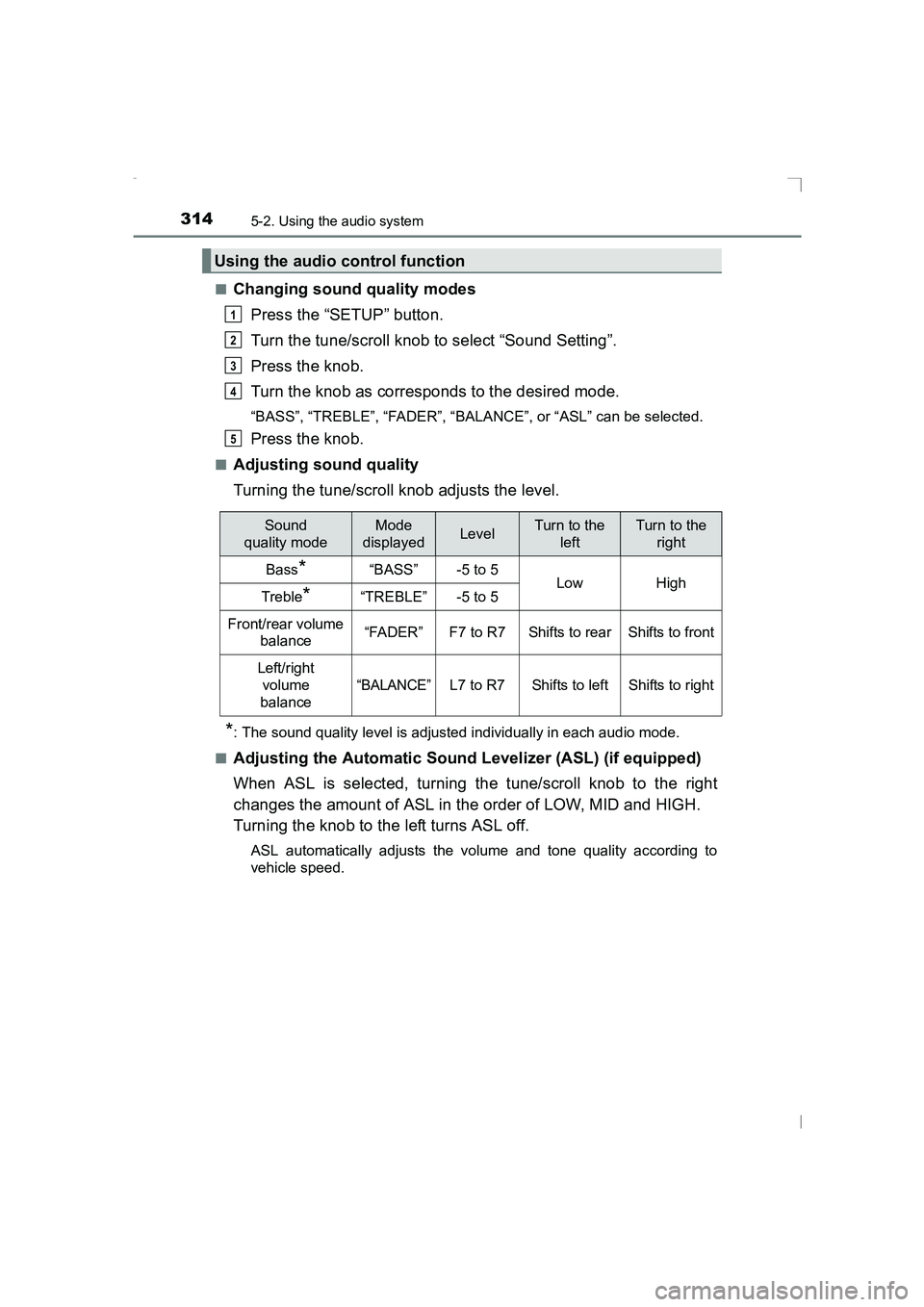
“BASS”, “TREBLE”, “FADER”, “BALANCE”, or “ASL” can be selected.
Press the knob.
■Adjusting sound quality
Turning the tune/scroll knob adjusts the level.
*: The sound quality level is adjusted individually in each audio mode.
■
Adjusting the Automatic Sound Levelizer (ASL) (if equipped)
When ASL is selected, turning the tune/scroll knob to the right
changes the amount of ASL in the order of LOW, MID and HIGH.
Turning the knob to the left turns ASL off.
ASL automatically adjusts the volume and tone quality according to
vehicle speed.
Using the audio control function
1
2
3
4
5
Sound
quality modeMode
displayedLevelTurn to the leftTurn to the right
Bass*“BASS”-5 to 5LowHighTreble*“TREBLE”-5 to 5
Front/rear volume balance“FADER”F7 to R7Shifts to rearShifts to front
Left/right
volume
balance
“BALANCE”L7 to R7Shifts to leftShifts to right
AVENSIS_OM_OM20C20E_(EE).book Page 314 Thursday, January 29, 2015 1:47 PM
Page 319 of 648
3195-3. Using the radio
5
Audio system
AVENSIS_OM_OM20C20E_(EE)
This feature allows your radio to receive station.
■Listening to stations of the same networkPress the “SETUP” button.
Turn the tune/scroll knob to “RADIO” and press the knob.
Turn the knob as corresponds to the desired mode: “FM AF” or
“Region code”.
Press the knob to select “ON” or “OFF”.
FM AF ON mode:
The station among those of the same network with strong recep-
tion is selected.
Region code ON mode:
The station among those of the same network with strong recep-
tion and broadcasting the same program is selected.
■Traffic informationPress the “SETUP” button.
Turn the tune/scroll knob to “RADIO” and press the knob.
Turn the knob to “FM TA” mode.
Press the knob to select “ON” or “OFF”.
FM TA On mode:
The system automatically switches to traffic information when a
broadcast with a traffic information signal is received.
The station returns to the previous one when the traffic informa-
tion ends.
RDS (Radio Data System)
1
2
3
4
1
2
3
4
AVENSIS_OM_OM20C20E_(EE).book Page 319 Thursday, January 29, 2015 1:47 PM
Page 337 of 648
3375-5. Using an external device
5
Audio system
AVENSIS_OM_OM20C20E_(EE)
Press the tune/scroll knob (type A and B) or the “TEXT” button (type
C).
Track title, Artist name and Album title are shown on the display.
To return to the previous display, press the knob or the back button (type A
and B), or the “TEXT” button or [BACK] (type C).
■ About iPod
●“Made for iPod” and “Made for iPhone” mean that an electronic accessory
has been designed to connect specifically to iPod, or iPhone, respectively,
and has been certified by the developer to meet Apple performance stan-
dards.
● Apple is not responsible for the operation of this device or its compliance
with safety and regulatory standards. Please note that the use of this acces-
sory with iPod or iPhone may affect wireless performance.
● iPhone, iPod, iPod classic, iPod nano, iPod shuffle, and iPod touch are
trademarks of Apple Inc., registered in the U.S. and other countries.
■ iPod functions
●When an iPod is connected and the audio source is changed to iPod mode,
the iPod will resume play from the same point in which it was last used.
● Depending on the iPod that is connected to the system, certain functions
may not be available. Disconnecting the device and reconnecting it once
again may resolve some malfunctions.
● While connected to the system, the iPod cannot be operated with its own
controls. It is necessary to use the controls of the vehicle’s audio system
instead.
■ iPod problems
To resolve most problems encountered when using your iPod, disconnect
your iPod from the vehicle iPod connection and reset it.
For instructions on how to reset your iPod, refer to your iPod Owner’s Man-
ual.
Switching the display
AVENSIS_OM_OM20C20E_(EE).book Page 337 Thursday, January 29, 2015 1:47 PM
Page 346 of 648
3465-5. Using an external device
AVENSIS_OM_OM20C20E_(EE)
■USB memory functions
●Depending on the USB memory that is connected to the system, the device
itself may not be operable and certain functions may not be available.
If the device is inoperable or a function is unavailable due to a malfunction
(as opposed to a system specification), disconnecting the device and recon-
necting it once again may resolve the problem.
● If the USB memory still does not begin operation after being disconnected
and reconnected, format the memory.
■ Display
→ P. 327
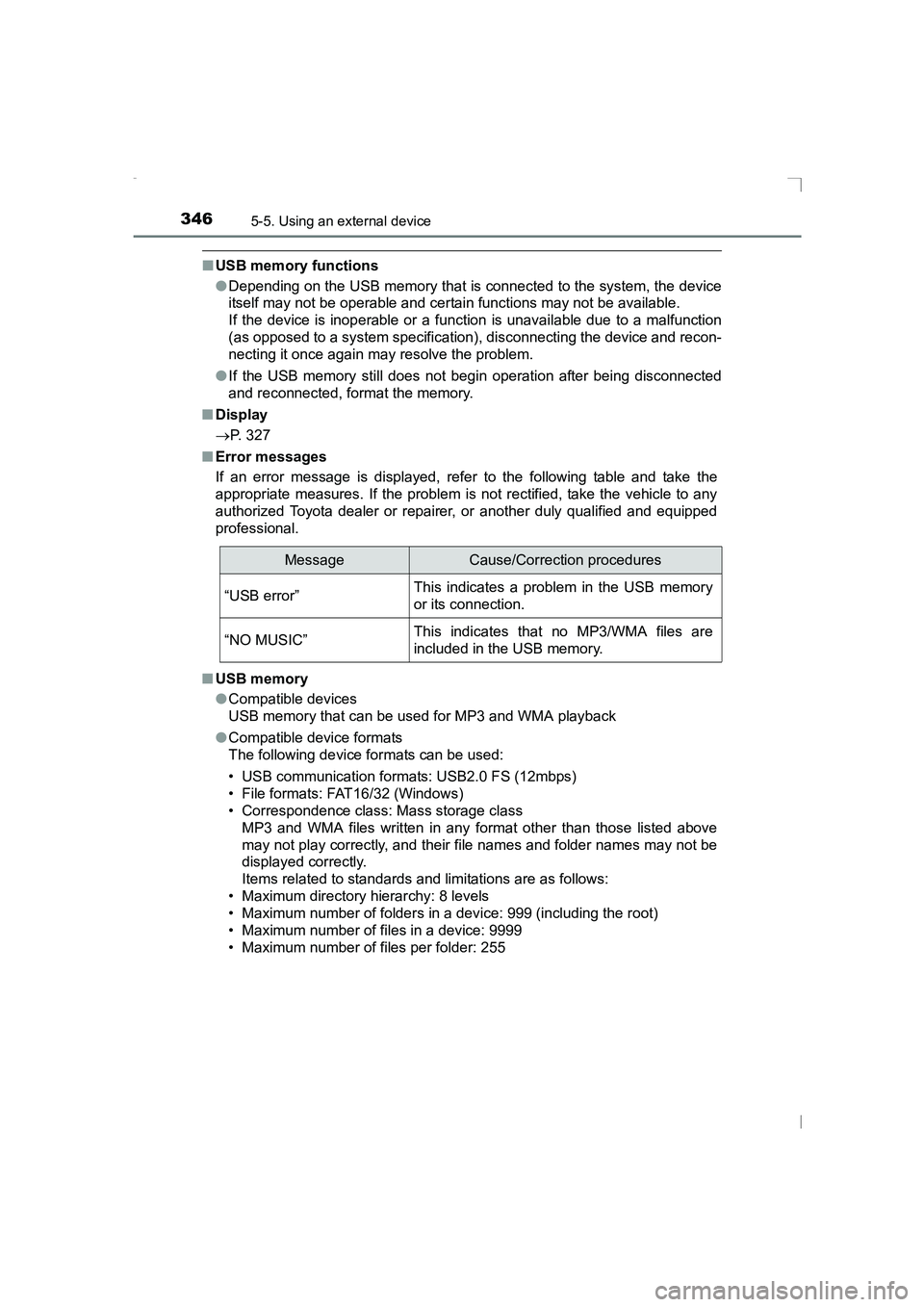
■ Error messages
If an error message is displayed, refer to the following table and take the
appropriate measures. If the problem is not rectified, take the vehicle to any
authorized Toyota dealer or repair er, or another duly qualified and equipped
professional.
■ USB memory
●Compatible devices
USB memory that can be used for MP3 and WMA playback
● Compatible device formats
The following device formats can be used:
• USB communication formats: USB2.0 FS (12mbps)
• File formats: FAT16/32 (Windows)
• Correspondence class: Mass storage class
MP3 and WMA files written in any format other than those listed above
may not play correctly, and their file names and folder names may not be
displayed correctly.
Items related to standards and limitations are as follows:
• Maximum directory hierarchy: 8 levels
• Maximum number of folders in a device: 999 (including the root)
• Maximum number of files in a device: 9999
• Maximum number of files per folder: 255
MessageCause/Correction procedures
“USB error”This indicates a problem in the USB memory
or its connection.
“NO MUSIC”This indicates that no MP3/WMA files are
included in the USB memory.
AVENSIS_OM_OM20C20E_(EE).book Page 346 Thursday, January 29, 2015 1:47 PM
Page 374 of 648
3745-10. Bluetooth®
AVENSIS_OM_OM20C20E_(EE)■
About Bluetooth®
Bluetooth is a registered trade-
mark of Bluetooth SIG, Inc.
■Compatible models
●
Bluetooth
® specifications:
Ver. 1.1, or higher (recommended: Ver. 2.1 + EDR or higher)
● Following Profiles:
• A2DP (Advanced Audio Distribution Profile) Ver. 1.0, or higher (recommended: Ver. 1.2 or higher)
• AVRCP (Audio/Video Remote Control Profile) Ver. 1.0 or higher (recommended: Ver. 1.3 or higher)
Portable players must correspond to the above specifications in
order to be connected to the Bluetooth
® audio system. However,
please note that some functions may be limited depending on the
type of portable player.
● Cellular phone
• HFP (Hands Free Profile) Ver. 1.0 or higher (Recommended: Ver. 1.5)
• OPP (Object Push Profile) Ver. 1.1
• PBAP (Phone Book Access Profile) Ver. 1.0
AVENSIS_OM_OM20C20E_(EE).book Page 374 Thursday, January 29, 2015 1:47 PM
Page 431 of 648
4317-1. Maintenance and care
AVENSIS_OM_OM20C20E_(EE)
7
Maintenance and care
■Caring for leather areas
Toyota recommends cleaning the interior of the vehicle at least twice a year to
maintain the quality of the vehicle’s interior.
■ Shampooing the carpets
There are several commercial foaming-type cleaners available. Use a sponge
or brush to apply the foam. Rub in overlapping circles. Do not use water.
Wipe dirty surfaces and let them dry. Excellent results are obtained by keep-
ing the carpet as dry as possible.
■ Seat belts
Clean with mild soap and lukewarm water using a cloth or sponge. Also
check the belts periodically for excessive wear, fraying or cuts.
WARNING
■ Water in the vehicle
●Do not splash or spill liquid in the vehicle. Doing so may cause electrical
components etc. to malfunction or catch fire.
● Do not get any of the SRS components or wiring in the vehicle interior wet.
(→ P. 40)
An electrical malfunction may cause the airbags to deploy or not function
properly, resulting in death or serious injury.
■ Cleaning the interior (esp ecially instrument panel)
Do not use polish wax or polish cleaner. The instrument panel may reflect
off the windshield, obstructing the driver’s view and leading to an accident,
resulting in death or serious injury.
AVENSIS_OM_OM20C20E_(EE).book Page 431 Thursday, January 29, 2015 1:47 PM