warning light TOYOTA AVENSIS 2015 Owner's Guide
[x] Cancel search | Manufacturer: TOYOTA, Model Year: 2015, Model line: AVENSIS, Model: TOYOTA AVENSIS 2015Pages: 648, PDF Size: 39.64 MB
Page 231 of 648
2314-2. Driving procedures
4
Driving
AVENSIS_OM_OM20C20E_(EE)■
When the system is overheating
The system may become temporarily unavailable in order to prevent over-
heating caused by repeated unnecessary switch operation.
In this event, leaving the system to cool down for a short time will allow nor-
mal operation to resume.
■ When there is a malf unction in the system
Warning light will turn on or flash. ( →P. 520)
■ Usage in winter time
→ P. 303
WARNING
■ When parking the vehicle
●Make sure that the parking brake indicator light is illuminated. If the park-
ing brake is not applied, the vehicle could move, possibly leading to an
accident.
● Do not leave a child in the vehicle alone. The parking brake may be
released unintentionally and there is the danger of the vehicle moving that
may lead to an accident resulting in death or serious injury.
NOTICE
■ When parking the vehicle
Before you leave the vehicle, set the parking brake, shift the shift lever to P
(Multidrive) or 1 or R (manual transmi ssion) and make sure that the vehicle
does not move.
■ When the system malfunctions
Stop the vehicle in a safe place and check the warning messages.
(→ P. 527)
■ When the parking brake cannot be released due to a malfunction
Use the parking brake release tool to manually release the parking brake.
(→ P. 578)
Driving the vehicle with the parking brake set will lead to brake components
overheating, which may affect braking performance and increase brake
wear.
AVENSIS_OM_OM20C20E_(EE).book Page 231 Thursday, January 29, 2015 1:47 PM
Page 245 of 648
2454-3. Operating the lights and wipers
4
Driving
AVENSIS_OM_OM20C20E_(EE)■
Windshield wiper features
The rear window and outside rear view mirror defoggers automatically turn on
when you operate the wipers.
WARNING
■ Caution regarding the use of windshield wipers in “AUTO” mode
The windshield wipers may operate unexpectedly if the sensor is touched or
the windshield is subject to vibration in “AUTO” mode. Take care that your
fingers or anything else do not become caught in the windshield wipers.
■ Caution regarding the use of washer fluid
When it is cold, do not use the washer fluid until the windshield becomes
warm. The fluid may freeze on the windshield and cause low visibility. This
may lead to an accident, resulting in death or serious injury.
NOTICE
■When the windshield is dry
Do not use the wipers, as they may damage the windshield.
■ When there is no washer fluid spray from the nozzle
Damage to the washer fluid pump may be caused if the lever is pulled
toward you and held continually.
■ When a nozzle becomes blocked
Do not try to clean it with a pin or other object. The nozzle will be damaged.
AVENSIS_OM_OM20C20E_(EE).book Page 245 Thursday, January 29, 2015 1:47 PM
Page 250 of 648
2504-4. Refueling
AVENSIS_OM_OM20C20E_(EE)
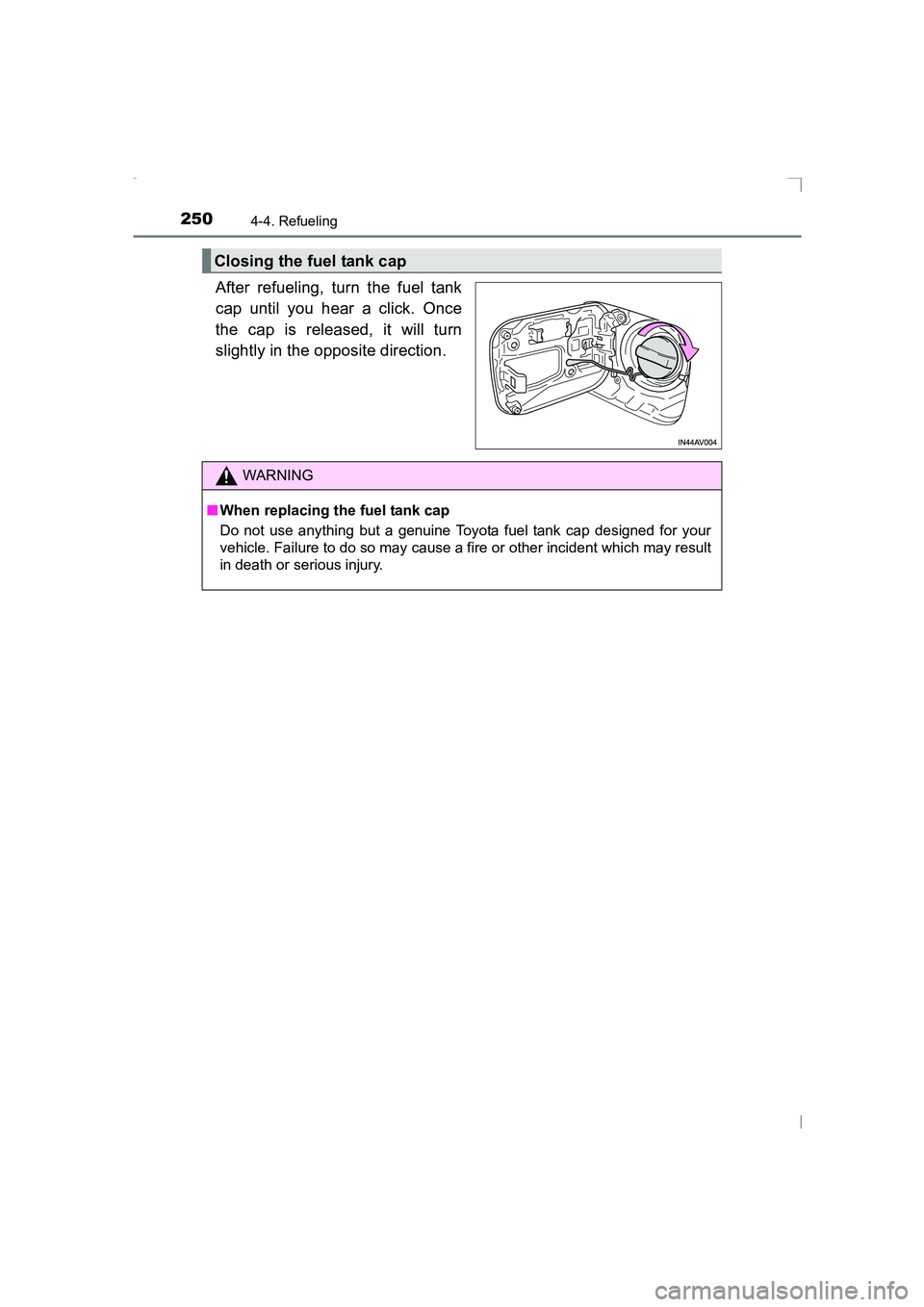
After refueling, turn the fuel tank
cap until you hear a click. Once
the cap is released, it will turn
slightly in the opposite direction.
Closing the fuel tank cap
WARNING
■ When replacing the fuel tank cap
Do not use anything but a genuine Toyota fuel tank cap designed for your
vehicle. Failure to do so may cause a fire or other incident which may result
in death or serious injury.
AVENSIS_OM_OM20C20E_(EE).book Page 250 Thursday, January 29, 2015 1:47 PM
Page 256 of 648
2564-5. Toyota Safety Sense
AVENSIS_OM_OM20C20E_(EE)
◆Pre-crash braking
When the system determines that the possibility of a frontal colli-
sion with a vehicle is high, the system warns the driver. If the sys-
tem determines that the possibility of a collision is extremely high,
the brakes are automatically applied to help avoid the collision or
reduce the collision speed.
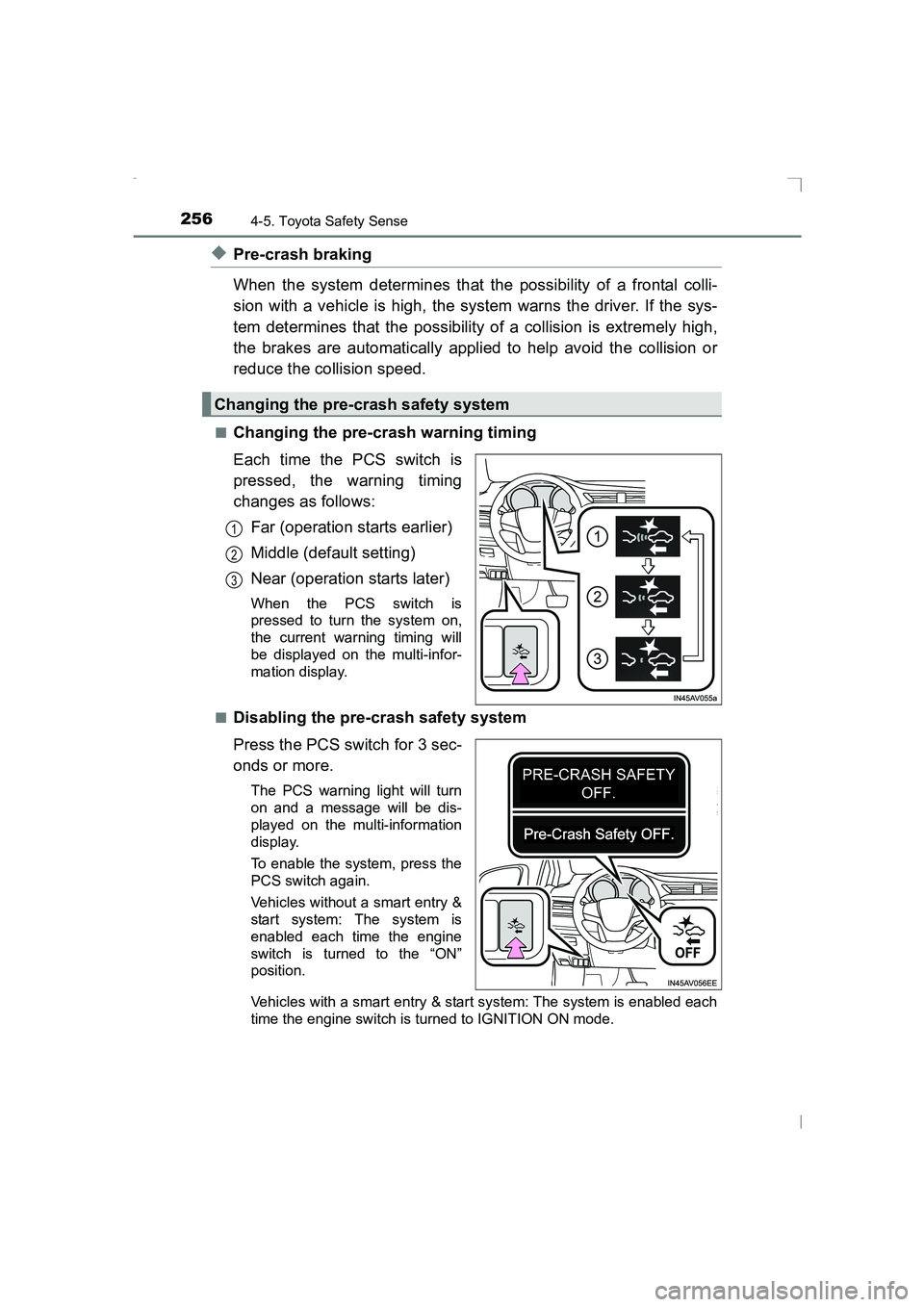
■Changing the pre-crash warning timing
Each time the PCS switch is
pressed, the warning timing
changes as follows:Far (operation starts earlier)
Middle (default setting)
Near (operation starts later)
When the PCS switch is
pressed to turn the system on,
the current warning timing will
be displayed on the multi-infor-
mation display.
■
Disabling the pre-crash safety system
Press the PCS switch for 3 sec-
onds or more.
The PCS warning light will turn
on and a message will be dis-
played on the multi-information
display.
To enable the system, press the
PCS switch again.
Vehicles without a smart entry &
start system: The system is
enabled each time the engine
switch is turned to the “ON”
position.
Vehicles with a smart entry & start system: The system is enabled each
time the engine switch is turned to IGNITION ON mode.
Changing the pre-crash safety system
1
2
3
AVENSIS_OM_OM20C20E_(EE).book Page 256 Thursday, January 29, 2015 1:47 PM
Page 257 of 648
2574-5. Toyota Safety Sense
4
Driving
AVENSIS_OM_OM20C20E_(EE)
■Operational conditions
The pre-crash safety system is enabled and determines that the possibility of
a frontal collision with a vehicle (e xcept motorcycles and bicycles) is high.
● Pre-crash warning:
• Vehicle speed is approximately 15 to 140 km/h (10 to 87 mph).
• The relative speed between your vehicle and the vehicle ahead is greater
than approximately 15 km/h (10 mph).
● Pre-crash brake assist:
• Vehicle speed is approximately 30 to 80 km/h (19 to 50 mph).
• The relative speed between your vehicle and the vehicle ahead is greater
than approximately 30 km/h (19 mph).
● Pre-crash braking:
• Vehicle speed is approximately 10 to 80 km/h (7 to 50 mph).
• The relative speed between your vehicle and the vehicle ahead is greater
than approximately 10 km/h (7 mph).
The system may not operate in the following situations:
● If a battery terminal has been disconnected and reconnected and then the
vehicle has not been driven for a certain amount of time
● If VSC is disabled (only the pre-crash warning function will be operational)
● If the PCS warning light is flashing or illuminated
■ Cancelation of the pre-crash braking
●If either of the following situations occur while the pre-crash braking function
is operating, it will be canceled:
• The accelerator pedal is depressed strongly.
• The steering wheel is turned sharply or abruptly.
● If the vehicle is stopped by the operation of the pre-crash braking function,
the operation of the pre-crash braking function will be canceled after the
vehicle has been stopped for approximately 2 seconds.
AVENSIS_OM_OM20C20E_(EE).book Page 257 Thursday, January 29, 2015 1:47 PM
Page 260 of 648
2604-5. Toyota Safety Sense
AVENSIS_OM_OM20C20E_(EE)When a very bright light, such as the sun or the headlights of oncoming
traffic, shines directly into the front sensor
When driving in inclement weather such as heavy rain, fog, snow or a
sand storm
When the surrounding area is dark, such as while in a tunnel or during
nighttime
■ If the PCS warning light flashes and a warning message is displayed on
the multi-information display
The pre-crash safety system may be temporarily unavailable or there may be
a malfunction in the system.
●In the following situations, the indicator and message will be cleared and the
system will become operational when normal operating conditions return:
• When the area around the front sensor is hot, such as after the vehicle
has been parked in the sun
• When the windshield is fogged up or covered with condensation or ice
• If the area in front of the front sens or is obstructed, such as when the
hood is open
● If the PCS warning light continues to flash or the warning message is not
cleared, the system may be malfunctioning. Have the vehicle inspected by
any authorized Toyota dealer or repairer, or another duly qualified and
equipped professional immediately.
■ If TRC and VSC are disabled
●If TRC and VSC are disabled ( →P. 299), the pre-crash brake assist and pre-
crash braking functions are also disabled. However, the pre-crash warning
function will still operate.
● The PCS warning light will turn on and a warning message will be displayed
on the multi-information display. ( →P. 534)
9
10
11
AVENSIS_OM_OM20C20E_(EE).book Page 260 Thursday, January 29, 2015 1:47 PM
Page 266 of 648
2664-5. Toyota Safety Sense
AVENSIS_OM_OM20C20E_(EE)■
Conditions in which the func tion may not operate correctly
In the following situations, the front sensor may be unable to recognize lane
markers causing the lane departure warning function to operate incorrectly.
However, this does not indicate a malfunction.
● When driving through an area, such as a tollbooth, a crossing or before a
ticket checkpoint
● When driving on a sharp curve
● When lane markers are extremel y narrow or extremely wide
● When the vehicle leans to one side an unusual amount due to a heavy load
or improper tire inflation pressure
● When the following distance between your vehicle and the vehicle ahead is
extremely short
● When the lane markers are yellow (These may be more difficult for the sys-
tem to recognize compared to white markers.)
● When the lane markers are broken, Botts’ dots (raised pavement markers)
or stones
● When the lane markers are on a curb etc.
● When lane markers are obscured or part ially obscured by sand, dirt, etc.
● When there are shadows on the road running parallel with lane markers, or
if a shadow covers the lane markers
● When driving on a particularly bright road surface, such as concrete
● When driving on a road surface that is bright due to reflected light
● When driving in a location where the light level changes rapidly, such as the
entrance to or exit from a tunnel
● When sunlight or the headlights of oncoming vehicles are shining directly
into the camera lens
● When driving on roads that are branching or merging
● When driving on a road surface that is wet due to rain, previous rainfall,
standing water, etc.
● When the vehicle experiences strong up-and-down motion such as when
driving on an extremely rough road or on a seam in the pavement
● When headlight brightness at nighttime is reduced due to dirt on the lenses,
or when the headlights are misaligned
● When driving on winding roads or roads that are uneven
● When driving on rough or unpaved roads
● When the windshield is dirty, or if raindrops, condensation or ice are adher-
ing to the windshield.
● When the heater is blowing to the feet, the upper part of the windshield may
get fogged up and have a negative effect.
● When cleaning the inside of the windshi eld, touching the lens or getting
glass cleaner on the lens may have a negative effect.
AVENSIS_OM_OM20C20E_(EE).book Page 266 Thursday, January 29, 2015 1:47 PM
Page 268 of 648
2684-5. Toyota Safety Sense
AVENSIS_OM_OM20C20E_(EE)
WARNING
■ Situations unsuitable for LDA system
Do not use the LDA system in any of the following situations.
Otherwise, the system may not function correctly and could result in an
accident.
●When driving with tire chains, a spare tire, or similar equipment
● When there are objects or structures along the roadside that might be mis-
interpreted as lane markers (such as guardrails, a curb, reflector posts,
etc.)
● When driving on snowy roads
● When pavement lane markers are difficult to see due to rain, snow, fog,
sand, dirt, etc.
● When there are visible lines on the pave ment from road repairs, or if the
remains of old lane markers are still visible on the road
● When driving on a road with lane closures due to maintenance, or when
driving in a temporary lane
NOTICE
■ To prevent damage to or incorrect operation of the LDA system
●Do not modify the headlights or attach stickers to the surface of the lights.
● Do not modify the suspension. If your suspension needs repairs, contact
any authorized Toyota dealer or repa irer, or another duly qualified and
equipped professional.
● Do not install or place anything on the hood or the grille. Also, do not install
a grille guard (bull bars, kangaroo bar, etc.).
AVENSIS_OM_OM20C20E_(EE).book Page 268 Thursday, January 29, 2015 1:47 PM
Page 278 of 648
2784-5. Toyota Safety Sense
AVENSIS_OM_OM20C20E_(EE)
In the following situations, the RSA system alerts the driver using a
warning display.
●When the vehicle speed exceeds the speed warning threshold
applied to the speed limit of the sign displayed on the multi-informa-
tion display, the sign color becomes inverted.
● If it is detected that your vehicle is overtaking when a no overtaking
sign is displayed on the multi-information display, the sign flashes.
■Automatic turn-off of RSA sign display
One or more signs automatically turn off in the following situations.
●A new sign is not recognized for a certain distance.
● The road changes due to a left or right turn, etc.
■ Conditions in which the function may not operate or detect correctly
In the following situations, RSA does not operate normally and may not rec-
ognize signs, display the incorrect sign, etc. However, this does not indicate a
malfunction.
● The front sensor is misaligned due to a strong impact being applied to the
sensor, etc.
● Dirt, snow, stickers, etc., are on the front windshield near the front sensor.
● In inclement weather such as heavy rain, fog, snow or sand storms
● Light from an oncoming vehicle, the sun, etc., enters the front sensor.
● The sign is small, dirty, faded, tilted or bent, and if an electronic sign, the
contrast is poor.
● All or part of the sign is hidden by the leaves of a tree, a pole, etc.
● The sign is only visible to the front sensor for a short amount of time.
● The driving scene (turning, lane change, etc.) is judged incorrectly.
● Even if it is a sign not appropriate for the currently traveled lane, such a sign
exists directly after a freeway branches, or in an adjacent lane just before
merging.
● Stickers are attached to the rear of the preceding vehicle.
● A sign resembling a system compatible sign is recognized.
● The vehicle is driven in a country with a different direction of traffic.
● Side road speed signs may be detected and displayed (if positioned in sight
of the front sensor) while the vehicle is traveling on the main road.
● Roundabout exit road speed signs may be detected and displayed (if posi-
tioned in sight of the front sensor) while traveling on a roundabout.
● The speed information displayed on the meter and that displayed on the
Navigation system (if equipped) may be different due to the Navigation sys-
tem using map data.
Warning display
AVENSIS_OM_OM20C20E_(EE).book Page 278 Thursday, January 29, 2015 1:47 PM
Page 290 of 648
2904-6. Using the driving support systems
AVENSIS_OM_OM20C20E_(EE)■
When to use the Stop & Start system
●If the engine is stopped by the Stop & Start system and the shift lever is
shifted into a position other than N with the clutch pedal released, a buzzer
will sound and Stop & Start indicator will flash. This indicates that the engine
is only stopped by the Stop & Start system, not that the engine has been
turned off completely.
● Use the Stop & Start system when stopping the vehicle temporarily at red
lights, intersections, etc. When stopping the vehicle for a longer period of
time, turn off the engine completely.
● When the system cannot operate, is canceled, or is malfunctioning, warning
messages and the warning buzzer are used to inform the driver. ( →P. 529)
● Vehicles with smart entry and start system: Even if the engine switch is
pressed during an engine stop, the engine does not restart. Start the engine
by shifting the shift lever to N and performing a normal engine start opera-
tion.
● When the engine restarts after having been stopped by the Stop & Start sys-
tem, the power outlet may be temporar ily unusable, but this does not indi-
cate a malfunction.
● Installation and removal of electrical components and wireless devices may
affect the Stop & Start system, contact any authorized Toyota dealer or
repairer, or another duly qualified and equipped professional.
■ If the windshield is fogged up while the engine is stopped by the Stop &
Start system
Turn the windshield defogger on. (The engine will start due to the automatic
engine start function.) ( →P. 384, 391)
If the windshield fogs up frequently, press the Stop & Start cancel switch to
deactivate the system.
■ Air conditioning system while the engine is stopped by the Stop & Start
system (vehicles with an air conditioning system)
While the engine is stopped by the Stop & Start system, the air conditioning
system (cooling, heating and dehumidifying functions) is cancelled and it only
blows air or stops blowing air. In order to prevent the air conditioning system
from being cancelled, deactivate the Stop & Start system by pressing the Stop
& Start cancel switch.
AVENSIS_OM_OM20C20E_(EE).book Page 290 Thursday, January 29, 2015 1:47 PM