warning light TOYOTA AVENSIS 2015 Service Manual
[x] Cancel search | Manufacturer: TOYOTA, Model Year: 2015, Model line: AVENSIS, Model: TOYOTA AVENSIS 2015Pages: 648, PDF Size: 39.64 MB
Page 296 of 648
2964-6. Using the driving support systems
AVENSIS_OM_OM20C20E_(EE)■
If the Stop & Start cancel indicator continues to flash
The Stop & Start system may be malfunctioning. Contact any authorized
Toyota dealer or repairer, or another duly qualified and equipped professional.
WARNING
■ When the Stop & Start system is operating
●Keep the shift lever in N and apply the brake pedal or parking brake for
safety while the engine is stopped due to the Stop & Start system (while
the Stop & Start indicator is on).
Unexpected accidents may occur due to the automatic engine start func-
tion.
● Do not leave the vehicle while the engine is stopped due to the Stop &
Start system (while the Stop & Start indicator is on).
Unexpected accidents may occur due to the automatic engine start func-
tion.
● Ensure that the engine is not stopped by the Stop & Start system while the
vehicle is in a poorly ventilated area. The engine may restart due to the
automatic engine start function, causing exhaust gases to collect and
enter the vehicle and resulting in death or a serious health hazard.
NOTICE
■ To ensure the system operates correctly
If any one of the following situations occurs, the Stop & Start system may
not operate correctly, thus, please have your vehicle checked by any autho-
rized Toyota dealer or repairer, or another duly qualified and equipped pro-
fessional.
● While the driver’s seat belt is fastened, the seat belt reminder light flashes.
● Even when the driver’s seat belt is not fastened, the seat belt reminder
light remains off.
● Even when the driver’s door is closed, the open door warning is displayed
on the multi-information display, or the interior light comes on when the
interior light switch is in the door position.
● Even when the driver’s door is opened, the open door warning is not dis-
played on the multi-information display, or the interior light does not come
on when the interior light switch is in the door position.
AVENSIS_OM_OM20C20E_(EE).book Page 296 Thursday, January 29, 2015 1:47 PM
Page 301 of 648
3014-6. Using the driving support systems
4
Driving
AVENSIS_OM_OM20C20E_(EE)
WARNING
Any of the following conditions may result in an accident which could cause
death or serious injury:
■ The ABS does not operate effectively when
●The limits of tire gripping performance have been exceeded (such as
excessively worn tires on a snow covered road).
● The vehicle hydroplanes while driving at high speed on wet or slick roads.
■ Stopping distance when the ABS is operating may exceed that of nor-
mal conditions
The ABS is not designed to shorten t he vehicle’s stopping distance. Always
maintain a safe distance from the vehicle in front of you, especially in the
following situations:
● When driving on dirt, gravel or snow-covered roads
● When driving with tire chains
● When driving over bumps in the road
● When driving over roads with potholes or uneven surfaces
■ TRC may not operate effectively when
Directional control and power may not be achievable while driving on slip-
pery road surfaces, even if the TRC system is operating.
Drive the vehicle carefully in conditions where stability and power may be
lost.
■ Hill- start assist control does not operate effectively when
●Do not overly rely on the hill-start assist control. The hill-start assist control
may not operate effectively on steep inclines and roads covered with ice.
● Unlike the parking brake, hill-start assist control is not intended to hold the
vehicle stationary for an extended period of time. Do not attempt to use
hill-start assist control to hold the vehicle on an incline, as doing so may
lead to an accident.
■ When the VSC is activated
The slip indicator light flashes. Always drive carefully.
Reckless driving may cause an accident. Exercise particular care when the
indicator light flashes.
■ When the TRC/VSC systems are turned off
Be especially careful and drive at a speed appropriate to the road condi-
tions. As these are systems to help ensure vehicle stability and driving
force, do not turn the TRC/VSC systems off unless necessary.
AVENSIS_OM_OM20C20E_(EE).book Page 301 Thursday, January 29, 2015 1:47 PM
Page 397 of 648
3976-1. Using the air conditioning system and defogger
AVENSIS_OM_OM20C20E_(EE)
6
Interior features
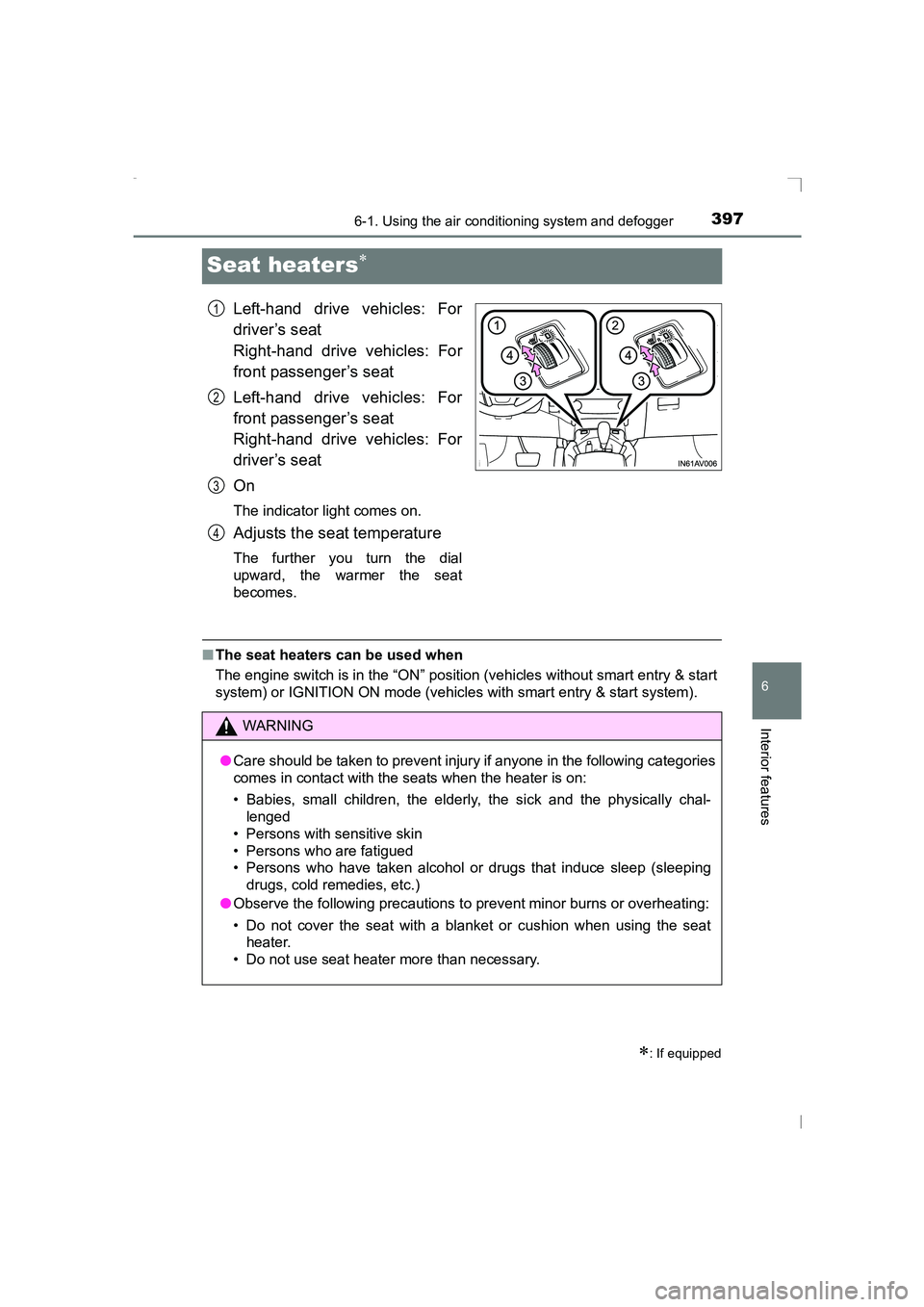
Seat heaters∗
Left-hand drive vehicles: For
driver’s seat
Right-hand drive vehicles: For
front passenger’s seat
Left-hand drive vehicles: For
front passenger’s seat
Right-hand drive vehicles: For
driver’s seat
On
The indicator light comes on.
Adjusts the seat temperature
The further you turn the dial
upward, the warmer the seat
becomes.
■The seat heaters can be used when
The engine switch is in the “ON” position (vehicles without smart entry & start
system) or IGNITION ON mode (vehicles with smart entry & start system).
∗: If equipped
1
2
3
4
WARNING
● Care should be taken to prevent injury if anyone in the following categories
comes in contact with the seats when the heater is on:
• Babies, small children, the elderly, the sick and the physically chal-
lenged
• Persons with sensitive skin
• Persons who are fatigued
• Persons who have taken alcohol or drugs that induce sleep (sleeping drugs, cold remedies, etc.)
● Observe the following precautions to prevent minor burns or overheating:
• Do not cover the seat with a blanket or cushion when using the seat heater.
• Do not use seat heater more than necessary.
AVENSIS_OM_OM20C20E_(EE).book Page 397 Thursday, January 29, 2015 1:47 PM
Page 402 of 648
4026-3. Using the storage features
AVENSIS_OM_OM20C20E_(EE)
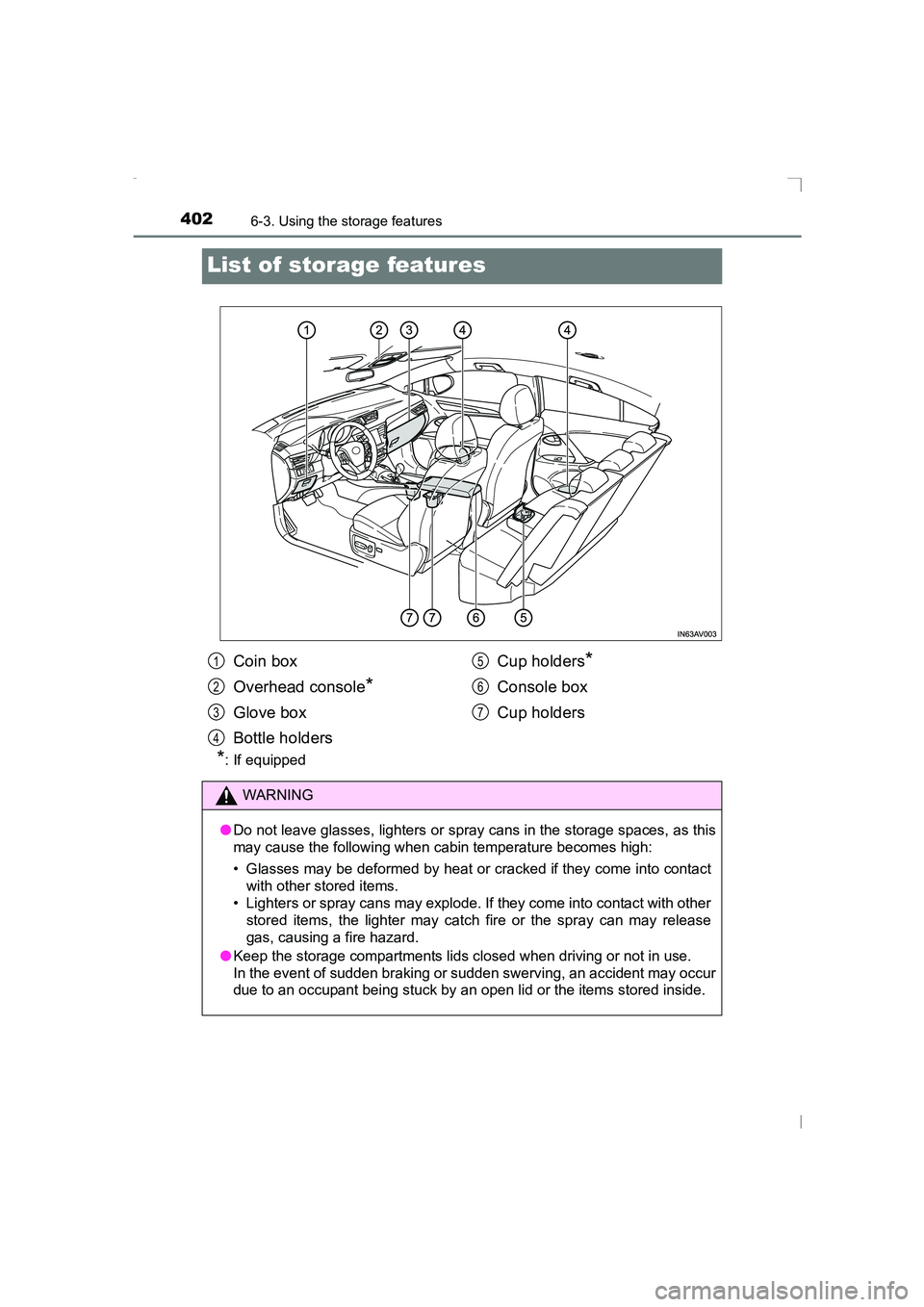
List of storage features
*: If equipped
Coin box
Overhead console
*
Glove box
Bottle holdersCup holders
*
Console box
Cup holders
WARNING
● Do not leave glasses, lighters or spray cans in the storage spaces, as this
may cause the following when cabin temperature becomes high:
• Glasses may be deformed by heat or cracked if they come into contact
with other stored items.
• Lighters or spray cans may explode. If they come into contact with other stored items, the lighter may catch fire or the spray can may release
gas, causing a fire hazard.
● Keep the storage compartments lids cl osed when driving or not in use.
In the event of sudden braking or sudden swerving, an accident may occur
due to an occupant being stuck by an open lid or the items stored inside.
1
2
3
4
5
6
7
AVENSIS_OM_OM20C20E_(EE).book Page 402 Thursday, January 29, 2015 1:47 PM
Page 422 of 648
422
AVENSIS_OM_OM20C20E_(EE)
6-4. Using the other interior features
WARNING
■ When closing the panoramic roof shade
Observe the following precautions.
Failing to do so may result in death or serious injury.
●Check to make sure that all passengers do not have any part of their bod-
ies in a position where they could be caught when the panoramic roof
shade is being operated.
● Do not allow children to operate the panoramic roof shade.
Closing the panoramic roof shade on someone can cause death or serious
injury.
■ Jam protection function
●Never try jamming any part of your body to activate the jam protection
function intentionally.
● The jam protection function may not work if something gets caught just
before the panoramic roof shade fully closes.
■ To prevent burns or injury
Observe the following precautions.
●Although the jam protection function has been installed, make sure that
passenger’s hands and faces are not caught in the panoramic roof shade
while it is closing. Also, as there is a chance that the jam protection func-
tion will not react just before closing, make sure not to catch fingers etc. in
the roof.
● The opening or closing of the panoramic roof shade can be stopped by
pressing the switch.
● If the panoramic roof shade will not close (for example, due to a malfunc-
tion in the jam protection function), the shade can be closed by pressing
and holding the switch.
● The jam protection function may operate if a load or impact, similar to that
applied when a foreign object is caught in the roof shade, is applied by
environmental or driving conditions.
● The underside of the roof will become hot if the vehicle is left in the direct
sunlight for a long period of time. Do not touch the parts inside the gap
between the roof underside and the roof shade, as you may burn yourself.
● Do not touch any rough or sheared parts of the roof underside, as you may
injure yourself.
AVENSIS_OM_OM20C20E_(EE).book Page 422 Thursday, January 29, 2015 1:47 PM
Page 455 of 648
4557-3. Do-it-yourself maintenance
AVENSIS_OM_OM20C20E_(EE)
7
Maintenance and care
WARNING
■ Chemicals in the battery
A battery contains poisonous and corrosive sulfuric acid and may produce
hydrogen gas which is flammable and explosive. To reduce the risk of death
or serious injury, take the following precautions while working on or near
battery:
●Do not cause sparks by touching the battery terminals with tools.
● Do not smoke or light a match near the battery.
● Avoid contact with eyes, skin and clothes.
● Never inhale or swallow electrolyte.
● Wear protective safety glasses when working near the battery.
● Keep children away from the battery.
■ Where to safely charge the battery
Always charge the battery in an open area. Do not charge the battery in a
garage or closed room w here there is not sufficient ventilation.
■ Emergency measures regarding electrolyte
●If electrolyte gets in your eyes
Flush your eyes with clean water for at least 15 minutes and get immedi-
ate medical attention. If possible, continue to apply water with a sponge or
cloth while traveling to the nearest medical facility.
● If electrolyte gets on your skin
Wash the affected area thoroughly. If you feel pain or burning, get medical
attention immediately.
● If electrolyte gets on your clothes
It can soak through clothing on to your skin. Immediately take off the cloth-
ing and follow the procedure above if necessary.
● If you accidentally swallow electrolyte
Drink a large quantity of water or milk. Get emergency medical attention
immediately.
AVENSIS_OM_OM20C20E_(EE).book Page 455 Thursday, January 29, 2015 1:47 PM
Page 460 of 648
4607-3. Do-it-yourself maintenance
AVENSIS_OM_OM20C20E_(EE)
Your vehicle is equipped with a tire pressure warning system that uses
tire pressure warning valves and transmitters to detect low tire infla-
tion pressure before serious problems arise.
If the tire pressure drops below a predetermined level, the driver is
warned by a warning light. (→P. 523)
◆Installing tire pressure warning valves and transmitters
When replacing tires or wheels, tire pressure warning valves and
transmitters must also be installed.
When new tire pressure warning valves and transmitters are
installed, new ID codes must be registered in the tire pressure
warning computer and the tire pressure warning system must be
initialized. Have tire pressure warning valve and transmitter ID
codes registered by any authorized Toyota dealer or repairer, or
another duly qualified and equipped professional. ( →P. 462)
◆Initializing the tire pressure warning system
■The tire pressure warning system must be initialized in the fol-
lowing circumstances:
● When rotating front and rear tires which have different tire infla-
tion pressures
● When changing the tire size
● When the tire inflation pressure is changed such as when chang-
ing traveling speed
● When changing between two registered wheel sets
When the tire pressure warning system is initialized, the current tire
inflation pressure is set as the benchmark pressure.
Tire pressure warning system (if equipped)
AVENSIS_OM_OM20C20E_(EE).book Page 460 Thursday, January 29, 2015 1:47 PM
Page 461 of 648
4617-3. Do-it-yourself maintenance
AVENSIS_OM_OM20C20E_(EE)
7
Maintenance and care
■How to initialize the tire pressure warning systemPark the vehicle in a safe place and turn the engine switch to the
“LOCK” position (vehicles without smart entry & start system) or
off (vehicles with smart entry & start system).
Initialization cannot be performed while the vehicle is moving.
Adjust the tire inflation pressure to the specified cold tire inflation
pressure level. ( →P. 613)
Make sure to adjust the tire pressure to the specified cold tire inflation
pressure level. The tire pressure warning system will operate based on
this pressure level.
Turn the engine switch to the “ON” position (vehicles without
smart entry & start system) or IGNITION ON mode (vehicles with
smart entry & start system).
XVehicles with monochrome display
Press the “DISP” switch until the settings screen appears.
(→ P. 108)
Press and hold the “DISP” switch to enter the adjustment mode.
Press the “DISP” switch until the menu of tire pressure warning
system appears.
Press and hold the “DISP” switch to display the menu.
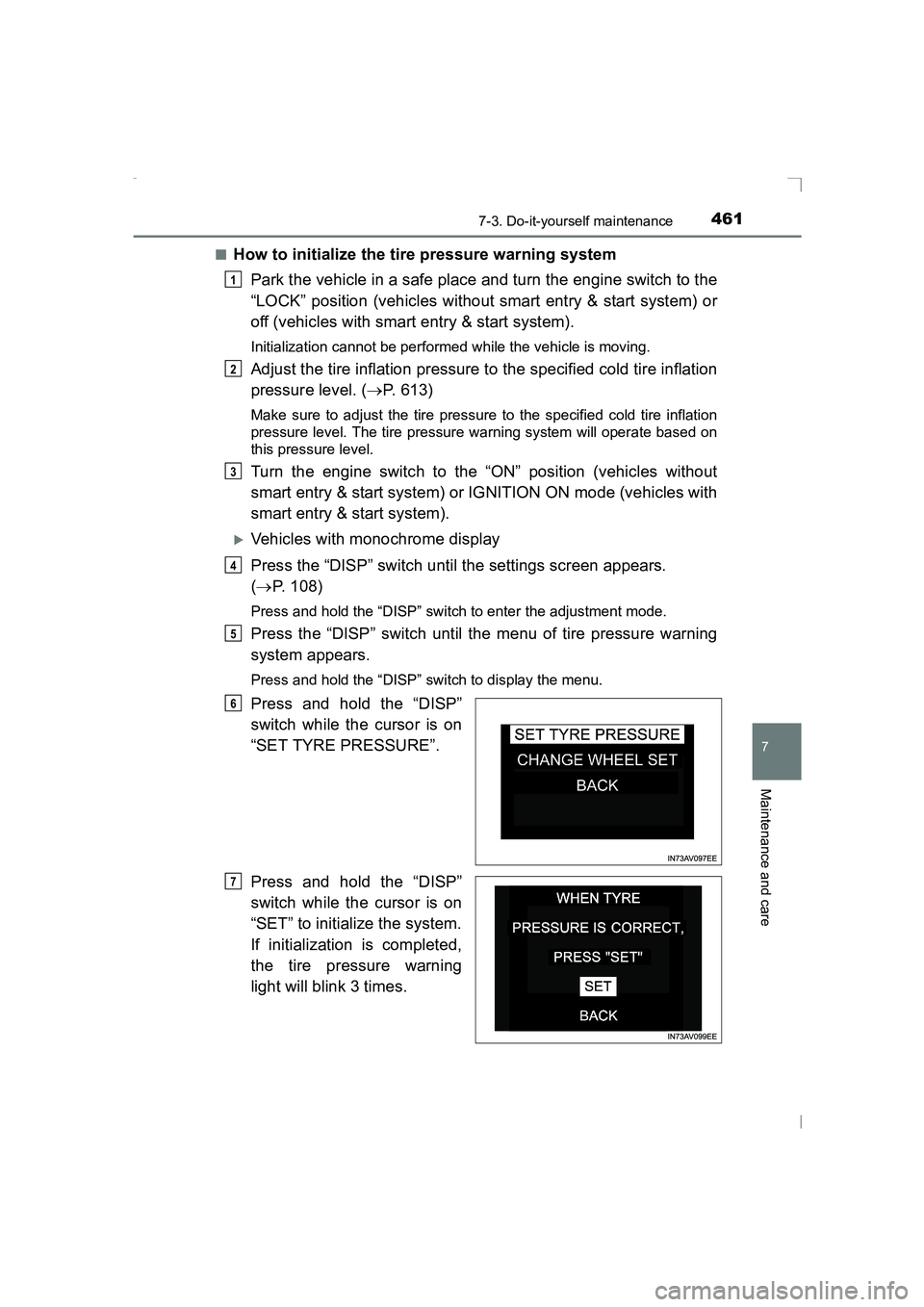
Press and hold the “DISP”
switch while the cursor is on
“SET TYRE PRESSURE”.
Press and hold the “DISP”
switch while the cursor is on
“SET” to initialize the system.
If initialization is completed,
the tire pressure warning
light will blink 3 times.
1
2
3
4
5
6
7
AVENSIS_OM_OM20C20E_(EE).book Page 461 Thursday, January 29, 2015 1:47 PM
Page 462 of 648
4627-3. Do-it-yourself maintenance
AVENSIS_OM_OM20C20E_(EE)
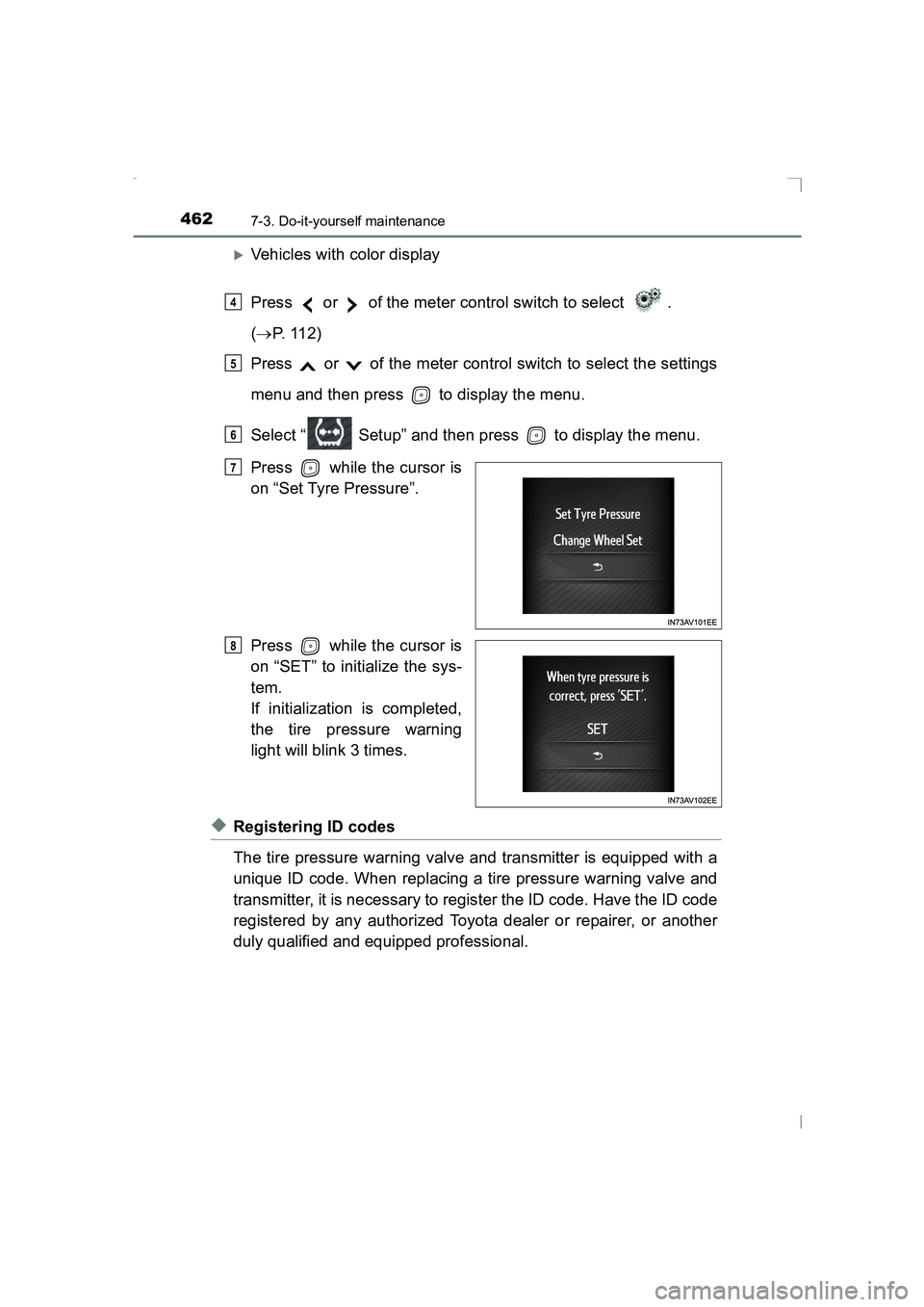
XVehicles with color display
Press or of the meter control switch to select .
(→ P. 112)
Press or of the meter control switch to select the settings
menu and then press to display the menu.
Select “ Setup” and then press to display the menu.
Press while the cursor is
on “Set Tyre Pressure”.
Press while the cursor is
on “SET” to initialize the sys-
tem.
If initialization is completed,
the tire pressure warning
light will blink 3 times.
◆Registering ID codes
The tire pressure warning valve and transmitter is equipped with a
unique ID code. When replacing a tire pressure warning valve and
transmitter, it is necessary to register the ID code. Have the ID code
registered by any authorized Toyota dealer or repairer, or another
duly qualified and equipped professional.
4
5
6
7
8
AVENSIS_OM_OM20C20E_(EE).book Page 462 Thursday, January 29, 2015 1:47 PM
Page 464 of 648
4647-3. Do-it-yourself maintenance
AVENSIS_OM_OM20C20E_(EE)
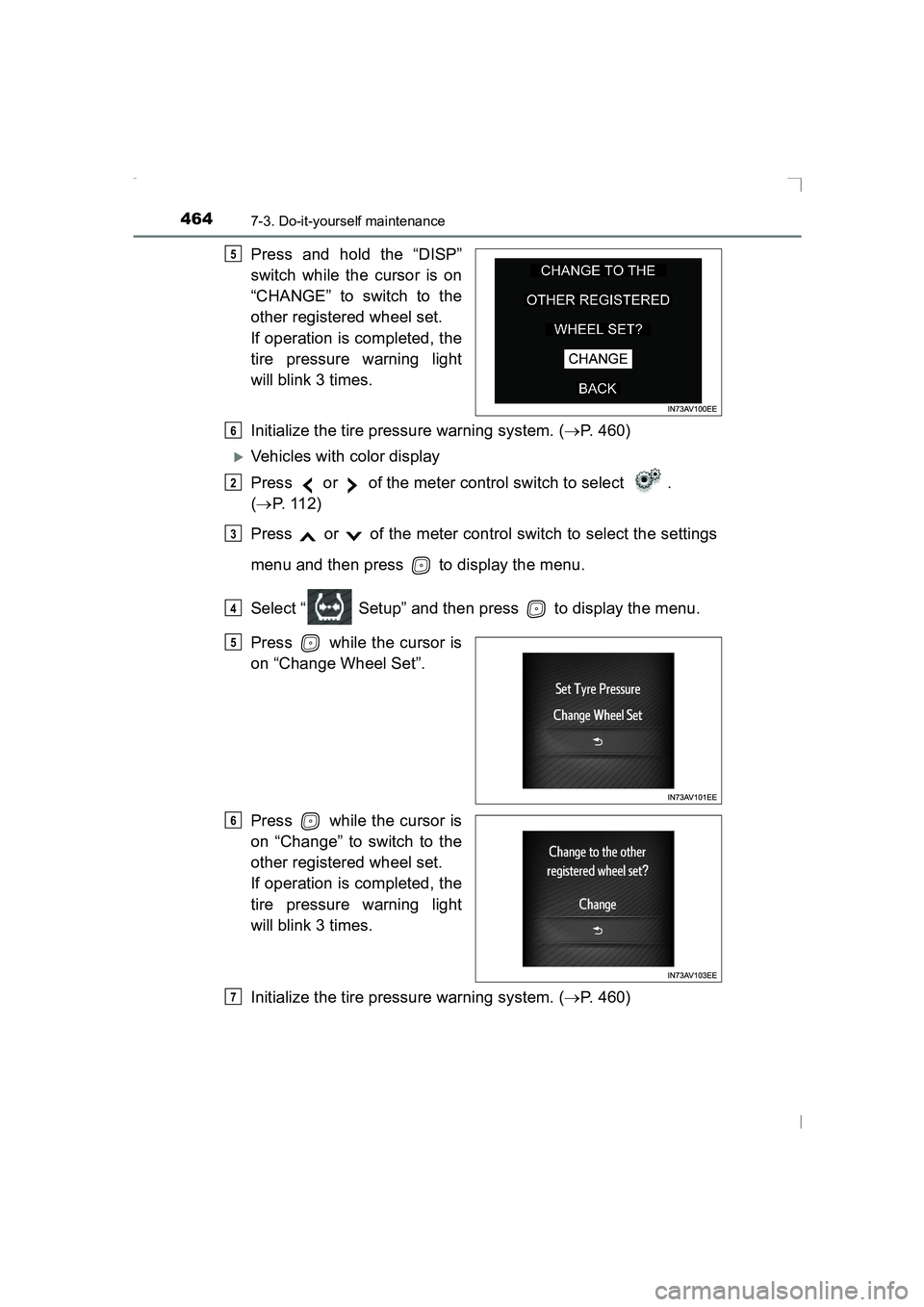
Press and hold the “DISP”
switch while the cursor is on
“CHANGE” to switch to the
other registered wheel set.
If operation is completed, the
tire pressure warning light
will blink 3 times.
Initialize the tire pressure warning system. (→P. 460)
XVehicles with color display
Press or of the meter control switch to select .
(→ P. 112)
Press or of the meter control switch to select the settings
menu and then press to display the menu.
Select “ Setup” and then press to display the menu.
Press while the cursor is
on “Change Wheel Set”.
Press while the cursor is
on “Change” to switch to the
other registered wheel set.
If operation is completed, the
tire pressure warning light
will blink 3 times.
Initialize the tire pressure warning system. ( →P. 460)
5
6
2
3
4
5
6
7
AVENSIS_OM_OM20C20E_(EE).book Page 464 Thursday, January 29, 2015 1:47 PM