lock TOYOTA AYGO 2012 (in English) Repair Manual
[x] Cancel search | Manufacturer: TOYOTA, Model Year: 2012, Model line: AYGO, Model: TOYOTA AYGO 2012Pages: 368, PDF Size: 16.94 MB
Page 158 of 368
158
AYGO_WE_99E96E
2-4. Using other driving systems
Driving assist systems
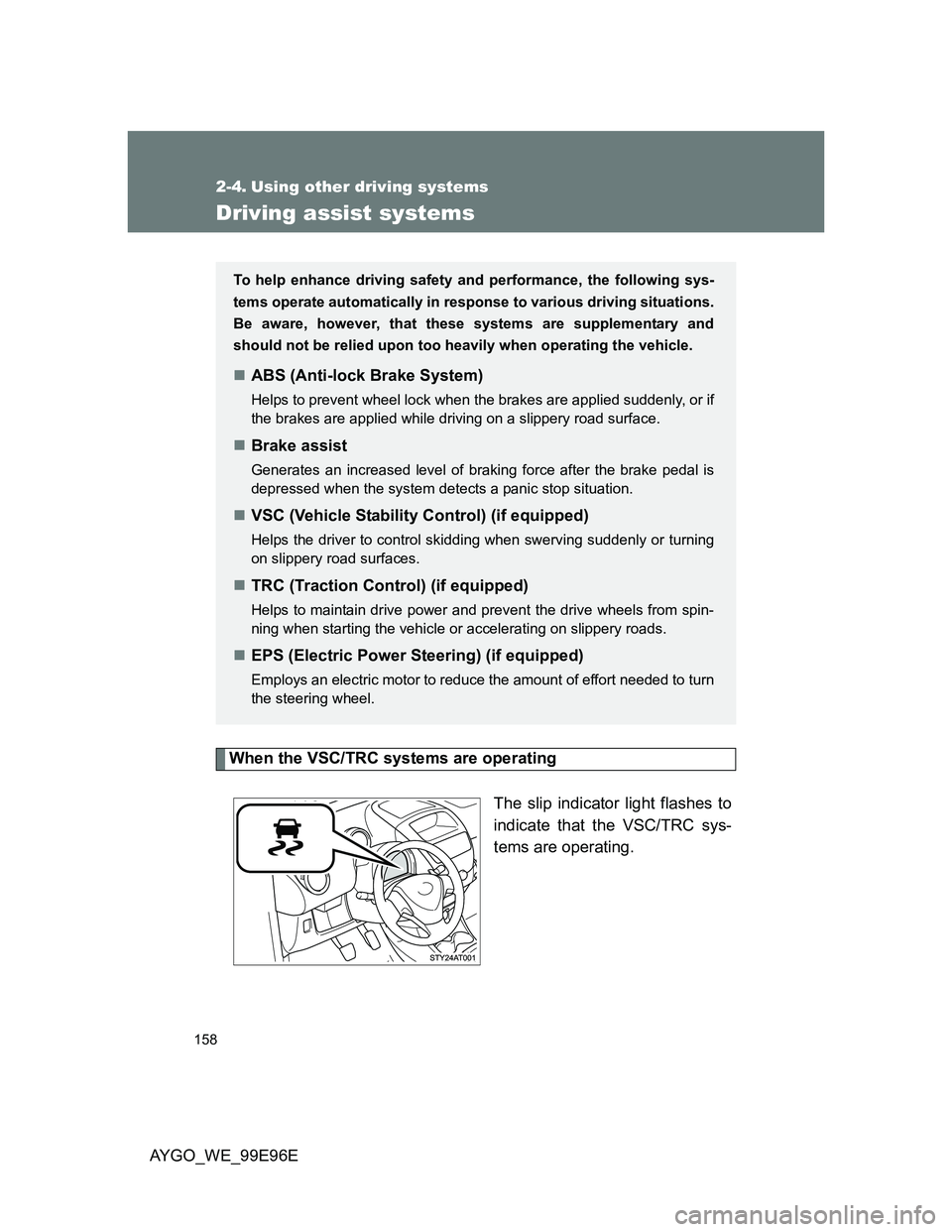
When the VSC/TRC systems are operating
The slip indicator light flashes to
indicate that the VSC/TRC sys-
tems are operating.
To help enhance driving safety and performance, the following sys-
tems operate automatically in response to various driving situations.
Be aware, however, that these systems are supplementary and
should not be relied upon too heavily when operating the vehicle.
ABS (Anti-lock Brake System)
Helps to prevent wheel lock when the brakes are applied suddenly, or if
the brakes are applied while driving on a slippery road surface.
Brake assist
Generates an increased level of braking force after the brake pedal is
depressed when the system detects a panic stop situation.
VSC (Vehicle Stability Control) (if equipped)
Helps the driver to control skidding when swerving suddenly or turning
on slippery road surfaces.
TRC (Traction Control) (if equipped)
Helps to maintain drive power and prevent the drive wheels from spin-
ning when starting the vehicle or accelerating on slippery roads.
EPS (Electric Power Steering) (if equipped)
Employs an electric motor to reduce the amount of effort needed to turn
the steering wheel.
Page 161 of 368
161
2
When driving
AYGO_WE_99E96E
2-5. Driving information
Cargo and luggage
CAUTION
Things that must not be carried in the luggage compartment
The following things may cause a fire if loaded in the luggage compartment:
Receptacles containing gasoline
Aerosol cans
Storage precautions
Observe the following precautions.
Failure to do so may result in death or serious injury.
Stow cargo and luggage in the luggage compartment whenever possible.
Do not stack cargo and luggage in the luggage compartment higher than
the seatbacks.
Such items may be thrown about and possibly injure people in the vehicle
in the event of sudden braking or in an accident.
Do not place cargo or luggage in or on the following locations as the item
may get under the clutch, brake or accelerator pedal and prevent the ped-
als from being depressed properly, block the driver’s vision, or hit the
driver or passengers, causing an accident:
• At the feet of the driver
• On the front passenger or rear seats (when stacking items)
• On the luggage cover
• On the instrument panel
• On the dashboard
Take notice of the following information about storage precautions,
cargo capacity and load:
Stow cargo and luggage in the luggage compartment whenever
possible.
Be sure all items are secured in place.
To maintain vehicle balance while driving, position luggage
evenly within the luggage compartment.
For better fuel economy, do not carry unnecessary weight.
Page 164 of 368
164 2-5. Driving information
AYGO_WE_99E96E
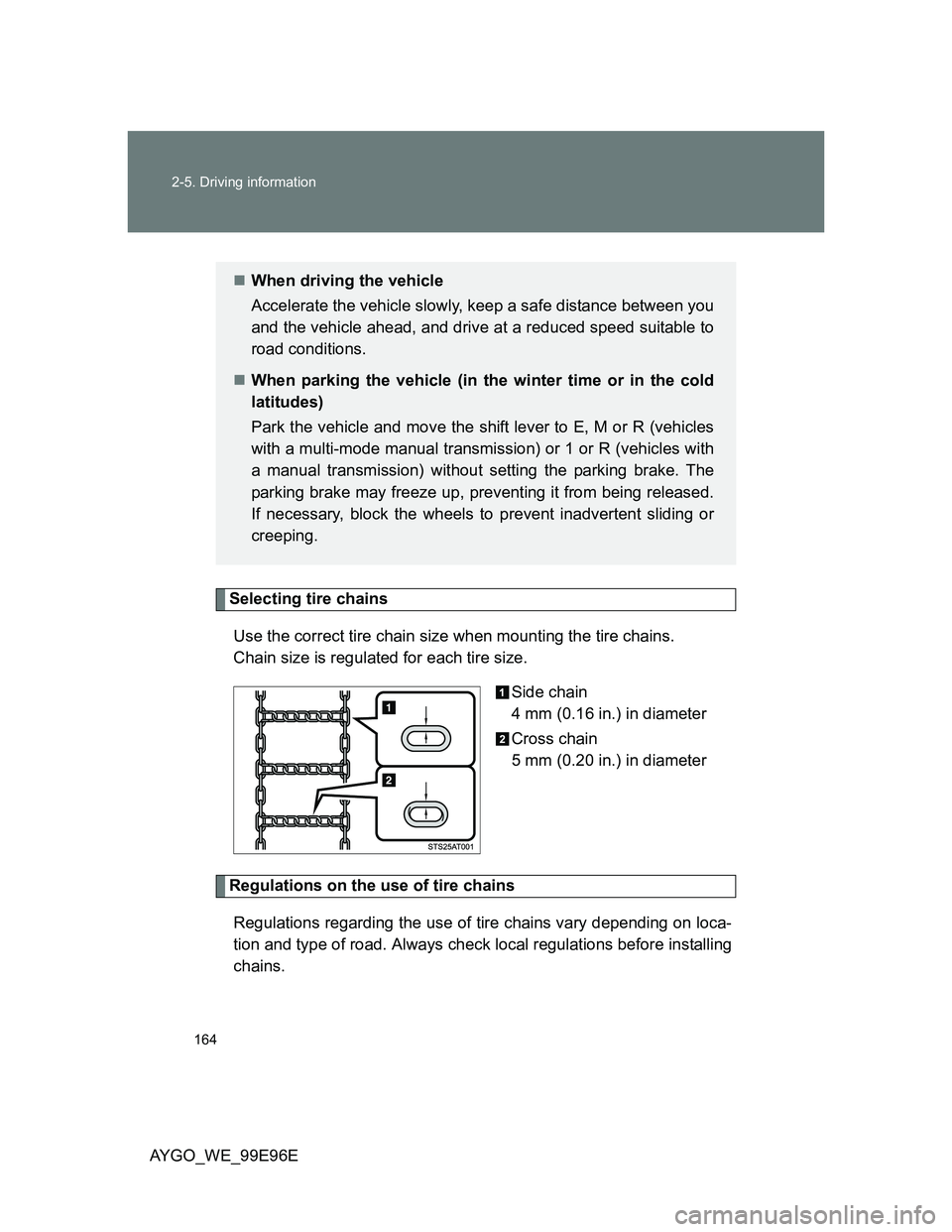
Selecting tire chains
Use the correct tire chain size when mounting the tire chains.
Chain size is regulated for each tire size.
Side chain
4 mm (0.16 in.) in diameter
Cross chain
5 mm (0.20 in.) in diameter
Regulations on the use of tire chains
Regulations regarding the use of tire chains vary depending on loca-
tion and type of road. Always check local regulations before installing
chains.
When driving the vehicle
Accelerate the vehicle slowly, keep a safe distance between you
and the vehicle ahead, and drive at a reduced speed suitable to
road conditions.
When parking the vehicle (in the winter time or in the cold
latitudes)
Park the vehicle and move the shift lever to E, M or R (vehicles
with a multi-mode manual transmission) or 1 or R (vehicles with
a manual transmission) without setting the parking brake. The
parking brake may freeze up, preventing it from being released.
If necessary, block the wheels to prevent inadvertent sliding or
creeping.
Page 169 of 368
3Interior features
169
AYGO_WE_99E96E
3-1. Using the air conditioning
system and defogger
Air conditioning system..... 170
Rear window defogger...... 178
3-2. Using the audio system
(Type A)
Audio system types .......... 179
Using the radio ................. 181
Using the CD player ......... 185
Optimal use of the audio
system ............................ 191
Using the AUX port ........... 193
3-3. Using the audio system
(Type B)
Audio system types .......... 194
Using the radio ................. 196
Using the CD player ......... 200
Operating a USB memory/
iPod ................................ 206
Using the AUX port ........... 212
Using the Bluetooth
® audio
streaming ........................ 213
Using the telephone.......... 214
Audio settings ................... 221
Configuration .................... 223
Frequently asked
questions ........................ 2253-4. Using the interior lights
Interior lights list ................ 229
• Interior light ..................... 229
3-5. Using the storage features
List of storage features ..... 230
• Cup holders .................... 231
3-6. Other interior features
Sun visors ......................... 232
Vanity mirrors.................... 233
Clock ................................. 234
Power outlet ...................... 237
Floor mat........................... 238
Luggage compartment
features........................... 240
Page 172 of 368
172 3-1. Using the air conditioning system and defogger
AYGO_WE_99E96E
Adjusting the settings
To adjust the fan speed, turn the fan speed control dial clock-
wise (increase) or counterclockwise (decrease).
Turning the dial to turns off the fan.
Vehicles without a cooling and dehumidification function on/off
button:
Turn the temperature control lever up to increase the tem-
perature.
Vehicles with a cooling and dehumidification function on/off
button:
To adjust the temperature setting, turn the temperature control
lever up (warm) or down (cool).
If is not pressed, the system will blow ambient tem-
perature air or heated air.
To select the air outlets, set the air outlet selection lever to the
desired position.
The positions between the air outlet selections shown below can
also be selected for more delicate adjustment.
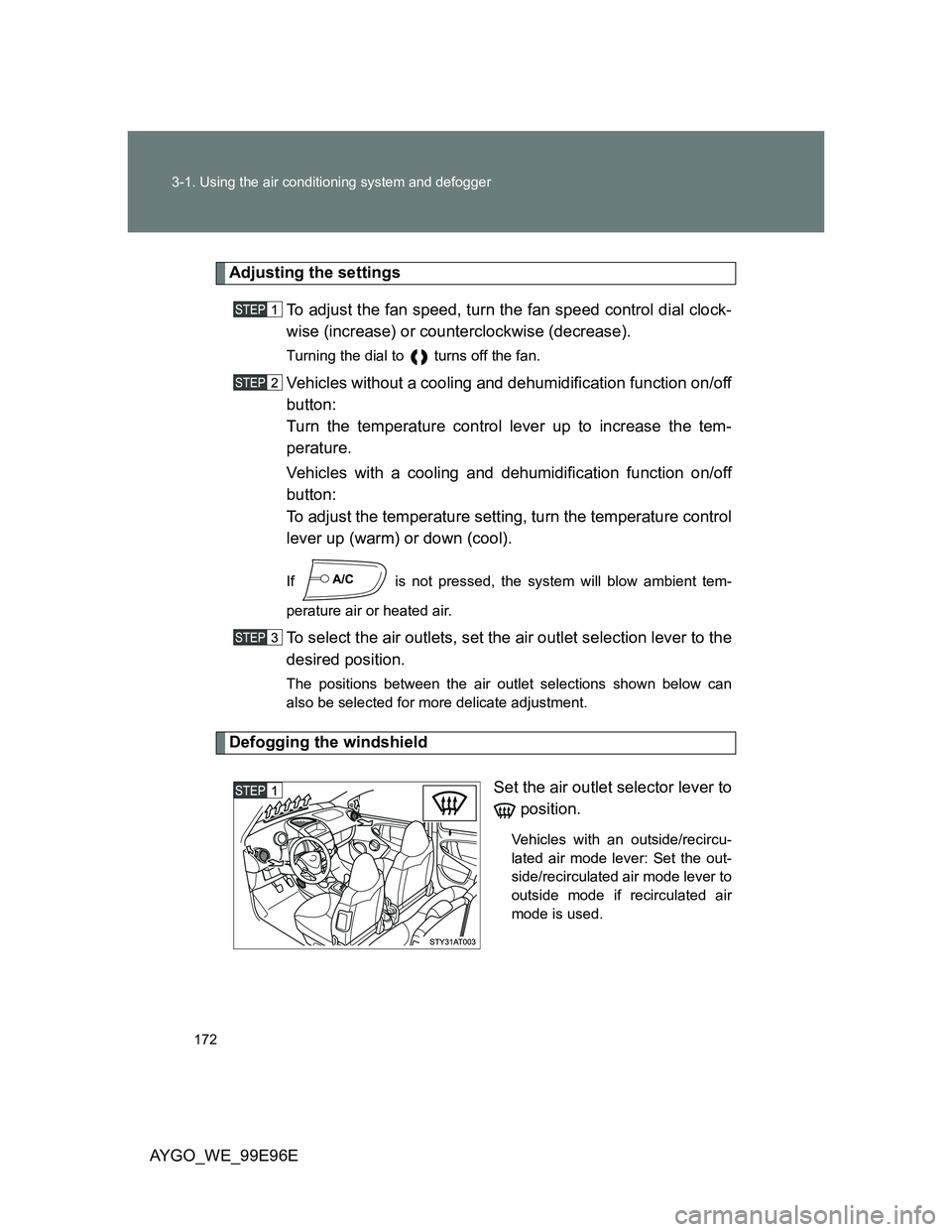
Defogging the windshield
Set the air outlet selector lever to
position.
Vehicles with an outside/recircu-
lated air mode lever: Set the out-
side/recirculated air mode lever to
outside mode if recirculated air
mode is used.
Page 177 of 368
177 3-1. Using the air conditioning system and defogger
3
Interior features
AYGO_WE_99E96E
Air conditioning odors
During use, various odors from inside and outside the vehicle may enter
into and accumulate in the air conditioning system. This may then cause
odor to be emitted from the vents.
To reduce potential odors from occurring:
It is recommended that the air conditioning system be set to outside air
mode prior to turning the vehicle off.
Air conditioning filter (vehicles with a cooling and dehumidification
function on/off button)
P. 279
CAUTION
To prevent the windshield from fogging up
Do not use during cool air operation in extremely humid weather. The
difference between the temperature of the outside air and that of the wind-
shield can cause the outer surface of the windshield to fog up, blocking your
vision.
NOTICE
To prevent battery discharge
Do not leave the air conditioning system on longer than necessary when the
engine is stopped.
Page 223 of 368
223
3-3. Using the audio system (Type B)
3
Interior features
AYGO_WE_99E96E
Configuration
Adjust the clock
Press (Time) to adjust the clock. (P. 234)
Scrolling text
Press (Display).
Press (Scrolling) to activate or deactivate scrolling text.
Press (OK).
Selecting the language
Press (Language).
Press ( or ) to select the desired language.
Press (OK).
Confirm the system software
Press (Version) for information on the software.
: If equipped
You can change the system to your desired setting.
Press the “MENU” button.
Press (Config.) to display the configuration screen.
The settings available are:
“Time”: Adjust the clock
“Display”: Scrolling text
“Language”: Modify the display language
“Version”: Confirm the system software
“System”: Update the system
Page 225 of 368
225
3-3. Using the audio system (Type B)
3
Interior features
AYGO_WE_99E96E
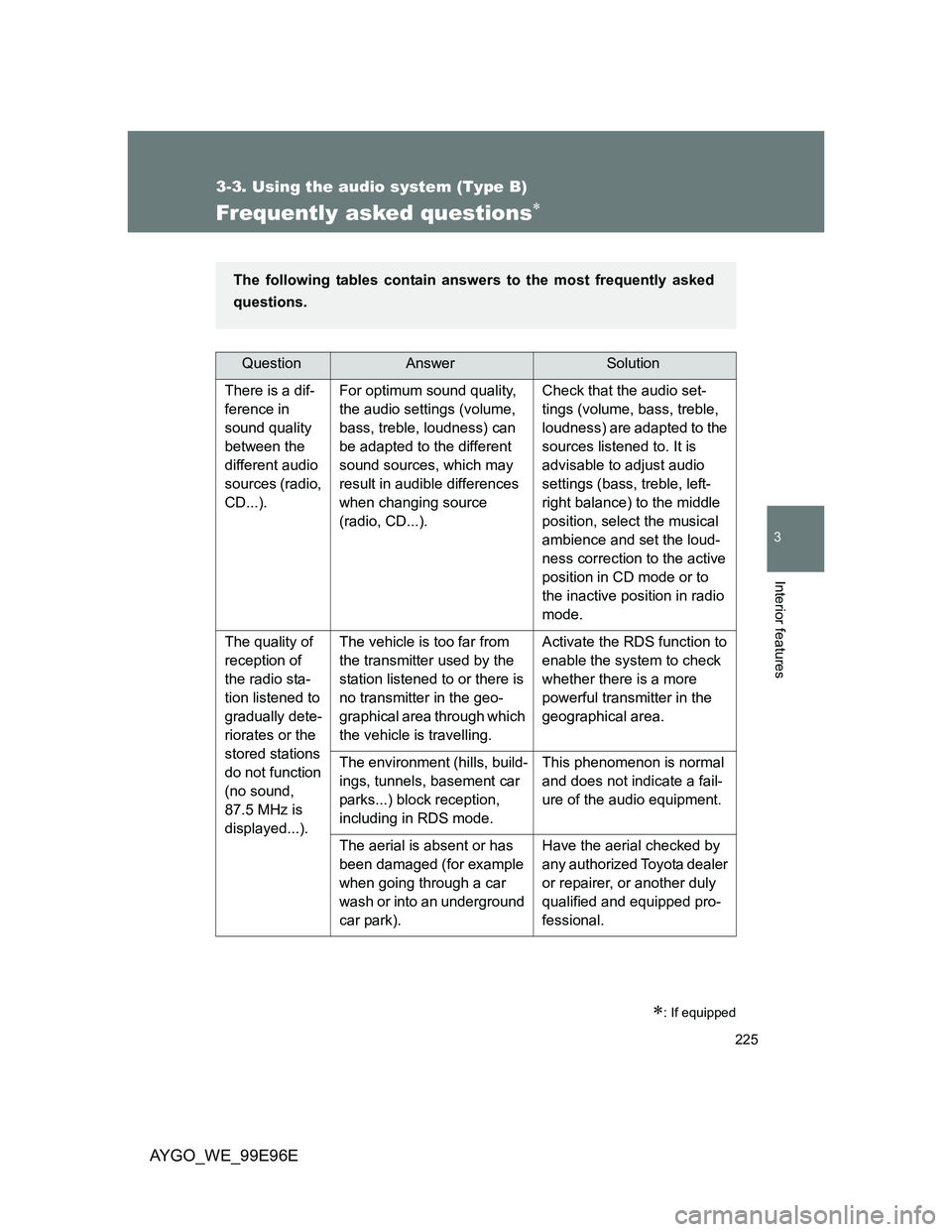
Frequently asked questions
: If equipped
QuestionAnswerSolution
There is a dif-
ference in
sound quality
between the
different audio
sources (radio,
CD...).For optimum sound quality,
the audio settings (volume,
bass, treble, loudness) can
be adapted to the different
sound sources, which may
result in audible differences
when changing source
(radio, CD...).Check that the audio set-
tings (volume, bass, treble,
loudness) are adapted to the
sources listened to. It is
advisable to adjust audio
settings (bass, treble, left-
right balance) to the middle
position, select the musical
ambience and set the loud-
ness correction to the active
position in CD mode or to
the inactive position in radio
mode.
The quality of
reception of
the radio sta-
tion listened to
gradually dete-
riorates or the
stored stations
do not function
(no sound,
87.5 MHz is
displayed...).The vehicle is too far from
the transmitter used by the
station listened to or there is
no transmitter in the geo-
graphical area through which
the vehicle is travelling.Activate the RDS function to
enable the system to check
whether there is a more
powerful transmitter in the
geographical area.
The environment (hills, build-
ings, tunnels, basement car
parks...) block reception,
including in RDS mode.This phenomenon is normal
and does not indicate a fail-
ure of the audio equipment.
The aerial is absent or has
been damaged (for example
when going through a car
wash or into an underground
car park).Have the aerial checked by
any authorized Toyota dealer
or repairer, or another duly
qualified and equipped pro-
fessional.
The following tables contain answers to the most frequently asked
questions.
Page 234 of 368
234
3-6. Other interior features
AYGO_WE_99E96E
Clock
: If equipped
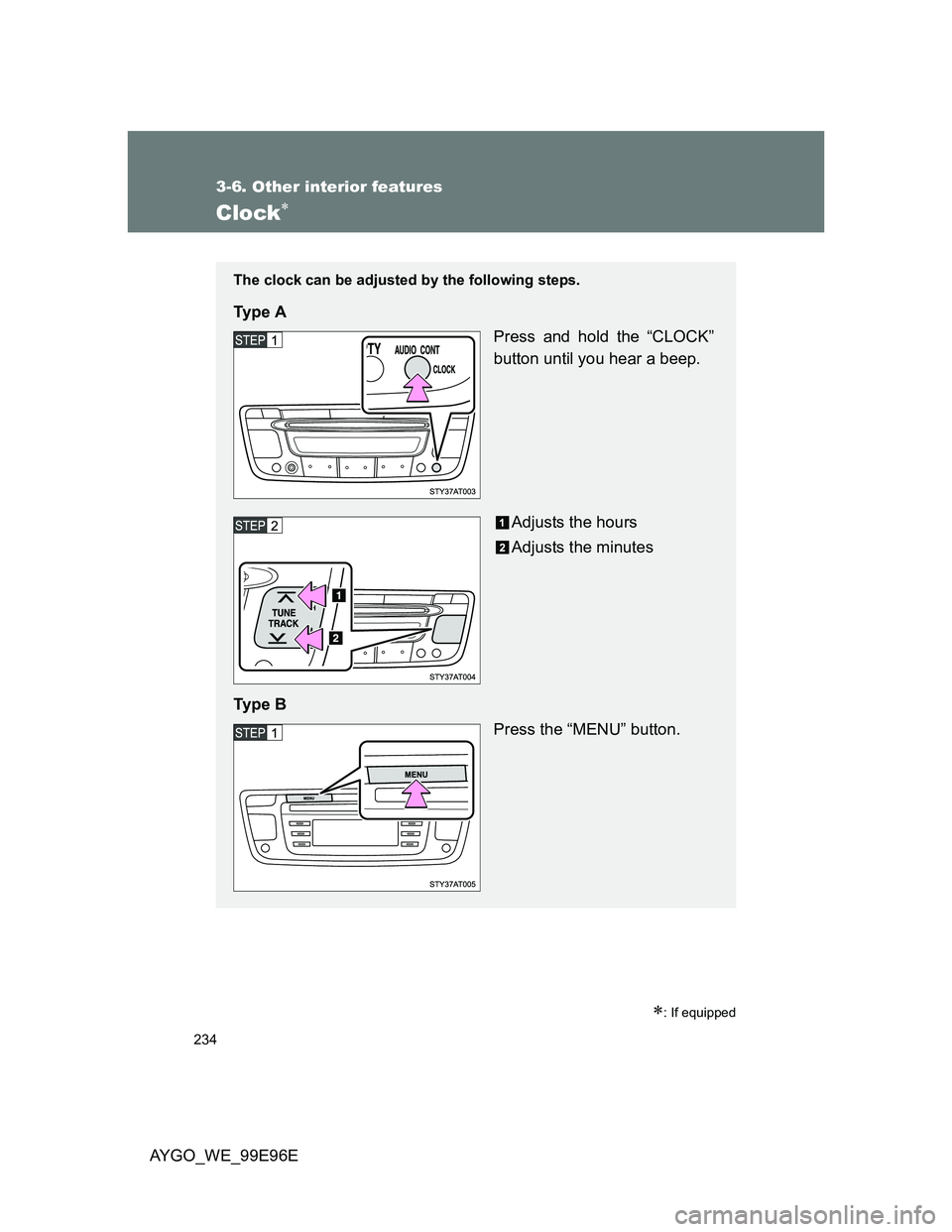
The clock can be adjusted by the following steps.
Ty p e A
Press and hold the “CLOCK”
button until you hear a beep.
Adjusts the hours
Adjusts the minutes
Ty p e B
Press the “MENU” button.
Page 236 of 368
236 3-6. Other interior features
AYGO_WE_99E96E
The clock is displayed when
The engine switch is in the “ACC” or “ON” position.
Type A only: Also, press (Power) to turn the audio system on and off.
The audio power can be turned on only once even when the key is not in the
engine switch. The power, however, will automatically turn off when 30 min-
utes have elapsed.
When disconnecting and reconnecting battery terminals
The clock data will be reset.