ECO mode TOYOTA AYGO 2021 Owner's Manual
[x] Cancel search | Manufacturer: TOYOTA, Model Year: 2021, Model line: AYGO, Model: TOYOTA AYGO 2021Pages: 546, PDF Size: 81 MB
Page 278 of 546
2764-6. Using the driving support systems
AYGO_OM_Europe_OM9A012E■The Stop & Start system protection feature
Vehicles without a smart entry & start system: When an excessively loud
sound is being projected by the audio system, the audio system may be auto-
matically cut off in order to maintain power for the Stop & Start system func-
tion.
If this occurs, turning the engine switch to the “LOCK” position then to the
“ACC” or “ON” position re-enables the audio system.
Vehicles with a smart entry & start system: When an excessively loud sound
is being projected by the audio system, the audio system may be automati-
cally cut off in order to maintain power for the Stop & Start system function.
If this occurs, turning the engine switch off then to ACCESSORY mode or
IGNITION ON mode re-enables the audio system.
■Steering wheel operation
When the engine is stopped by the Stop & Start system, the steering wheel
may become heavier than when driving.
■Hood
If the hood is opened while the engine is stopped by the Stop & Start system,
the engine cannot be restarted by the Stop & Start system or the automatic
engine start function. Restart the engine with the engine switch operation.
(P. 214, 217)
■When to use the Stop & Start system
Use the Stop & Start system when stopping the vehicle temporarily at red
lights, intersections, etc. When stopping the vehicle for a longer period of
time, turn off the engine completely.
Page 283 of 546
2814-6. Using the driving support systems
4
Driving
AYGO_OM_Europe_OM9A012E■When the “TRC OFF” indicator light comes on even if has not been
pressed
TRC is temporary deactivated. If the indicator light continues to remain on,
contact any authorized Toyota retailer or Toyota authorized repairer, or any
reliable repairer.
■Operating conditions of hill-start assist control
When the following four conditions are met, the hill-start assist control will
operate:
●Vehicles with a multi-mode manual transmission: The shift lever is in a posi-
tion other than N (when starting off forward/backward on an upward incline)
●Vehicles with a manual transmission: The shift lever is in a position other
than R when starting off forward on an upward incline, or the shift lever is in
R when starting off backward on an upward incline
●The vehicle is stopped
●The accelerator pedal is not depressed
●The parking brake is not engaged
■Automatic system cancelation of hill-start assist control
The hill-start assist control will turn off in any of the following situations:
●Vehicles with a multi-mode manual transmission: The shift lever is shifted to
N
●Vehicles with a manual transmission: The shift lever is shifted to R when
starting off forward on an upward incline, or the shift lever is shifted to other
than R when starting off backward on an upward incline
●The accelerator pedal is depressed
●The parking brake is engaged
●2 seconds at maximum elapsed after the brake pedal is released
■Sounds and vibrations caused by the ABS, brake assist, VSC, TRC and
hill-start assist control systems
●A sound may be heard from the engine compartment when the brake pedal
is depressed repeatedly, when the engine is started or just after the vehicle
begins to move. This sound does not indicate that a malfunction has
occurred in any of these systems.
●Any of the following conditions may occur when the above systems are
operating. None of these indicates that a malfunction has occurred.
• Vibrations may be felt through the vehicle body and steering.
• A motor sound may be heard also after the vehicle comes to a stop.
• The brake pedal may pulsate slightly after the ABS is activated.
• The brake pedal may move down slightly after the ABS is activated.
Page 309 of 546
3075-4. Using an external device
5
Audio system
AYGO_OM_Europe_OM9A012E
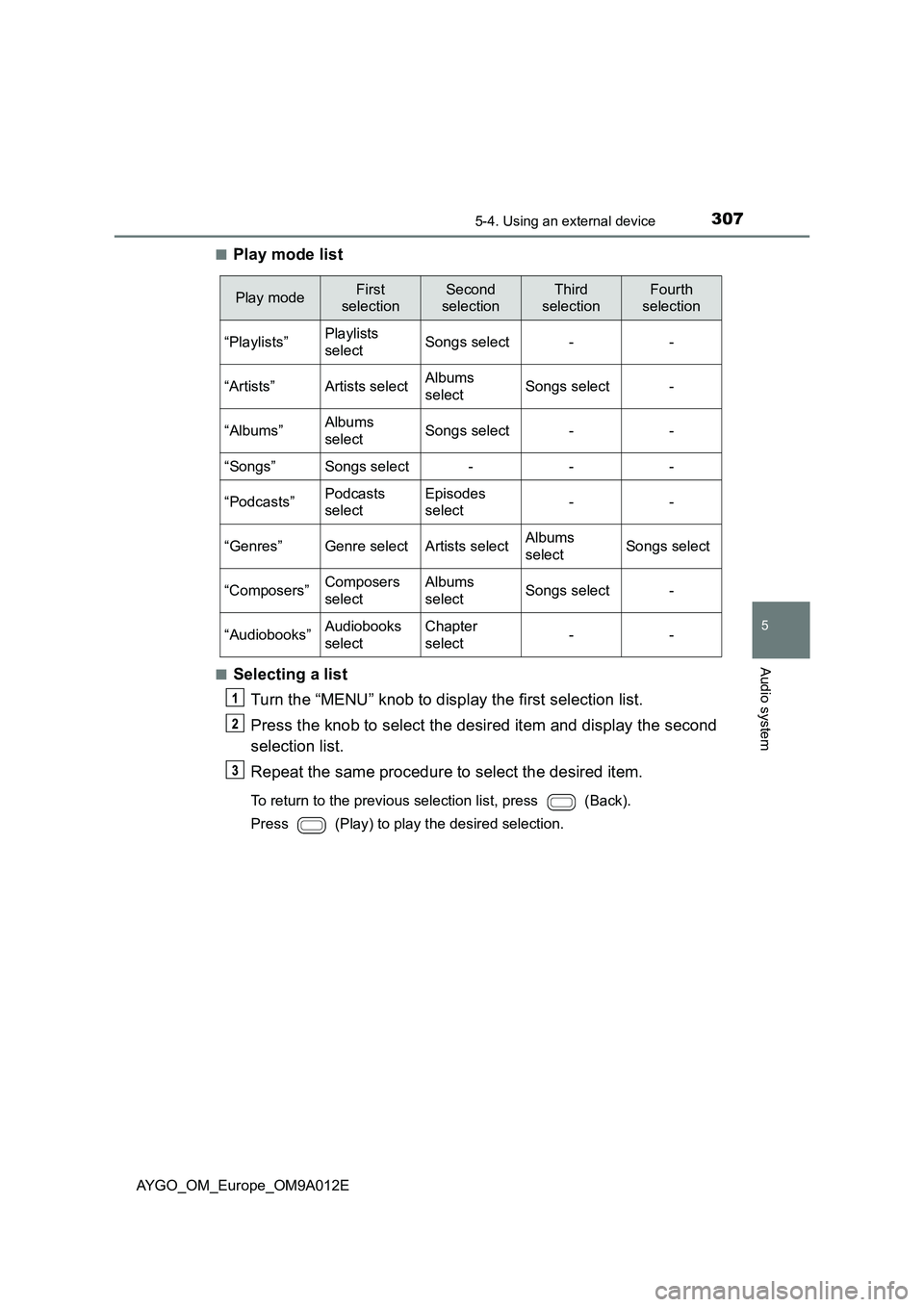
■Play mode list
■Selecting a list
Turn the “MENU” knob to display the first selection list.
Press the knob to select the desired item and display the second
selection list.
Repeat the same procedure to select the desired item.
To return to the previous selection list, press (Back).
Press (Play) to play the desired selection.
Play modeFirst
selection
Second
selection
Third
selection
Fourth
selection
“Playlists”Playlists
selectSongs select--
“Artists”Artists selectAlbums
selectSongs select-
“Albums”Albums
selectSongs select--
“Songs”Songs select---
“Podcasts”Podcasts
select
Episodes
select--
“Genres”Genre selectArtists selectAlbums
selectSongs select
“Composers”Composers
select
Albums
selectSongs select-
“Audiobooks”Audiobooks
select
Chapter
select--
Page 311 of 546
3095-4. Using an external device
5
Audio system
AYGO_OM_Europe_OM9A012E
■About iPod
●Use of the Made for Apple badge means that an accessory has been
designed to connect specifically to the Apple product(s) identified in the
badge, and has been certified by the developer to meet Apple performance
standards.
●Apple is not responsible for the operation of this device or its compliance
with safety and regulatory standards. Please note that the use of this acces-
sory with an Apple product may affect wireless performance.
●iPhone, iPod, iPod classic, iPod nano and iPod touch are trademarks of
Apple Inc., registered in the U.S. and other countries.
■iPod functions
●When an iPod is connected and the audio source is changed to iPod mode,
the iPod will resume play from the same point in which it was last used.
●Depending on the iPod that is connected to the system, certain functions
may not be available. Disconnecting the device and reconnecting it once
again may resolve some malfunctions.
●While connected to the system, the iPod cannot be operated with its own
controls. It is necessary to use the controls of the vehicle’s audio system
instead.
■iPod problems
To resolve most problems encountered when using your iPod, disconnect
your iPod from the vehicle iPod connection and reset it.
For instructions on how to reset your iPod, refer to your iPod Owner’s Man-
ual.
■Display
Depending on the contents recorded, the characters may not be displayed
properly or may not be displayed at all.
Page 319 of 546
3175-4. Using an external device
5
Audio system
AYGO_OM_Europe_OM9A012E■USB memory
●Compatible devices
USB memory that can be used for MP3 and WMA playback
●Compatible device formats
The following device formats can be used:
• USB communication formats: USB2.0 FS (12mbps)
• File formats: FAT12/16/32 (Windows)
• Correspondence class: Mass storage class
MP3 and WMA files written in any format other than those listed above may
not play correctly, and their file names and folder names may not be dis-
played correctly.
Items related to standards and limitations are as follows:
• Maximum directory hierarchy: 8 levels
• Maximum number of folders in a device: 999 (including the root)
• Maximum number of files in a device: 9999
• Maximum number of files per folder: 255
●MP3 and WMA files
MP3 (MPEG Audio LAYER3) is a standard audio compression format.
Files can be compressed to approximately 1/10 of their original size by
using MP3 compression.
WMA (Windows Media Audio) is a Microsoft audio compression format.
This format compresses audio data to a size smaller than that of the MP3
format.
There is a limit to the MP3 and WMA file standards and to the media/for-
mats recorded by them that can be used.
●MP3 file compatibility
• Compatible standards
MP3 (MPEG1 AUDIO LAYER II, III, MPEG2 AUDIO LAYER II, III,
MPEG2.5)
• Compatible sampling frequencies
MPEG1 AUDIO LAYER II, III: 32, 44.1, 48 (kHz)
MPEG2 AUDIO LAYER II, III: 16, 22.05, 24 (kHz)
MPEG 2.5: 8, 11.025, 12 (kHz)
• Compatible bit rates (compatible with VBR)
MPEG1 AUDIO LAYER II, III: 32—320 (kbps)
MPEG2 AUDIO LAYER II, III: 8—160 (kbps)
MPEG2.5: 8—160 (kbps)
• Compatible channel modes: stereo, joint stereo, dual channel and mon-
aural
Page 320 of 546
3185-4. Using an external device
AYGO_OM_Europe_OM9A012E●WMA file compatibility
• Compatible standards
WMA Ver. 7, 8, 9
• Compatible sampling frequencies
HIGH PROFILE 32, 44.1, 48 (kHz)
• Compatible bit rates
HIGH PROFILE 32—320 (kbps, CBR)
●File names
The only files that can be recognized as MP3/WMA and played are those
with the extension .mp3 or .wma.
●ID3 and WMA tags
ID3 tags can be added to MP3 files, making it possible to record the track
title, artist name, etc.
The system is compatible with ID3 Ver. 1.0, 1.1, and Ver. 2.2, 2.3, 2.4 ID3
tags. (The number of characters is based on ID3 Ver. 1.0 and 1.1.)
WMA tags can be added to WMA files, making it possible to record the
track title and artist name in the same way as with ID3 tags.
●MP3 and WMA playback
• When a device containing MP3 or WMA files is connected, all files in the
USB memory device are checked. Once the file check is finished, the first
MP3 or WMA file is played. To make the file check finish more quickly, we
recommend that you do not include any files other than MP3 or WMA
files or create any unnecessary folders.
• When the USB device is connected and the audio source is changed to
USB memory mode, the USB device will start playing the first file in the
first folder. If the same device is removed and reinserted (and the con-
tents have not been changed), the USB memory will resume play from
the same point in which it was last used.
●Extensions
If the file extensions .mp3 and .wma are used for files other than MP3 and
WMA files, they will be skipped (not played).
●Playback
• To play MP3 files with steady sound quality, we recommend a fixed bit
rate of at least 128 kbps and a sampling frequency of 44.1 kHz.
• There is a wide variety of freeware and other encoding software for MP3
and WMA files on the market, and depending on the status of the encod-
ing and the file format, poor sound quality or noise at the start of playback
may result. In some cases, playback may not be possible at all.
• Microsoft, Windows, and Windows Media are registered trademarks of
Microsoft Corporation in the U.S.A. and other countries.
Page 346 of 546
3445-9. Bluetooth®
AYGO_OM_Europe_OM9A012E
■When transferring ownership of the vehicle
Be sure to initialize the system to prevent personal data from being improp-
erly accessed. (P. 332)
■About Bluetooth
®
■Compatible models
●Bluetooth® specifications:
Ver. 1.1, or higher (Recommended: Ver. 2.1 + EDR or higher)
●Following Profiles:
• A2DP (Advanced Audio Distribution Profile) Ver. 1.0 or higher (recom-
mended: Ver. 1.2 or higher)
• AVRCP (Audio/Video Remote Control Profile) Ver. 1.0 or higher (recom-
mended: Ver. 1.3 or higher)
Portable players must correspond to the above specifications in order to be
connected to the Bluetooth
® audio/phone. However, please note that some
functions may be limited depending on the type of portable player.
●Cellular phone
• HFP (Hands Free Profile) Ver. 1.0 or higher (Recommended: Ver. 1.5)
• OPP (Object Push Profile) Ver. 1.1
• PBAP (Phone Book Access Profile) Ver. 1.0 The Bluetooth word mark and logos are
registered trademarks owned by Blue-
tooth SIG, Inc. and any use of such marks
by Panasonic Corporation is under
license. Other trademarks and trade
names are those of their respective own-
ers.
Page 358 of 546
3566-1. Using the air conditioning system and defogger
AYGO_OM_Europe_OM9A012E
■Fogging up of the windows (type B only)
●The windows will easily fog up when the humidity in the vehicle is high.
Turning on will dehumidify the air from the outlets and defog the wind-
shield effectively.
●If you turn off, the windows may fog up more easily.
●The windows may fog up if the recirculated air mode is used.
■When driving on dusty roads (type B only)
Close all windows. If dust thrown up by the vehicle is still drawn into the vehi-
cle after closing the windows, it is recommended that the air intake mode be
set to outside air mode and the fan speed to any setting except off.
■Outside/recirculated air mode (type B only)
Setting to the recirculated air mode temporarily is recommended in prevent-
ing dirty air from entering the vehicle interior and helping to cool the vehicle
when the outside air temperature is high.
■When the outside temperature falls to nearly 0C (32F) (type B only)
The dehumidification function may not operate even when is pressed.
■Ventilation and air conditioning odors (type B only)
●To let fresh air in, set the air conditioning system to the outside air mode.
●During use, various odors from inside and outside the vehicle may enter into
and accumulate in the air conditioning system. This may then cause odor to
be emitted from the vents.
●To reduce potential odors from occurring:
It is recommended that the air conditioning system be set to outside air
mode prior to turning the vehicle off.
■An odor comes from the air conditioning system due to the Stop & Start
system operation (vehicles with a Stop & Start system)
When the engine is stopped due to the Stop & Start system, an odor caused
by moisture may be detected. This does not indicate a malfunction.
■Air conditioning filter
P. 414
Page 364 of 546
3626-1. Using the air conditioning system and defogger
AYGO_OM_Europe_OM9A012E
■Using automatic mode
Fan speed is adjusted automatically according to the temperature setting and
the ambient conditions.
Therefore, the fan may stop for a while until warm or cool air is ready to flow
immediately after is pressed.
■Fogging up of the windows
●The windows will easily fog up when the humidity in the vehicle is high.
Turning on will dehumidify the air from the outlets and defog the wind-
shield effectively.
●If you turn off, the windows may fog up more easily.
●The windows may fog up if the recirculated air mode is used.
■When driving on dusty roads
Close all windows. If dust thrown up by the vehicle is still drawn into the vehi-
cle after closing the windows, it is recommended that the air intake mode be
set to outside air mode and the fan speed to any setting except off.
■Outside/recirculated air mode
●Setting to the recirculated air mode temporarily is recommended in prevent-
ing dirty air from entering the vehicle interior and helping to cool the vehicle
when the outside air temperature is high.
●Outside/recirculated air mode may automatically switch depending on the
temperature setting or the inside temperature.
■When the outside temperature falls to nearly 0C (32F)
The dehumidification function may not operate even when is selected.
■Ventilation and air conditioning odors
●To let fresh air in, set the air conditioning system to the outside air mode.
●During use, various odors from inside and outside the vehicle may enter into
and accumulate in the air conditioning system. This may then cause odor to
be emitted from the vents.
●To reduce potential odors from occurring:
• It is recommended that the air conditioning system be set to outside air
mode prior to turning the vehicle off.
• The start timing of the blower may be delayed for a short period of time
immediately after the air conditioning system is started in automatic
mode.
Page 376 of 546
3746-4. Other interior features
AYGO_OM_Europe_OM9A012E
Vehicles with a multimedia system
Refer to the “Multimedia owner’s manual”.
Vehicles without a multimedia system
“MENU” knob
“Back” button
Display can be returned to the
previous screen, by pressing the
“Back” button.
■
Adjusting the clock
Press the “MENU” knob when the vehicle is stopped.
Select “Clock” on the menu
screen.
Turn the “MENU” knob to adjust the hours.
After adjusting the hours, press the “MENU” knob to input the hours.
Turn the “MENU” knob to adjust the minutes.
After adjusting the minutes, press the “MENU” knob to input the min-
utes.
■The clock is displayed when
Vehicles without a smart entry & start system
The engine switch is in the “ACC” or “ON” position.
Vehicles with a smart entry & start system
The engine switch is in ACCESSORY or IGNITION ON mode.
■When disconnecting and reconnecting battery terminals
The clock data will be reset.
Clock (if equipped)
1
2