light TOYOTA C-HR 2021 Owners Manual (in English)
[x] Cancel search | Manufacturer: TOYOTA, Model Year: 2021, Model line: C-HR, Model: TOYOTA C-HR 2021Pages: 56, PDF Size: 6.27 MB
Page 2 of 56
C-HR 2021
This Quick Reference Guide is a summary of basic vehicle
operations. It contains brief descriptions of fundamental
operations so you can locate and use the vehicle’s main
equipment quickly and easily.
The Quick Reference Guide is not intended as a substitute for
the Owner’s Manual located in your vehicle’s glove box. We
strongly encourage you to review the Owner’s Manual and sup-
plementary manuals so you will have a better understanding of
your vehicle’s capabilities and limitations.
Your dealership and the entire staff of Toyota Motor North
America, Inc. wish you many years of satisfied driving in your
new C-HR.
A word about safe vehicle operations
This Quick Reference Guide is not a full description of C-HR operations. Every
C-HR owner should review the Owner’s Manual that accompanies this vehicle.
Pay special attention to the boxed information highlighted in color throughout
the Owner’s Manual. Each box contains safe operating instructions to help you
avoid injury or equipment malfunction.
All information in this Quick Reference Guide is current at the time of printing.
Toyota reserves the right to make changes at any time without notice.
64380_Cvr_MY21_C-HR.indd 27/21/20 9:47 AM
Page 3 of 56
1
OVERVIEW
FEATURES & OPERATIONS
TOYOTA SAFETY SENSE
SAFETY & EMERGENCY FEATURES
1 Visit your Toyota dealer for information on customizing this feature.2 Programmable by customer. Refer to the Owner’s Manual for instructions and more information.
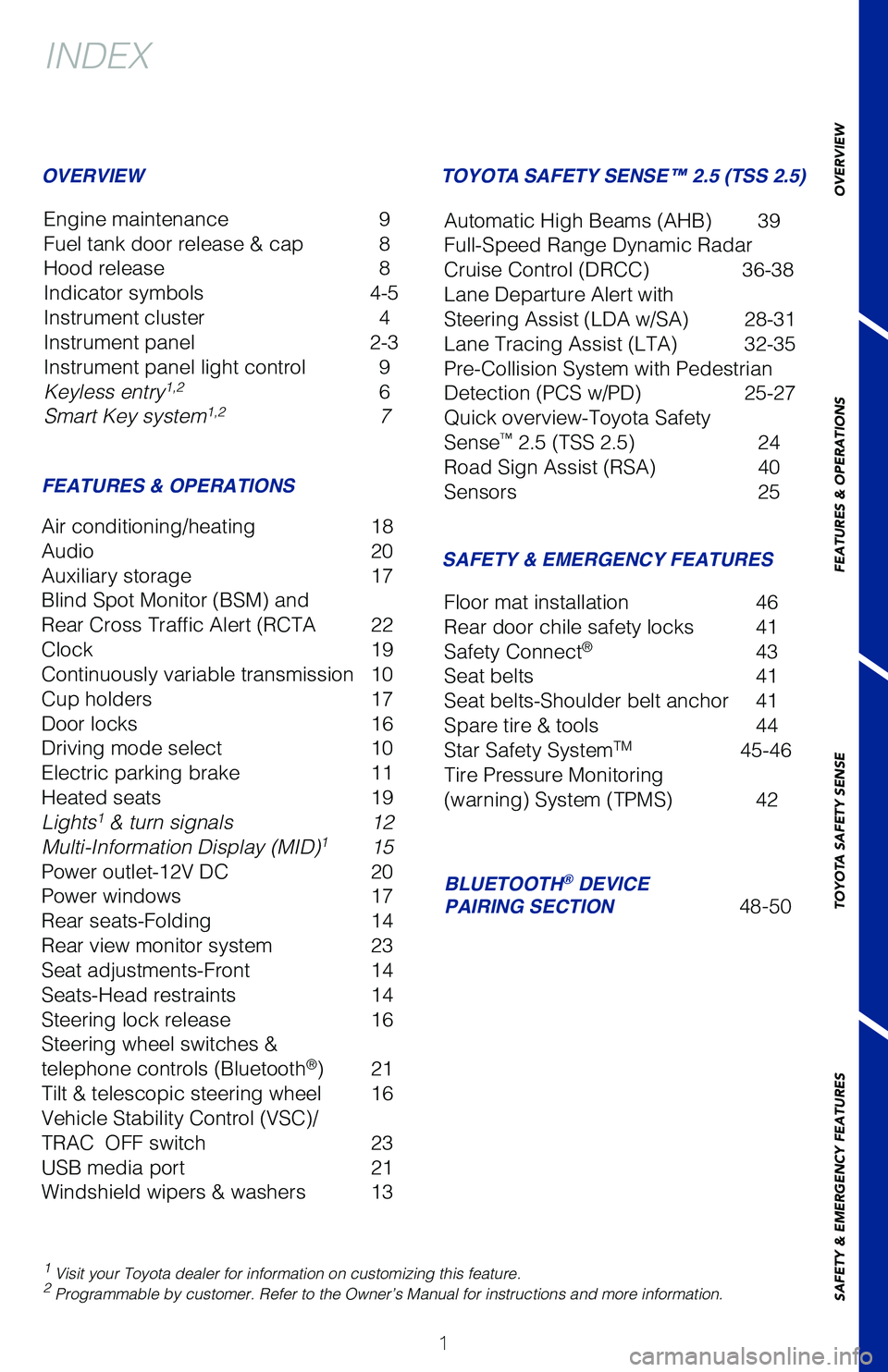
INDEX
Engine maintenance 9
Fuel tank door release & cap 8
Hood release 8
Indicator symbols 4-5
Instrument cluster 4
Instrument panel 2-3
Instrument panel light control 9
Keyless entry
1,2 6
Smart Key system1,2 7
OVERVIEW
FEATURES & OPERATIONS
Air conditioning/heating 18
Audio 20
Auxiliary storage 17
Blind Spot Monitor (BSM) and
Rear Cross Traffic Alert (RCTA 22
Clock 19
Continuously variable transmission 10
Cup holders 17
Door locks 16
Driving mode select 10
Electric parking brake 11
Heated seats 19
Lights
1 & turn signals 12
Multi-Information Display (MID)1 15
Power outlet-12V DC 20
Power windows 17
Rear seats-Folding 14
Rear view monitor system 23
Seat adjustments-Front 14
Seats-Head restraints 14
Steering lock release 16
Steering wheel switches &
telephone controls (Bluetooth
®) 21
Tilt & telescopic steering wheel 16
Vehicle Stability Control (VSC)/
TRAC OFF switch 23
USB media port 21
Windshield wipers & washers 13
SAFETY & EMERGENCY FEATURES
TOYOTA SAFETY SENSE™ 2.5 (TSS 2.5)
BLUETOOTH
® DEVICE
PAIRING SECTION 48-50
Floor mat installation
46
Rear door chile safety locks 41
Safety Connect
® 43
Seat belts 41
Seat belts-Shoulder belt anchor 41
Spare tire & tools 44
Star Safety System
TM 45-46
Tire Pressure Monitoring
(warning) System (TPMS) 42 Automatic High Beams (AHB) 39
Full-Speed Range Dynamic Radar
Cruise Control (DRCC) 36-38
Lane Departure Alert with
Steering Assist (LDA w/SA) 28-31
Lane Tracing Assist (LTA) 32-35
Pre-Collision System with Pedestrian
Detection (PCS w/PD) 25-27
Quick overview-Toyota Safety
Sense
™ 2.5 (TSS 2.5) 24
Road Sign Assist (RSA) 40
Sensors 25
64380_Txt_MY21_C-HR.indd 17/21/20 10:32 AM
Page 4 of 56
2
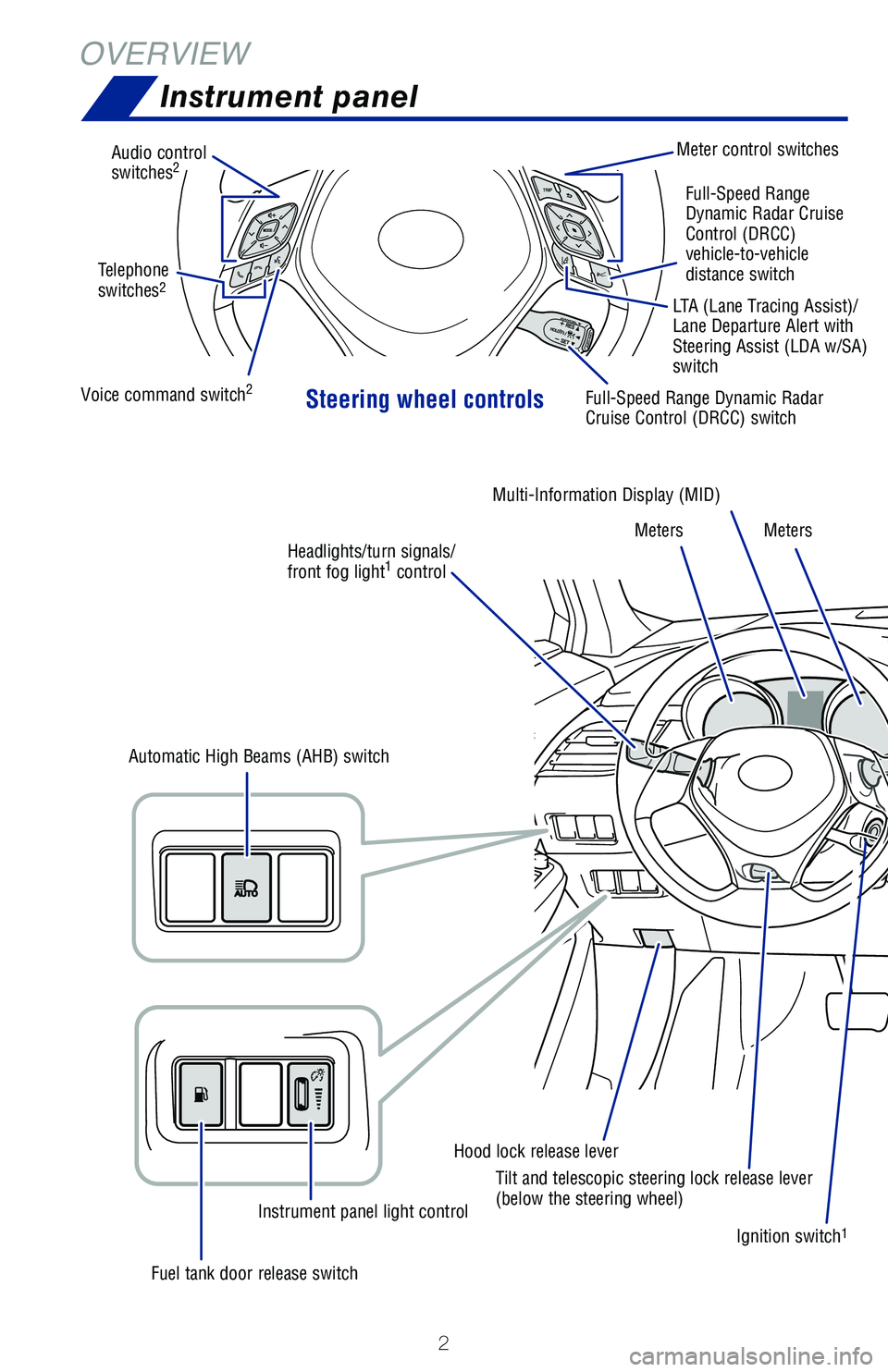
OVERVIEWInstrument panel
Steering wheel controls
Audio control
switches2Meter control switches
Voice command switch
2Full-Speed Range Dynamic Radar
Cruise Control (DRCC) switch
Ignition switch
1
Hood lock release leverMulti-Information Display (MID)
Meters Meters
Fuel tank door release switch Instrument panel light control
Automatic High Beams (AHB) switch
Tilt and telescopic steering lock release lever
(below the steering wheel)Full-Speed Range
Dynamic Radar Cruise
Control (DRCC)
vehicle-to-vehicle
distance switch
Telephone
switches
2LTA (Lane Tracing Assist)/
Lane Departure Alert with
Steering Assist (LDA w/SA)
switch
Headlights/turn signals/
front fog light
1 control
64380_Txt_MY21_C-HR.indd 27/21/20 10:32 AM
Page 6 of 56
4
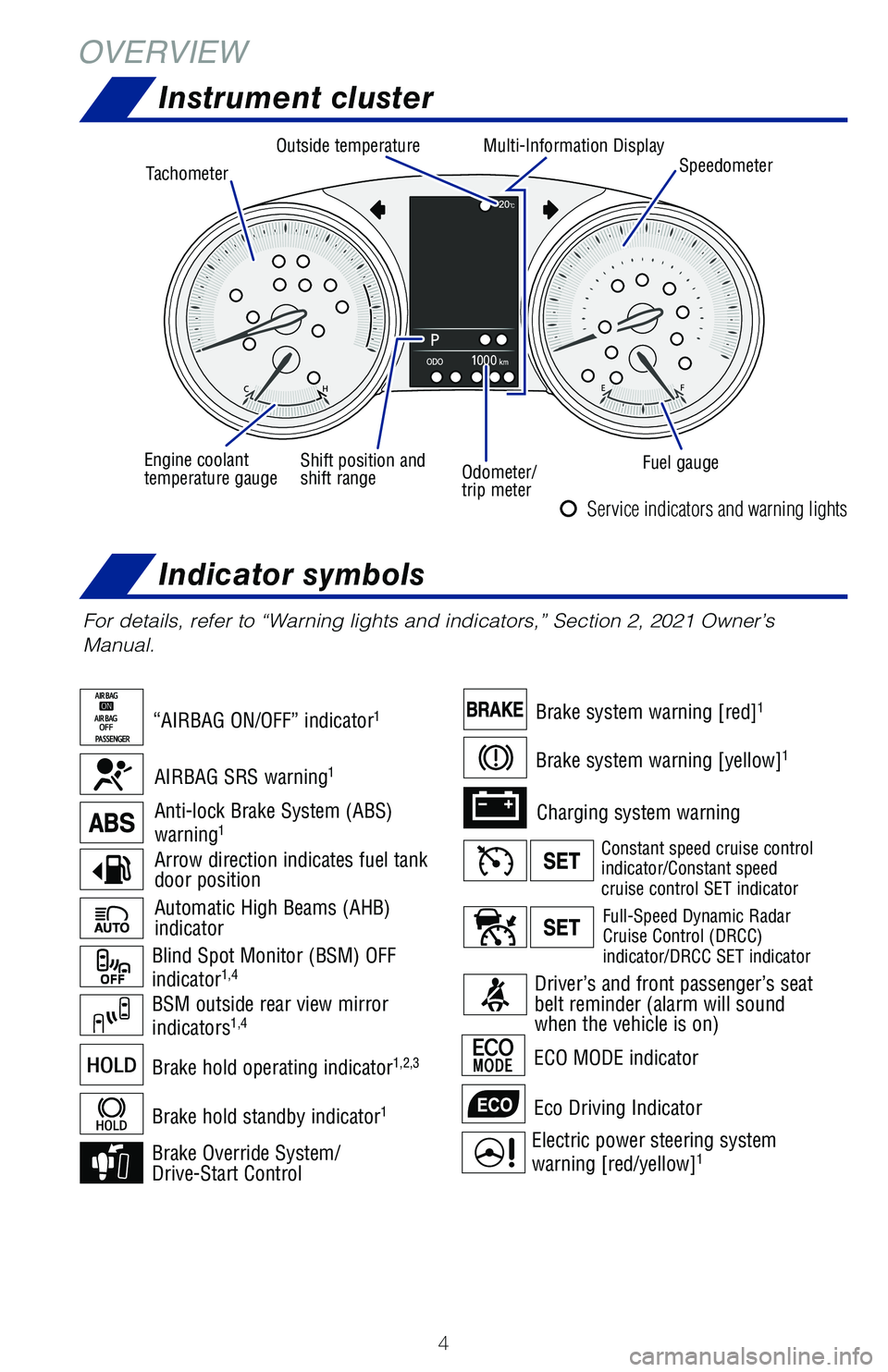
OVERVIEWInstrument cluster
Indicator symbols
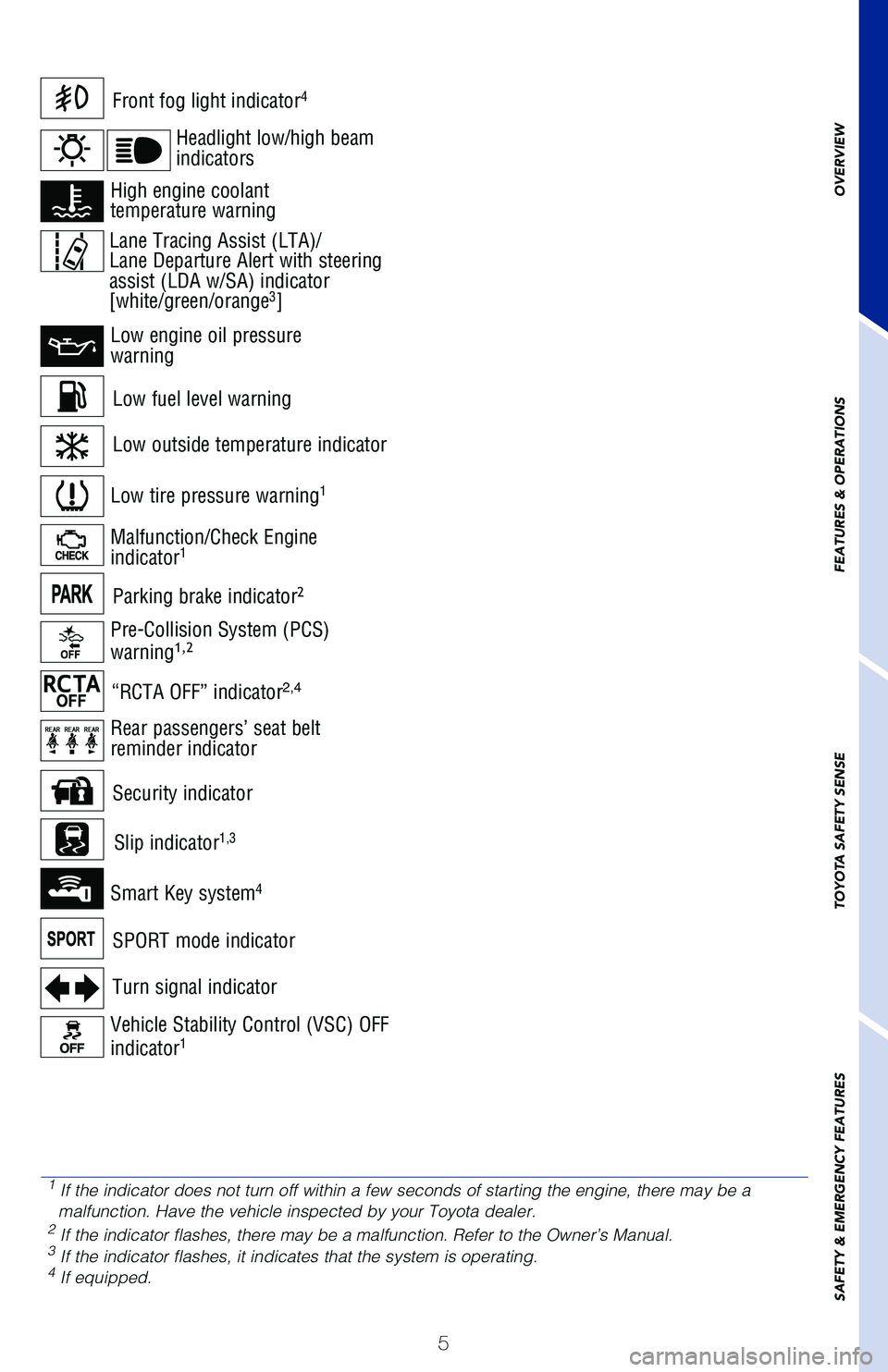
For details, refer to “Warning lights and indicators,” Section 2, 2021 Owner’s
Manual.
Automatic High Beams (AHB)
indicator
Electric power steering system
warning [red/yellow]1
BSM outside rear view mirror
indicators1,4
Charging system warning
Brake Override System/
Drive-Start Control ECO MODE indicator
Eco Driving Indicator
Arrow direction indicates fuel tank
door position
Anti-lock Brake System (ABS)
warning1
Blind Spot Monitor (BSM) OFF
indicator1,4
Brake system warning [red]1
Brake system warning [yellow]1
Brake hold operating indicator1,2,3
Brake hold standby indicator1
“AIRBAG ON/OFF” indicator1
AIRBAG SRS warning1
Service indicators and warning lights
Driver’s and front passenger’s seat
belt reminder (alarm will sound
when the vehicle is on)
Constant speed cruise control
indicator/Constant speed
cruise control SET indicator
Full-Speed Dynamic Radar
Cruise Control (DRCC)
indicator/DRCC SET indicator
Tachometer
Outside temperature
Fuel gauge
Shift position and
shift range
Engine coolant
temperature gauge
Odometer/
trip meterMulti-Information Display
Speedometer
64380_Txt_MY21_C-HR.indd 47/21/20 10:32 AM
Page 7 of 56
5
OVERVIEW
FEATURES & OPERATIONS
TOYOTA SAFETY SENSE
SAFETY & EMERGENCY FEATURES
Low fuel level warning
Front fog light indicator4
Turn signal indicator
Low tire pressure warning1
Vehicle Stability Control (VSC) OFF
indicator1
Malfunction/Check Engine
indicator1
Low engine oil pressure
warning
High engine coolant
temperature warning
Smart Key system4
ECO MODE indicator
SPORT mode indicator
Parking brake indicator2
Headlight low/high beam
indicators
Pre-Collision System (PCS)
warning1,2
Rear passengers’ seat belt
reminder indicator
Slip indicator
1,3
Security indicator
Low outside temperature indicator
“RCTA OFF” indicator2,4
1 If the indicator does not turn off within a few seconds of starting the engine, there may be a
malfunction. Have the vehicle inspected by your Toyota dealer.
2 If the indicator flashes, there may be a malfunction. Refer to the Owner’s Manual.3 If the indicator flashes, it indicates that the system is operating.4 If equipped.
Lane Tracing Assist (LTA)/
Lane Departure Alert with steering
assist (LDA w/SA) indicator
[white/green/orange
3]
64380_Txt_MY21_C-HR.indd 57/21/20 10:32 AM
Page 11 of 56
9
OVERVIEW
FEATURES & OPERATIONS
TOYOTA SAFETY SENSE
SAFETY & EMERGENCY FEATURES
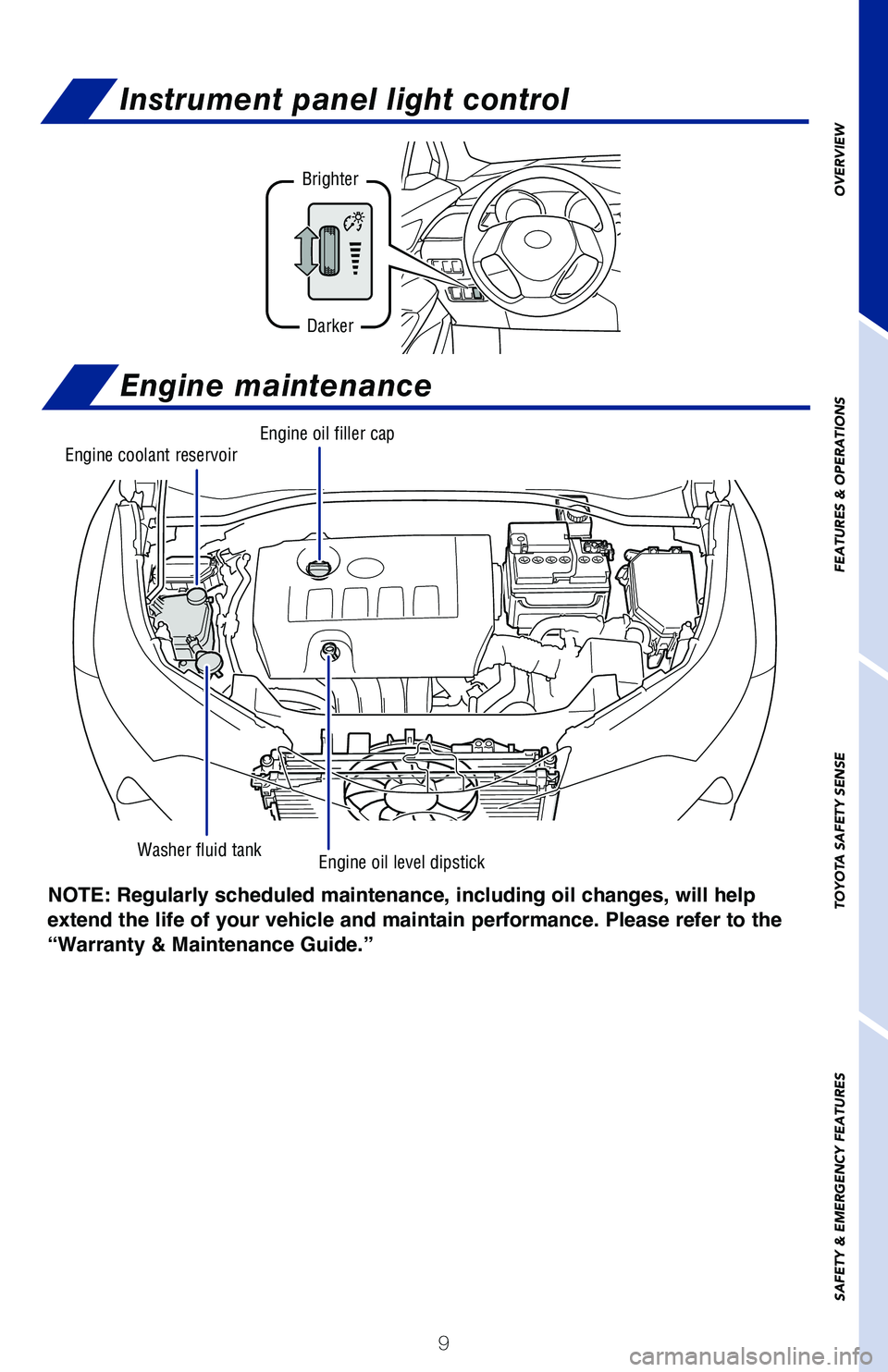
NOTE: Regularly scheduled maintenance, including oil changes, will help
extend the life of your vehicle and maintain performance. Please refer to the
“Warranty & Maintenance Guide.”
Engine maintenance
Washer fluid tank
Engine coolant reservoirEngine oil filler cap
Engine oil level dipstick
Instrument panel light control
Brighter
Darker
64380_Txt_MY21_C-HR.indd 97/21/20 10:32 AM
Page 13 of 56
11
OVERVIEW
FEATURES & OPERATIONS
TOYOTA SAFETY SENSE
SAFETY & EMERGENCY FEATURES
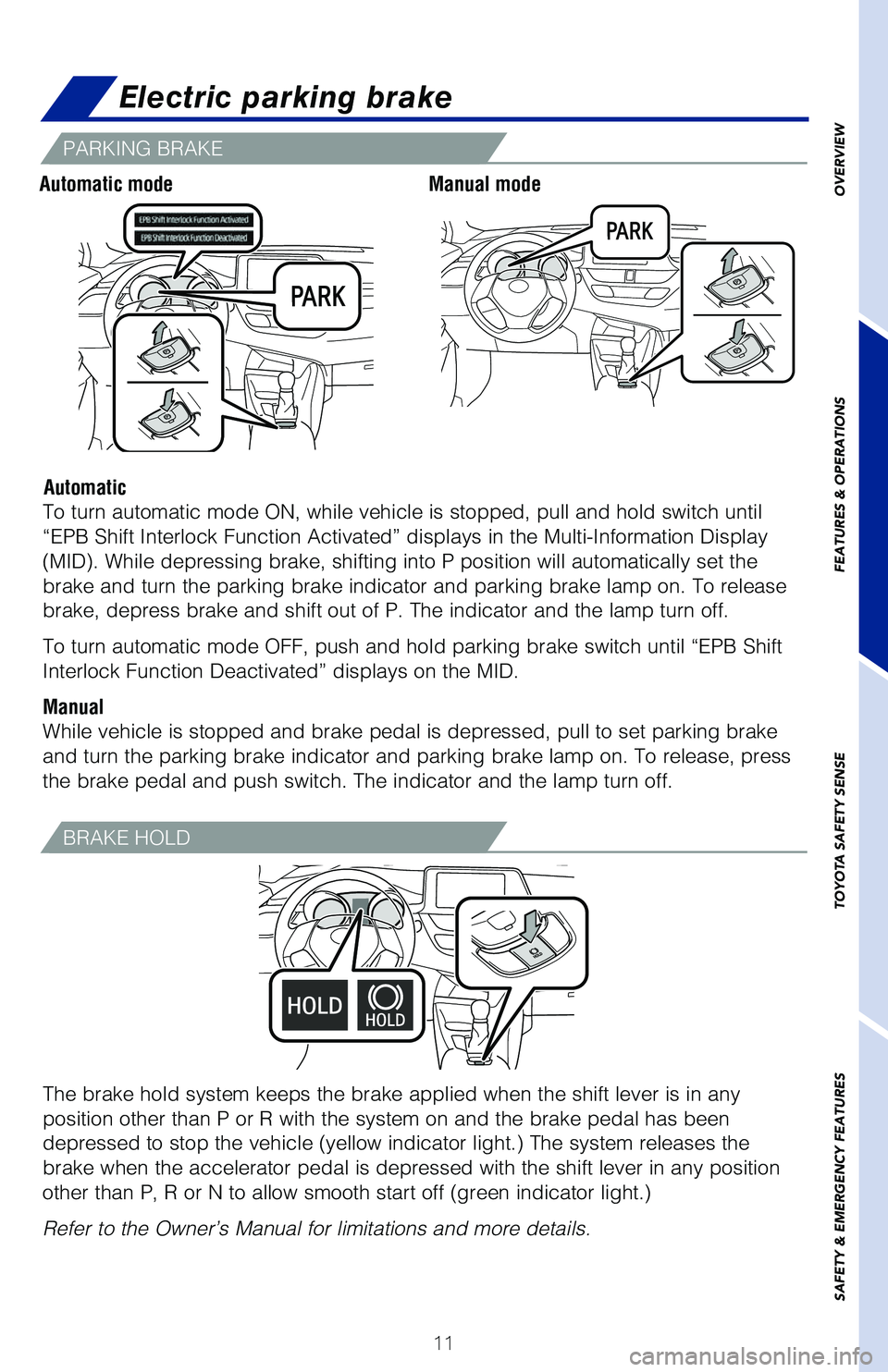
PARKING BRAKE
Electric parking brake
Automatic modeManual mode
Automatic
To turn automatic mode ON, while vehicle is stopped, pull and hold switch until
“EPB Shift Interlock Function Activated” displays in the Multi-Information Display
(MID). While depressing brake, shifting into P position will automatically set the
brake and turn the parking brake indicator and parking brake lamp on. To release
brake, depress brake and shift out of P. The indicator and the lamp turn off.
To turn automatic mode OFF, push and hold parking brake switch until “EPB Shift
Interlock Function Deactivated” displays on the MID.
Manual
While vehicle is stopped and brake pedal is depressed, pull to set parking brake
and turn the parking brake indicator and parking brake lamp on. To release, press
the brake pedal and push switch. The indicator and the lamp turn off.
The brake hold system keeps the brake applied when the shift lever is in any
position other than P or R with the system on and the brake pedal has been
depressed to stop the vehicle (yellow indicator light.) The system releases the
brake when the accelerator pedal is depressed with the shift lever in any position
other than P, R or N to allow smooth start off (green indicator light.)
Refer to the Owner’s Manual for limitations and more details.
BRAKE HOLD
64380_Txt_MY21_C-HR.indd 117/21/20 10:32 AM
Page 14 of 56
12
FEATURES & OPERATIONS
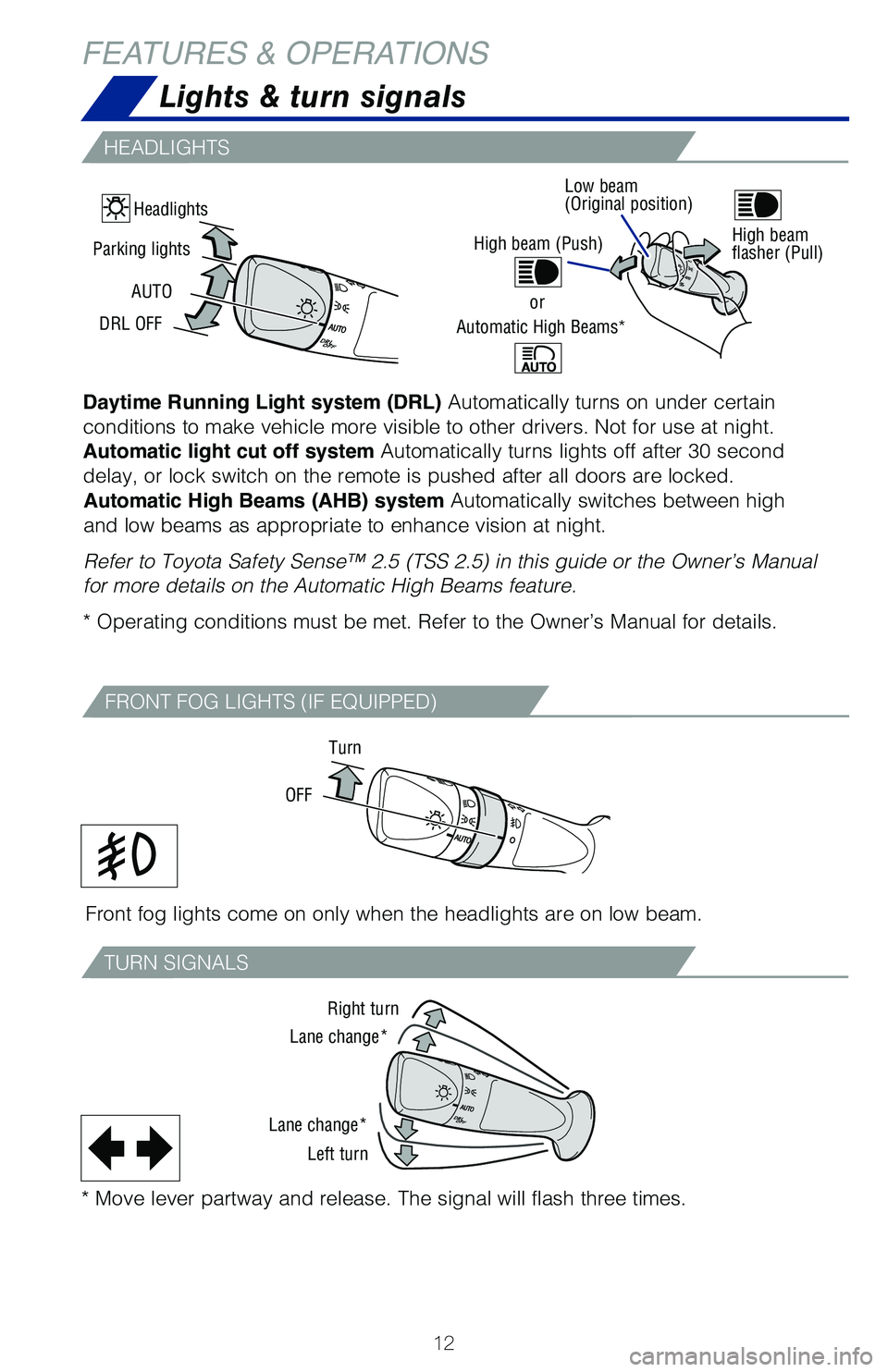
Daytime Running Light system (DRL) Automatically turns on under certain
conditions to make vehicle more visible to other drivers. Not for use at night.
Automatic light cut off system Automatically turns lights off after 30 second
delay, or lock switch on the remote is pushed after all doors are locked.Automatic High Beams (AHB) system Automatically switches between high
and low beams as appropriate to enhance vision at night.
Refer to Toyota Safety Sense™ 2.5 (TSS 2.5) in this guide or the Owner’s Manual
for more details on the Automatic High Beams feature.
* Operating conditions must be met. Refer to the Owner’s Manual for details.
High beam (Push)
or
Automatic High Beams*
Front fog lights come on only when the headlights are on low beam.
Turn
OFF
FRONT FOG LIGHTS (IF EQUIPPED)
Lights & turn signals
HEADLIGHTS
TURN SIGNALS
Right turn
Lane change*
Lane change* Left turn
* Move lever partway and release. The signal will flash three times.
High beam
flasher (Pull)
Headlights
Parking lights
DRL OFF AUTO
Low beam
(Original position)
64380_Txt_MY21_C-HR.indd 127/21/20 10:32 AM
Page 18 of 56
16
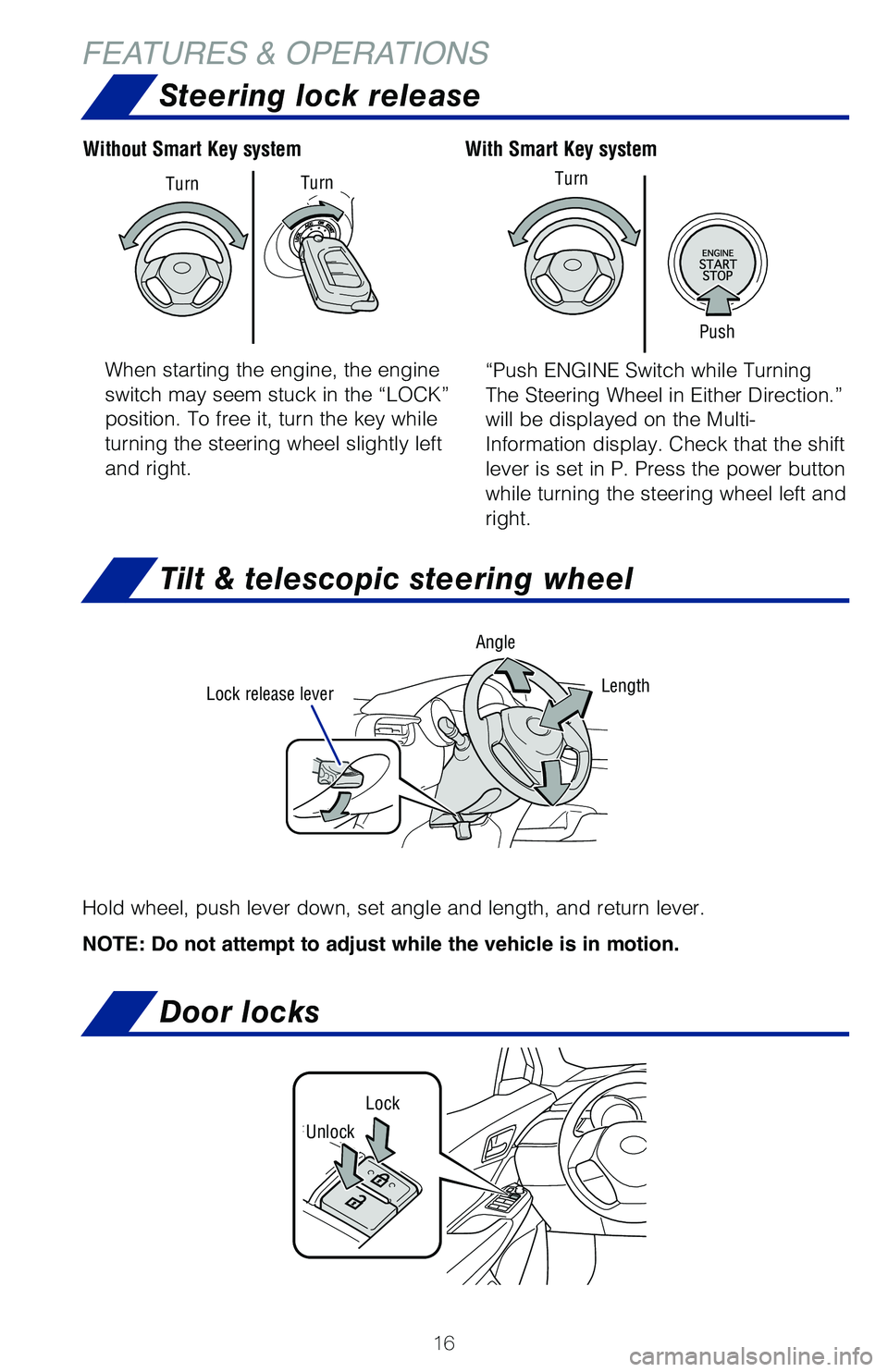
FEATURES & OPERATIONSTilt & telescopic steering wheel
Lock release lever AngleLength
Hold wheel, push lever down, set angle and length, and return lever.
NOTE: Do not attempt to adjust while the vehicle is in motion.
When starting the engine, the engine
switch may seem stuck in the “LOCK”
position. To free it, turn the key while
turning the steering wheel slightly left
and right. “Push ENGINE Switch while Turning
The Steering Wheel in Either Direction.”
will be displayed on the Multi-
Information display. Check that the shift
lever is set in P. Press the power button
while turning the steering wheel left and
right.
With Smart Key system
Without Smart Key system
Push
Turn
Turn
Turn
Steering lock release
Door locks
Lock
Unlock
64380_Txt_MY21_C-HR.indd 167/21/20 10:32 AM
Page 21 of 56
19
OVERVIEW
FEATURES & OPERATIONS
TOYOTA SAFETY SENSE
SAFETY & EMERGENCY FEATURES
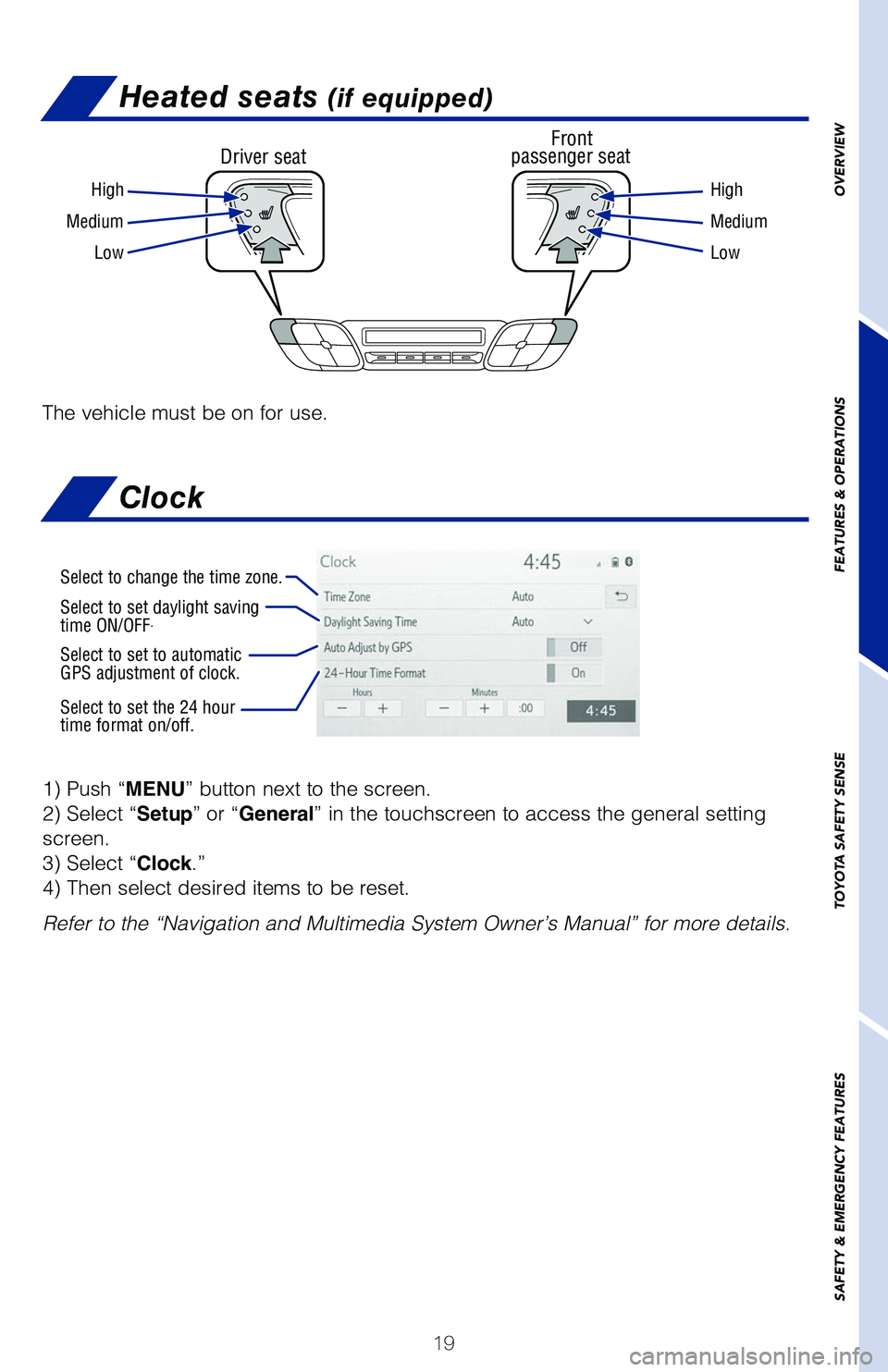
Heated seats (if equipped)
Driver seat Front
passenger seat
High High
Medium Medium
Low Low
The vehicle must be on for use.
1) Push “MENU” button next to the screen.
2) Select “Setup” or “General” in the touchscreen to access the general setting
screen.
3) Select “Clock.”
4) Then select desired items to be reset.
Refer to the “Navigation and Multimedia System Owner’s Manual” for more details.
Select to change the time zone.
Select to set daylight saving
time ON/OFF.
Select to set to automatic
GPS adjustment of clock.
Select to set the 24 hour
time format on/off.
Clock
64380_Txt_MY21_C-HR.indd 197/21/20 10:32 AM