change time TOYOTA C-HR 2021 (in English) User Guide
[x] Cancel search | Manufacturer: TOYOTA, Model Year: 2021, Model line: C-HR, Model: TOYOTA C-HR 2021Pages: 548, PDF Size: 12.51 MB
Page 213 of 548
2134-3. Operating the lights and wipers
4
Driving
C-HR_OM_USA_OM10684U■
Temporarily lowering sensor sensitivity
The sensitivity of the sensor can be temporarily lowered.
Turn the engine switch off while the following conditions are m et.
• The headlight switch is in or .
• The headlight switch lever is in high beam position.
• Automatic High Beam switch is on.
Turn the engine switch to ON mode.
Within 30 seconds after , repeat pulling the headlight switch lever to the
original position then pushing it to the high beam position qui ckly 10 times,
then leave the lever in high beam position.
If the sensitivity is changed, the Automatic High Beam indicato r is turn on
and off 3 times.
Automatic High Beam (headlights) may turn on even the vehicle i s stopped.
■ If “Headlight System Malfunction. Visit Your Dealer.” is displayed on the
multi-information display
The system may be malfunctioning. Have the vehicle inspected by your
Toyota dealer.
1
2
32
4
Page 230 of 548

2304-5. Using the driving support systems
C-HR_OM_USA_OM10684U●
In the following situations, if the situation has changed (or the vehicle has
been driven for some time) and the normal operating conditions are
detected, the message will disappear and the system will become opera-
tional.
If the message does not disappear, contact your Toyota dealer. • When the temperature around the radar sensor is outside of the opera-
tional range, such as when the vehicle is in the sun or in an e xtremely
cold environment
• When the front camera cannot detect objects in front of the ve hicle, such
as when driving in the dark, snow, or fog, or when bright lights are shining
into the front camera
• Depending on the conditions in the vicinity of the vehicle, th e radar may
judge the surrounding environment can not be properly recognize d. In
that case, “Pre-Collision System Unavailable See owner’s manual .” is
displayed.
Page 244 of 548
2444-5. Using the driving support systems
C-HR_OM_USA_OM10684U• If a pedestrian/bicyclist is wearing oversized clothing (a rai
n coat, long
skirt, etc.), making their silhouette obscure
• If a pedestrian is bending forward or squatting or bicyclist i s bending for-
ward
• If a pedestrian/bicyclist is moving fast
• If a pedestrian is pushing a stroller, wheelchair, bicycle or other vehicle
• When driving in inclement weather such as heavy rain, fog, snow or a sandstorm
• When driving through steam or smoke
• When the surrounding area is dim, such as at dawn or dusk, or while at
night or in a tunnel, making a detectable object appear to be n early the
same color as its surroundings
• When driving in a place where the surrounding brightness changes sud- denly, such as at the entrance or exit of a tunnel
• After the engine has started the vehicle has not been driven for a certain amount of time
• While making a left/right turn and for a few seconds after mak ing a left/
right turn
• While driving on a curve and for a few seconds after driving o n a curve
• If your vehicle is skidding
• If the wheels are misaligned
• If a wiper blade is blocking the front camera
• The vehicle is being driven at extremely high speeds
• When driving on a hill
• If the radar sensor or front camera is misaligned
• When driving in a traffic lane separated by more than one lane where
oncoming vehicles are driving while making a right/left turn
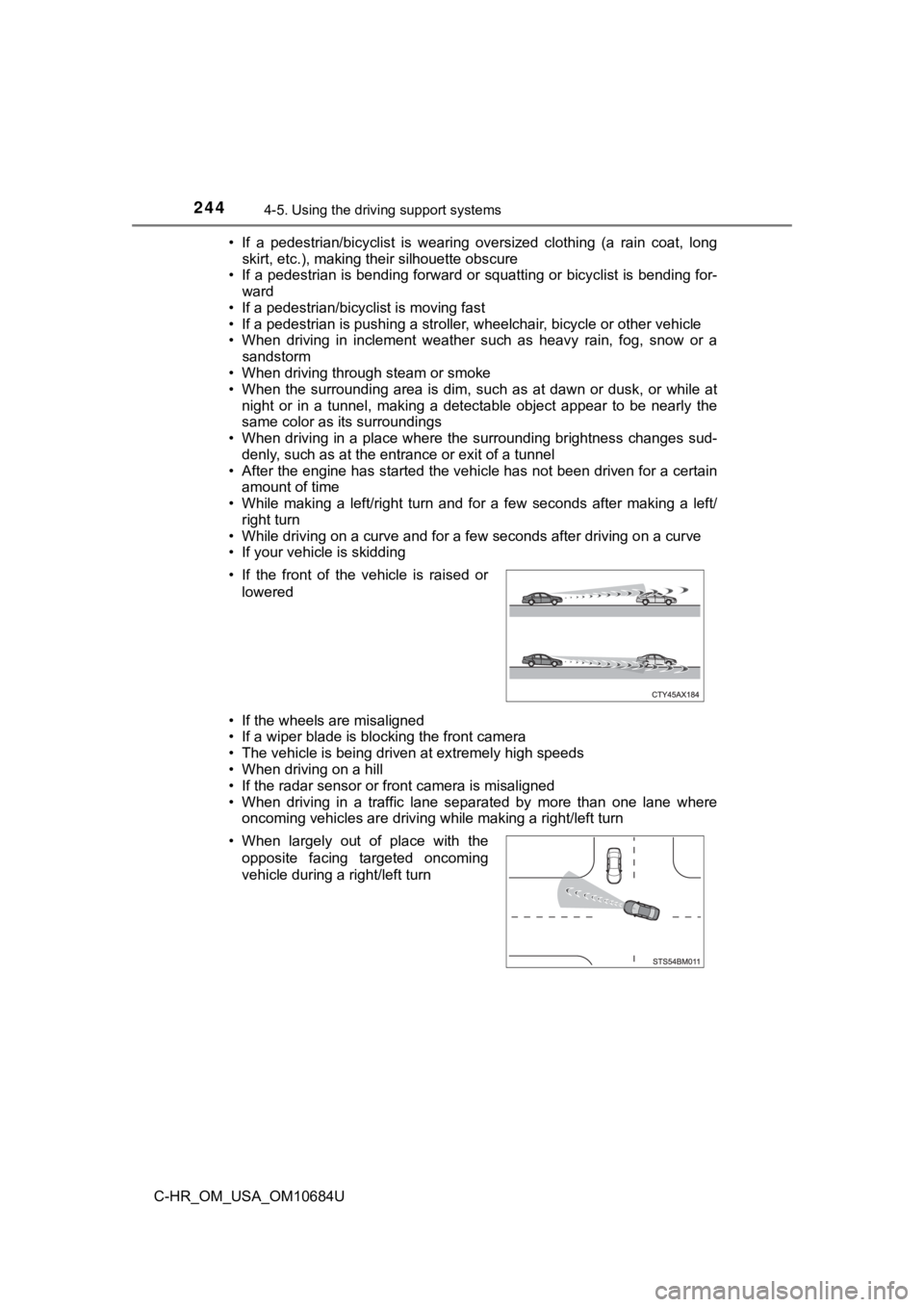
• If the front of the vehicle is raised or
lowered
• When largely out of place with the opposite facing targeted oncoming
vehicle during a right/left turn
Page 254 of 548
2544-5. Using the driving support systems
C-HR_OM_USA_OM10684U■
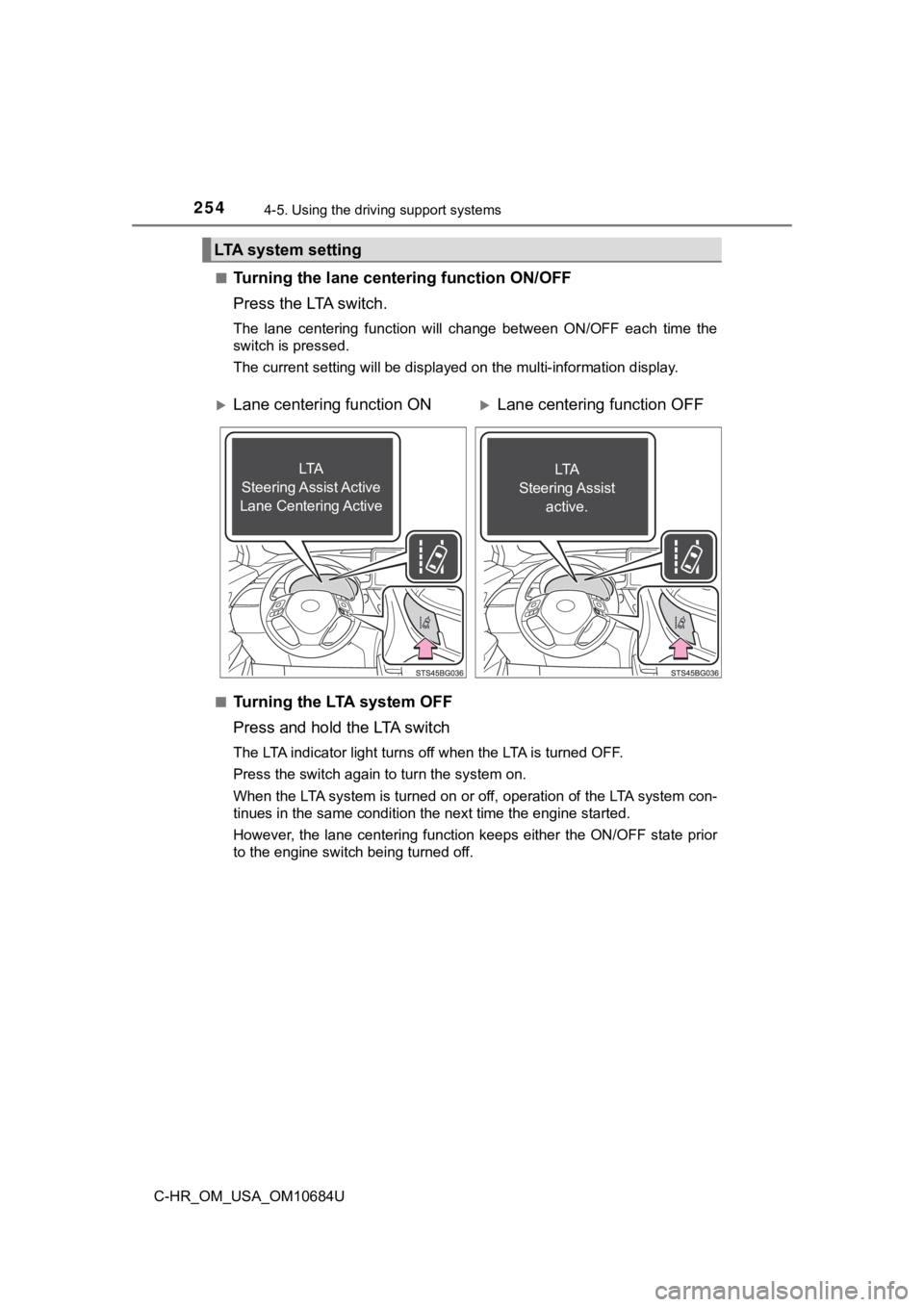
Turning the lane cen
tering function ON/OFF
Press the LTA switch.
The lane centering function will change between ON/OFF each tim e the
switch is pressed.
The current setting will be displayed on the multi-information display.
■
Tu r n i n g t h e LTA s y s t e m O F F
Press and hold the LTA switch
The LTA indicator light turns off when the LTA is turned OFF.
Press the switch again to turn the system on.
When the LTA system is turned on or off, operation of the LTA s ystem con-
tinues in the same condition the next time the engine started.
However, the lane centering function keeps either the ON/OFF st ate prior
to the engine switch being turned off.
LTA system setting
Lane centering function ONLane centering function OFF
LTA
Steering Assist Active
Lane Centering ActiveLTA
Steering Assist active.
Page 264 of 548
2644-5. Using the driving support systems
C-HR_OM_USA_OM10684U
■Setting procedure
Press “ ” or “ ” of meter control switches and select . ( P. 100)
Press “ ” or “ ” of meter control switches and select , and press .
■ Automatic turn-off of RSA sign display
In the following situations, a displayed speed limit sign and/o r do not enter
sign will stop being displayed automatically:
● No sign has been recognized for a certain distance.
● The road changes due to a left or right turn, etc.
In the following situations, stop and yield signs will stop bei ng displayed auto-
matically:
● The system determines that your vehicle has passed the sign.
● The road changes due to a left or right turn, etc.
■ Conditions in which the function may not operate or detect correctly
In the following situations, RSA does not operate normally and may not rec-
ognize signs, display the incorrect sign, etc. However, this do es not indicate a
malfunction.
● The front camera is misaligned due to a strong impact being applied to the
sensor, etc.
● Dirt, snow, stickers, etc., are on the windshield near the fron t camera.
● In inclement weather such as heavy rain, fog, snow or sand storms
● Light from an oncoming vehicle, the sun, etc., enters the front camera.
● The sign is dirty, faded, tilted or bent.
● The contrast of electronic sign is low.
● All or part of the sign is hidden by the leaves of a tree, a pole, etc.
● The sign is only visible to the front camera for a short amount of time.
● The driving scene (turning, lane change, etc.) is judged incorr ectly.
1
2
Page 270 of 548

2704-5. Using the driving support systems
C-HR_OM_USA_OM10684U
Example of constant speed cruising
When there are no vehicles ahead
The vehicle travels at the speed set by the driver.
Example of deceleration crui sing and follow-up cruising
When a preceding vehicle driving slower than the set speed
appears
When a vehicle is detected running ahead of you, the system automatically
decelerates your vehicle. When a greater reduction in vehicle s peed is
necessary, the system applies the brakes (the stop lights will come on at
this time). The system will respond to changes in the speed of the vehicle
ahead in order to maintain the vehicle-to-vehicle distance set by the driver.
Approach warning warns you when the system cannot decelerate su ffi-
ciently to prevent your vehicle fr om closing in on the vehicle ahead.
When the vehicle ahead of you stops, your vehicle will also stop (vehicle is
stopped by system control). After the vehicle ahead starts off, pushing the
cruise control lever up or depressing the accelerator pedal (st art-off opera-
tion) will resume follow-up cruising. If the start-off operatio n is not per-
formed, system control continues to keep your vehicle stopped.
When the turn signal lever is operated and your vehicle moves to an over-
taking lane while driving at 50 mph (80 km/h) or more, the vehi cle will
accelerate to help to overtake a passing vehicle.
The system’s identification of what is an overtaking lane may b e deter-
mined solely based on the location of the steering wheel in the vehicle (left
side driver position versus right side driver position.) If the vehicle is driven
to a region where the overtaking lane is on a different side fr om where the
vehicle is normally driven, the vehicle may accelerate when the turn signal
lever is operated in the opposite direction to the overtaking l ane (e.g., if the
driver normally operates the vehicle in a region where the overtaking lane
is to the right but then drives to a region where the overtaking lane is to the
left, the vehicle may accelerate when the right turn signal is activated).
Example of acceleration
When there are no longer any preceding vehicles driving slower
than the set speed
The system accelerates until the set speed is reached. The syst em then
returns to constant speed cruising.
Page 272 of 548
2724-5. Using the driving support systems
C-HR_OM_USA_OM10684U
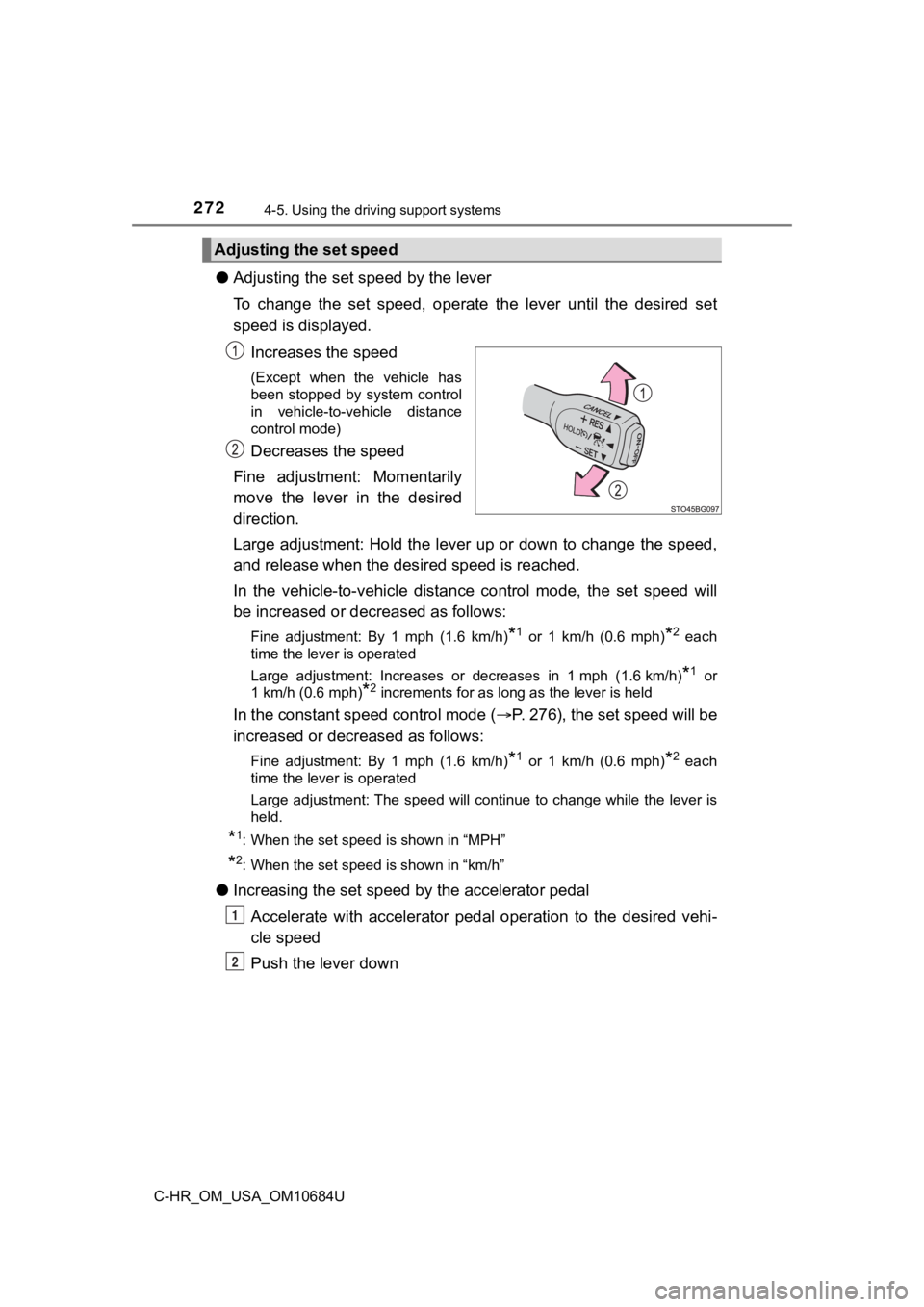
●Adjusting the set speed by the lever
To change the set speed, operate the lever until the desired se t
speed is displayed.
Increases the speed
(Except when the vehicle has
been stopped by system control
in vehicle-to-vehicle distance
control mode)
Decreases the speed
Fine adjustment: Momentarily
move the lever in the desired
direction.
Large adjustment: Hold the lever up or down to change the speed ,
and release when the desired speed is reached.
In the vehicle-to-vehicle distance control mode, the set speed will
be increased or decreased as follows:
Fine adjustment: By 1 mph (1.6 km/h)*1 or 1 km/h (0.6 mph)*2 each
time the lever is operated
Large adjustment: Increases or decreases in 1 mph (1.6 km/h)
*1 or
1 km/h (0.6 mph)
*2 increments for as long as the lever is held
In the constant speed control mode ( P. 276), the set speed will be
increased or decreased as follows:
Fine adjustment: By 1 mph (1.6 km/h)*1 or 1 km/h (0.6 mph)*2 each
time the lever is operated
Large adjustment: The speed will continue to change while the l ever is
held.
*1: When the set speed is shown in “MPH”
*2: When the set speed is shown in “km/h”
● Increasing the set speed b y the accelerator pedal
Accelerate with accelerator pedal operation to the desired vehi -
cle speed
Push the lever down
Adjusting the set speed
1
2
Page 278 of 548
2784-5. Using the driving support systems
C-HR_OM_USA_OM10684U■
Automatic cancelation of c onstant speed control mode
Constant speed control mode is automatically canceled in the following situa-
tions:
● Actual vehicle speed is more than approximately 10 mph (16 km/h ) below
the set vehicle speed.
● Actual vehicle speed falls below approximately 20 mph (30 km/h) .
● VSC is activated.
● TRAC is activated for a period of time.
● When the VSC or TRAC system is turned off.
● Pre-collision braking is activated.
If constant speed control mode is automatically canceled for any reasons
other than the above, there may be a malfunction in the system. Contact your
Toyota dealer.
■ Brake operation
A brake operation sound may be heard and the brake pedal response may
change, but these are not malfunctions.
■ Warning messages and buzzers for d ynamic radar cruise control with
full-speed range
Warning messages and buzzers are used to indicate a system malfunction or
to inform the driver of the need for caution while driving. If a warning message
is shown on the multi-information display, read the message and follow the
instructions. ( P. 229, 444)
■ When the sensor may not be correctly detect ing the vehicle ahead
In the case of the following and depending on the conditions, o perate the
brake pedal when deceleration of the system is insufficient or operate the
accelerator pedal when acceleration is required.
As the sensor may not be able to correctly detect these types o f vehicles, the
approach warning ( P. 275) may not be activated.
● Vehicles that cut in suddenly
● Vehicles traveling at low speeds
● Vehicles that are not moving in the same lane
Page 284 of 548
2844-5. Using the driving support systems
C-HR_OM_USA_OM10684U
Press “” or “” of the meter control switches, select .
Press “ ” or “ ” of the meter control switches, select .
Press “ ” or “ ” of the meter control switches, select .
When the BSM function is disabled, the BSM OFF indicator ( P. 283) illu-
minates.
(Each time the engine switch is turned off then changed to ON, the BSM
function will be enabled automatically.)
■ The outside rear view mirror indicators visibility
When under strong sunlight, the outside rear view mirror indica tor may be dif-
ficult to see.
■ When “Blind Spot Monitor Unavaila ble.” is shown on the multi-informa-
tion display
Water, snow mud, etc., may be built up in the vicinity of the s ensor area of
bumper ( P. 286).
Removing the water, snow, mud, etc., from the vicinity of the s ensor area
bumper should return it to normal.
Also, the sensor may not function normally when used in extreme ly hot or
cold weather.
■ When “Blind Spot Monitor System M alfunction. Visit Your Dealer.” is
shown on the multi-information display
There may be a sensor malfunction or misaligned. Have the vehicle
inspected by your Toyota dealer.
■ Customization
Some functions can be customized. ( P. 508)
Turning the BSM function on/off
1
2
3
Page 293 of 548
2934-5. Using the driving support systems
4
Driving
C-HR_OM_USA_OM10684U
Press “” or “” of the meter control switches, select .
Press “ ” or “ ” of the meter control switches, select .
Press “ ” or “ ” of the meter control switches, select
“RCTA”.
When the RCTA function is disabled, the “RCTA OFF” indicator ( P. 292)
illuminates.
(Each time the engine switch is turned off then changed to ON, the RCTA
function will be enabled automatically.)
■ The outside rear view mirror indicators visibility
When under strong sunlight, the outside rear view mirror indica tor may be dif-
ficult to see.
■ Hearing the RCTA buzzer
The RCTA buzzer may be difficult to hear over loud noises, such as if the
audio system volume is high.
■ When “RCTA Unavailable.” is shown on the multi-information display
Water, snow mud, etc., may be built up in the vicinity of the s ensor area of
bumper ( P. 286).
Removing the water, snow, mud, etc., from the vicinity of the s ensor area
bumper should return it to normal.
Also, the sensor may not function normally when used in extremely hot or
cold weather
■ When “RCTA Malfunction Visit You r Dealer.” is shown on the multi-infor-
mation display
There may be a sensor malfunction or misaligned. Have the vehicle
inspected by your Toyota dealer.
■ Rear side radar sensors
P. 286
Turning the RCTA function on/off
1
2
3