high beam TOYOTA C-HR 2021 Owners Manual (in English)
[x] Cancel search | Manufacturer: TOYOTA, Model Year: 2021, Model line: C-HR, Model: TOYOTA C-HR 2021Pages: 548, PDF Size: 12.51 MB
Page 3 of 548
3
1
8 7 5 4
3
2
9
C-HR_OM_USA_OM10684U
6
4-1. Before drivingDriving the vehicle ............. 164
Cargo and luggage............ 174
Vehicle load limits ............. 177
Trailer towing..................... 178
Dinghy towing.................... 179
4-2. Driving procedures Engine (ignition) switch (vehicles without a
smart key system) ........... 180
Engine (ignition) switch (vehicles with a
smart key system) ........... 183
Continuously variable transmission .................... 190
Turn signal lever................ 195
Parking brake .................... 196
Brake Hold ........................ 201
4-3. Operating the lights and wipers
Headlight switch ................ 204
Automatic High Beam ....... 209
Fog light switch ................. 214
Windshield wipers and washer ............................ 215
Rear window wiper and washer ............................ 218 4-4. Refueling
Opening the fuel tank cap................................... 220
4-5. Using the driving support systems
Toyota Safety Sense 2.5 ... 224
PCS (Pre-Collision System)..... 231
LTA (Lane Tracing Assist) ...... 246
RSA (Road Sign Assist) .... 261
Dynamic radar cruise control with
full-speed range............... 266
Driving mode select ........... 281
BSM (Blind Spot Monitor)......... 283
RCTA (Rear Cross Traffic Alert) ..................... 292
Driving assist systems ....... 300
4-6. Driving tips Winter driving tips .............. 306
4Driving
Page 18 of 548
18Pictorial index
C-HR_OM_USA_OM10684U
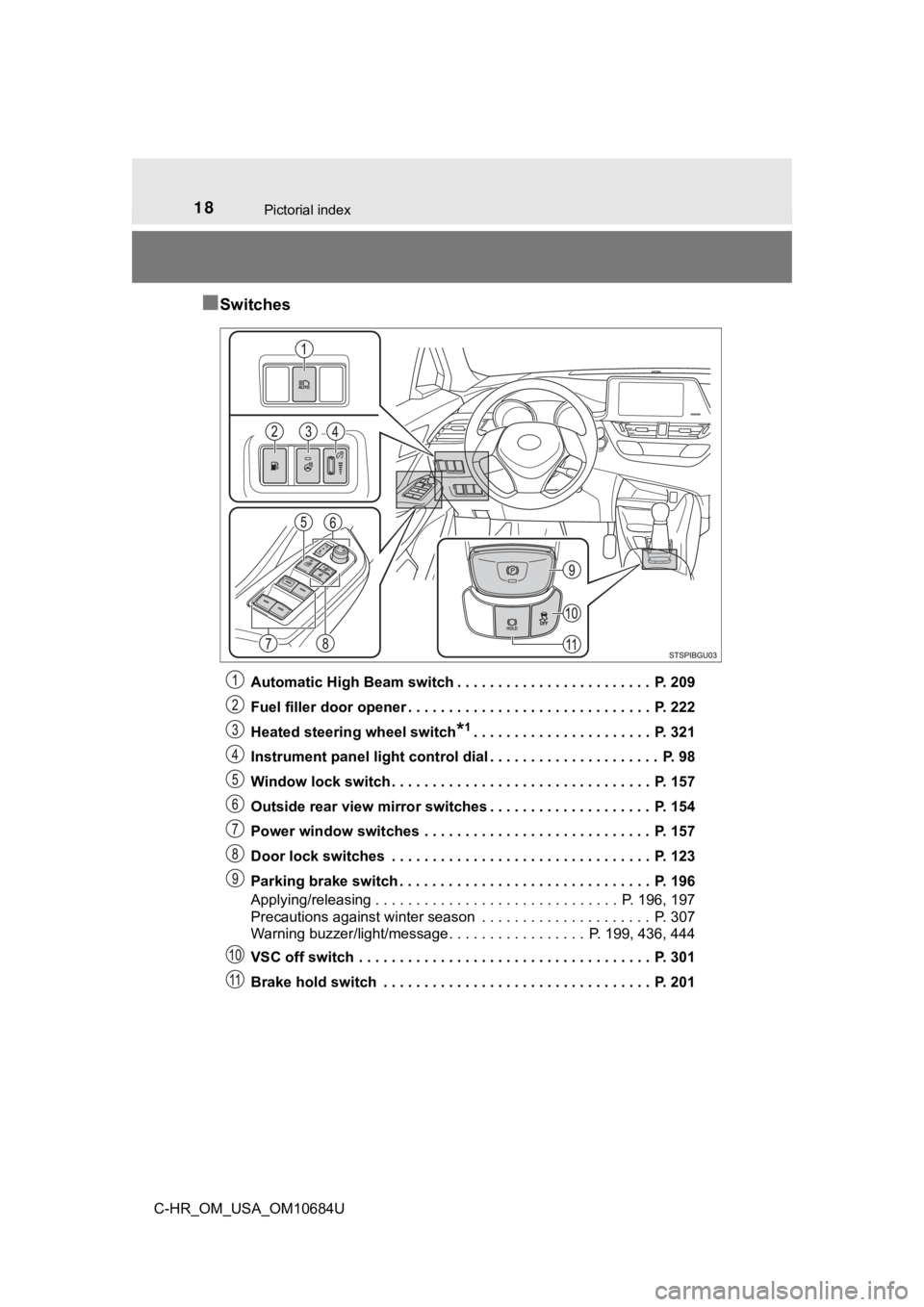
■Switches
Automatic High Beam switch . . . . . . . . . . . . . . . . . . . . . . . . P. 209
Fuel filler door opener . . . . . . . . . . . . . . . . . . . . . . . . . . . . . . P. 222
Heated steering wheel switch
*1. . . . . . . . . . . . . . . . . . . . . . P. 321
Instrument panel light control dial . . . . . . . . . . . . . . . . . . . . . P. 98
Window lock switch . . . . . . . . . . . . . . . . . . . . . . . . . . . . . . . . P. 157
Outside rear view mirror switches . . . . . . . . . . . . . . . . . . . . P. 154
Power window switches . . . . . . . . . . . . . . . . . . . . . . . . . . . . P. 157
Door lock switches . . . . . . . . . . . . . . . . . . . . . . . . . . . . . . . . P. 123
Parking brake switch . . . . . . . . . . . . . . . . . . . . . . . . . . . . . . . P. 196
Applying/releasing . . . . . . . . . . . . . . . . . . . . . . . . . . . . . . P. 196, 197
Precautions against winter season . . . . . . . . . . . . . . . . . . . . . P. 307
Warning buzzer/light/message. . . . . . . . . . . . . . . . . P . 199, 436, 444
VSC off switch . . . . . . . . . . . . . . . . . . . . . . . . . . . . . . . . . . . . P. 301
Brake hold switch . . . . . . . . . . . . . . . . . . . . . . . . . . . . . . . . . P. 201
Page 91 of 548
912. Instrument cluster
2
Instrument cluster
C-HR_OM_USA_OM10684U
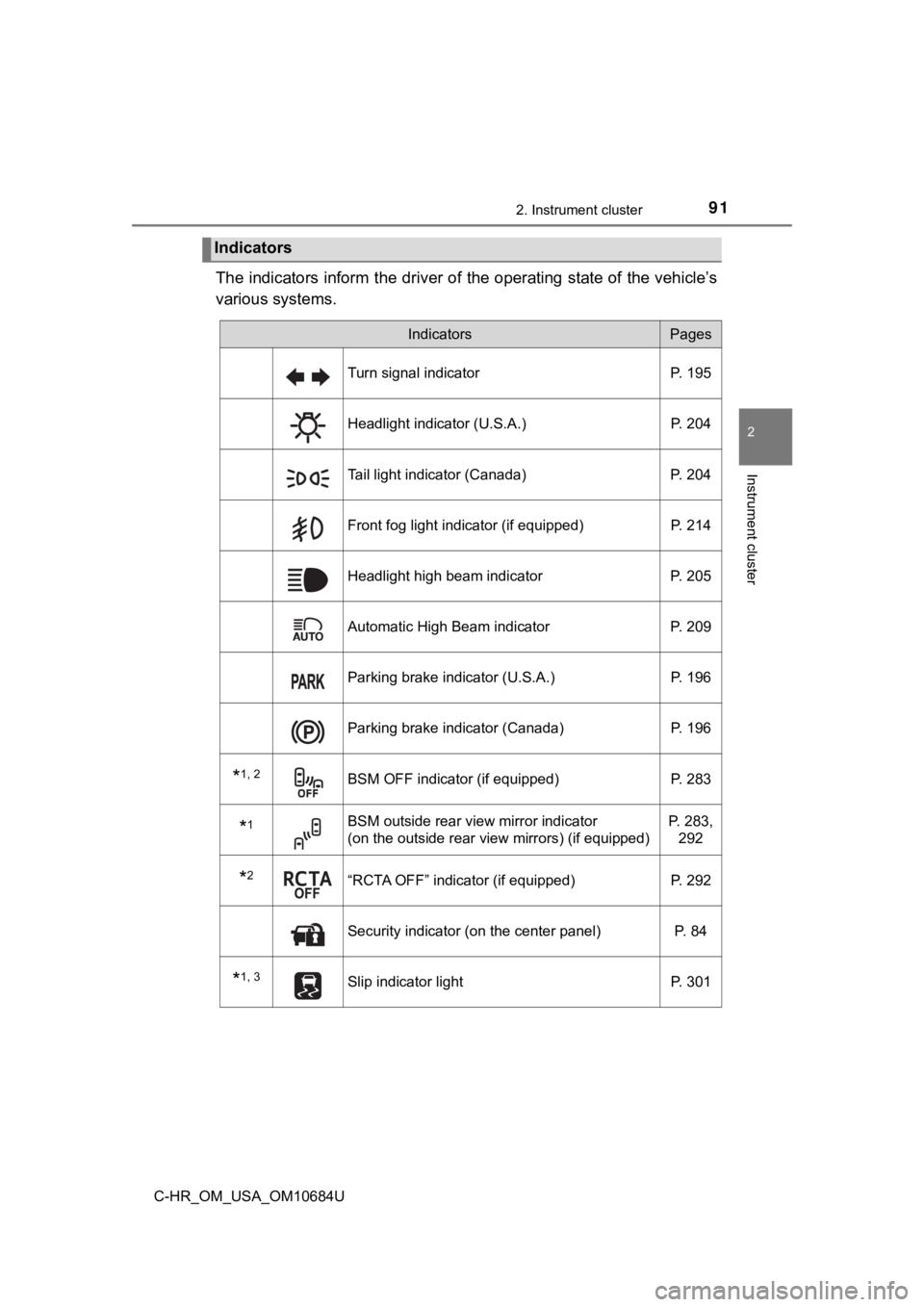
The indicators inform the driver of the operating state of the vehicle’s
various systems.
Indicators
IndicatorsPages
Turn signal indicator P. 195
Headlight indicator (U.S.A.) P. 204
Tail light indicator (Canada)P. 204
Front fog light indicator (if equipped) P. 214
Headlight high beam indicatorP. 205
Automatic High Beam indicator P. 209
Parking brake indicator (U.S.A.) P. 196
Parking brake indicator (Canada)P. 196
*1, 2BSM OFF indicator (if equipped)P. 283
*1BSM outside rear view mirror indicator
(on the outside rear view mirrors) (if equipped)P. 283,
292
*2“RCTA OFF” indicator (if equipped) P. 292
Security indicator (on the center panel) P. 84
*1, 3Slip indicator lightP. 301
Page 163 of 548
163
4Driving
C-HR_OM_USA_OM10684U4-1. Before driving
Driving the vehicle ............. 164
Cargo and luggage ........... 174
Vehicle load limits ............. 177
Trailer towing..................... 178
Dinghy towing ................... 179
4-2. Driving procedures Engine (ignition) switch (vehicles without a
smart key system) ........... 180
Engine (ignition) switch (vehicles with a
smart key system) ........... 183
Continuously variable transmission .................... 190
Turn signal lever................ 195
Parking brake .................... 196
Brake Hold ........................ 201
4-3. Operating the lights and wipers
Headlight switch ................ 204
Automatic High Beam ....... 209
Fog light switch ................. 214
Windshield wipers and washer ............................ 215
Rear window wiper and washer ............................ 218 4-4. Refueling
Opening the fuel tank cap ................... 220
4-5. Using the driving support systems
Toyota Safety Sense 2.5... 224
PCS (Pre-Collision System) .... 231
LTA (Lane Tracing Assist) ...... 246
RSA (Road Sign Assist) .... 261
Driving mode select .......... 281
BSM (Blind Spot Monitor) ........ 283
RCTA (Rear Cross Traffic Alert) .................... 292
Driving assist systems ...... 300
4-6. Driving tips Winter driving tips ............. 306
Page 205 of 548
2054-3. Operating the lights and wipers
4
Driving
C-HR_OM_USA_OM10684U
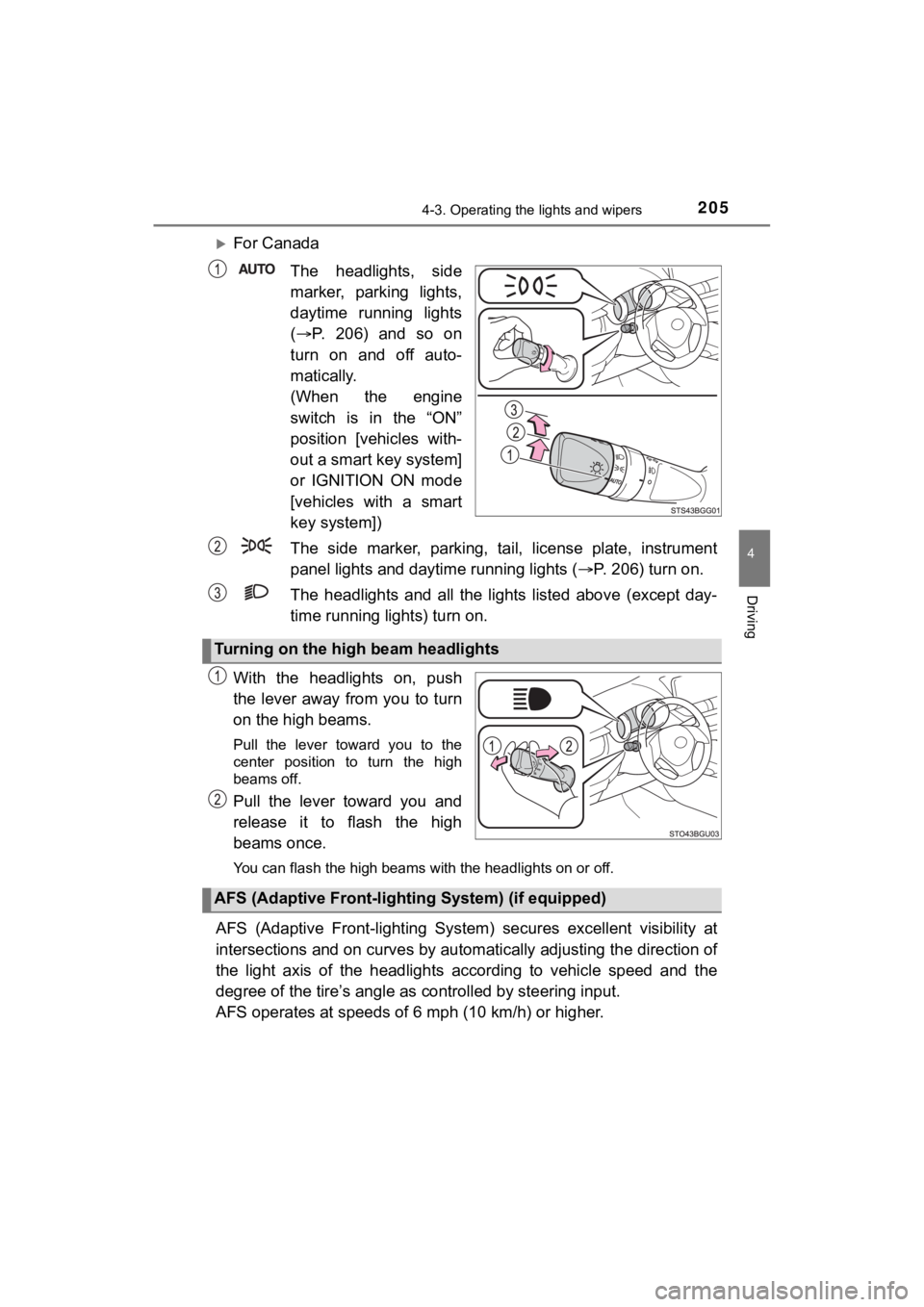
For Canada
The headlights, side
marker, parking lights,
daytime running lights
( P. 206) and so on
turn on and off auto-
matically.
(When the engine
switch is in the “ON”
position [vehicles with-
out a smart key system]
or IGNITION ON mode
[vehicles with a smart
key system])
The side marker, parking, tail, license plate, instrument
panel lights and dayti me running lights (P. 206) turn on.
The headlights and all the li ghts listed above (except day-
time running lights) turn on.
With the headlights on, push
the lever away from you to turn
on the high beams.
Pull the lever toward you to the
center position to turn the high
beams off.
Pull the lever toward you and
release it to flash the high
beams once.
You can flash the high beams with the headlights on or off.
AFS (Adaptive Front-lighting System) secures excellent visibili ty at
intersections and on curves by automatically adjusting the dire ction of
the light axis of the headlights according to vehicle speed and the
degree of the tire’s angle as controlled by steering input.
AFS operates at speeds of 6 mph (10 km/h) or higher.
Turning on the high beam headlights
AFS (Adaptive Front-light ing System) (if equipped)
Page 209 of 548
2094-3. Operating the lights and wipers
4
Driving
C-HR_OM_USA_OM10684U
Automatic High Beam
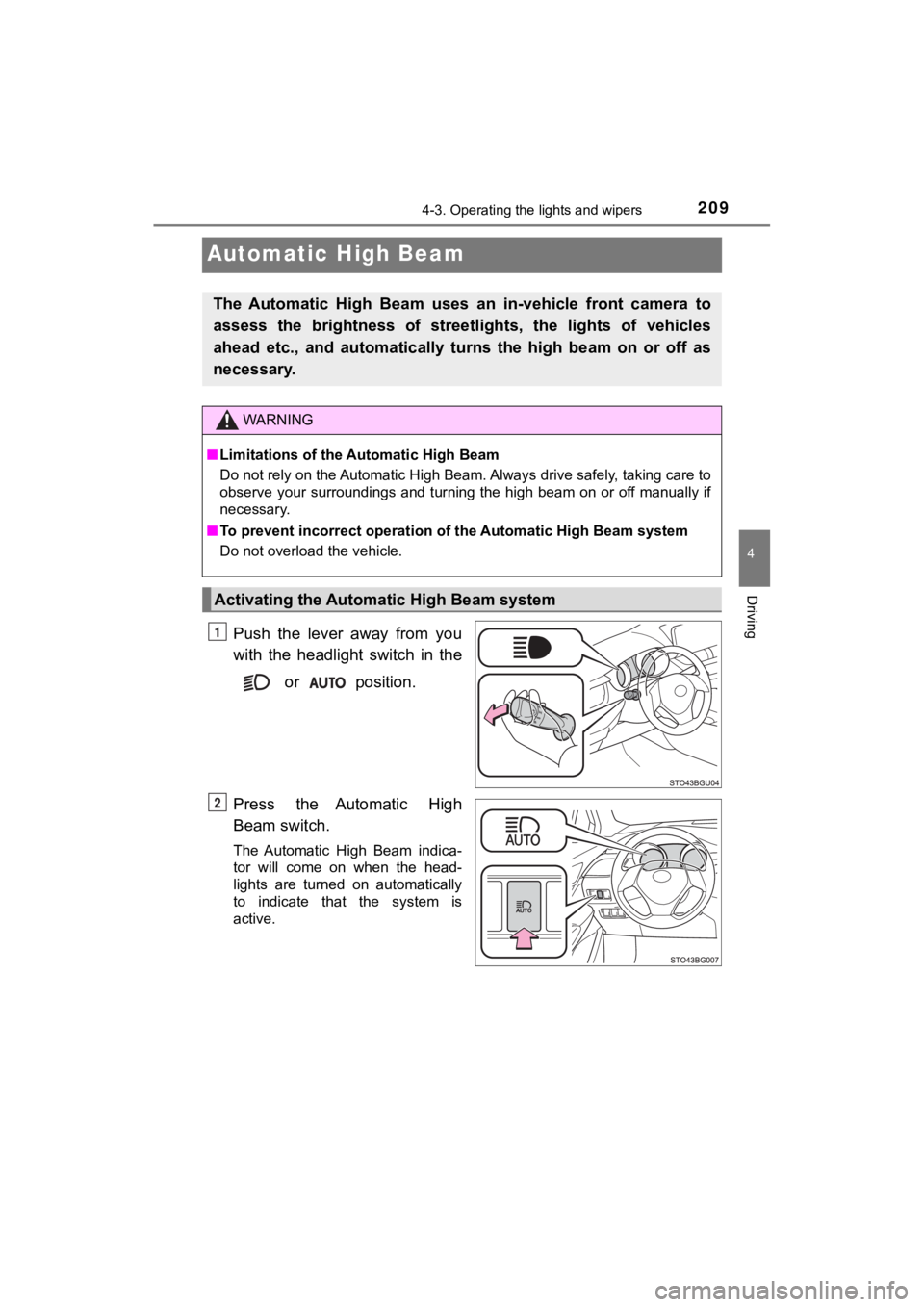
Push the lever away from you
with the headlight switch in the
or position.
Press the Automatic High
Beam switch.
The Automatic High Beam indica-
tor will come on when the head-
lights are turned on automatically
to indicate that the system is
active.
The Automatic High Beam uses an in-vehicle front camera to
assess the brightness of streetl ights, the lights of vehicles
ahead etc., and automatically turns the high beam on or off as
necessary.
WARNING
■ Limitations of the Automatic High Beam
Do not rely on the Automatic High Beam. Always drive safely, ta king care to
observe your surroundings and turning the high beam on or off m anually if
necessary.
■ To prevent incorrect operation o f the Automatic High Beam syste m
Do not overload the vehicle.
Activating the Automatic High Beam system
1
2
Page 210 of 548
2104-3. Operating the lights and wipers
C-HR_OM_USA_OM10684U■
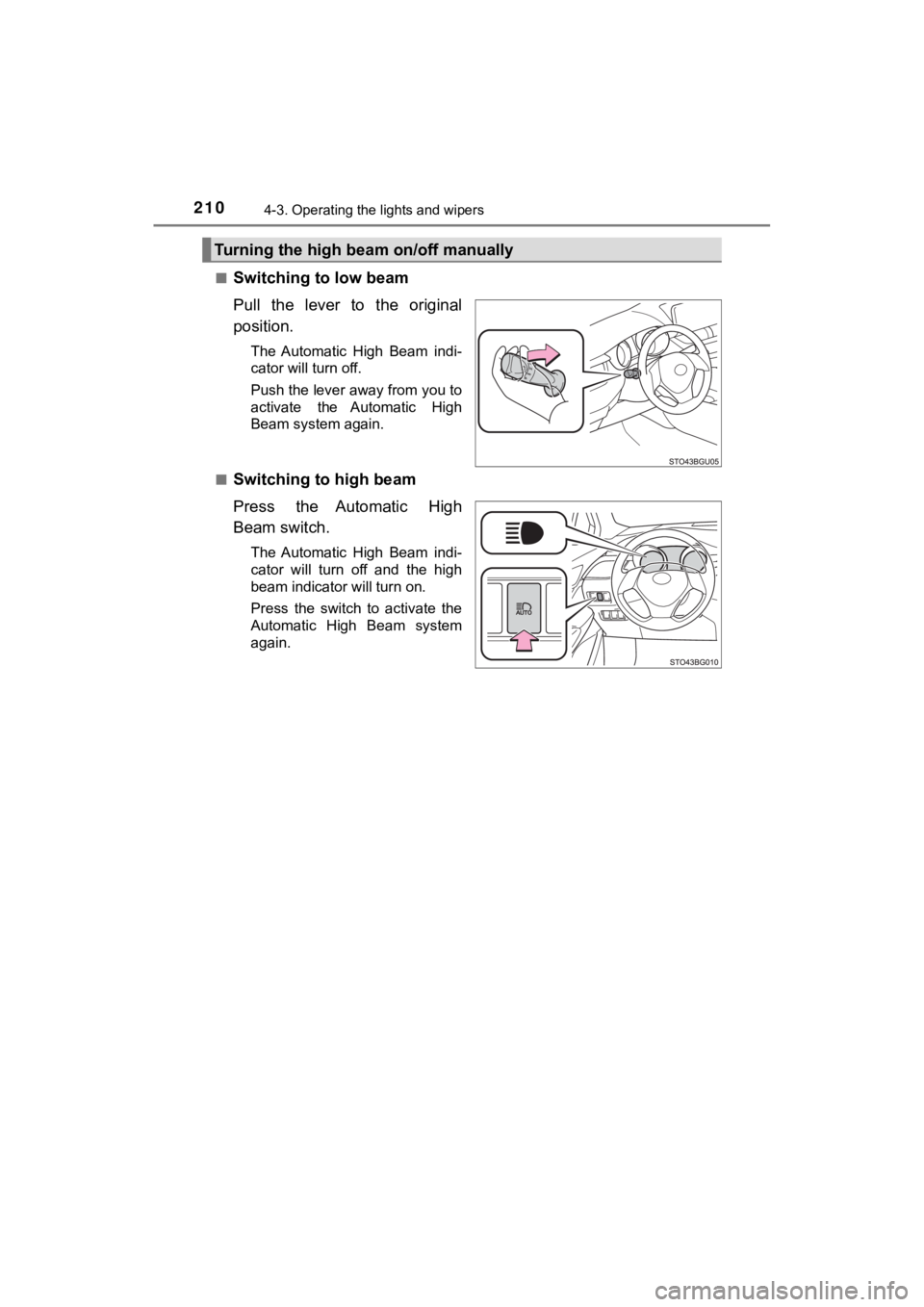
Switching to low beam
Pull the lever to the original
position.
The Automatic High Beam indi-
cator will turn off.
Push the lever away from you to
activate the Automatic High
Beam system again.
■
Switching to high beam
Press the Automatic High
Beam switch.
The Automatic High Beam indi-
cator will turn off and the high
beam indicator will turn on.
Press the switch to activate the
Automatic High Beam system
again.
Turning the high beam on/off manually
Page 211 of 548
2114-3. Operating the lights and wipers
4
Driving
C-HR_OM_USA_OM10684U
■High beam automatic turning on or off conditions
●When all of the following conditions are fulfilled, the high be am will be auto-
matically turned on (after approximately 1 second):
• Vehicle speed is above approximately 21 mph (34 km/h).
• The area ahead of the vehicle is dark.
• There are no vehicles ahead with headlights or tail lights turned on.
• There are few streetlights on the road ahead.
● If any of the following conditions are fulfilled, the high beam will be automat-
ically turned off:
• Vehicle speed drops below approximately 17 mph (27 km/h).
• The area ahead of the vehicle is not dark.
• Vehicles ahead have headlights or tail lights turned on.
• There are many streetlights on the road ahead.
■ front camera detection information
●The high beam may not be automatically turned off in the following situa-
tions:
• When oncoming vehicles suddenly appear from a curve
• When the vehicle is cut off in front of by another vehicle
• When vehicles ahead are hidden from sight due to repeated curv es, road
dividers or roadside trees
• When vehicles ahead appear from the faraway lane on wide road
• When vehicles ahead have no lights
● The high beam may be turned off if a vehicle ahead that is usin g fog lights
without using the headlights is detected.
● House lights, street lights, traffic signals, and illuminated billboards or signs
may cause the high beam to switch to the low beams, or the low beams to
remain on.
● The following factors may affect the amount of time taken to tu rn the high
beam on or off:
• The brightness of headlights, fog lights, and tail lights of v ehicles ahead
• The movement and direction of vehicles ahead
• When a vehicle ahead only has operational lights on one side
• When a vehicle ahead is a two-wheeled vehicle
• The condition of the road (gradient, curve, condition of the r oad surface,
etc.)
• The number of passengers and amount of luggage
Page 212 of 548

2124-3. Operating the lights and wipers
C-HR_OM_USA_OM10684U●
The high beam may be turned on or off when the driver does not expect it.
● Bicycles or similar objects may not be detected.
● In the situations shown below, the system may not be able to accurately
detect surrounding brightness levels. This may cause the low be ams to
remain on or the high beams to cause problems for pedestrians, vehicles
ahead or other parties. In these cases, manually switch between the high
and low beams.
• In bad weather (rain, snow, fog, sandstorms, etc.)
• The windshield is obscured by fog, mist, ice, dirt, etc.
• The windshield is cracked or damaged.
• The front camera is deformed or dirty.
• The front camera temperature is extremely high.
• Surrounding brightness levels are equal to those of headlights , tail lights
or fog lights.
• Vehicles ahead have headlights that are either switched off, d irty, are
changing color, or are not aimed properly.
• When driving through an area of intermittently changing brightness and darkness.
• When frequently and repeatedly driving ascending/descending roads, or
roads with rough, bumpy or uneven surfaces (such as stone-paved
roads, gravel tracks, etc.).
• When frequently and repeatedly taking curves or driving on a w inding
road.
• There is a highly reflective object ahead of the vehicle, such as a sign or a mirror.
• The back of a vehicle ahead is highly reflective, such as a co ntainer on a
truck.
• The vehicle’s headlights are damaged or dirty.
• The vehicle is listing or tilting, due to a flat tire, a trailer being towed etc.
• The high beam and low beam are repeatedly being switched betwe en in
an abnormal manner.
• The driver believes that the high beam may be causing problems or dis-
tress to other drivers or pedestrians nearby.
Page 213 of 548
2134-3. Operating the lights and wipers
4
Driving
C-HR_OM_USA_OM10684U■
Temporarily lowering sensor sensitivity
The sensitivity of the sensor can be temporarily lowered.
Turn the engine switch off while the following conditions are m et.
• The headlight switch is in or .
• The headlight switch lever is in high beam position.
• Automatic High Beam switch is on.
Turn the engine switch to ON mode.
Within 30 seconds after , repeat pulling the headlight switch lever to the
original position then pushing it to the high beam position qui ckly 10 times,
then leave the lever in high beam position.
If the sensitivity is changed, the Automatic High Beam indicato r is turn on
and off 3 times.
Automatic High Beam (headlights) may turn on even the vehicle i s stopped.
■ If “Headlight System Malfunction. Visit Your Dealer.” is displayed on the
multi-information display
The system may be malfunctioning. Have the vehicle inspected by your
Toyota dealer.
1
2
32
4