outlet TOYOTA C-HR 2021 Owners Manual (in English)
[x] Cancel search | Manufacturer: TOYOTA, Model Year: 2021, Model line: C-HR, Model: TOYOTA C-HR 2021Pages: 548, PDF Size: 12.51 MB
Page 4 of 548

TABLE OF CONTENTS4
C-HR_OM_USA_OM10684U5-1. Using the air conditioning
system and defogger
Air conditioning system ..... 312
Heated steering wheel/ seat heaters .................... 321
5-2. Using the interior lights Interior lights list ................ 323• Interior lights ................. 324
• Personal lights .............. 325
5-3. Using the storage features List of storage features...... 326• Glove box...................... 327
• Console box .................. 327
• Bottle holders ................ 328
• Cup holders .................. 329
Luggage compartment features ........................... 330
5-4. Using the other interior features
Other interior features ....... 336 • Sun visors ..................... 336
• Vanity mirrors................ 336
• Power outlet .................. 337
• Assist grips ................... 338 6-1. Maintenance and care
Cleaning and protecting the vehicle exterior .......... 340
Cleaning and protecting the vehicle interior ................. 344
6-2. Maintenance Maintenance requirements ................... 347
General maintenance ........ 350
Emission inspection and maintenance (I/M)
programs ......................... 354
6-3. Do-it-yourself maintenance Do-it-yourself service precautions ...................... 355
Hood .................................. 358
Positioning a floor jack....... 360
Engine compartment ......... 361
Tires................................... 376
Tire inflation pressure ........ 386
Wheels............................... 390
Air conditioning filter .......... 393
Wireless remote control/ electronic key battery ...... 397
Checking and replacing fuses ................................ 401
Headlight aim (vehicles with front fog lights)................. 405
Light bulbs ......................... 407
5Interior features6Maintenance and care
Page 180 of 548
1804-2. Driving procedures
C-HR_OM_USA_OM10684U
Engine (ignition) switch (vehicles without a
smart key system)
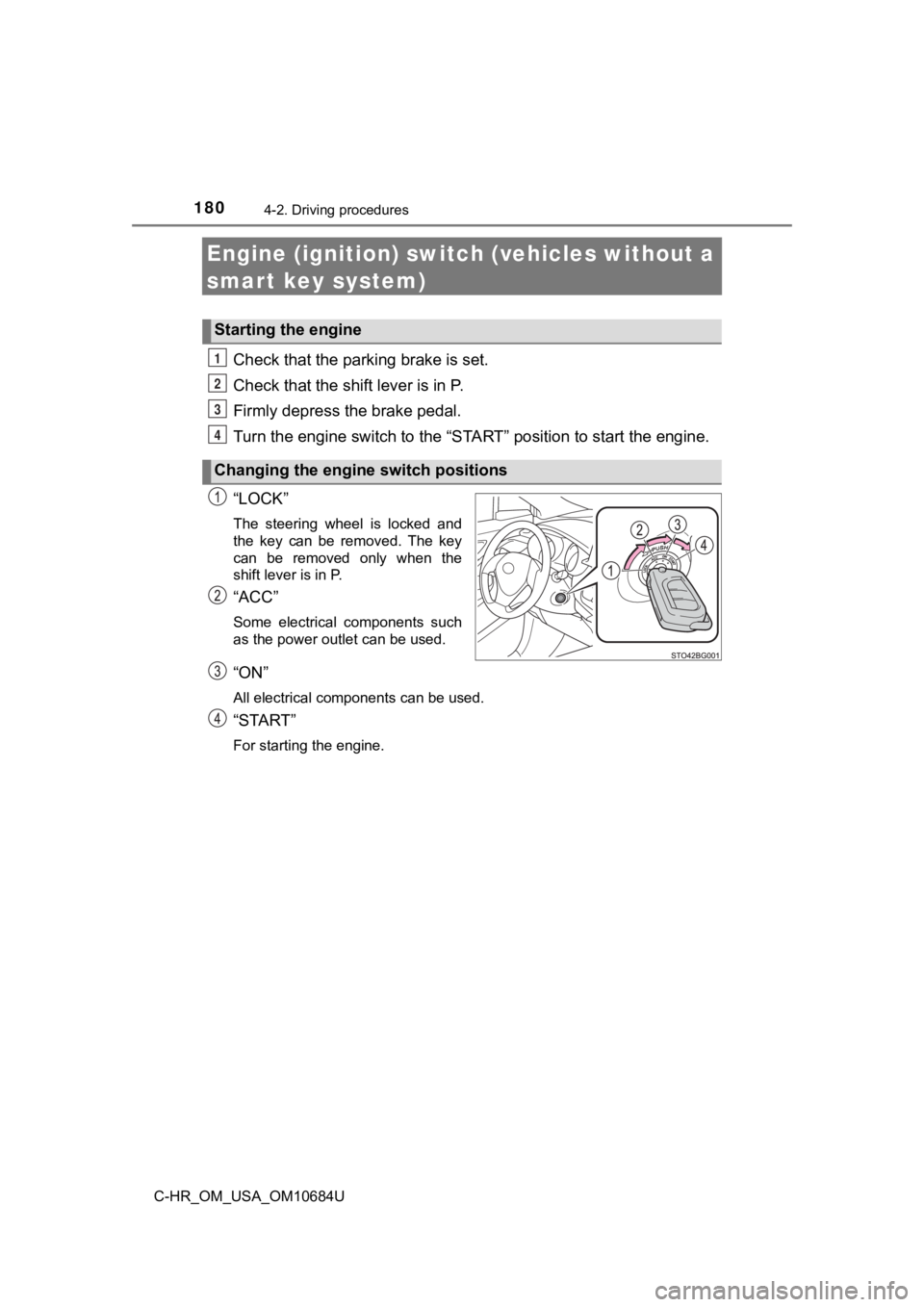
Check that the parking brake is set.
Check that the shift lever is in P.
Firmly depress the brake pedal.
Turn the engine switch to the “S TART” position to start the engine.
“LOCK”
The steering wheel is locked and
the key can be removed. The key
can be removed only when the
shift lever is in P.
“ACC”
Some electrical components such
as the power outlet can be used.
“ON”
All electrical components can be used.
“START”
For starting the engine.
Starting the engine
Changing the engine switch positions
1
2
3
4
Page 311 of 548

311
5Interior features
C-HR_OM_USA_OM10684U5-1. Using the air conditioning
system and defogger
Air conditioning system ..... 312
Heated steering wheel/ seat heaters .................... 321
5-2. Using the interior lights Interior lights list ................ 323• Interior lights ................. 324
• Personal lights .............. 325
5-3. Using the storage features
List of storage features ..... 326 • Glove box...................... 327
• Console box .................. 327
• Bottle holders ................ 328
• Cup holders .................. 329
Luggage compartment features ........................... 330
5-4. Using the other interior features
Other interior features ....... 336 • Sun visors ..................... 336
• Vanity mirrors................ 336
• Power outlet .................. 337
• Assist grips ................... 338
Page 312 of 548
3125-1. Using the air conditioning system and defogger
C-HR_OM_USA_OM10684U
Air conditioning system
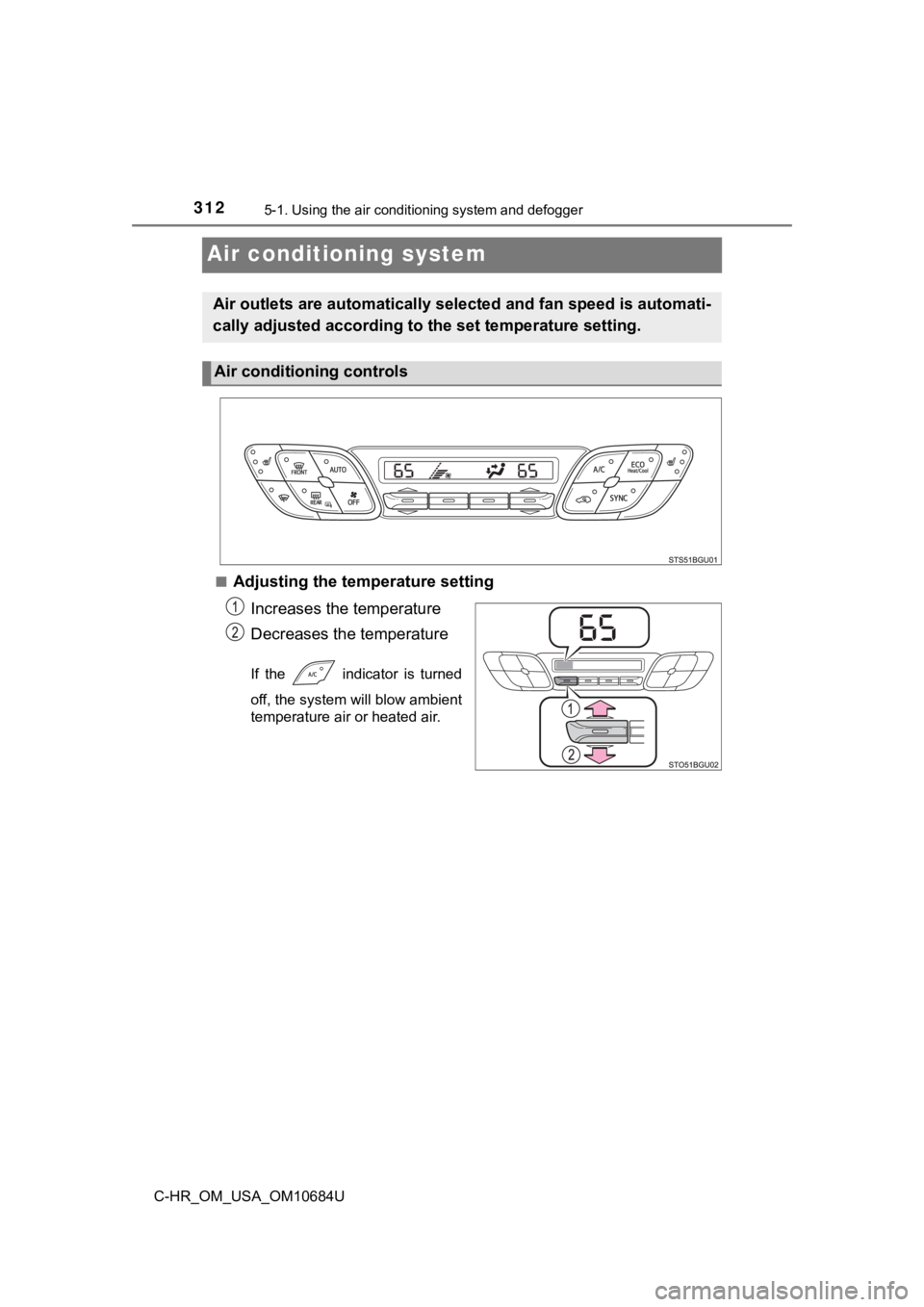
■Adjusting the temperature setting
Increases the temperature
Decreases the temperature
If the indicator is turned
off, the system will blow ambient
temperature air or heated air.
Air outlets are automatically sel ected and fan speed is automati-
cally adjusted according to t he set temperature setting.
Air conditioning controls
Page 313 of 548
3135-1. Using the air conditioning system and defogger
5
Interior features
C-HR_OM_USA_OM10684U■
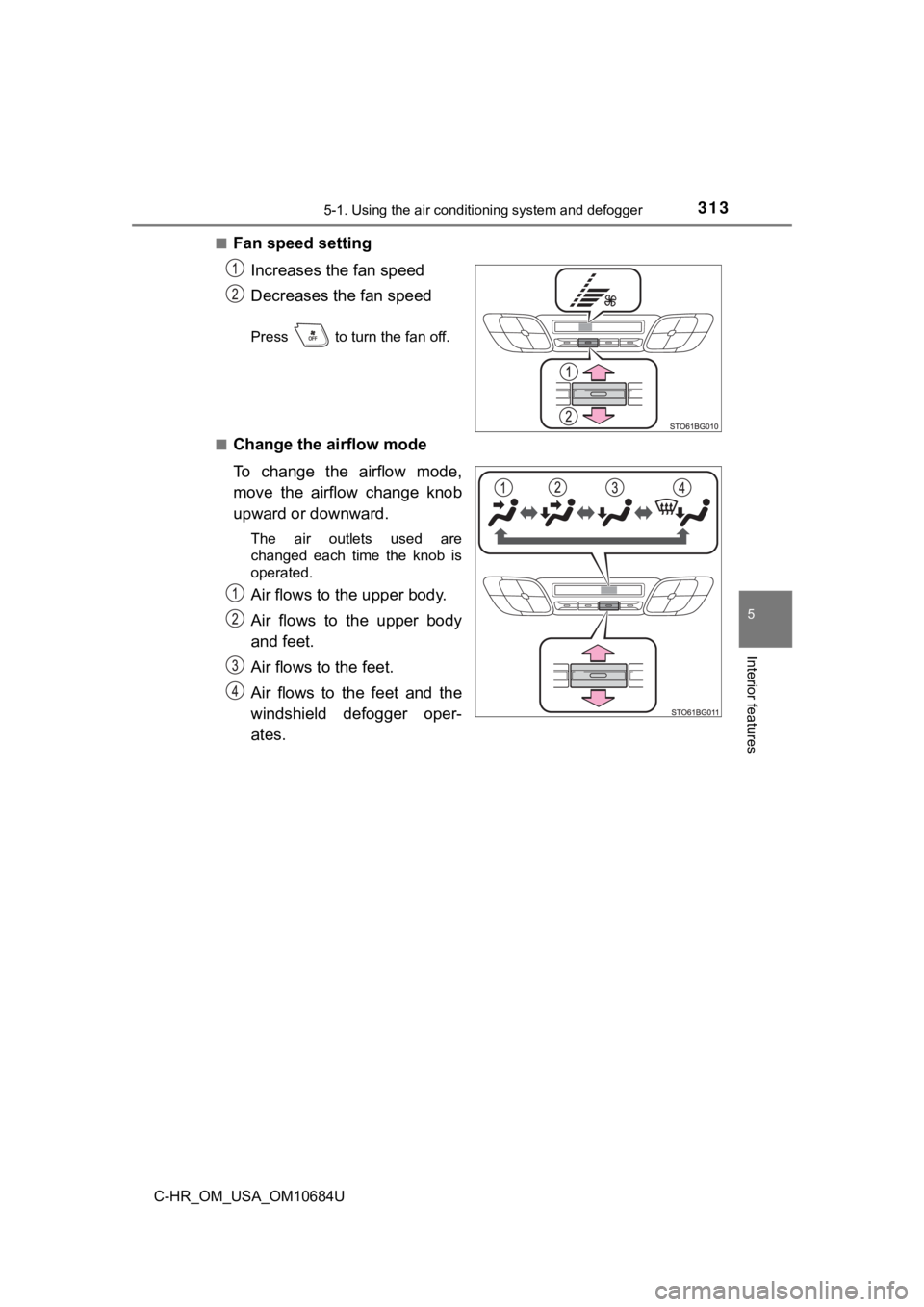
Fan speed setting
Increases the fan speed
Decreases the fan speed
Press to turn the fan off.
■
Change the airflow mode
To change the airflow mode,
move the airflow change knob
upward or downward.
The air outlets used are
changed each time the knob is
operated.
Air flows to the upper body.
Air flows to the upper body
and feet.
Air flows to the feet.
Air flows to the feet and the
windshield defogger oper-
ates.
Page 314 of 548
3145-1. Using the air conditioning system and defogger
C-HR_OM_USA_OM10684U
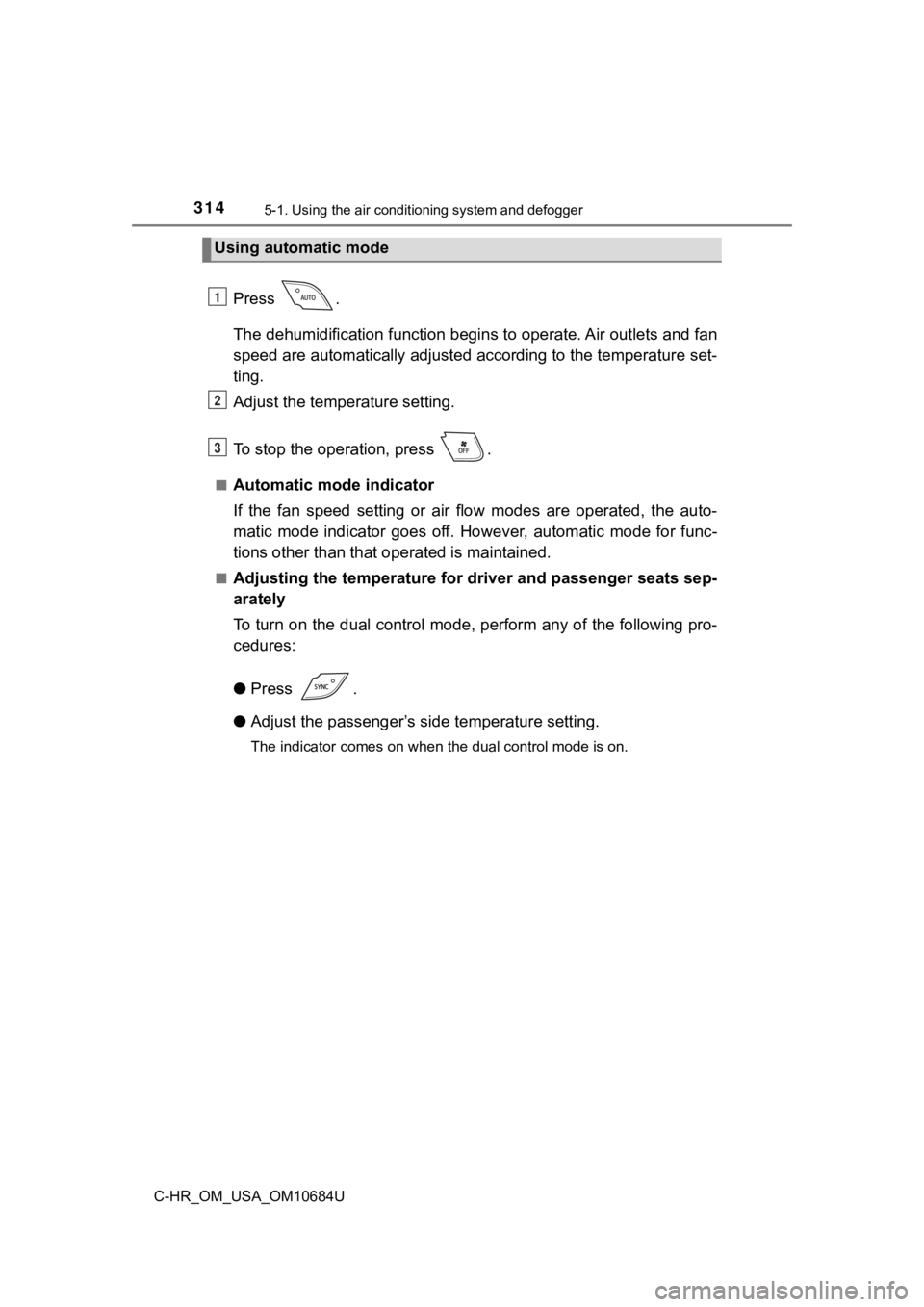
Press .
The dehumidification function begi ns to operate. Air outlets and fan
speed are automatically adjusted according to the temperature s et-
ting.
Adjust the temperature setting.
To stop the operation, press .
■Automatic mode indicator
If the fan speed setting or air flow modes are operated, the au to-
matic mode indicator goes off. However, automatic mode for func -
tions other than that o perated is maintained.
■Adjusting the temperature for driver and passenger seats sep-
arately
To turn on the dual control mode, perform any of the following pro-
cedures:
● Press .
● Adjust the passenger’s side temperature setting.
The indicator comes on when the dual control mode is on.
Using automatic mode
1
2
3
Page 316 of 548
3165-1. Using the air conditioning system and defogger
C-HR_OM_USA_OM10684U■
Climate control customization
Climate control setting can be changed.
Press .
The air conditioning is controlled with low fuel consumption pr
ioritized
such as reducing fan speed, etc.
■
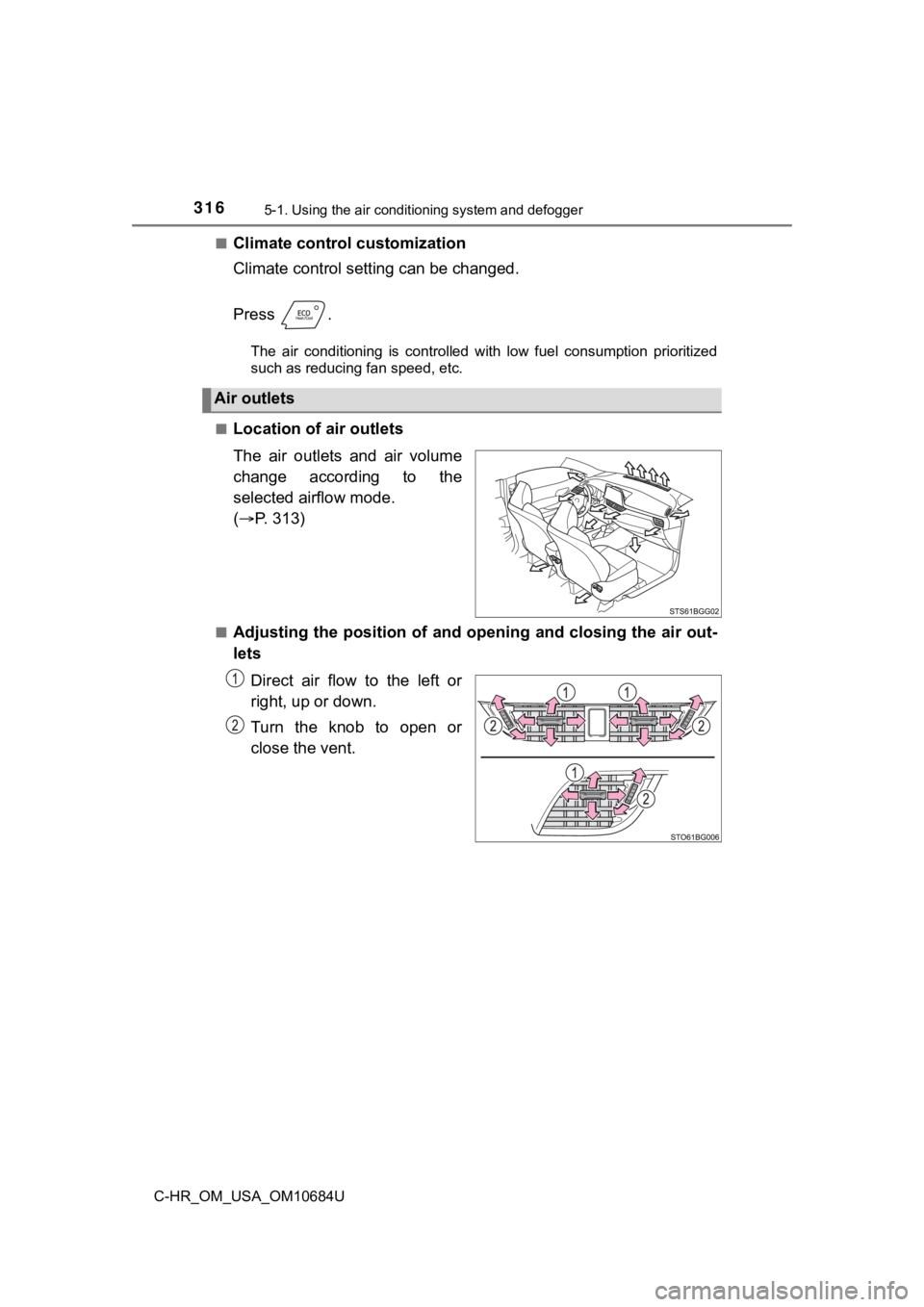
Location of a ir outlets
The air outlets and air volume
change according to the
selected airflow mode.
( P. 313)
■Adjusting the position of and opening and closing the air out-
lets
Direct air flow to the left or
right, up or down.
Turn the knob to open or
close the vent.
Air outlets
Page 317 of 548
3175-1. Using the air conditioning system and defogger
5
Interior features
C-HR_OM_USA_OM10684U
■Using automatic mode
Fan speed is adjusted automatically according to the temperatur e setting and
the ambient conditions.
Therefore, the fan may stop for a while until warm or cool air is ready to flow
immediately after is pressed.
■ Fogging up of the windows
●The windows will easily fog up when the humidity in the vehicle is high.
Turning on will dehumidify the air from the outlets and defog the
windshield effectively.
● If you turn off, the windows may fog up more easily.
● The windows may fog up if the recirculated air mode is used.
■ When driving on dusty roads
Close all windows. If dust thrown up by the vehicle is still drawn into the vehi-
cle after closing the windows, it is recommended that the air intake mode be
set to outside air mode and the fan speed to any setting except off.
■ Outside/recirculated air mode
●Setting to the recirculated air mode temporarily is recommended in prevent-
ing dirty air from entering the vehicle interior and helping to cool the vehicle
when the outside air temperature is high.
● Outside/recirculated air mode may automatically switch dependin g on the
temperature setting or the inside temperature.
■ Operation of the air conditioning system in Eco drive mode
●In Eco drive mode, the air conditioning system is controlled as follows to pri-
oritize fuel efficiency:
• Engine speed and compressor operation controlled to restrict h eating/
cooling capacity
• Fan speed restricted when automatic mode is selected
● To improve air conditioning performance, perform the following operations:
• Adjust the fan speed
• Adjust the temperature setting
• Turn off Eco drive mode
● Even when the drive mode is set to Eco drive mode, the air cond itioning eco
mode can be turned off by pressing .
Page 320 of 548
3205-1. Using the air conditioning system and defogger
C-HR_OM_USA_OM10684U
WARNING
■To prevent the windshield from fogging up
● Do not use during cool air operation in extremely humid weathe r.
The difference between the temperature of the outside air and t hat of the
windshield can cause the outer surface of the windshield to fog up, block-
ing your vision.
■ To prevent burns
● Do not touch the rear view mirror surfaces when the outside rear view mir-
ror defoggers are on.
● Do not touch the glass at the lower part of the windshield or t o the side of
the front pillars when the windshield wiper de-icer is on.
NOTICE
■ To prevent battery discharge
Do not leave the air conditioning system on longer than necessa ry when the
engine is stopped.
■ When repairing/replacing parts of the air conditioning system
Have repair/replacement performed by your Toyota dealer. When a part of
the air conditioning system, such as the evaporator, is to be r eplaced, it
must be replaced with a new one.
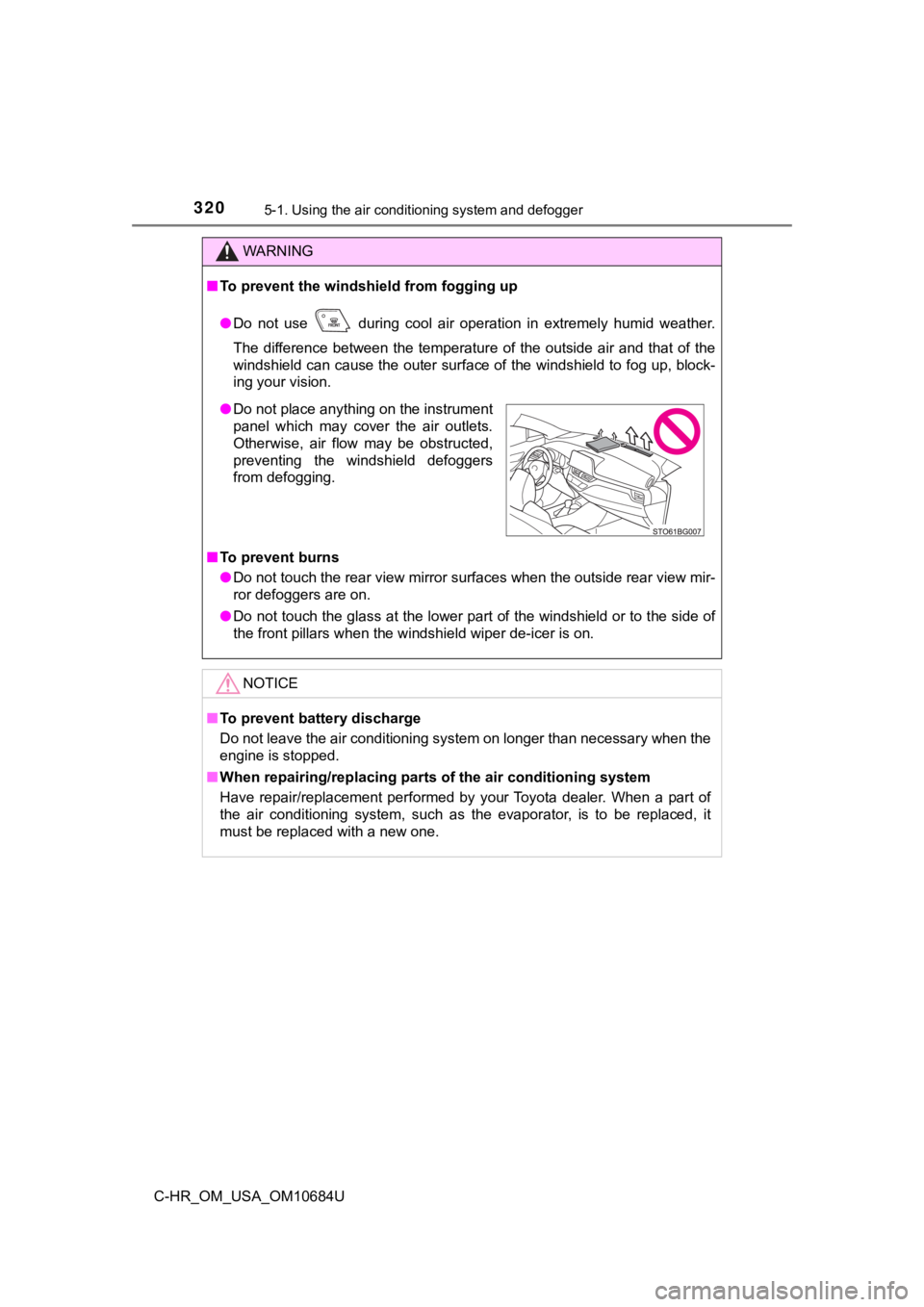
● Do not place anything on the instrument
panel which may cover the air outlets.
Otherwise, air flow may be obstructed,
preventing the windshield defoggers
from defogging.
Page 337 of 548
3375-4. Using the other interior features
5
Interior features
C-HR_OM_USA_OM10684U
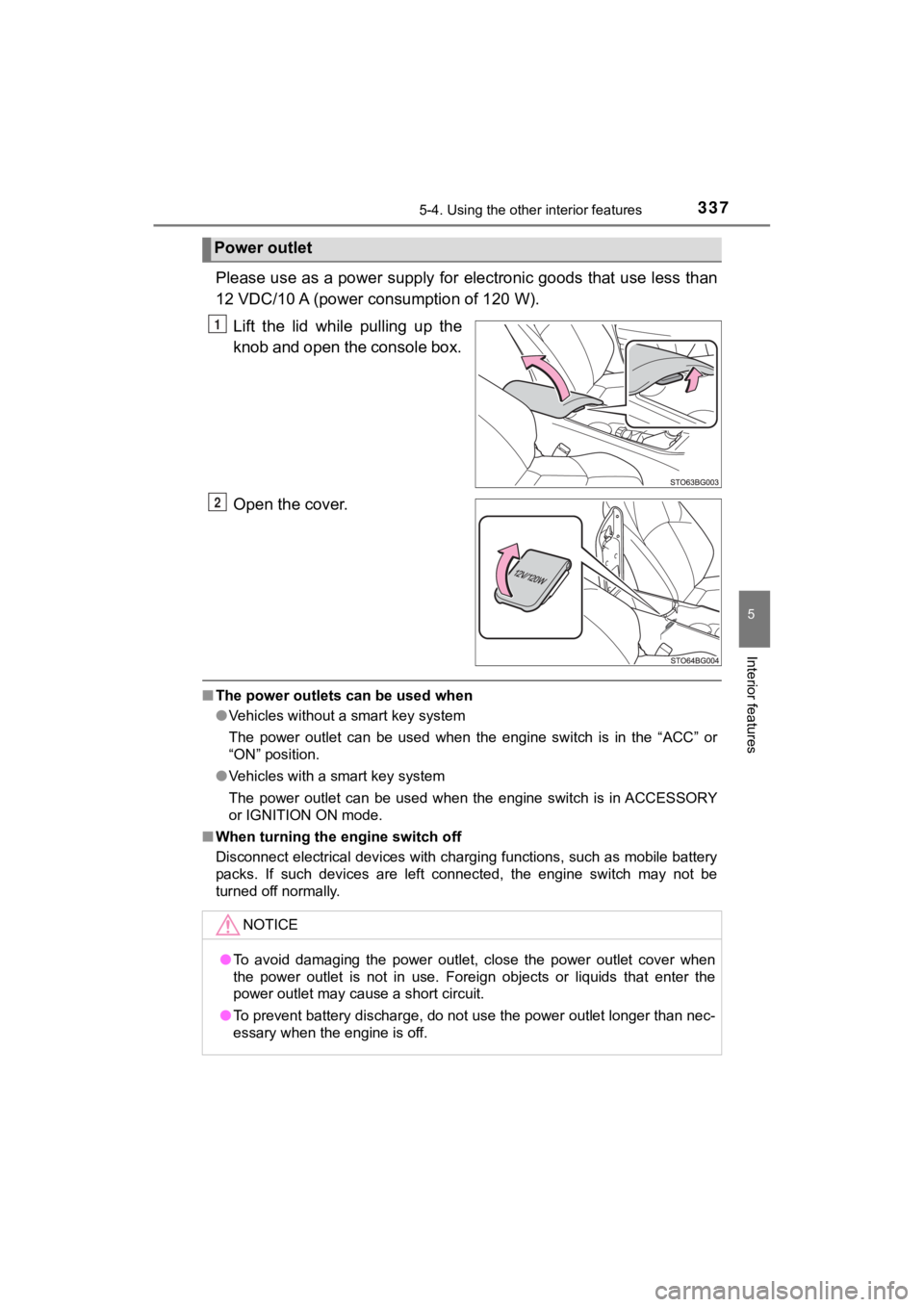
Please use as a power supply for electronic goods that use less than
12 VDC/10 A (power c onsumption of 120 W).
Lift the lid while pulling up the
knob and open the console box.
Open the cover.
■ The power outlets can be used when
●Vehicles without a smart key system
The power outlet can be used when the engine switch is in the “ ACC” or
“ON” position.
● Vehicles with a smart key system
The power outlet can be used when the engine switch is in ACCES SORY
or IGNITION ON mode.
■ When turning the engine switch off
Disconnect electrical devices with charging functions, such as mobile battery
packs. If such devices are left connected, the engine switch may not be
turned off normally.
Power outlet
1
2
NOTICE
● To avoid damaging the power outlet, close the power outlet cove r when
the power outlet is not in use. Foreign objects or liquids that enter the
power outlet may cause a short circuit.
● To prevent battery discharge, do not use the power outlet longe r than nec-
essary when the engine is off.