wheel TOYOTA C-HR 2023 Repair Manual
[x] Cancel search | Manufacturer: TOYOTA, Model Year: 2023, Model line: C-HR, Model: TOYOTA C-HR 2023Pages: 814, PDF Size: 112.62 MB
Page 506 of 814
5044-5. Using the driving support systems
C-HR_HEV_OM_Europe_OM10764E
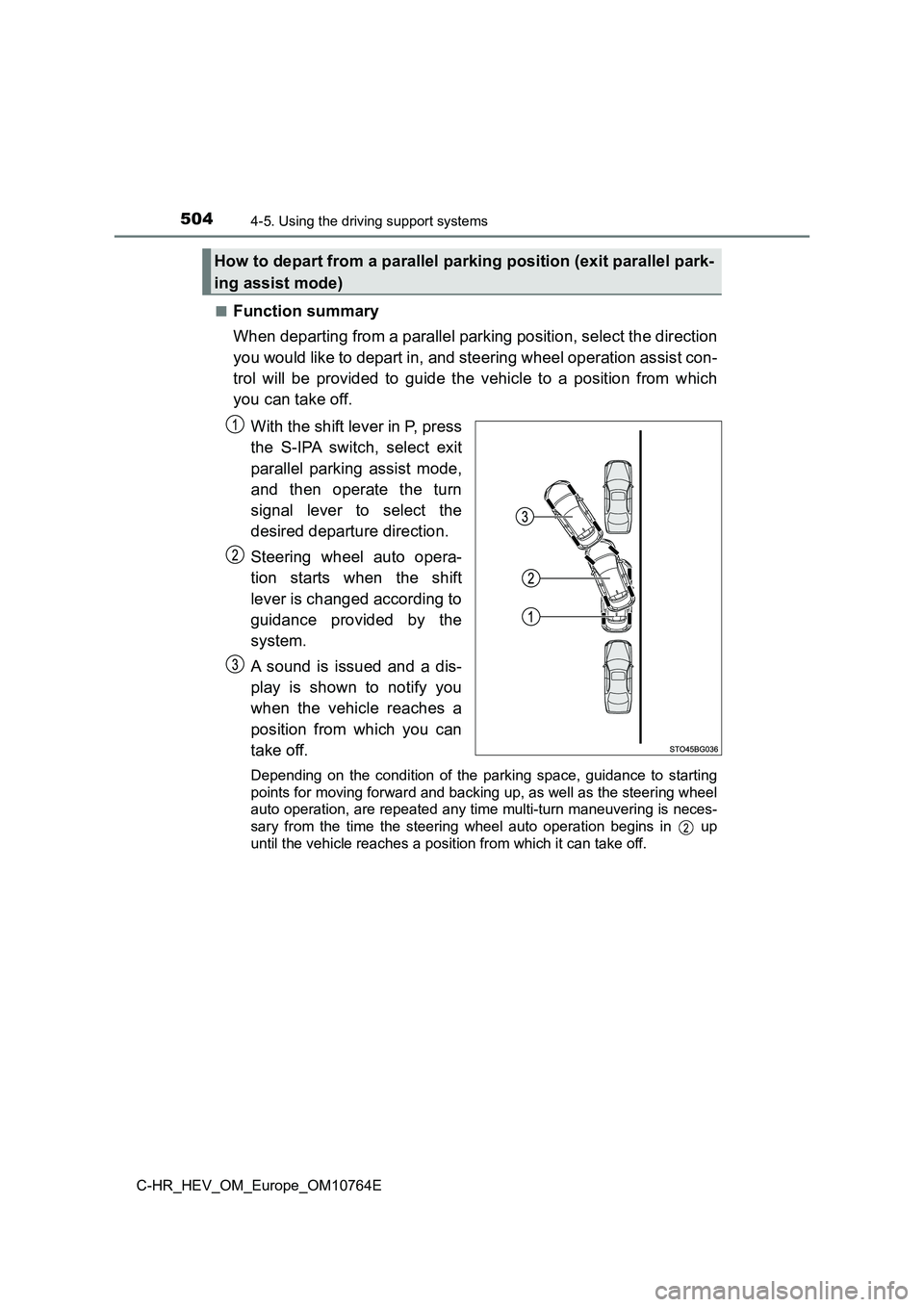
■Function summary
When departing from a parallel parking position, select the dir ection
you would like to depart in, and steering wheel operation assis t con-
trol will be provided to guide the vehicle to a position from w hich
you can take off.
With the shift lever in P, press
the S-IPA switch, select exit
parallel parking assist mode,
and then operate the turn
signal lever to select the
desired departure direction.
Steering wheel auto opera-
tion starts when the shift
lever is changed according to
guidance provided by the
system.
A sound is issued and a dis-
play is shown to notify you
when the vehicle reaches a
position from which you can
take off.
Depending on the condition of the parking space, guidance to st arting
points for moving forward and backing up, as well as the steeri ng wheel
auto operation, are repeated any time multi-turn maneuvering is neces-
sary from the time the steering wheel auto operation begins in up
until the vehicle reaches a posit ion from which it can take off.
How to depart from a parallel parking position (exit parallel park-
ing assist mode)
Page 507 of 814
5054-5. Using the driving support systems
4
Driving
C-HR_HEV_OM_Europe_OM10764E
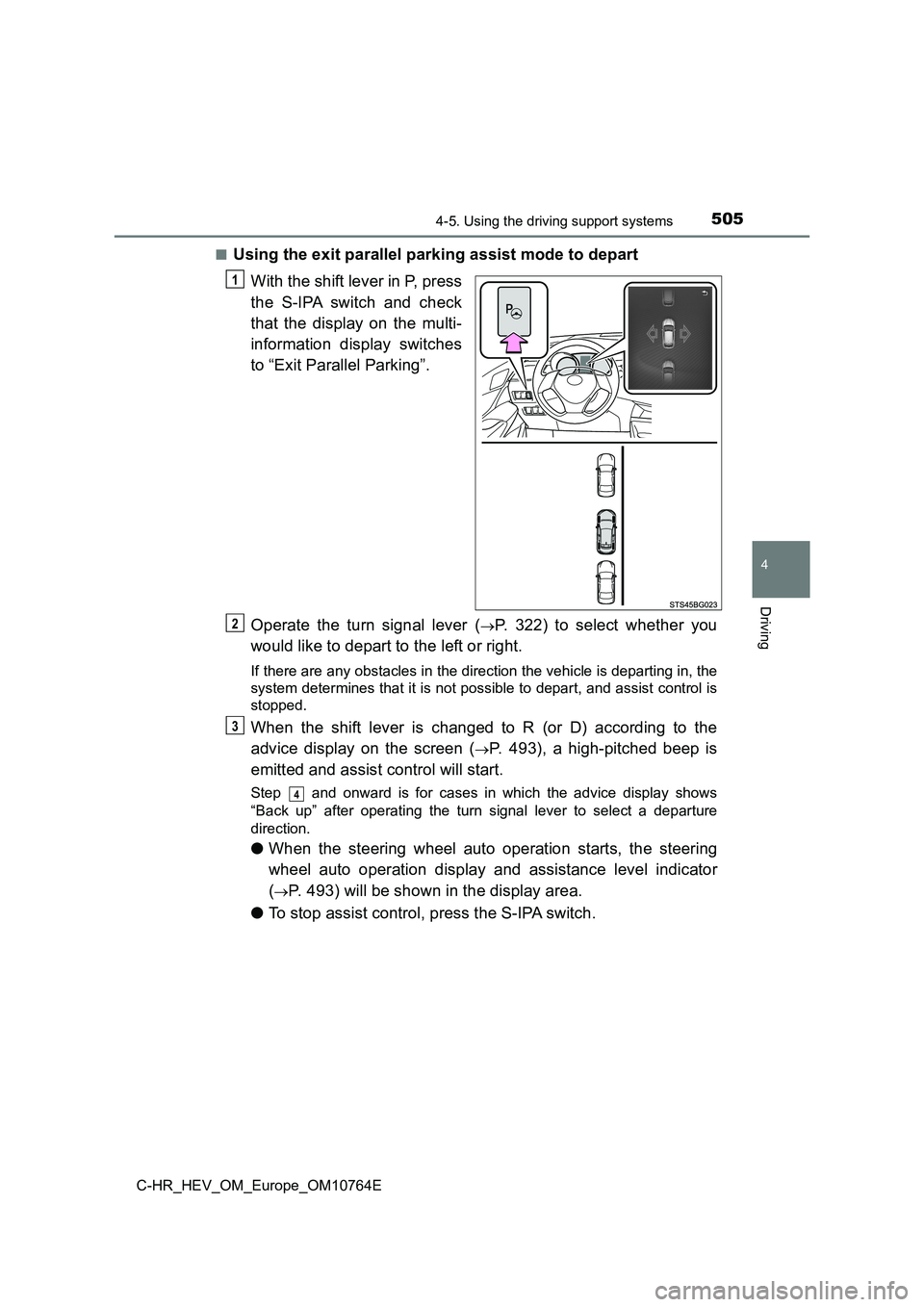
■Using the exit parallel parking assist mode to depart
With the shift lever in P, press
the S-IPA switch and check
that the display on the multi-
information display switches
to “Exit Parallel Parking”.
Operate the turn signal lever (P. 322) to select whether you
would like to depart to the left or right.
If there are any obstacles in the direction the vehicle is depa rting in, the
system determines that it is not possible to depart, and assist control is
stopped.
When the shift lever is changed to R (or D) according to the
advice display on the screen (P. 493), a high-pitched beep is
emitted and assist control will start.
Step and onward is for cases in which the advice display shows
“Back up” after operating the turn signal lever to select a dep arture
direction.
● When the steering wheel auto operation starts, the steering
wheel auto operation display and assistance level indicator
(P. 493) will be shown in the display area.
● To stop assist control, press the S-IPA switch.
1
2
3
4
Page 508 of 814
5064-5. Using the driving support systems
C-HR_HEV_OM_Europe_OM10764E
Assume an ordinary posture for backing up, rest your hands
lightly on the steering wheel without applying any force, direc tly
confirm the safety of the area to the rear and around the vehic le
and slowly back up while adjusting your speed by depressing the
brake pedal.
● When backing up too quickly, a sharp beeping sound is emit-
ted and assist control is stopped. (P. 493)
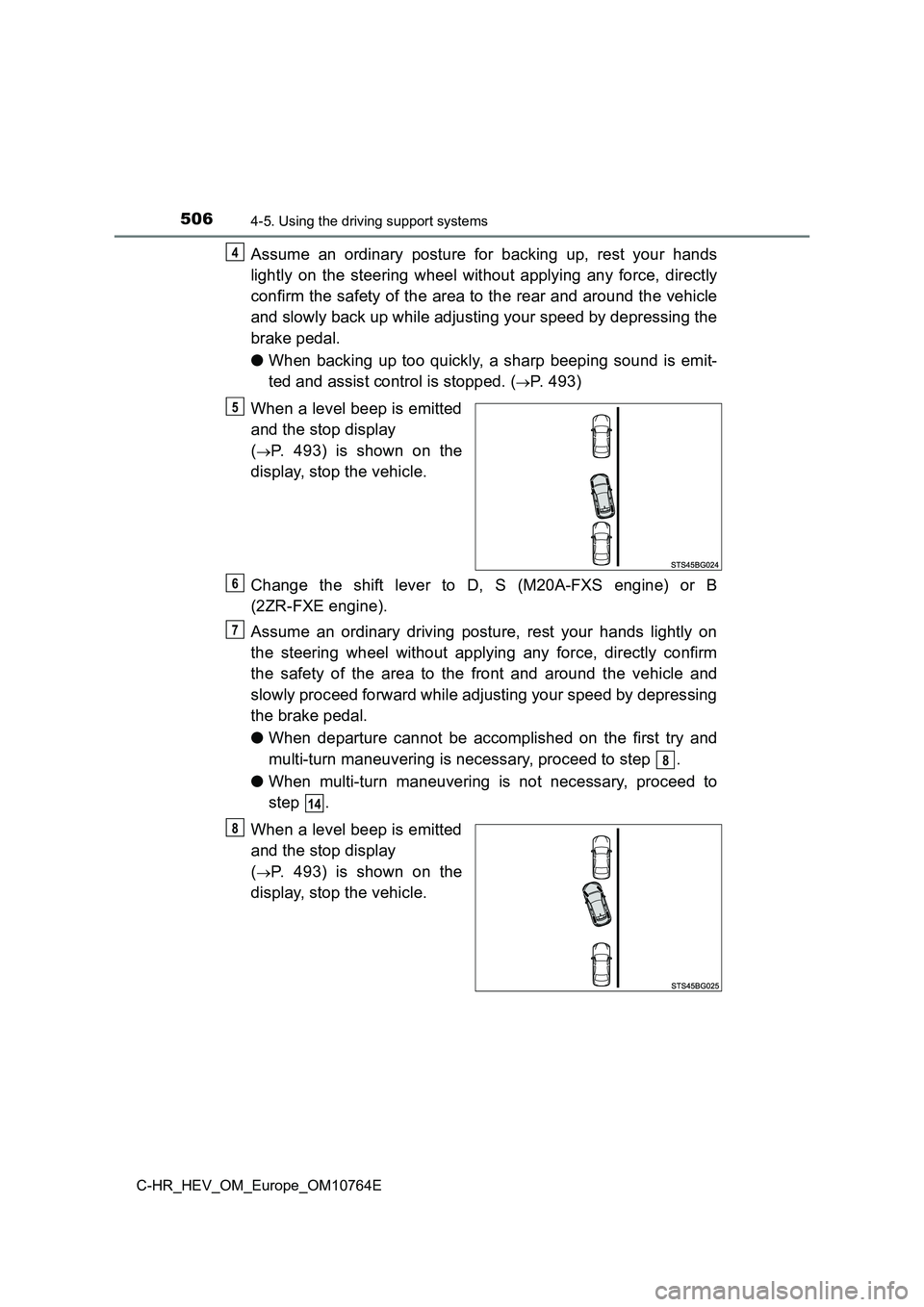
When a level beep is emitted
and the stop display
(P. 493) is shown on the
display, stop the vehicle.
Change the shift lever to D, S (M20A-FXS engine) or B
(2ZR-FXE engine).
Assume an ordinary driving posture, rest your hands lightly on
the steering wheel without applying any force, directly confirm
the safety of the area to the front and around the vehicle and
slowly proceed forward while adjusting your speed by depressing
the brake pedal.
● When departure cannot be accomplished on the first try and
multi-turn maneuvering is necessary, proceed to step .
● When multi-turn maneuvering is not necessary, proceed to
step .
When a level beep is emitted
and the stop display
(P. 493) is shown on the
display, stop the vehicle.
4
5
6
7
8
14
8
Page 509 of 814
5074-5. Using the driving support systems
4
Driving
C-HR_HEV_OM_Europe_OM10764E
Change the shift lever to R.
Assume an ordinary posture for backing up, rest your hands
lightly on the steering wheel without applying any force, direc tly
confirm the safety of the area to the rear and around the vehic le
and slowly back up while adjusting your speed by depressing the
brake pedal.
Depending on the condition of the parking space, steps to may
need to be repeated.
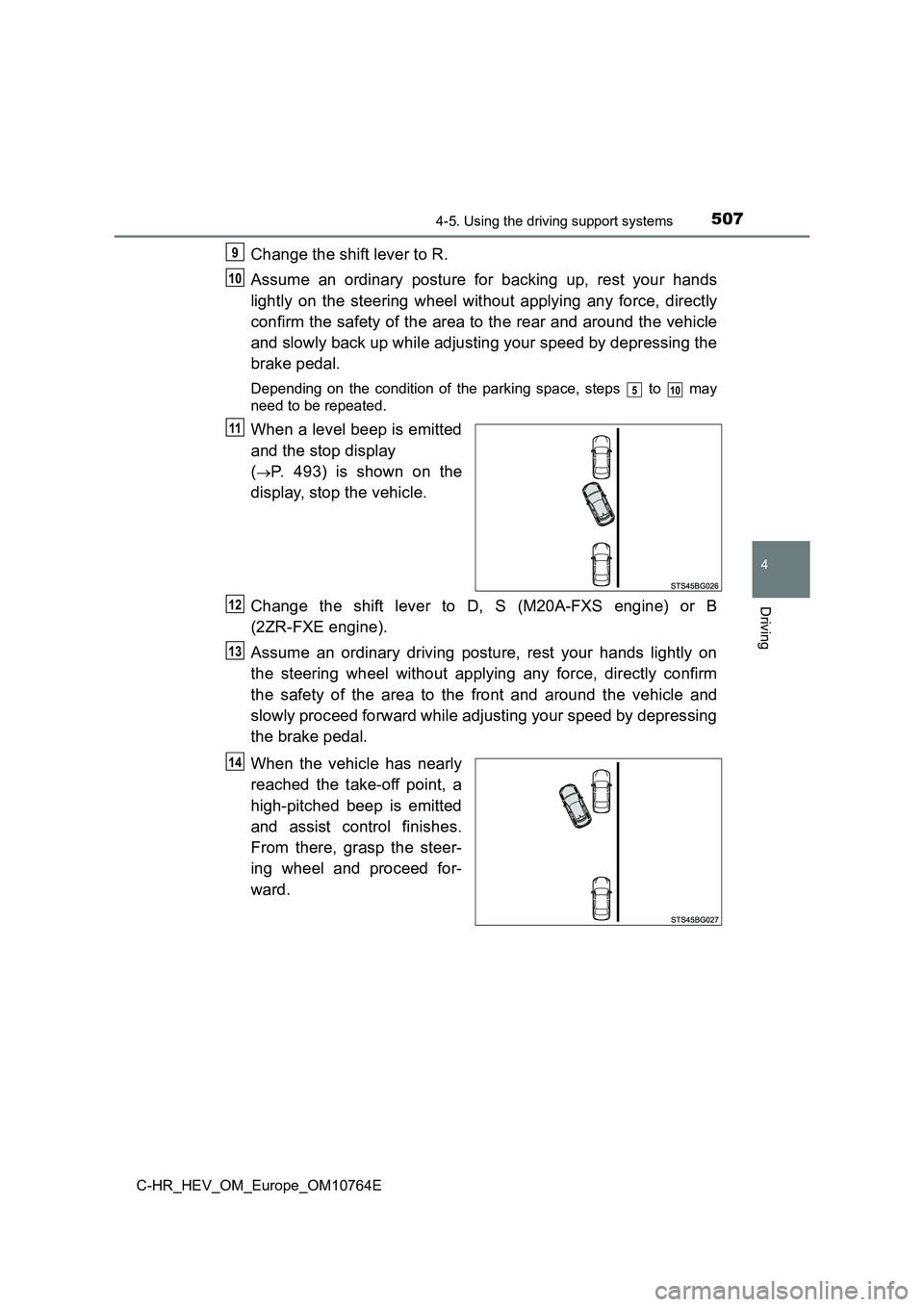
When a level beep is emitted
and the stop display
(P. 493) is shown on the
display, stop the vehicle.
Change the shift lever to D, S (M20A-FXS engine) or B
(2ZR-FXE engine).
Assume an ordinary driving posture, rest your hands lightly on
the steering wheel without applying any force, directly confirm
the safety of the area to the front and around the vehicle and
slowly proceed forward while adjusting your speed by depressing
the brake pedal.
When the vehicle has nearly
reached the take-off point, a
high-pitched beep is emitted
and assist control finishes.
From there, grasp the steer-
ing wheel and proceed for-
ward.
9
10
510
11
12
13
14
Page 510 of 814
5084-5. Using the driving support systems
C-HR_HEV_OM_Europe_OM10764E
■Exit parallel parking assist mode
● During assist control, if the driver determines that they are at a position
where take-off is possible and operates the steering wheel, ass ist control is
stopped at that position.
● Assist control cannot be used if there are no parked vehicles ahead, or if the
gap between the front of your vehicle and the vehicle parked ah ead is too
large.
● When using the exit parallel parking assist mode, the assist mode may be
not be able to operate depending on the surrounding environment .
■ When using the exit parallel parking assist mode
Do not use exit parallel parking assist mode in the following s ituations as it
may not operate properly:
● When the road surface is not paved or is rough, such as gravel.
● When there is a rut or other depression in the road to the side of your vehi-
cle.
● When the road to the side of your vehicle is sloped.
● When any of the following are behind the vehicle, within the area that the
vehicle will move to depart:
• Trees or poles
• Fire hydrants
• Tall grass, flower beds, etc.
• Walls which would surround the vehicle
• Vehicles waiting near the parking spot
• Metal I-beams
• Walls with protrusions
• Holes
Page 512 of 814
5104-5. Using the driving support systems
C-HR_HEV_OM_Europe_OM10764E
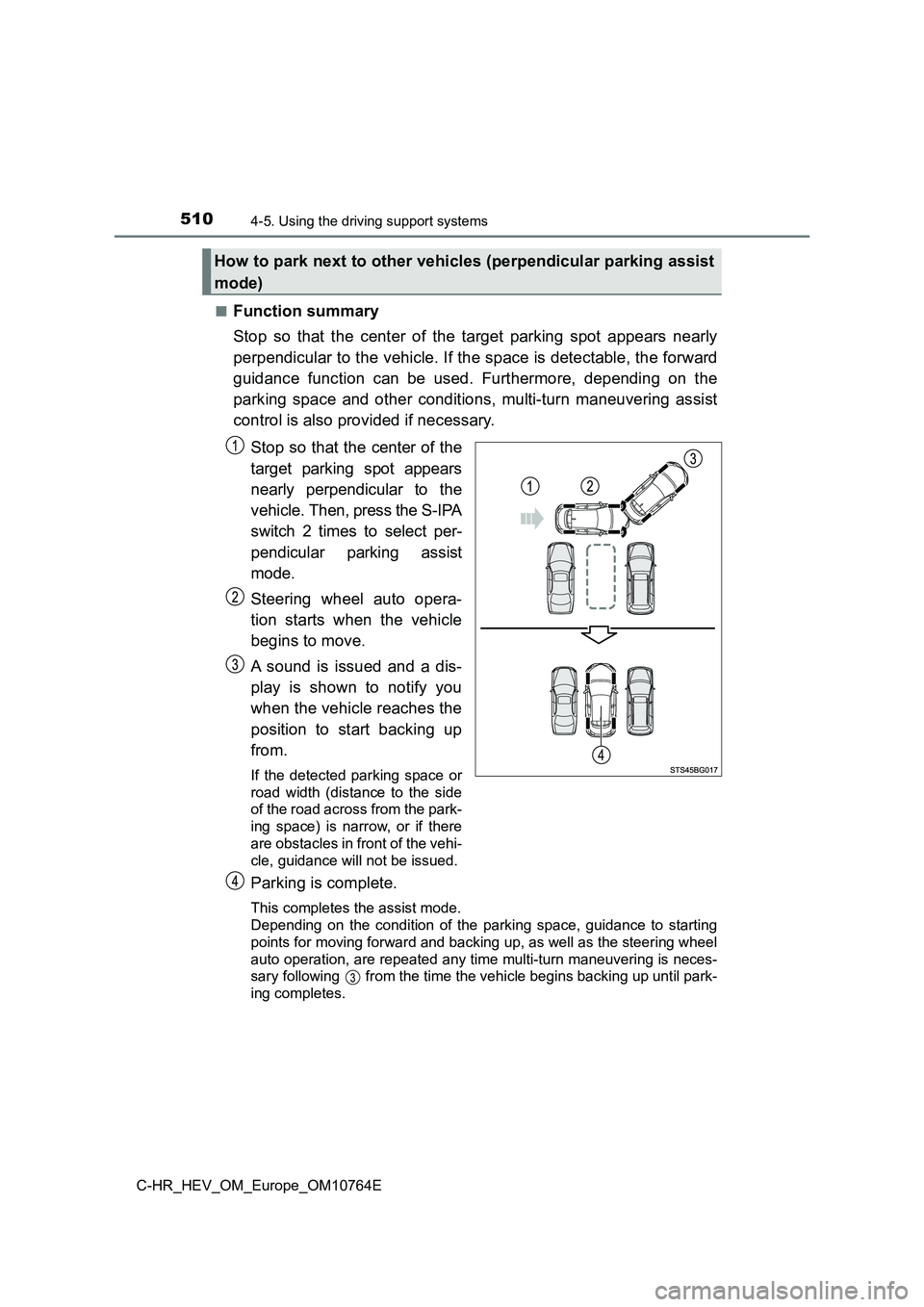
■Function summary
Stop so that the center of the target parking spot appears near ly
perpendicular to the vehicle. If the space is detectable, the f orward
guidance function can be used. Furthermore, depending on the
parking space and other conditions, multi-turn maneuvering assi st
control is also provided if necessary.
Stop so that the center of the
target parking spot appears
nearly perpendicular to the
vehicle. Then, press the S-IPA
switch 2 times to select per-
pendicular parking assist
mode.
Steering wheel auto opera-
tion starts when the vehicle
begins to move.
A sound is issued and a dis-
play is shown to notify you
when the vehicle reaches the
position to start backing up
from.
If the detected parking space or
road width (distance to the side
of the road across from the park-
ing space) is narrow, or if there
are obstacles in front of the vehi-
cle, guidance will not be issued.
Parking is complete.
This completes the assist mode.
Depending on the condition of the parking space, guidance to st arting
points for moving forward and backing up, as well as the steeri ng wheel
auto operation, are repeated any time multi-turn maneuvering is neces-
sary following from the time the vehicle begins backing up unt il park-
ing completes.
How to park next to other vehicles (perpendicular parking assis t
mode)
Page 513 of 814
5114-5. Using the driving support systems
4
Driving
C-HR_HEV_OM_Europe_OM10764E
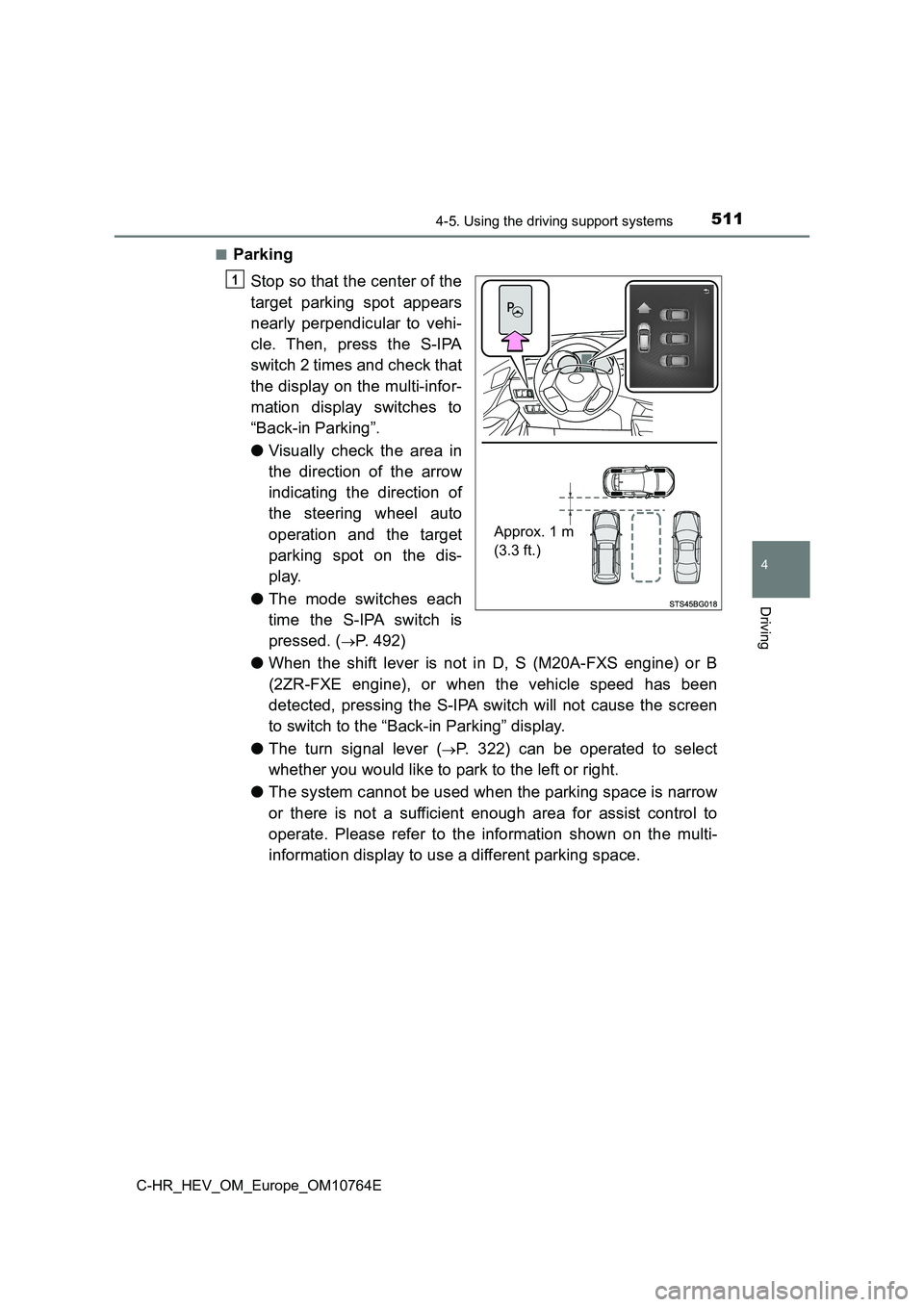
■Parking
Stop so that the center of the
target parking spot appears
nearly perpendicular to vehi-
cle. Then, press the S-IPA
switch 2 times and check that
the display on the multi-infor-
mation display switches to
“Back-in Parking”.
● Visually check the area in
the direction of the arrow
indicating the direction of
the steering wheel auto
operation and the target
parking spot on the dis-
play.
● The mode switches each
time the S-IPA switch is
pressed. (P. 492)
● When the shift lever is not in D, S (M20A-FXS engine) or B
(2ZR-FXE engine), or when the vehicle speed has been
detected, pressing the S-IPA switch will not cause the screen
to switch to the “Back-in Parking” display.
● The turn signal lever (P. 322) can be operated to select
whether you would like to park to the left or right.
● The system cannot be used when the parking space is narrow
or there is not a sufficient enough area for assist control to
operate. Please refer to the information shown on the multi-
information display to use a different parking space.
Approx. 1 m
(3.3 ft.)
1
Page 514 of 814
5124-5. Using the driving support systems
C-HR_HEV_OM_Europe_OM10764E
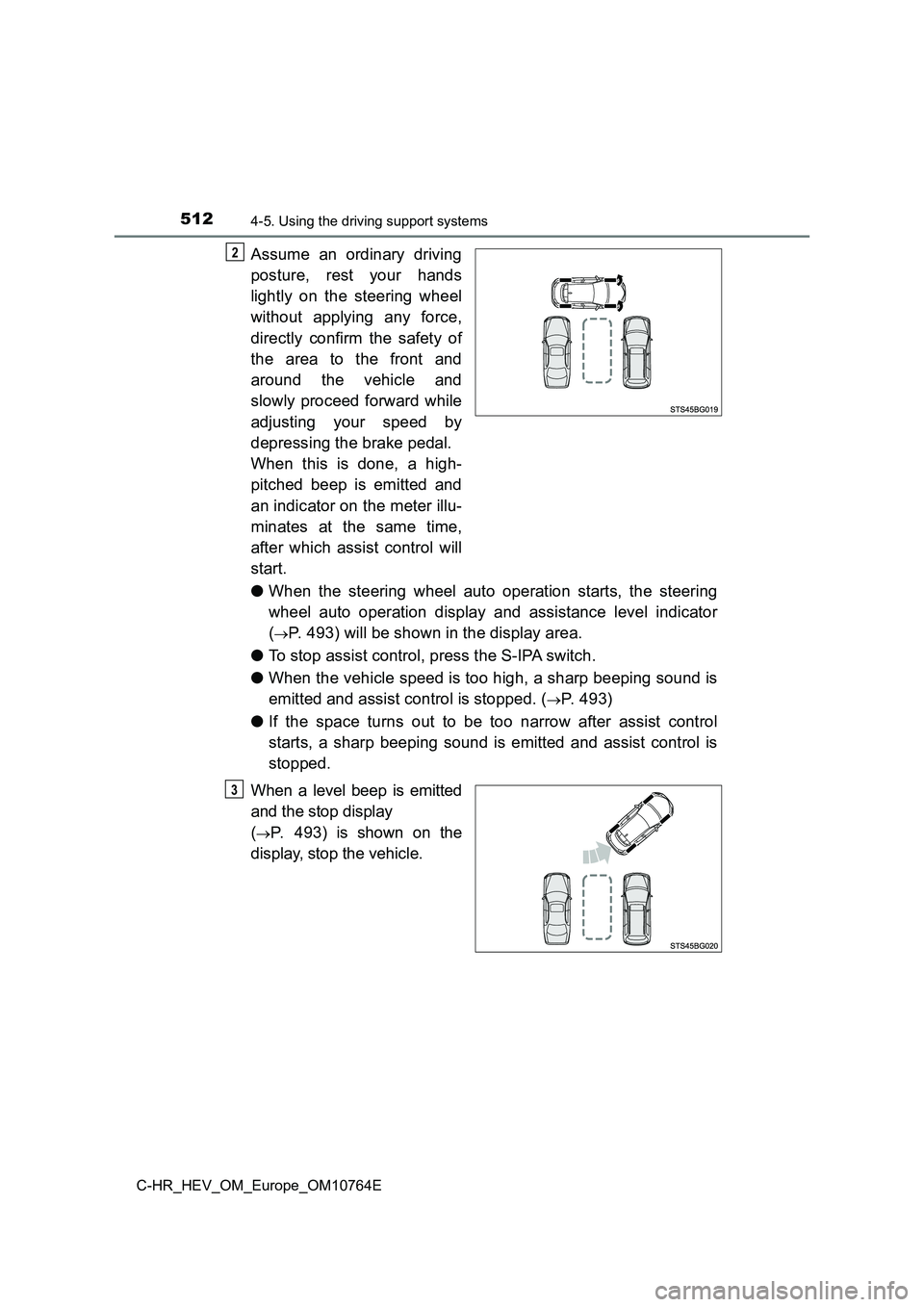
Assume an ordinary driving
posture, rest your hands
lightly on the steering wheel
without applying any force,
directly confirm the safety of
the area to the front and
around the vehicle and
slowly proceed forward while
adjusting your speed by
depressing the brake pedal.
When this is done, a high-
pitched beep is emitted and
an indicator on the meter illu-
minates at the same time,
after which assist control will
start.
● When the steering wheel auto operation starts, the steering
wheel auto operation display and assistance level indicator
(P. 493) will be shown in the display area.
● To stop assist control, press the S-IPA switch.
● When the vehicle speed is too high, a sharp beeping sound is
emitted and assist control is stopped. (P. 4 9 3 )
● If the space turns out to be too narrow after assist control
starts, a sharp beeping sound is emitted and assist control is
stopped.
When a level beep is emitted
and the stop display
(P. 493) is shown on the
display, stop the vehicle.
2
3
Page 515 of 814
5134-5. Using the driving support systems
4
Driving
C-HR_HEV_OM_Europe_OM10764E
Change the shift lever to R.
Assume an ordinary posture for backing up, rest your hands
lightly on the steering wheel without applying any force, direc tly
confirm the safety of the area to the rear and around the vehic le,
confirm that there are no obstacles in the parking space, and
slowly back up while adjusting your speed by depressing the
brake pedal.
● When the vehicle cannot be cleanly entered within the target
parking spot on the first try and multi-turn maneuvering is nec -
essary, proceed to step .
● When multi-turn maneuvering is not necessary, proceed to
step .
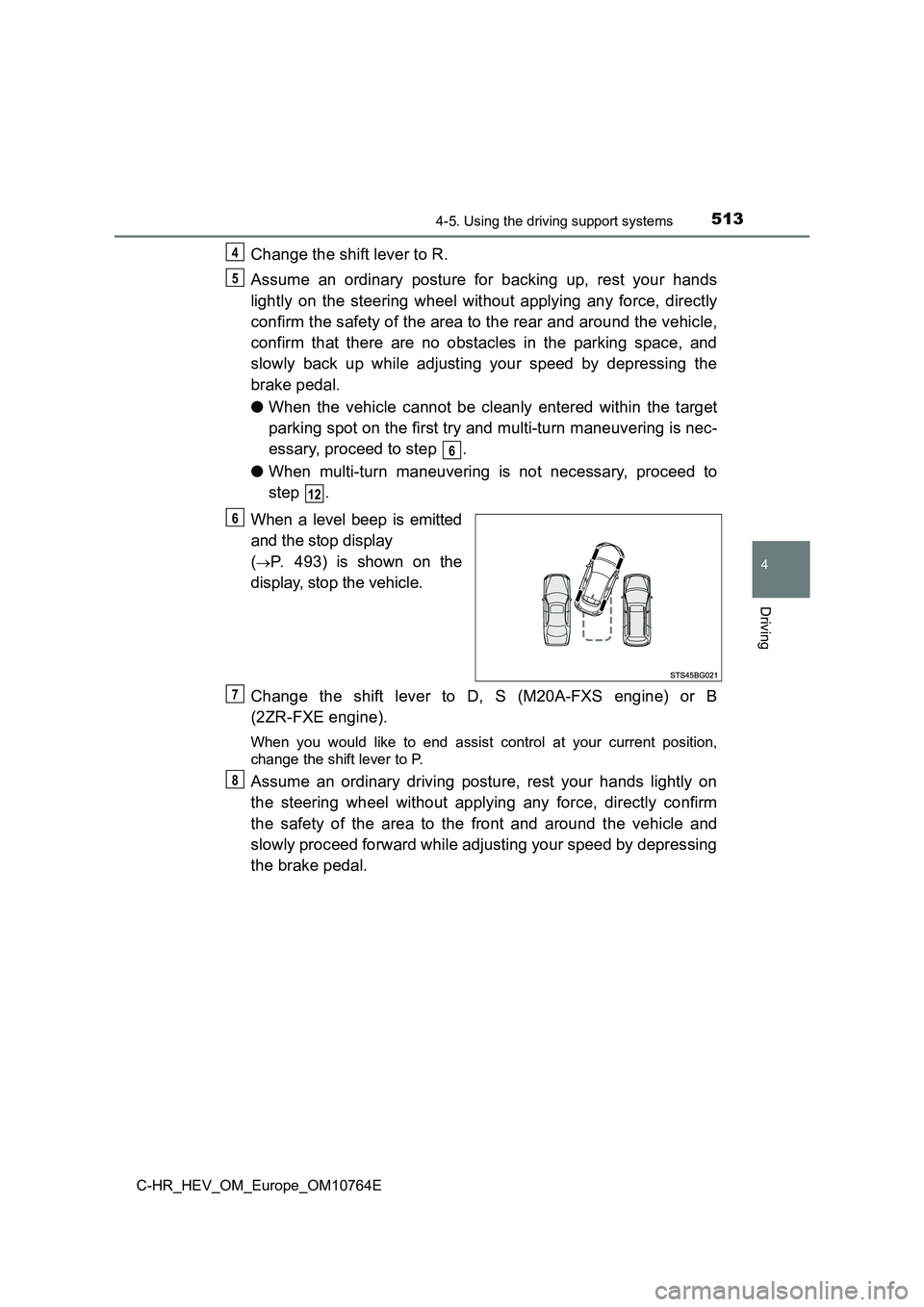
When a level beep is emitted
and the stop display
(P. 493) is shown on the
display, stop the vehicle.
Change the shift lever to D, S (M20A-FXS engine) or B
(2ZR-FXE engine).
When you would like to end assist control at your current posit ion,
change the shift lever to P.
Assume an ordinary driving posture, rest your hands lightly on
the steering wheel without applying any force, directly confirm
the safety of the area to the front and around the vehicle and
slowly proceed forward while adjusting your speed by depressing
the brake pedal.
4
5
6
12
6
7
8
Page 516 of 814
5144-5. Using the driving support systems
C-HR_HEV_OM_Europe_OM10764E
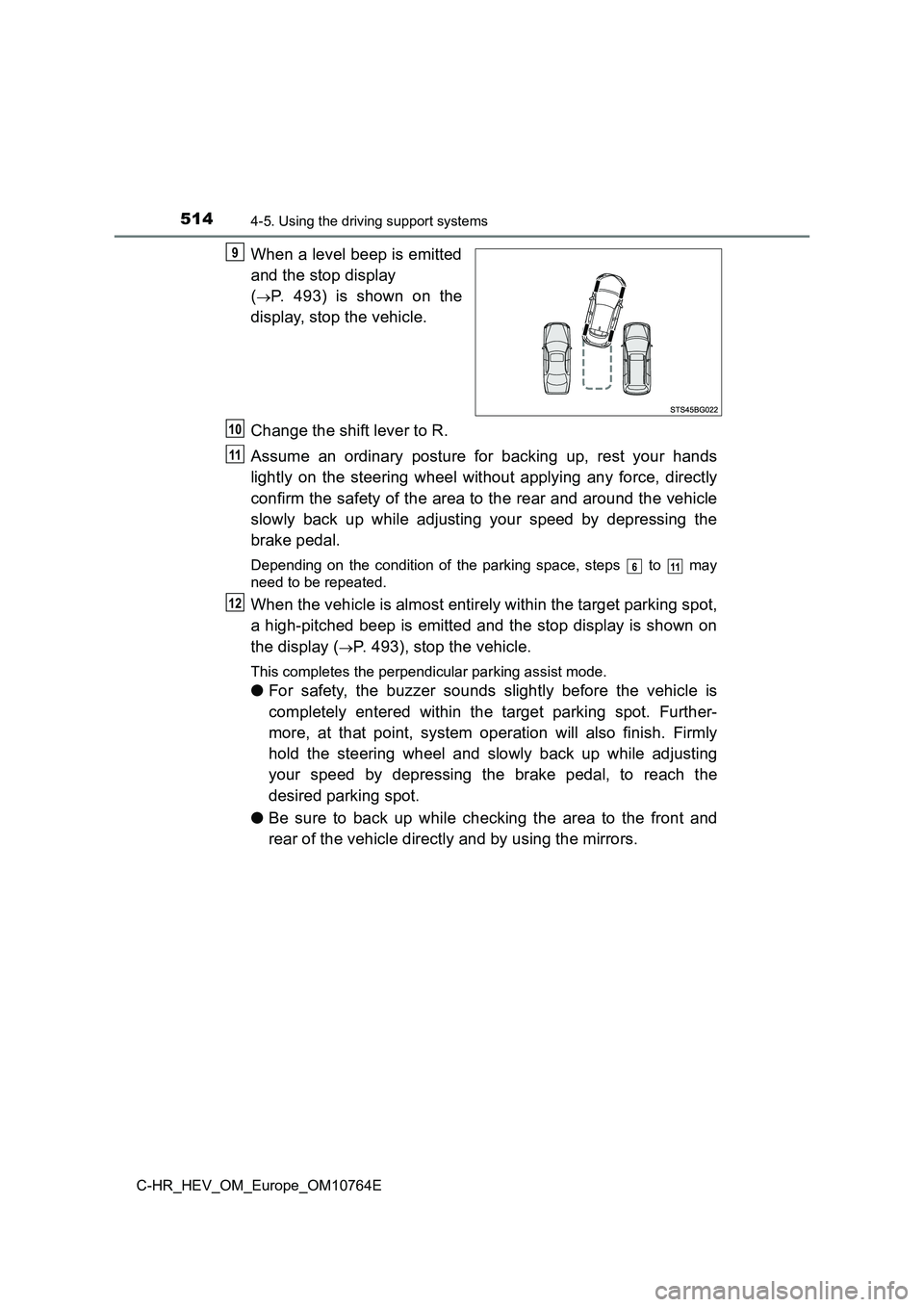
When a level beep is emitted
and the stop display
(P. 493) is shown on the
display, stop the vehicle.
Change the shift lever to R.
Assume an ordinary posture for backing up, rest your hands
lightly on the steering wheel without applying any force, direc tly
confirm the safety of the area to the rear and around the vehic le
slowly back up while adjusting your speed by depressing the
brake pedal.
Depending on the condition of the parking space, steps to may
need to be repeated.
When the vehicle is almost entirely within the target parking s pot,
a high-pitched beep is emitted and the stop display is shown on
the display (P. 493), stop the vehicle.
This completes the perpendicular parking assist mode.
● For safety, the buzzer sounds slightly before the vehicle is
completely entered within the target parking spot. Further-
more, at that point, system operation will also finish. Firmly
hold the steering wheel and slowly back up while adjusting
your speed by depressing the brake pedal, to reach the
desired parking spot.
● Be sure to back up while checking the area to the front and
rear of the vehicle directly and by using the mirrors.
9
10
11
611
12