ECU TOYOTA C-HR 2023 Manual PDF
[x] Cancel search | Manufacturer: TOYOTA, Model Year: 2023, Model line: C-HR, Model: TOYOTA C-HR 2023Pages: 814, PDF Size: 112.62 MB
Page 155 of 814
1531-5. Theft deterrent system
1
For safety and security
C-HR_HEV_OM_Europe_OM10764E
NOTICE
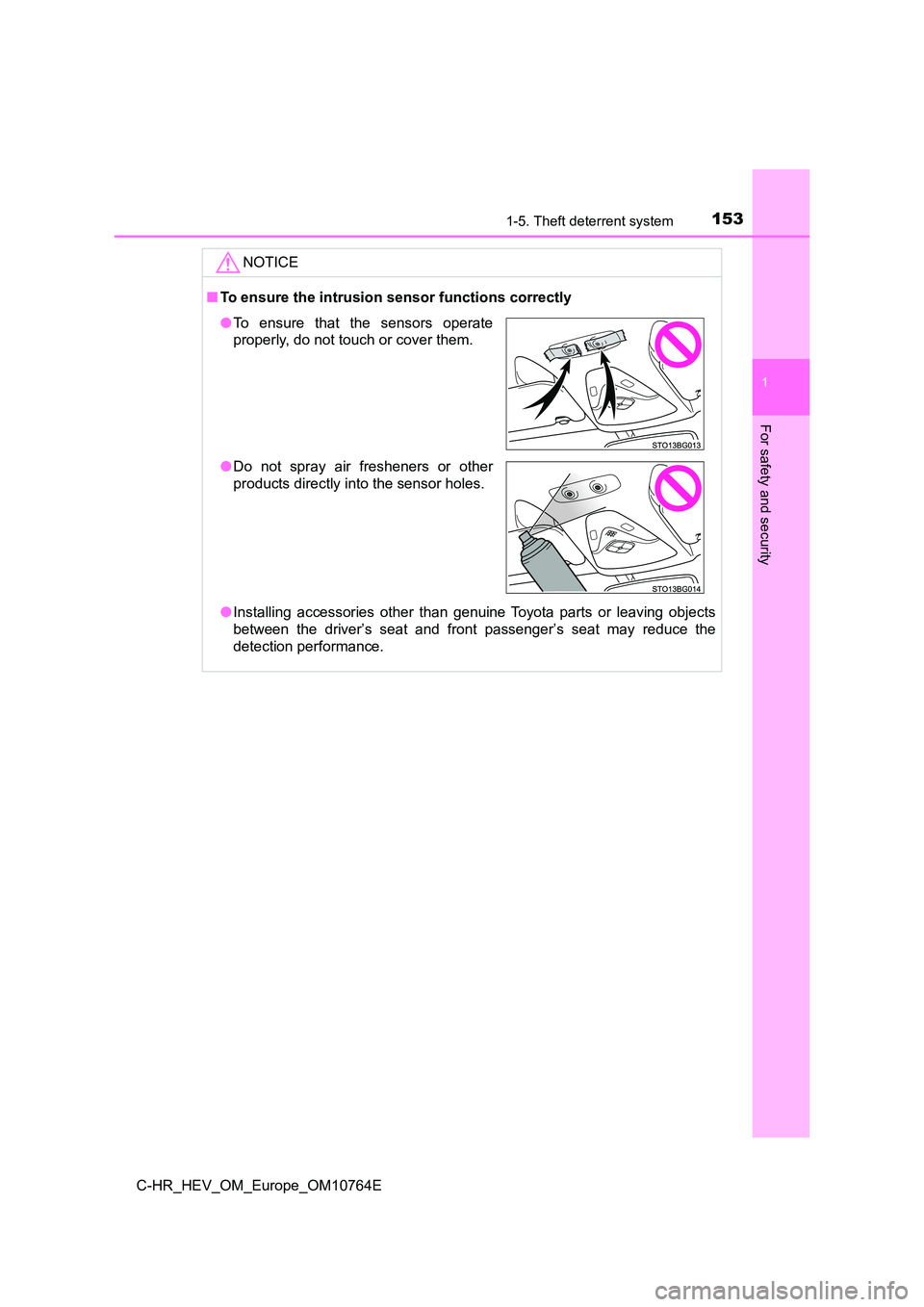
■To ensure the intrusion sensor functions correctly
● Installing accessories other than genuine Toyota parts or leaving objects
between the driver’s seat and front passenger’s seat may reduce the
detection performance.
● To ensure that the sensors operate
properly, do not touch or cover them.
● Do not spray air fresheners or other
products directly into the sensor holes.
Page 162 of 814
1602. Instrument cluster
C-HR_HEV_OM_Europe_OM10764E
*1: These lights turn on when the power switch is turned to ON mode to indi-
cate that a system check is being performed. They will turn off after the
hybrid system is on, or after a few seconds. There may be a mal function in
a system if a light does not come on, or if the lights do not t urn off. Have
the vehicle inspected by any authorized Toyota retailer or Toyo ta autho-
rized repairer, or any reliable repairer.
*2: The light turns on when the system is off.
*3: The light flashes to indicate that the system is operating.
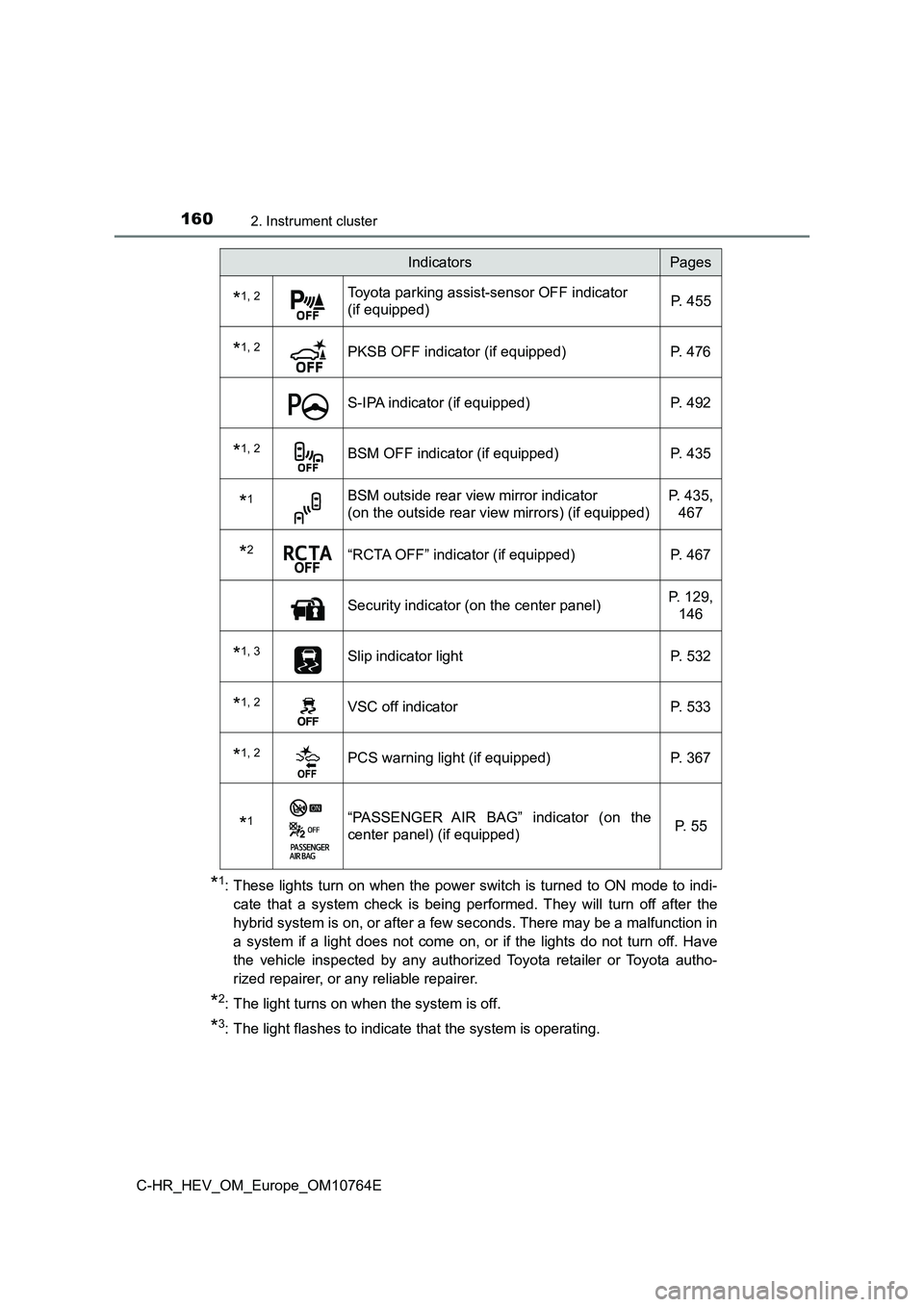
*1, 2Toyota parking assist-sensor OFF indicator
(if equipped) P. 4 5 5
*1, 2PKSB OFF indicator (if equipped) P. 476
S-IPA indicator (if equipped) P. 492
*1, 2BSM OFF indicator (if equipped) P. 435
*1BSM outside rear view mirror indicator
(on the outside rear vie w mirrors) (if equipped)
P. 435,
467
*2“RCTA OFF” indicator (if equipped) P. 467
Security indicator (on the center panel) P. 129,
146
*1, 3Slip indicator light P. 532
*1, 2VSC off indicator P. 533
*1, 2PCS warning light (if equipped) P. 367
*1“PASSENGER AIR BAG” indicator (on the
center panel) (if equipped) P. 55
IndicatorsPages
Page 193 of 814
191
3
3-2. Opening, closing and locking the doors
Operation of each component
C-HR_HEV_OM_Europe_OM10764E
Side doors
◆Entry function (vehicles with a smart entry & start system
equipped with entry function)
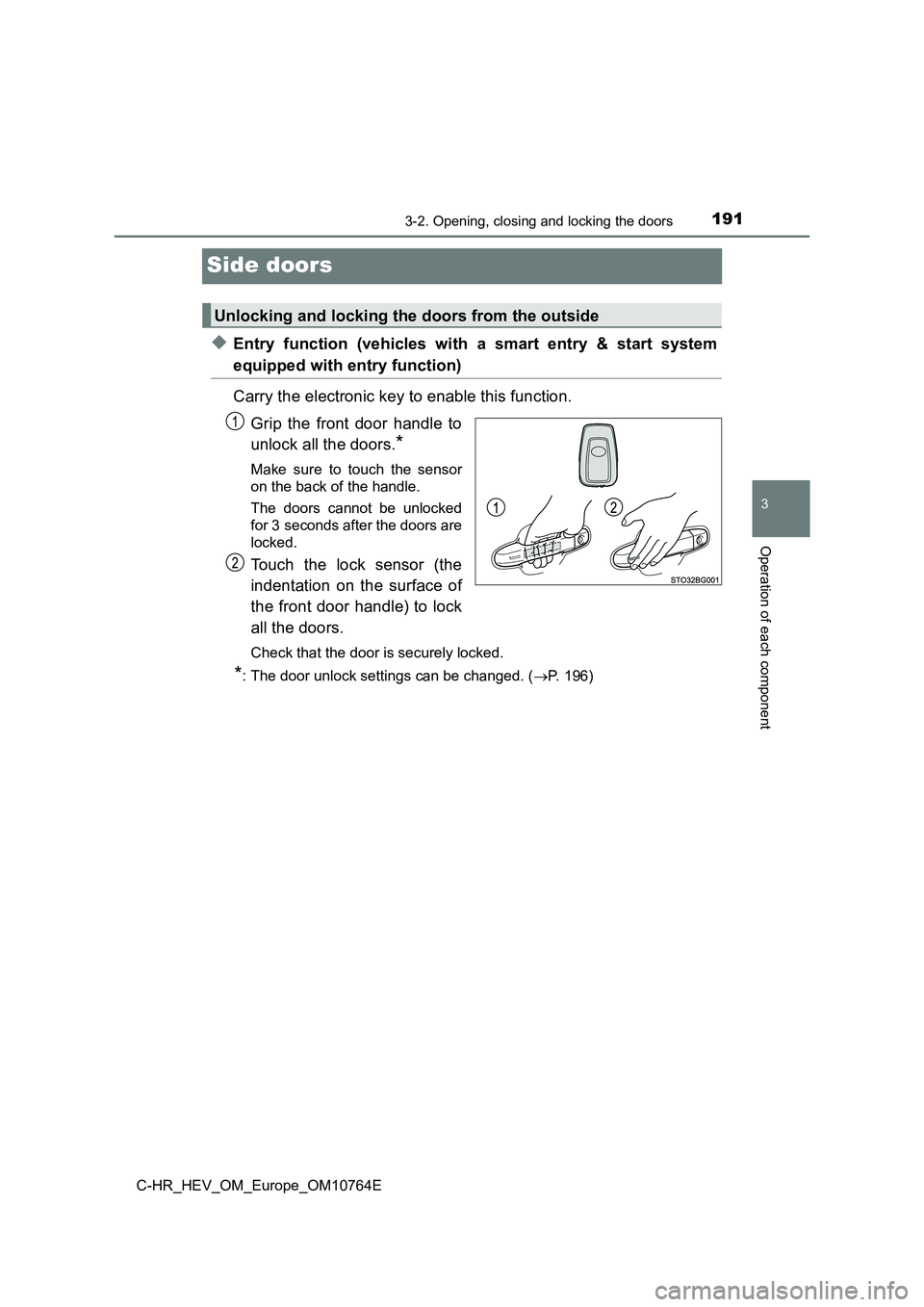
Carry the electronic key to enable this function.
Grip the front door handle to
unlock all the doors.*
Make sure to touch the sensor
on the back of the handle.
The doors cannot be unlocked
for 3 seconds after the doors are
locked.
Touch the lock sensor (the
indentation on the surface of
the front door handle) to lock
all the doors.
Check that the door is securely locked.
*: The door unlock settings can be changed. ( P. 196)
Unlocking and locking the doors from the outside
Page 194 of 814
1923-2. Opening, closing and locking the doors
C-HR_HEV_OM_Europe_OM10764E
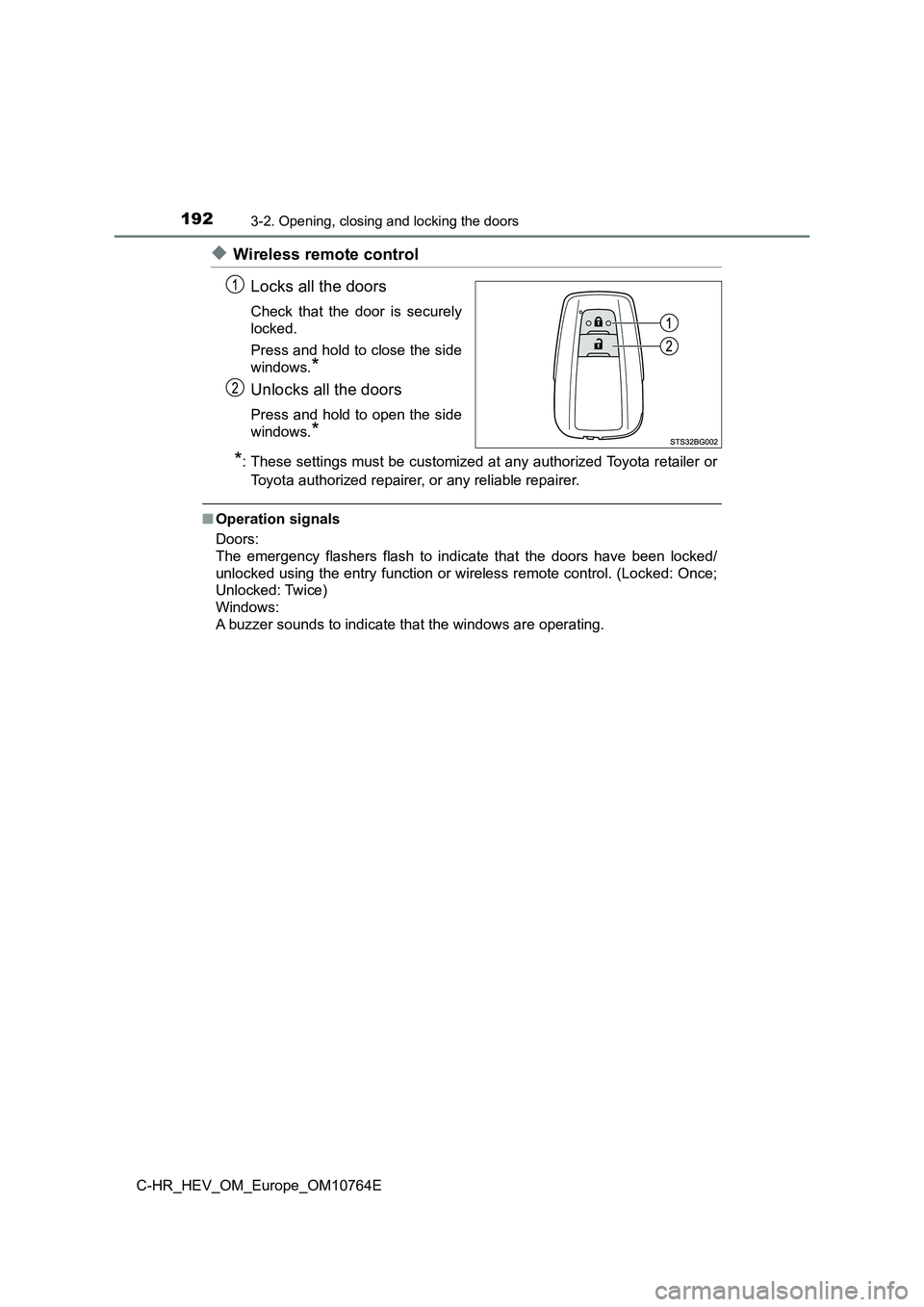
◆Wireless remote control
Locks all the doors
Check that the door is securely
locked.
Press and hold to close the side
windows.*
Unlocks all the doors
Press and hold to open the side
windows.*
*: These settings must be customized at any authorized Toyota ret ailer or
Toyota authorized repairer, or any reliable repairer.
■Operation signals
Doors:
The emergency flashers flash to indicate that the doors have be en locked/
unlocked using the entry function or wireless remote control. ( Locked: Once;
Unlocked: Twice)
Windows:
A buzzer sounds to indicate that the windows are operating.
Page 195 of 814
1933-2. Opening, closing and locking the doors
3
Operation of each component
C-HR_HEV_OM_Europe_OM10764E
■ Security feature
If a door is not opened within approximately 30 seconds after t he vehicle is
unlocked, the security feature automatically locks the vehicle again.
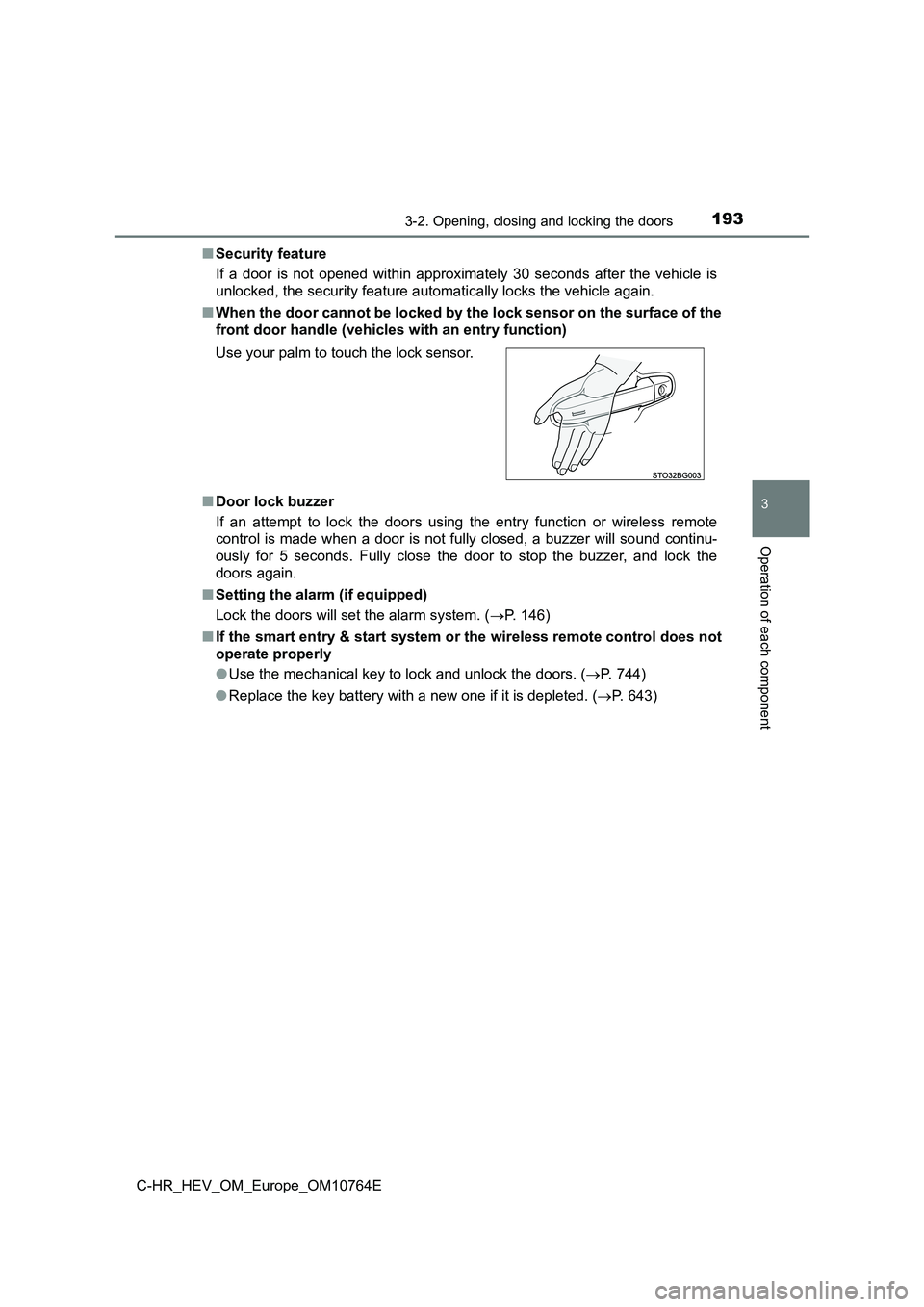
■ When the door cannot be locked by the lock sensor on the surface of the
front door handle (vehicl es with an entry function)
■ Door lock buzzer
If an attempt to lock the doors using the entry function or wir eless remote
control is made when a door is not fully closed, a buzzer will sound continu-
ously for 5 seconds. Fully close the door to stop the buzzer, a nd lock the
doors again.
■ Setting the alarm (if equipped)
Lock the doors will set the alarm system. ( P. 146)
■ If the smart entry & start system or the wireless remote control does not
operate properly
● Use the mechanical key to lock and unlock the doors. (P. 744)
● Replace the key battery with a new one if it is depleted. (P. 643)
Use your palm to touch the lock sensor.
Page 201 of 814
199
3
3-2. Opening, closing and locking the doors
Operation of each component
C-HR_HEV_OM_Europe_OM10764E
Back door
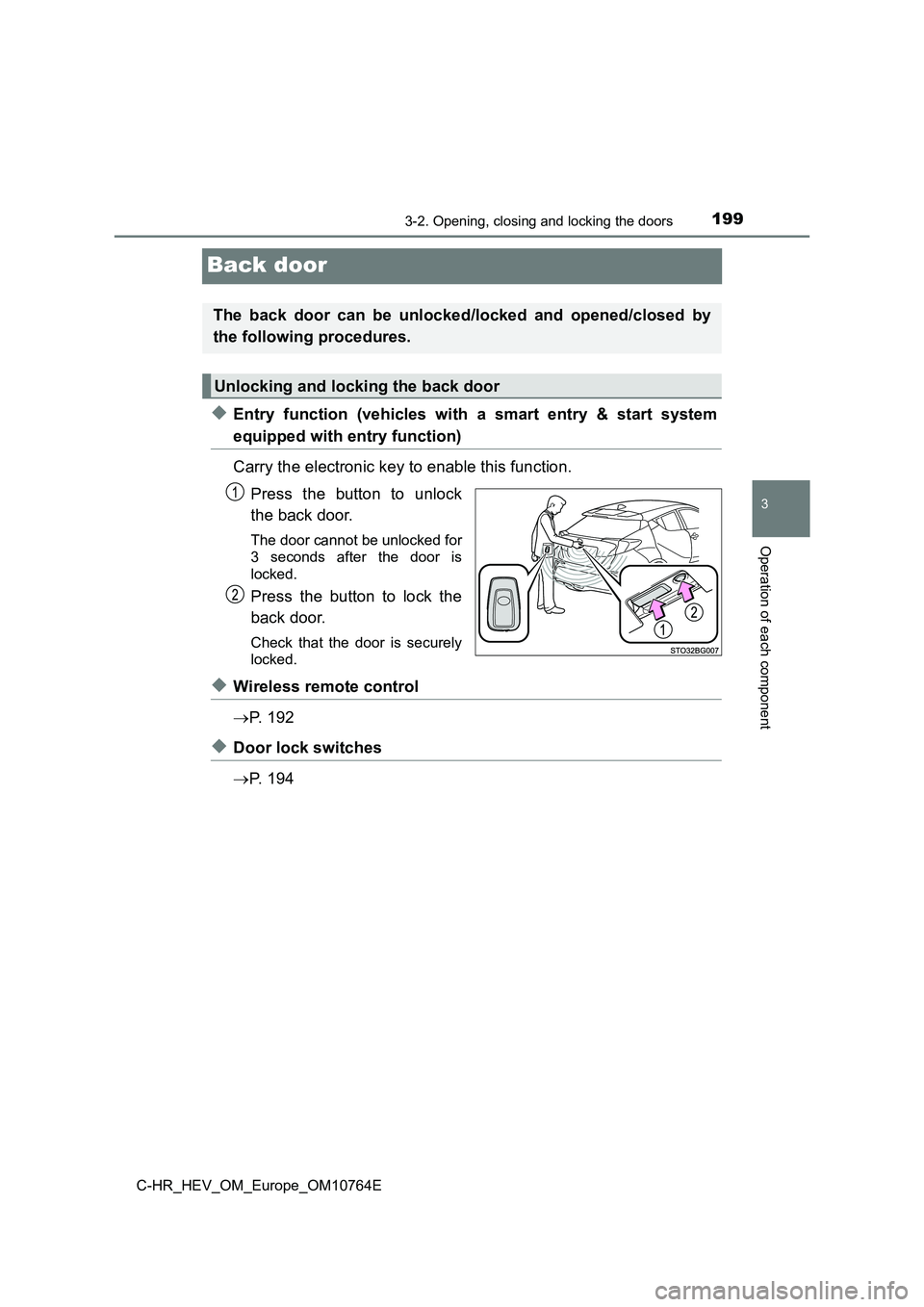
◆Entry function (vehicles with a smart entry & start system
equipped with entry function)
Carry the electronic key to enable this function.
Press the button to unlock
the back door.
The door cannot be unlocked for
3 seconds after the door is
locked.
Press the button to lock the
back door.
Check that the door is securely
locked.
◆Wireless remote control
P. 1 9 2
◆Door lock switches
P. 1 9 4
The back door can be unlocked/locked and opened/closed by
the following procedures.
Unlocking and locking the back door
Page 205 of 814
2033-2. Opening, closing and locking the doors
3
Operation of each component
C-HR_HEV_OM_Europe_OM10764E
WARNING
■Operating the back door
Observe the following precautions.
Failure to do so may cause parts of the body to be caught, resu lting in death
or serious injury.
● Remove any heavy loads, such as snow and ice, from the back door
before opening it. Failure to do so may cause the back door to suddenly
shut again after it is opened.
● When opening or closing the back door, thoroughly check to make sure
the surrounding area is safe.
● If anyone is in the vicinity, make sure they are safe and let them know that
the back door is about to open or close.
● Use caution when opening or closing the back door in windy weather as it
may move abruptly in strong wind.
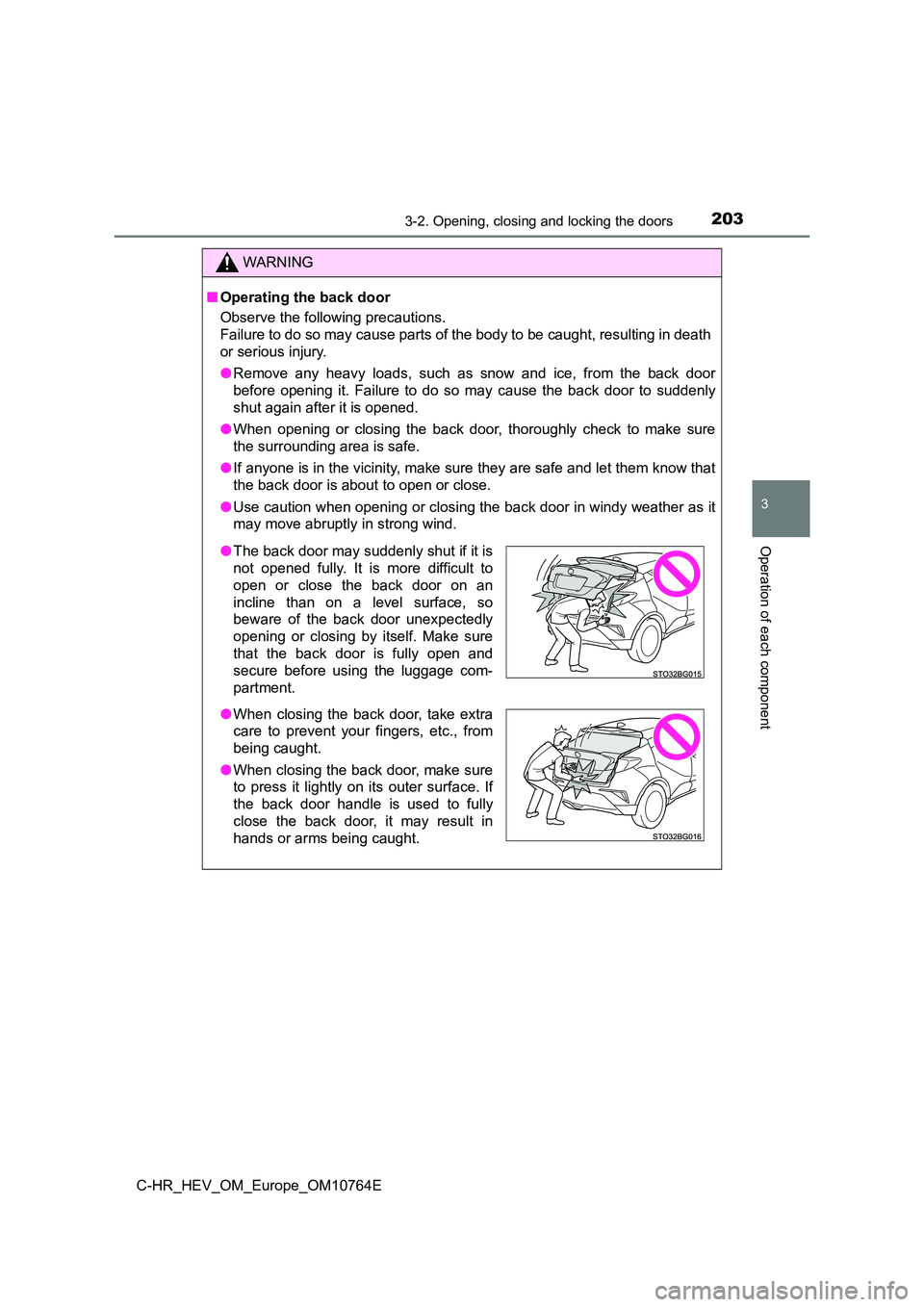
● The back door may suddenly shut if it is
not opened fully. It is more difficult to
open or close the back door on an
incline than on a level surface, so
beware of the back door unexpectedly
opening or closing by itself. Make sure
that the back door is fully open and
secure before using the luggage com-
partment.
● When closing the back door, take extra
care to prevent your fingers, etc., from
being caught.
● When closing the back door, make sure
to press it lightly on its outer surface. If
the back door handle is used to fully
close the back door, it may result in
hands or arms being caught.
Page 264 of 814
2623-3. Adjusting the seats
C-HR_HEV_OM_Europe_OM10764E
Rear seats
Park the vehicle in a safe place.
Apply the parking brake firmly and shift the shift lever to P. (P. 313)
Adjust the position of the front seat and the angle of the seatback.
(P. 260)
Depending on the position of the front seat, if the seatback is folded back-
ward, it may interfere with the operation of the rear seat.
Lower the head restraint of the rear seat. (P. 264)
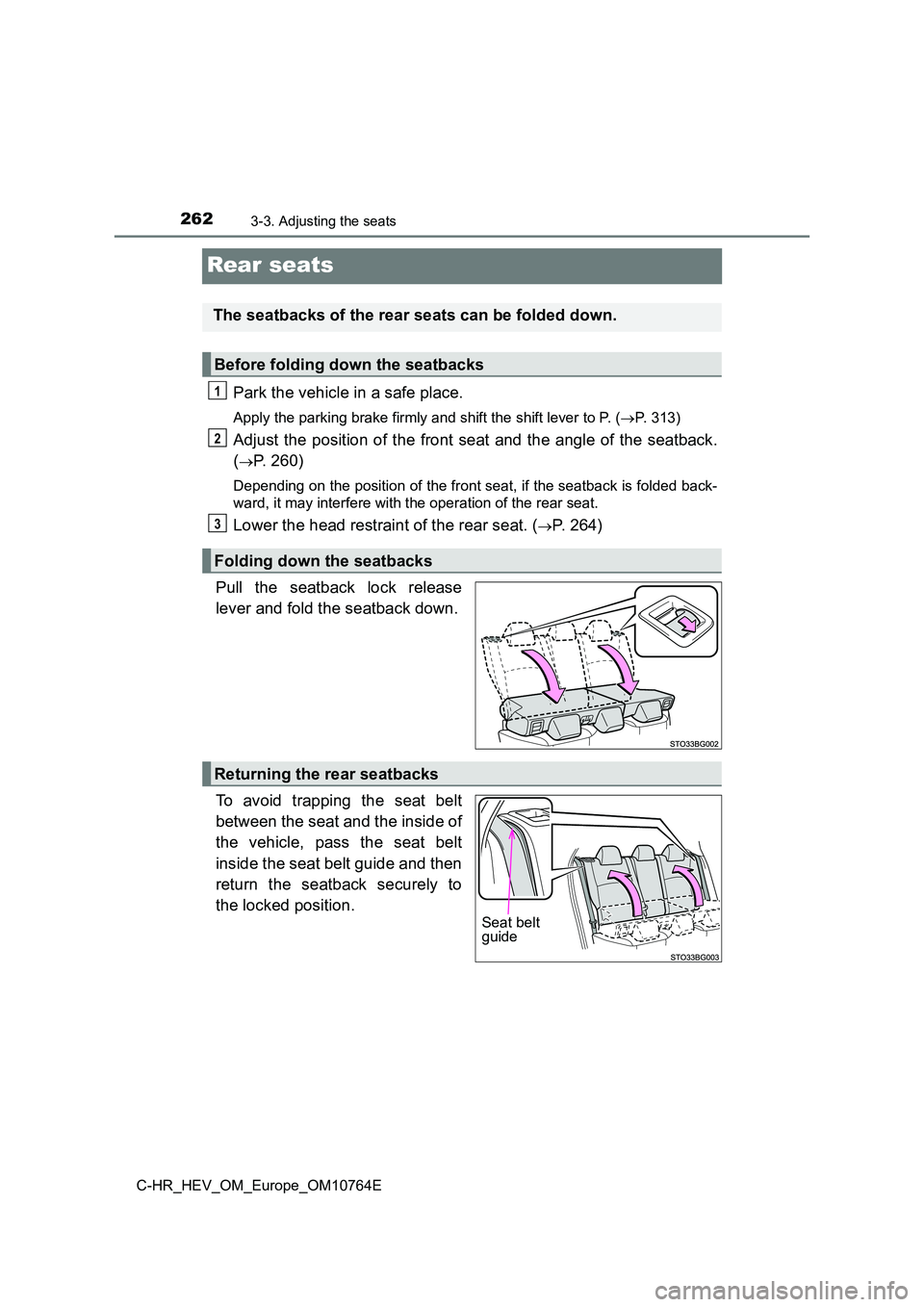
Pull the seatback lock release
lever and fold the seatback down.
To avoid trapping the seat belt
between the seat and the inside of
the vehicle, pass the seat belt
inside the seat belt guide and then
return the seatback securely to
the locked position.
The seatbacks of the rear seats can be folded down.
Before folding down the seatbacks
Folding down the seatbacks
1
2
3
Returning the rear seatbacks
Seat belt guide
Page 265 of 814
2633-3. Adjusting the seats
3
Operation of each component
C-HR_HEV_OM_Europe_OM10764E
WARNING
Observe the following precautions. Failure to do so may result in death or
serious injury.
■ When folding the rear seatbacks down
● Do not fold the seatbacks down while driving.
● Stop the vehicle on level ground, set the parking brake and shift the shift
lever to P.
● Do not allow anyone to sit on a folded seatback or in the luggage compart-
ment while driving.
● Do not allow children to enter the luggage compartment.
● Do not allow anyone to sit on the rear center seat if the rear right seat is
folded down, as the seat belt buckle for the rear center seat b elt is then
concealed under the folded seat and cannot be used.
● Be careful not to get your hand caught when folding the rear seatbacks.
● Adjust the position of the front seats before folding down the rear seat-
backs so that the front seats do not interfere with the rear se atbacks when
folding down the rear seatbacks.
■ After returning the rear seatback to the upright position
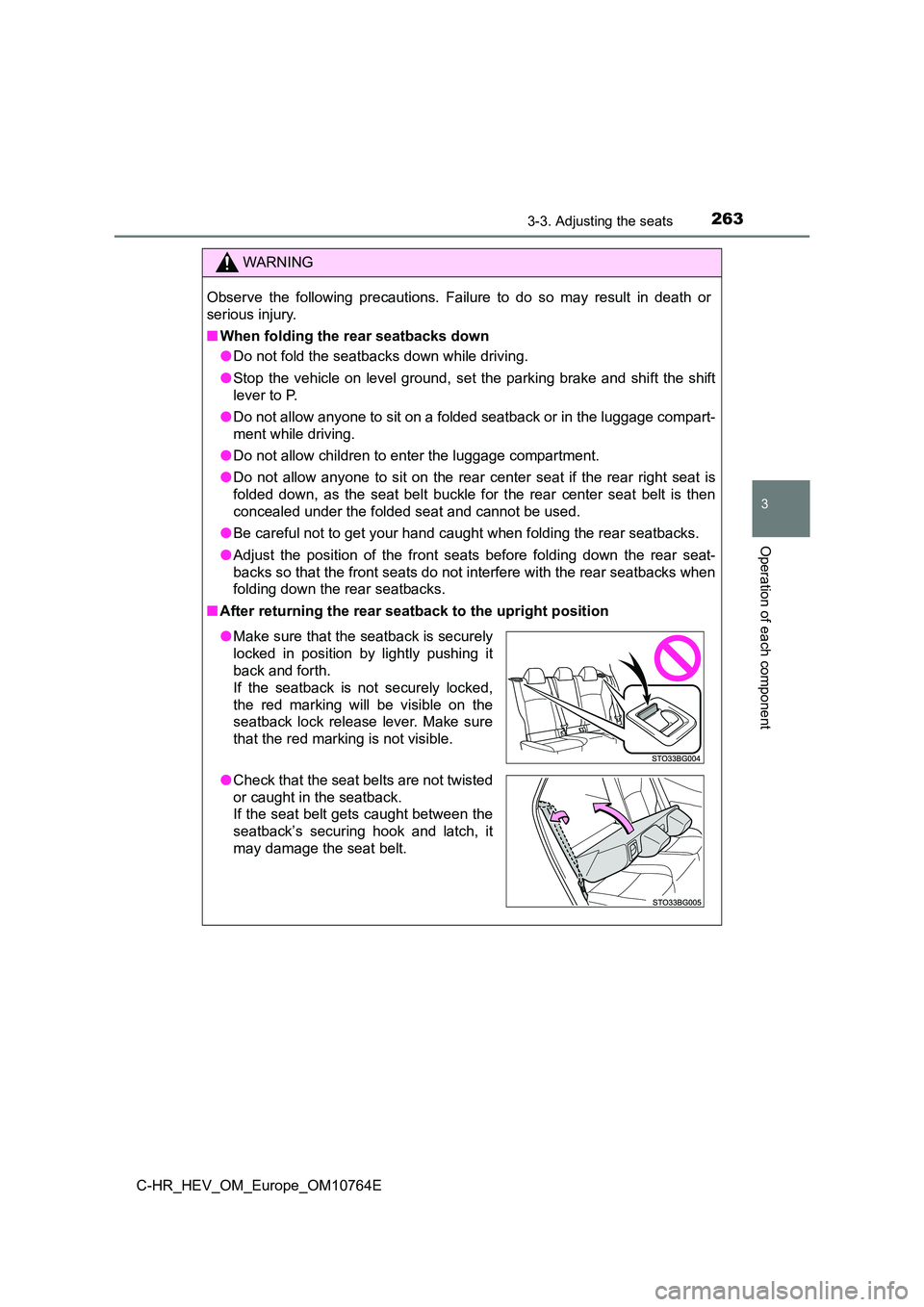
●Make sure that the seatback is securely
locked in position by lightly pushing it
back and forth.
If the seatback is not securely locked,
the red marking will be visible on the
seatback lock release lever. Make sure
that the red marking is not visible.
● Check that the seat belts are not twisted
or caught in the seatback.
If the seat belt gets caught between the
seatback’s securing hook and latch, it
may damage the seat belt.
Page 270 of 814
2683-4. Adjusting the steering wheel and mirrors
C-HR_HEV_OM_Europe_OM10764E
Steering wheel
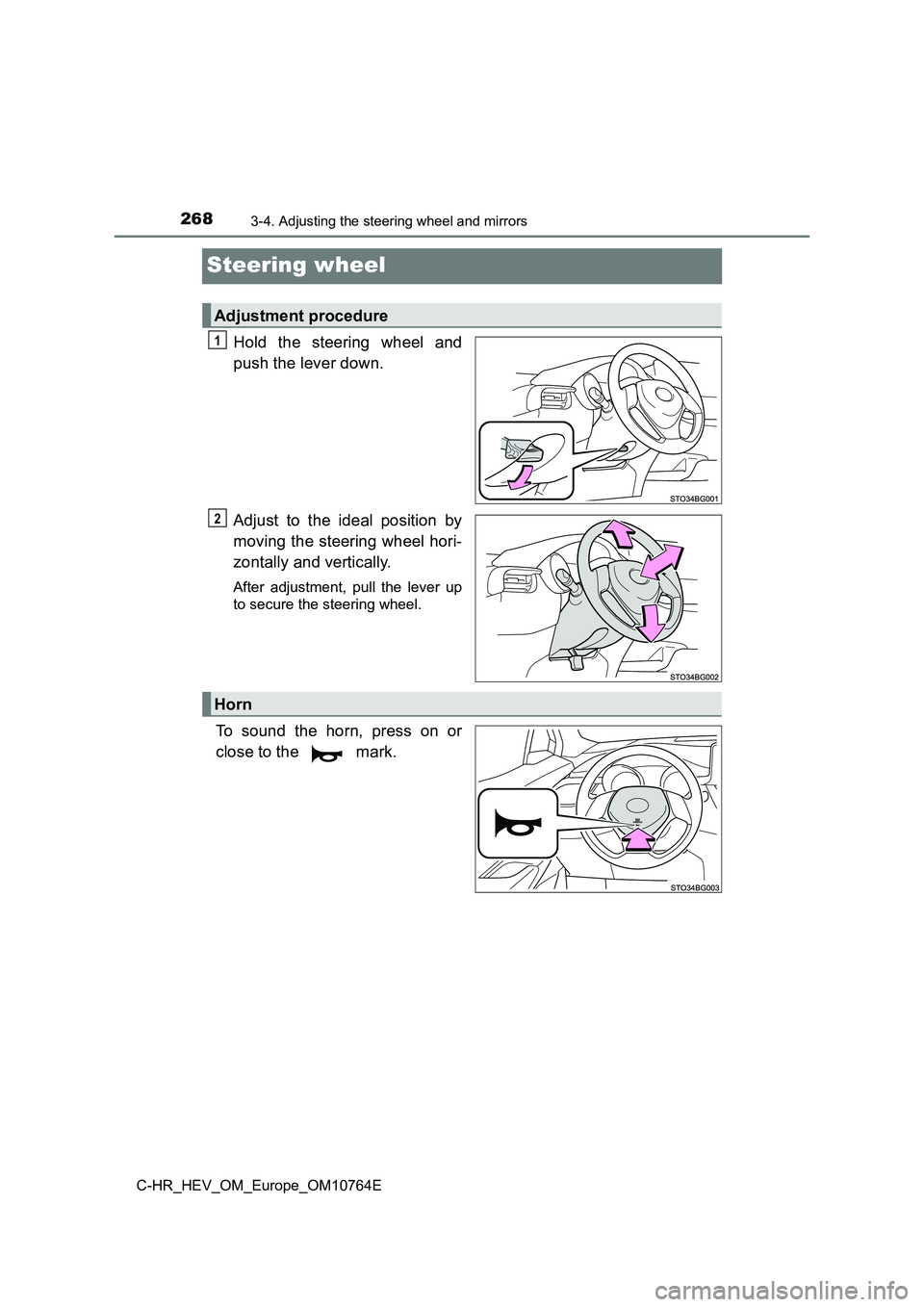
Hold the steering wheel and
push the lever down.
Adjust to the ideal position by
moving the steering wheel hori-
zontally and vertically.
After adjustment, pull the lever up
to secure the steering wheel.
To sound the horn, press on or
close to the mark.
Adjustment procedure
1
2
Horn