door lock TOYOTA CAMRY 2012 XV50 / 9.G Service Manual
[x] Cancel search | Manufacturer: TOYOTA, Model Year: 2012, Model line: CAMRY, Model: TOYOTA CAMRY 2012 XV50 / 9.GPages: 532, PDF Size: 6.44 MB
Page 96 of 532
96 1-6. Theft deterrent system
■System maintenance
The vehicle has a maintenance-free type alarm system.
■ Items to check before locking the vehicle
To prevent unexpected triggering of the alarm and vehicle theft, make sure
of the following:
●Nobody is in the vehicle.
● The windows and moon roof are closed before the alarm is set.
● No valuables or other personal items are left in the vehicle.
■ Deactivating or stopping the alarm
Do one of the following to deactivate or stop the alarm.
●Unlock the doors or trunk.
● Vehicles without a smart key system: Turn the engine switch
to the “ACC” or “ON” position, or start the engine. (The alarm
will be deactivated or stop ped after a few seconds.)
● Vehicles with a smart key system: Turn the “ENGINE START
STOP” switch to ACCESSORY or IGNITION ON mode, or
start the engine. (The alarm will be deactivated or stopped
after a few seconds.)
Page 97 of 532
97
1-6. Theft deterrent system
1
Before driving
■
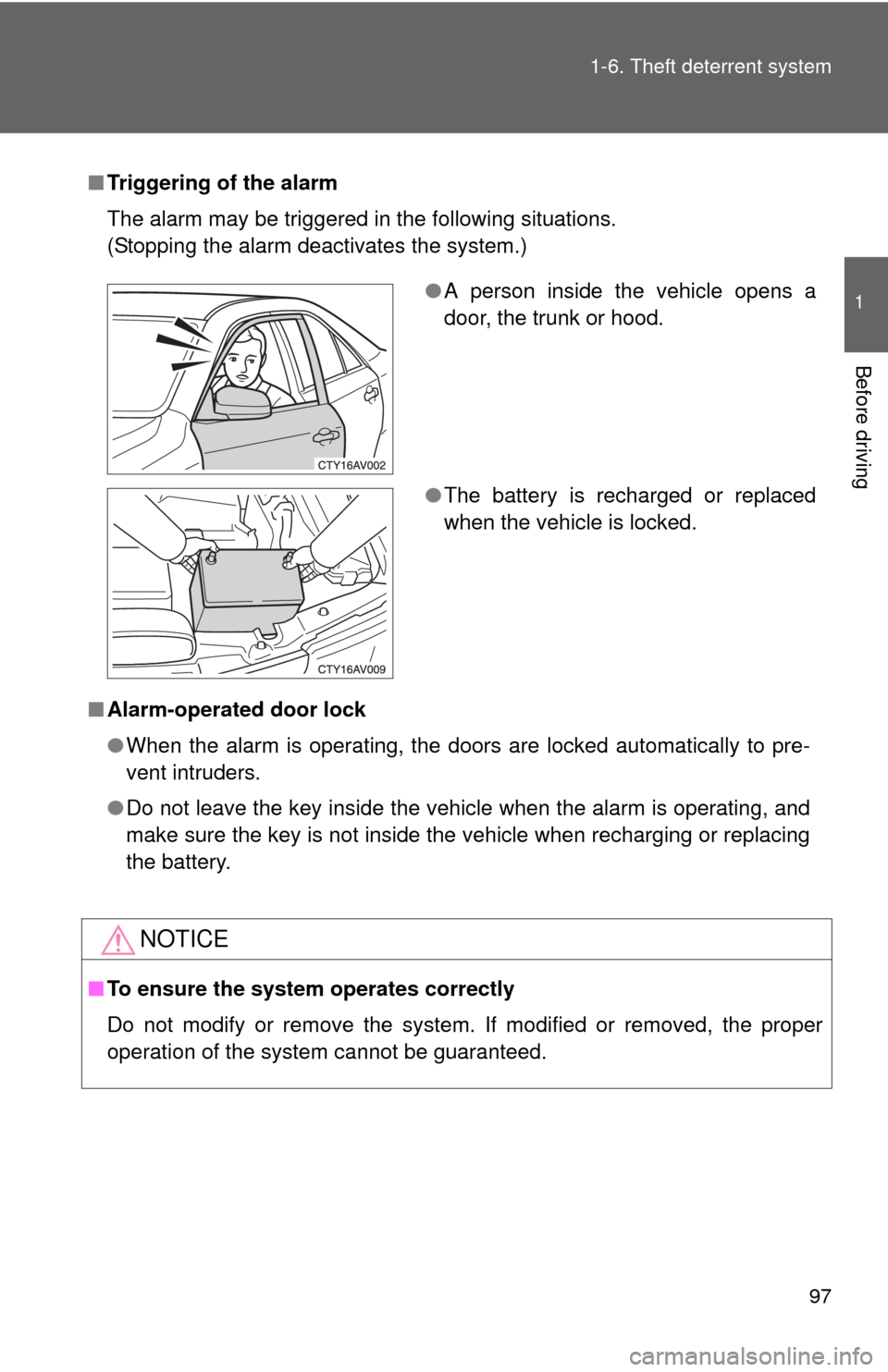
Triggering of the alarm
The alarm may be triggered in the following situations.
(Stopping the alarm deactivates the system.)
■ Alarm-operated door lock
●When the alarm is operating, the doors are locked automatically to pre-
vent intruders.
● Do not leave the key inside the vehicle when the alarm is operating, and
make sure the key is not inside the vehicle when recharging or replacing
the battery.
NOTICE
■To ensure the system operates correctly
Do not modify or remove the system. If modified or removed, the proper
operation of the system cannot be guaranteed.
●A person inside the vehicle opens a
door, the trunk or hood.
● The battery is recharged or replaced
when the vehicle is locked.
Page 134 of 532
134
2-1. Driving procedures
Driving the vehicle
The following procedures should be observed to ensure safe driv-
ing:
■ Starting the engine
P. 145, 148
■ Driving
With the brake pedal depressed, shift the shift lever to D.
( P. 155, 159)
Release the parking brake. ( P. 167)
Gradually release the brake pedal and gently depress the
accelerator pedal to accelerate the vehicle.
■ Stopping
With the shift lever in D, depress the brake pedal.
If necessary, set the parking brake.
If the vehicle is to be stopped for an extended period of time, shift
the shift lever to P or N. ( P. 155, 159)
■Parking the vehicle
With the shift lever in D, depress the brake pedal.
Set the parking brake. ( P. 167)
Shift the shift lever to P. ( P. 155, 159)
If parking on a hill, block the wheels as needed.
Vehicles without a smart key system:
Turn the engine switch to the “LOCK” position to stop the
engine.
Vehicles with a smart key system:
Press the “ENGINE START STOP” switch to stop the
engine.
Lock the door, making sure that you have the key on your
person.
STEP1
STEP2
STEP3
STEP1
STEP2
STEP1
STEP2
STEP3
STEP4
STEP5
Page 141 of 532

141
2-1. Driving procedures
2
When driving
CAUTION
■
When the vehicle is parked
●Do not leave glasses, cigarette lighters, spray cans, or soft drink cans in
the vehicle when it is in the sun.
Doing so may result in the following:
• Gas may leak from a cigarette lighter or spray can, and may lead to a
fire.
• The temperature inside the vehicle may cause the plastic lenses and plastic material of glasses to deform or crack.
• Soft drink cans may fracture, causing the contents to spray over the interior of the vehicle, and may also cause a short circuit in the vehi-
cle's electrical components.
● Do not leave cigarette lighters in the vehicle. If a cigarette lighter is in a
place such as the glove box or on the floor, it may be lit accidentally when
luggage is loaded or the seat is adjusted, causing a fire.
● Do not attach adhesive discs to the windshield or windows. Do not place
containers such as air fresheners on the instrument panel or dashboard.
Adhesive discs or containers may act as lenses, causing a fire in the vehi-
cle.
● Do not leave a door or window open if the curved glass is coated with a
metallized film such as a silver-colored one. Reflected sunlight may cause
the glass to act as a lens, causing a fire.
● Always apply the parking brake, shift the shift lever to P, stop the engine
and lock the vehicle.
Do not leave the vehicle unattended while the engine is running.
● Do not touch the exhaust pipe while the engine is running or immediately
after turning the engine off.
Doing so may cause burns.
● Do not leave the engine running in an area with snow build-up, or where it
is snowing. If snowbanks build up around the vehicle while the engine is
running, exhaust gases may collect and enter the vehicle. This may lead
to death or a serious health hazard.
Page 146 of 532
146 2-1. Driving procedures
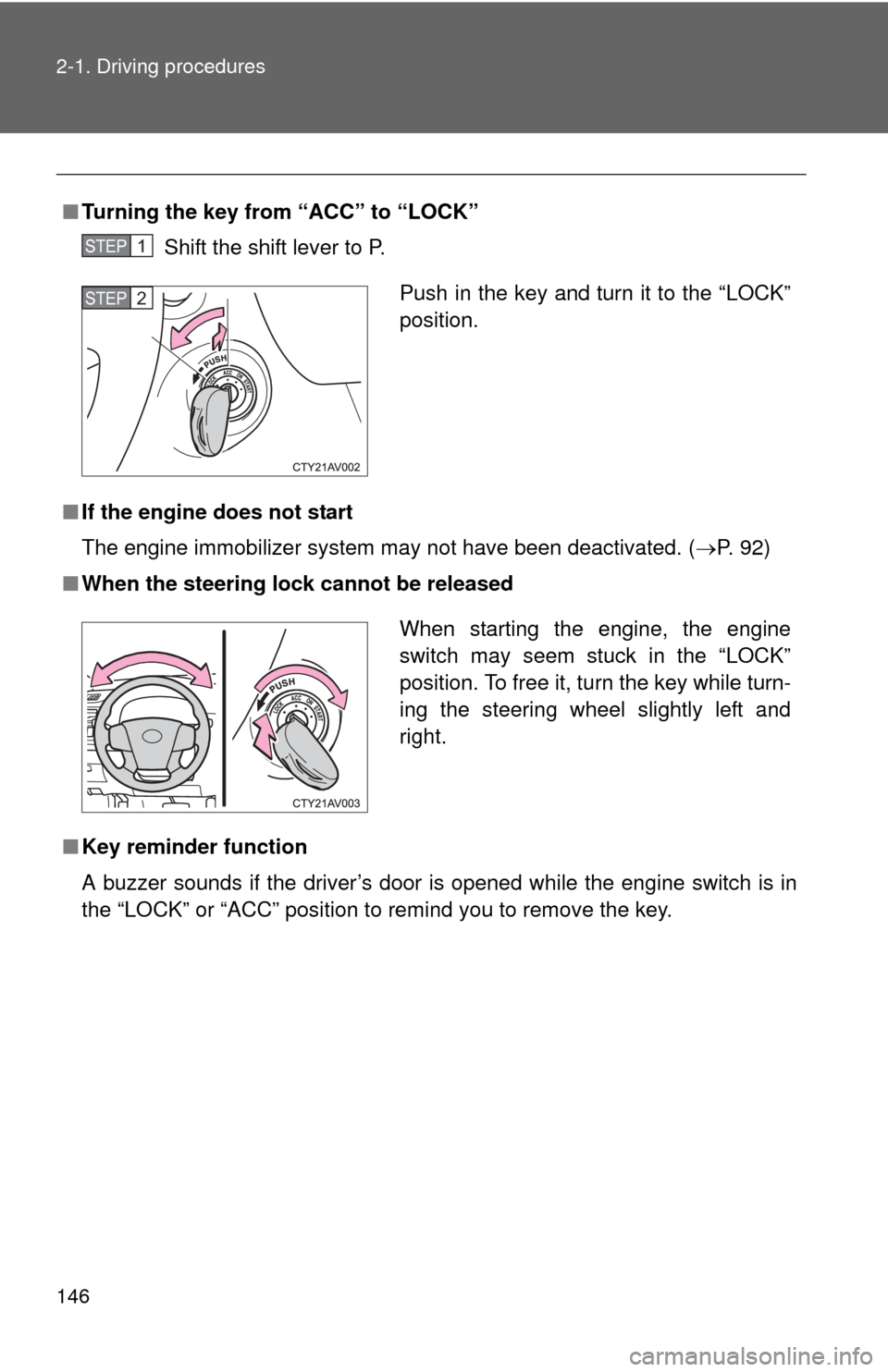
■Turning the key from “ACC” to “LOCK”
Shift the shift lever to P.
■ If the engine does not start
The engine immobilizer system may not have been deactivated. ( P. 92)
■ When the steering lock cannot be released
■ Key reminder function
A buzzer sounds if the driver’s door is opened while the engine switch is in
the “LOCK” or “ACC” position to remind you to remove the key.
STEP1
Push in the key and turn it to the “LOCK”
position.STEP2
When starting the engine, the engine
switch may seem stuck in the “LOCK”
position. To free it, turn the key while turn-
ing the steering wheel slightly left and
right.
Page 152 of 532
152 2-1. Driving procedures
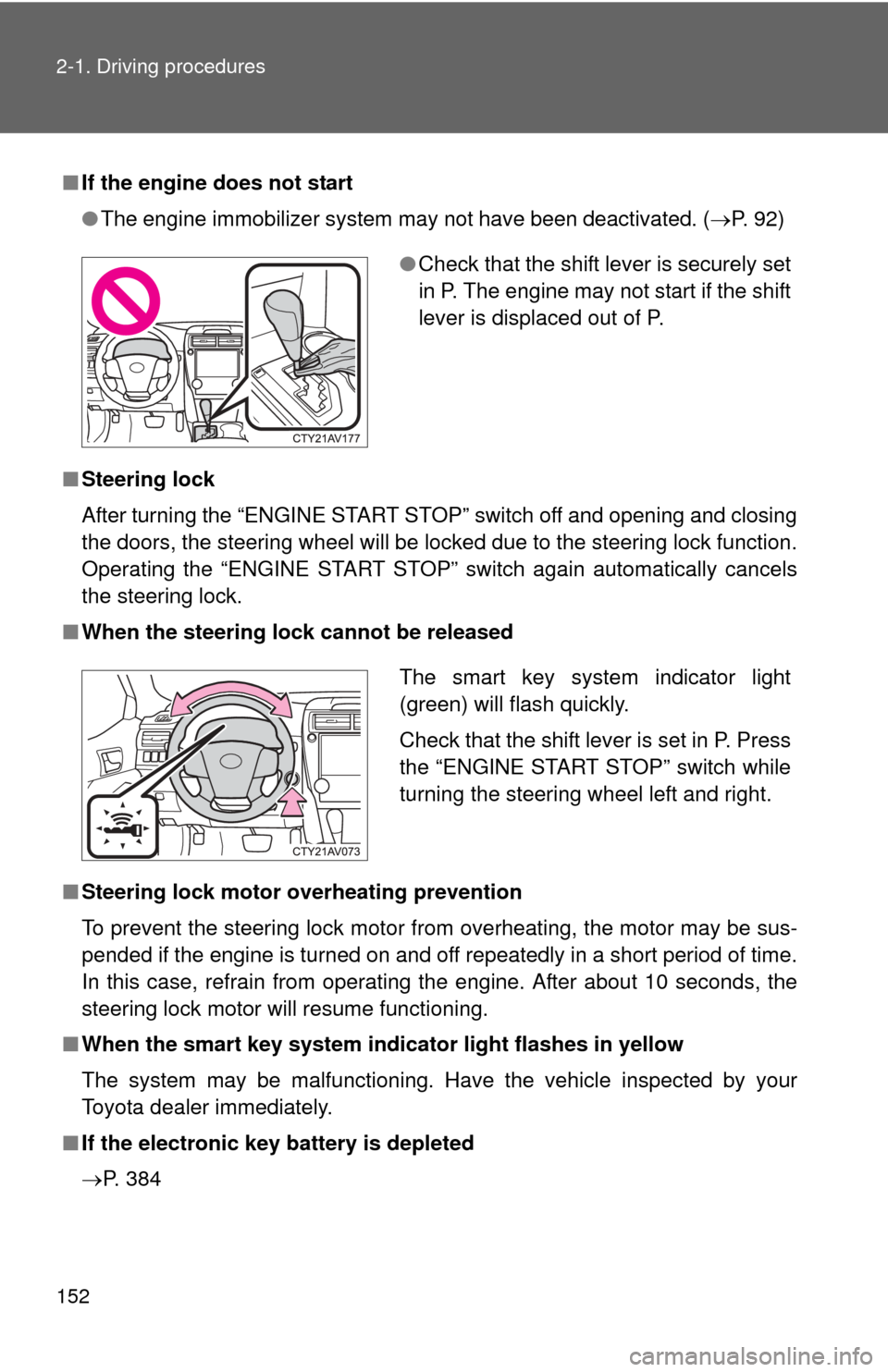
■If the engine does not start
●The engine immobilizer system may not have been deactivated. ( P. 92)
■ Steering lock
After turning the “ENGINE START STOP” switch off and opening and closing
the doors, the steering wheel will be locked due to the steering lock function.
Operating the “ENGINE START STOP” switch again automatically cancels
the steering lock.
■ When the steering lock cannot be released
■ Steering lock motor overheating prevention
To prevent the steering lock motor from overheating, the motor may be sus-
pended if the engine is turned on and off repeatedly in a short period of time.
In this case, refrain from operating the engine. After about 10 seconds, the
steering lock motor will resume functioning.
■ When the smart key system indi cator light flashes in yellow
The system may be malfunctioning. Have the vehicle inspected by your
Toyota dealer immediately.
■ If the electronic key battery is depleted
P. 384
●Check that the shift lever is securely set
in P. The engine may not start if the shift
lever is displaced out of P.
The smart key system indicator light
(green) will flash quickly.
Check that the shift lever is set in P. Press
the “ENGINE START STOP” switch while
turning the steering wheel left and right.
Page 153 of 532

153
2-1. Driving procedures
2
When driving
■
Operation of the “ENGINE START STOP” switch
When operating the “ENGINE START STOP” switch, one short, firm press is
enough. If the switch is pressed improperly, the engine may not start or the
“ENGINE START STOP” switch mode may not change. It is not necessary to
press and hold the switch.
■ If the smart key system has been d eactivated in a customized setting
P. 452
CAUTION
■ When starting the engine
Always start the engine while sitting in the driver's seat. Do not depress the
accelerator pedal while starting the engine under any circumstances.
Doing so may cause an accident resulting in death or serious injury.
■ Caution while driving
If engine failure occurs while the vehicle is moving, do not lock or open the
doors until the vehicle reaches a safe and complete stop. Activation of the
steering lock in this circumstance may lead to an accident, resulting in death
or serious injury.
■ Stopping the engine in an emergency
If you want to stop the engine in an emergency while driving the vehicle,
press and hold the “ENGINE START STOP” switch for more than 2 seconds,
or press it briefly 3 times or more in succession.
However, do not touch the “ENGINE START STOP” switch while driving
except in an emergency. Turning the engine off while driving will not cause
loss of steering or braking control, but the power assist to these systems will
be lost. This will make it more difficult to steer and brake, so you should pull
over and stop the vehicle as soon as it is safe to do so.
Page 190 of 532
190 2-3. Operating the lights and wipers
■Automatic light off system (if equipped)
Vehicles without a smart key system
●When the light switch is in : The headlights and tail lights turn off
30 seconds after the engine switch is turned to the “ACC” or “LOCK”
position and a door is opened and closed. (Vehicles with a wireless
remote control: The lights turn off immediately if on the key is
pressed twice after all the doors are closed.)
To turn the lights on again, turn the engine switch to “ON” position, or turn
the light switch off once and then back to or .
If any of the doors or trunk lid is kept open, the lights automatically turn off
after 20 minutes.
Vehicles with a smart key system
● When the light switch is in : The headlights and tail lights turn off
30 seconds after the “ENGINE START STOP” switch is turned to
ACCESSORY mode or turned off and a door is opened and closed. (The
lights turn off immediately if on the key is pressed twice after all
the doors are closed.)
To turn the lights on again, turn the “ENGINE START STOP” switch to IGNI-
TION ON mode, or turn the light switch off once and then back to
or .
If any of the doors or trunk lid is kept open, the lights automatically turn off
after 20 minutes.
■ Light reminder buzzer
Vehicles without a smart key system
A buzzer sounds when the engine switch is turned “OFF” or to “ACC” posi-
tion and the driver's door is opened with the key removed from the engin\
e
switch while the lights are turned on.
Vehicles with a smart key system
A buzzer sounds when the “ENGINE START STOP” switch is turned off or
turned to ACCESSORY mode and the driver's door is opened while the
lights are turned on.
Page 191 of 532

191
2-3. Operating the lights and wipers
2
When driving
■
Battery-saving function
In order to prevent the vehicle battery from discharging, if the headlights
and/or tail lights are on when the engine switch is turned to the “LOCK” posi-
tion (vehicles without a smart key system) or when the “ENGINE START
STOP” switch is turned off (vehicles with a smart key system) the battery
saving function will operate and automatically turn off all the lights after
approximately 20 minutes.
When the engine switch is turned to the “ON” position (vehicles without a
smart key system) or when the “ENGINE START STOP” switch is turned to
IGNITION ON mode (vehicles with a smart key system), the battery-saving
function will be disabled.
When any of the following are performed, the battery-saving function is can-
celed once and then reactivated. All the lights will turn off automatically 20
minutes after the battery-saving function has been reactivated:
●When the headlight switch is operated
● When a door is opened or closed
■ Customization that can be co nfigured at Toyota dealer
Settings (e.g. light sensor sensitivity) can be changed.
(Customizable features P. 493)
NOTICE
■To prevent battery discharge
Do not leave the lights on longer than necessary when the engine is not run-
ning.
Page 225 of 532
Interior features3
225
3-1. Using the air conditioning system and defogger
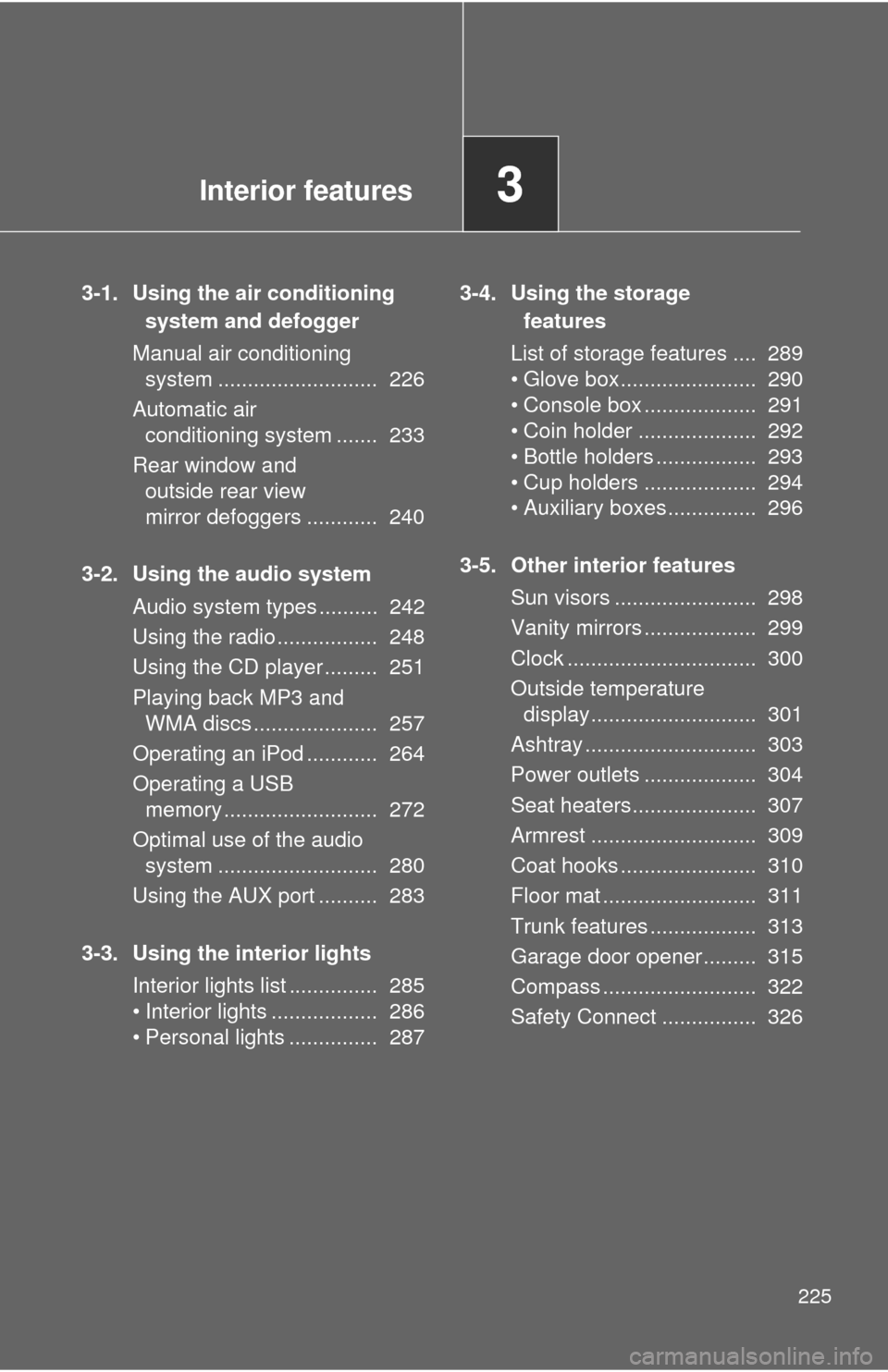
Manual air conditioning system ........................... 226
Automatic air conditioning system ....... 233
Rear window and outside rear view
mirror defoggers ............ 240
3-2. Using the audio system Audio system types .......... 242
Using the radio ................. 248
Using the CD player ......... 251
Playing back MP3 and WMA discs ..................... 257
Operating an iPod ............ 264
Operating a USB memory .......................... 272
Optimal use of the audio system ........................... 280
Using the AUX port .......... 283
3-3. Using the interior lights Interior lights list ............... 285
• Interior lights .................. 286
• Personal lights ............... 287 3-4. Using the storage
features
List of storage features .... 289
• Glove box....................... 290
• Console box ................... 291
• Coin holder .................... 292
• Bottle holders ................. 293
• Cup holders ................... 294
• Auxiliary boxes ............... 296
3-5. Other interior features Sun visors ........................ 298
Vanity mirrors ................... 299
Clock ................................ 300
Outside temperature display............................ 301
Ashtray ............................. 303
Power outlets ................... 304
Seat heaters..................... 307
Armrest ............................ 309
Coat hooks ....................... 310
Floor mat .......................... 311
Trunk features .................. 313
Garage door opener......... 315
Compass .......................... 322
Safety Connect ................ 326