fog light TOYOTA CAMRY 2012 XV50 / 9.G Owners Manual
[x] Cancel search | Manufacturer: TOYOTA, Model Year: 2012, Model line: CAMRY, Model: TOYOTA CAMRY 2012 XV50 / 9.GPages: 532, PDF Size: 6.44 MB
Page 3 of 532

1
2
3
4
5
6
7
3
2-2. Instrument clusterGauges and meters ............ 169
Indicators and warning lights ................................. 179
2-3. Operating the lights and wipers
Headlight switch .................. 185
Fog light switch ................... 192
Windshield wipers and washer .............................. 194
2-4. Using other driving systems
Cruise control ...................... 199
Driving assist systems ........ 203
BSM (Blind Spot Monitor) ... 208
2-5. Driving information Cargo and luggage ............. 213
Vehicle load limits ............... 217
Winter driving tips ............... 218
Trailer towing ...................... 222
Dinghy towing ..................... 223 3-1. Using the air conditioning
system and defogger
Manual air conditioning system .............................. 226
Automatic air conditioning system.......... 233
Rear window and outside rear view mirror
defoggers ......................... 240
3-2. Using the audio system Audio system types ............ 242
Using the radio ................... 248
Using the CD player ........... 251
Playing back MP3 and WMA discs ....................... 257
Operating an iPod .............. 264
Operating a USB memory ............................ 272
Optimal use of the audio system .............................. 280
Using the AUX port............. 283
3-3. Using the interior lights Interior lights list ................. 285
• Interior lights..................... 286
• Personal lights.................. 287
3Interior features
Page 6 of 532
6
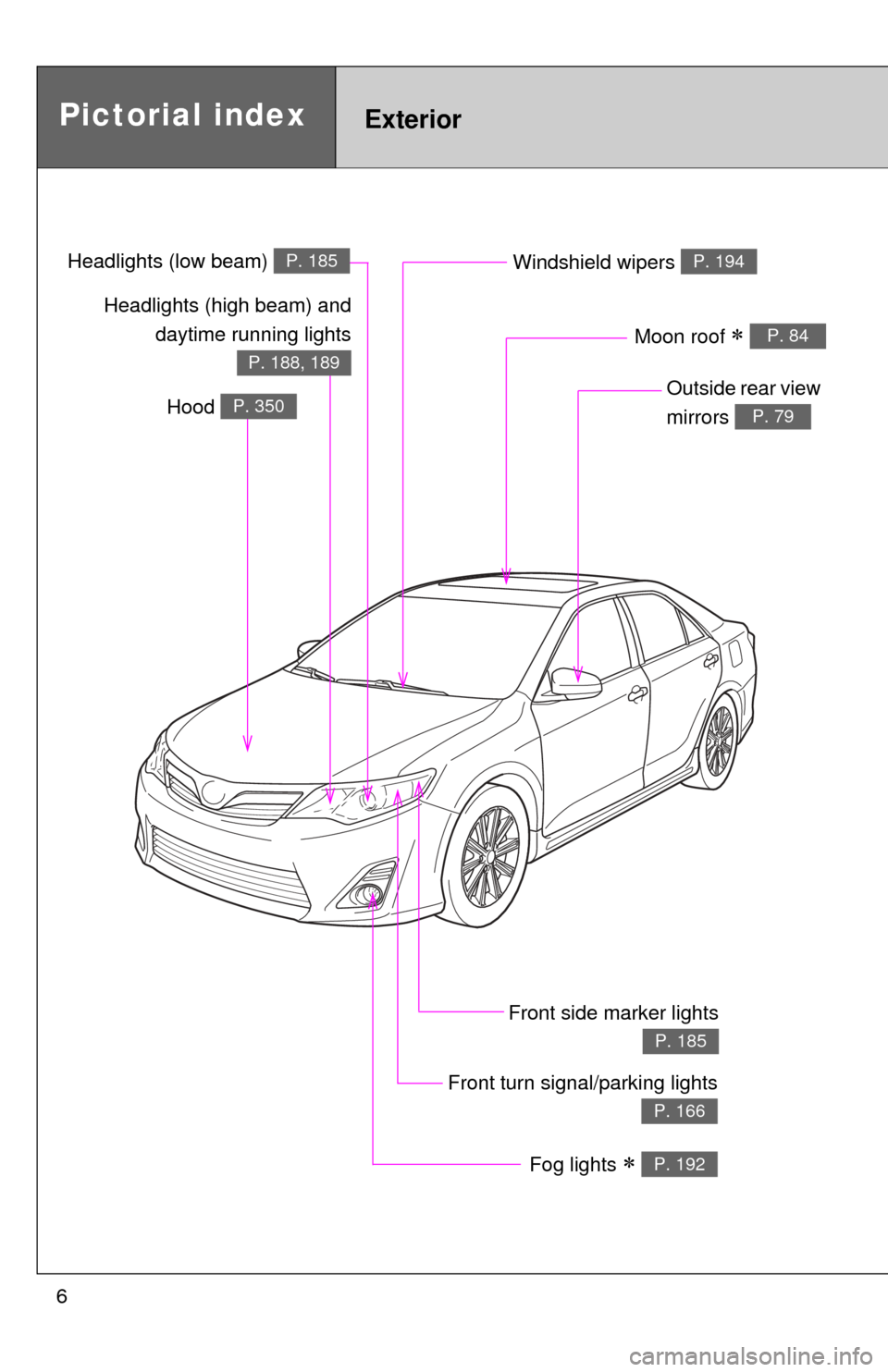
Pictorial indexExterior
Fog lights P. 192
Front turn signal/parking lights
P. 166
Windshield wipers P. 194
Outside rear view
mirrors
P. 79
Front side marker lights
P. 185
Moon roof P. 84
Headlights (high beam) anddaytime running lights
P. 188, 189
Hood P. 350
Headlights (low beam) P. 185
Page 7 of 532
7
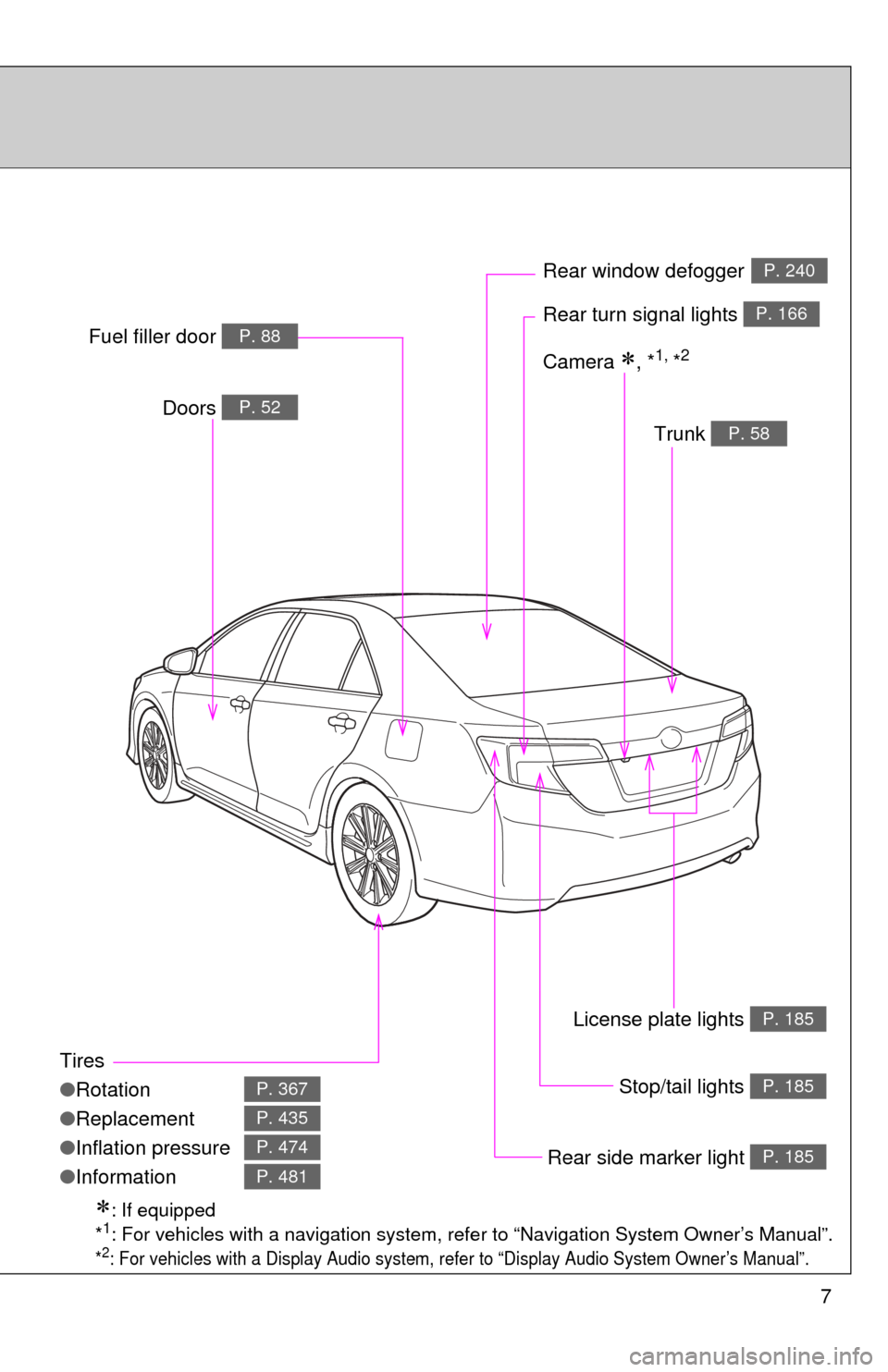
Tires
●Rotation
● Replacement
● Inflation pressure
● Information
P. 367
P. 435
P. 474
P. 481
Trunk P. 58
Doors P. 52
Rear turn signal lights P. 166
Rear window defoggerP. 240
Stop/tail lights P. 185
Rear side marker light P. 185
Fuel filler door P. 88
: If equipped
*1: For vehicles with a navigation system, refe r to “Navigation System Owner’s Manual”.
*2: For vehicles with a Display Audio system, re fer to “Display Audio System Owner’s Manual”.
Camera , *1, *2
License plate lights P. 185
Page 13 of 532
13
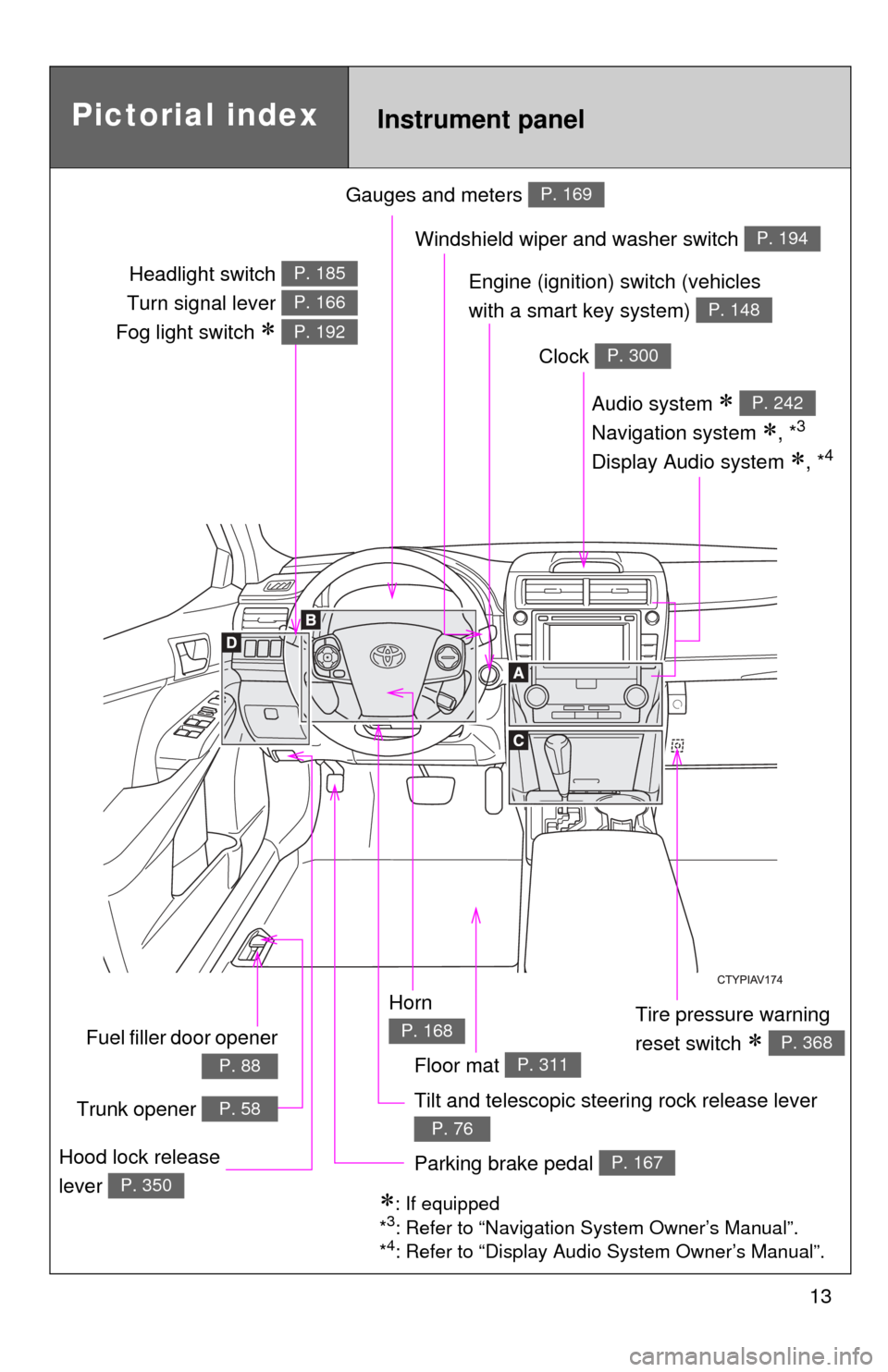
Gauges and meters P. 169
Tilt and telescopic steering rock release lever
P. 76
Pictorial indexInstrument panel
Audio system
Navigation system
, *3
Display Audio system , *4
P. 242
Windshield wiper and washer switch P. 194
Clock P. 300
Tire pressure warning
reset switch
P. 368
Parking brake pedal P. 167Hood lock release
lever
P. 350: If equipped
*3: Refer to “Navigation System Owner’s Manual”.
*4: Refer to “Display Audio System Owner’s Manual”.
Horn
P. 168
Engine (ignition) switch (vehicles
with a smart key system)
P. 148
Headlight switch
Turn signal lever
Fog light switch
P. 185
P. 166
P. 192
Fuel filler door opener
P. 88
Trunk opener P. 58
Floor mat P. 311
Page 133 of 532
When driving2
133
2-1. Driving proceduresDriving the vehicle............ 134
Engine (ignition) switch (vehicles without a
smart key system).......... 145
Engine (ignition) switch (vehicles with a smart
key system).................... 148
Automatic transmission (vehicles without
paddle shift switches) .... 155
Automatic transmission (vehicles with paddle
shift switches) ................ 159
Turn signal lever .............. 166
Parking brake ................... 167
Horn ................................. 168
2-2. Instrument cluster Gauges and meters ......... 169
Indicators and warning lights .............................. 179
2-3. Operating the lights and wipers
Headlight switch ............... 185
Fog light switch ................ 192
Windshield wipers and washer ........................... 194 2-4. Using other driving
systems
Cruise control ................... 199
Driving assist systems ..... 203
BSM (Blind Spot Monitor) ....... 208
2-5. Driving information Cargo and luggage .......... 213
Vehicle load limits ............ 217
Winter driving tips ............ 218
Trailer towing ................... 222
Dinghy towing .................. 223
Page 181 of 532
181
2-2. Instrument cluster
2
When driving
■
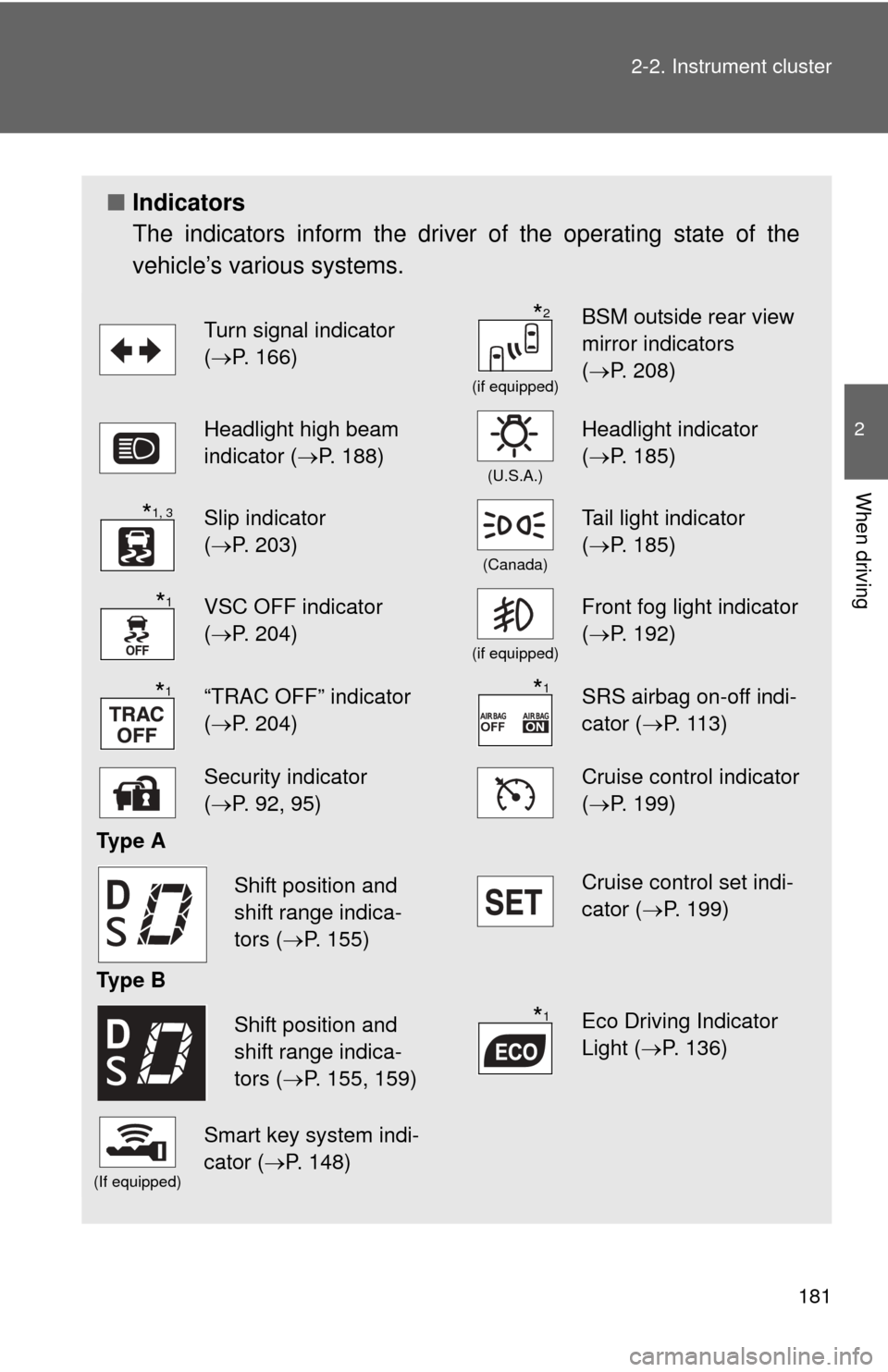
Indicators
The indicators inform the driver of the operating state of the
vehicle’s various systems.
Turn signal indicator
(P. 166)
(if equipped)
BSM outside rear view
mirror indicators
( P. 208)
Headlight high beam
indicator ( P. 188)
(U.S.A.)
Headlight indicator
(P. 185)
Slip indicator
(P. 203)
(Canada)
Tail light indicator
( P. 185)
VSC OFF indicator
(P. 204)
(if equipped)
Front fog light indicator
( P. 192)
“TRAC OFF” indicator
(P. 204)SRS airbag on-off indi-
cator (P. 113)
Security indicator
(P. 92, 95)Cruise control indicator
( P. 199)
Ty p e A
Cruise control set indi-
cator (P. 199)
Ty p e B
Eco Driving Indicator
Light ( P. 136)
(If equipped)
Smart key system indi-
cator ( P. 148)
*2
*1, 3
*1
*1*1
Shift position and
shift range indica-
tors (P. 155)
Shift position and
shift range indica-
tors (P. 155, 159)*1
Page 192 of 532
192
2-3. Operating the lights and wipers
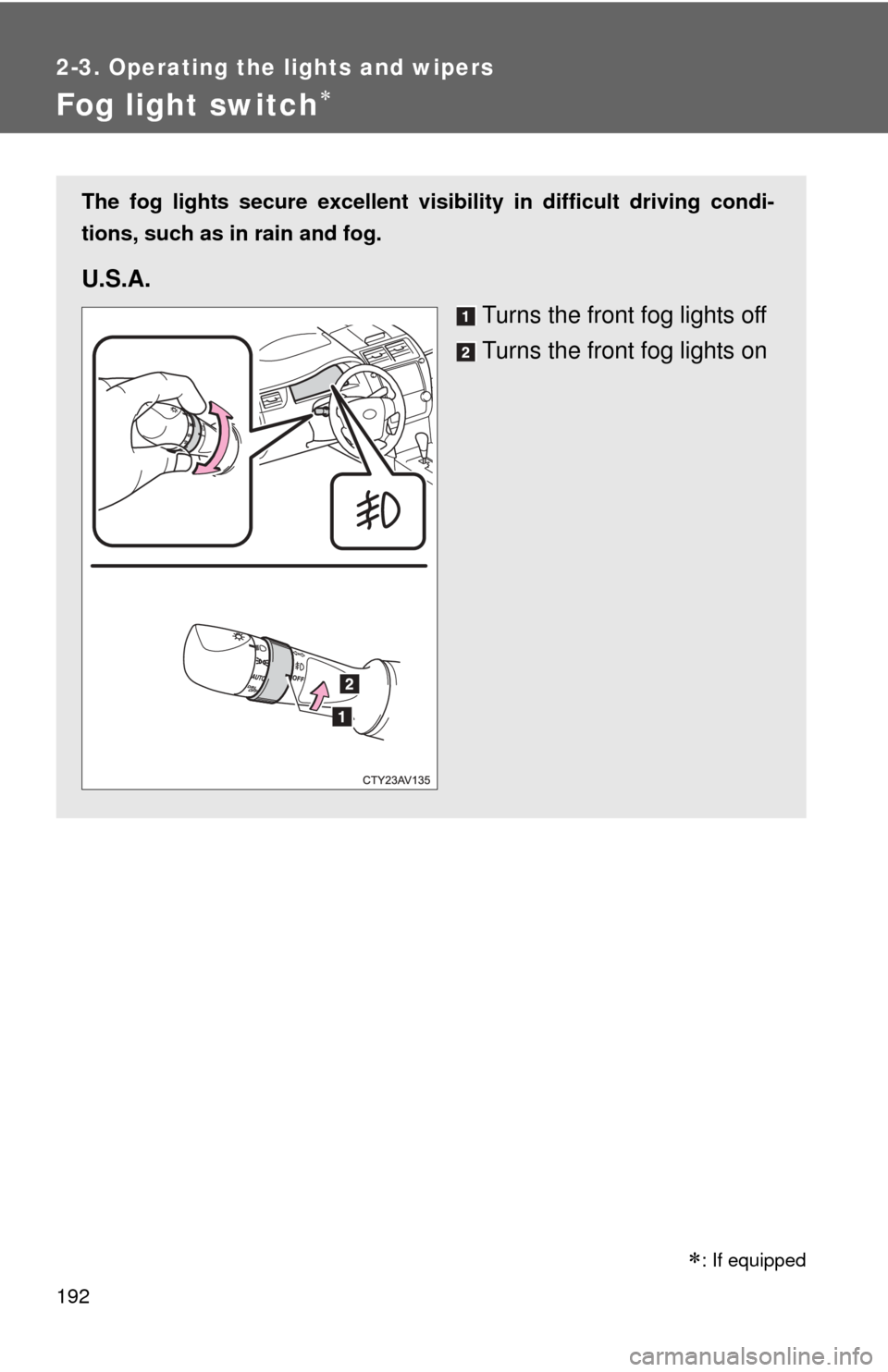
Fog light switch
The fog lights secure excellent visibility in difficult driving condi-
tions, such as in rain and fog.
U.S.A.
Turns the front fog lights off
Turns the front fog lights on
: If equipped
Page 193 of 532
193
2-3. Operating the lights and wipers
2
When driving
■
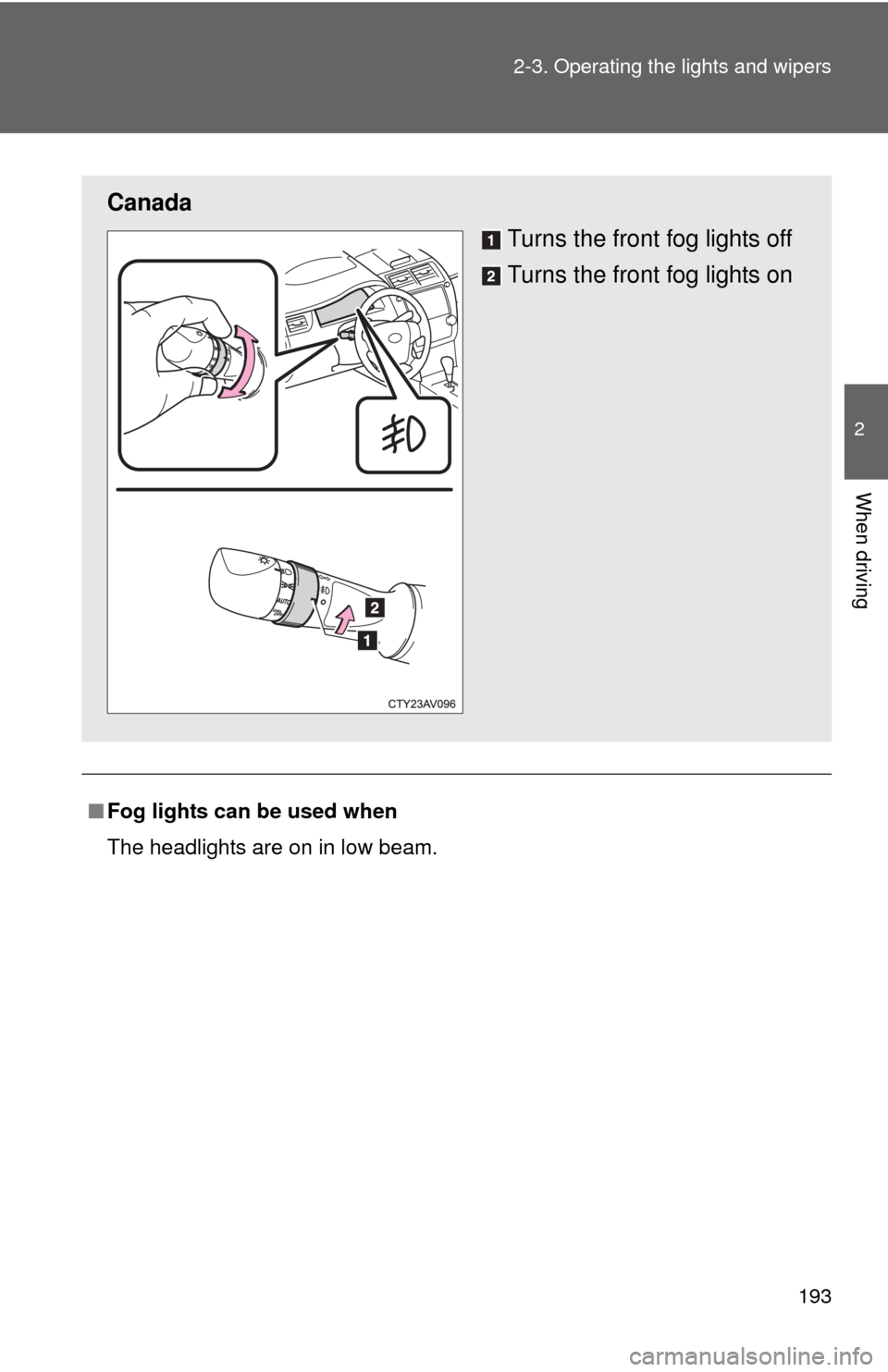
Fog lights can be used when
The headlights are on in low beam.
Canada
Turns the front fog lights off
Turns the front fog lights on
Page 225 of 532
Interior features3
225
3-1. Using the air conditioning system and defogger
Manual air conditioning system ........................... 226
Automatic air conditioning system ....... 233
Rear window and outside rear view
mirror defoggers ............ 240
3-2. Using the audio system Audio system types .......... 242
Using the radio ................. 248
Using the CD player ......... 251
Playing back MP3 and WMA discs ..................... 257
Operating an iPod ............ 264
Operating a USB memory .......................... 272
Optimal use of the audio system ........................... 280
Using the AUX port .......... 283
3-3. Using the interior lights Interior lights list ............... 285
• Interior lights .................. 286
• Personal lights ............... 287 3-4. Using the storage
features
List of storage features .... 289
• Glove box....................... 290
• Console box ................... 291
• Coin holder .................... 292
• Bottle holders ................. 293
• Cup holders ................... 294
• Auxiliary boxes ............... 296
3-5. Other interior features Sun visors ........................ 298
Vanity mirrors ................... 299
Clock ................................ 300
Outside temperature display............................ 301
Ashtray ............................. 303
Power outlets ................... 304
Seat heaters..................... 307
Armrest ............................ 309
Coat hooks ....................... 310
Floor mat .......................... 311
Trunk features .................. 313
Garage door opener......... 315
Compass .......................... 322
Safety Connect ................ 326
Page 339 of 532

339
4-1. Maintenance and care
4
Maintenance and care
NOTICE
■
Cleaning detergents
●Do not use the following types of detergent, as they may discolor the vehi-
cle interior or cause streaks or damage to painted surfaces:
• Non-seat portions: Organic substances such as benzene or gasoline,
alkaline or acidic solutions, dye, and bleach
• Seats: Alkaline or acidic solutions, such as thinner, benzene, and alco- hol
● Do not use polish wax or polish cleaner. The instrument panel's or other
interior part’s painted surface may be damaged.
■ Preventing damage to leather surfaces
Observe the following precautions to avoid damage to and deterioration o\
f
leather surfaces:
●Remove any dust or dirt from leather surfaces immediately.
● Do not expose the vehicle to direct sunlight for extended periods of time.
Park the vehicle in the shade, especially during summer.
● Do not place items made of vinyl, plastic, or containing wax on the uphol-
stery, as they may stick to the leather surface if the vehicle interior heats
up significantly.
■ Water on the floor
Do not wash the vehicle floor with water.
Vehicle systems such as the audio system may be damaged if water comes
into contact with electrical components such as the audio system above or
under the floor of the vehicle. Water may also cause the body to rust.
■ Cleaning the inside of the rear window
●Do not use glass cleaner to clean the rear window, as this may cause
damage to the rear window defogger heater wires or antenna. Use a cloth
dampened with lukewarm water to gently wipe the window clean. Wipe the
window in strokes running parallel to the heater wires or antenna.
● Be careful not to scratch or damage the heater wires or antenna.