phone TOYOTA CAMRY 2012 XV50 / 9.G Owners Manual
[x] Cancel search | Manufacturer: TOYOTA, Model Year: 2012, Model line: CAMRY, Model: TOYOTA CAMRY 2012 XV50 / 9.GPages: 532, PDF Size: 6.44 MB
Page 9 of 532
9
A
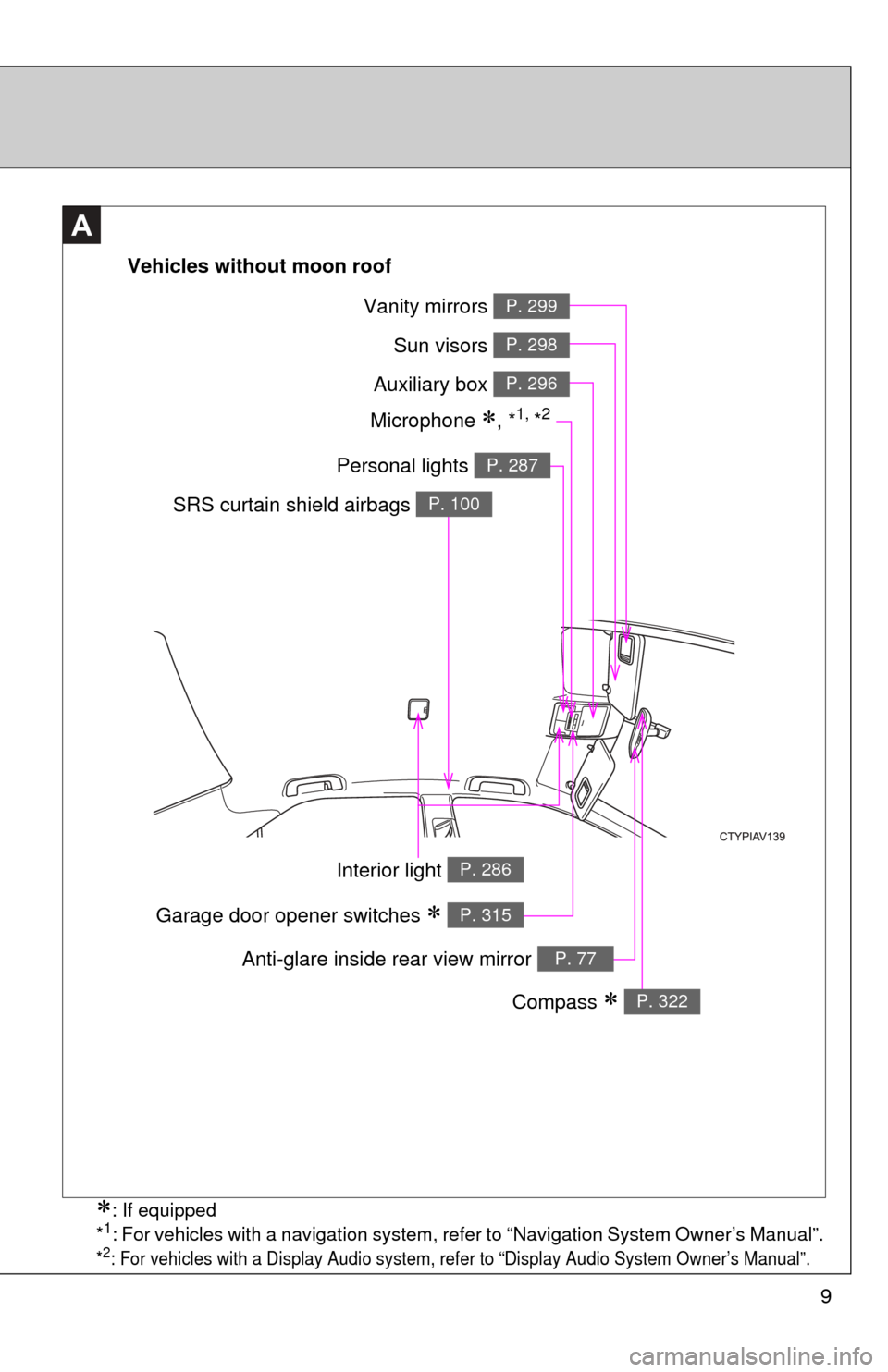
Vehicles without moon roof
Vanity mirrors P. 299
Sun visors P. 298
Auxiliary box P. 296
Personal lights P. 287
SRS curtain shield airbags P. 100
Interior light P. 286
Compass P. 322
Anti-glare inside rear view mirror P. 77
Garage door opener switches P. 315
Microphone , *1, *2
: If equipped
*1: For vehicles with a navigation system, refer to “Navigation System Owner’s Manual”.
*2: For vehicles with a Display Audio system, refer to “Display Audio System Owner’s Manual”.
Page 10 of 532
10
A
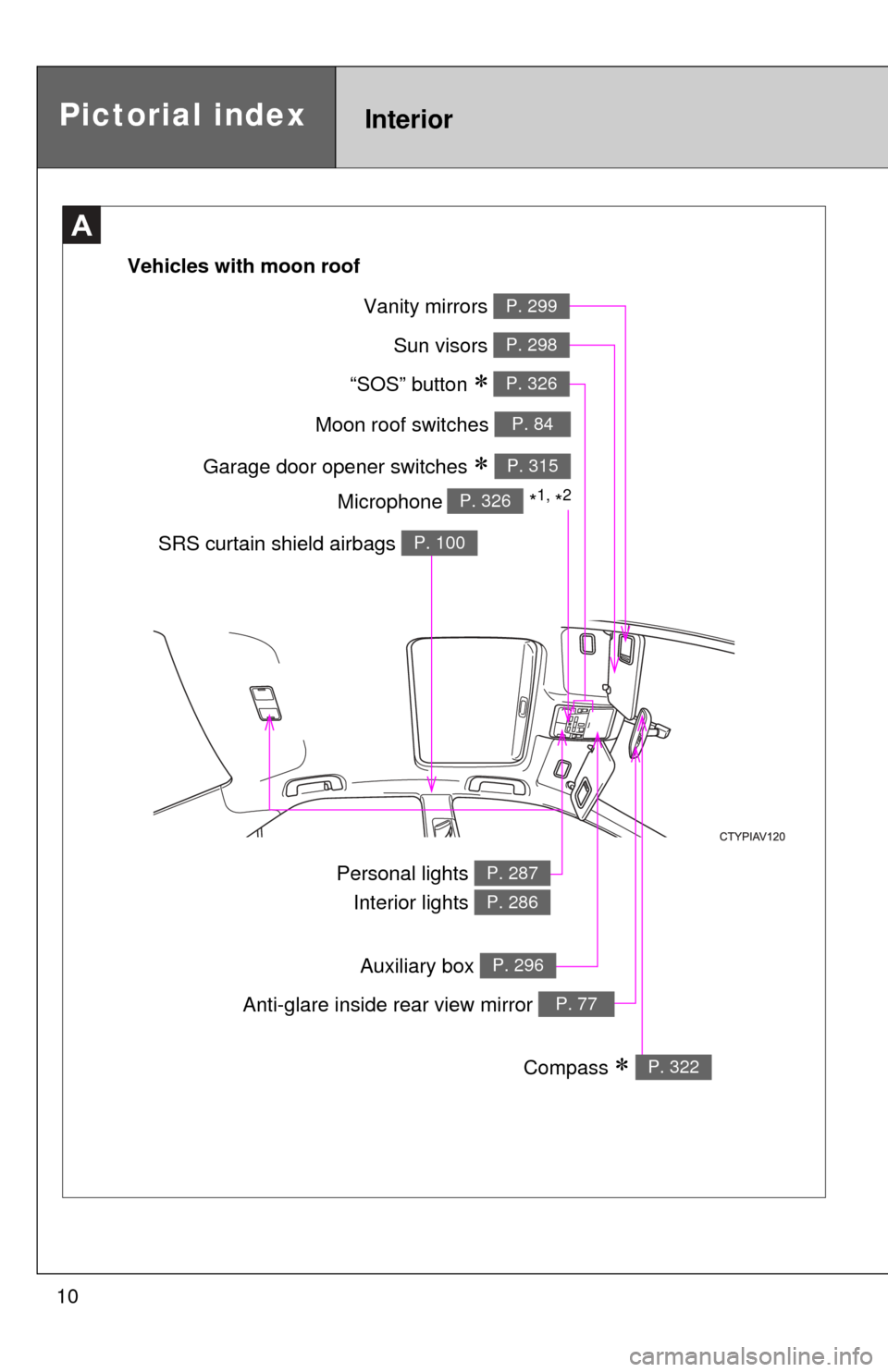
Moon roof switches P. 84
Garage door opener switches P. 315
“SOS” button P. 326
Sun visors P. 298
Vanity mirrors P. 299
SRS curtain shield airbags P. 100
Personal lights Interior lights P. 287
P. 286
Anti-glare inside rear view mirror P. 77
Compass P. 322
Vehicles with moon roof
Microphone
*1, *2P. 326
Pictorial indexInterior
Auxiliary box P. 296
Page 15 of 532
15
B
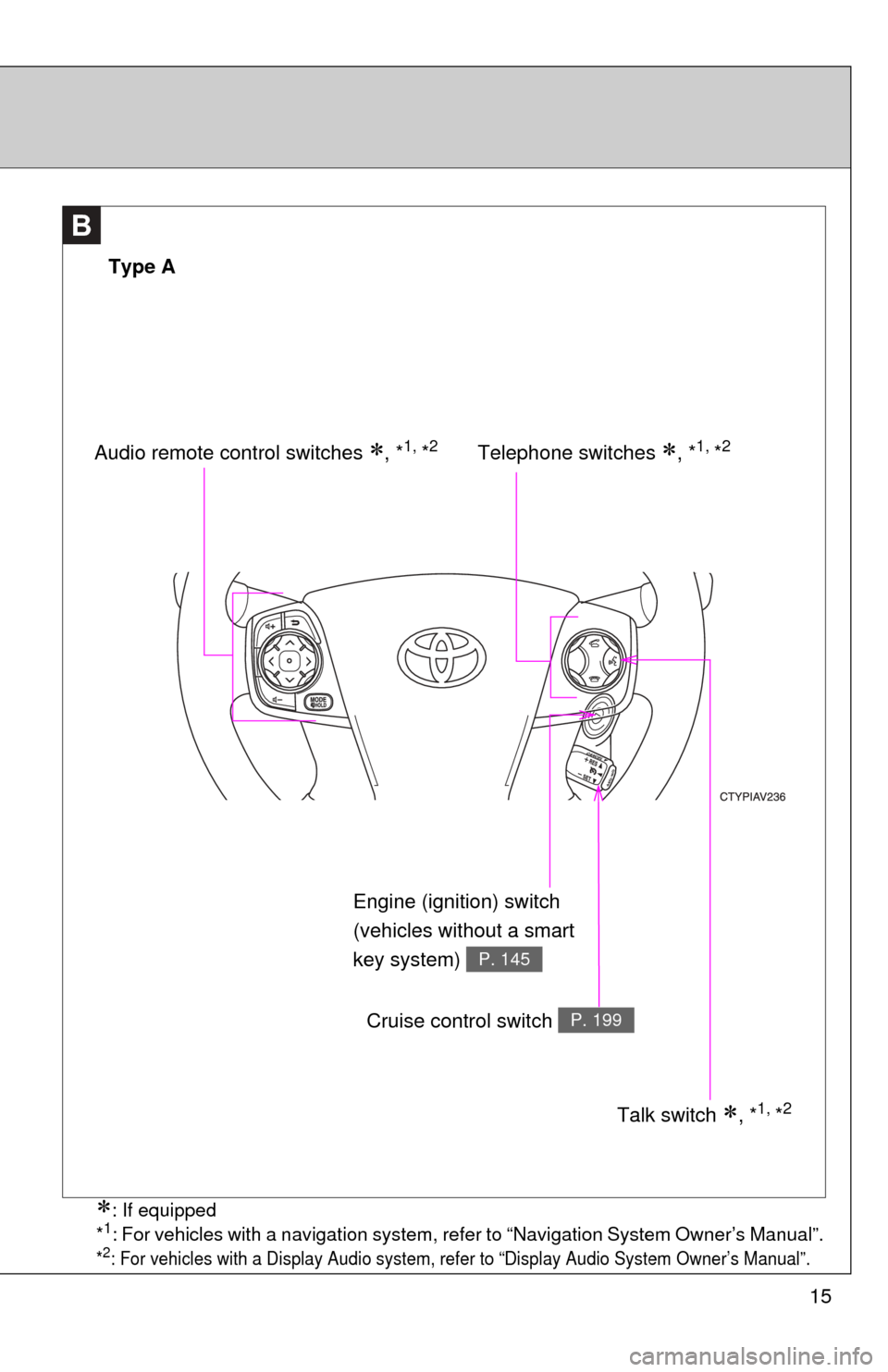
Telephone switches , *1, *2
Type A
Audio remote control switches , *1, *2
Talk switch , *1, *2
Cruise control switch P. 199
Engine (ignition) switch
(vehicles without a smart
key system)
P. 145
: If equipped
*1: For vehicles with a navigation system, refer to “Navigation System Owner’s Manual”.
*2: For vehicles with a Display Audio system, refer to “Display Audio System Owner’s Manual”.
Page 16 of 532
16
B
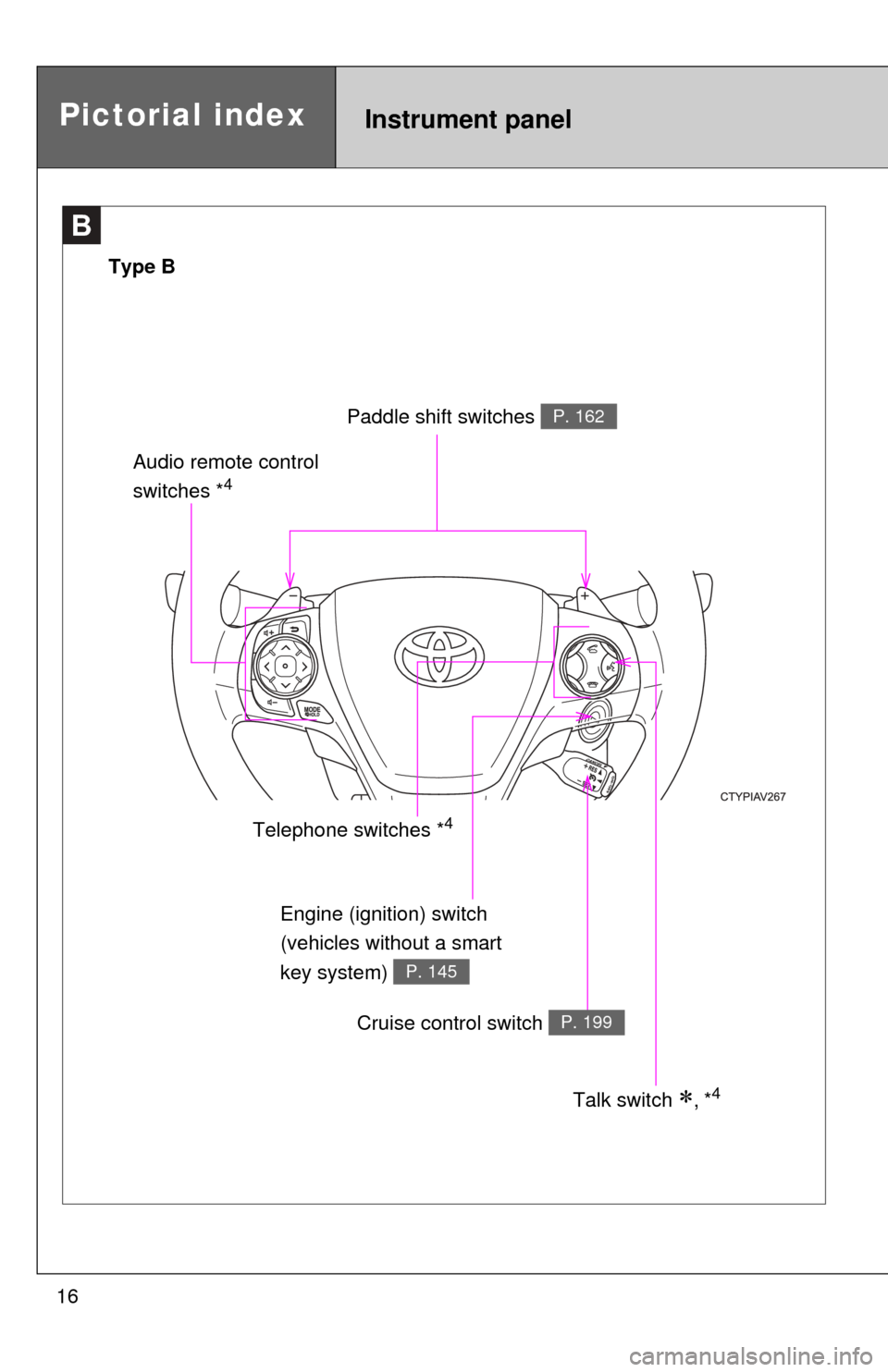
Engine (ignition) switch
(vehicles without a smart
key system)
P. 145
Telephone switches *4
Pictorial indexInstrument panel
Type B
Paddle shift switches P. 162
Audio remote control
switches *4
Cruise control switch P. 199
Talk switch , *4
Page 24 of 532

24
CAUTION
■General precautions while driving
Driving under the influence: Never drive your vehicle when under the influ-
ence of alcohol or drugs that have impaired your ability to operate your vehi-
cle. Alcohol and certain drugs delay reaction time, impair judgment and
reduce coordination, which could lead to an accident that could result in
death or serious injury.
Defensive driving: Always drive defensively. Anticipate mistakes that other
drivers or pedestrians might make and be ready to avoid accidents.
Driver distraction: Always give your full attention to driving. Anything that dis-
tracts the driver, such as adjusting controls, talking on a cellular phone or
reading can result in a collision with resulting death or serious injury to you,
your occupants or others.
■ General precaution regarding children’s safety
Never leave children unattended in the vehicle, and never allow children to
have or use the key.
Children may be able to start the vehicle or shift the vehicle into neutral.
There is also a danger that children may injure themselves by playing with
the windows, the moon roof, or other features of the vehicle. In addition, heat
build-up or extremely cold temperatures inside the vehicle can be fatal to
children.
Page 40 of 532

40 1-2. Opening, closing and locking the doors and trunk
■Conditions affecting operation
The smart key system uses weak radio waves. In the following situations,
the communication between the electronic key and the vehicle may be
affected, preventing the smart key system, wireless remote control and
engine immobilizer system from operating properly.
(Ways of coping: P. 451)
● When the electronic key battery is depleted
● Near a TV tower, electric power plant, gas station, radio station, large dis-
play, airport or other facility that generates strong radio waves or electri-
cal noise
● When the electronic key is in contact with, or is covered by the following
metallic objects
• Cards to which aluminum foil is attached
• Cigarette boxes that have aluminum foil inside
• Metallic wallets or bags
• Coins
• Hand warmers made of metal
• Media such as CDs and DVDs
● When other wireless key (that emit radio waves) is being used nearby
● When carrying the electronic key together with the following devices that
emit radio waves
• A portable radio, cellular phone, cordless phone or other wireless com-
munication device
• Another vehicle’s electronic key or a wireless key that emits radio waves
• Personal computers or personal digital assistants (PDAs)
• Digital audio players
• Portable game systems
● If window tint with a metallic content or metallic objects are attached to
the rear window
● When the electronic key is placed near a battery charger or electronic
devices
Page 44 of 532

44 1-2. Opening, closing and locking the doors and trunk
■Electronic key battery depletion
●The standard battery life is 1 to 2 years.
● If the battery becomes low, an alarm will sound in the cabin when the
engine stops. ( P. 427)
● As the electronic key always receives radio waves, the battery will
become depleted even if the electronic key is not used. The following
symptoms indicate that the electronic key battery may be depleted.
Replace the battery when necessary. ( P. 386)
• The smart key system or the wireless remote control does not operate.
• The detection area becomes smaller.
• The LED indicator on the key surface does not turn on.
● To avoid serious deterioration, do not leave the electronic key within 3 ft.
(1 m) of the following electrical appliances that produce a magnetic field:
•TVs
• Personal computers
• Cellular phones, cordless phones and battery chargers
• Recharging cellular phones or cordless phones
• Glass top ranges
• Table lamps
■ When the electronic key battery is fully depleted
P. 386
■ If the smart key system has been d eactivated in a customized setting
● Locking and unlocking the doors: Use the wireless remote control or
mechanical key. ( P. 46, 451)
● Starting the engine and changing “ENGINE START STOP” switch
modes: P. 4 5 2
● Stopping the engine: P. 149
■ Customization that can be co nfigured at Toyota dealer
Settings (e. g. smart key system) can be changed.
(Customizable features: P. 493)
Page 50 of 532

50 1-2. Opening, closing and locking the doors and trunk
■Conditions affecting operation
Vehicles without a smart key system
The wireless remote control function may not operate normally in the follow-
ing situations:
●When the wireless key battery is depleted
● Near a TV tower, electric power plant, gas station, radio station, large dis-
play, airport or other facility that generates strong radio waves or electri-
cal noise
● When carrying a portable radio, cell ular phone or other wireless commu-
nication devices
● When the wireless key is in contact with, or is covered by a metallic
object
● When other wireless key (that emit radio waves) is being used nearby
● If window tint with a metallic content or metallic objects are attached to
the rear window
Vehicles with a smart key system
P. 4 0
■ If the wireless remote control does not operate properly (vehicles with
a smart key system)
Locking and unlocking the doors: Use the mechanical key. ( P. 451)
■ Key battery depletion
Vehicles without a smart key system
If the wireless remote control function does not operate, the battery may be
depleted. Replace the battery when necessary. ( P. 384)
Vehicles with a smart key system
P. 4 4
■ When the key battery is fully depleted
P. 384
■ Confirmation of the registered key number (vehicles with a smart key
system)
The number of keys already registered to the vehicle can be confirmed. Ask
your Toyota dealer for details.
Page 268 of 532
268 3-2. Using the audio system
Shuffle playbackPressing (RDM) changes mode s in the following order:
Track shuffle Album shuffle Off.
Playing and pausing songs
Press ( ).
Switching the displayPress .
Each time is pressed, the display changes in the following order:
Track no./Elapsed time Album name Track title Artist name.
■About iPod
●“Made for iPod” and “Made for iPhone” mean that an electroni\
c acces-
sory has been designed to connect specifically to iPod, or iPhone,
respectively, and has been certified by the developer to meet Apple per-
formance standards.
Page 269 of 532

269
3-2. Using the audio system
3
Interior features
●
Apple is not responsible for the operation of this device or its compliance
with safety and regulatory standards. Please note that the use of this
accessory with iPod or iPhone may affect wireless performance.
● iPhone, iPod, iPod classic, iPod nano and iPod touch are trademarks of
Apple Inc., registered in the U.S. and other countries.
■ iPod functions
●When an iPod is connected and the audio source is changed to iPod
mode, the iPod will resume play from the same point in which it was last
used.
● Depending on the iPod that is connected to the system, certain functions
may not be available. If a function is unavailable due to a malfunction (as
opposed to a system specification), disconnecting the device and recon-
necting it once again may resolve the problem.
● While connected to the system, the iPod cannot be operated with its own
controls. It is necessary to use the controls of the vehicle’s audio system
instead.
● When the battery level of an iPod is very low, the iPod may not operate. If
so, charge the iPod before use.
● Supported models ( P. 270)
■ iPod problems
To resolve most problems encountered when using your iPod, disconnect
your iPod from the vehicle iPod connection and reset it.
For instructions on how to reset your iPod, refer to your iPod Owner’s Man-
ual.
■ Display
P. 253