ECO mode TOYOTA CAMRY 2019 (in English) Owner's Guide
[x] Cancel search | Manufacturer: TOYOTA, Model Year: 2019, Model line: CAMRY, Model: TOYOTA CAMRY 2019Pages: 612, PDF Size: 11.44 MB
Page 276 of 612
2764-5. Using the driving support systems
CAMRY_U
Example of acceleration
When there are no longer any preceding vehicles driving slower
than the set speed
The system accelerates until the set speed is reached. The syst em then
returns to constant speed cruising.
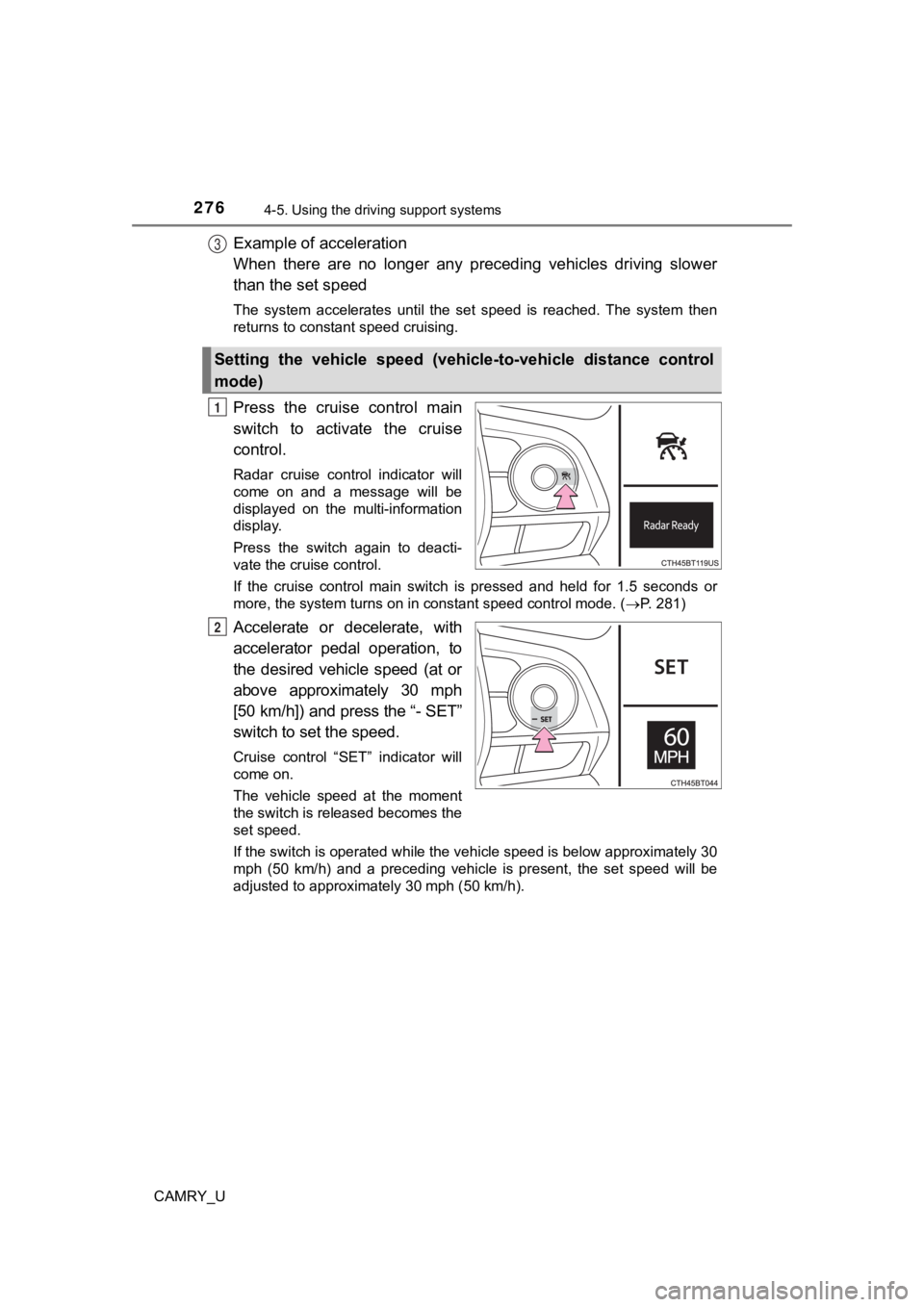
Press the cruise control main
switch to activate the cruise
control.
Radar cruise control indicator will
come on and a message will be
displayed on the multi-information
display.
Press the switch again to deacti-
vate the cruise control.
If the cruise control main switch is pressed and held for 1.5 seconds or
more, the system turns on in constant speed control mode. ( P. 281)
Accelerate or decelerate, with
accelerator pedal operation, to
the desired vehicle speed (at or
above approximately 30 mph
[50 km/h]) and press the “- SET”
switch to set the speed.
Cruise control “SET” indicator will
come on.
The vehicle speed at the moment
the switch is released becomes the
set speed.
If the switch is operated while the vehicle speed is below appr oximately 30
mph (50 km/h) and a preceding vehicle is present, the set speed will be
adjusted to approximately 30 mph (50 km/h).
Setting the vehicle speed (vehicle-to-vehicle distance control
mode)
3
1
2
Page 281 of 612
2814-5. Using the driving support systems
4
Driving
CAMRY_U
When constant speed control mode is selected, your vehicle will main-
tain a set speed without controllin g the vehicle-to-vehicle distance.
Select this mode only when vehic le-to-vehicle distance control mode
does not function correctly due to a dirty radar sensor, etc.
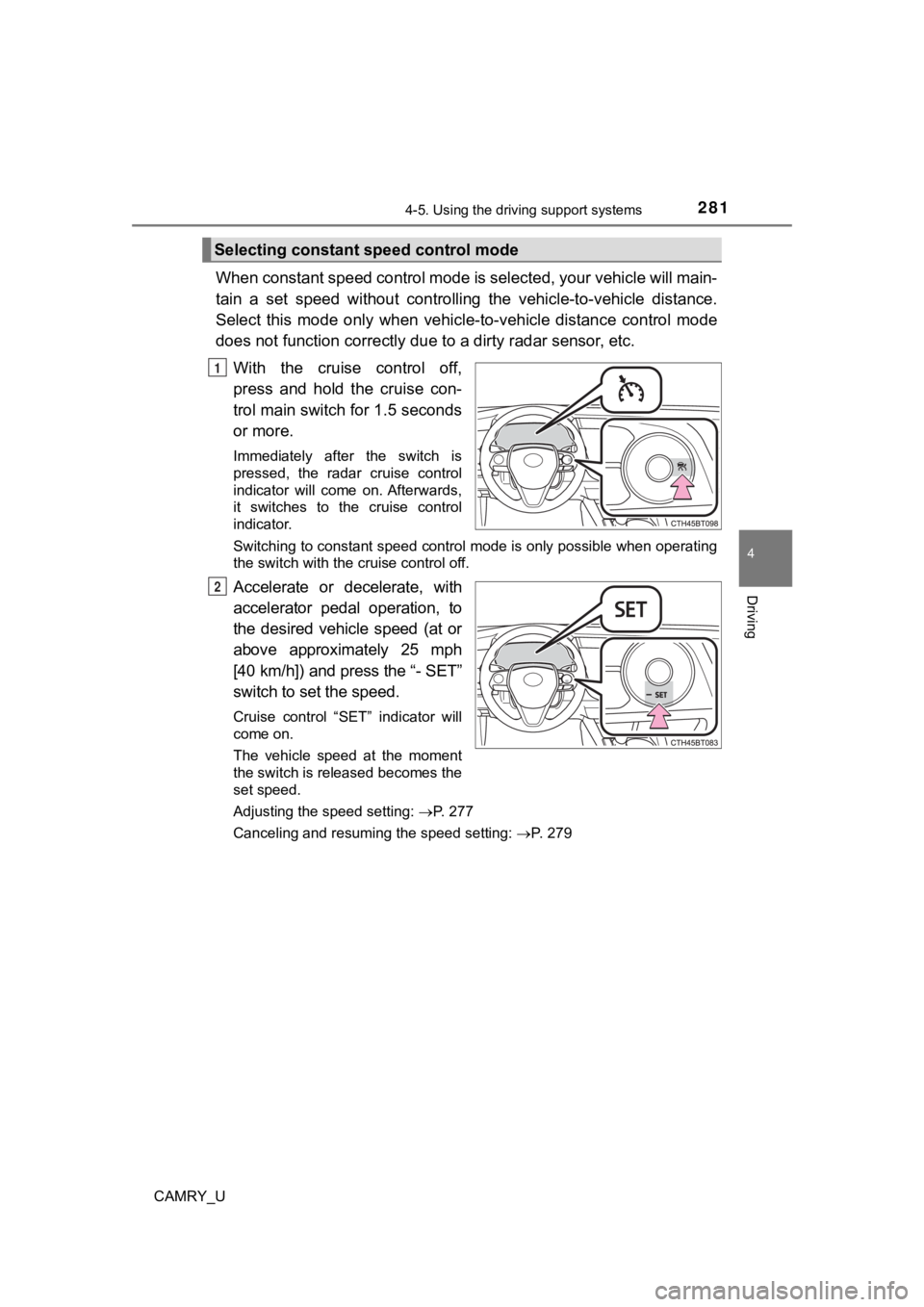
With the cruise control off,
press and hold the cruise con-
trol main switch for 1.5 seconds
or more.
Immediately after the switch is
pressed, the radar cruise control
indicator will come on. Afterwards,
it switches to the cruise control
indicator.
Switching to constant speed control mode is only possible when operating
the switch with the cruise control off.
Accelerate or decelerate, with
accelerator pedal operation, to
the desired vehicle speed (at or
above approximately 25 mph
[40 km/h]) and press the “- SET”
switch to se t the speed.
Cruise control “SET” indicator will
come on.
The vehicle speed at the moment
the switch is released becomes the
set speed.
Adjusting the speed setting: P. 277
Canceling and resuming the speed setting: P. 279
Selecting constant speed control mode
1
2
Page 282 of 612

2824-5. Using the driving support systems
CAMRY_U
■Dynamic radar cruise control wi th full-speed range can be set when
● The shift lever is in D or range 4 or higher of S has been sele cted.
● Range 4 or higher of D has been selected by using the paddle sh ift switch.
(vehicles with paddle shift switches)
● Vehicle speed is at or above approximately 30 mph (50 km/h). Ho wever,
when a preceding vehicle is detected, the dynamic radar cruise control with
full-speed range can be set even if the vehicle speed is at or below approxi-
mately 30 mph (50 km/h).
■ Accelerating after setting the vehicle speed
The vehicle can accelerate by operating the accelerator pedal. After acceler-
ating, the set speed resumes. However, during vehicle-to-vehicl e distance
control mode, the vehicle speed may decrease below the set spee d in order
to maintain the distance to the preceding vehicle.
■ When the vehicle stops while follow-up cruising
●Pressing the “+ RES” switch while the vehicle ahead stops will resume fol-
low-up cruising if the vehicle ahead starts off within approxim ately 3 sec-
onds after the switch is pressed.
● If the vehicle ahead starts off within 3 seconds after your veh icle stops, fol-
low-up cruising will be resumed.
■ Automatic cancelation of vehicle-to-vehicle distance control mode
Vehicle-to-vehicle distance control mode is automatically cance led in the fol-
lowing situations:
● Actual vehicle speed falls at or below approximately 25 mph (40 km/h) when
there are no vehicles ahead.
● The preceding vehicle leaves the lane when your vehicle is following at a
vehicle speed at or below approximately 25 mph (40 km/h). Other wise, the
sensor cannot properly detect the vehicle. (“Radar Cruise Contr ol Unavail-
able” is displayed on the multi-information display)
● VSC is activated.
● TRAC is activated for a period of time.
● When the VSC or TRAC system is turned off.
● The sensor cannot detect correctly because it is covered in some way.
● Pre-collision braking is activated.
● The parking brake is operated.
● The vehicle is stopped by system control on a steep incline.
● The following are detected when the vehicle has been stopped by system
control:
• The driver is not wearing a seat belt.
• The driver’s door is opened.
• The vehicle has been stopped for about 3 minutes
If vehicle-to-vehicle distance control mode is automatically ca nceled for any
other reason, there may be a malfunction in the system. Contact your Toyota
dealer.
Page 290 of 612
2904-5. Using the driving support systems
CAMRY_U
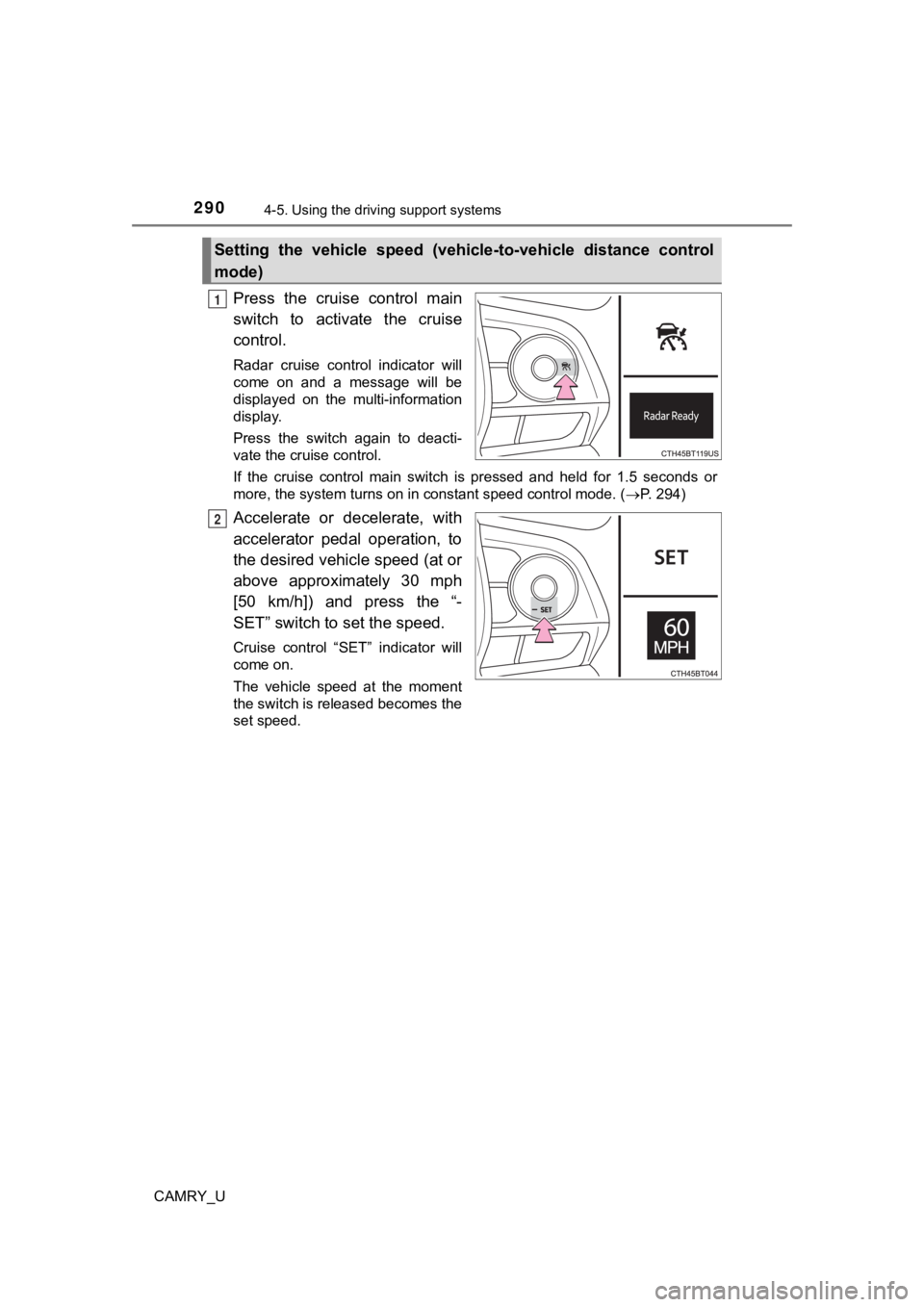
Press the cruise control main
switch to activate the cruise
control.
Radar cruise control indicator will
come on and a message will be
displayed on the multi-information
display.
Press the switch again to deacti-
vate the cruise control.
If the cruise control main switch is pressed and held for 1.5 seconds or
more, the system turns on in constant speed control mode. ( P. 294)
Accelerate or decelerate, with
accelerator pedal operation, to
the desired vehicle speed (at or
above approximately 30 mph
[50 km/h]) and press the “-
SET” switch to set the speed.
Cruise control “SET” indicator will
come on.
The vehicle speed at the moment
the switch is released becomes the
set speed.
Setting the vehicle speed (vehicle-to-vehicle distance control
mode)
1
2
Page 294 of 612
2944-5. Using the driving support systems
CAMRY_U
When constant speed control mode is selected, your vehicle will main-
tain a set speed without controllin g the vehicle-to-vehicle distance.
Select this mode only when vehic le-to-vehicle distance control mode
does not function correctly due to a dirty radar sensor, etc.
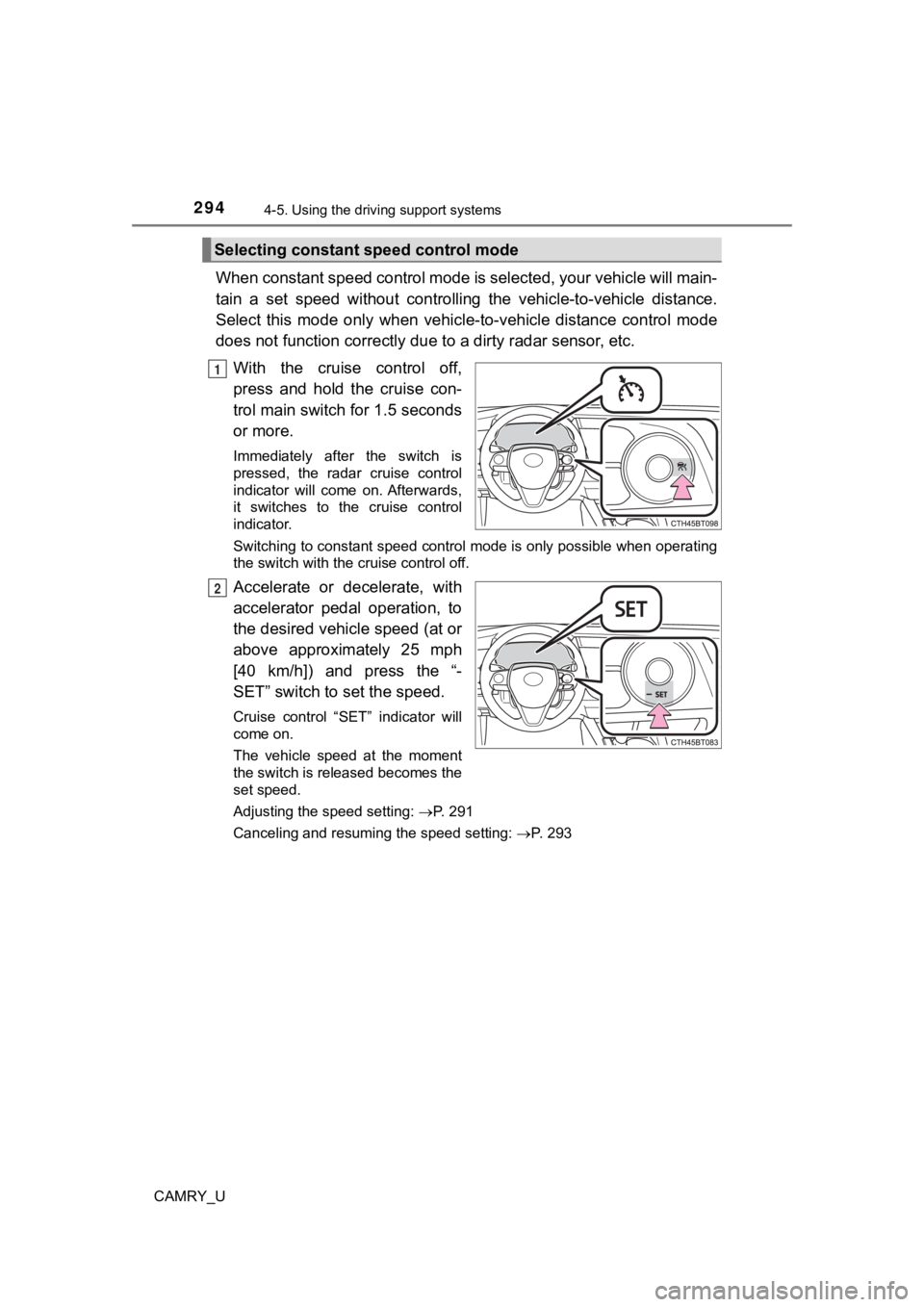
With the cruise control off,
press and hold the cruise con-
trol main switch for 1.5 seconds
or more.
Immediately after the switch is
pressed, the radar cruise control
indicator will come on. Afterwards,
it switches to the cruise control
indicator.
Switching to constant speed control mode is only possible when operating
the switch with the cruise control off.
Accelerate or decelerate, with
accelerator pedal operation, to
the desired vehicle speed (at or
above approximately 25 mph
[40 km/h]) and press the “-
SET” switch to set the speed.
Cruise control “SET” indicator will
come on.
The vehicle speed at the moment
the switch is released becomes the
set speed.
Adjusting the speed setting: P. 291
Canceling and resuming the speed setting: P. 293
Selecting constant speed control mode
1
2
Page 295 of 612
2954-5. Using the driving support systems
4
Driving
CAMRY_U
■Dynamic radar cruise control can be set when
●The shift lever is in D or range 4 or higher of S has been sele cted.
● Range 4 or higher of D has been selected by using the paddle sh ift switch.
(vehicles with paddle shift switches)
● Vehicle speed is at or above approximately 30 mph (50 km/h).
■ Accelerating after setting the vehicle speed
The vehicle can accelerate by operating the accelerator pedal. After acceler-
ating, the set speed resumes. However, during vehicle-to-vehicl e distance
control mode, the vehicle speed may decrease below the set spee d in order
to maintain the distance to the preceding vehicle.
■ When the vehicle stops while follow-up cruising
●Pressing the “+ RES” switch while the vehicle ahead stops will resume fol-
low-up cruising if the vehicle ahead starts off within approxim ately 3 sec-
onds after the switch is pressed.
● If the vehicle ahead starts off within 3 seconds after your veh icle stops, fol-
low-up cruising will be resumed.
■ Automatic cancelation of vehicle-to-vehicle distance control mode
Vehicle-to-vehicle distance control mode is automatically cance led in the fol-
lowing situations:
● Actual vehicle speed falls at or below approximately 25 mph (40 km/h).
● VSC is activated.
● TRAC is activated for a period of time.
● When the VSC or TRAC system is turned off.
● The sensor cannot detect correctly because it is covered in some way.
● Pre-collision braking is activated.
If vehicle-to-vehicle distance control mode is automatically ca nceled for any
other reason, there may be a malfunction in the system. Contact your Toyota
dealer.
Page 321 of 612
3214-5. Using the driving support systems
4
Driving
CAMRY_U
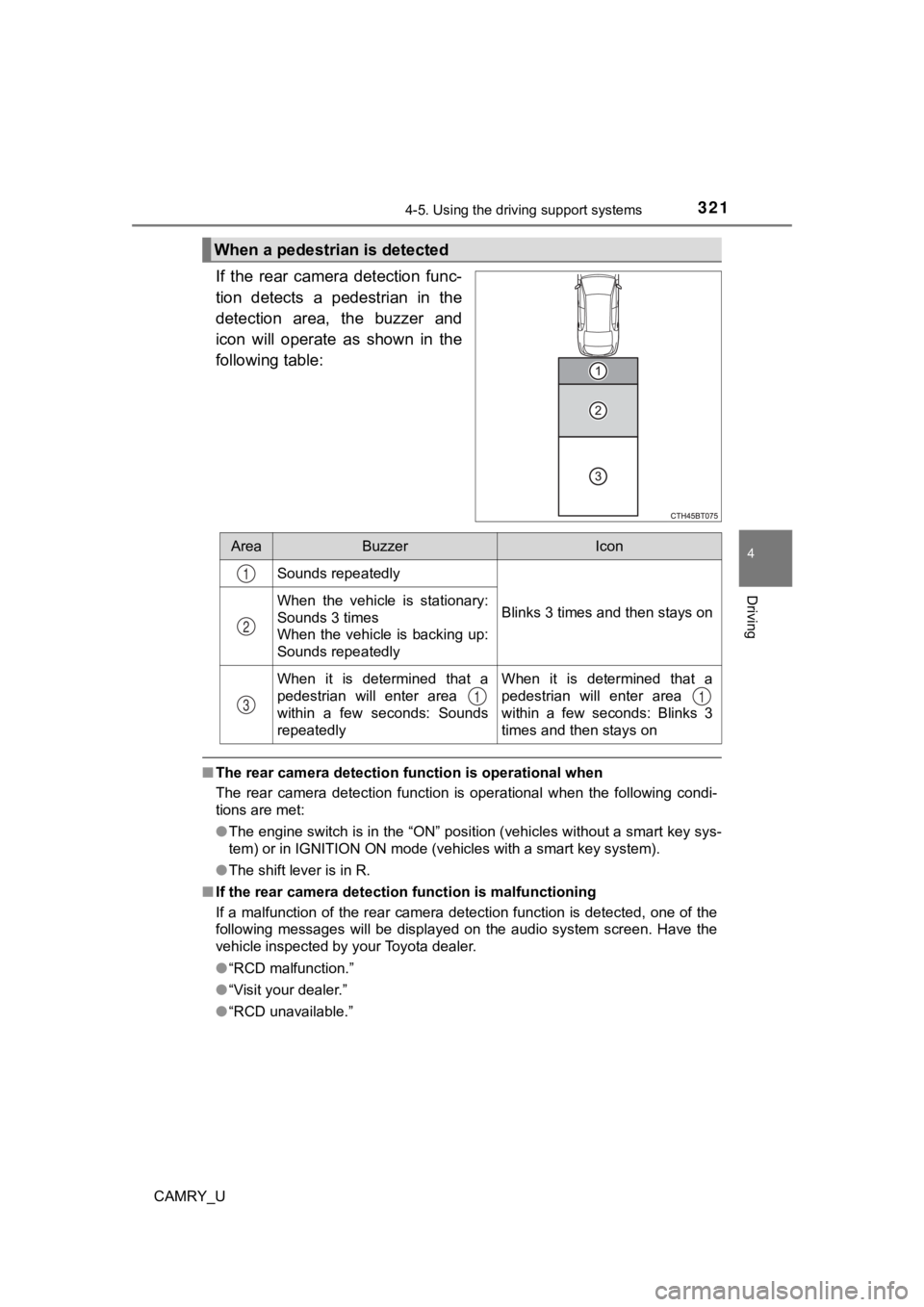
If the rear camera detection func-
tion detects a pedestrian in the
detection area, the buzzer and
icon will operate as shown in the
following table:
■The rear camera detection function is operational when
The rear camera detection function is operational when the foll owing condi-
tions are met:
● The engine switch is in the “ON” position (vehicles without a s mart key sys-
tem) or in IGNITION ON mode (vehicles with a smart key system).
● The shift lever is in R.
■ If the rear camera detection function is malfunctioning
If a malfunction of the rear camera detection function is detec ted, one of the
following messages will be displayed on the audio system screen. Have the
vehicle inspected by your Toyota dealer.
● “RCD malfunction.”
● “Visit your dealer.”
● “RCD unavailable.”
When a pedestrian is detected
AreaBuzzerIcon
Sounds repeatedly
Blinks 3 times and then stays onWhen the vehicle is stationary:
Sounds 3 times
When the vehicle is backing up:
Sounds repeatedly
When it is determined that a
pedestrian will enter area
within a few seconds: Sounds
repeatedlyWhen it is determined that a
pedestrian will enter area
within a few seconds: Blinks 3
times and then stays on
1
2
311
Page 340 of 612

3404-5. Using the driving support systems
CAMRY_U■
Re-enabling the Intelligent Clearance Sonar system
To re-enable the Intelligent Clearance Sonar system when it is disabled due
to operation of the Intelligent Clearance Sonar function, either enable the sys-
tem again (P. 335), or turn the engine switch off and then back to IGNITIO N
ON mode.
Additionally, if the object becomes no longer in the traveling direction of the
vehicle or if the traveling direction of the vehicle changes (such as changing
from moving forward to backing up, or from backing up to moving forward),
the system will be re-enabled automatically.
■ Objects that the Intelligent Clearance Sonar function may not d etect
The sensors may not be able to detect certain objects, such as the following.
● Cotton cloth, snow, and other materials that are poor reflector s of ultrasonic
waves.
(People may also not be detected depending on the type of cloth ing they are
wearing.)
● Objects which are not perpendicular to the ground, are not perp endicular to
the traveling direction of the vehicle, are uneven or are wavin g.
● Low objects
● Thin objects such as wires, fences, ropes and signposts
● Objects that are extremely close to the bumper
■ Intuitive parking assist buzzer
Regardless of whether the intuitive parking assist system is en abled or not
( P. 324), if the Intelligent Clearance Sonar system is enabled ( P. 335),
the front or rear sensors detect an object and brake control is performed, the
intuitive parking assist buzzer will sound to notify the driver of the approxi-
mate distance to the object.
Page 353 of 612
3534-5. Using the driving support systems
4
Driving
CAMRY_U
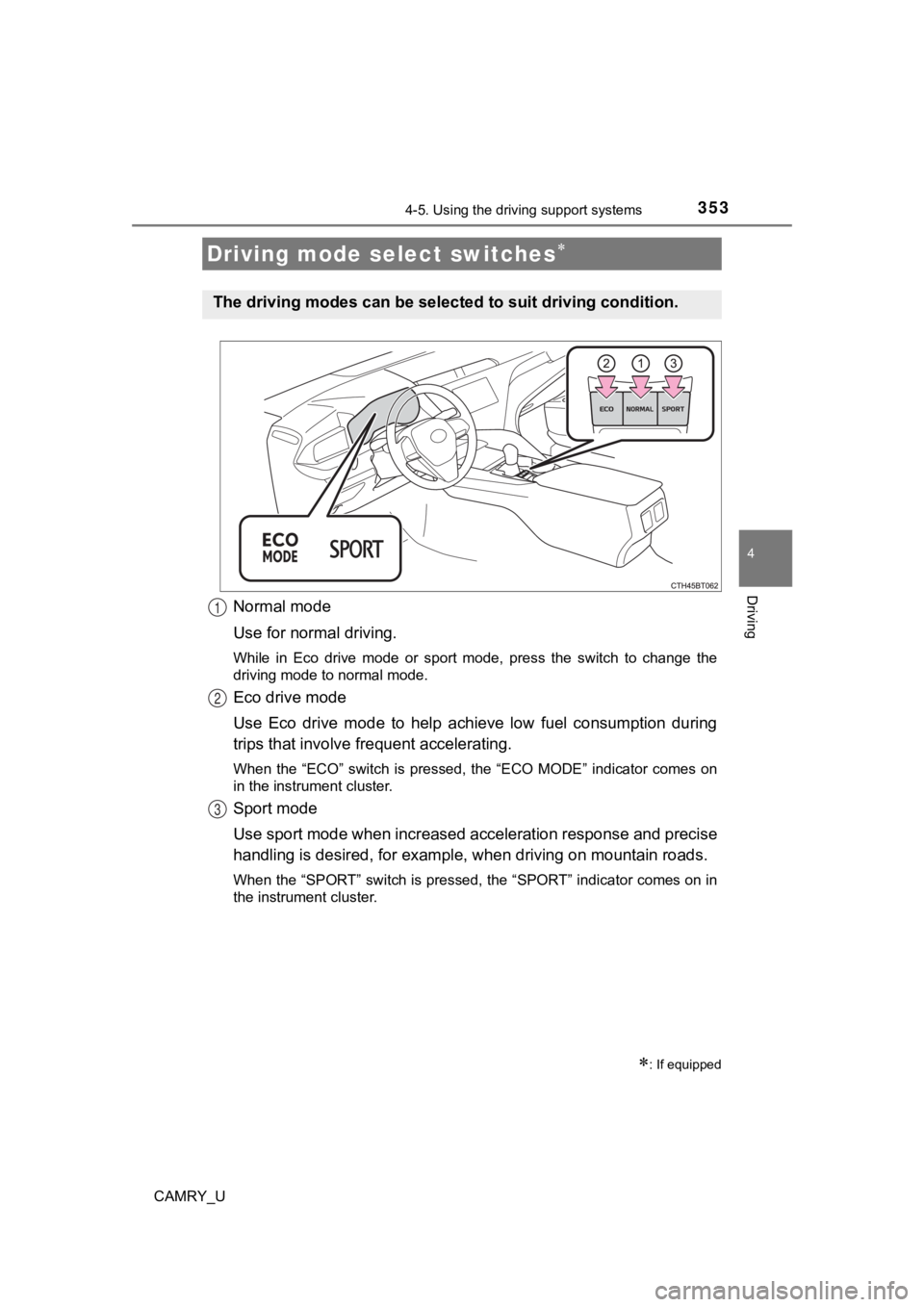
Normal mode
Use for normal driving.
While in Eco drive mode or sport mode, press the switch to change the
driving mode to normal mode.
Eco drive mode
Use Eco drive mode to help achieve low fuel consumption during
trips that involve frequent accelerating.
When the “ECO” switch is pressed, the “ECO MODE” indicator comes on
in the instrument cluster.
Sport mode
Use sport mode when increased acceleration response and precise
handling is desired, for exampl e, when driving on mountain road s.
When the “SPORT” switch is pressed, the “SPORT” indicator comes on in
the instrument cluster.
Driving mode select switches
: If equipped
The driving modes can be select ed to suit driving condition.
1
2
3
Page 354 of 612

3544-5. Using the driving support systems
CAMRY_U
■Operation of the air conditioning system in Eco drive mode
Eco drive mode controls the heating/cooling operations and fan speed of the
air conditioning system to enhance fuel efficiency ( P. 360, 365). To improve
air conditioning performance, adjust the fan speed or turn off Eco drive mode.
■ Sport mode automatic deactivation
Sport mode is automatically deactivated if the engine switch is turned off after
driving in sport mode.