sensor TOYOTA CAMRY 2019 Owners Manual (in English)
[x] Cancel search | Manufacturer: TOYOTA, Model Year: 2019, Model line: CAMRY, Model: TOYOTA CAMRY 2019Pages: 612, PDF Size: 11.44 MB
Page 32 of 612

321-1. For safe use
CAMRY_U
WARNING
■When children are in the vehicle
P. 6 6
■ Seat belt pretensioners
● Do not place anything, such as a cushion, on the front passenge r's seat.
Doing so will disperse the passenger's weight, which prevents t he sensor
from detecting the passenger's weight properly. As a result, th e seat belt
pretensioner for the front passenger's seat may not activate in the event of
a collision.
● If the pretensioner has activated, the SRS warning light will c ome on. In
that case, the seat belt cannot be used again and must be replaced at
your Toyota dealer.
■ Adjustable shoulder anchor
Always make sure the shoulder belt is positioned across the cen ter of your
shoulder. The belt should be kept away from your neck, but not falling off
your shoulder. Failure to do so could reduce the amount of prot ection in an
accident and cause death or serious injuries in the event of a sudden stop,
sudden swerve or accident. ( P. 29)
■ Seat belt damage and wear
● Do not damage the seat belts by allowing the belt, plate, or bu ckle to be
jammed in the door.
● Inspect the seat belt system periodically. Check for cuts, fray ing, and loose
parts. Do not use a damaged seat belt until it is replaced. Dam aged seat
belts cannot protect an occupant from death or serious injury.
● Ensure that the belt and plate are locked and the belt is not twisted.
If the seat belt does not function correctly, immediately conta ct your Toyota
dealer.
● Replace the seat assembly, including the belts, if your vehicle has been
involved in a serious accident, even if there is no obvious dam age.
● Do not attempt to install, remove, modify, disassemble or dispo se of the
seat belts. Have any necessary repairs carried out by your Toyota dealer.
Inappropriate handling may lead to incorrect operation.
● Always make sure the shoulder belt passes through the guide whe n using
the seat belt. Failure to properly position the belt may reduce the amount
of protection in an accident and could lead to death or serious injury in a
collision or sudden stop.
● Always make sure that the seat belt is not twisted, does not get caught in
the guide or the seatback and is arranged in the proper positio n.
Page 36 of 612
361-1. For safe use
CAMRY_U
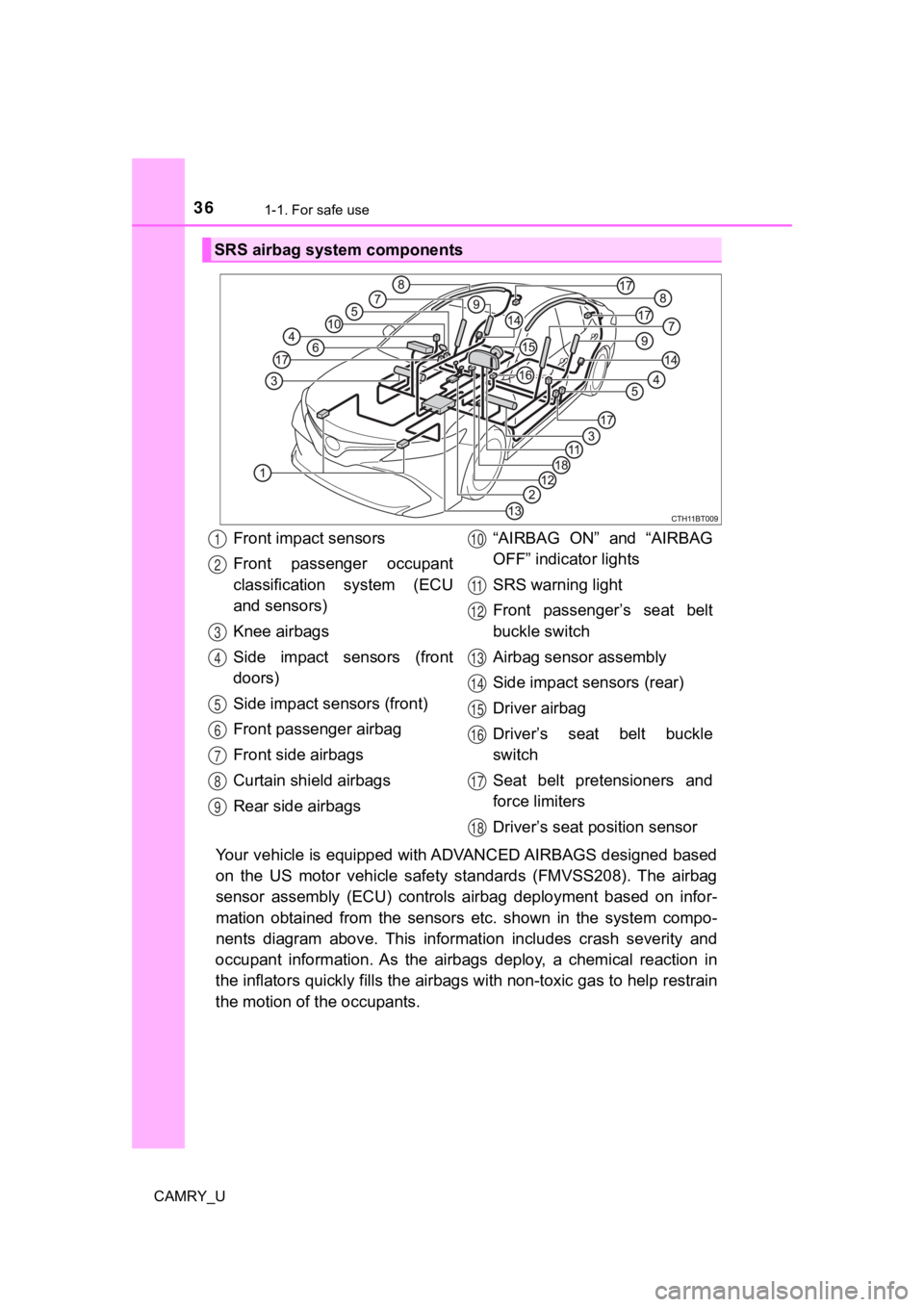
Your vehicle is equipped with ADVANCED AIRBAGS designed based
on the US motor vehicle safety standards (FMVSS208). The airbag
sensor assembly (ECU) controls airbag deployment based on infor-
mation obtained from the sensors etc. shown in the system compo -
nents diagram above. This informat ion includes crash severity and
occupant information. As the airbags deploy, a chemical reactio n in
the inflators quickly fills the airbags with non-toxic gas to h elp restrain
the motion of t he occupants.
SRS airbag system components
Front impact sensors
Front passenger occupant
classification system (ECU
and sensors)
Knee airbags
Side impact sensors (front
doors)
Side impact sensors (front)
Front passenger airbag
Front side airbags
Curtain shield airbags
Rear side airbags “AIRBAG ON” and “AIRBAG
OFF” indicator lights
SRS warning light
Front passenger’s seat belt
buckle switch
Airbag sensor assembly
Side impact sensors (rear)
Driver airbag
Driver’s seat belt buckle
switch
Seat belt pretensioners and
force limiters
Driver’s seat p
osition sensor1
2
3
4
5
6
7
8
9
10
11
12
13
14
15
16
17
18
Page 41 of 612

411-1. For safe use
1
For safety and security
CAMRY_U
WARNING
■SRS airbag precautions
● If a vinyl cover is put on the area where the SRS knee airbag w ill deploy,
be sure to remove it.
● Do not use seat accessories which cover the parts where the SRS side
airbags inflate as they may interfere with inflation of the air bags. Such
accessories may prevent the side airbags from activating correc tly, disable
the system or cause the side airbags to inflate accidentally, r esulting in
death or serious injury.
● Do not strike or apply significant levels of force to the area of the SRS air-
bag components or the front doors.
Doing so can cause the SRS airbags to malfunction.
● Do not touch any of the component parts immediately after the S RS air-
bags have deployed (inflated) as they may be hot.
● If breathing becomes difficult after the SRS airbags have deplo yed, open a
door or window to allow fresh air in, or leave the vehicle if i t is safe to do
so. Wash off any residue as soon as possible to prevent skin ir ritation.
● If the areas where the SRS airbags are stored, such as the steering wheel
pad and front and rear pillar garnishes, are damaged or cracked , have
them replaced by your Toyota dealer.
● Do not place anything, such as a cushion, on the front passenge r's seat.
Doing so will disperse the passenger's weight, which prevents t he sensor
from detecting the passenger's weight properly. As a result, th e SRS front
airbags for the front passenger may not deploy in the event of a collision.
Page 102 of 612
1022. Instrument cluster
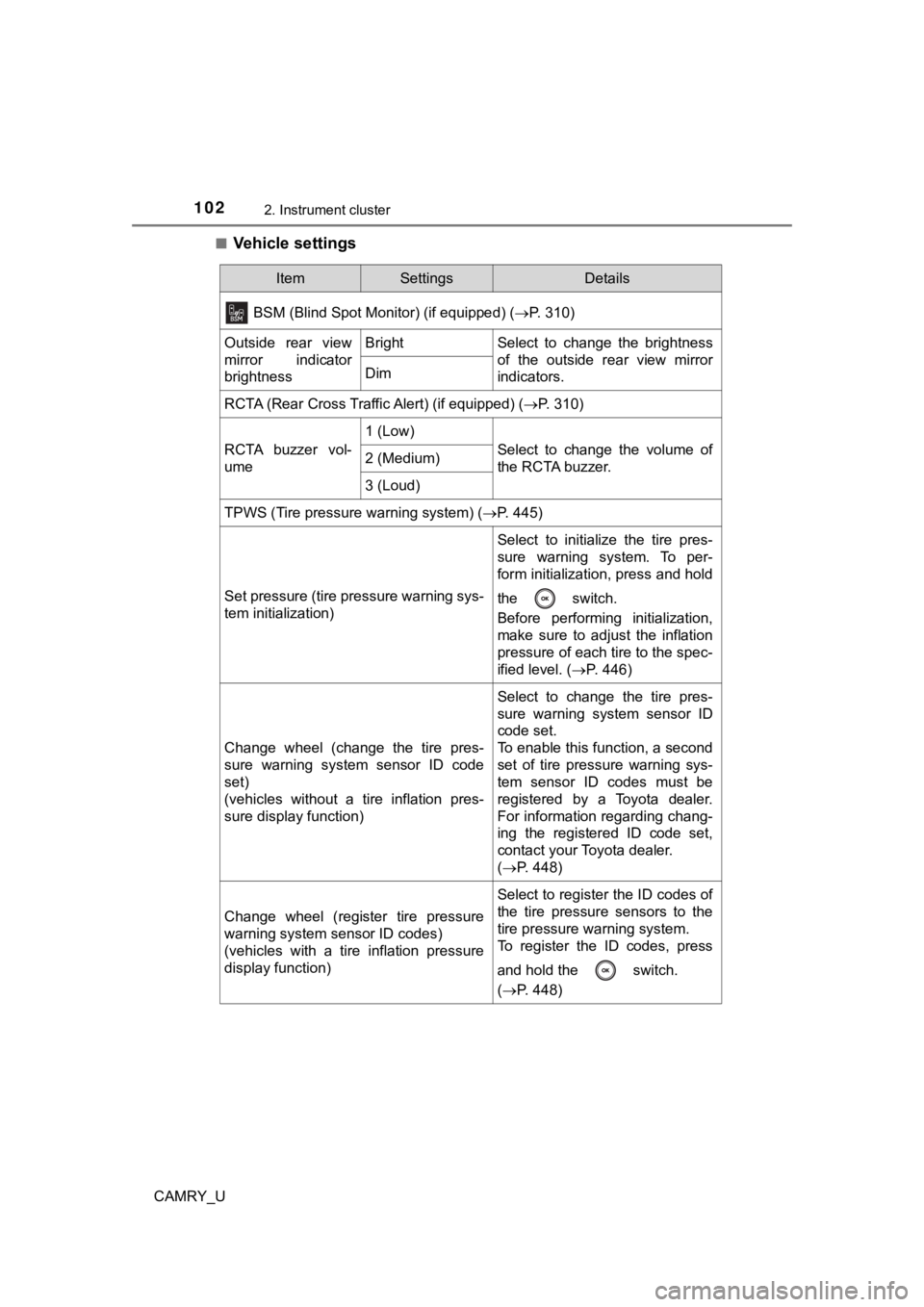
CAMRY_U■
Vehicle settings
ItemSettingsDetails
BSM (Blind Spot Monitor) (if equipped) (P. 310)
Outside rear view
mirror indicator
brightnessBrightSelect to change the brightness
of the outside rear view mirror
indicators.
Dim
RCTA (Rear Cross Traffic Alert) (if equipped) ( P. 310)
RCTA buzzer vol-
ume
1 (Low)
Select to change the volume of
the RCTA buzzer.2 (Medium)
3 (Loud)
TPWS (Tire pressure warning system) (P. 445)
Set pressure (tire pressure warning sys-
tem initialization)
Select to initialize the tire pres-
sure warning system. To per-
form initialization, press and hold
the switch.
Before performing initialization,
make sure to adjust the inflation
pressure of each tire to the spec-
ified level. (P. 446)
Change wheel (change the tire pres-
sure warning system sensor ID code
set)
(vehicles without a tire inflation pres-
sure display function)
Select to change the tire pres-
sure warning system sensor ID
code set.
To enable this function, a second
set of tire pressure warning sys-
tem sensor ID codes must be
registered by a Toyota dealer.
For information regarding chang-
ing the registered ID code set,
contact your Toyota dealer.
(P. 448)
Change wheel (register tire pressure
warning system sensor ID codes)
(vehicles with a tire inflation pressure
display function)
Select to register the ID codes of
the tire pressure sensors to the
tire pressure warning system.
To register the ID codes, press
and hold the switch.
(P. 448)
Page 116 of 612
1162. Instrument cluster
CAMRY_U■
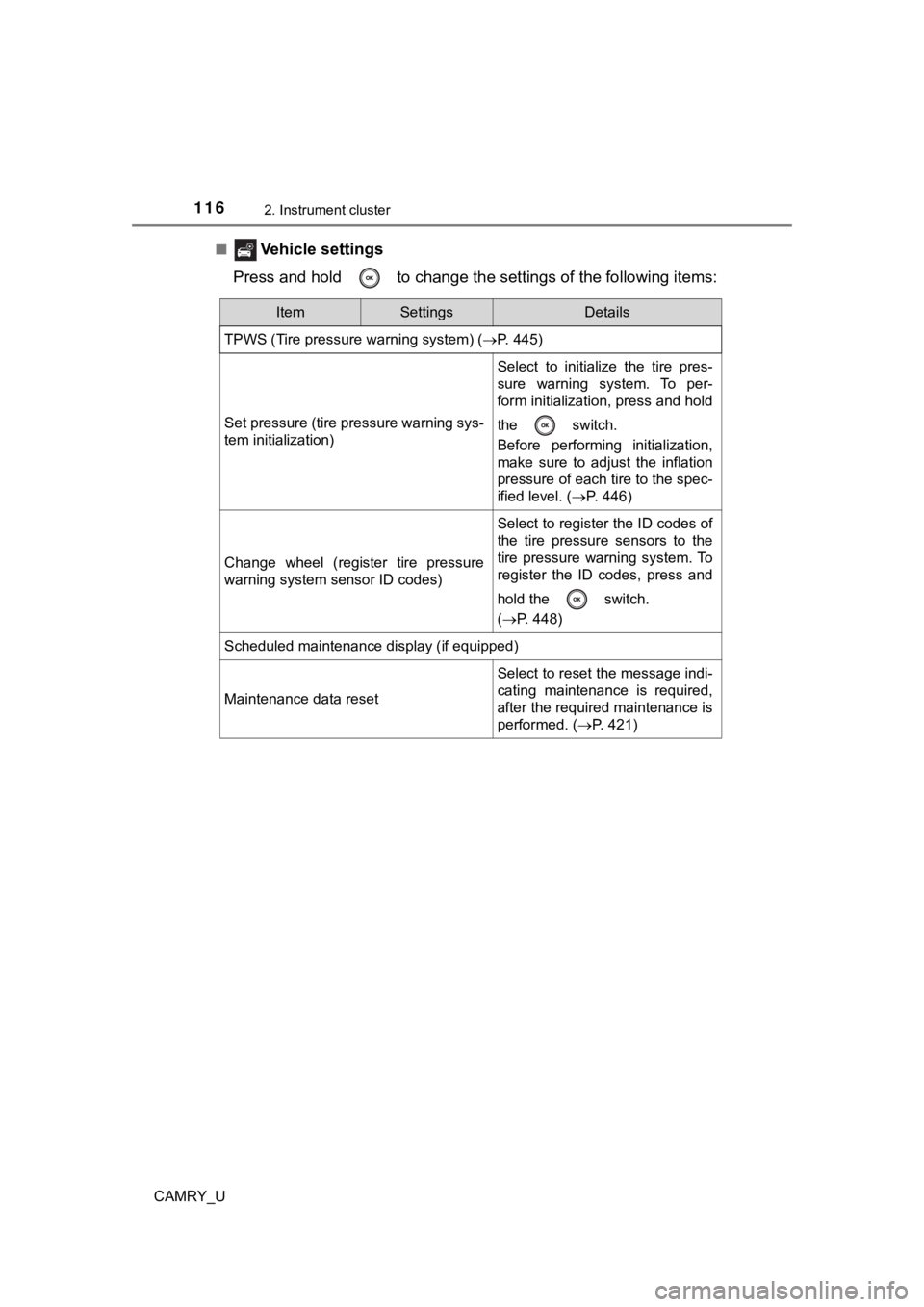
Vehicle settings
Press and hold to change the se ttings of the following items:
ItemSettingsDetails
TPWS (Tire pressure warning system) ( P. 445)
Set pressure (tire pressure warning sys-
tem initialization)
Select to initialize the tire pres-
sure warning system. To per-
form initialization, press and hold
the switch.
Before performing initialization,
make sure to adjust the inflation
pressure of each tire to the spec-
ified level. (P. 446)
Change wheel (register tire pressure
warning system sensor ID codes)
Select to register the ID codes of
the tire pressure sensors to the
tire pressure warning system. To
register the ID codes, press and
hold the switch.
(P. 448)
Scheduled maintenance display (if equipped)
Maintenance data reset
Select to reset the message indi-
cating maintenance is required,
after the required maintenance is
performed. ( P. 421)
Page 143 of 612
143
3
Operation of each component
CAMRY_U
3-2. Opening, closing and locking the doors
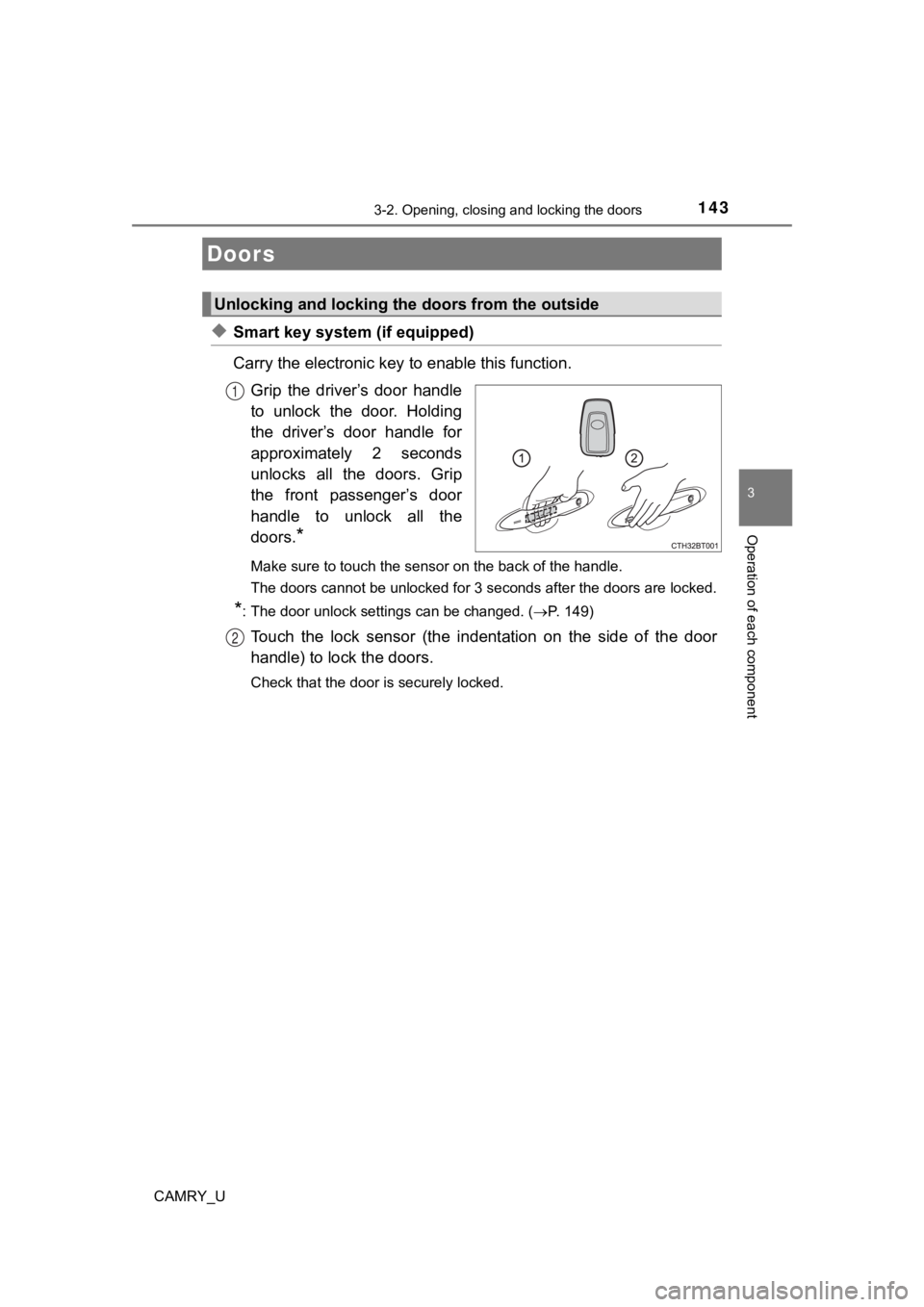
◆Smart key system (if equipped)
Carry the electronic key to enable this function.
Grip the driver’s door handle
to unlock the door. Holding
the driver’s door handle for
approximately 2 seconds
unlocks all the doors. Grip
the front passenger’s door
handle to unlock all the
doors.
*
Make sure to touch the sensor on the back of the handle.
The doors cannot be unlocked for 3 seconds after the doors are locked.
*: The door unlock settings can be changed. (P. 149)
Touch the lock sensor (the indentation on the side of the door
handle) to lock the doors.
Check that the door is securely locked.
Doors
Unlocking and locking the doors from the outside
1
2
Page 146 of 612
1463-2. Opening, closing and locking the doors
CAMRY_U
■Operation signals
Doors:
A buzzer sounds and the emergency flashers flash to indicate th at the doors
have been locked/unlocked. (Locked: Once; Unlocked: Twice)
Windows and moon roof or panoramic moon roof:
A buzzer sounds to indicate that the windows and moon roof or p anoramic
moon roof are operating.
■ Security feature
If a door is not opened within approximately 60 seconds after t he vehicle is
unlocked, the security feature automatically locks the vehicle again.
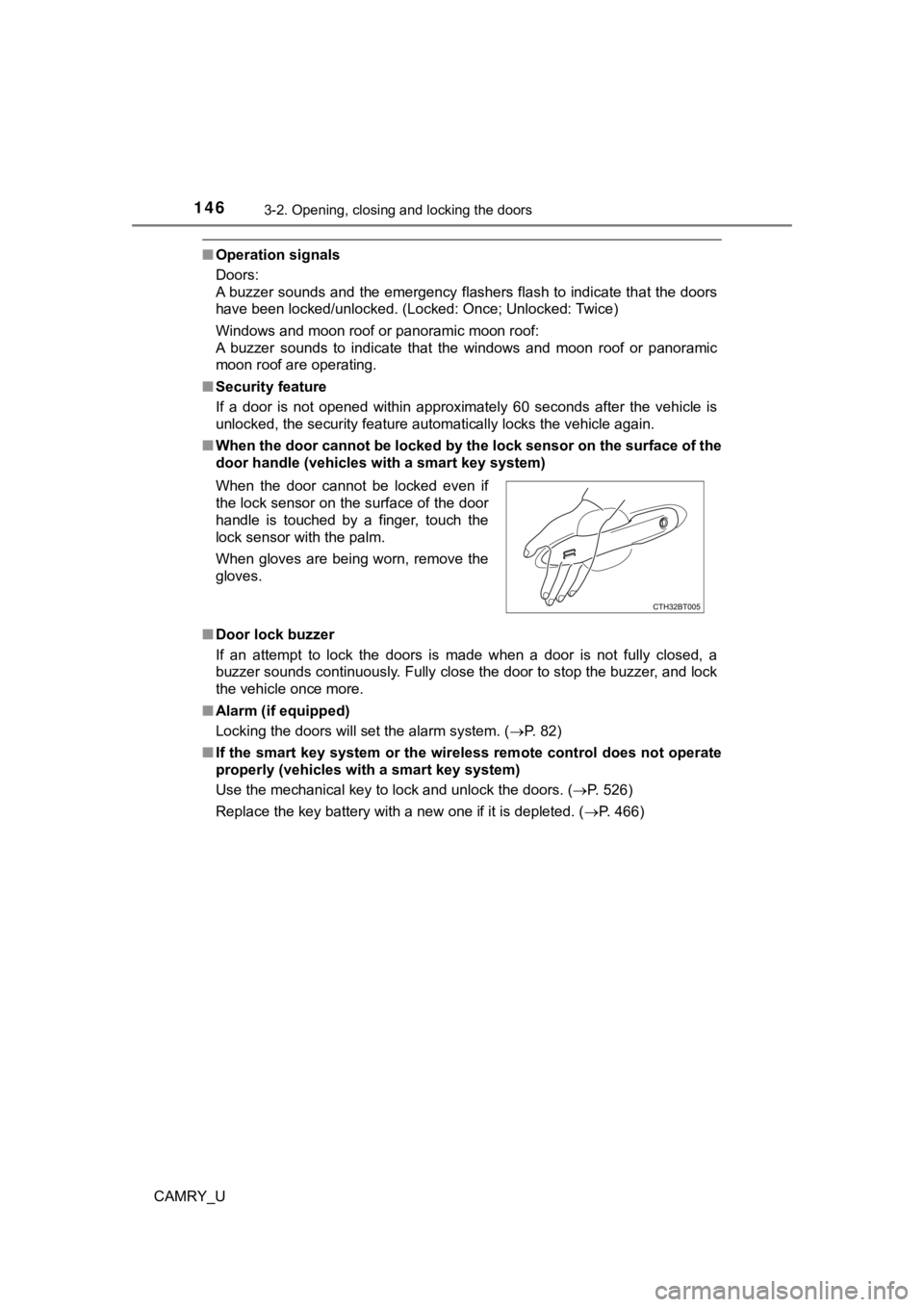
■ When the door cannot be locked by the lock sensor on the surface of the
door handle (vehicles with a smart key system)
■ Door lock buzzer
If an attempt to lock the doors is made when a door is not full y closed, a
buzzer sounds continuously. Fully close the door to stop the bu zzer, and lock
the vehicle once more.
■ Alarm (if equipped)
Locking the doors will set the alarm system. ( P. 82)
■ If the smart key system or the wireless remote control does not operate
properly (vehicles with a smart key system)
Use the mechanical key to lock and unlock the doors. ( P. 526)
Replace the key battery with a new one if it is depleted. ( P. 466)
When the door cannot be locked even if
the lock sensor on the surface of the door
handle is touched by a finger, touch the
lock sensor with the palm.
When gloves are being worn, remove the
gloves.
Page 161 of 612

1613-2. Opening, closing and locking the doors
3
Operation of each component
CAMRY_U●
If the wireless remote control is used to lock the doors when t he electronic
key is near the vehicle, there is a possibility that the door m ay not be
unlocked by the entry function. (Use the wireless remote contro l to unlock
the doors.)
● Touching the door lock sensor while wearing gloves may delay or prevent
lock operation. Remove the gloves and touch the lock sensor aga in.
● When the lock operation is performed using the lock sensor, rec ognition sig-
nals will be shown up to two consecutive times. After this, no recognition
signals will be given.
*
● If the door handle becomes wet while the electronic key is with in the effec-
tive range, the door may lock and unlock repeatedly. In this ca se, follow the
following correction procedures to wash the vehicle:
• Place the electronic key in a location 6 ft. (2 m) or more awa y from the
vehicle. (Take care to ensure that the key is not stolen.)
• Set the electronic key to battery-saving mode to disable the s mart key
system. ( P. 159)
● If the electronic key is inside the vehicle and a door handle b ecomes wet
during a car wash, a message may be shown on the multi-informat ion dis-
play and a buzzer will sound outside the vehicle. To turn off t he alarm, lock
all the doors.
● The lock sensor may not work properly if it comes into contact with ice,
snow, mud, etc. Clean the lock sensor and attempt to operate it again.
● A sudden approach to the effective range or door handle may prevent the
doors from being unlocked. In this case, return the door handle to the origi-
nal position and check that the doors unlock before pulling the door handle
again.
● If there is another electronic key in the detection area, it ma y take slightly
longer to unlock the doors after the door handle is gripped.
● Fingernails may scrape against the door during operation of the door han-
dle. Be careful not to injure fingernails or damage the surface of the door.
*: This setting can be customized at your Toyota dealer.
Page 175 of 612
1753-4. Adjusting the steering wheel and mirrors
3
Operation of each component
CAMRY_U
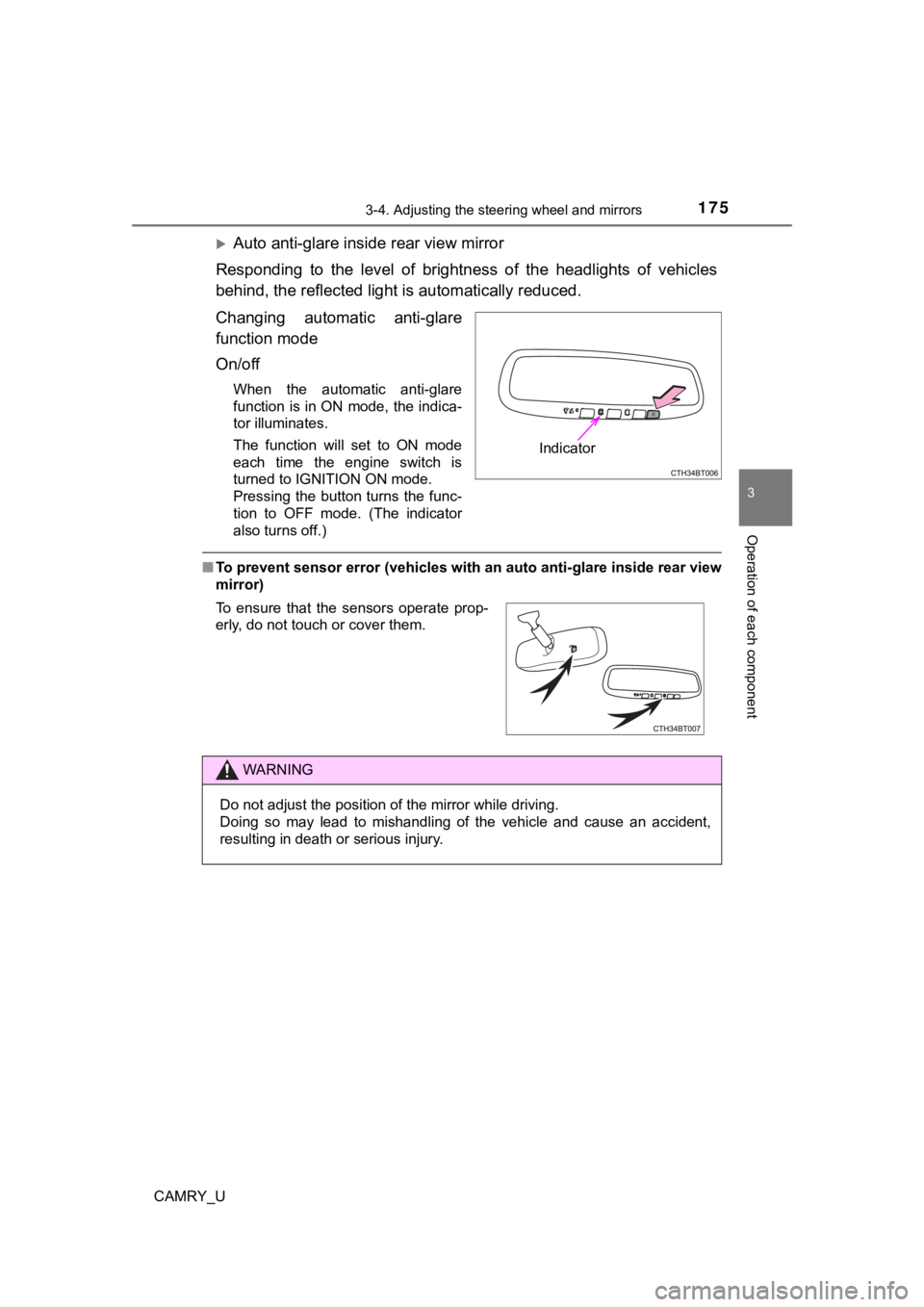
Auto anti-glare inside rear view mirror
Responding to the level of brightness of the headlights of vehi cles
behind, the reflected light is automatically reduced.
Changing automatic anti-glare
function mode
On/off
When the automatic anti-glare
function is in ON mode, the indica-
tor illuminates.
The function will set to ON mode
each time the engine switch is
turned to IGNITION ON mode.
Pressing the button turns the func-
tion to OFF mode. (The indicator
also turns off.)
■ To prevent sensor error (vehicles with an auto anti-glare insid e rear view
mirror)
Indicator
To ensure that the sensors operate prop-
erly, do not touch or cover them.
WARNING
Do not adjust the position of the mirror while driving.
Doing so may lead to mishandling of the vehicle and cause an ac cident,
resulting in death or serious injury.
Page 229 of 612
2294-3. Operating the lights and wipers
4
Driving
CAMRY_U■
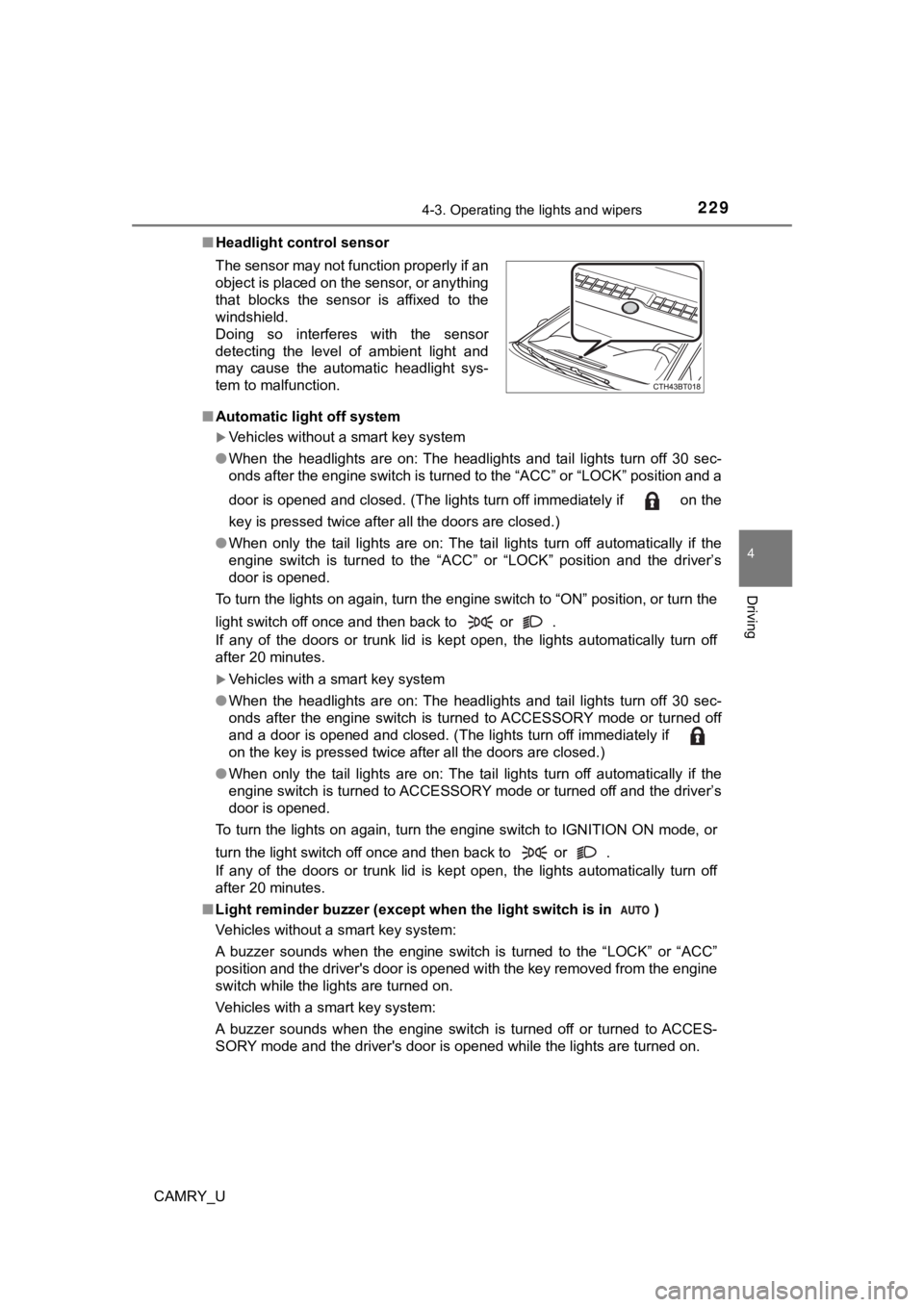
Headlight control sensor
■ Automatic light off system
Vehicles without a smart key system
● When the headlights are on: The headlights and tail lights turn off 30 sec-
onds after the engine switch is turned to the “ACC” or “LOCK” p osition and a
door is opened and closed. (The lights turn off immediately if on the
key is pressed twice after all the doors are closed.)
● When only the tail lights are on: The tail lights turn off automatically if the
engine switch is turned to the “ACC” or “LOCK” position and the driver’s
door is opened.
To turn the lights on again, turn the engine switch to “ON” pos ition, or turn the
light switch off once and then back to or .
If any of the doors or trunk lid is kept open, the lights automatically turn off
after 20 minutes.
Vehicles with a smart key system
● When the headlights are on: The headlights and tail lights turn off 30 sec-
onds after the engine switch is turned to ACCESSORY mode or tur ned off
and a door is opened and closed. (The lights turn off immediate ly if
on the key is pressed twice after all the doors are closed.)
● When only the tail lights are on: The tail lights turn off automatically if the
engine switch is turned to ACCESSORY mode or turned off and the driver’s
door is opened.
To turn the lights on again, turn the engine switch to IGNITION ON mode, or
turn the light switch off once and then back to or .
If any of the doors or trunk lid is kept open, the lights automatically turn off
after 20 minutes.
■ Light reminder buzzer (except when the light switch is in )
Vehicles without a smart key system:
A buzzer sounds when the engine switch is turned to the “LOCK” or “ACC”
position and the driver's door is opened with the key removed f rom the engine
switch while the lights are turned on.
Vehicles with a smart key system:
A buzzer sounds when the engine switch is turned off or turned to ACCES-
SORY mode and the driver's door is opened while the lights are turned on.
The sensor may not function properly if an
object is placed on the sensor, or anything
that blocks the sensor is affixed to the
windshield.
Doing so interferes with the sensor
detecting the level of ambient light and
may cause the automatic headlight sys-
tem to malfunction.