inflation pressure TOYOTA CAMRY 2021 Owners Manual (in English)
[x] Cancel search | Manufacturer: TOYOTA, Model Year: 2021, Model line: CAMRY, Model: TOYOTA CAMRY 2021Pages: 660, PDF Size: 16.97 MB
Page 5 of 660

5
1
8 7 5 4
3
2
CAMRY_U
9
6
5-3. Using the storage features
List of storage features...... 419
• Glove box...................... 420
• Console box .................. 420
• Coin holder ................... 420
• Bottle holders ................ 421
• Cup holders .................. 422
• Auxiliary boxes .............. 423
• Open tray ...................... 424
Trunk features ................... 425
5-4. Other interior features Other interior features ....... 426
• Sun visors ..................... 426
• Vanity mirrors................ 426
• Power outlet .................. 427
• USB charging ports....... 428
• Wireless charger ........... 430
• Armrest ......................... 439
• Assist grips ................... 439
• Coat hooks.................... 440
Garage door opener .......... 441 6-1. Maintenance and care
Cleaning and protecting the vehicle exterior .......... 450
Cleaning and protecting the vehicle interior ........... 453
6-2. Maintenance Maintenance requirements ................... 456
General maintenance ........ 459
Emission inspection and maintenance (I/M)
programs ......................... 463
6-3. Do-it-yourself maintenance
Do-it-yourself service precautions ...................... 464
Hood .................................. 466
Positioning a floor jack....... 468
Engine compartment ......... 469
Tires................................... 482
Tire inflation pressure ........ 497
Wheels............................... 500
Air conditioning filter .......... 502
Wireless remote control/ electronic key battery ...... 504
Checking and replacing fuses ................................ 509
Light bulbs ......................... 5126Maintenance and care
Page 15 of 660
15Pictorial index
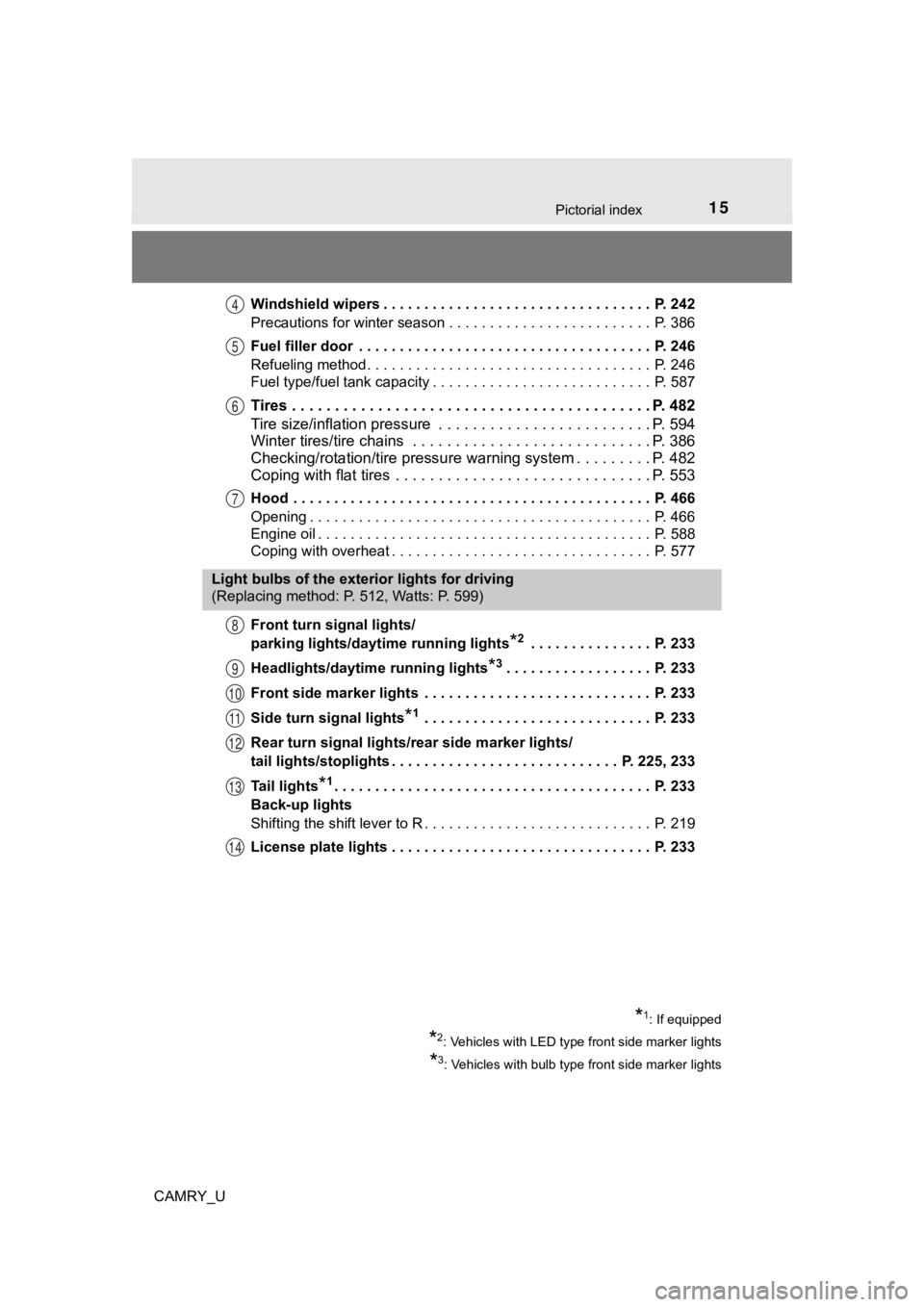
CAMRY_UWindshield wipers . . . . . . . . . . . . . . . . . . . . . . . . . . . . . . . . . P. 242
Precautions for winter season . . . . . . . . . . . . . . . . . . . . . . . . . P. 386
Fuel filler door . . . . . . . . . . . . . . . . . . . . . . . . . . . . . . . . . . . . P. 246
Refueling method . . . . . . . . . . . . . . . . . . . . . . . . . . . . . . . . . . . P. 246
Fuel type/fuel tank capacity . . . . . . . . . . . . . . . . . . . . . . . . . . . P. 587
Tires . . . . . . . . . . . . . . . . . . . . . . . . . . . . .
. . . . . . . . . . . . . P. 482
Tire size/inflation pressure . . . . . . . . . . . . . . . . . . . . . . . . . P. 594
Winter tires/tire chains . . . . . . . . . . . . . . . . . . . . . . . . . . . . P. 386
Checking/rotation/tire pressur e warning system . . . . . . . . .P. 482
Coping with flat tires . . . . . . . . . . . . . . . . . . . . . . . . . . . . . . P. 553
Hood . . . . . . . . . . . . . . . . . . . . . . . . . . . . . . . . . . . . . . . . . . . . P. 466
Opening . . . . . . . . . . . . . . . . . . . . . . . . . . . . . . . . . . . . . . . . . . P. 466
Engine oil . . . . . . . . . . . . . . . . . . . . . . . . . . . . . . . . . . . . . . . . . P. 588
Coping with overheat . . . . . . . . . . . . . . . . . . . . . . . . . . . . . . . . P. 577
Front turn signal lights/
parking lights/daytime running lights
*2 . . . . . . . . . . . . . . . P. 233
Headlights/daytime running lights
*3. . . . . . . . . . . . . . . . . . P. 233
Front side marker lights . . . . . . . . . . . . . . . . . . . . . . . . . . . . P. 233
Side turn signal lights
*1 . . . . . . . . . . . . . . . . . . . . . . . . . . . . P. 233
Rear turn signal lights/r ear side marker lights/
tail lights/stoplights . . . . . . . . . . . . . . . . . . . . . . . . . . . . P. 225, 233
Tail lights
*1. . . . . . . . . . . . . . . . . . . . . . . . . . . . . . . . . . . . . . . P. 233
Back-up lights
Shifting the shift lever to R . . . . . . . . . . . . . . . . . . . . . . . . . . . . P. 219
License plate lights . . . . . . . . . . . . . . . . . . . . . . . . . . . . . . . . P. 233
4
5
6
7
Light bulbs of the exterior lights for driving
(Replacing method: P. 512, Watts: P. 599)
8
9
10
11
12
13
14
*1: If equipped
*2: Vehicles with LED type front side marker lights
*3: Vehicles with bulb type front side marker lights
Page 100 of 660
1002. Instrument cluster
CAMRY_U■
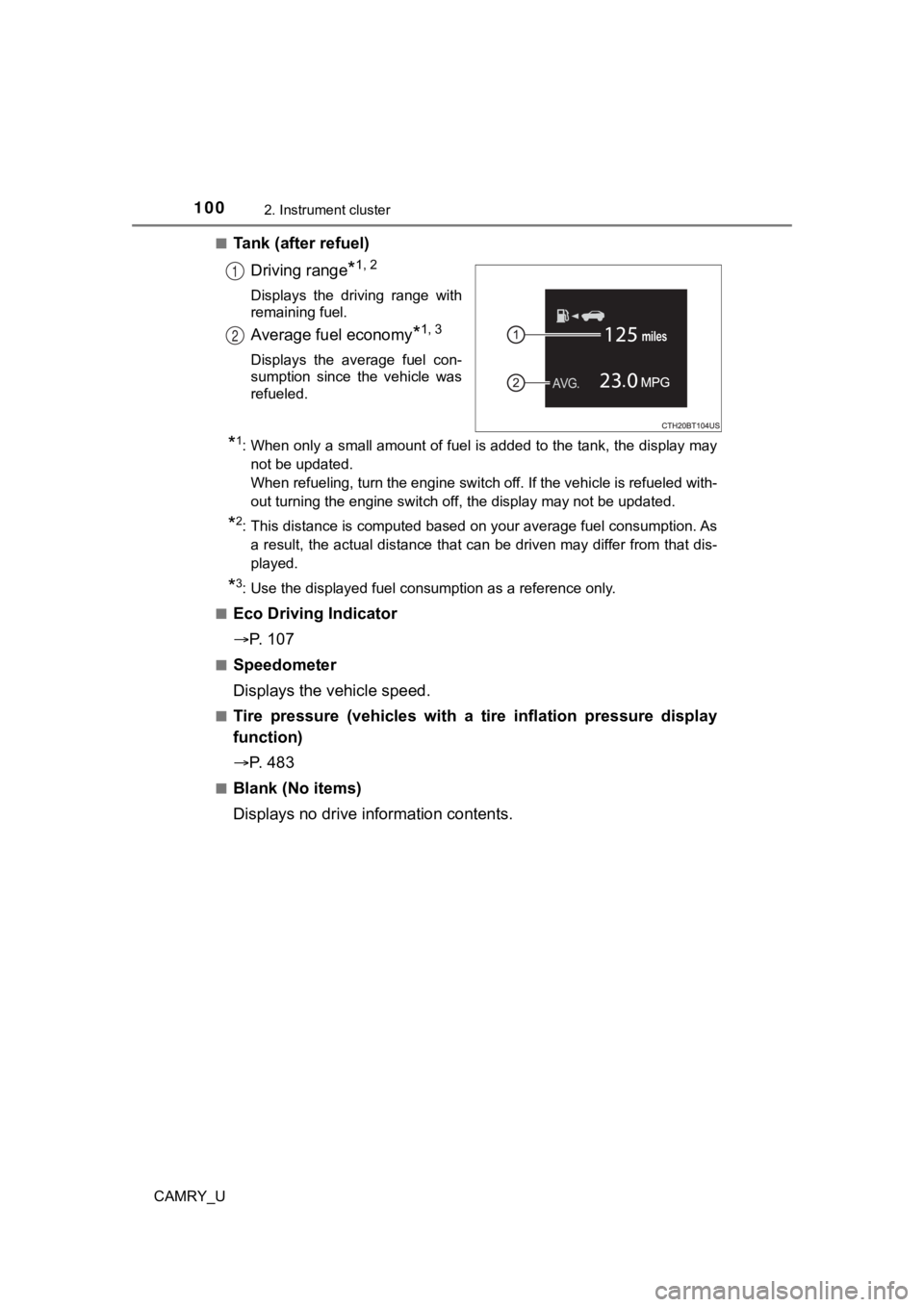
Tank (after refuel)
Driving range
*1, 2
Displays the driving range with
remaining fuel.
Average fuel economy*1, 3
Displays the average fuel con-
sumption since the vehicle was
refueled.
*1: When only a small amount of fuel is added to the tank, the dis play may
not be updated.
When refueling, turn the engine switch off. If the vehicle is r efueled with-
out turning the engine switch off, the display may not be updat ed.
*2: This distance is computed based on your average fuel consumpti on. As
a result, the actual distance that can be driven may differ fro m that dis-
played.
*3: Use the displayed fuel consumption as a reference only.
■
Eco Driving Indicator
P. 1 0 7
■Speedometer
Displays the vehicle speed.
■Tire pressure (vehicles with a tire inflation pressure display
function)
P. 4 8 3
■Blank (No items)
Displays no drive information contents.
1
2
Page 104 of 660
1042. Instrument cluster
CAMRY_U■
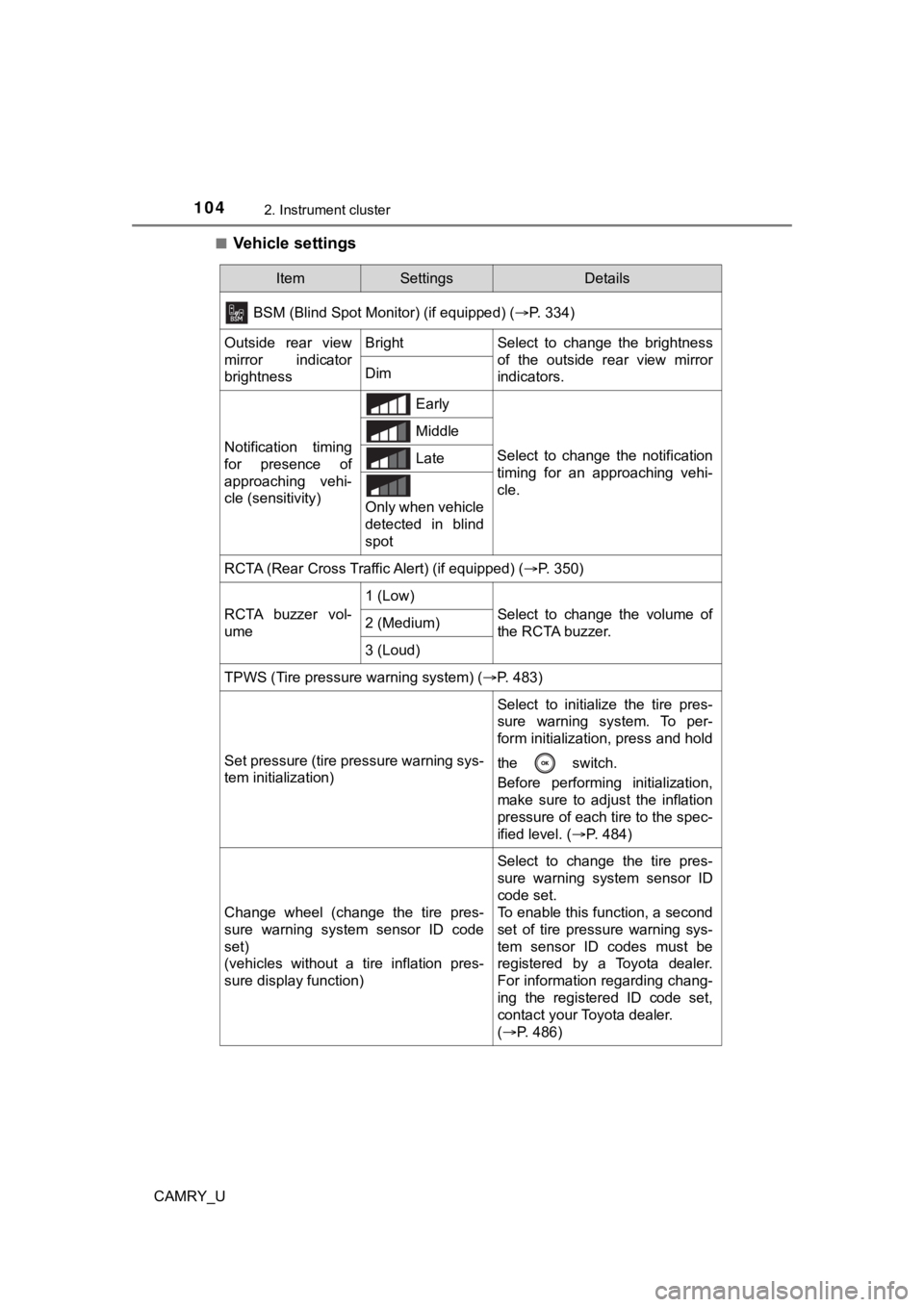
Vehicle settings
ItemSettingsDetails
BSM (Blind Spot Monitor) (if equipped) (P. 334)
Outside rear view
mirror indicator
brightnessBrightSelect to change the brightness
of the outside rear view mirror
indicators.
Dim
Notification timing
for presence of
approaching vehi-
cle (sensitivity) Early
Select to change the notification
timing for an approaching vehi-
cle.
Middle
Late
Only when vehicle
detected in blind
spot
RCTA (Rear Cross Traffic Alert) (if equipped) ( P. 350)
RCTA buzzer vol-
ume
1 (Low)
Select to change the volume of
the RCTA buzzer.2 (Medium)
3 (Loud)
TPWS (Tire pressure warning system) (P. 483)
Set pressure (tire pressure warning sys-
tem initialization)
Select to initialize the tire pres-
sure warning system. To per-
form initialization, press and hold
the switch.
Before performing initialization,
make sure to adjust the inflation
pressure of each tire to the spec-
ified level. (P. 484)
Change wheel (change the tire pres-
sure warning system sensor ID code
set)
(vehicles without a tire inflation pres-
sure display function)
Select to change the tire pres-
sure warning system sensor ID
code set.
To enable this function, a second
set of tire pressure warning sys-
tem sensor ID codes must be
registered by a Toyota dealer.
For information regarding chang-
ing the registered ID code set,
contact your Toyota dealer.
(P. 486)
Page 105 of 660
1052. Instrument cluster
2
Instrument cluster
CAMRY_U■
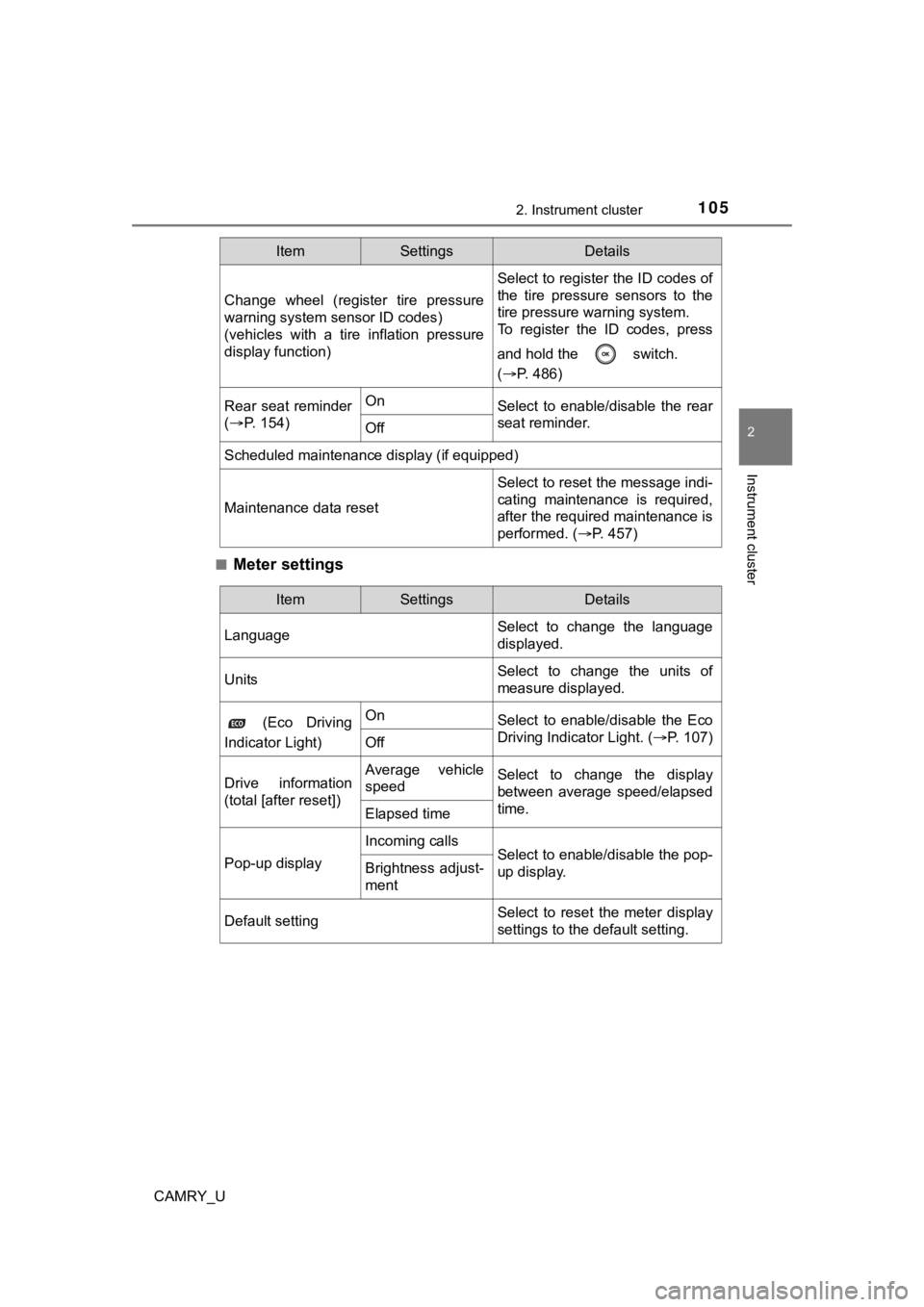
Meter settings
Change wheel (register tire pressure
warning system sensor ID codes)
(vehicles with a tire inflation pressure
display function)
Select to register the ID codes of
the tire pressure sensors to the
tire pressure warning system.
To register the ID codes, press
and hold the switch.
(
P. 486)
Rear seat reminder
( P. 1 5 4 )OnSelect to enable/disable the rear
seat reminder.
Off
Scheduled maintenance display (if equipped)
Maintenance data reset
Select to reset the message indi-
cating maintenance is required,
after the required maintenance is
performed. ( P. 457)
ItemSettingsDetails
ItemSettingsDetails
Language Select to change the language
displayed.
UnitsSelect to change the units of
measure displayed.
(Eco Driving
Indicator Light)OnSelect to enable/disable the Eco
Driving Indicator Light. ( P. 107)
Off
Drive information
(total [after reset])Average vehicle
speedSelect to change the display
between average speed/elapsed
time.
Elapsed time
Pop-up display
Incoming callsSelect to enable/disable the pop-
up display.Brightness adjust-
ment
Default settingSelect to reset the meter display
settings to the default setting.
Page 107 of 660
1072. Instrument cluster
2
Instrument cluster
CAMRY_U
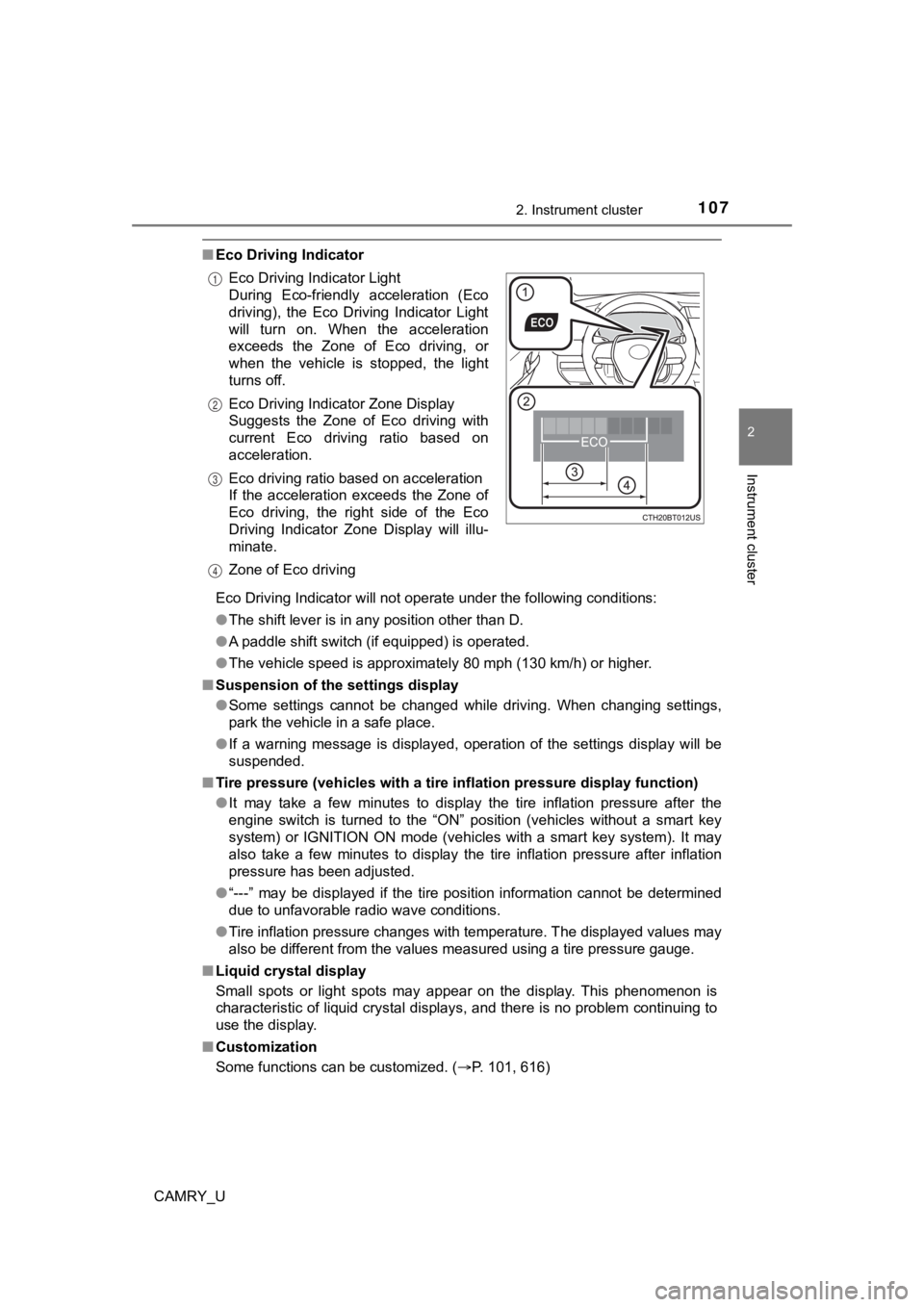
■Eco Driving Indicator
Eco Driving Indicator will not operate under the following cond itions:
● The shift lever is in any position other than D.
● A paddle shift switch (if equipped) is operated.
● The vehicle speed is approximately 80 mph (130 km/h) or higher.
■ Suspension of the settings display
●Some settings cannot be changed while driving. When changing se ttings,
park the vehicle in a safe place.
● If a warning message is displayed, operation of the settings di splay will be
suspended.
■ Tire pressure (vehicles with a tire inflation pressure display function)
● It may take a few minutes to display the tire inflation pressur e after the
engine switch is turned to the “ON” position (vehicles without a smart key
system) or IGNITION ON mode (vehicles with a smart key system). It may
also take a few minutes to display the tire inflation pressure after inflation
pressure has been adjusted.
● “---” may be displayed if the tire position information cannot be determined
due to unfavorable radio wave conditions.
● Tire inflation pressure changes with temperature. The displayed values may
also be different from the values measured using a tire pressur e gauge.
■ Liquid crystal display
Small spots or light spots may appear on the display. This phen omenon is
characteristic of liquid crystal displays, and there is no prob lem continuing to
use the display.
■ Customization
Some functions can be customized. ( P. 101, 616)
Eco Driving Indicator Light
During Eco-friendly acceleration (Eco
driving), the Eco Driving Indicator Light
will turn on. When the acceleration
exceeds the Zone of Eco driving, or
when the vehicle is stopped, the light
turns off.
Eco Driving Indicator Zone Display
Suggests the Zone of Eco driving with
current Eco driving ratio based on
acceleration.
Eco driving ratio based on acceleration
If the acceleration exceeds the Zone of
Eco driving, the right side of the Eco
Driving Indicator Zone Display will illu-
minate.
Zone of Eco driving
1
2
3
4
Page 112 of 660
1122. Instrument cluster
CAMRY_U
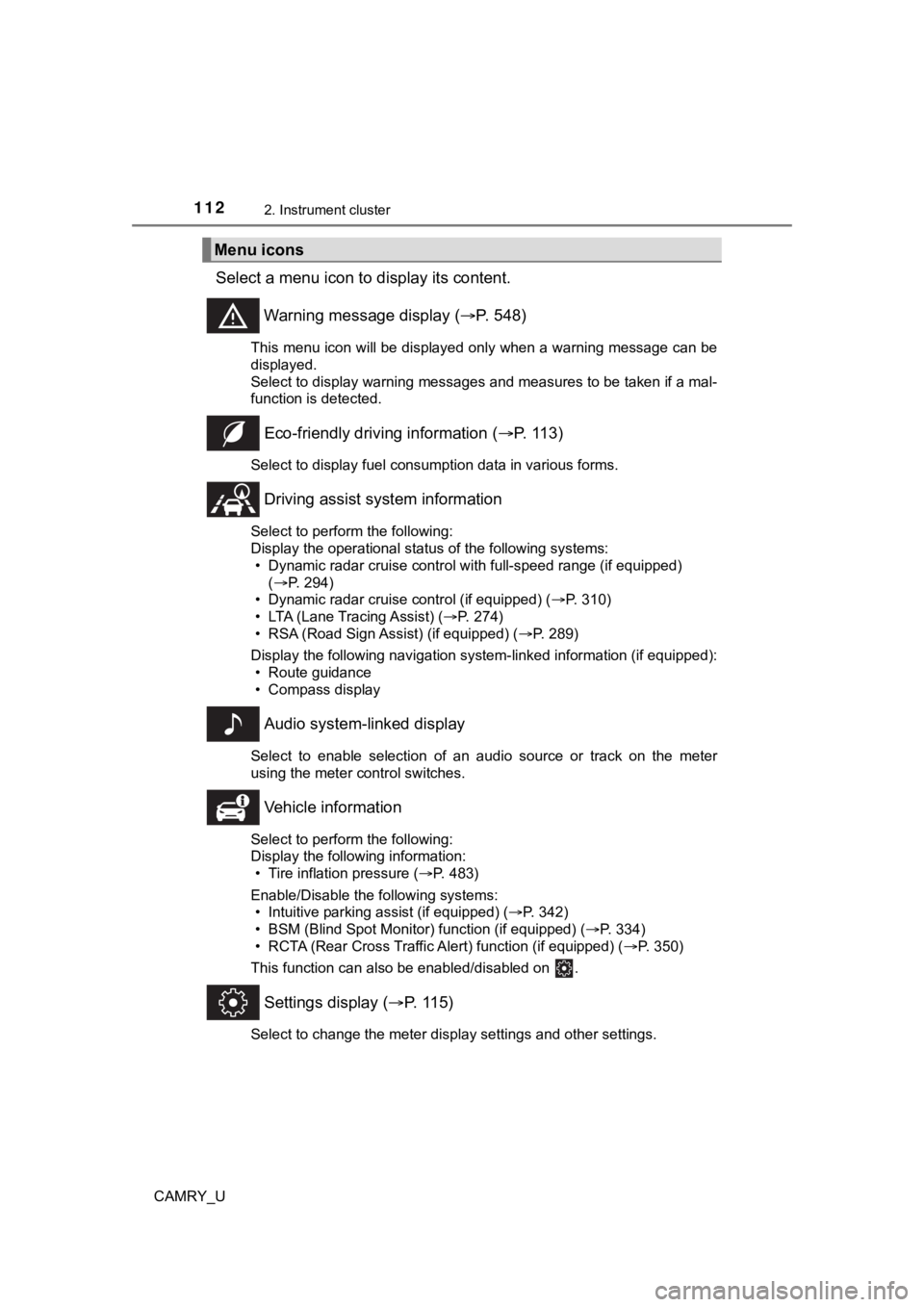
Select a menu icon to display its content.
Warning message display ( P. 548)
This menu icon will be displayed only when a warning message ca n be
displayed.
Select to display warning messages and measures to be taken if a mal-
function is detected.
Eco-friendly drivin g information (P. 113)
Select to display fuel consumption data in various forms.
Driving assist sys tem information
Select to perform the following:
Display the operational status of the following systems:
• Dynamic radar cruise control with full-speed range (if equippe d)
( P. 294)
• Dynamic radar cruise control (if equipped) ( P. 310)
• LTA (Lane Tracing Assist) ( P. 274)
• RSA (Road Sign Assist) (if equipped) ( P. 289)
Display the following navigation system-linked information (if equipped):
• Route guidance
• Compass display
Audio system-linked display
Select to enable selection of an audio source or track on the m eter
using the meter control switches.
Vehicle information
Select to perform the following:
Display the following information: • Tire inflation pressure ( P. 483)
Enable/Disable the following systems: • Intuitive parking assist (if equipped) ( P. 342)
• BSM (Blind Spot Monitor) function (if equipped) ( P. 334)
• RCTA (Rear Cross Traffic Al ert) function (if equipped) (P. 350)
This function can also be enabled/disabled on .
Settings display ( P. 115)
Select to change the meter display settings and other settings.
Menu icons
Page 121 of 660
1212. Instrument cluster
2
Instrument cluster
CAMRY_U■
Vehicle settings
Press and hold to change the se ttings of the following items:
ItemSettingsDetails
TPWS (Tire pressure warning system) ( P. 483)
Set pressure (tire pressure warning sys-
tem initialization)
Select to initialize the tire pres-
sure warning system. To per-
form initialization, press and hold
the switch.
Before performing initialization,
make sure to adjust the inflation
pressure of each tire to the spec-
ified level. (P. 484)
Change wheel (change the tire pres-
sure warning system sensor ID code
set)
(vehicles without a tire inflation pres-
sure display function)
Select to change the tire pres-
sure warning system sensor ID
code set.
To enable this function, a second
set of tire pressure warning sys-
tem sensor ID codes must be
registered by a Toyota dealer.
For information regarding chang-
ing the registered ID code set,
contact your Toyota dealer.
(P. 486)
Change wheel (register tire pressure
warning system sensor ID codes) (vehi-
cles with a tire inflation pressure display
function)
Select to register the ID codes of
the tire pressure sensors to the
tire pressure warning system. To
register the ID codes, press and
hold the switch.
(P. 486)
Rear seat reminder
( P. 1 5 4 )OnSelect to enable/disable the rear
seat reminder.
Off
Scheduled maintenance display (if equipped)
Maintenance data reset
Select to reset the message indi-
cating maintenance is required,
after the required maintenance is
performed. ( P. 457)
Page 124 of 660
1242. Instrument cluster
CAMRY_U
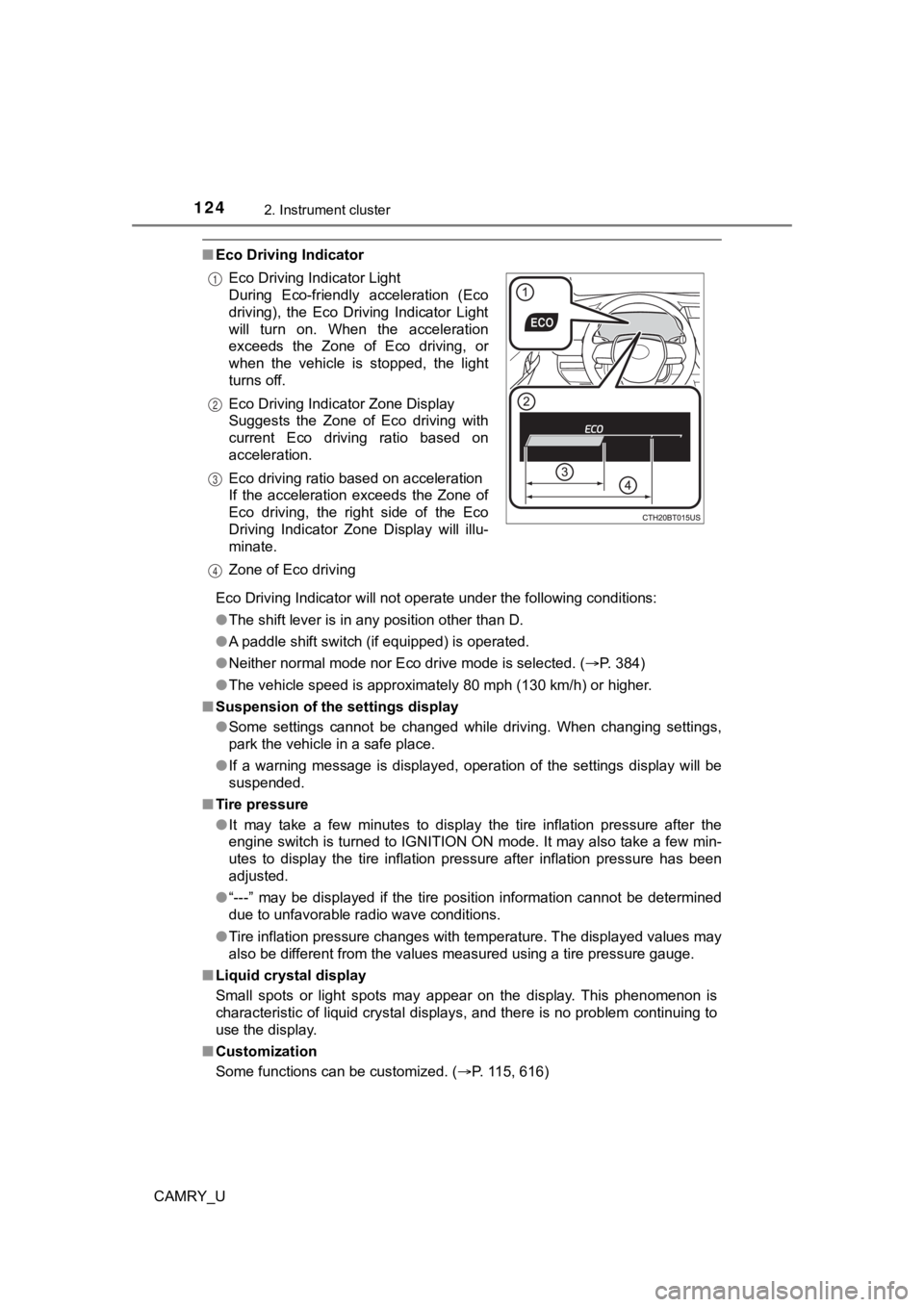
■Eco Driving Indicator
Eco Driving Indicator will not operate under the following cond itions:
● The shift lever is in any position other than D.
● A paddle shift switch (if equipped) is operated.
● Neither normal mode nor Eco drive mode is selected. ( P. 384)
● The vehicle speed is approximately 80 mph (130 km/h) or higher.
■ Suspension of the settings display
●Some settings cannot be changed while driving. When changing se ttings,
park the vehicle in a safe place.
● If a warning message is displayed, operation of the settings di splay will be
suspended.
■ Tire pressure
●It may take a few minutes to display the tire inflation pressur e after the
engine switch is turned to IGNITION ON mode. It may also take a few min-
utes to display the tire inflation pressure after inflation pre ssure has been
adjusted.
● “---” may be displayed if the tire position information cannot be determined
due to unfavorable radio wave conditions.
● Tire inflation pressure changes with temperature. The displayed values may
also be different from the values measured using a tire pressur e gauge.
■ Liquid crystal display
Small spots or light spots may appear on the display. This phen omenon is
characteristic of liquid crystal displays, and there is no prob lem continuing to
use the display.
■ Customization
Some functions can be customized. ( P. 115, 616)
Eco Driving Indicator Light
During Eco-friendly acceleration (Eco
driving), the Eco Driving Indicator Light
will turn on. When the acceleration
exceeds the Zone of Eco driving, or
when the vehicle is stopped, the light
turns off.
Eco Driving Indicator Zone Display
Suggests the Zone of Eco driving with
current Eco driving ratio based on
acceleration.
Eco driving ratio based on acceleration
If the acceleration exceeds the Zone of
Eco driving, the right side of the Eco
Driving Indicator Zone Display will illu-
minate.
Zone of Eco driving
1
2
3
4
Page 273 of 660

2734-5. Using the driving support systems
4
Driving
CAMRY_U●
In some situations such as the following, sufficient braking force or steering
force may not be obtained, preventing the system from performin g properly:
• If the braking functions cannot operate to their full extent, such as when
the brake parts are extremely cold, extremely hot, or wet
• If the vehicle is not properly maintained (brakes or tires are excessively
worn, improper tire inflation pressure, etc.)
• When the vehicle is being driven on a gravel road or other sli ppery sur-
face
• When the road surface has deep wheel tracks
• When driving on a hill road
• When driving on a road that has inclines to the left or right
■ If VSC is disabled
●If VSC is disabled ( P. 328), the pre-collision brake assist and pre-collision
braking functions are also disabled.
● The PCS warning light will turn on and “VSC Turned Off Pre-Coll ision Brake
System Unavailable” will be displayed on the multi-information display.