warning TOYOTA CAMRY 2022 Owners Manual
[x] Cancel search | Manufacturer: TOYOTA, Model Year: 2022, Model line: CAMRY, Model: TOYOTA CAMRY 2022Pages: 664, PDF Size: 11.3 MB
Page 222 of 664

2224-2. Driving procedures
CAMRY_U
WARNING
■When driving on slippery road surfaces
Do not accelerate or shift gears suddenly.
Sudden changes in engine braking may cause the vehicle to spin or skid,
resulting in an accident.
■ To prevent an accident when releasing the shift lock
Before pressing the shift lock override button, make sure to se t the parking
brake and depress the brake pedal.
If the accelerator pedal is accidentally depressed instead of t he brake pedal
when the shift lock override button is pressed and the shift le ver is shifted
out of P, the vehicle may suddenly start, possibly leading to an accident
resulting in death or serious injury.
Page 224 of 664
2244-2. Driving procedures
CAMRY_U
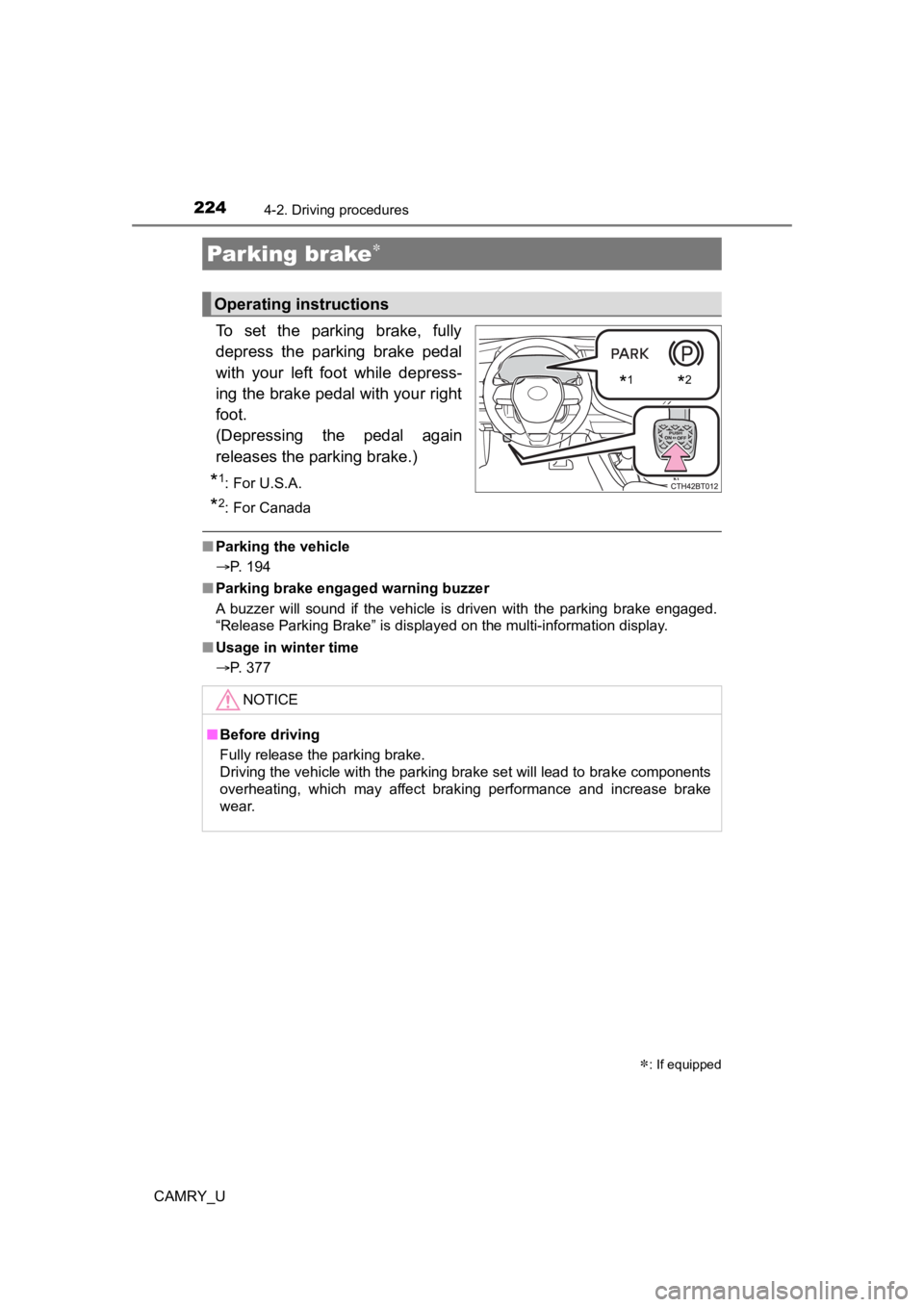
To set the parking brake, fully
depress the parking brake pedal
with your left foot while depress-
ing the brake pedal with your right
foot.
(Depressing the pedal again
releases the parking brake.)
*1: For U.S.A.
*2: For Canada
■Parking the vehicle
P. 194
■ Parking brake engaged warning buzzer
A buzzer will sound if the vehicle is driven with the parking b rake engaged.
“Release Parking Brake” is displayed on the multi-information display.
■ Usage in winter time
P. 377
Parking brake
: If equipped
Operating instructions
*1*2
NOTICE
■Before driving
Fully release the parking brake.
Driving the vehicle with the parking brake set will lead to bra ke components
overheating, which may affect braking performance and increase brake
wear.
Page 227 of 664

2274-2. Driving procedures
4
Driving
CAMRY_U
■Parking the vehicle
P. 194
■ Parking brake operation
●When the engine switch is not in IGNITION ON mode, the parking brake
cannot be released using the parking brake switch.
● When the engine switch is not in IGNITION ON mode, automatic mo de
(automatic brake setting and releasing) is not available.
■ Automatic release function
The parking brake is automatical ly released when slowly depress the acceler-
ator pedal.
The parking brake will be released automatically under the foll owing condi-
tions:
● The driver’s door is closed.
● The driver’s seatbelt is fastened.
● Shift the shift lever is in a forward or reverse position.
● The malfunction indicator lamp or brake system warning light is not illumi-
nated.
If the automatic release function does not operate, manually re lease the park-
ing brake.
■ If “Parking Brake Temporarily Un available” is displayed on the multi-
information display
If the parking brake is operated repeatedly over a short period of time, the
system may restrict operation to prevent overheating. If this happens, refrain
from operating the parking brake. Normal operation will return after about 1
minute.
■ If “Parking Brake Unavailable” is displayed on the multi-information dis-
play
Operate the parking brake switch. If the message does not disappear after
operating the switch several times, the system may be malfuncti oning. Have
the vehicle inspected by your Toyota dealer immediately.
■ Parking brake operation sound
When the parking brake operates, a motor sound (whirring sound) may be
heard. This does not indicate a malfunction.
■ Parking brake indicator light and parking brake light
●Depending on the engine switch mode, the parking brake indicato r light and
parking brake light will turn on and stay on as described below:
IGNITION ON mode: Comes on until the parking brake is released.
Not in IGNITION ON mode: Stays on for approximately 15 seconds.
● When the engine switch is turned off with the parking brake set, the parking
brake indicator light and parking brake light will stay on for about 15 sec-
onds. This does not indicate a malfunction.
Page 228 of 664
2284-2. Driving procedures
CAMRY_U■
Parking brake engaged warning buzzer
A buzzer will sound if the vehicle is driven with the parking b rake engaged.
“Release Parking Brake” is displayed on the multi-information display.
■ Warning messages and buzzers
Warning messages and buzzers are used to indicate a system malfunction or
to inform the driver of the need for caution. If a warning message is shown on
the multi-information display, read the message and follow the instructions.
■ If the brake system warning light comes on
P. 528
■ Usage in winter time
P. 377
WARNING
■When parking the vehicle
Do not leave a child in the vehicle alone. The parking brake may be
released unintentionally and there is the danger of the vehicle moving that
may lead to an accident resulting in death or serious injury.
■ Parking brake switch
Do not set any objects near the parking brake switch. Objects m ay interfere
with the switch and may lead the parking brake to unexpectedly operate.
NOTICE
■ When parking the vehicle
Before you leave the vehicle, shift the shift lever to P, set the parking brake
and make sure that the vehicle does not move.
■ When the system malfunctions
Stop the vehicle in a safe place and check the warning messages.
■ When the parking brake cannot be released due to a malfunction
Driving the vehicle with the parking brake set will lead to bra ke components
overheating, which may affect braking performance and increase brake
wear. Contact your Toyota dealer immediately if this occurs.
Page 229 of 664
2294-2. Driving procedures
4
Driving
CAMRY_U
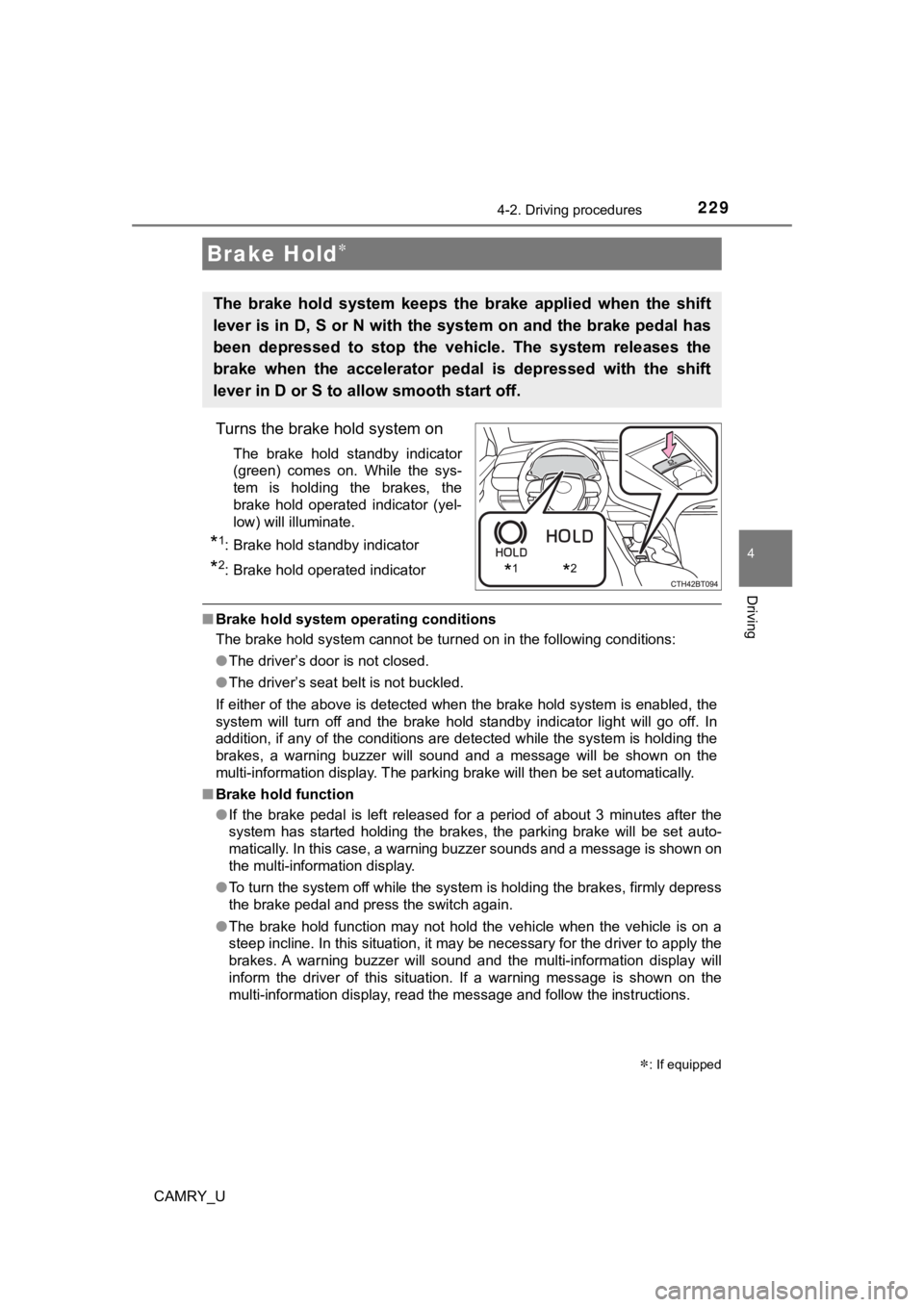
Turns the brake hold system on
The brake hold standby indicator
(green) comes on. While the sys-
tem is holding the brakes, the
brake hold operated indicator (yel-
low) will illuminate.
*1: Brake hold standby indicator
*2: Brake hold operated indicator
■Brake hold system operating conditions
The brake hold system cannot be turned on in the following cond itions:
● The driver’s door is not closed.
● The driver’s seat belt is not buckled.
If either of the above is detected when the brake hold system i s enabled, the
system will turn off and the brake hold standby indicator light will go off. In
addition, if any of the conditions are detected while the system is holding the
brakes, a warning buzzer will sound and a message will be shown on the
multi-information display. The parking brake will then be set a utomatically.
■ Brake hold function
●If the brake pedal is left released for a period of about 3 min utes after the
system has started holding the brakes, the parking brake will b e set auto-
matically. In this case, a warning buzzer sounds and a message is shown on
the multi-information display.
● To turn the system off while the system is holding the brakes, firmly depress
the brake pedal and press the switch again.
● The brake hold function may not hold the vehicle when the vehic le is on a
steep incline. In this situation, it may be necessary for the d river to apply the
brakes. A warning buzzer will sound and the multi-information d isplay will
inform the driver of this situation. If a warning message is sh own on the
multi-information display, read the message and follow the inst ructions.
Brake Hold
The brake hold system keeps the brake applied when the shift
lever is in D, S or N with the system on and the brake pedal has
been depressed to stop the vehicle. The system releases the
brake when the accelerator pedal is depressed with the shift
lever in D or S to allow smooth start off.
*1*2
: If equipped
Page 230 of 664

2304-2. Driving procedures
CAMRY_U■
When the parking brake is set aut omatically while the system is holding
the brakes
Perform any of the following operations to release the parking brake.
● Depress the accelerator pedal. (The parking brake will not be released auto-
matically if the seat belt is not fastened.)
● Operate the parking brake switch with the brake pedal depressed .
Make sure that the parking brake indicator light goes off. ( P. 225)
■ When an inspection at your Toyota dealer is necessary
When the brake hold standby indicator (green) does not illumina te even when
the brake hold switch is pressed with the brake hold system ope rating condi-
tions met, the system may be malfunctioning. Have the vehicle inspected at
your Toyota dealer.
■ Warning messages and buzzers
Warning messages and buzzers are used to indicate a system malfunction or
to inform the driver of the need for caution. If a warning message is shown on
the multi-information display, read the message and follow the instructions.
■ If the brake hold opera ted indicator flashes
P. 529
WARNING
■ When the vehicle is on a steep incline
When using the brake hold system on a steep incline, exercise caution. The
brake hold function may not hold the vehicle in such a situatio n.
■ When stopped on a slippery road
The system cannot stop the vehicle when the gripping ability of the tires has
been exceeded. Do not use the system when stopped on a slippery road.
NOTICE
■When parking the vehicle
The brake hold system is not designed for use when parking the vehicle for
a long period of time. Turning the engine switch off while the system is hold-
ing the brakes may release the brakes, which would cause the vehicle to
move. When operating the engine switch, depress the brake pedal, shift the
shift lever to P and set the parking brake.
Page 236 of 664
2364-3. Operating the lights and wipers
CAMRY_U
Turn the headlight switch to the or position.
( P. 231)
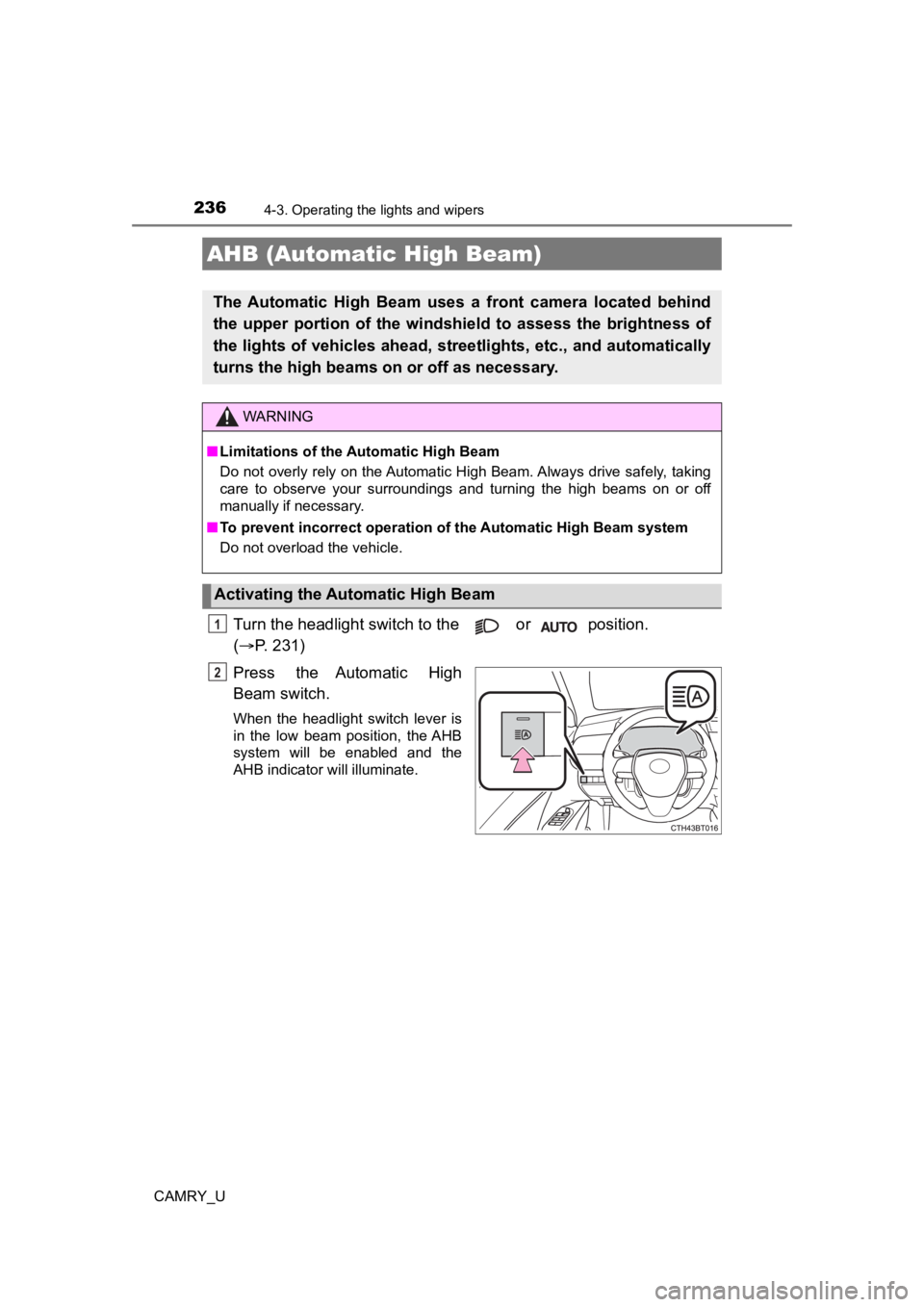
Press the Automatic High
Beam switch.
When the headlight switch lever is
in the low beam position, the AHB
system will be enabled and the
AHB indicator will illuminate.
AHB (Automatic High Beam)
The Automatic High Beam uses a front camera located behind
the upper portion of the windshi eld to assess the brightness of
the lights of vehicles ahead, streetlights, etc., and automatically
turns the high beams on or off as necessary.
WARNING
■Limitations of the Automatic High Beam
Do not overly rely on the Automatic High Beam. Always drive safely, taking
care to observe your surroundings and turning the high beams on or off
manually if necessary.
■ To prevent incorrect operation of the Automatic High Beam syste m
Do not overload the vehicle.
Activating the Automatic High Beam
1
2
Page 241 of 664
2414-3. Operating the lights and wipers
4
Driving
CAMRY_U
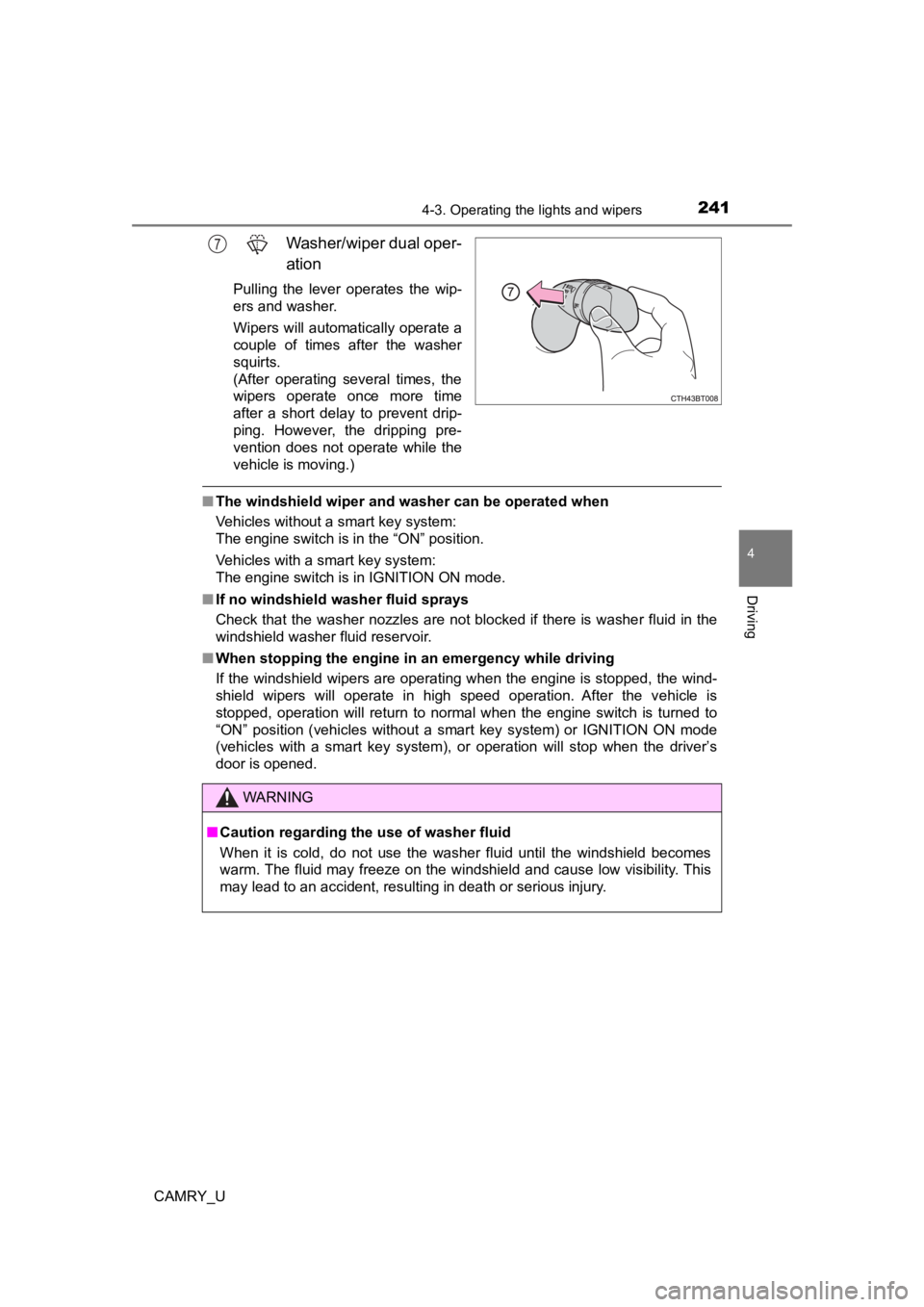
Washer/wiper dual oper-
ation
Pulling the lever operates the wip-
ers and washer.
Wipers will automatically operate a
couple of times after the washer
squirts.
(After operating several times, the
wipers operate once more time
after a short delay to prevent drip-
ping. However, the dripping pre-
vention does not operate while the
vehicle is moving.)
■The windshield wiper and washer can be operated when
Vehicles without a smart key system:
The engine switch is in the “ON” position.
Vehicles with a smart key system:
The engine switch is in IGNITION ON mode.
■ If no windshield washer fluid sprays
Check that the washer nozzles are not blocked if there is washe r fluid in the
windshield washer fluid reservoir.
■ When stopping the engine in an emergency while driving
If the windshield wipers are operating when the engine is stopp ed, the wind-
shield wipers will operate in high speed operation. After the v ehicle is
stopped, operation will return to normal when the engine switch is turned to
“ON” position (vehicles without a smart key system) or IGNITION ON mode
(vehicles with a smart key system), or operation will stop when the driver’s
door is opened.
7
WARNING
■ Caution regarding the use of washer fluid
When it is cold, do not use the washer fluid until the windshie ld becomes
warm. The fluid may freeze on the windshield and cause low visi bility. This
may lead to an accident, resulting in death or serious injury.
Page 245 of 664
2454-4. Refueling
4
Driving
CAMRY_U
WARNING
■When refueling the vehicle
Observe the following precautions while refueling the vehicle. Failure to do
so may result in death or serious injury.
● After exiting the vehicle and before opening the fuel door, touch an
unpainted metal surface to discharge any static electricity. It is important to
discharge static electricity before refueling because sparks resulting from
static electricity can cause fuel vapors to ignite while refueling.
● Always hold the grips on the fuel tank cap and turn it slowly t o remove it.
A whooshing sound may be heard when the fuel tank cap is loosened.
Wait until the sound cannot be heard before fully removing the cap. In hot
weather, pressurized fuel may spray out the filler neck and cau se injury.
● Do not allow anyone that has not discharged static electricity from their
body to come close to an open fuel tank.
● Do not inhale vaporized fuel.
Fuel contains substances that are harmful if inhaled.
● Do not smoke while refueling the vehicle.
Doing so may cause the fuel to ignite and cause a fire.
● Do not return to the vehicle or touch any person or object that is statically
charged.
This may cause static electricity to build up, resulting in a p ossible ignition
hazard.
■ When refueling
Observe the following precautions to prevent fuel overflowing from the fuel
tank:
● Securely insert the fuel nozzle into the fuel filler neck.
● Stop filling the tank after the fuel nozzle automatically click s off.
● Do not top off the fuel tank.
NOTICE
■Refueling
Do not spill fuel during refueling.
Doing so may damage the vehicle, such as causing the emission c ontrol
system to operate abnormally or damaging fuel system components or the
vehicle’s painted surface.
Page 247 of 664
2474-4. Refueling
4
Driving
CAMRY_U
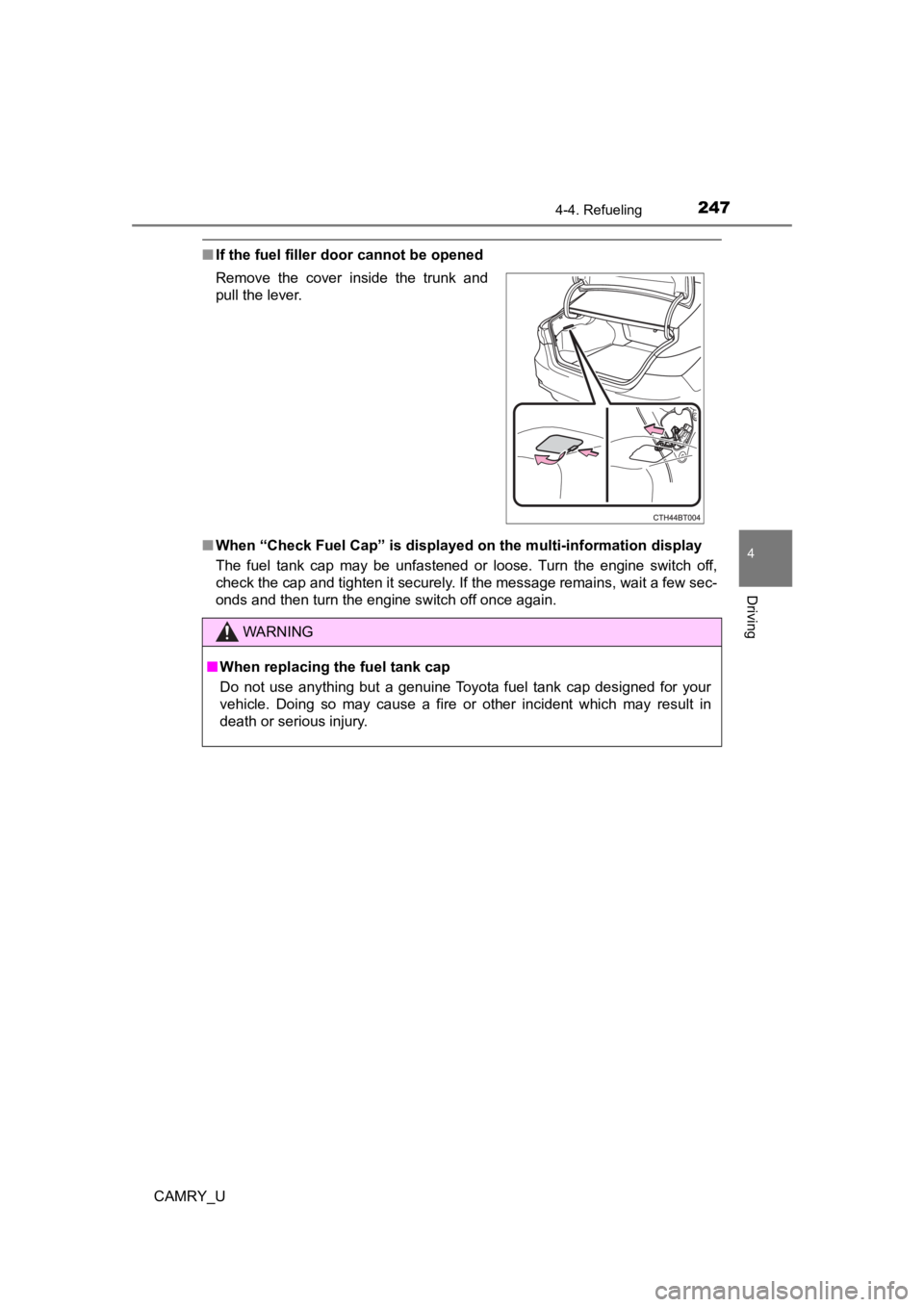
■If the fuel filler door cannot be opened
■ When “Check Fuel Cap” is displayed on the multi-information dis play
The fuel tank cap may be unfastened or loose. Turn the engine switch off,
check the cap and tighten it securely. If the message remains, wait a few sec-
onds and then turn the engine switch off once again. Remove the cover inside the trunk and
pull the lever.
WARNING
■ When replacing the fuel tank cap
Do not use anything but a genuine Toyota fuel tank cap designed for your
vehicle. Doing so may cause a fire or other incident which may result in
death or serious injury.