warning TOYOTA CAMRY 2022 Repair Manual
[x] Cancel search | Manufacturer: TOYOTA, Model Year: 2022, Model line: CAMRY, Model: TOYOTA CAMRY 2022Pages: 664, PDF Size: 11.3 MB
Page 158 of 664
1583-2. Opening, closing and locking the doors
CAMRY_U
■Tr u n k l i g h t
The trunk light turns on when the trunk is opened.
■ Function to prevent th e trunk being locked with the electronic key inside
(vehicles with a smart key system)
● When all doors are locked, closing the trunk lid with the elect ronic key left
inside the trunk will sound an alarm.
In this case, the trunk lid can be opened by pressing the trunk release but-
ton on the trunk lid.
● If the spare electronic key is put in the trunk with all the doors locked, the
key confinement prevention function is activated so the trunk can be
opened. In order to prevent theft, take all electronic keys wit h you when
leaving the vehicle.
● If the electronic key is put in the trunk with all the doors lo cked, the key may
not be detected depending on the location of the key and the su rrounding
radio wave conditions. In this case, the key confinement preven tion function
cannot be activated, causing the doors to lock when the trunk i s closed.
Make sure to check where the key is before closing the trunk.
● The key confinement prevention function cannot be activated if any one of
the doors is unlocked. In this case, open the trunk using the t runk opener.
■ Open trunk warning buzzer
If the vehicle reaches a speed of 3 mph (5 km/h), the master warning light
flashes and a buzzer sounds to indicate that the trunk is not y et fully closed.
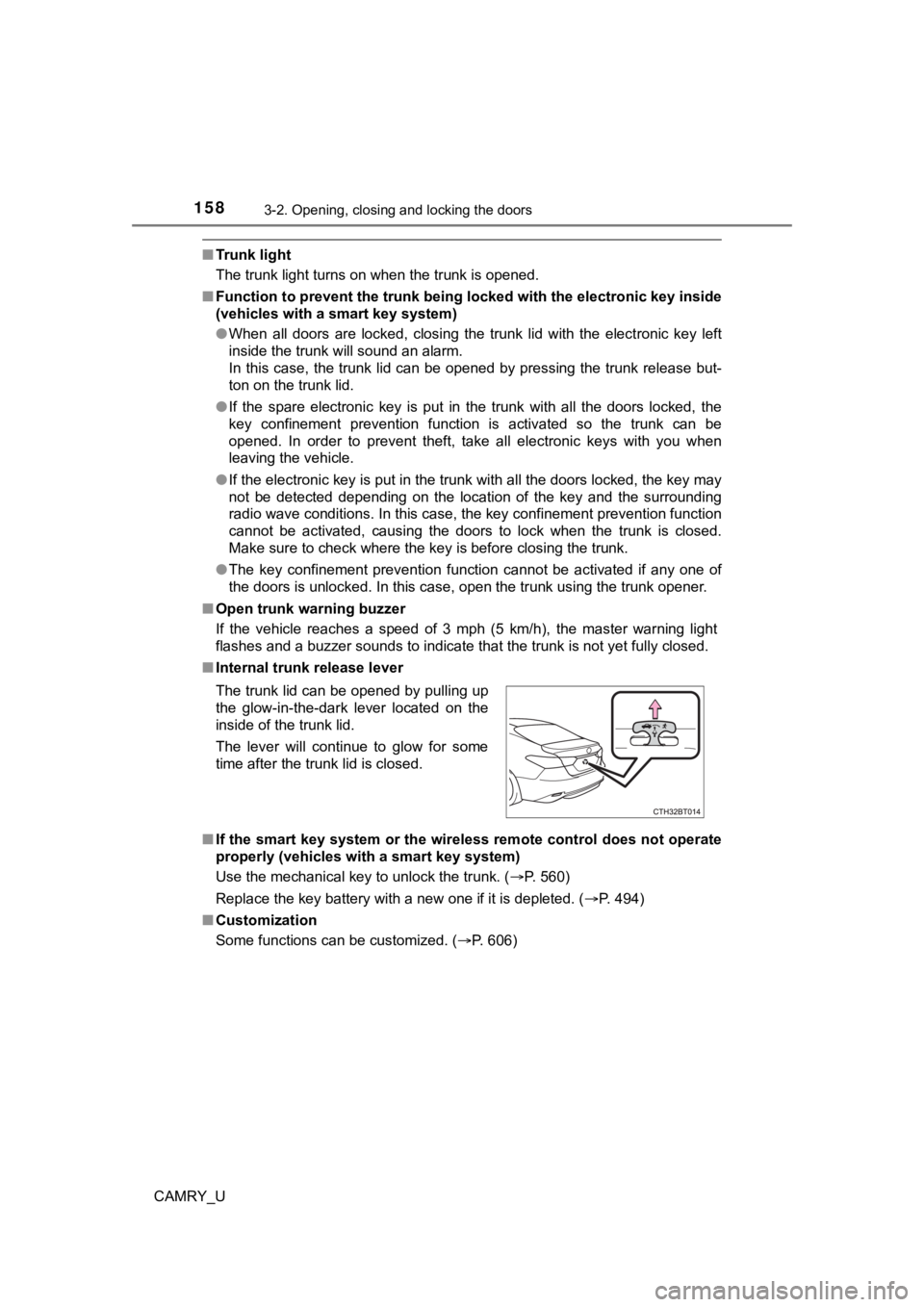
■ Internal trunk release lever
■ If the smart key system or the wireless remote control does not operate
properly (vehicles with a smart key system)
Use the mechanical key to unlock the trunk. ( P. 560)
Replace the key battery with a new one if it is depleted. ( P. 494)
■ Customization
Some functions can be customized. ( P. 606)
The trunk lid can be opened by pulling up
the glow-in-the-dark lever located on the
inside of the trunk lid.
The lever will continue to glow for some
time after the trunk lid is closed.
Page 159 of 664

1593-2. Opening, closing and locking the doors
3
Operation of each component
CAMRY_U
WARNING
Observe the following precautions.
Failure to do so may result in death or serious injury.
■Before driving
● Make sure that the trunk lid is fully closed. If the trunk lid is not fully closed,
it may open unexpectedly while driving and hit near-by objects or luggage
in the trunk may be thrown out, causing an accident.
● Do not allow children to play in the trunk.
If a child is accidentally locked in the trunk, they could suffer from heat
exhaustion, suffocation or other injuries.
● Do not allow a child to open or close the trunk lid.
Doing so may cause the trunk lid to open unexpectedly, or cause the
child’s hands, head, or neck to be caught by the closing trunk lid.
■ Important points while driving
Never let anyone sit in the trunk. In the event of sudden braking or a colli-
sion, they are susceptible to death or serious injury.
Page 160 of 664
1603-2. Opening, closing and locking the doors
CAMRY_U
WARNING
■Using the trunk
Observe the following precautions.
Failure to do so may cause parts of the body to be caught, resu lting in seri-
ous injury.
● Remove any heavy loads, such as snow and ice, from the trunk li d before
opening it. Failure to do so may cause the trunk lid to suddenl y shut again
after it is opened.
● When opening or closing the trunk lid, thoroughly check to make sure the
surrounding area is safe.
● If anyone is in the vicinity, make sure they are safe and let them know that
the trunk is about to open or close.
● Use caution when opening or closing the trunk lid in windy weat her as it
may move abruptly in strong wind.
● On an incline it is more difficult to open or close the trunk lid than on a level
surface, so beware of the trunk lid unexpectedly opening or closing by
itself. Make sure that the trunk lid is fully open and secure before using the
trunk.
● Do not attach any accessories other than genuine Toyota parts to the trunk
lid. Such additional weight on the trunk lid may cause the lid to suddenly
shut again after it is opened.
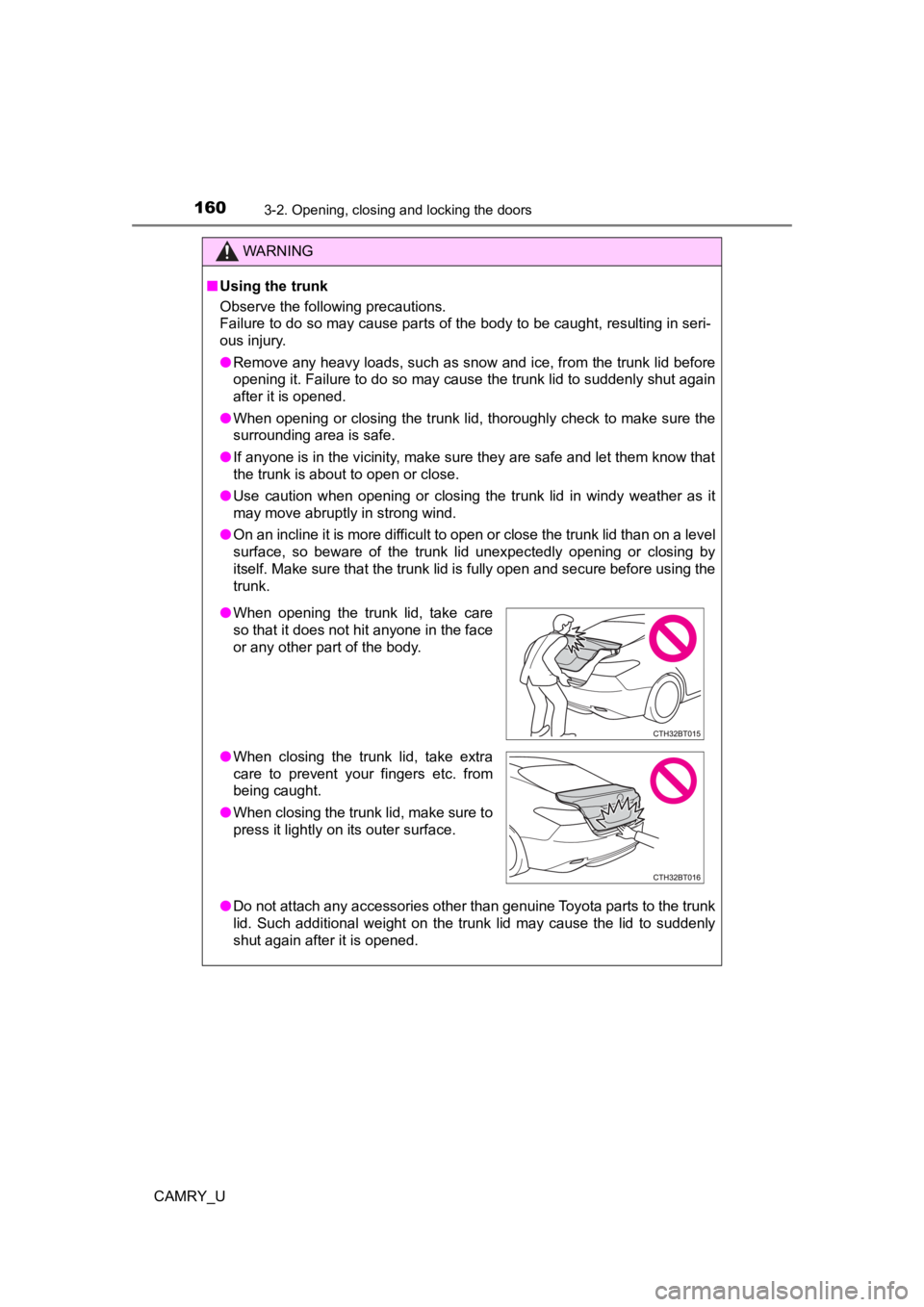
●When opening the trunk lid, take care
so that it does not hit anyone in the face
or any other part of the body.
● When closing the trunk lid, take extra
care to prevent your fingers etc. from
being caught.
● When closing the trunk lid, make sure to
press it lightly on its outer surface.
Page 162 of 664

1623-2. Opening, closing and locking the doors
CAMRY_U■
Alarms and warning indicators
A combination of exterior and interior alarms as well as warnin g messages
shown on the multi-information display are used to prevent theft of the vehicle
and accidents resulting from erroneous operation. Take appropriate mea-
sures in response to any warning message on the multi-information display.
( P. 538)
When only an alarm sounds, circumstances and correction procedu res are as
follows.
AlarmSituationCorrection procedure
Exterior alarm sounds
once for 5 seconds An attempt was made
to lock the vehicle while
a door was open.
Close all of the doors
and lock the doors
again.
The trunk was closed
while the electronic key
was still inside the trunk
and all the doors were
locked. Retrieve the electronic
key from the trunk and
close the trunk lid.
Interior alarm pings
repeatedly The engine switch was
turned to ACCESSORY
mode while the driver’s
door was open (The
driver’s door was
opened when the
engine switch was in
ACCESSORY mode).
Turn the engine switch
off and close the
driver’s door.
The engine switch was
turned off while the
driver’s door was open. Close the driver’s door.
Page 166 of 664

1663-2. Opening, closing and locking the doors
CAMRY_U■
When the vehicle is not driven for extended periods
●To prevent theft of the vehicle, do not leave the electronic key within 6 ft. (2
m) of the vehicle.
● The smart key system can be deactivated in advance. ( P. 606)
● Setting the electronic key to battery-saving mode helps to reduce key bat-
tery depletion. ( P. 163)
■ To operate the system properly
Make sure to carry the electronic key when operating the system. Do not get
the electronic key too close to the vehicle when operating the system from the
outside of the vehicle.
Depending on the position and holding condition of the electronic key, the key
may not be detected correctly and the system may not operate properly. (The
alarm may go off accidentally, or the door lock prevention func tion may not
operate.)
■ If the smart key system do es not operate properly
● Locking and unlocking the doors and trunk: Use the mechanical k ey.
( P. 559)
● Starting the engine: P. 560
■ Customization
Some functions can be customized. ( P. 606)
■ If the smart key system has been d eactivated in a customized setting
● Locking and unlocking the doors and opening the trunk:
Use the wireless remote control or mechanical key. ( P. 148, 157, 559)
● Starting the engine and changing engine switch modes: P. 560
● Stopping the engine: P. 212
WARNING
■Caution regarding interference with electronic devices
● People with implantable cardiac pacemakers, cardiac resynchroni zation
therapy-pacemakers or implantable cardioverter defibrillators should keep
away from the smart key system antennas. ( P. 161)
The radio waves may affect the operation of such devices. If ne cessary,
the entry function can be disabled. Ask your Toyota dealer for details, such
as the frequency of radio waves and timing of the emitted radio waves.
Then, consult your doctor to see if you should disable the entry function.
● Users of any electrical medical device other than implantable c ardiac
pacemakers, cardiac resynchronization therapy-pacemakers or imp lant-
able cardioverter defibrillators should consult the manufacture r of the
device for information about its operation under the influence of radio
waves.
Radio waves could have unexpected effects on the operation of such
medical devices.
Ask your Toyota dealer for details for disabling the entry func tion.
Page 168 of 664

1683-3. Adjusting the seats
CAMRY_U
WARNING
■When adjusting the seat position
● Take care when adjusting the seat position to ensure that other passen-
gers are not injured by the moving seat.
● Do not put your hands under the seat or near the moving parts to avoid
injury.
Fingers or hands may become jammed in the seat mechanism.
● Make sure to leave enough space around the feet so they do not get stuck.
■ Seat adjustment
● Be careful that the seat does not hit passengers or luggage.
● To reduce the risk of sliding under the lap belt during a collision, do not
recline the seat more than necessary.
If the seat is too reclined, the lap belt may slide past the hips and apply
restraint forces directly to the abdomen, or your neck may contact the
shoulder belt, increasing the risk of death or serious injury i n the event of
an accident.
Adjustments should not be made while driving as the seat may un expect-
edly move and cause the driver to lose control of the vehicle.
● Manual seat only: After adjusting the seat, make sure that the seat is
locked in position.
NOTICE
■When adjusting a front seat
When adjusting a front seat, make sure that the head restraint does not
contact the headliner. Otherwise, the head restraint and headli ner may be
damaged.
Page 170 of 664

1703-3. Adjusting the seats
CAMRY_U
WARNING
■When folding the seatbacks down
Observe the following precautions. Failure to do so may result in death or
serious injury.
● Do not fold the seatbacks down while driving.
● Stop the vehicle on level ground, set the parking brake and shi ft the shift
lever to P.
● Do not allow anyone to sit on a folded seatback or in the trunk while driv-
ing.
● Do not allow children to enter the trunk.
■ When returning the seat t o its original position
● Ensure that the seat belt does not get caught between or behind the seats.
● If the seat belt has been released from its guide, pass the sea t belt through
its guide. ( P. 32)
■ Seat adjustment
Be careful not to get hands or feet pinched between the rear co nsole box
and the rear seat when folding down the rear seatback.
■ After returning the seatback to the upright position
Observe the following precautions. Failure to do so may result in death or
serious injury.
● Make sure the seatback is securely locked by pressing it forwar d and rear-
ward on the top.
● Check that the seat belts are not twisted or caught in the seatback.
● Make sure that the seat belt is passed through its guide.
NOTICE
■When the right seatback is folded down
Make sure the luggage loaded in the enlarged trunk will not damage the
webbing of the rear center seat belt.
Page 172 of 664
1723-3. Adjusting the seats
CAMRY_U■
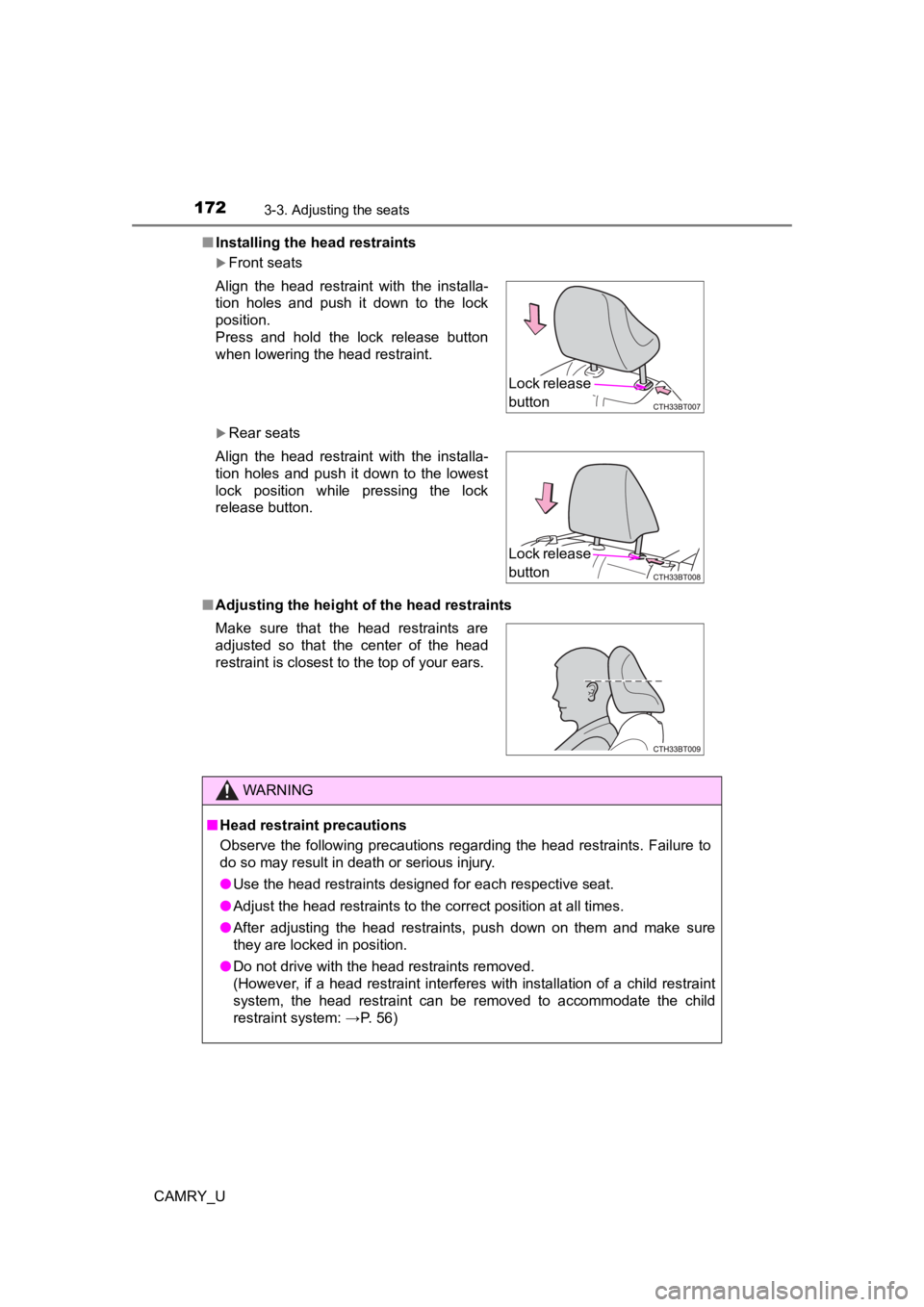
Installing the head restraints
Front seats
Rear seats
■ Adjusting the height o f the head restraints
Align the head restraint with the installa-
tion holes and push it down to the lock
position.
Press and hold the lock release button
when lowering the head restraint.
Align the head restraint with the installa-
tion holes and push it down to the lowest
lock position while pressing the lock
release button.
Make sure that the head restraints are
adjusted so that the center of the head
restraint is closest to the top of your ears.
WARNING
■
Head restraint precautions
Observe the following precautions regarding the head restraints. Failure to
do so may result in death or serious injury.
● Use the head restraints designed for each respective seat.
● Adjust the head restraints to the correct position at all times.
● After adjusting the head restraints, push down on them and make sure
they are locked in position.
● Do not drive with the head restraints removed.
(However, if a head restraint interferes with installation of a child restraint
system, the head restraint can be removed to accommodate the ch ild
restraint system: →P. 56)
Lock release
button
Lock release
button
Page 174 of 664

1743-4. Adjusting the steering wheel and mirrors
CAMRY_U
WARNING
■Caution while driving
Do not adjust the steering wheel while driving.
Doing so may cause the driver to mishandle the vehicle and caus e an acci-
dent, resulting in death or serious injury.
■ After adjusting the steering wheel
Make sure that the steering wheel is securely locked.
Otherwise, the steering wheel may move suddenly, possibly causi ng an
accident, and resulting in death or serious injury. Also, the horn may not
sound if the steering wheel is not securely locked.
Page 176 of 664
1763-4. Adjusting the steering wheel and mirrors
CAMRY_U
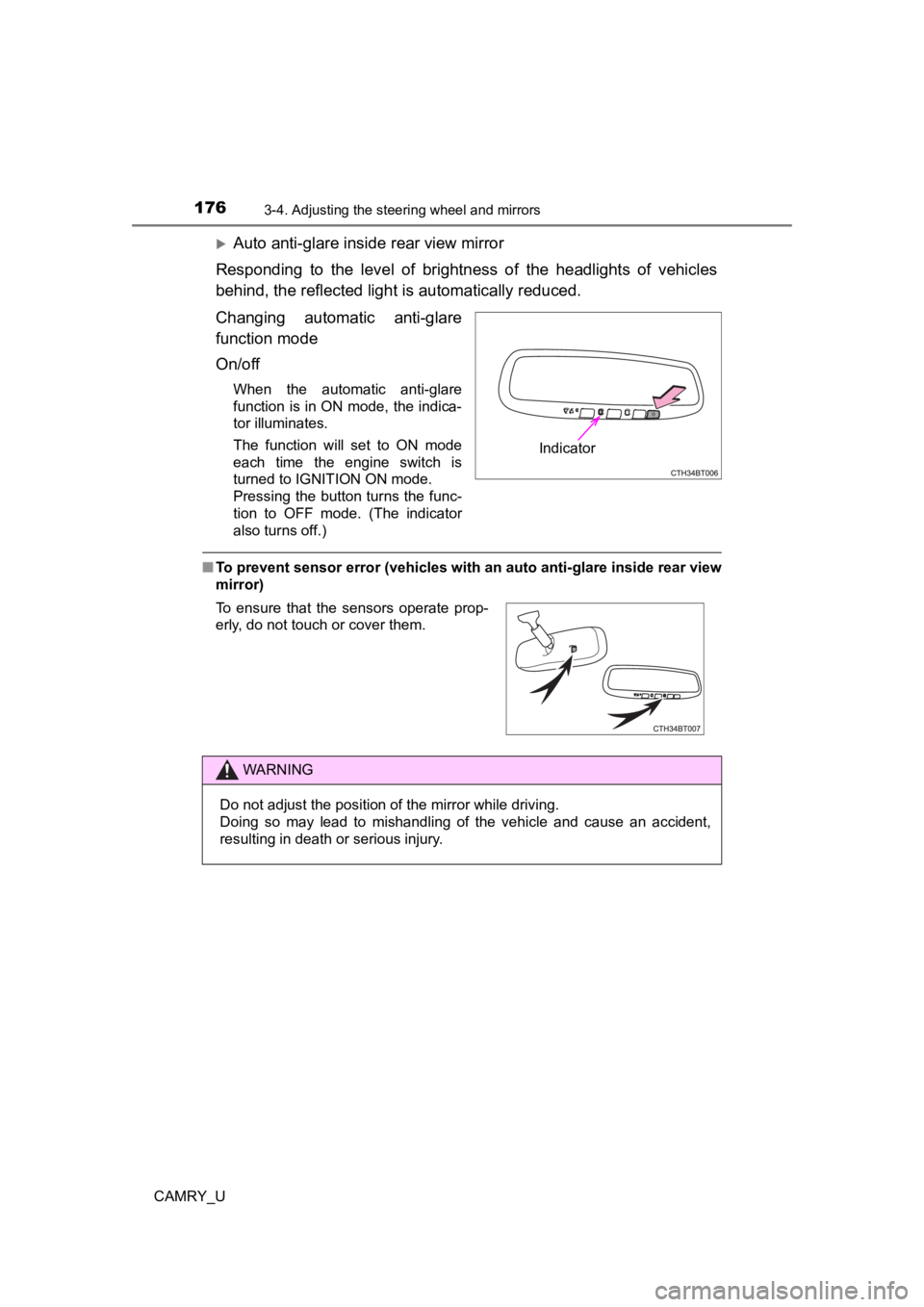
Auto anti-glare inside rear view mirror
Responding to the level of brightness of the headlights of vehi cles
behind, the reflected light is automatically reduced.
Changing automatic anti-glare
function mode
On/off
When the automatic anti-glare
function is in ON mode, the indica-
tor illuminates.
The function will set to ON mode
each time the engine switch is
turned to IGNITION ON mode.
Pressing the button turns the func-
tion to OFF mode. (The indicator
also turns off.)
■ To prevent sensor error (vehicles with an auto anti-glare insid e rear view
mirror)
Indicator
To ensure that the sensors operate prop-
erly, do not touch or cover them.
WARNING
Do not adjust the position of the mirror while driving.
Doing so may lead to mishandling of the vehicle and cause an accident,
resulting in death or serious injury.