warning TOYOTA CAMRY 2022 Workshop Manual
[x] Cancel search | Manufacturer: TOYOTA, Model Year: 2022, Model line: CAMRY, Model: TOYOTA CAMRY 2022Pages: 664, PDF Size: 11.3 MB
Page 114 of 664
1142. Instrument cluster
CAMRY_U
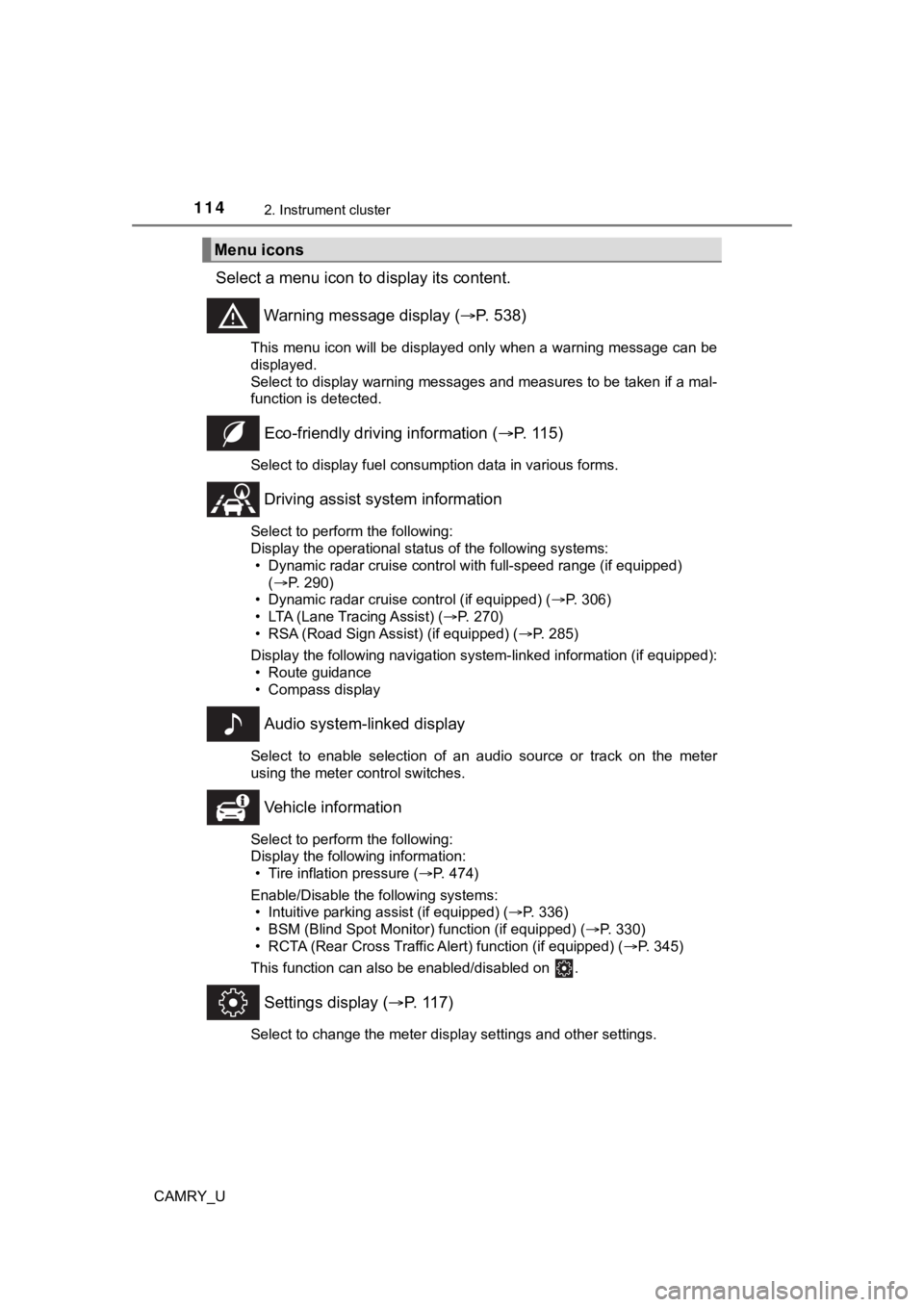
Select a menu icon to display its content.
Warning message display ( P. 538)
This menu icon will be displayed only when a warning message ca n be
displayed.
Select to display warning messages and measures to be taken if a mal-
function is detected.
Eco-friendly drivin g information (P. 115)
Select to display fuel consumption data in various forms.
Driving assist sys tem information
Select to perform the following:
Display the operational status of the following systems:
• Dynamic radar cruise control with full-speed range (if equippe d)
( P. 290)
• Dynamic radar cruise control (if equipped) ( P. 306)
• LTA (Lane Tracing Assist) ( P. 270)
• RSA (Road Sign Assist) (if equipped) ( P. 285)
Display the following navigation system-linked information (if equipped):
• Route guidance
• Compass display
Audio system-linked display
Select to enable selection of an audio source or track on the m eter
using the meter control switches.
Vehicle information
Select to perform the following:
Display the following information: • Tire inflation pressure ( P. 474)
Enable/Disable the following systems: • Intuitive parking assist (if equipped) ( P. 336)
• BSM (Blind Spot Monitor) function (if equipped) ( P. 330)
• RCTA (Rear Cross Traffic Al ert) function (if equipped) (P. 345)
This function can also be enabled/disabled on .
Settings display ( P. 117)
Select to change the meter display settings and other settings.
Menu icons
Page 118 of 664
1182. Instrument cluster
CAMRY_U
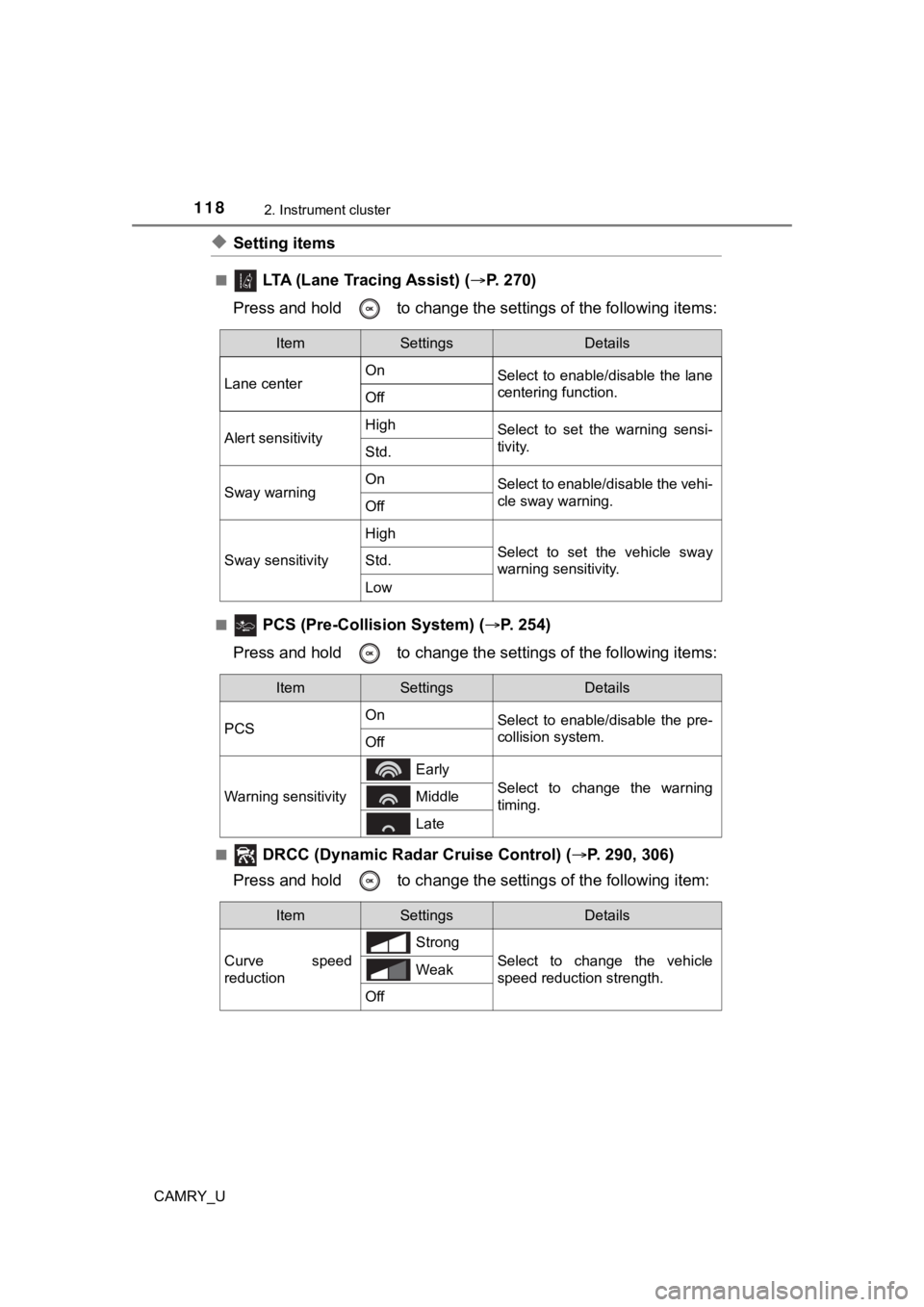
◆Setting items
■ LTA (Lane Tracing Assist) (P. 2 7 0 )
Press and hold to change the se ttings of the following items:
■ PCS (Pre-Collision System) (P. 254)
Press and hold to change the se ttings of the following items:
■ DRCC (Dynamic Radar Cruise Control) (P. 290, 306)
Press and hold to c hange the settings of the following item:
ItemSettingsDetails
Lane center On
Select to enable/disable the lane
centering function.
Off
Alert sensitivityHighSelect to set the warning sensi-
tivity.
Std.
Sway warningOnSelect to enable/disable the vehi-
cle sway warning.
Off
Sway sensitivity
High
Select to set the vehicle sway
warning sensitivity.Std.
Low
ItemSettingsDetails
PCS On
Select to enable/disable the pre-
collision system.
Off
Warning sensitivity
Early
Select to change the warning
timing. Middle
Late
ItemSettingsDetails
Curve speed
reduction Strong
Select to change the vehicle
speed reduction strength.
Weak
Off
Page 123 of 664
1232. Instrument cluster
2
Instrument cluster
CAMRY_U■
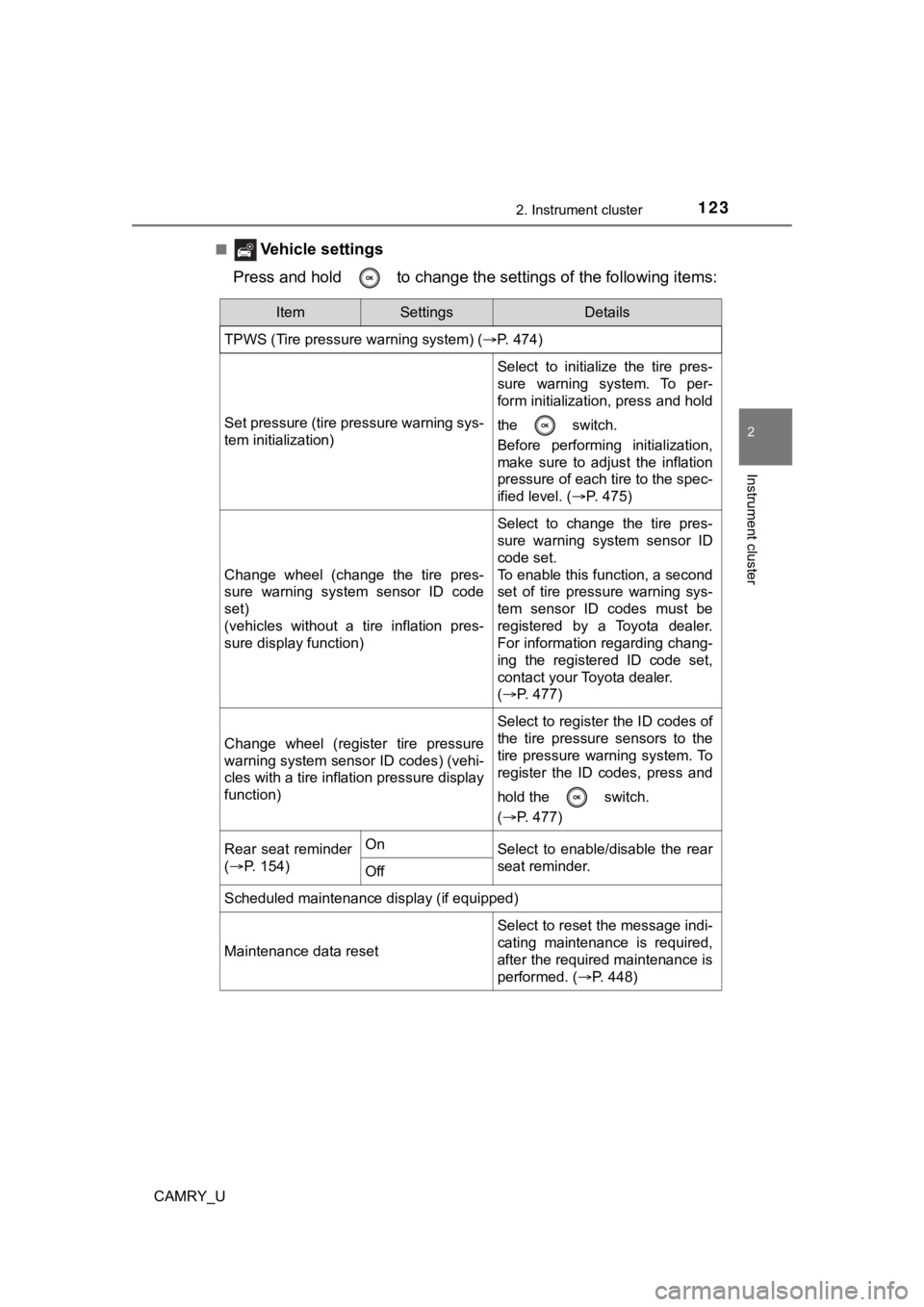
Vehicle settings
Press and hold to change the se ttings of the following items:
ItemSettingsDetails
TPWS (Tire pressure warning system) ( P. 474)
Set pressure (tire pressure warning sys-
tem initialization)
Select to initialize the tire pres-
sure warning system. To per-
form initialization, press and hold
the switch.
Before performing initialization,
make sure to adjust the inflation
pressure of each tire to the spec-
ified level. (P. 475)
Change wheel (change the tire pres-
sure warning system sensor ID code
set)
(vehicles without a tire inflation pres-
sure display function)
Select to change the tire pres-
sure warning system sensor ID
code set.
To enable this function, a second
set of tire pressure warning sys-
tem sensor ID codes must be
registered by a Toyota dealer.
For information regarding chang-
ing the registered ID code set,
contact your Toyota dealer.
(P. 477)
Change wheel (register tire pressure
warning system sensor ID codes) (vehi-
cles with a tire inflation pressure display
function)
Select to register the ID codes of
the tire pressure sensors to the
tire pressure warning system. To
register the ID codes, press and
hold the switch.
(P. 477)
Rear seat reminder
( P. 1 5 4 )OnSelect to enable/disable the rear
seat reminder.
Off
Scheduled maintenance display (if equipped)
Maintenance data reset
Select to reset the message indi-
cating maintenance is required,
after the required maintenance is
performed. ( P. 448)
Page 126 of 664
1262. Instrument cluster
CAMRY_U
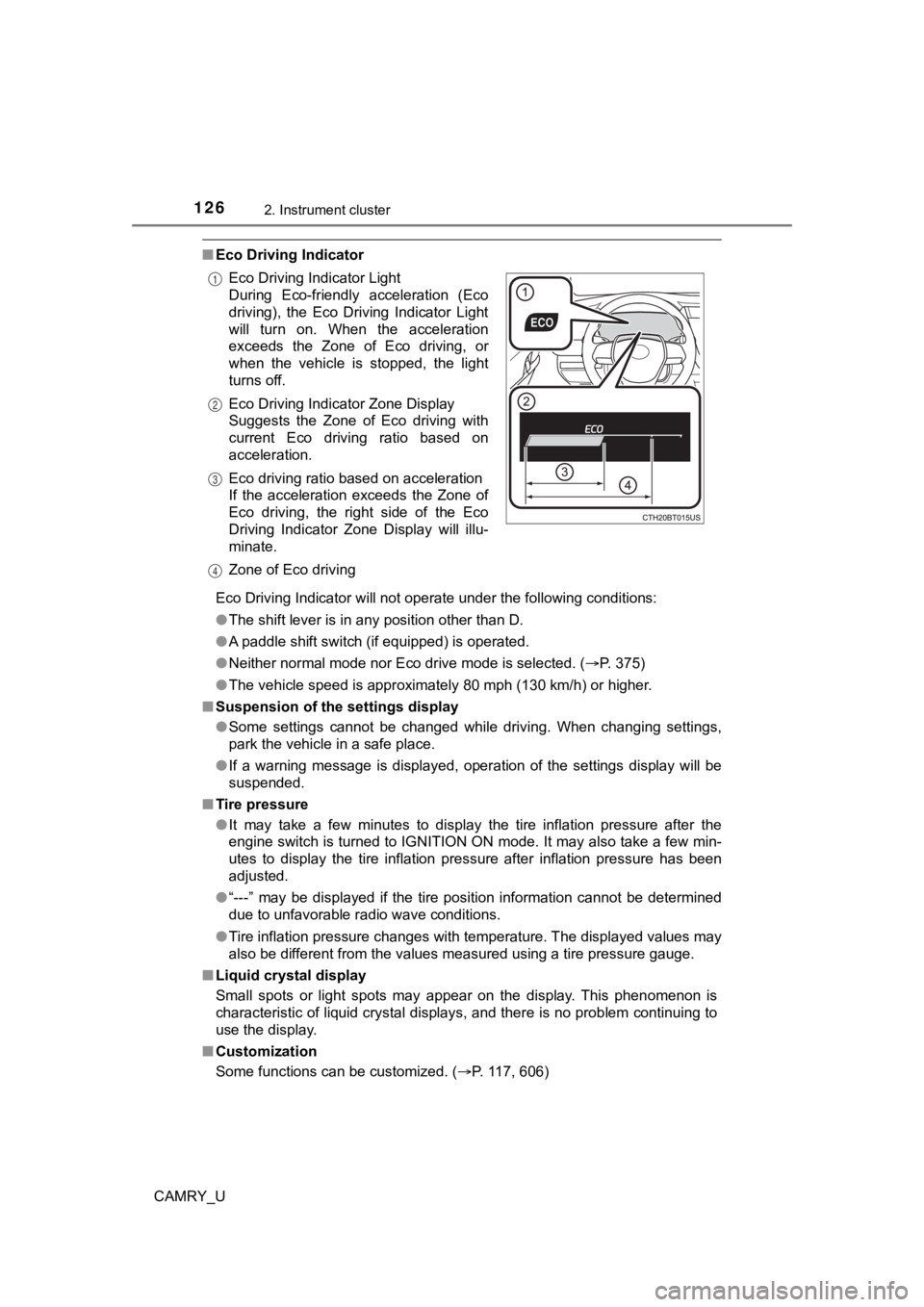
■Eco Driving Indicator
Eco Driving Indicator will not operate under the following cond itions:
● The shift lever is in any position other than D.
● A paddle shift switch (if equipped) is operated.
● Neither normal mode nor Eco drive mode is selected. ( P. 375)
● The vehicle speed is approximately 80 mph (130 km/h) or higher.
■ Suspension of the settings display
●Some settings cannot be changed while driving. When changing se ttings,
park the vehicle in a safe place.
● If a warning message is displayed, operation of the settings di splay will be
suspended.
■ Tire pressure
●It may take a few minutes to display the tire inflation pressur e after the
engine switch is turned to IGNITION ON mode. It may also take a few min-
utes to display the tire inflation pressure after inflation pre ssure has been
adjusted.
● “---” may be displayed if the tire position information cannot be determined
due to unfavorable radio wave conditions.
● Tire inflation pressure changes with temperature. The displayed values may
also be different from the values measured using a tire pressur e gauge.
■ Liquid crystal display
Small spots or light spots may appear on the display. This phen omenon is
characteristic of liquid crystal displays, and there is no prob lem continuing to
use the display.
■ Customization
Some functions can be customized. ( P. 117, 606)
Eco Driving Indicator Light
During Eco-friendly acceleration (Eco
driving), the Eco Driving Indicator Light
will turn on. When the acceleration
exceeds the Zone of Eco driving, or
when the vehicle is stopped, the light
turns off.
Eco Driving Indicator Zone Display
Suggests the Zone of Eco driving with
current Eco driving ratio based on
acceleration.
Eco driving ratio based on acceleration
If the acceleration exceeds the Zone of
Eco driving, the right side of the Eco
Driving Indicator Zone Display will illu-
minate.
Zone of Eco driving
1
2
3
4
Page 127 of 664
1272. Instrument cluster
2
Instrument cluster
CAMRY_U
WARNING
■Caution for use while driving
● When operating the multi-information display while driving, pay extra
attention to the safety of the area around the vehicle.
● Do not look continuously at the multi-information display while driving as
you may fail to see pedestrians, objects on the road, etc. ahea d of the
vehicle.
■ The information display at low temperatures
Allow the interior of the vehicle to warm up before using the liquid crystal
information display. At extremely low temperatures, the information display
monitor may respond slowly, and display changes may be delayed.
For example, there is a lag between the driver’s shifting and the new gear
number appearing on the display. This lag could cause the drive r to down-
shift again, causing rapid and excessive engine braking and pos sibly an
accident resulting in death or injury.
■ Cautions during setting up the display
As the engine needs to be running during setting up the display , ensure that
the vehicle is parked in a place with adequate ventilation. In a closed area
such as a garage, exhaust gases including harmful carbon monoxi de (CO)
may collect and enter the vehicle. This may lead to death or a serious
health hazard.
NOTICE
■ While setting up the display
To prevent battery discharge, ensure that the engine is running while setting
up the display features.
Page 128 of 664
1282. Instrument cluster
CAMRY_U
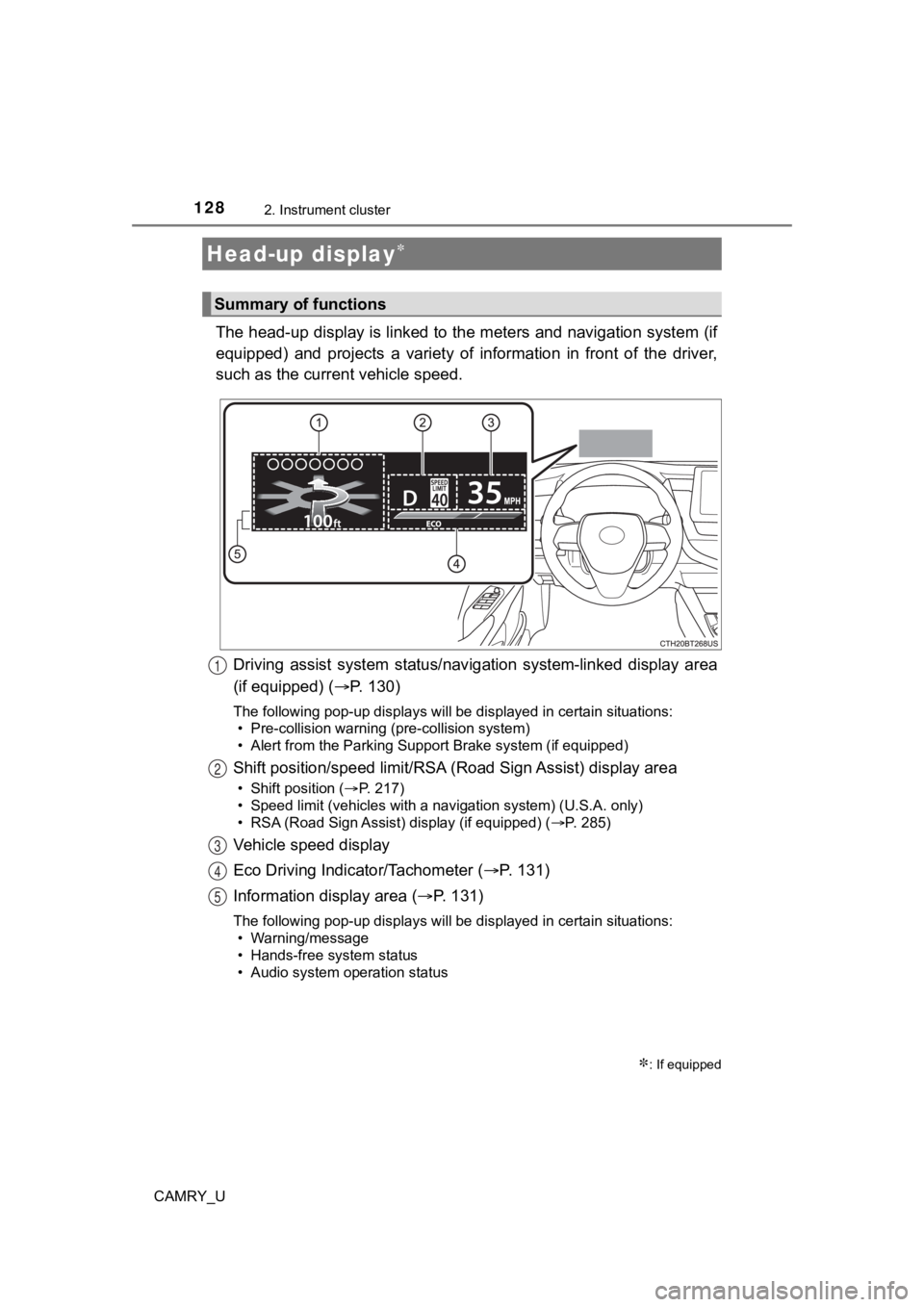
The head-up display is linked to the meters and navigation system (if
equipped) and projects a variety of information in front of the driver,
such as the current vehicle speed.
Driving assist system status/nav igation system-linked display area
(if equipped) ( P. 130)
The following pop-up displays will be displayed in certain situations:
• Pre-collision warning (pre-collision system)
• Alert from the Parking Support Brake system (if equipped)
Shift position/speed limit/RSA ( Road Sign Assist) display area
• Shift position (P. 217)
• Speed limit (vehicles with a navigation system) (U.S.A. only)
• RSA (Road Sign Assist) display (if equipped) ( P. 285)
Vehicle speed display
Eco Driving Indicator/Tachometer (P. 1 3 1 )
Information display area ( P. 131)
The following pop-up displays will be displayed in certain situations:
• Warning/message
• Hands-free system status
• Audio system operation status
Head-up display
: If equipped
Summary of functions
1
2
3
4
5
Page 131 of 664
1312. Instrument cluster
2
Instrument cluster
CAMRY_U■
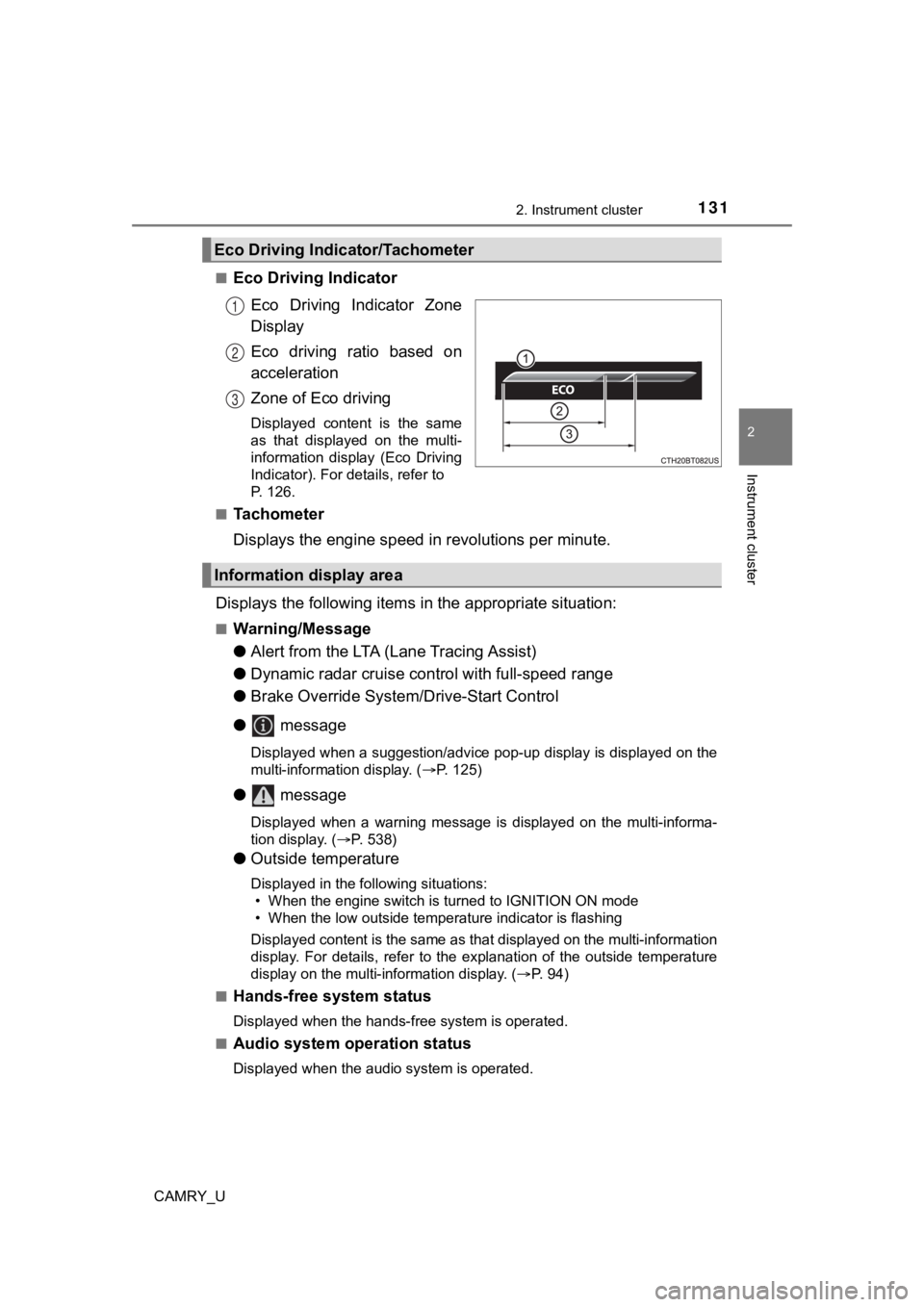
Eco Driving Indicator
Eco Driving Indicator Zone
Display
Eco driving ratio based on
acceleration
Zone of Eco driving
Displayed content is the same
as that displayed on the multi-
information display (Eco Driving
Indicator). For details, refer to
P. 126.
■
Tachometer
Displays the engine speed in revolutions per minute.
Displays the following items in the appropriate situation:
■Warning/Message
●Alert from the LTA (Lane Tracing Assist)
● Dynamic radar cruise control with full-speed range
● Brake Override System/Drive-Start Control
● message
Displayed when a suggestion/advice pop-up display is displayed on the
multi-information display. ( P. 125)
● message
Displayed when a warning message is displayed on the multi-informa-
tion display. ( P. 538)
● Outside temperature
Displayed in the following situations:
• When the engine switch is turned to IGNITION ON mode
• When the low outside temperature indicator is flashing
Displayed content is the same as that displayed on the multi-in formation
display. For details, refer to the explanation of the outside temperature
display on the multi-information display. ( P. 94)
■
Hands-free system status
Displayed when the hands-free system is operated.
■
Audio system operation status
Displayed when the audio system is operated.
Eco Driving Indicator/Tachometer
1
2
3
Information display area
Page 132 of 664

1322. Instrument cluster
CAMRY_U
■Head-up display
The head-up display may seem dark or hard to see when viewed th rough
sunglasses, especially polarized sunglasses.
Adjust the brightness of the head-up display or remove your sunglasses.
■ Display brightness
The brightness of the head-up display can be adjusted on of the multi-
information display. Also, it is automatically adjusted accordi ng to the ambient
brightness.
■ Enabling/disabling of the head-up display
If the head-up display is disabled, it will remain disabled when the engine
switch is turned off then back to IGNITION ON mode.
■ Street name display (vehicles with a navigation system)
Only street names which are included in the map data will be displayed.
WARNING
■Before using the head-up display
● Check that the position and brightness of the head-up display i mage does
not interfere with safe driving. Incorrect adjustment of the image’s position
or brightness may obstruct the driver’s view and lead to an accident,
resulting in death or serious injury.
● Do not continuously look at the head-up display while driving a s you may
fail to see pedestrians, objects on the road, etc. ahead of the vehicle.
■ Caution for changing settings of the head-up display
As the engine needs to be running while changing the settings of the head-
up display, ensure that the vehicle is parked in a place with adequate venti-
lation. In a closed area such as a garage, exhaust gases includ ing harmful
carbon monoxide (CO) may collect and enter the vehicle. This may lead to
death or a serious health hazard.
Page 154 of 664

1543-2. Opening, closing and locking the doors
CAMRY_U■
Impact detection door lock release system
In the event that the vehicle is subject to a strong impact, all the doors are
unlocked. Depending on the force of the impact or the type of a ccident, how-
ever, the system may not operate.
■ Open door warning buzzer
If the vehicle reaches a speed of 3 mph (5 km/h), the master warning light
flashes and a buzzer sounds to indicate that the door(s) are no t yet fully
closed.
The open door(s) is displayed on the multi-information display.
■ Conditions affecting the operation of the smart key system or w ireless
remote control
Vehicles without a smart key system
P. 144
Vehicles with a smart key system
P. 163
■ Rear seat reminder function
In order to remind you not to forget luggage, etc. in the rear seat, when the
engine switch is turned off after any of the following conditio ns are met, a
buzzer will sound and a message will be displayed on the multi- information
display for approximately 6 seconds.
● The engine is started within 10 minutes after opening and closi ng a rear
door.
● A rear door has been opened and closed after the engine was sta rted.
However, if a rear door is opened and then closed within approx imately 2 sec-
onds, the rear seat reminder function may not operate.
The rear seat reminder function determines that luggage, etc. h as been
placed in a rear seat based on opening and closing of a rear do or. Therefore,
depending on the situation, the rear seat reminder function may not operate
and you may still forget luggage, etc. in the rear seat, or it may operate
unnecessarily.
The rear seat reminder function can be enabled/disabled. ( P. 106, 123)
■ Customization
Some functions can be customized. ( P. 606)
Page 155 of 664

1553-2. Opening, closing and locking the doors
3
Operation of each component
CAMRY_U
WARNING
■To prevent an accident
Observe the following precautions while driving the vehicle.
Failure to do so may result in a door opening and an occupant f alling out,
resulting in death or serious injury.
● Ensure that all doors are properly closed.
● Do not pull the inside handle of the doors while driving.
Be especially careful for the front doors, as the doors may be opened
even if the inside lock buttons are in locked position.
● Set the rear door child-protector locks when children are seated in the rear
seats.
■ When opening or closing a door
Check the surroundings of the vehicle such as whether the vehicle is on an
incline, whether there is enough space for a door to open and w hether a
strong wind is blowing.
When opening or closing the door, hold the door handle tightly to prepare
for any unpredictable movement.