light TOYOTA CAMRY 2022 Owners Manual
[x] Cancel search | Manufacturer: TOYOTA, Model Year: 2022, Model line: CAMRY, Model: TOYOTA CAMRY 2022Pages: 664, PDF Size: 11.3 MB
Page 358 of 664

3584-5. Using the driving support systems
CAMRY_U■
Situations in which the syst em may operate unexpectedly
● Even though there are no pedestrians in the detection area, som e objects,
such as the following, may be detected, possibly causing the re ar camera
detection function to operate.
• Three dimensional objects, such as a pole, traffic cone, fence , or parked
vehicle
• Moving objects, such as a car or motorcycle
• Objects moving toward your vehicle when backing up, such as fl ags or
puddles (or airborne matter, such as smoke, steam, rain, or sno w)
• Cobblestone or gravel roads, tram rails, road repairs, white l ines, pedes-
trian crossings or fallen leaves on the road
• Metal covers (gratings), such as those used for drainage ditch es
• Objects reflected in a puddle or on a wet road surface
• Shadows on the road
● In some situations, such as the following, the rear camera dete ction function
may operate even though there are no pedestrians in the detection area.
• When backing up toward the roadside or a bump on the road
• When backing up toward an incline/decline
• If the rear of the vehicle is raised or lowered due to the carried load
• If a bumper protector, such as an additional trim strip, is in stalled to the
rear bumper
• If the orientation of the rear camera has been changed
• If a towing eyelet is installed to the rear of the vehicle
• When the rear camera is obscured (dirt, snow, ice, etc. are at tached) or
scratched
• When water is flowing over the rear camera lens
• If there is a flashing light in the detection area, such as th e emergency
flashers of another vehicle
• When a tire chains is used
● Situations in which the rear camera detection function may be difficult to
notice
• If buzzer may be difficult to hear if the surrounding area is noisy, the vol-
ume of the audio system volume is high, the air conditioning sy stem is
being used, etc.
• If the temperature in the cabin is extremely high or low, the audio system
screen may not operate correctly.
Page 377 of 664
377
4
Driving
CAMRY_U
4-6. Driving tips
●Use fluids that are appropriate t o the prevailing outside tempera-
tures. • Engine oil
• Engine coolant
• Washer fluid
● Have a service technician inspec t the condition of the battery.
● Have the vehicle fitted with four snow tires or purchase a set of tire
chains for the front tires.
*
Ensure that all tires are the same size and brand, and that cha ins match
the size of the tires.
*: Tire chains cannot be mounted on vehicles with 18 and 19-inch tires.
Perform the following according to the driving conditions:
● Do not try to forcibly open a window or move a wiper that is fr ozen.
Pour warm water over the frozen area to melt the ice. Wipe away
the water immediately to p revent it from freezing.
● To ensure proper operation of the climate control system fan,
remove any snow that has accumulated on the air inlet vents in
front of the windshield.
● Check for and remove any excess ic e or snow that may have accu-
mulated on the exterior lights, vehicle’s roof, chassis, around the
tires or on the brakes.
● Remove any snow or mud from the bottom of your shoes before
getting in the vehicle.
Winter driving tips
Carry out the necessary preparations and inspections before
driving the vehicle in winter. Always drive the vehicle in a ma n-
ner appropriate to the prevailing weather conditions.
Preparation for winter
Before driving the vehicle
Page 381 of 664

381
5Interior features
CAMRY_U5-1. Using the air conditioning
system and defogger
Manual air conditioning system............................. 382
Automatic air conditioning system (without “SYNC”
button) ............................. 387
Automatic air conditioning system (with “SYNC”
button) ............................. 394
Heated steering wheel/ seat heaters/
seat ventilators ................ 402
5-2. Using the interior lights Interior lights list ................ 405
• Interior lights ................. 406
• Personal lights .............. 407
5-3. Using the storage features
List of storage features ..... 409
• Glove box...................... 410
• Console box .................. 410
• Coin holder ................... 410
• Bottle holders ................ 411
• Cup holders .................. 412
• Auxiliary boxes.............. 413
• Open tray ...................... 414
Trunk features ................... 415 5-4. Other interior features
Other interior features ....... 416
• Sun visors ..................... 416
• Vanity mirrors................ 416
• Power outlet .................. 417
• USB charging ports....... 418
• Wireless charger ........... 420
• Armrest ......................... 430
• Assist grips ................... 430
• Coat hooks.................... 431
Garage door opener.......... 432
Page 403 of 664
4035-1. Using the air conditioning system and defogger
5
Interior features
CAMRY_U
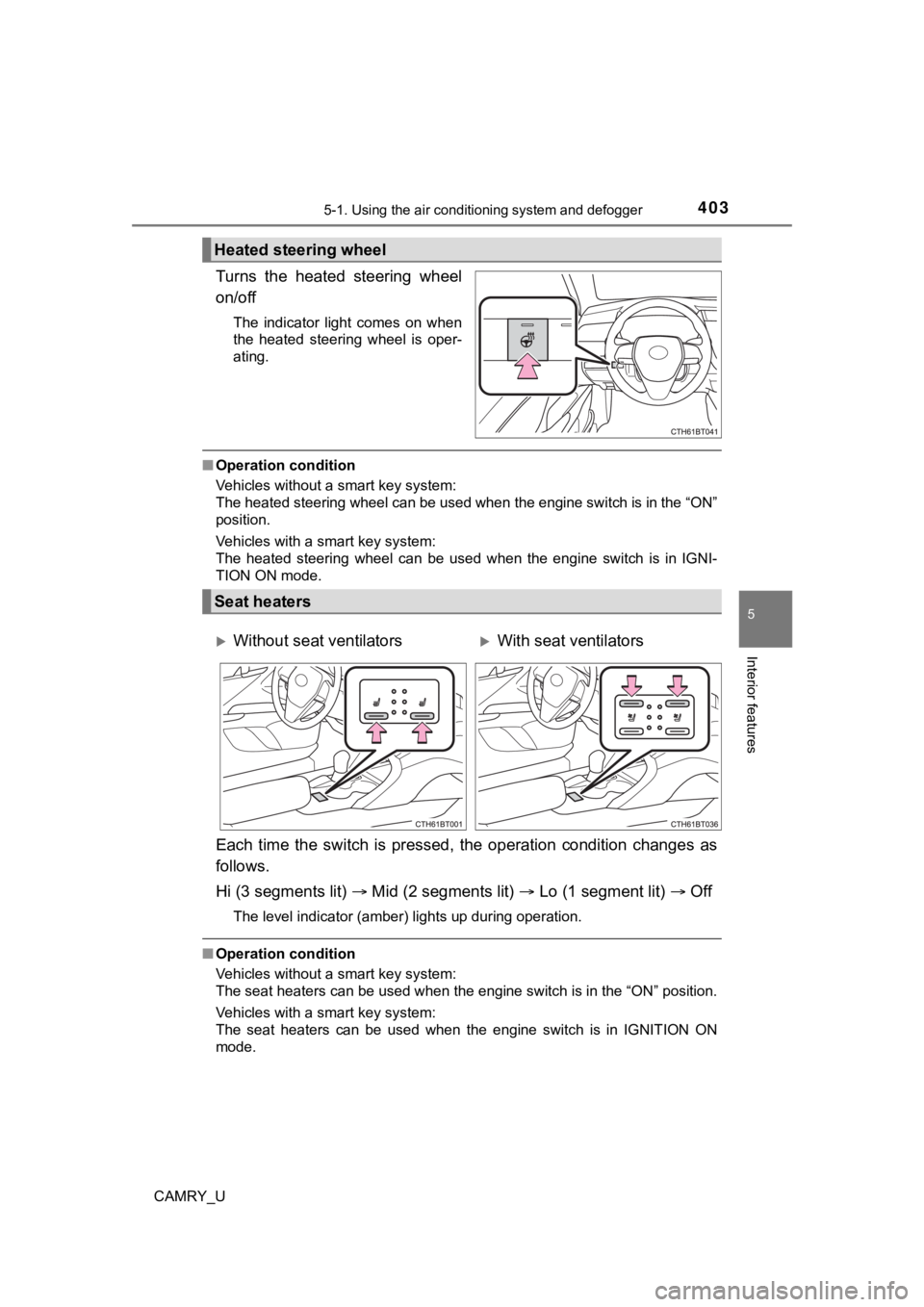
Turns the heated steering wheel
on/off
The indicator light comes on when
the heated steering wheel is oper-
ating.
■Operation condition
Vehicles without a smart key system:
The heated steering wheel can be used when the engine switch is in the “ON”
position.
Vehicles with a smart key system:
The heated steering wheel can be used when the engine switch is in IGNI-
TION ON mode.
Each time the switch is pressed, the operation condition change s as
follows.
Hi (3 segments lit) Mid (2 segments lit) Lo (1 segment lit) Off
The level indicator (amber) lights up during operation.
■Operation condition
Vehicles without a smart key system:
The seat heaters can be used when the engine switch is in the “ ON” position.
Vehicles with a smart key system:
The seat heaters can be used when the engine switch is in IGNIT ION ON
mode.
Heated steering wheel
Seat heaters
Without seat ventilatorsWith seat ventilators
Page 404 of 664
4045-1. Using the air conditioning system and defogger
CAMRY_U
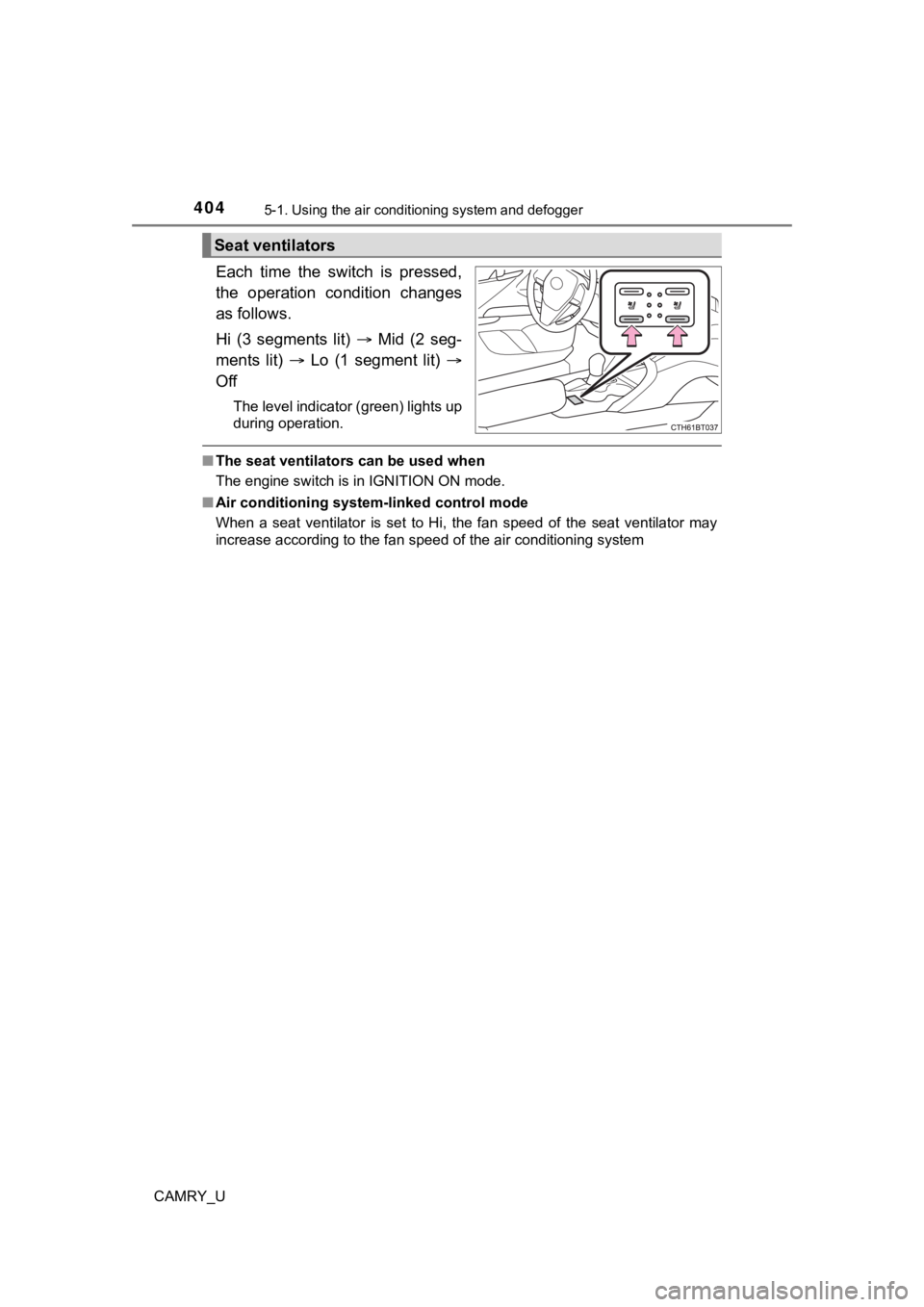
Each time the switch is pressed,
the operation condition changes
as follows.
Hi (3 segments lit) Mid (2 seg-
ments lit) Lo (1 segment lit)
Off
The level indicator (green) lights up
during operation.
■ The seat ventilators can be used when
The engine switch is in IGNITION ON mode.
■ Air conditioning system-linked control mode
When a seat ventilator is set to Hi, the fan speed of the seat ventilator may
increase according to the fan speed of the air conditioning system
Seat ventilators
Page 405 of 664
405
CAMRY_U
5
Interior features
5-2. Using the interior lights
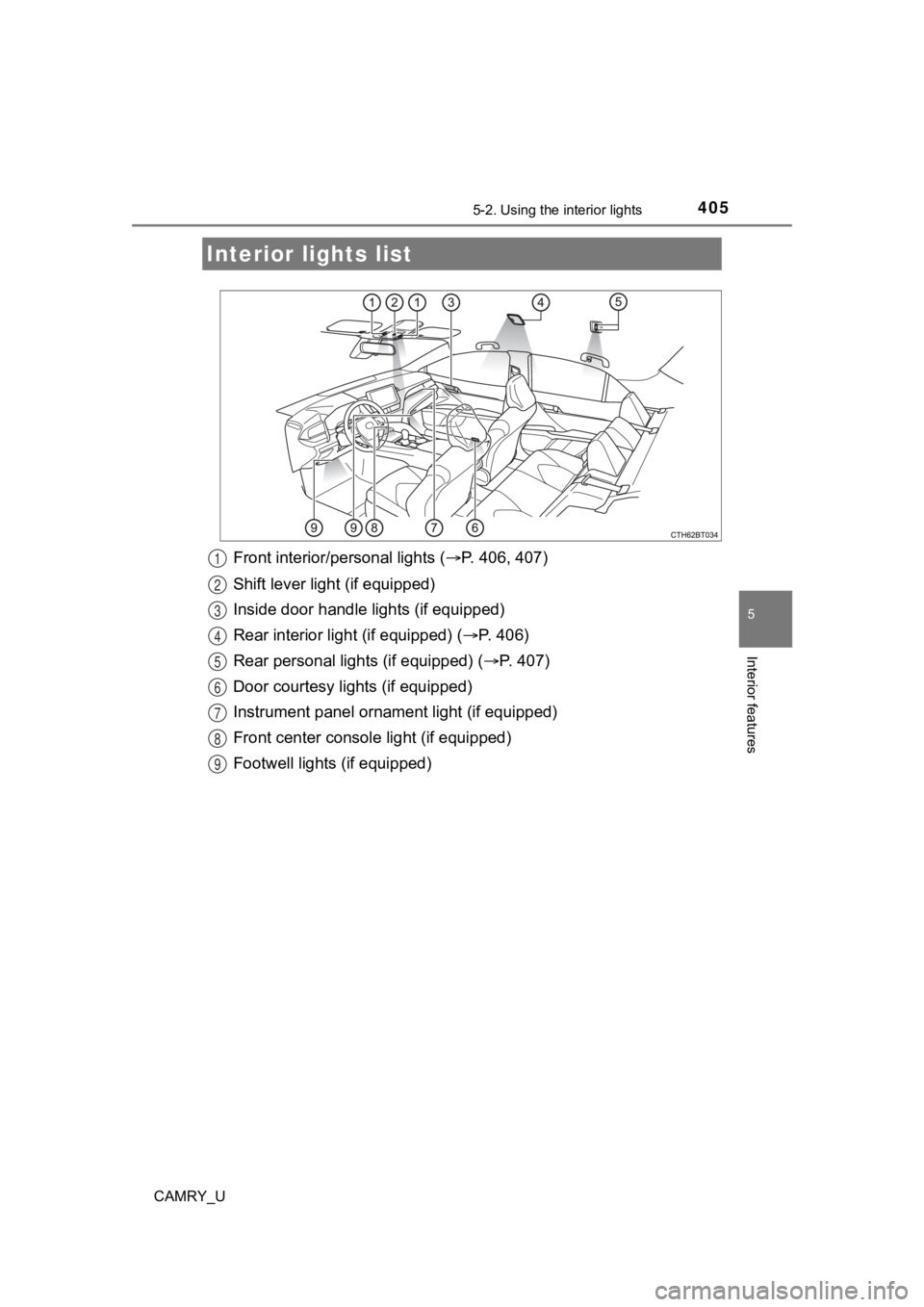
Front interior/personal lights ( P. 406, 407)
Shift lever light (if equipped)
Inside door handle lights (if equipped)
Rear interior light (if equipped) ( P. 406)
Rear personal lights (if equipped) ( P. 407)
Door courtesy lights (if equipped)
Instrument panel ornamen t light (if equipped)
Front center console light (if equipped)
Footwell lights (if equipped)
Interior lights list
1
2
3
4
5
6
7
8
9
Page 406 of 664
4065-2. Using the interior lights
CAMRY_U■
Front (if equipped)
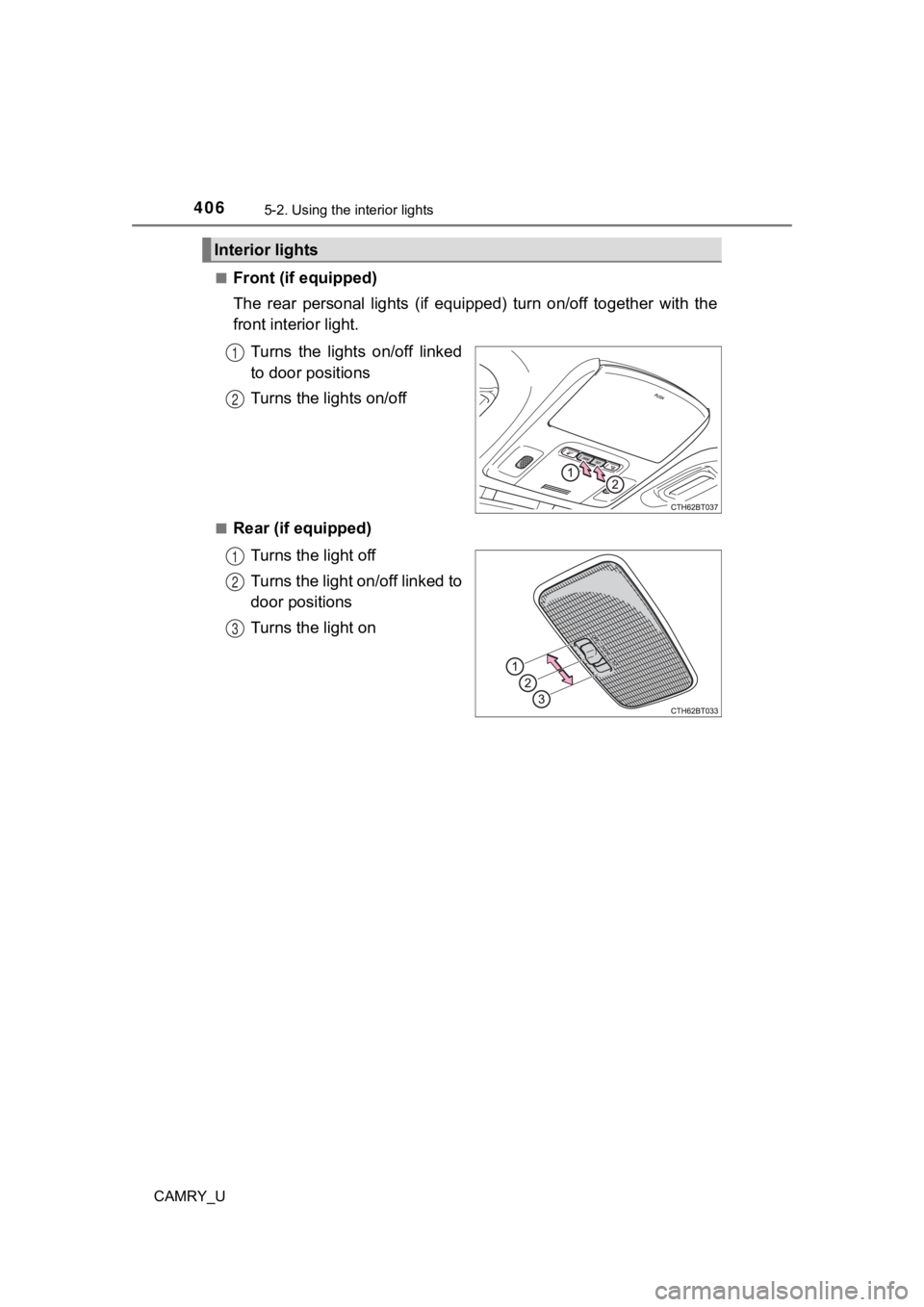
The rear personal lights (if equipped) turn on/off together wit
h the
front interior light.
Turns the lights on/off linked
to door positions
Turns the lights on/off
■Rear (if equipped)Turns the light off
Turns the light on/off linked to
door positions
Turns the light on
Interior lights
1
2
1
2
3
Page 407 of 664
4075-2. Using the interior lights
CAMRY_U
5
Interior features
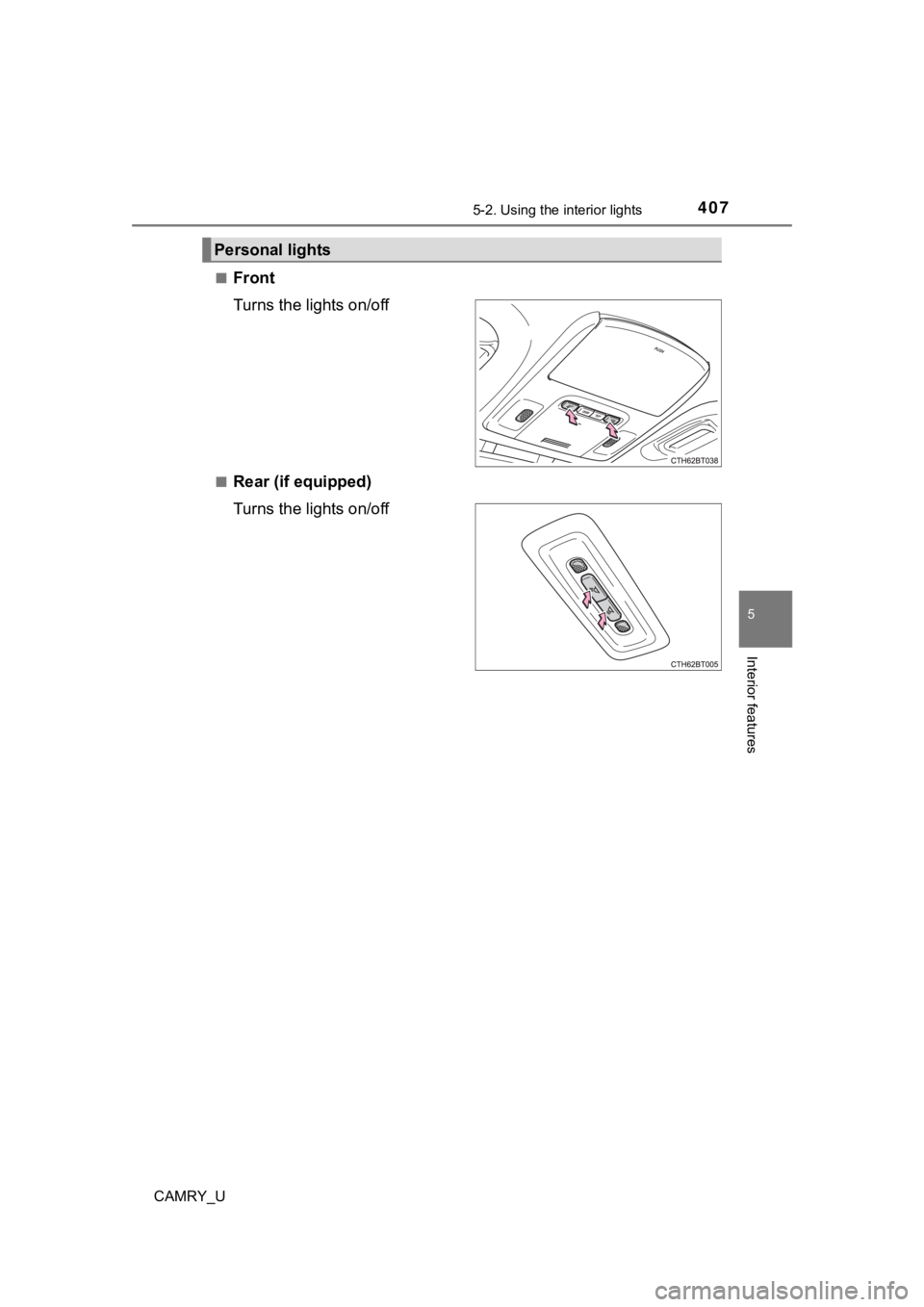
■Front
Turns the lights on/off
■Rear (if equipped)
Turns the lights on/off
Personal lights
Page 408 of 664

4085-2. Using the interior lights
CAMRY_U
■Illuminated entry system
Vehicles without a smart key system:
The lights automatically turn on/off according to the engine sw itch position,
whether the doors are locked/unlocked, and whether the doors ar e open/
closed.
Vehicles with a smart key system:
The lights automatically turn on/off according to the engine sw itch mode, the
presence of the electronic key, whether the doors are locked/un locked, and
whether the doors are open/closed.
■ To prevent the battery from being discharged
If the interior lights remain on when the engine switch is turned off, the lights
will go off automatically after 20 minutes.
■ The interior lights may turn on automatically when
If any of the SRS airbags deploy (inflate) or in the event of a strong rear
impact, the interior lights will turn on automatically.
The interior lights will turn off automatically after approxima tely 20 minutes.
The interior lights can be turned off manually. However, in order to help pre-
vent further collisions, it is recommended that they be left on until safety can
be ensured.
(The interior lights may not turn on automatically depending on the force of
the impact and conditions of the collision.)
■ Customization
Some functions can be customized. ( P. 612)
Page 409 of 664
409
CAMRY_U
5
Interior features
5-3. Using the storage features
List of storage features
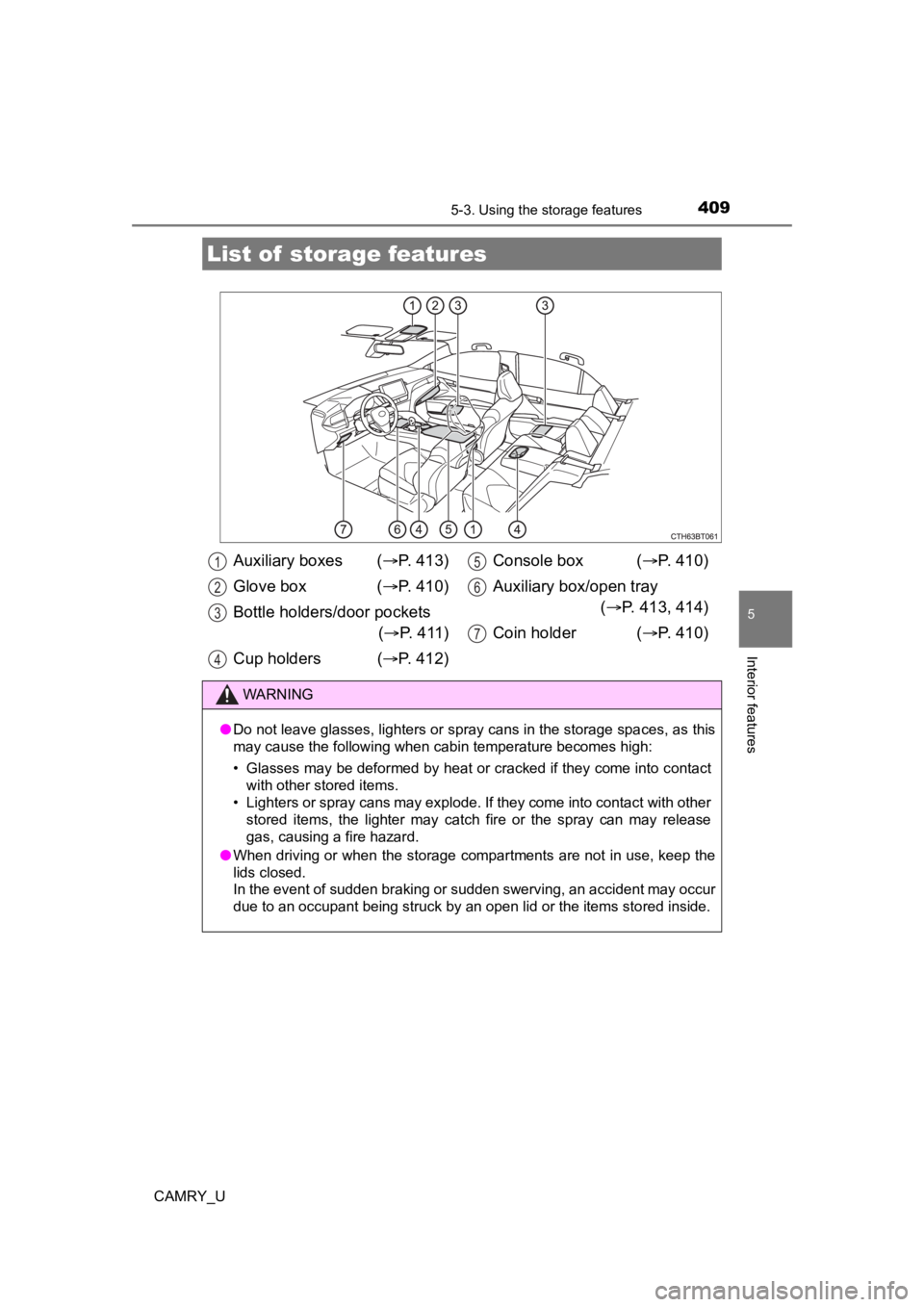
Auxiliary boxes ( P. 413)
Glove box ( P. 410)
Bottle holders/door pockets ( P. 411)
Cup holders ( P. 412) Console box (
P. 410)
Auxiliary box/open tray ( P. 413, 414)
Coin holder ( P. 410)
WARNING
●Do not leave glasses, lighters or spray cans in the storage spaces, as this
may cause the following when cabin temperature becomes high:
• Glasses may be deformed by heat or cracked if they come into c ontact
with other stored items.
• Lighters or spray cans may explode. If they come into contact with other
stored items, the lighter may catch fire or the spray can may r elease
gas, causing a fire hazard.
● When driving or when the storage compartments are not in use, k eep the
lids closed.
In the event of sudden braking or sudden swerving, an accident may occur
due to an occupant being struck by an open lid or the items stored inside.
1
2
3
4
5
6
7