lock TOYOTA CAMRY 2023 Owners Manual
[x] Cancel search | Manufacturer: TOYOTA, Model Year: 2023, Model line: CAMRY, Model: TOYOTA CAMRY 2023Pages: 664, PDF Size: 11.28 MB
Page 481 of 664

4816-3. Do-it-yourself maintenance
CAMRY_U
6
Maintenance and care
●Performance may be affected in the following situations.
• When driving near a TV tower, electric power plant, gas station, radio
station, large display, airport or other facilit y that generates strong
radio waves or electrical noise
• When carrying a portable radio, cellular phone, cordless phone or
other wireless communication device
Vehicles with a tire inflation pressure display function: If ti re position
information is not correctly displayed due to the radio wave co nditions,
the display may be corrected by changing the location of the ve hicle as
the radio wave conditions may change.
●When the vehicle is stopped, the time taken for the warning to start or
turn off may be longer.
●When the inflation pressure of a tire drops rapidly, for exampl e when a
tire has burst, the warning may not operate.
■Initialization procedure
●Make sure to perform the initialization procedure after adjusti ng the tire
inflation pressure.
Also, make sure the tires are cold before performing the initia lization
procedure or adjusting the tire inflation pressure.
●If the engine switch is turned t o the “LOCK” position (vehicles without a
smart key system) or off (vehicles with a smart key system) dur ing ini-
tialization, it is not necessary to restart the initialization procedure from
the beginning as it will begin aut omatically when the engine switch is
turned back to the “ON” position (vehicles without a smart key system)
or IGNITION ON mode (vehicles with a smart key system).
●If initialization has accidentally been started when it is not necessary,
adjust the tire inflation pressu re to the specified level when the tires are
cold and then perform the ini tialization procedure again.
●Vehicles with a tire inflation p ressure display function: While the position
of each tire is being determined and the inflation pressures are not being
displayed on the multi-information display, if the inflation pr essure of a
tire drops, the tire pressure warning light will come on.
■Warning performance of the tire pressure warning system
The warning of the tire pressu re warning system will change in accor-
dance with the conditions under which it was initialized. For t his reason,
the system may give a warning even if the tire pressure does no t reach a
low enough level, or if the pressure is higher than the pressur e that was
adjusted to when the sys tem was initialized.
Page 492 of 664
4926-3. Do-it-yourself maintenance
CAMRY_U
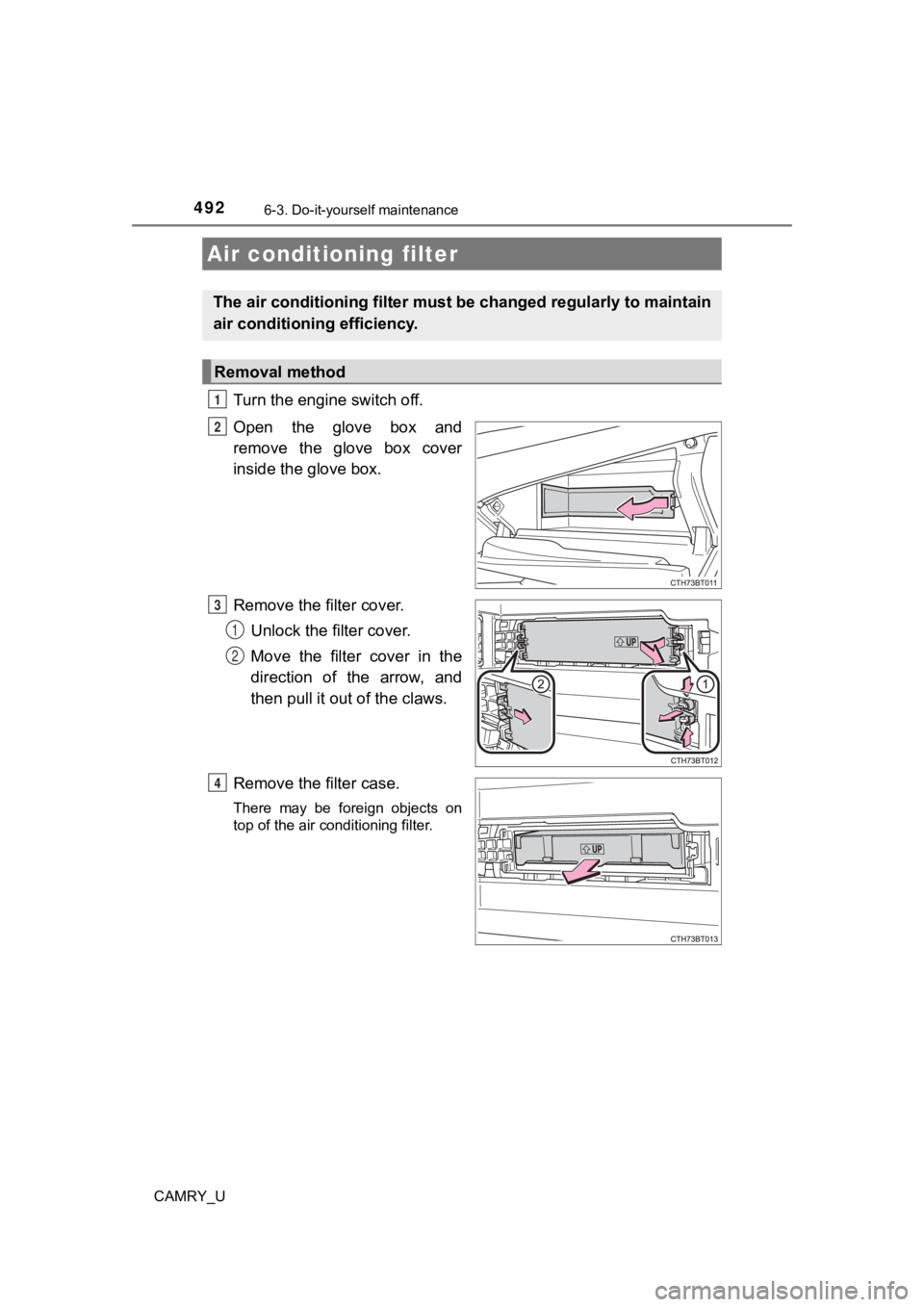
Turn the engine switch off.
Open the glove box and
remove the glove box cover
inside the glove box.
Remove the filter cover.Unlock the filter cover.
Move the filter cover in the
direction of the arrow, and
then pull it out of the claws.
Remove the filter case.
There may be foreign objects on
top of the air conditioning filter.
Air conditioning filter
The air conditioning filter must b e changed regularly to maintain
air conditioning efficiency.
Removal method
1
2
3
1
2
4
Page 495 of 664
4956-3. Do-it-yourself maintenance
CAMRY_U
6
Maintenance and care
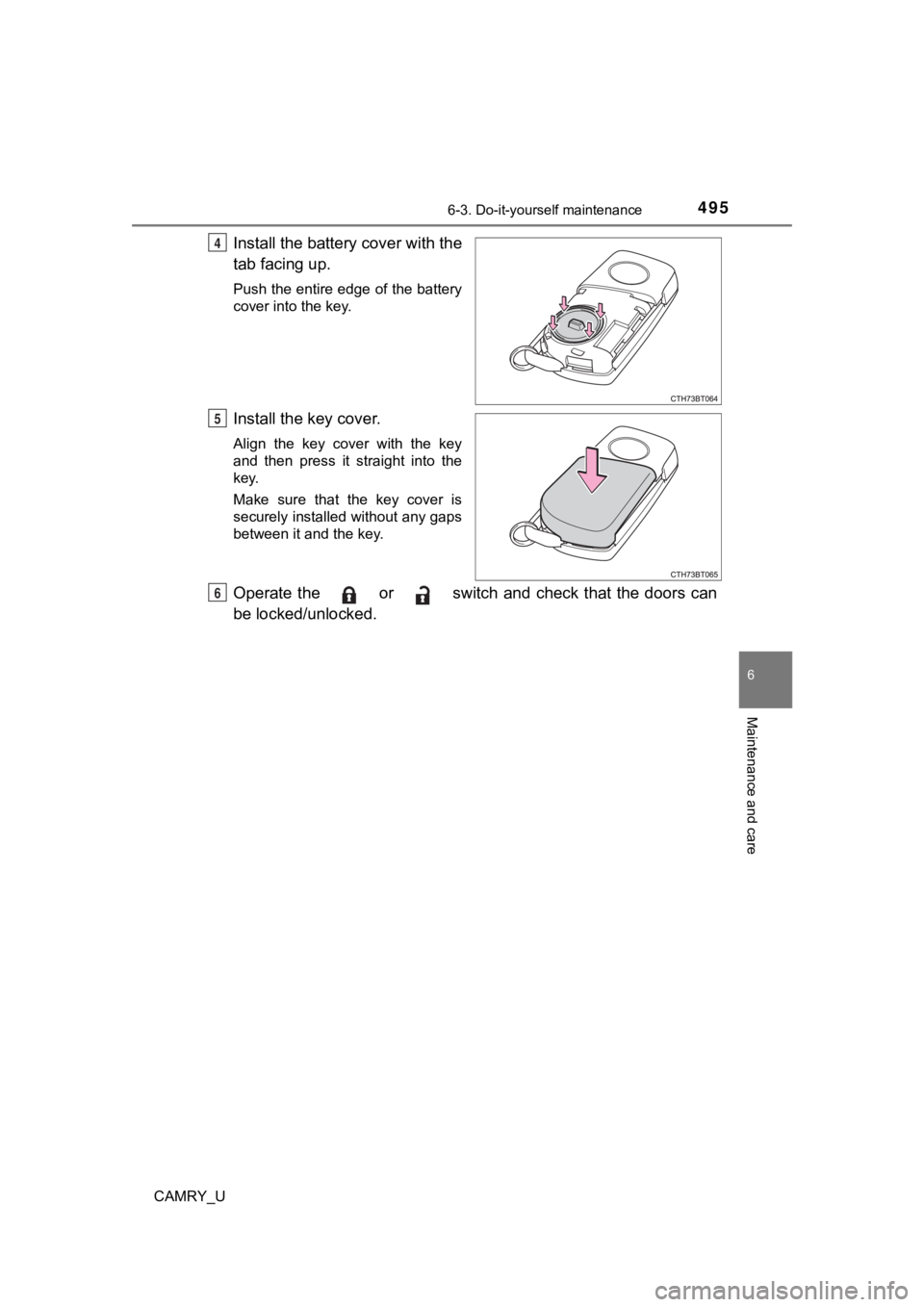
Install the battery cover with the
tab facing up.
Push the entire edge of the battery
cover into the key.
Install the key cover.
Align the key cover with the key
and then press it straight into the
key.
Make sure that the key cover is
securely installed without any gaps
between it and the key.
Operate the or switch and check that the doors can
be locked/unlocked.
4
5
6
Page 496 of 664
4966-3. Do-it-yourself maintenance
CAMRY_U
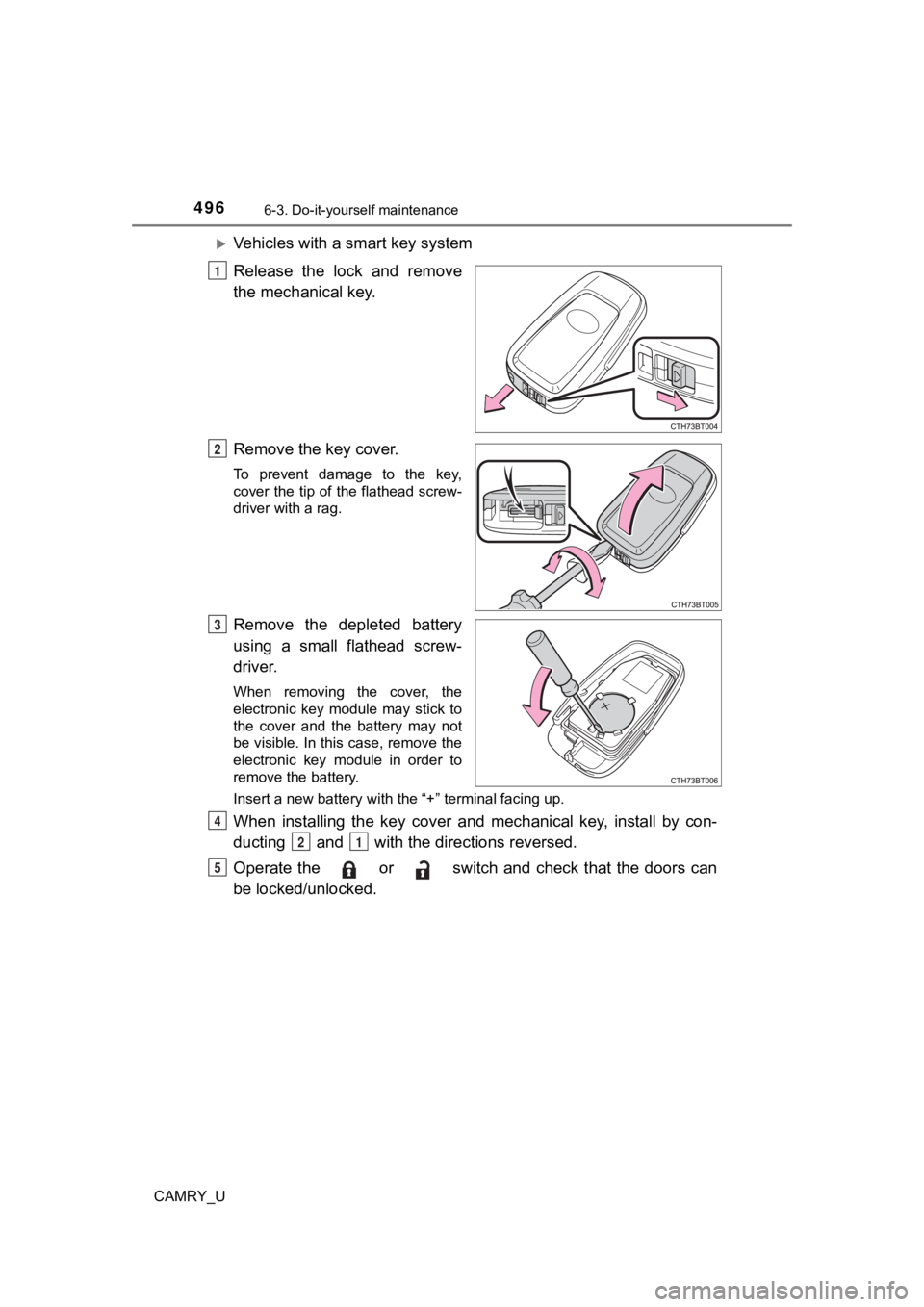
Vehicles with a smart key system
Release the lock and remove
the mechanical key.
Remove the key cover.
To prevent damage to the key,
cover the tip of the flathead screw-
driver with a rag.
Remove the depleted battery
using a small flathead screw-
driver.
When removing the cover, the
electronic key module may stick to
the cover and the battery may not
be visible. In this case, remove the
electronic key module in order to
remove the battery.
Insert a new battery with the “+” terminal facing up.
When installing the key cover and mechanical key, install by con-
ducting and with the directions reversed.
Operate the or switch and check that the doors can
be locked/unlocked.
1
2
3
4
21
5
Page 503 of 664
5036-3. Do-it-yourself maintenance
CAMRY_U
6
Maintenance and care
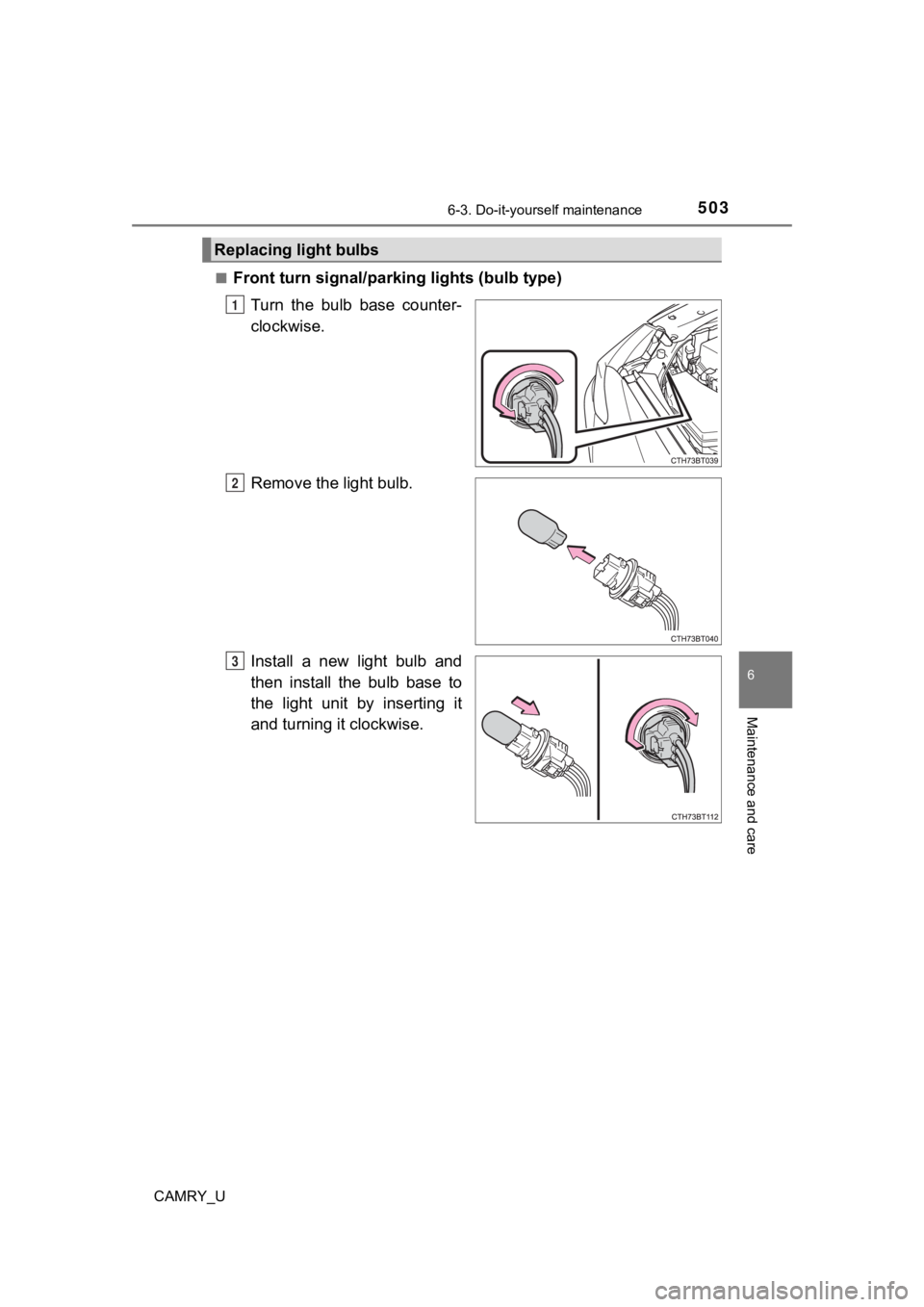
■Front turn signal/parking lights (bulb type)
Turn the bulb base counter-
clockwise.
Remove the light bulb.
Install a new light bulb and
then install the bulb base to
the light unit by inserting it
and turning it clockwise.
Replacing light bulbs
1
2
3
Page 505 of 664
5056-3. Do-it-yourself maintenance
CAMRY_U
6
Maintenance and care
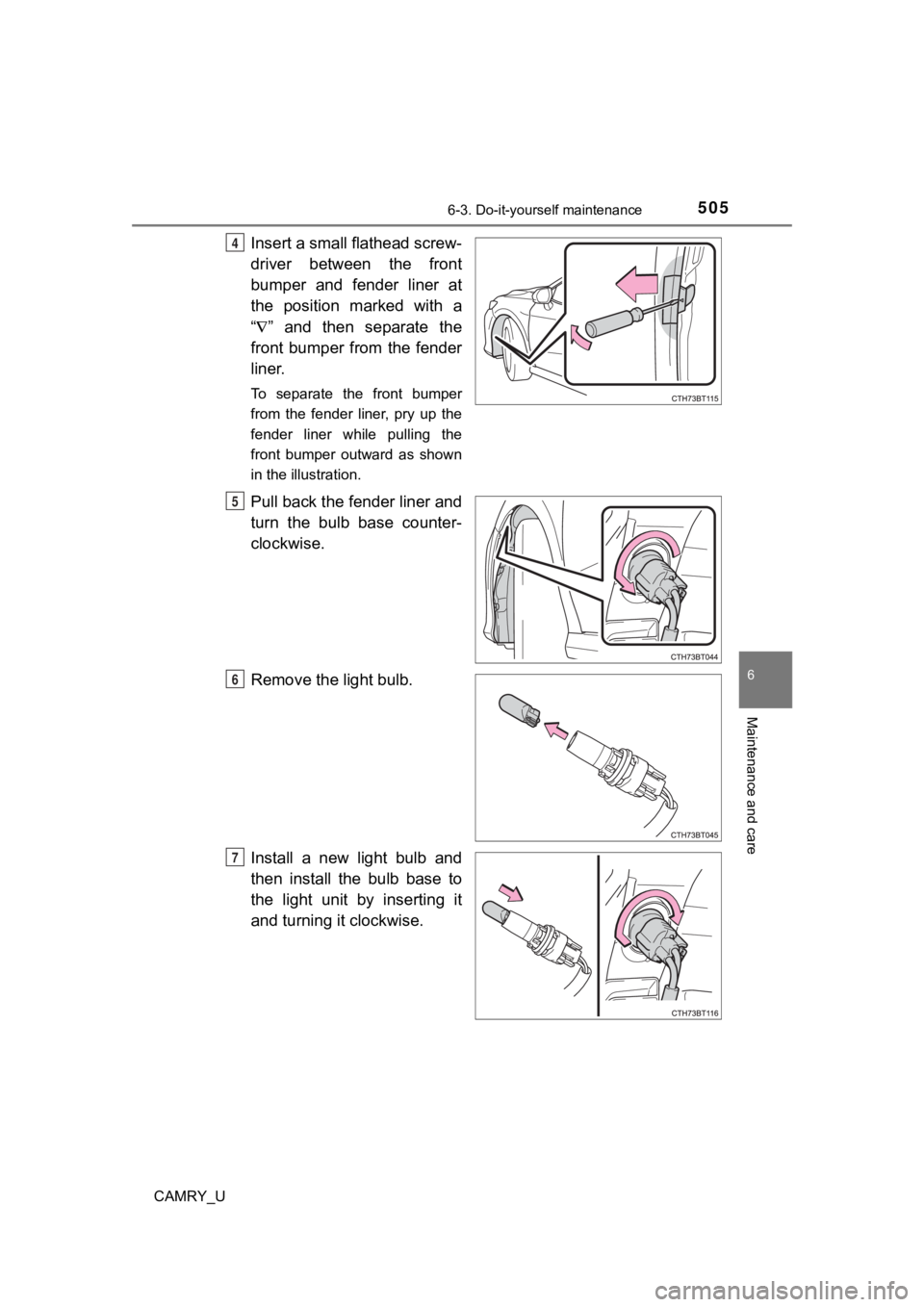
Insert a small flathead screw-
driver between the front
bumper and fender liner at
the position marked with a
“ ” and then separate the
front bumper from the fender
liner.
To separate the front bumper
from the fender liner, pry up the
fender liner while pulling the
front bumper outward as shown
in the illustration.
Pull back the fender liner and
turn the bulb base counter-
clockwise.
Remove the light bulb.
Install a new light bulb and
then install the bulb base to
the light unit by inserting it
and turning it clockwise.
4
5
6
7
Page 507 of 664
5076-3. Do-it-yourself maintenance
CAMRY_U
6
Maintenance and care
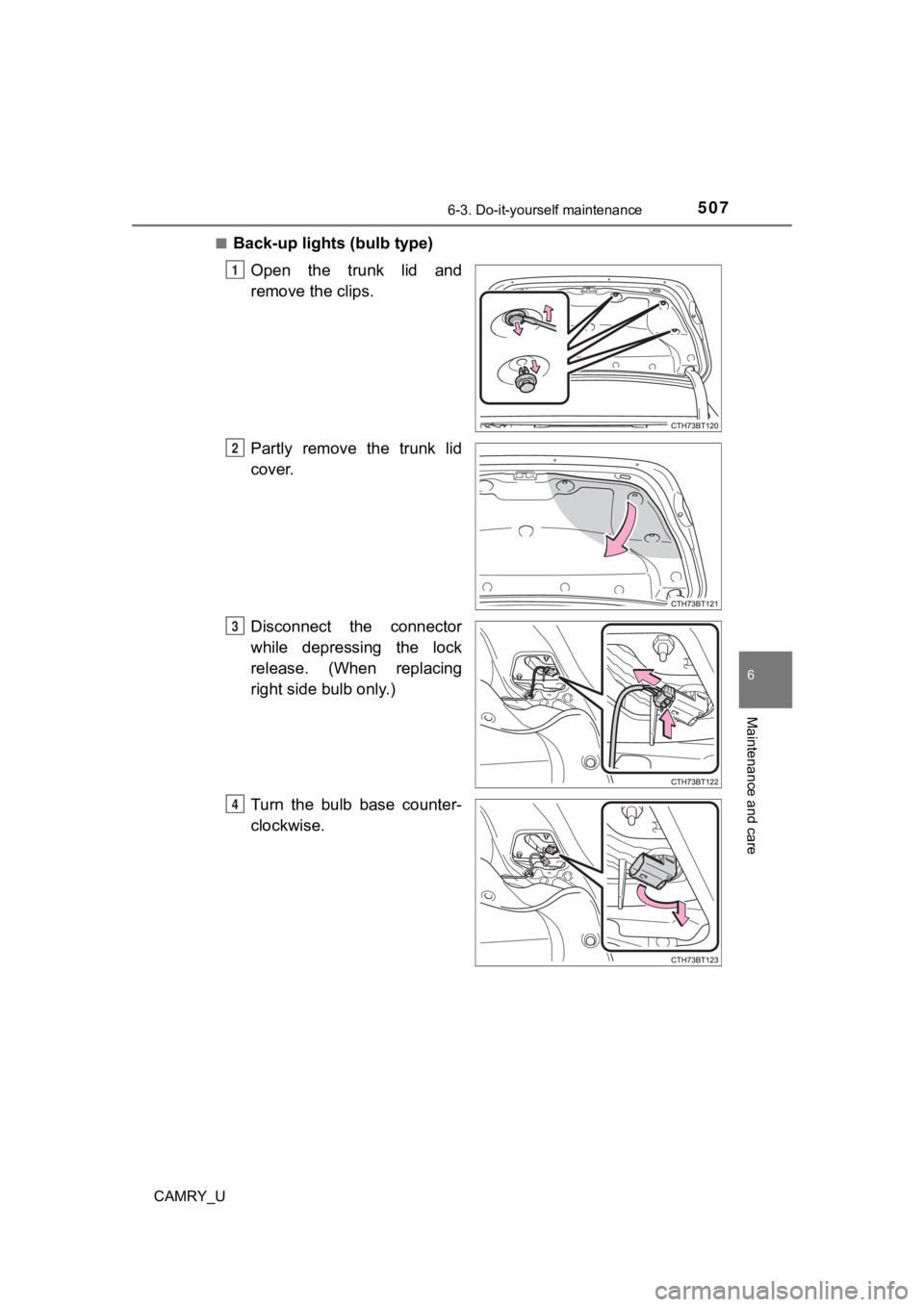
■Back-up lights (bulb type)Open the trunk lid and
remove the clips.
Partly remove the trunk lid
cover.
Disconnect the connector
while depressing the lock
release. (When replacing
right side bulb only.)
Turn the bulb base counter-
clockwise.
1
2
3
4
Page 508 of 664
5086-3. Do-it-yourself maintenance
CAMRY_U
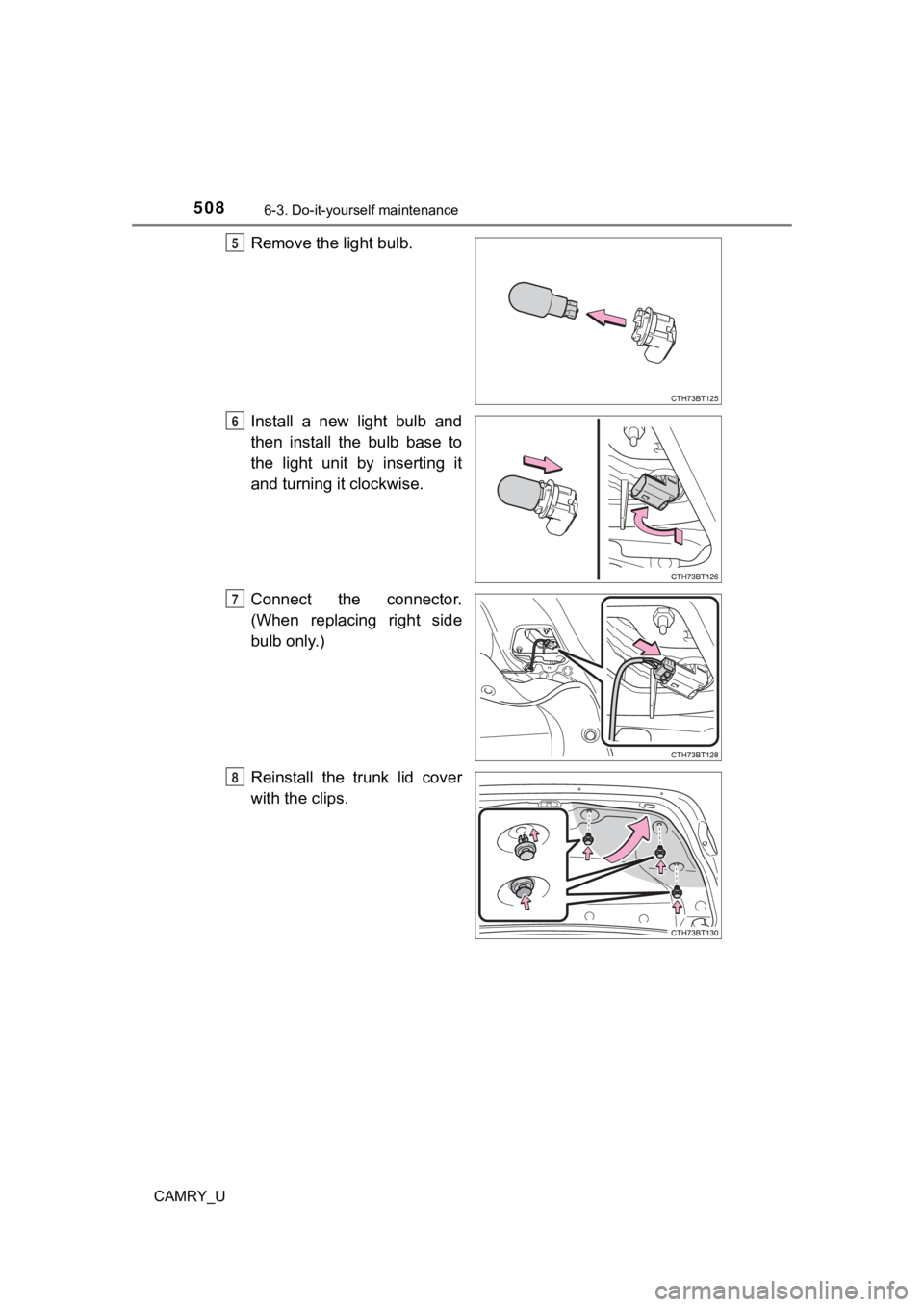
Remove the light bulb.
Install a new light bulb and
then install the bulb base to
the light unit by inserting it
and turning it clockwise.
Connect the connector.
(When replacing right side
bulb only.)
Reinstall the trunk lid cover
with the clips.5
6
7
8
Page 510 of 664
5106-3. Do-it-yourself maintenance
CAMRY_U
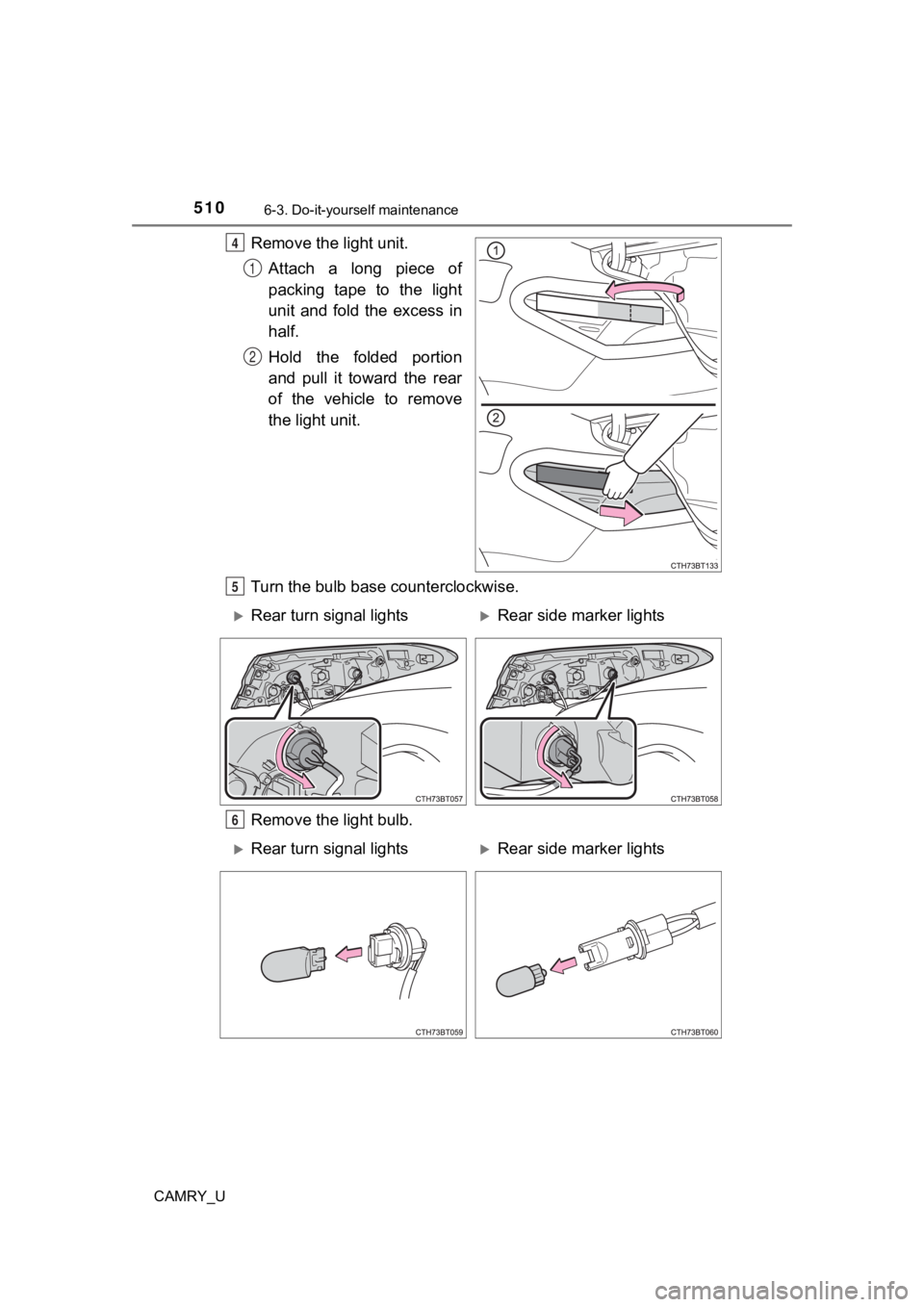
Remove the light unit.Attach a long piece of
packing tape to the light
unit and fold the excess in
half.
Hold the folded portion
and pull it toward the rear
of the vehicle to remove
the light unit.
Turn the bulb base counterclockwise.
Remove the light bulb.4
1
2
5
Rear turn signal lightsRear side ma rker lights
6
Rear turn signal lightsRear side marker lights
Page 511 of 664
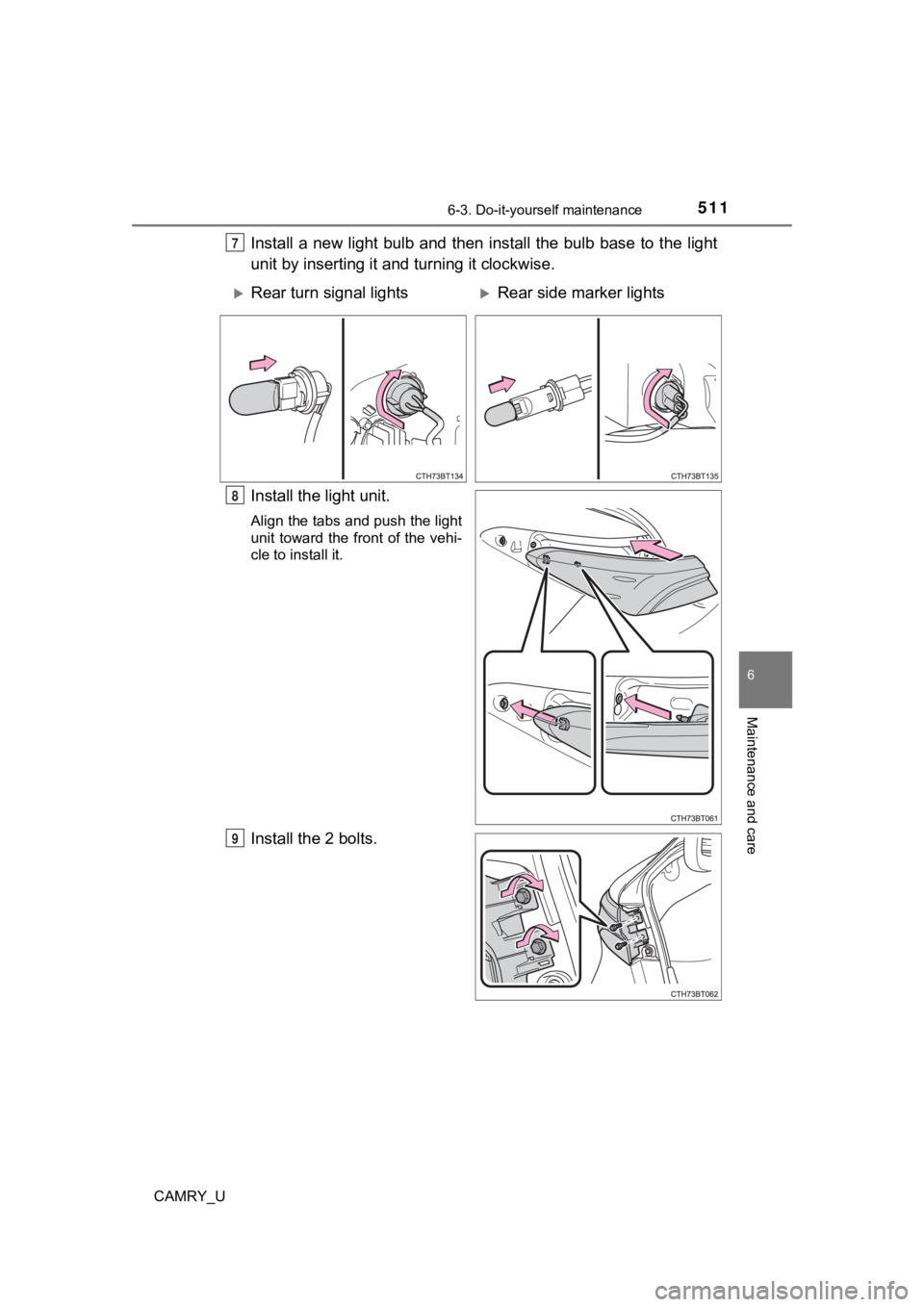
5116-3. Do-it-yourself maintenance
CAMRY_U
6
Maintenance and care
Install a new light bulb and then install the bulb base to the light
unit by inserting it and turning it clockwise.
Install the light unit.
Align the tabs and push the light
unit toward the front of the vehi-
cle to install it.
Install the 2 bolts.
7
Rear turn signal lightsRear side ma rker lights
8
9