lock TOYOTA CAMRY 2023 Owners Manual
[x] Cancel search | Manufacturer: TOYOTA, Model Year: 2023, Model line: CAMRY, Model: TOYOTA CAMRY 2023Pages: 664, PDF Size: 11.28 MB
Page 554 of 664
5547-2. Steps to take in an emergency
CAMRY_U
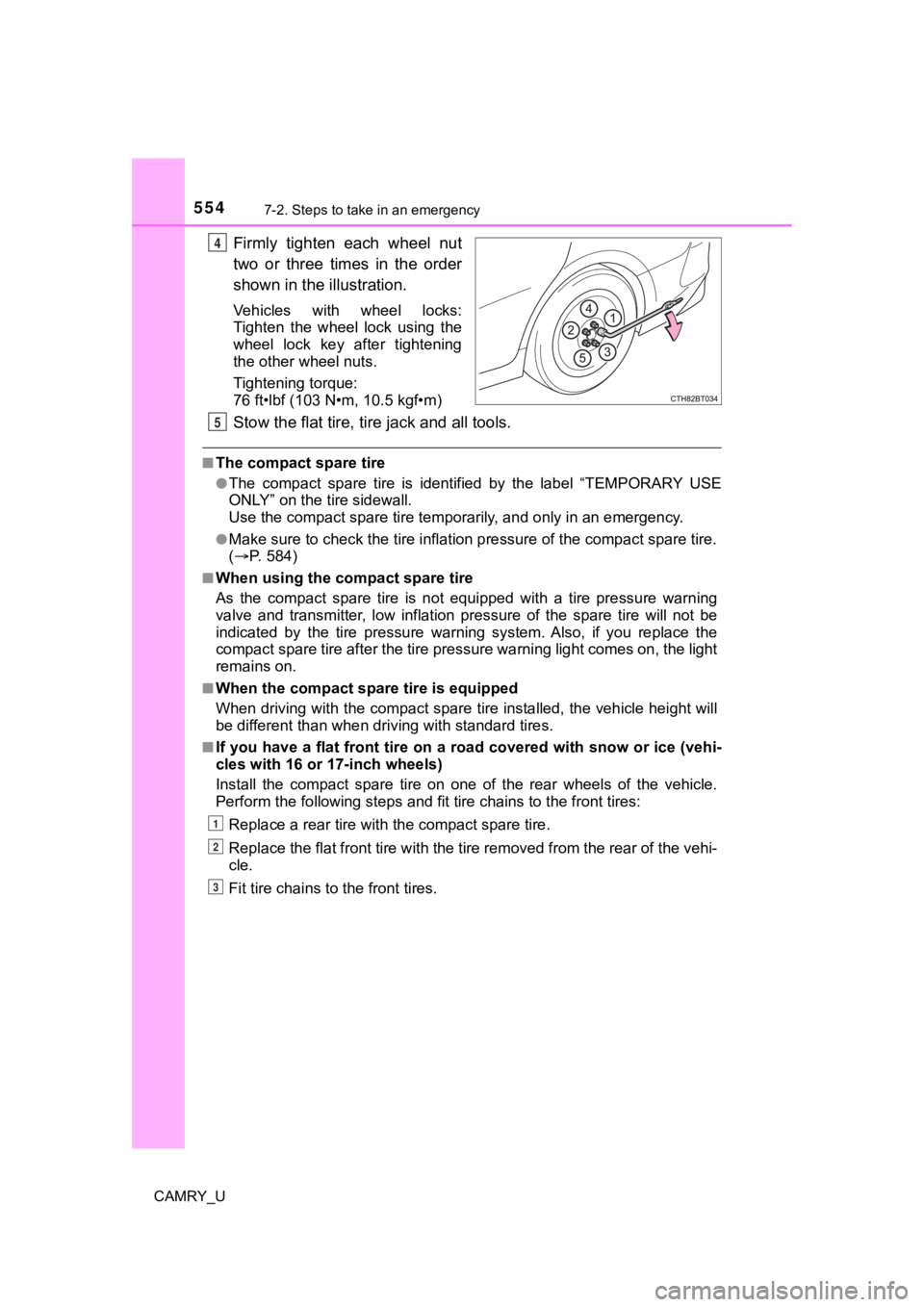
Firmly tighten each wheel nut
two or three times in the order
shown in the illustration.
Vehicles with wheel locks:
Tighten the wheel lock using the
wheel lock key after tightening
the other wheel nuts.
Tightening torque:
76 ft•lbf (103 N•m, 10.5 kgf•m)
Stow the flat tire, tire jack and all tools.
■The compact spare tire
●The compact spare tire is identified by the label “TEMPORARY US E
ONLY” on the tire sidewall.
Use the compact spar e tire temporarily, and only in an emergenc y.
●Make sure to check the tire inflation pressure of the compact spare tire.
( P. 5 8 4 )
■When using the compact spare tire
As the compact spare tire is not equipped with a tire pressure warning
valve and transmitter, low inflation pressure of the spare tire will not be
indicated by the tire pressure warning system. Also, if you rep lace the
compact spare tire after the tire pressure warning light comes on, the light
remains on.
■When the compact spa re tire is equipped
When driving with the compact spare tire installed, the vehicle height will
be different than when driving with standard tires.
■If you have a flat front tire on a road covered with snow or ic e (vehi-
cles with 16 or 17-inch wheels)
Install the compact spare tire on one of the rear wheels of the vehicle.
Perform the following steps and f it tire chains to the front tires:
Replace a rear tire with the compact spare tire.
Replace the flat front tire with the tire removed from the rear of the vehi-
cle.
Fit tire chains to the front tires.
4
5
1
2
3
Page 559 of 664
5597-2. Steps to take in an emergency
CAMRY_U
7
When trouble arises
■Doors
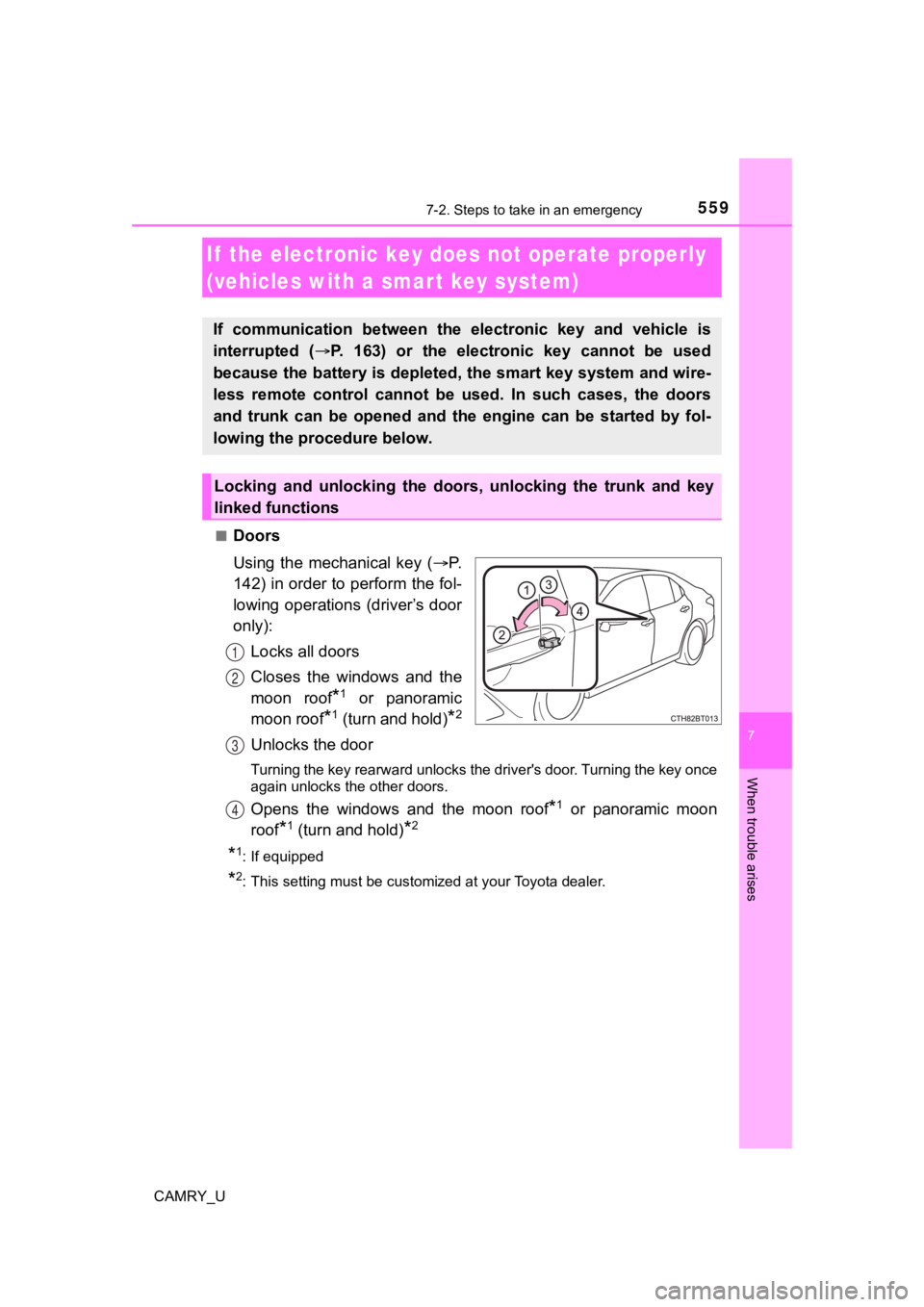
Using the mechanical key (P.
142) in order to perform the fol-
lowing operations (driver’s door
only):
Locks all doors
Closes the windows and the
moon roof
*1 or panoramic
moon roof
*1 (turn and hold)*2
Unlocks the door
Turning the key rearward unlocks the driver's door. Turning the key once
again unlocks the other doors.
Opens the windows and the moon roof*1 or panoramic moon
roof
*1 (turn and hold)*2
*1: If equipped
*2: This setting must be customized at your Toyota dealer.
If the electronic key does not operate properly
(vehicles with a smar t key system)
If communication between the electronic key and vehicle is
interrupted ( P. 163) or the electronic key cannot be used
because the battery is depleted, the smart key system and wire-
less remote control cannot be used. In such cases, the doors
and trunk can be opened and the engine can be started by fol-
lowing the procedure below.
Locking and unlocking the doors, unlocking the trunk and key
linked functions
1
2
3
4
Page 560 of 664
5607-2. Steps to take in an emergency
CAMRY_U■
Tr u n k
Turn the mechanical key clock-
wise to open.
Ensure that the shift lever is in P and firmly depress the brak
e
pedal.
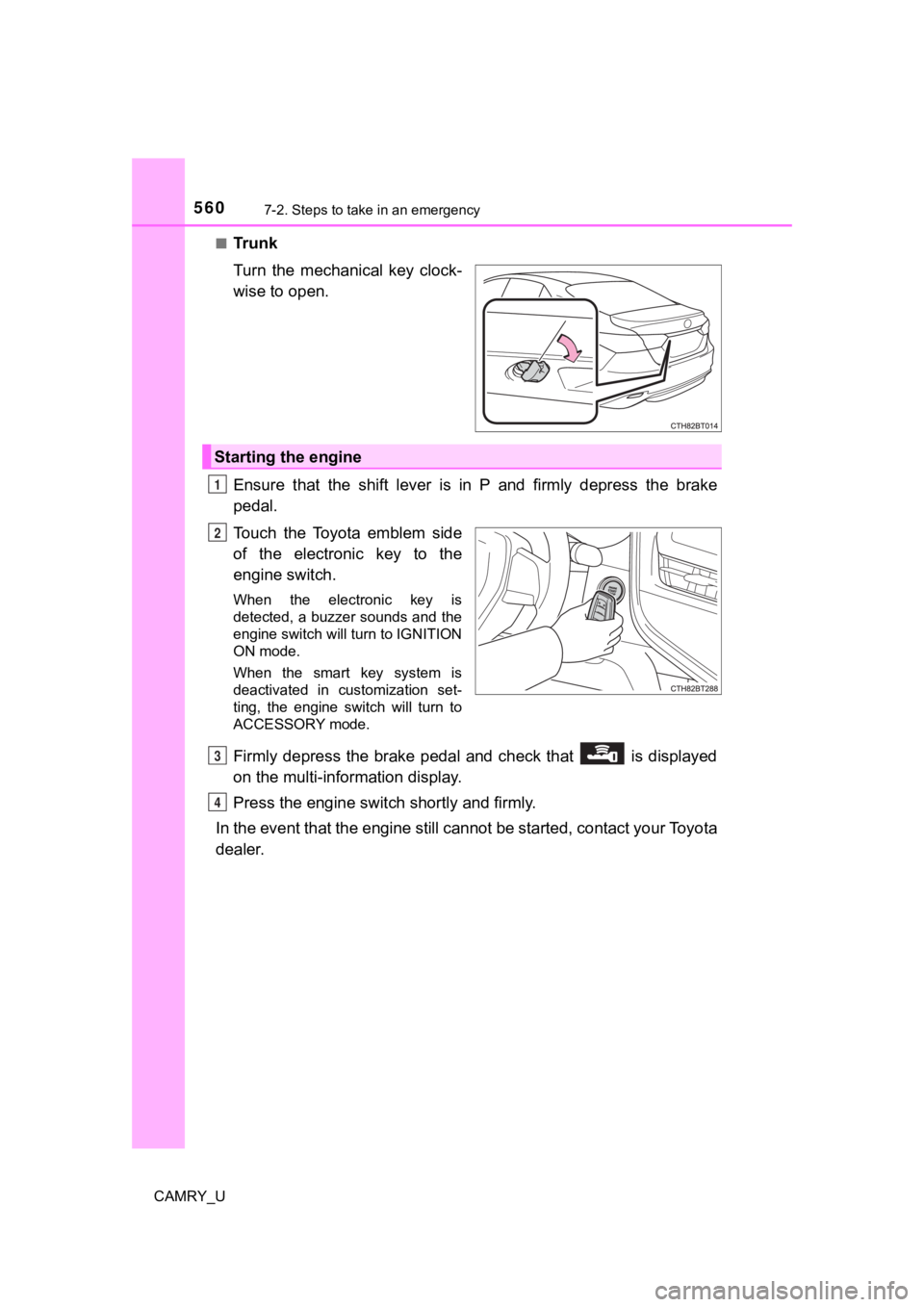
Touch the Toyota emblem side
of the electronic key to the
engine switch.
When the electronic key is
detected, a buzzer sounds and the
engine switch will turn to IGNITION
ON mode.
When the smart key system is
deactivated in customization set-
ting, the engine switch will turn to
ACCESSORY mode.
Firmly depress the brake pedal and check that is displayed
on the multi-information display.
Press the engine switch shortly and firmly.
In the event that the engine still cannot be started, contact your Toyota
dealer.
Starting the engine
1
2
3
4
Page 561 of 664

5617-2. Steps to take in an emergency
CAMRY_U
7
When trouble arises
■Stopping the engine
Shift the shift lever to P and press the engine switch as you normally do when
stopping the engine.
■ Replacing the key battery
As the above procedure is a temporary measure, it is recommended that the
electronic key battery be replaced immediately when the battery is depleted.
(P. 494)
■ Alarm (for Canada only)
Using the mechanical key to lock the doors will not set the ala rm system.
If a door is unlocked using the mechanical key when the alarm s ystem is set,
the alarm may be triggered.
■ Changing engine switch modes
Release the brake pedal and press the engine switch in step above.
The engine does not start and modes will be changed each time t he switch is
pressed. (P. 213)
■ When the electronic key does not work properly
●Make sure that the smart key system has not been deactivated in the cus-
tomization setting. If it is off, turn the function on.
(Customizable features: P. 606)
● Check if battery-saving mode is set. If it is set, cancel the f unction.
( P. 163)
WARNING
■ When using the mechanical key and operating the power windows or
the moon roof or panoramic moon roof
Operate the power window or the moon roof or panoramic moon roo f after
checking to make sure that there is no possibility of any passe nger having
any of their body parts caught in the window or the moon roof o r panoramic
moon roof. Also, do not allow children to operate the mechanical key. It is
possible for children and other passengers to get caught in the power win-
dow or the moon roof or panoramic moon roof.
3
Page 562 of 664
5627-2. Steps to take in an emergency
CAMRY_U
If you have a set of jumper (or booster) cables and a second vehicle
with a 12-volt battery, you can jump start your vehicle by foll owing the
steps below.
Confirm that the electronic key
(vehicles with a smart key sys-
tem) or key (vehicles without a
smart key system) is being car-
ried.
When connecting the jumper (or
booster) cables, depending on the
situation, the alarm may activate
and doors locked. ( P. 84)
Open the hood. ( P. 457)
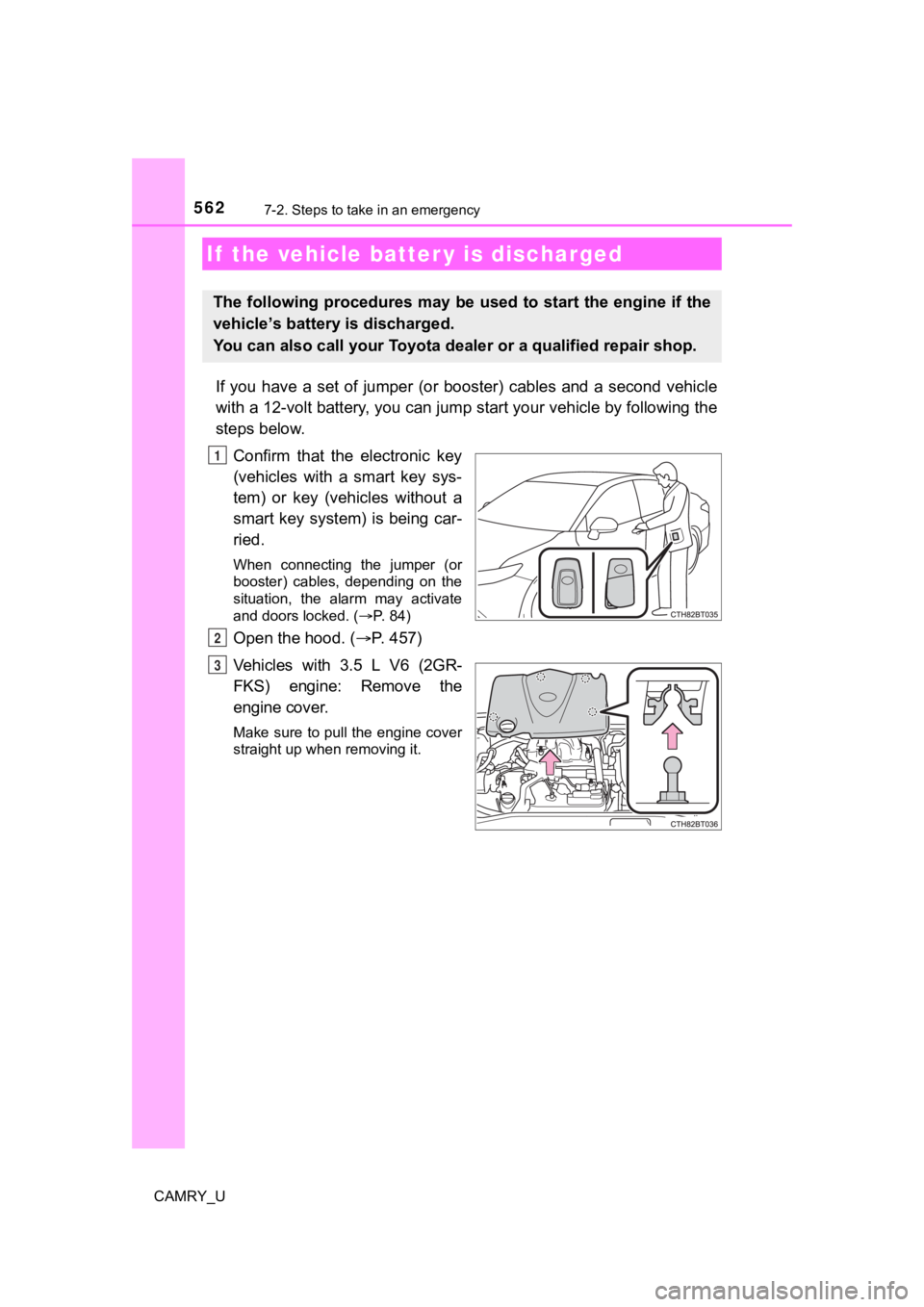
Vehicles with 3.5 L V6 (2GR-
FKS) engine: Remove the
engine cover.
Make sure to pull the engine cover
straight up when removing it.
If the vehicle batt er y is discharged
The following procedures may be used to start the engine if the
vehicle’s battery is discharged.
You can also call your Toyota de aler or a qualified repair shop.
1
2
3
Page 565 of 664
5657-2. Steps to take in an emergency
CAMRY_U
7
When trouble arises
■When recharging or replacing the battery (vehicles with a smart key sys-
tem)
● In some cases, it may not be possible to unlock the doors using the smart
key system when the battery is discharged. Use the wireless rem ote control
or the mechanical key to lock or unlock the doors.
● The engine may not start on the first attempt after the battery has recharged
but will start normally after the second attempt. This is not a malfunction.
● The engine switch mode is memorized by the vehicle. When the ba ttery is
reconnected, the system will return to the mode it was in befor e the battery
was discharged. Before disconnecting the battery, turn the engine switch off.
If you are unsure what mode the engine switch was in before the battery dis-
charged, be especially careful when reconnecting the battery.
■ When replacing the battery
●Use a battery that conforms to European regulations.
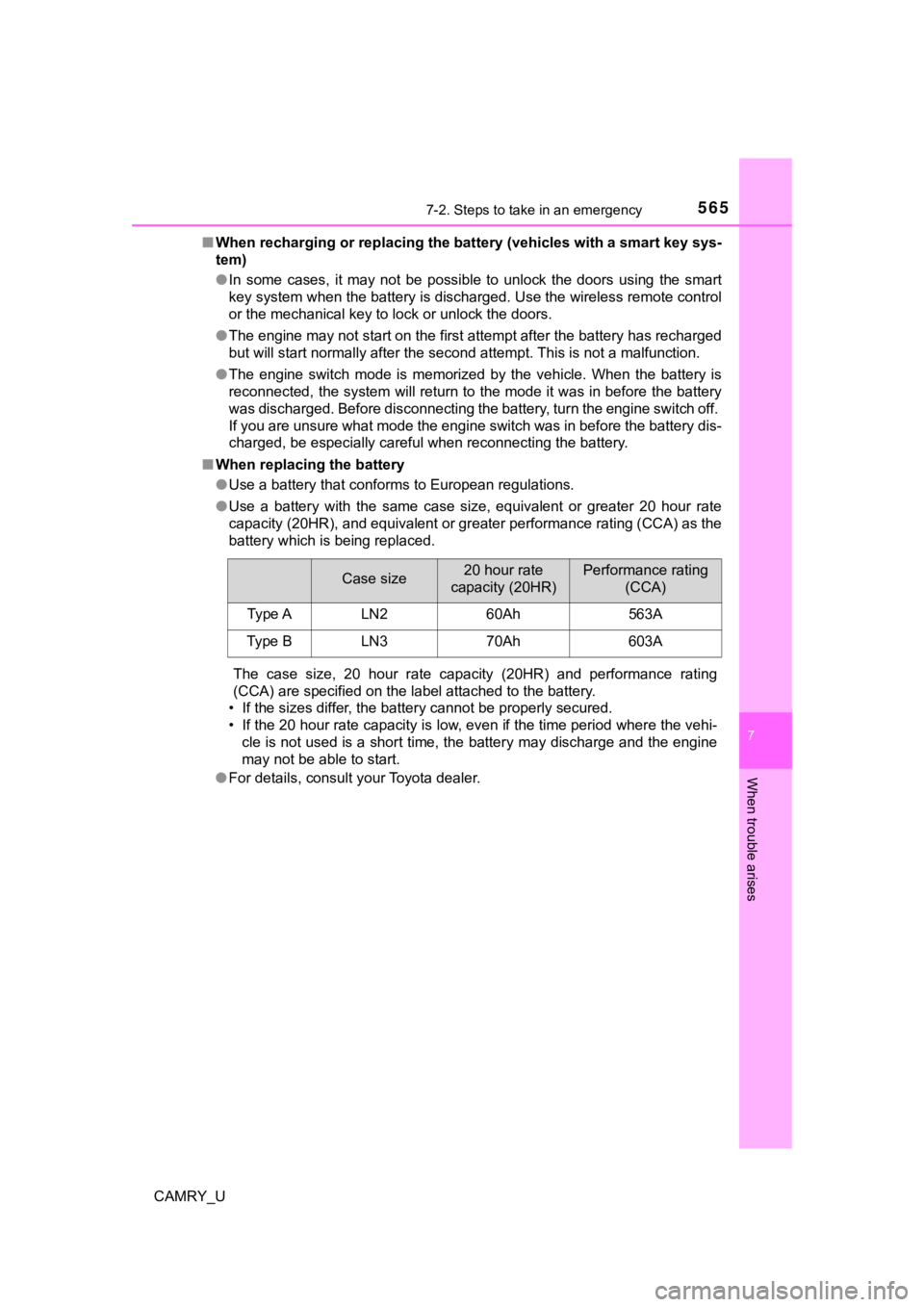
● Use a battery with the same case size, equivalent or greater 20 hour rate
capacity (20HR), and equivalent or greater performance rating ( CCA) as the
battery which is being replaced.
The case size, 20 hour rate capacity (20HR) and performance rat ing
(CCA) are specified on the label attached to the battery.
• If the sizes differ, the battery cannot be properly secured.
• If the 20 hour rate capacity is low, even if the time period w here the vehi-
cle is not used is a short time, the battery may discharge and the engine
may not be able to start.
● For details, consult your Toyota dealer.
Case size20 hour rate
capacity (20HR)Performance rating (CCA)
Type ALN260Ah563A
Type BLN370Ah603A
Page 577 of 664
5778-1. Specifications
8
Vehicle specifications
CAMRY_U■
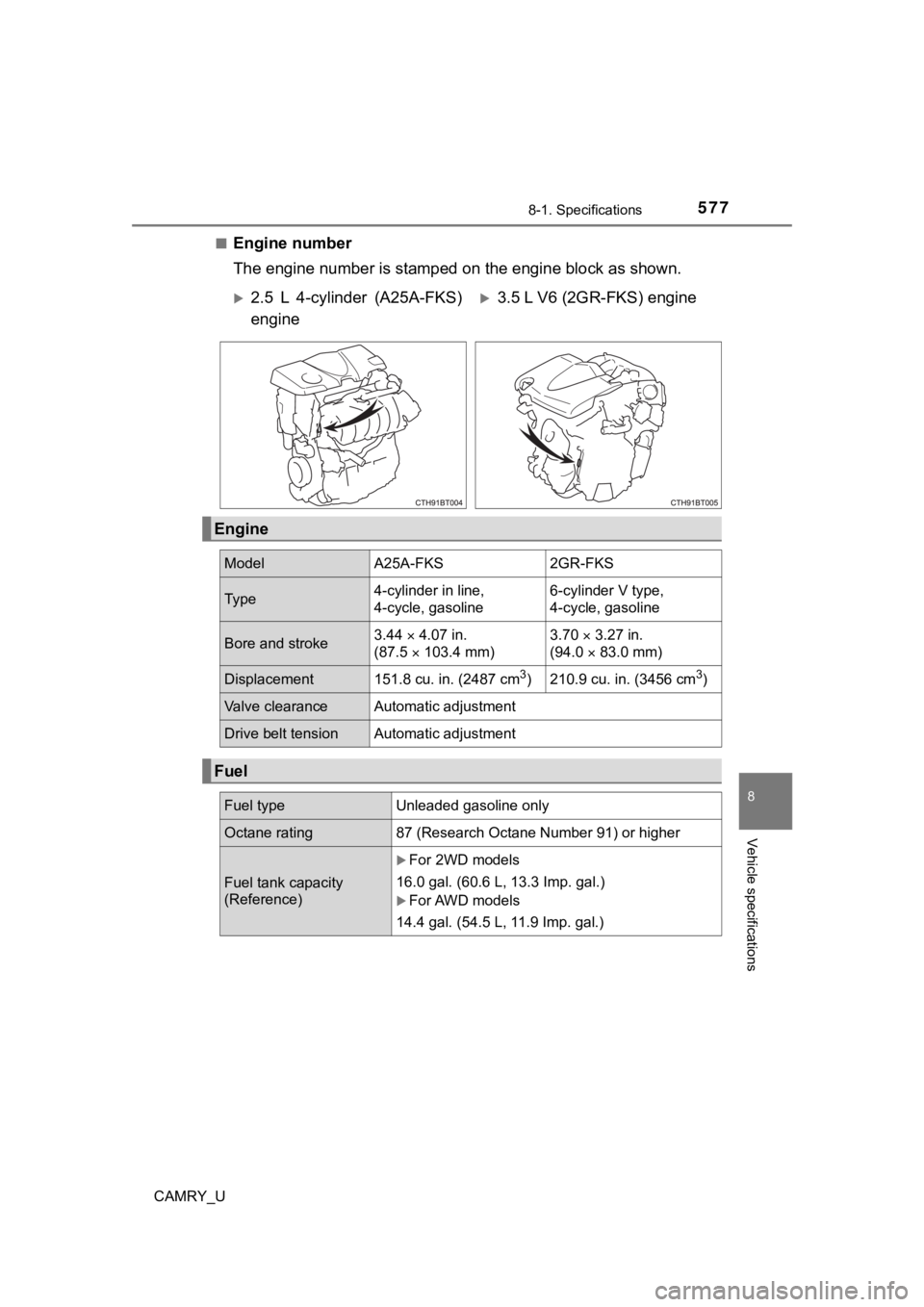
Engine number
The engine number is stamped
on the engine block as shown.
2.5 L 4-cylinder (A25A-FKS)
engine3.5 L V6 (2GR-FKS) engine
Engine
Model A25A-FKS 2GR-FKS
Ty p e4-cylinder in line,
4-cycle, gasoline 6-cylinder V type,
4-cycle, gasoline
Bore and stroke
3.44
4.07 in.
(87.5 103.4 mm) 3.70
3.27 in.
(94.0 83.0 mm)
Displacement 151.8 cu. in. (2487 cm3) 210.9 cu. in. (3456 cm3)
Valve clearance Automatic adjustment
Drive belt tension Automatic adjustment
Fuel
Fuel type Unleaded gasoline only
Octane rating87 (Research Octane Number 91) or higher
Fuel tank capacity
(Reference)
For 2WD models
16.0 gal. (60.6 L, 13.3 Imp. gal.)
For AWD models
14.4 gal. (54.5 L, 11.9 Imp. gal.)
Page 608 of 664
6088-2. Customization
CAMRY_U■
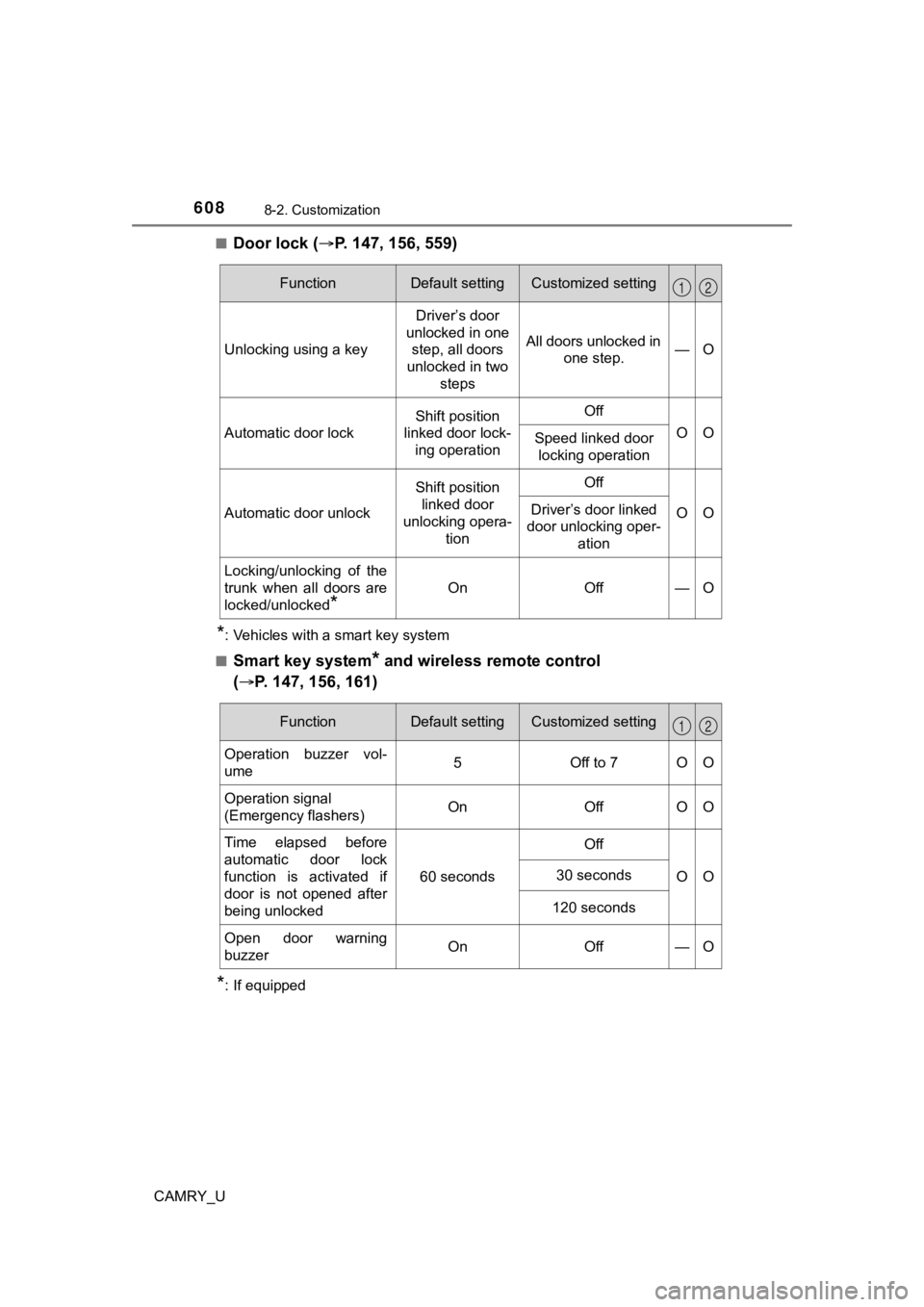
Door lock (
P. 147, 156, 559)
*: Vehicles with a smart key system
■
Smart key system* and wireless remote control
( P. 147, 156, 161)
*: If equipped
FunctionDefault settingCustomized setting
Unlocking using a key Driver’s door
unlocked in one step, all doors
unlocked in two steps All doors unlocked in
one step. —O
Automatic door lock
Shift position
linked door lock-
ing operationOff
OOSpeed linked door locking operation
Automatic door unlock
Shift position linked door
unlocking opera-
tionOff
OODriver’s door linked
door unlocking oper-
ation
Locking/unlocking of the
trunk when all doors are
locked/unlocked
*
OnOff—O
12
FunctionDefault settingCustomized setting
Operation buzzer vol-
ume5Off to 7OO
Operation signal
(Emergency flashers) On Off O O
Time elapsed before
automatic door lock
function is activated if
door is not opened after
being unlocked 60 seconds
Off
OO
30 seconds
120 seconds
Open door warning
buzzerOnOff —O
12
Page 609 of 664
6098-2. Customization
CAMRY_U
8
Vehicle specifications
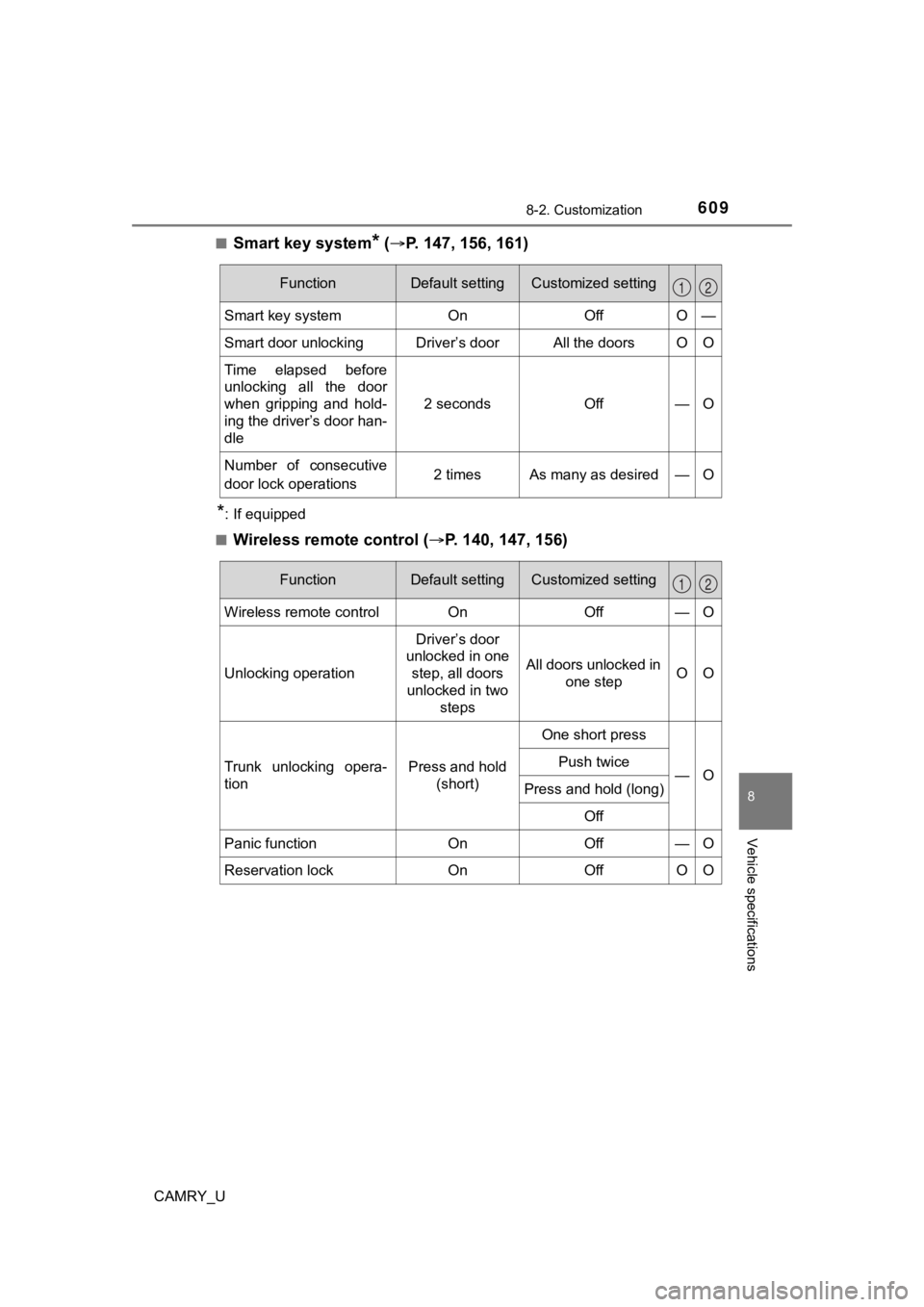
■Smart key system* ( P. 147, 156, 161)
*: If equipped
■
Wireless remote control ( P. 140, 147, 156)
FunctionDefault settingCustomized setting
Smart key systemOnOff O —
Smart door unlockingDriver’s doorAll the doors O O
Time elapsed before
unlocking all the door
when gripping and hold-
ing the driver’s door han-
dle
2 secondsOff—O
Number of consecutive
door lock operations 2 times As many as desired — O
12
FunctionDefault settingCustomized setting
Wireless remote controlOnOff—O
Unlocking operation
Driver’s door
unlocked in one
step, all doors
unlocked in two steps
All doors unlocked in one stepOO
Trunk unlocking opera-
tionPress and hold (short)
One short press
—OPush twice
Press and hold (long)
Off
Panic functionOnOff—O
Reservation lockOnOffOO
12
Page 612 of 664
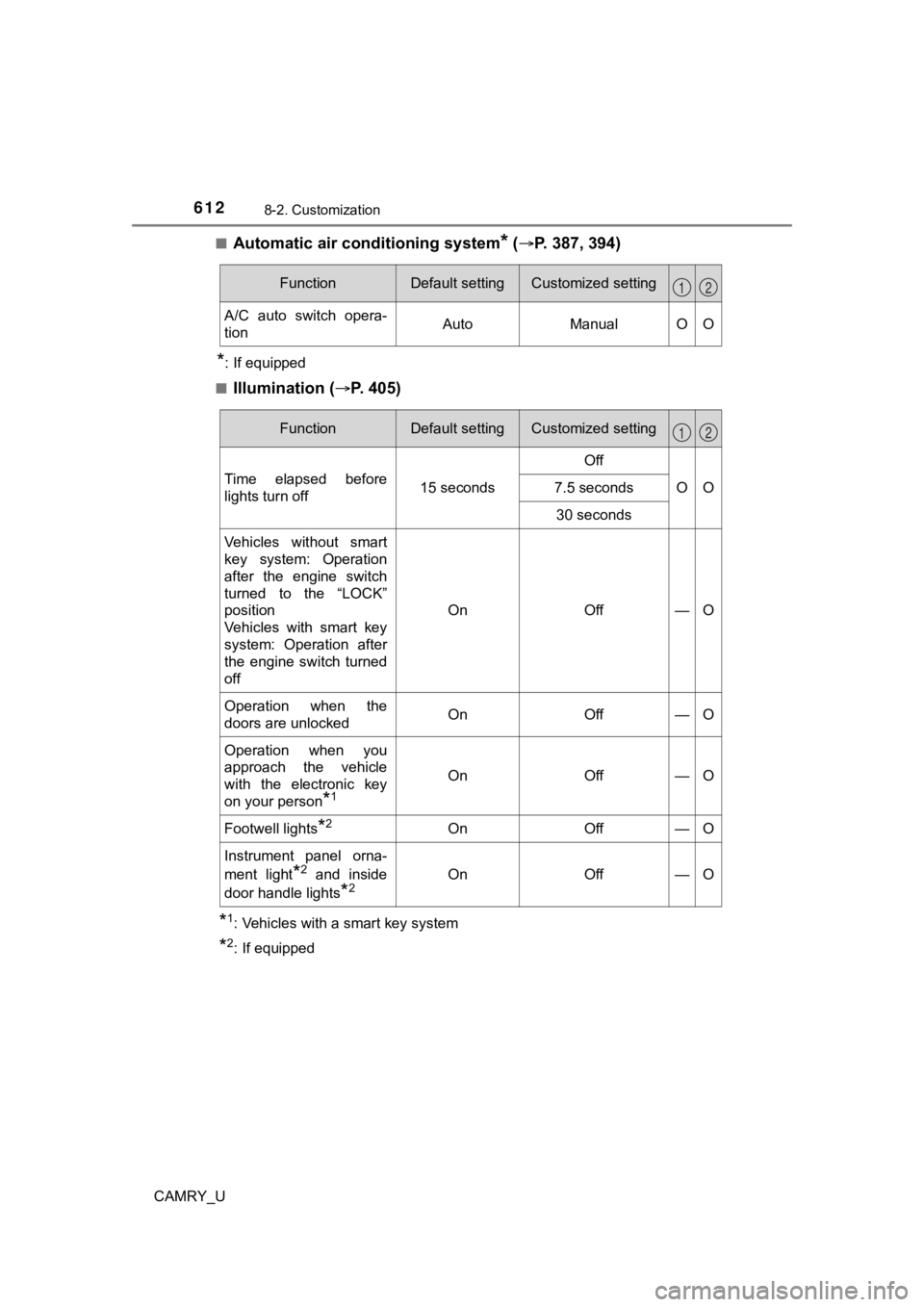
6128-2. Customization
CAMRY_U■
Automatic air c
onditioning system* ( P. 387, 394)
*: If equipped
■
Illumination ( P. 4 0 5 )
*1: Vehicles with a smart key system
*2: If equipped
FunctionDefault settingCustomized setting
A/C auto switch opera-
tionAutoManualOO
12
FunctionDefault settingCustomized setting
Time elapsed before
lights turn off15 seconds
Off
OO7.5 seconds
30 seconds
Vehicles without smart
key system: Operation
after the engine switch
turned to the “LOCK”
position
Vehicles with smart key
system: Operation after
the engine switch turned
off
OnOff—O
Operation when the
doors are unlockedOnOff—O
Operation when you
approach the vehicle
with the electronic key
on your person
*1
OnOff—O
Footwell lights*2OnOff—O
Instrument panel orna-
ment light
*2 and inside
door handle lights
*2OnOff—O
12