audio TOYOTA CAMRY 2023 Owner's Manual
[x] Cancel search | Manufacturer: TOYOTA, Model Year: 2023, Model line: CAMRY, Model: TOYOTA CAMRY 2023Pages: 664, PDF Size: 11.28 MB
Page 446 of 664

4466-1. Maintenance and care
CAMRY_U
NOTICE
■Cleaning detergents
● Do not use the following types of detergent, as they may discolor the vehi-
cle interior or cause streaks or damage to painted surfaces:
• Areas other than the seats and steering wheel: Organic substan ces
such as benzene or gasoline, alkaline or acidic solutions, dye, and
bleach
• Seats: Alkaline or acidic solutions, such as thinner, benzene, and alco-
hol
• Steering wheel: Organic substances, such as thinner, and clean er that
contains alcohol
● Do not use polish wax or polish cleaner. The instrument panel’s or other
interior part’s painted surface may be damaged.
■ Preventing damage to leather surfaces
Observe the following precautions to avoid damage to and deterioration of
leather surfaces:
● Remove any dust or dirt from leather surfaces immediately.
● Do not expose the vehicle to direct sunlight for extended periods of time.
Park the vehicle in the shade, especially during summer.
● Do not place items made of vinyl, plastic, or containing wax on the uphol-
stery, as they may stick to the leather surface if the vehicle interior heats
up significantly.
■ Water on the floor
Do not wash the vehicle floor with water.
Vehicle systems such as the audio system may be damaged if water comes
into contact with electrical components such as the audio system above or
under the floor of the vehicle. Water may also cause the body to rust.
■ When cleaning the inside of the windshield
Do not allow glass cleaner to contact the lens. Also, do not touch the lens.
(P. 249)
■ Cleaning the inside of the rear window
● Do not use glass cleaner to clean the rear window, as this may cause
damage to the rear window defogger heater wires or antenna. Use a cloth
dampened with lukewarm water to gently wipe the window clean. Wipe the
window in strokes running parallel to the heater wires or antenna.
● Be careful not to scratch or damage the heater wires or antenna .
Page 534 of 664

5347-2. Steps to take in an emergency
CAMRY_U■
When the tire pressure warning light comes on
Inspect the tires to check if a tire is punctured.
If a tire is punctured:
P. 543
If none of the tires are punctured:
Turn the engine switch off then turn it to the “ON” position (v ehicle without
a smart key system) or IGNITION ON mode (vehicle with a smart k ey
system). Check if the tire press ure warning light comes on or b links.
If the tire pressure warning light comes on
After the temperature of the tires has lowered sufficiently, ch eck the
inflation pressure of each tire and adjust them to the specifie d level.
If the warning light does not turn off even after several minut es have
elapsed, check that the inflation pressure of each tire is at t he specified
level and perform initialization. (P. 4 7 5 )
If the warning light does not tu rn off several minutes after the initialization
has been performed, have the vehi cle inspected by your Toyota dealer
immediately.
If the tire pressure warning light blinks fo r 1 minute then stays on
There may be a malfunction in the tire pressure warning system. Have
the vehicle inspected by you r Toyota dealer immediately.
■The tire pressure warning light may come on due to natural caus es
The tire pressure warning light may come on due to natural caus es such
as natural air leaks and tire inflation pressure changes caused by tem-
perature. In this case, adjusting the tire inflation pressure w ill turn off the
warning light (afte r a few minutes).
■When a tire is replace d with a spare tire
The compact spare tire is not equipped with a tire pressure war ning valve
and transmitter. If a tire goes flat, the tire pressure warning light will not
turn off even though the flat tire has been replaced with the s pare tire.
Replace the spare tire with the repaired tire and adjust the ti re inflation
pressure. The tire pressure war ning light will go off after a few minutes.
■Conditions that the tire pressure warning system may not functi on
properly
P. 4 8 0
■Warning buzzer
In some cases, the buzzer may not be heard because of noisy pla ce or an
audio sound.
1
2
Page 564 of 664

5647-2. Steps to take in an emergency
CAMRY_U
Start the engine of the second vehicle. Increase the engine speed
slightly and maintain at that lev el for approximately 5 minutes to
recharge the batter y of your vehicle.
Vehicles with a smart key syst em: Open and close any of the doo rs
of your vehicle with the engine switch off.
Vehicles without a smart key system:
Maintain the engine speed of the second vehicle and turn the
engine switch to the “ON” posit ion, then start the vehicle's engine.
Vehicles with a smart key system:
Maintain the engine speed of the second vehicle and turn the
engine switch to IGNITION ON mode, then start the vehicle's
engine.
Once the vehicle’s engine has st arted, remove the jumper cables in
the exact reverse order from which they were connected.
Once the engine starts, have the vehicle inspected at your Toyota
dealer as soon as possible.
■ Starting the engine when t he battery is discharged
The engine cannot be started by push-starting.
■ To prevent battery discharge
●Turn off the headlights and the audio system while the engine is off.
● Turn off any unnecessary electrical components when the vehicle is running
at a low speed for an extended period, such as in heavy traffic .
■ When the battery is removed or discharged
●Information stored in the ECU is cleared. When the battery is d epleted, have
the vehicle inspected at your Toyota dealer.
● Some systems may require initialization. (→P. 614)
■ When removing the battery terminals
When the battery terminals are removed, the information stored in the ECU is
cleared. Before removing the battery terminals, contact your Toyota dealer.
■ Charging the battery
The electricity stored in the battery will discharge gradually even when the
vehicle is not in use, due to natural discharge and the draining effects of cer-
tain electrical appliances. If the vehicle is left for a long t ime, the battery may
discharge, and the engine may be unable to start. (The battery recharges
automatically during driving.)
5
6
7
8
Page 606 of 664
606
CAMRY_U
8-2. Customization
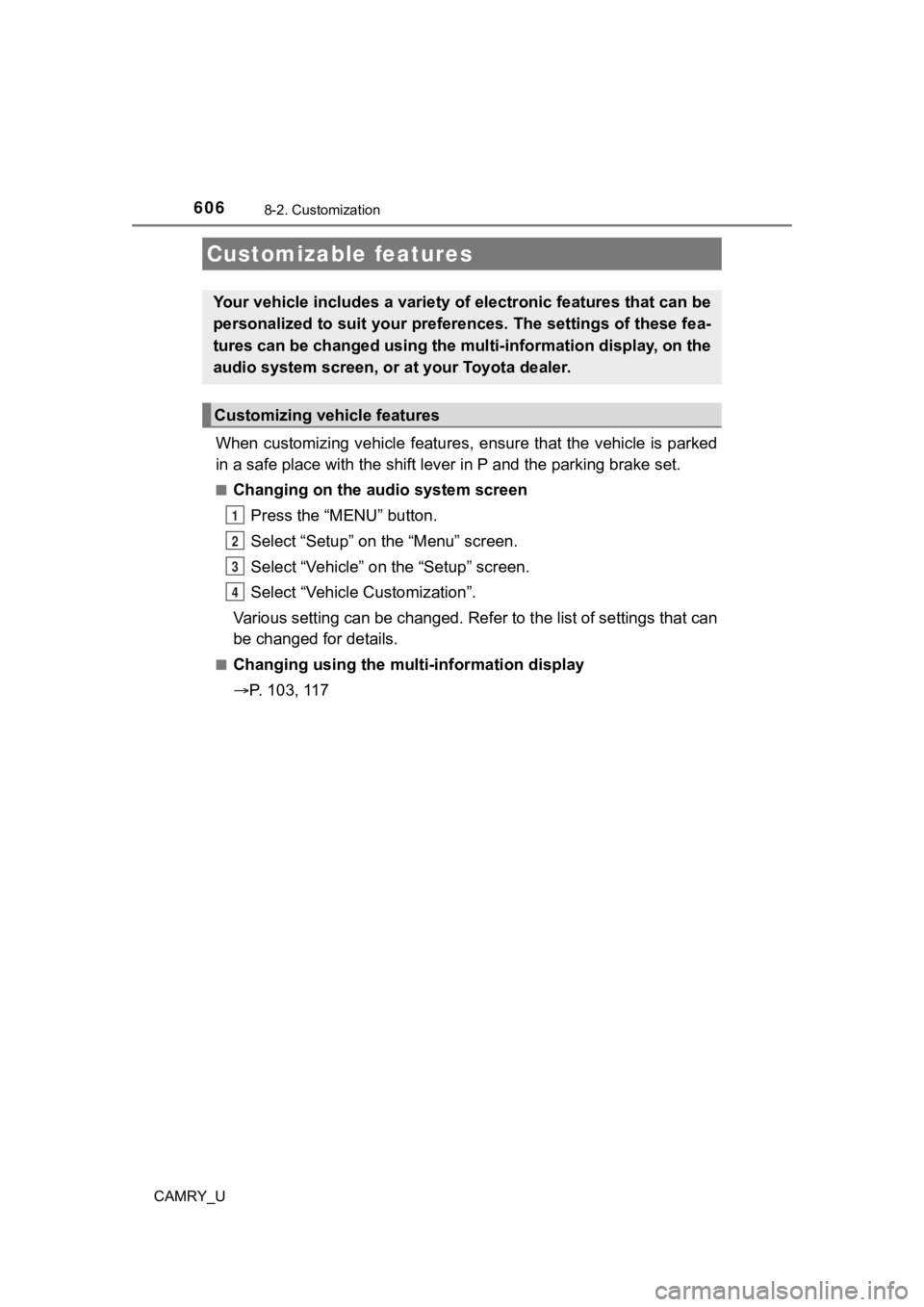
When customizing vehicle features, ensure that the vehicle is parked
in a safe place with the shift le ver in P and the parking brake set.
■Changing on the audio system screen
Press the “MENU” button.
Select “Setup” on the “Menu” screen.
Select “Vehicle” on the “Setup” screen.
Select “Vehicle Customization”.
Various setting can be changed. Refer to the list of settings t hat can
be changed for details.
■Changing using the mult i-information display
P. 103, 117
Customizable features
Your vehicle includes a variety of electronic features that can be
personalized to suit your preferences. The settings of these fe a-
tures can be changed using the multi-information display, on th e
audio system screen, or at your Toyota dealer.
Customizing vehicle features
1
2
3
4
Page 607 of 664
6078-2. Customization
CAMRY_U
8
Vehicle specifications
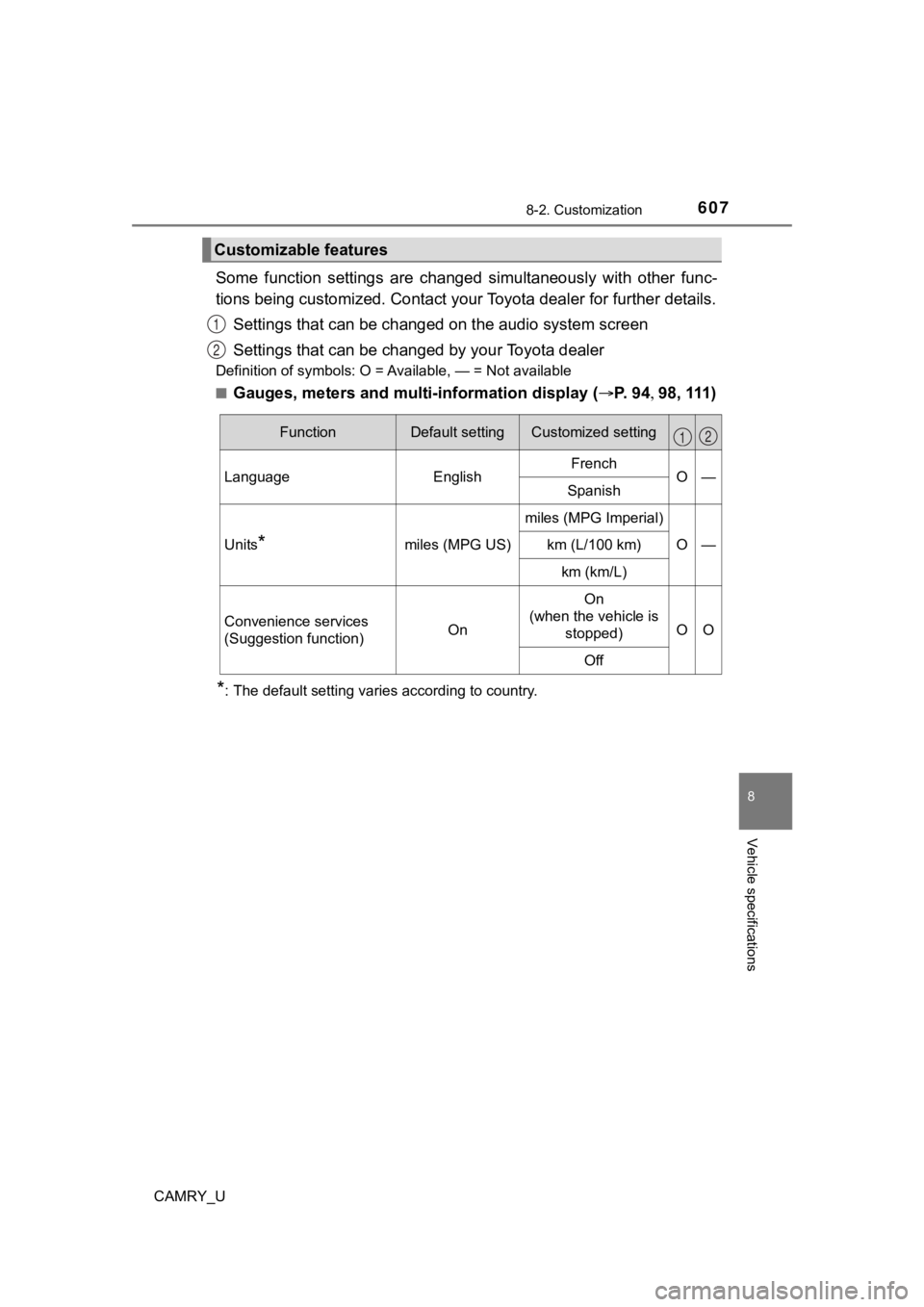
Some function settings are changed simultaneously with other func-
tions being customized. Contact your Toyota dealer for further details.
Settings that can be changed on the audio system screen
Settings that can be chan ged by your Toyota dealer
Definition of symbols: O = Available, — = Not available
■
Gauges, meters and multi-information display ( P. 94 98, 111)
*: The default setting varies according to country.
Customizable features
1
2
FunctionDefault settingCustomized setting
LanguageEnglishFrenchO—Spanish
Units*miles (MPG US)
miles (MPG Imperial)
O—km (L/100 km)
km (km/L)
Convenience services
(Suggestion function)On
On
(when the vehicle is stopped)
OO
Off
12
Page 629 of 664

629
Index
CAMRY_UWhat to do if...
(Troubleshooting) .................... 630
Alphabetical index ..................... 634
For information regarding the equipment listed below, refer to “NAV-
IGATION AND MULTIMEDIA SYSTEM OWNER’S MANUAL”.
• Navigation system
• Audio system
• Rear view monitor system
• Toyota parking assist monitor
• Panoramic view monitor
• Connected Services
Page 635 of 664
635Alphabetical index
CAMRY_U
Alarm .......................................... 82
Anchor brackets ........................ 58
Antennas (smart key system)................ 161
Anti-lock Brake System
(ABS) ...................................... 322 Warning light ......................... 529
Approach warning ........... 299, 315
Armrest ..................................... 430
Assist grips .............................. 430
Audio
*
Audio Plus*
Audio system*
Automatic air
conditioning system ..... 387, 394 Air conditioning filter ............. 492
Automatic High Beam ............. 236
Automatic light control
system .................................... 231
Automatic transmission.......... 217
If the shift lever cannot be shifted from P .... 221
Paddle shift switches ............ 219
S mode ................................. 218
Auxiliary boxes ........................ 413 Back-up lights
Replacing light bulb ...... 507, 512
Wattage ................................ 589
Battery ...................................... 469 Battery checking ................... 469
If the battery is discharged ... 562
Preparing and checking before winter ...................... 377
Replacing.............................. 565
Blind Spot Monitor (BSM) ....... 330 Blind Spot Monitor
function............................... 333
Bluetooth®*
Bottle holders .......................... 411
Brake Brake Hold ............................ 229
Fluid ...................................... 583
Parking brake ............... 224, 225
Warning light......................... 528
Brake assist ............................. 322
Brake Hold ............................... 229
Warning light......................... 529
Brake override system ............ 195
Break-in tips ............................ 196
Brightness control
Instrument panel light control .................................. 95
BSM (Blind Spot Monitor) ....... 330 Blind Spot Monitor function............................... 333
B
*: Refer to the “NAVIGATION AND MULTIMEDIA SYSTEM OWNER’S MANUAL”.
Page 643 of 664
643Alphabetical index
CAMRY_U
Navigation system*
Noise from under vehicle............ 8
Odometer.................................... 94
OilEngine oil .............................. 578
Opener
Fuel filler door ....................... 246
Hood ..................................... 457
Trunk..................................... 156
Outside rear view mirrors ....... 177 Adjusting and folding ............ 177
Blind spot monitor (BSM) ...... 330
Outside rear view mirror defoggers ........... 383, 389, 397
Outside temperature
display ...................................... 94
Overheating.............................. 567
Paddle shift switches .............. 219
Panic mode .............................. 143
Panoramic moon roof ............. 187 Jam protection function......... 188
Operation .............................. 187
Panoramic view monitor
*
Parking brake ................... 224, 225
Parking brake engaged warning buzzer/
message ..................... 224, 228
Warning light ......................... 529
Parking lights ........................... 231
Light switch ........................... 231
Replacing light bulbs..... 503, 512
Wattage ................................ 589 Parking Support Brake
(PKSB).................................... 360
Indicator .................................. 91
Warning light......................... 530
Warning messages ............... 365
Parking Support Brake function (rear-crossing
vehicles)................................. 372 Function ................................ 372
Parking Support Brake function (static objects) ....... 368
Function ................................ 368
PCS (Pre-Collision System).......... 254
Warning light......................... 530
Personal lights......................... 407
Phone switch
*
PKSB (Parking Support Brake)....... 360 Indicator .................................. 91
Warning light......................... 530
Warning messages ............... 365
Power outlet ............................. 417
Power steering
(Electric power steering
system) .................................. 323 Warning light......................... 530
Power windows ....................... 179 Door lock linked window operation ............................ 181
Jam protection function ........ 180
Operation .............................. 179
Window lock switch .............. 179
Pre-Collision System (PCS) ...................................... 254 Warning light......................... 530
Premium Audio
*
N
O
P
*: Refer to the “NAVIGATION AND MULTIMEDIA SYSTEM OWNER’S MANUAL”.
Page 646 of 664

646Alphabetical index
CAMRY_U
Side mirrors ............................. 177Adjusting and folding ............ 177
BSM (Blind Spot Monitor) ..... 330
Side turn signal lights Replacing light bulbs............. 512
Turn signal lever ................... 223
Smart key system .................... 161 Antenna location ................... 161
Entry functions .............. 147, 156
Starting the engine................ 211
Snow tires ................................ 379
Spare tire .................................. 543
Inflation pressure .................. 584
Storage location .................... 544
Spark plug ................................ 580
Specifications .......................... 574
Speedometer .............................. 94
Sport mode............................... 375
Steering lock Column lock release ............. 210
Steering wheel ......................... 173 Adjustment ............................ 173
Audio switches
*
Heated steering wheel .......... 402
Meter control switches .... 99, 113
Stoplights Replacing light bulbs............. 512
Storage feature ........................ 409
Stuck If the vehicle becomes
stuck ................................... 570
Sunshade Panoramic moon roof ........... 187
Roof ...................................... 184
Sun visors ................................ 416 Switches
Audio remote control
switches
*
Automatic High Beam switch ................................. 236
Brake hold switch ................. 229
Cruise control switch ......................... 290, 306
Door lock switches................ 151
Driving mode select switches ............................. 375
Emergency flasher switch..... 516
Engine switch ............... 209, 211
Fuel door opener switch ....... 246
Garage door opener switches ............................. 432
Heated steering wheel .......... 402
Ignition switch ............... 209, 211
Light switch ........................... 231
LTA (Lane Tracing Assist)
switch ................................. 278
Meter control switches .... 99, 113
Moon roof switches............... 183
“ODO/TRIP” switch ......... 99, 113
Outside rear view mirror switches ............................. 177
Paddle shift switches ............ 219
Panoramic moon roof
switches ............................. 187
Parking brake switch ............ 225
Phone switch
*
Power window switches........ 179
Rear window and outside
rear view mirror
defoggers
switch ................. 383, 389, 397