instrument cluster TOYOTA CAMRY 2023 Workshop Manual
[x] Cancel search | Manufacturer: TOYOTA, Model Year: 2023, Model line: CAMRY, Model: TOYOTA CAMRY 2023Pages: 664, PDF Size: 11.28 MB
Page 135 of 664
1352. Instrument cluster
2
Instrument cluster
CAMRY_U
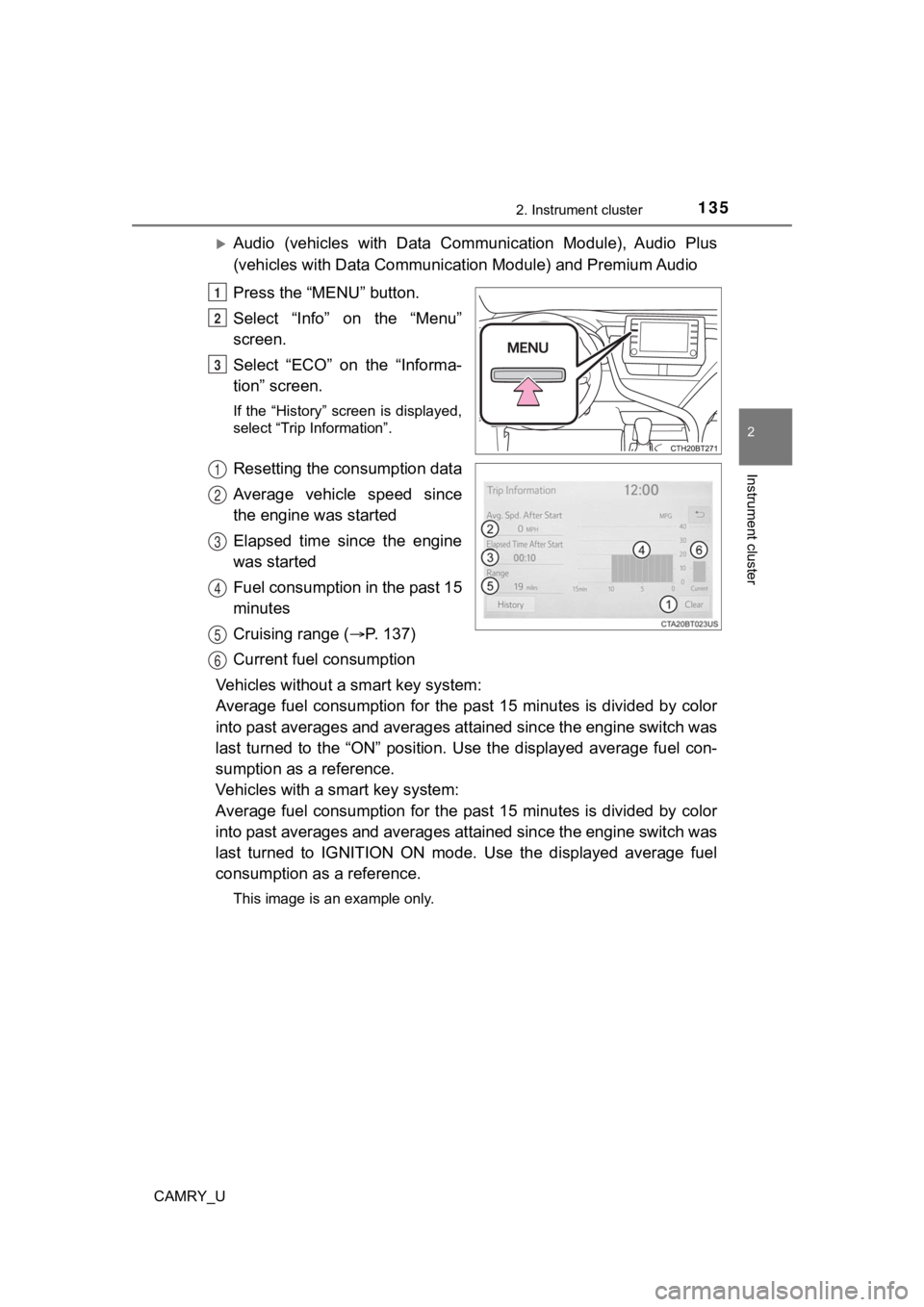
Audio (vehicles with Data Communication Module), Audio Plus
(vehicles with Data Communicat ion Module) and Premium Audio
Press the “MENU” button.
Select “Info” on the “Menu”
screen.
Select “ECO” on the “Informa-
tion” screen.
If the “History” screen is displayed,
select “Trip Information”.
Resetting the consumption data
Average vehicle speed since
the engine was started
Elapsed time since the engine
was started
Fuel consumption in the past 15
minutes
Cruising range ( P. 137)
Current fuel consumption
Vehicles without a smart key system:
Average fuel consumption for the past 15 minutes is divided by color
into past averages and averages attained since the engine switch was
last turned to the “ON” position. Use the displayed average fue l con-
sumption as a reference.
Vehicles with a smart key system:
Average fuel consumption for the past 15 minutes is divided by color
into past averages and averages attained since the engine switch was
last turned to IGNITION ON mode. Use the displayed average fuel
consumption as a reference.
This image is an example only.
1
2
3
1
2
3
4
5
6
Page 136 of 664
1362. Instrument cluster
CAMRY_U
Audio (vehicles without Data Communication Module) or Audio
Plus (vehicles without Data Communication Module)
Press the “MENU” button.
Select “Info” on t he “Menu” screen.
If the “Trip Information” screen is displayed, select “History” .
Audio (vehicles with Data Communication Module), Audio Plus
(vehicles with Data Communicat ion Module) and Premium Audio
Press the “MENU” button.
Select “Info” on t he “Menu” screen.
Select “ECO” on the “Information” screen.
If the “Trip Information” screen is displayed, select “History” .
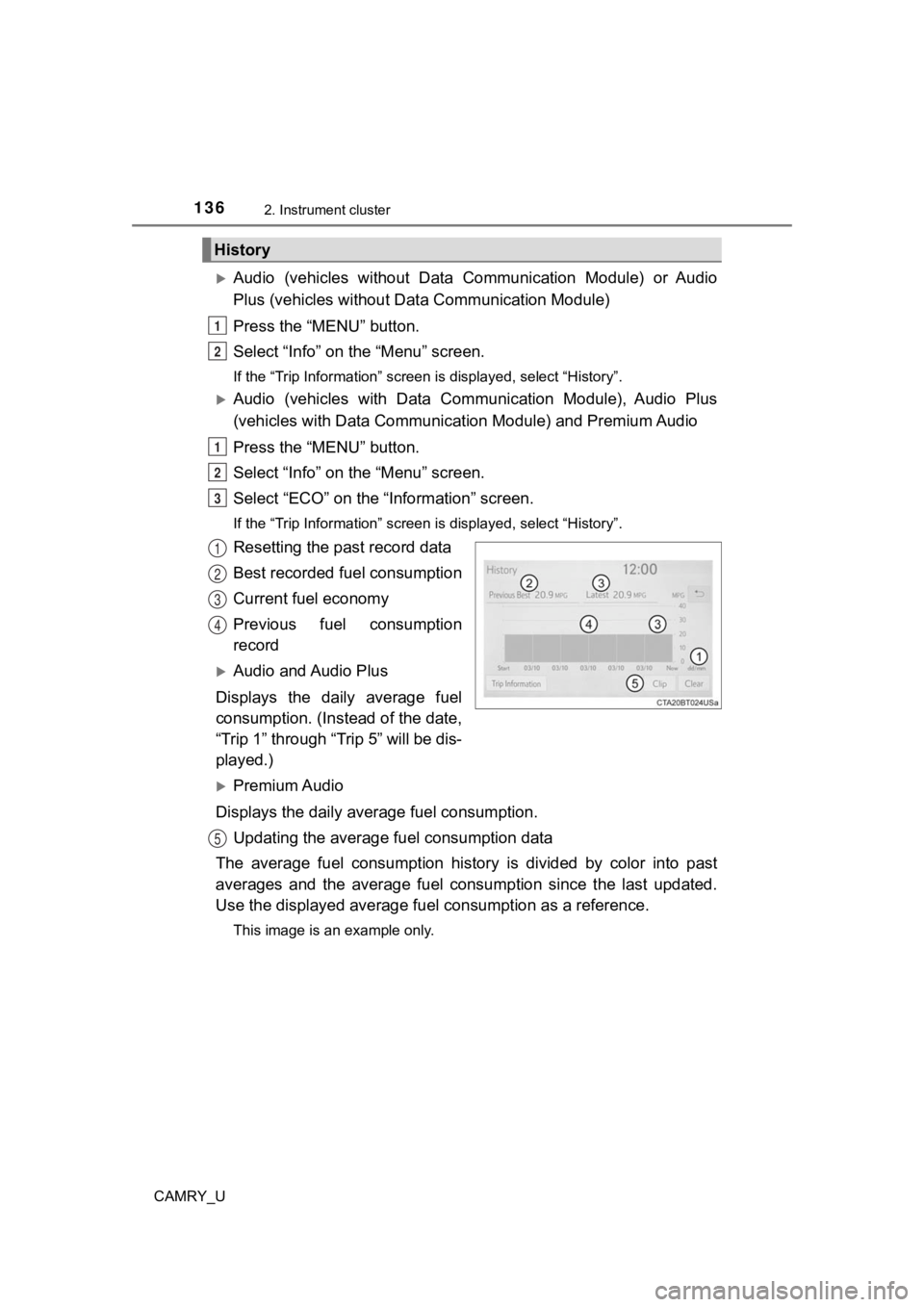
Resetting the past record data
Best recorded fuel consumption
Current fuel economy
Previous fuel consumption
record
Audio and Audio Plus
Displays the daily average fuel
consumption. (In stead of the date,
“Trip 1” through “Trip 5” will be dis-
played.)
Premium Audio
Displays the daily average fuel consumption. Updating the average fuel consumption data
The average fuel consumption histo ry is divided by color into past
averages and the average fuel co nsumption since the last updated.
Use the displayed average fuel consumption as a reference.
This image is an example only.
History
1
2
1
2
3
1
2
3
4
5
Page 137 of 664

1372. Instrument cluster
2
Instrument cluster
CAMRY_U
■Updating the past record data
Update the average fuel consumption by selecting “Clip” to meas ure the cur-
rent fuel consumption again.
■ Resetting the data
The fuel consumption data can be deleted by selecting “Clear”.
■ Cruising range
Displays the estimated maximum distance that can be driven with the quan-
tity of fuel remaining.
This distance is computed based on your average fuel consumptio n.
As a result, the actual distance that can be driven may differ from that dis-
played.
Page 138 of 664

1382. Instrument cluster
CAMRY_U
Page 181 of 664
1813-5. Opening and closing the windows
3
Operation of each component
CAMRY_U●
If the door window cannot be opened and closed even when perfor ming the
above operations, perform the following procedure for function initialization.
Vehicles without a smart key system:
Turn the engine switch to the “ON” position.
Vehicles with a smart key system:
Turn the engine switch to IGNITION ON mode.
Pull and hold the power window switch in the one-touch closing direction
and completely close the door window.
Release the power window switch for a moment, resume pulling the
switch in the one-touch closing direction, and hold it there for approxi-
mately 6 seconds or more.
Press and hold the power window switch in the one-touch opening direc-
tion. After the door window is completely opened, continue hold ing the
switch for an additional 1 second or more.
Release the power window switch for a moment, resume pushing th e
switch in the one-touch opening direction, and hold it there fo r approxi-
mately 4 seconds or more.
Pull and hold the power window switch in the one-touch closing direction
again. After the door window is completely closed, continue holding the
switch for a further 1 second or more.
If you release the switch while the window is moving, start aga in from the
beginning.
If the window reverses and cannot be fully closed or opened, have the vehicle
inspected by your Toyota dealer.
■ Door lock linked window operation
●Vehicles without a smart key system: The power windows can be o pened
and closed using the key.
* ( P. 149)
Vehicles with a smart key system: The power windows can be open ed and
closed using the mechanical key.
* ( P. 559)
● The power windows can be opened using the wireless remote control.
*
(P. 148)
*: These settings must be customized at your Toyota dealer.
■ Alarm
The alarm may be triggered if the alarm is set and a power wind ow is closed
using the door lock linked power window operation function. ( P. 83)
■ Power windows open warning buzzer
A buzzer sounds and a message is shown on the multi-information display in
the instrument cluster when the engine switch is turned off and the driver’s
door is opened with the power windows open.
■ Customization
Some functions can be customized. ( P. 606)
1
2
3
4
5
6
Page 185 of 664
1853-5. Opening and closing the windows
3
Operation of each component
CAMRY_U■
When the moon roof does not close normally
Perform the following procedure:
●If the moon roof closes but then re-opens slightly
Stop the vehicle.
Press and hold the “CLOSE” switch.
*1
The moon roof will close, reopen and pause for approximately 10 sec-
onds.
*2 Then it will close again, tilt up and pause for approximately 1 sec-
ond. Finally, it will tilt down, open and close.
Check to make sure that the moon roof is completely closed and then
release the switch.
● If the moon roof tilts down but then tilts back up
Stop the vehicle.
Press and hold the “UP” switch
*1 until the moon roof moves into the tilt
up position and stops.
Release the “UP” switch once and then press and hold the “UP” s witch
again.
*1
The moon roof will pause for approximately 10 seconds in the tilt up posi-
tion.
*2 Then it will adjust slightly and pause for approximately 1 second.
Finally, it will tilt down, open and close.
Check to make sure that the moon roof is completely closed and then
release the switch.
*1: If the switch is released at the incorrect time, the procedure will have to
be performed again from the beginning.
*2: If the switch is released after the above mentioned 10 second pause, automatic operation will be disabled. In that case, press and h old the
“CLOSE” or “UP” switch, and the moon roof will tilt up and paus e for
approximately 1 second. Then it will tilt down, open and close. Check to
make sure that the moon roof is completely closed and then release the
switch.
If the moon roof does not fully close even after performing the above proce-
dure correctly, have the vehicle inspected by your Toyota deale r.
■ Alarm
The alarm may be triggered if the alarm is set and the moon roo f is closed
using the door lock linked moon roof operation function. ( P. 83)
■ Moon roof open warning buzzer
A buzzer sounds and a message is shown on the multi-information display in
the instrument cluster when the engine switch is turned off and the driver's
door is opened with the moon roof open.
■ Customization
Some functions can be customized. ( P. 606)
1
2
3
1
2
3
4
Page 189 of 664
1893-5. Opening and closing the windows
3
Operation of each component
CAMRY_U■
Closing both the panoramic moon roof and electronic sunshade
Slide the
switch forward.
The electronic sunshade will close to the half-open position an d pause. The
panoramic moon roof will then fully close. Then the electronic sunshade will
fully close.
■ When the panoramic moon roof or electronic sunshade does not close
normally
Perform the following procedure:
Stop the vehicle.
Turn the engine switch to IGNITION ON mode.
Slide and hold the switch or switch forward. Continue pressing
the switch for approximately 10 seconds after the panoramic moo n roof or
electronic sunshade closes and reopens. The panoramic moon roof and
electronic sunshade will start to close.
*
Check that the panoramic moon roof and electronic sunshade are fully
closed and release the switch.
*: If the switch is released at the incorrect time, the procedure will have to be
performed again from the beginning.
If the panoramic moon roof or electronic sunshade does not fully close even
after performing the above procedure correctly, have the vehicle inspected by
your Toyota dealer.
■ Alarm
The alarm may be triggered if the alarm is set and the panorami c moon roof is
closed using the door lock linked panoramic moon roof operation function.
( P. 83)
■ Panoramic moon roof open warning buzzer
A buzzer sounds and a message is shown on the multi-information display in
the instrument cluster when the engine switch is turned off and the driver’s
door is opened with the panoramic moon roof open.
■ Customization
Some functions can be customized. ( P. 606)
1
2
3
4
Page 375 of 664
3754-5. Using the driving support systems
4
Driving
CAMRY_U
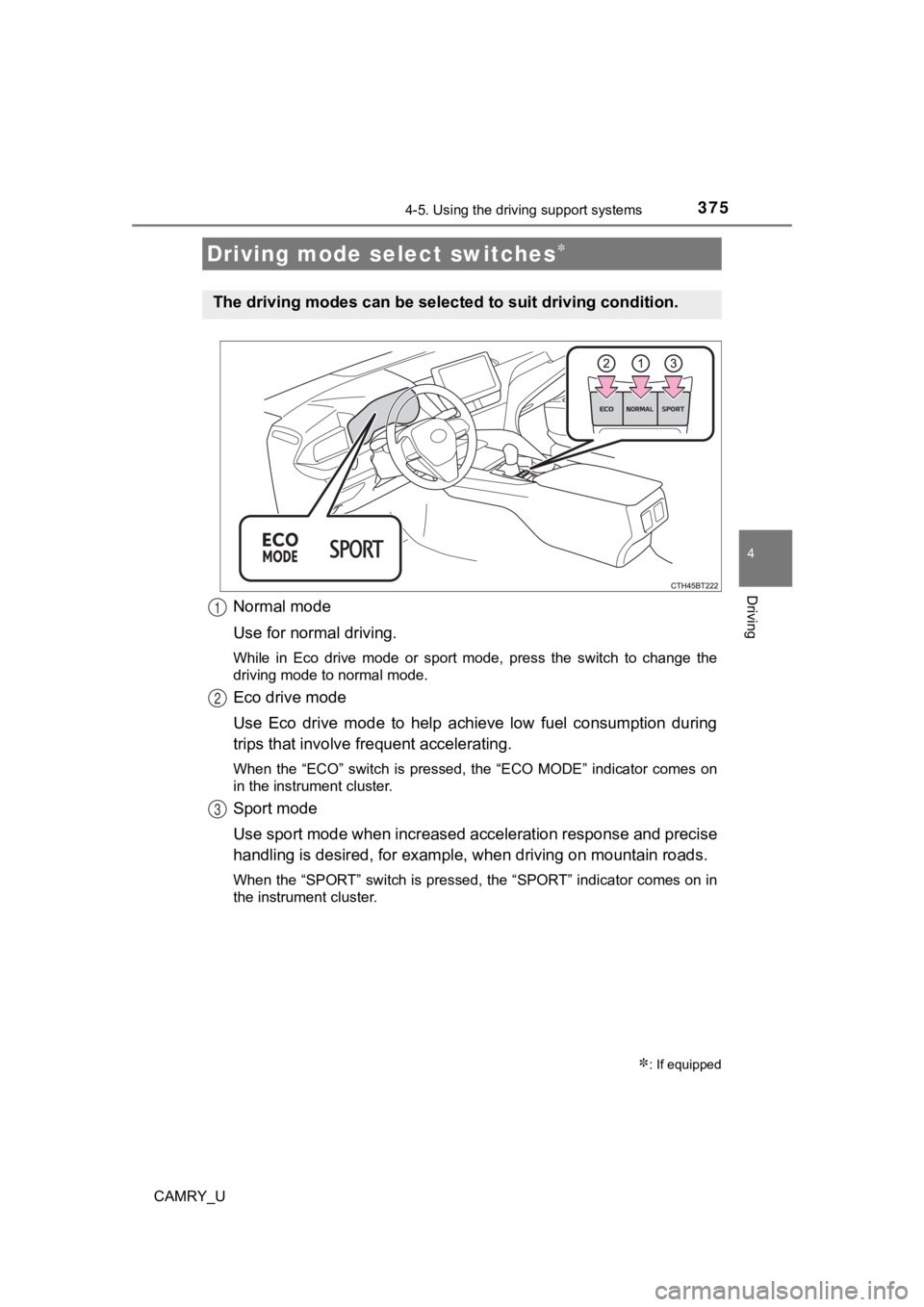
Normal mode
Use for normal driving.
While in Eco drive mode or sport mode, press the switch to change the
driving mode to normal mode.
Eco drive mode
Use Eco drive mode to help achieve low fuel consumption during
trips that involve frequent accelerating.
When the “ECO” switch is pressed, the “ECO MODE” indicator comes on
in the instrument cluster.
Sport mode
Use sport mode when increased acceleration response and precise
handling is desired, for exampl e, when driving on mountain road s.
When the “SPORT” switch is pressed, the “SPORT” indicator comes on in
the instrument cluster.
Driving mode select switches
: If equipped
The driving modes can be select ed to suit driving condition.
1
2
3
Page 591 of 664
5918-1. Specifications
8
Vehicle specifications
CAMRY_U■
Recommendation of the use of low emissions gasoline
Gasolines containing oxygenates such as ethers and ethanol, as well as
reformulated gasolines, are available in some cities. These fue ls are typically
acceptable for use, providing they meet other fuel requirements .
Toyota recommends these fuels, since the formulations allow for reduced
vehicle emissions.
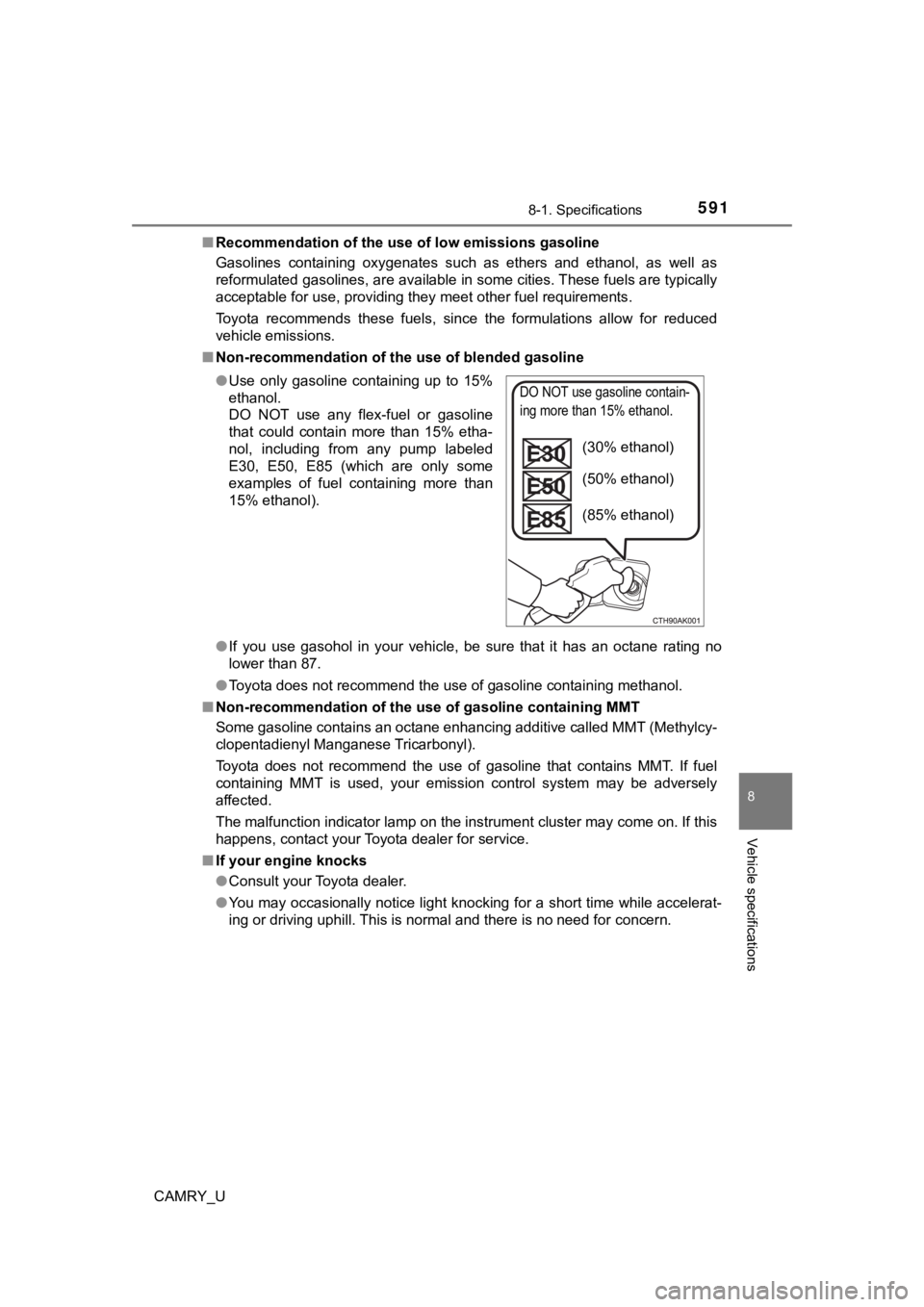
■ Non-recommendation of the use of blended gasoline
●If you use gasohol in your vehicle, be sure that it has an octa ne rating no
lower than 87.
● Toyota does not recommend the use of gasoline containing methan ol.
■ Non-recommendation of the use of gasoline containing MMT
Some gasoline contains an octane enhancing additive called MMT (Methylcy-
clopentadienyl Manganese Tricarbonyl).
Toyota does not recommend the use of gasoline that contains MMT. If fuel
containing MMT is used, your emission control system may be adversely
affected.
The malfunction indicator lamp on the instrument cluster may come on. If this
happens, contact your Toyota dealer for service.
■ If your engine knocks
●Consult your Toyota dealer.
● You may occasionally notice light knocking for a short time whi le accelerat-
ing or driving uphill. This is normal and there is no need for concern.
●
Use only gasoline containing up to 15%
ethanol.
DO NOT use any flex-fuel or gasoline
that could contain more than 15% etha-
nol, including from any pump labeled
E30, E50, E85 (which are only some
examples of fuel containing more than
15% ethanol).
DO NOT use gasoline contain-
ing more than 15% ethanol.
(30% ethanol)
(50% ethanol)
(85% ethanol)