Switches TOYOTA CAMRY 2023 Owners Manual
[x] Cancel search | Manufacturer: TOYOTA, Model Year: 2023, Model line: CAMRY, Model: TOYOTA CAMRY 2023Pages: 664, PDF Size: 11.28 MB
Page 4 of 664

TABLE OF CONTENTS4
CAMRY_U4-5. Using the driving
support systems
Toyota Safety Sense 2.5+ ...................... 248
PCS (Pre-Collision System) ........................... 254
LTA (Lane Tracing Assist) ............................. 270
RSA (Road Sign Assist) .... 285
Dynamic radar cruise control with full-speed
range ............................... 290
Dynamic radar cruise control ............................. 306
Driving assist systems....... 322
BSM (Blind Spot Monitor) ........................... 330
Intuitive parking assist ....... 336
RCTA (Rear Cross Traffic Alert) .................... 345
RCD (Rear Camera Detection)........................ 354
PKSB (Parking Support Brake) ............................. 360
Parking Support Brake function (static
objects) ........................... 368
Parking Support Brake function (rear-crossing
vehicles) .......................... 372
Driving mode select switches .......................... 375
4-6. Driving tips Winter driving tips.............. 377 5-1. Using the air conditioning
system and defogger
Manual air conditioning system ............................. 382
Automatic air conditioning system (without “SYNC”
button) ............................. 387
Automatic air conditioning system (with “SYNC”
button) ............................. 394
Heated steering wheel/ seat heaters/
seat ventilators ................ 402
5-2. Using the interior lights Interior lights list................. 405
• Interior lights.................. 406
• Personal lights............... 407
5-3. Using the storage features
List of storage features ...... 409
• Glove box ...................... 410
• Console box .................. 410
• Coin holder .................... 410
• Bottle holders ................ 411
• Cup holders ................... 412
• Auxiliary boxes .............. 413
• Open tray ...................... 414
Trunk features ................... 415
5Interior features
Page 14 of 664
14
CAMRY_U
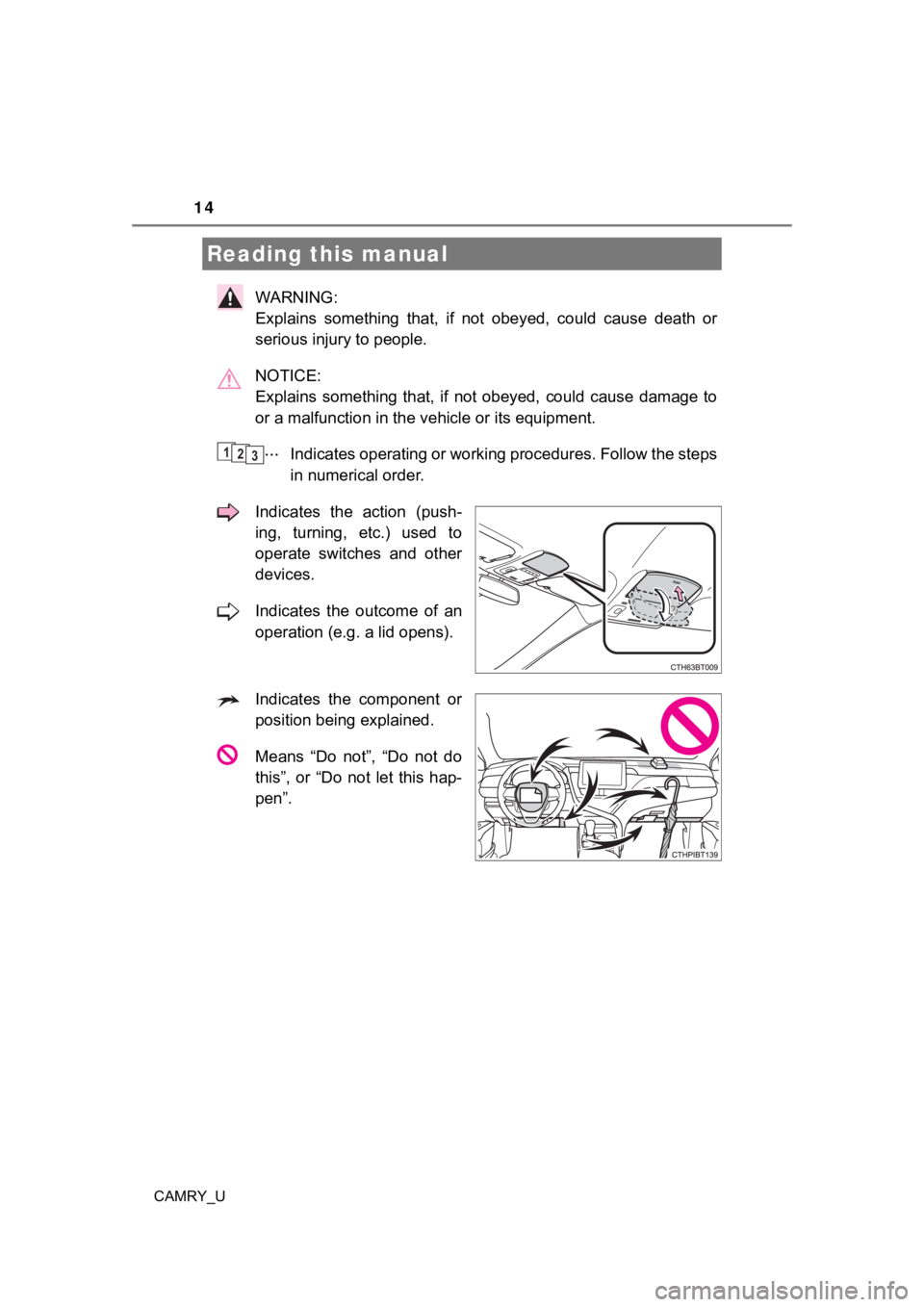
WARNING:
Explains something that, if not obeyed, could cause death or
serious injury to people.
NOTICE:
Explains something that, if not obeyed, could cause damage to
or a malfunction in the vehicle or its equipment.
Indicates operating or working procedures. Follow the steps
in numerical order.
Indicates the action (push-
ing, turning, etc.) used to
operate switches and other
devices.
Indicates the outcome of an
operation (e.g. a lid opens).
Indicates the component or
position being explained.
Means “Do not”, “Do not do
this”, or “Do not let this hap-
pen”.
Reading this manual
123
Page 20 of 664
20Pictorial index
CAMRY_U
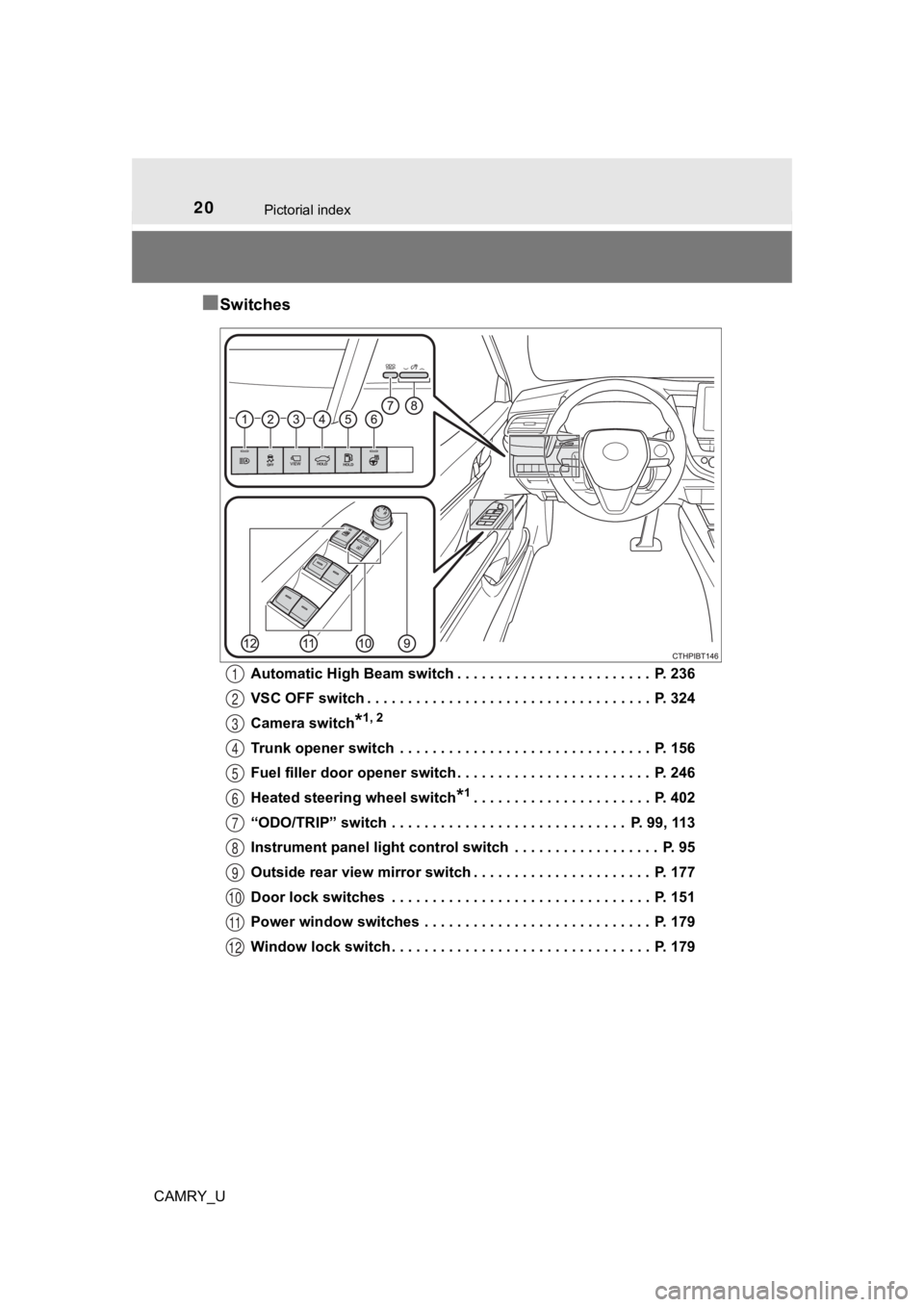
■Switches
Automatic High Beam switch . . . . . . . . . . . . . . . . . . . . . . . . P. 236
VSC OFF switch . . . . . . . . . . . . . . . . . . . . . . . . . . . . . . . . . . . P. 324
Camera switch
*1, 2
Trunk opener switch . . . . . . . . . . . . . . . . . . . . . . . . . . . . . . . P. 156
Fuel filler door opener switch . . . . . . . . . . . . . . . . . . . . . . . . P. 246
Heated steering wheel switch
*1. . . . . . . . . . . . . . . . . . . . . . P. 402
“ODO/TRIP” switch . . . . . . . . . . . . . . . . . . . . . . . . . . . . . P. 99, 113
Instrument panel light control switch . . . . . . . . . . . . . . . . . . P. 95
Outside rear view mirror switch . . . . . . . . . . . . . . . . . . . . . . P. 177
Door lock switches . . . . . . . . . . . . . . . . . . . . . . . . . . . . . . . . P. 151
Power window switches . . . . . . . . . . . . . . . . . . . . . . . . . . . . P. 179
Window lock switch . . . . . . . . . . . . . . . . . . . . . . . . . . . . . . . . P. 179
1
2
3
4
5
6
7
8
9
10
11
12
Page 21 of 664
21Pictorial index
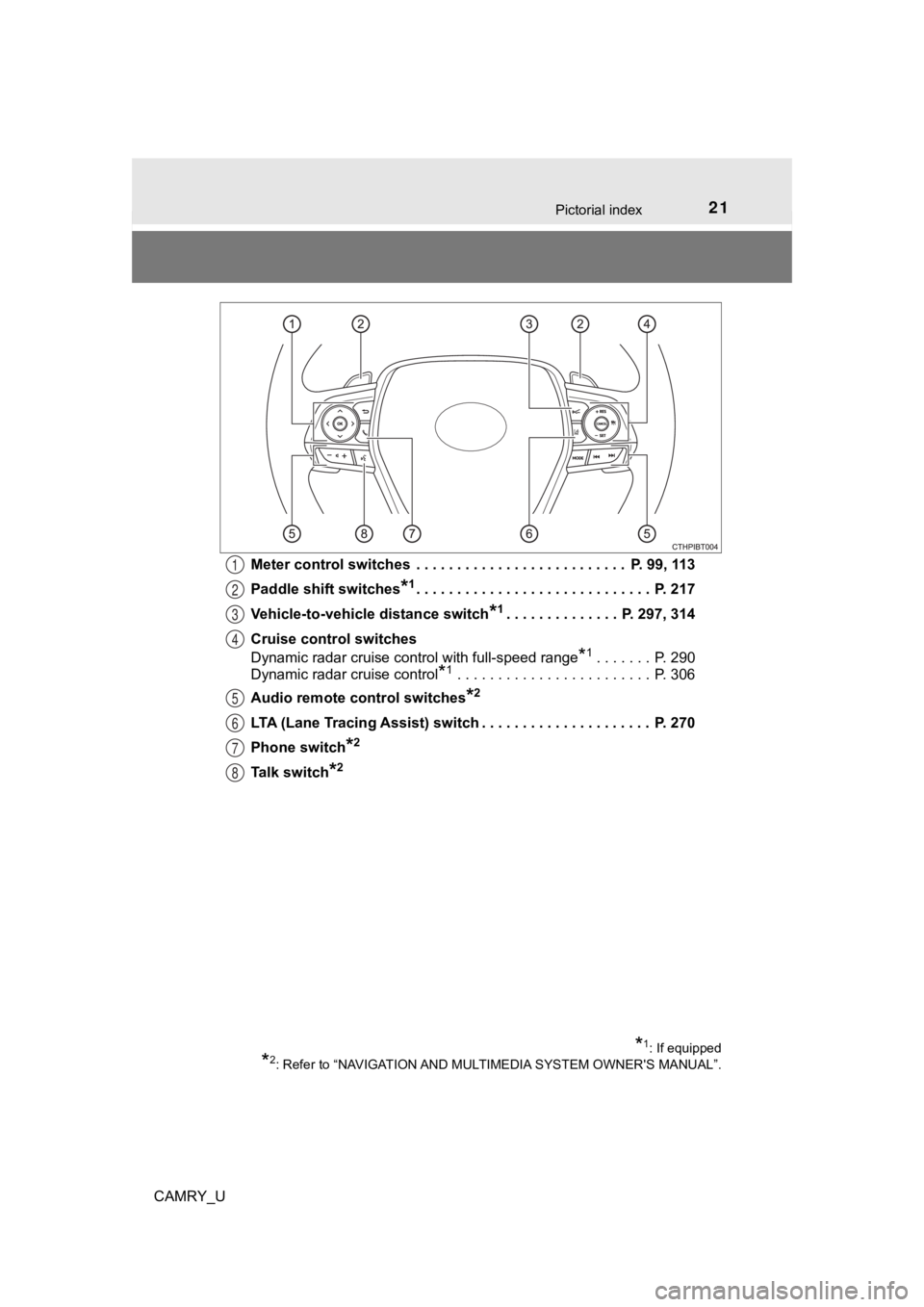
CAMRY_UMeter control switches . . . . . . . . . . . . . . . . . . . . . . . . . . P. 99, 113
Paddle shift switches
*1. . . . . . . . . . . . . . . . . . . . . . . . . . . . . P. 21
7
Vehicle-to-vehicle distance switch
*1. . . . . . . . . . . . . . P. 297, 314
Cruise control switches
Dynamic radar cruise control with full-speed range
*1. . . . . . . P. 290
Dynamic radar cruise control
*1 . . . . . . . . . . . . . . . . . . . . . . . . P. 306
Audio remote control switches
*2
LTA (Lane Tracing Assist) switch . . . . . . . . . . . . . . . . . . . . . P. 270
Phone switch
*2
Talk switch*2
1
2
3
4
5
6
7
8
*1: If equipped
*2: Refer to “NAVIGATION AND MULTIMEDIA SYSTEM OWNER'S MANUAL”.
Page 22 of 664
22Pictorial index
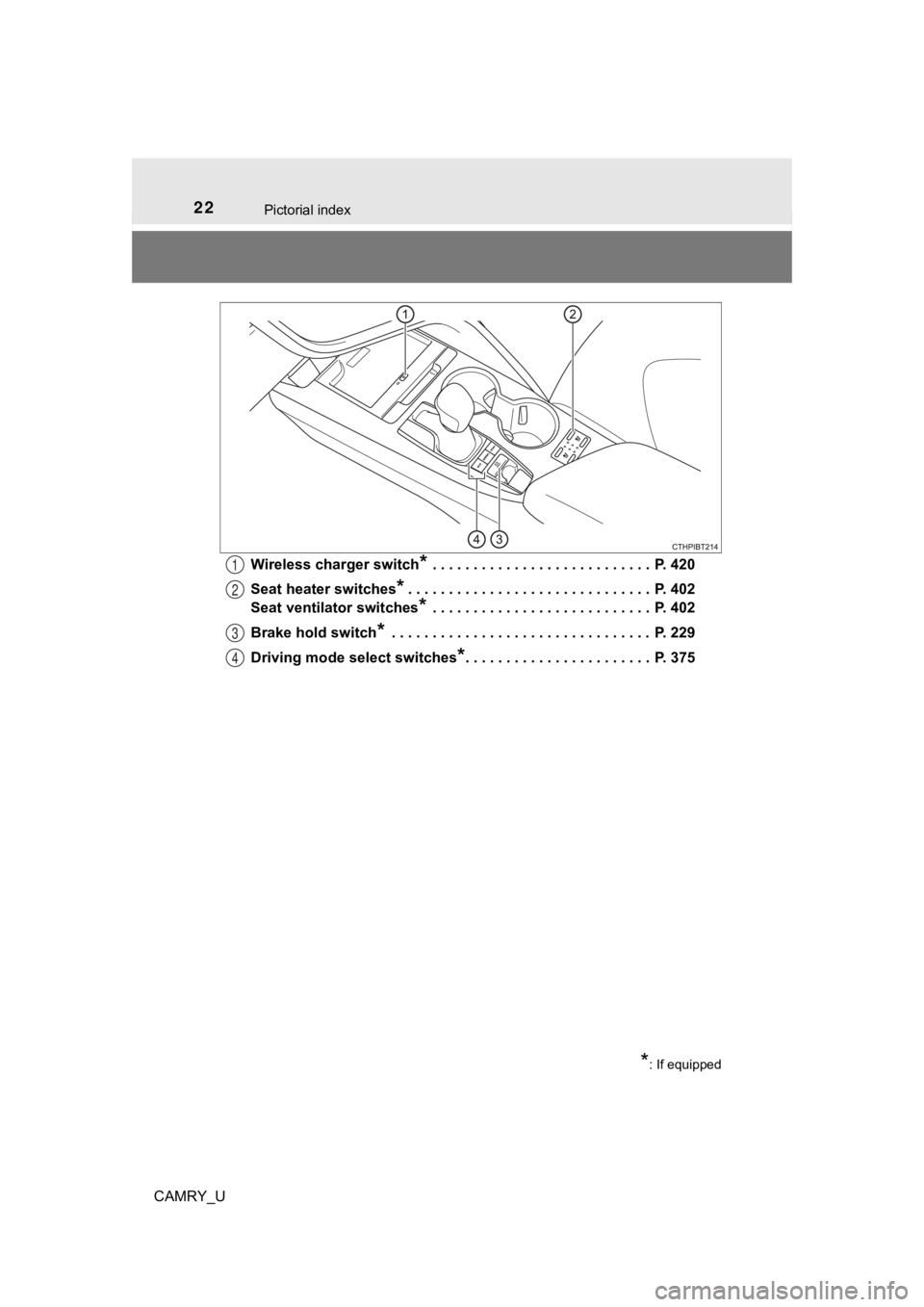
CAMRY_UWireless charger switch
* . . . . . . . . . . . . . . . . . . . . . . . . . . . P. 420
Seat heater switches
*. . . . . . . . . . . . . . . . . . . . . . . . . . . . . . P. 402
Seat ventilator switches
* . . . . . . . . . . . . . . . . . . . . . . . . . . . P. 402
Brake hold switch
* . . . . . . . . . . . . . . . . . . . . . . . . . . . . . . . . P. 229
Driving mode select switches
*. . . . . . . . . . . . . . . . . . . . . . . P. 375
1
2
3
4
*: If equipped
Page 24 of 664
24Pictorial index
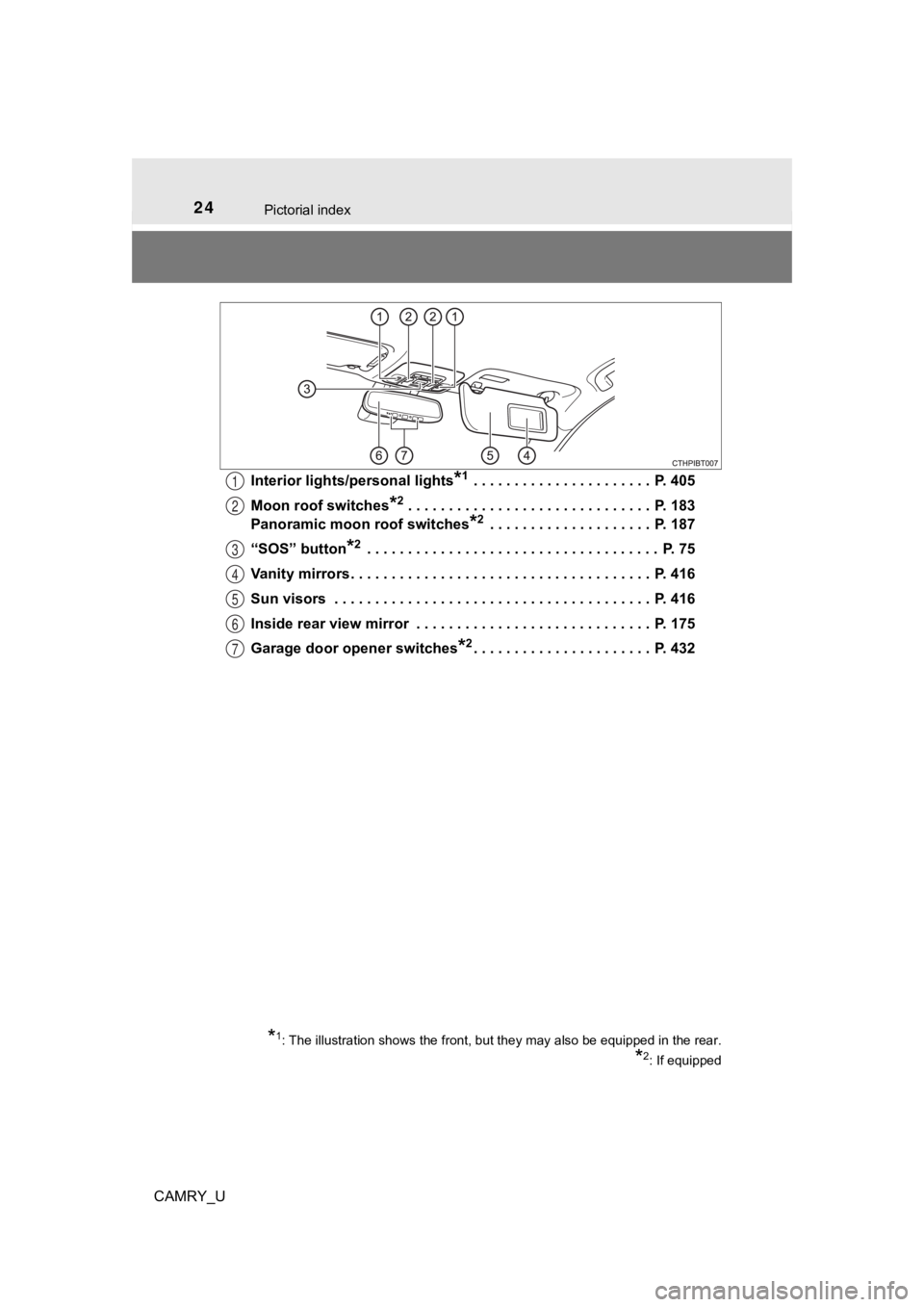
CAMRY_UInterior lights/personal lights
*1 . . . . . . . . . . . . . . . . . . . . . . P. 405
Moon roof switches
*2 . . . . . . . . . . . . . . . . . . . . . . . . . . . . . . P. 183
Panoramic moon roof switches
*2 . . . . . . . . . . . . . . . . . . . . P. 187
“SOS” button
*2 . . . . . . . . . . . . . . . . . . . . . . . . . . . . . . . . . . . . P. 75
Vanity mirrors . . . . . . . . . . . . . . . . . . . . . . . . . . . . . . . . . . . . . P. 416
Sun visors . . . . . . . . . . . . . . . . . . . . . . . . . . . . . . . . . . . . . . . P. 416
Inside rear view mirror . . . . . . . . . . . . . . . . . . . . . . . . . . . . . P. 175
Garage door opener switches
*2. . . . . . . . . . . . . . . . . . . . . . P. 432
1
2
3
4
5
6
7
*1: The illustration shows the front, but they may also be equipp ed in the rear.
*2: If equipped
Page 99 of 664
992. Instrument cluster
2
Instrument cluster
CAMRY_U
RSA (Road Sign Assist) (if equipped) (P. 285)
“ODO/TRIP” switch ( P. 9 9 )
Meter control switches ( P. 99)
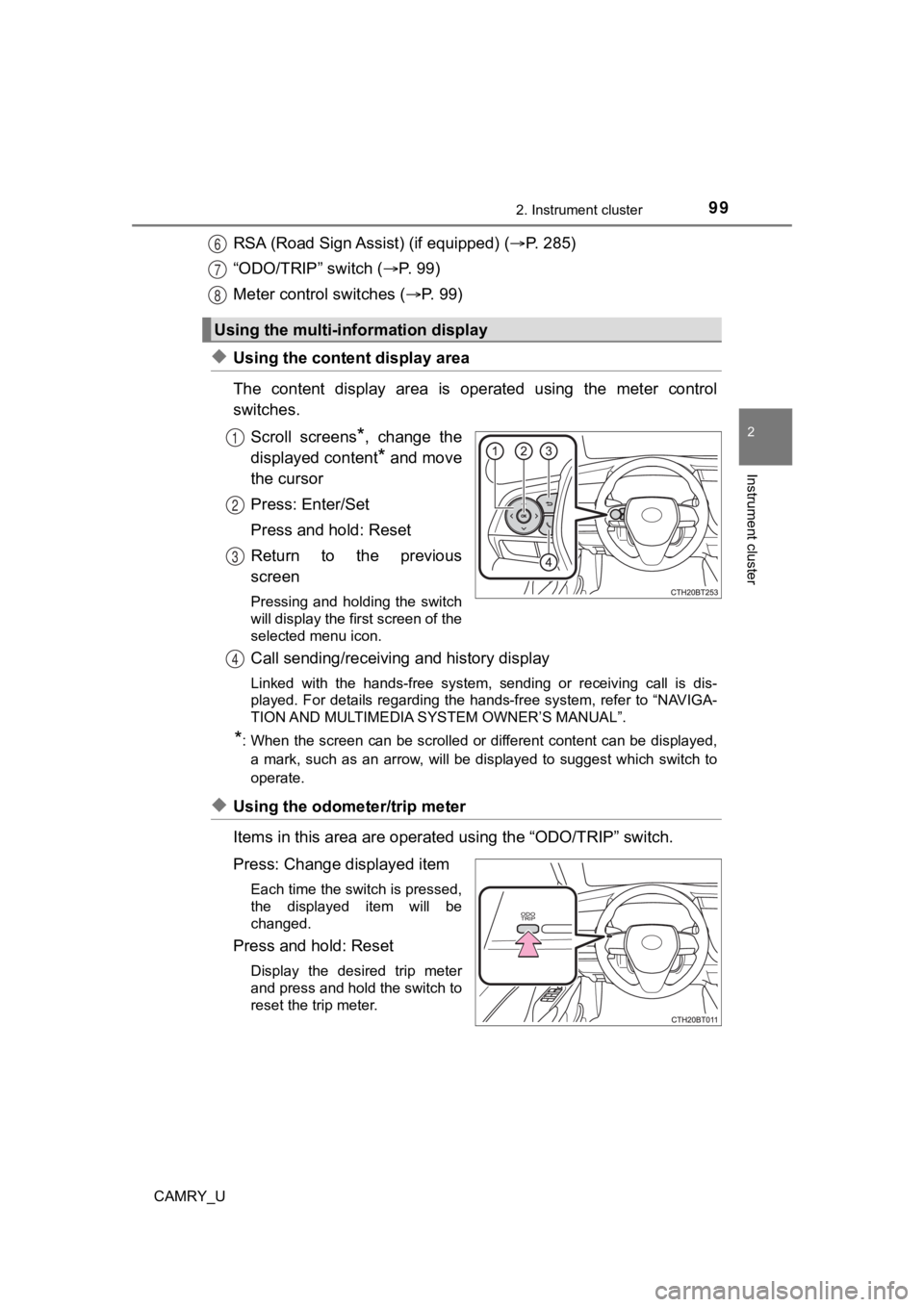
◆Using the content display area
The content display area is operated using the meter control
switches.
Scroll screens
*, change the
displayed content
* and move
the cursor
Press: Enter/Set
Press and hold: Reset
Return to the previous
screen
Pressing and holding the switch
will display the first screen of the
selected menu icon.
Call sending/receiving and history display
Linked with the hands-free system, sending or receiving call is dis-
played. For details regarding the hands-free system, refer to “ NAVIGA-
TION AND MULTIMEDIA SYS TEM OWNER’S MANUAL”.
*: When the screen can be scrolled or different content can be di splayed,
a mark, such as an arrow, will be displayed to suggest which sw itch to
operate.
◆Using the odometer/trip meter
Items in this area are operated using the “ODO/TRIP” switch.
Press: Change displayed item
Each time the switch is pressed,
the displayed item will be
changed.
Press and hold: Reset
Display the desired trip meter
and press and hold the switch to
reset the trip meter.
Using the multi-information display
6
7
8
1
2
3
4
Page 100 of 664
1002. Instrument cluster
CAMRY_U
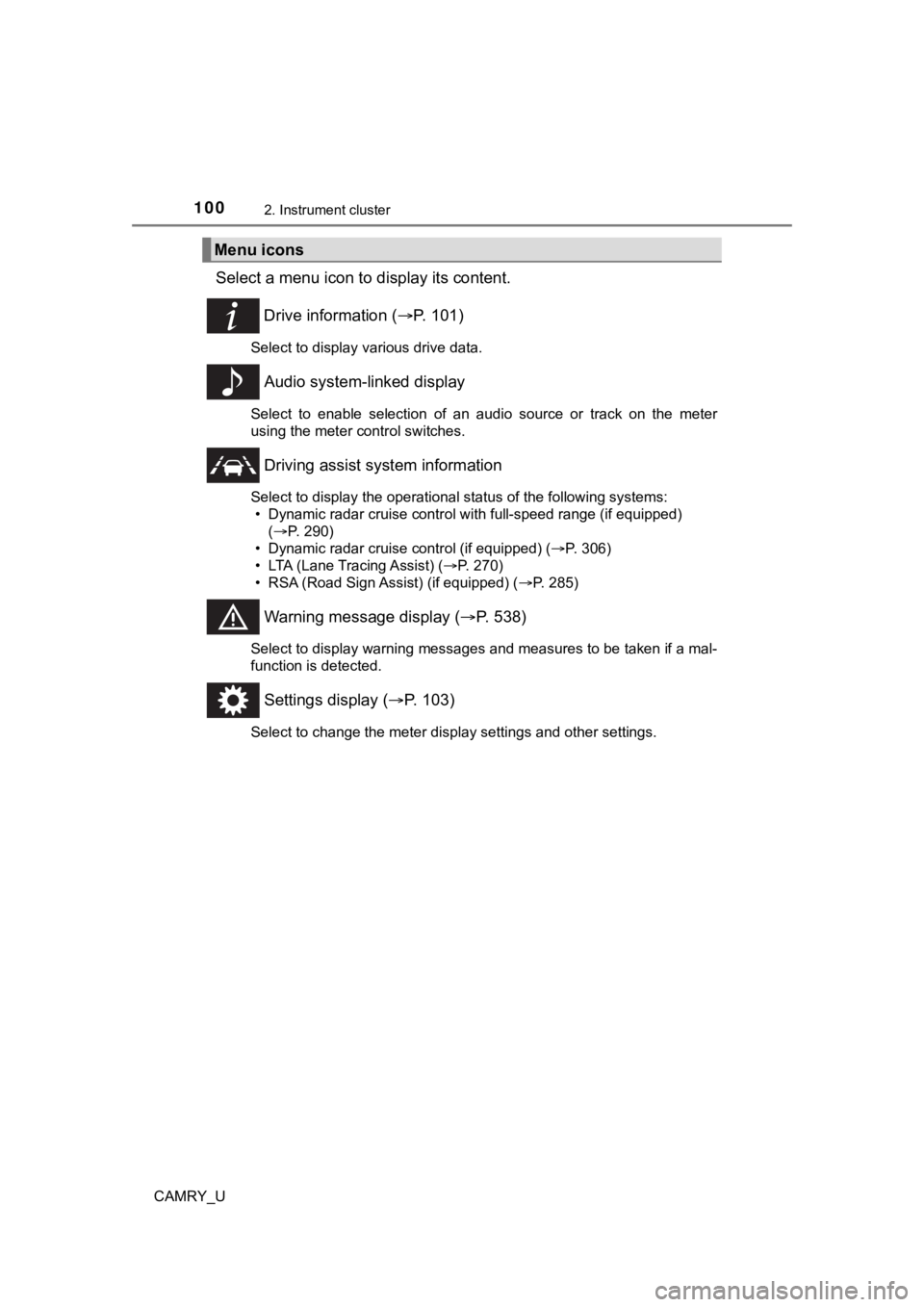
Select a menu icon to display its content.
Drive information ( P. 1 0 1 )
Select to display various drive data.
Audio system-linked display
Select to enable selection of an audio source or track on the m eter
using the meter control switches.
Driving assist sys tem information
Select to display the operational status of the following syste ms:
• Dynamic radar cruise control with full-speed range (if equippe d)
( P. 290)
• Dynamic radar cruise control (if equipped) ( P. 306)
• LTA (Lane Tracing Assist) ( P. 270)
• RSA (Road Sign Assist) (if equipped) ( P. 285)
Warning message display (P. 538)
Select to display warning messages and measures to be taken if a mal-
function is detected.
Settings display ( P. 103)
Select to change the meter display settings and other settings.
Menu icons
Page 103 of 664
1032. Instrument cluster
2
Instrument cluster
CAMRY_U
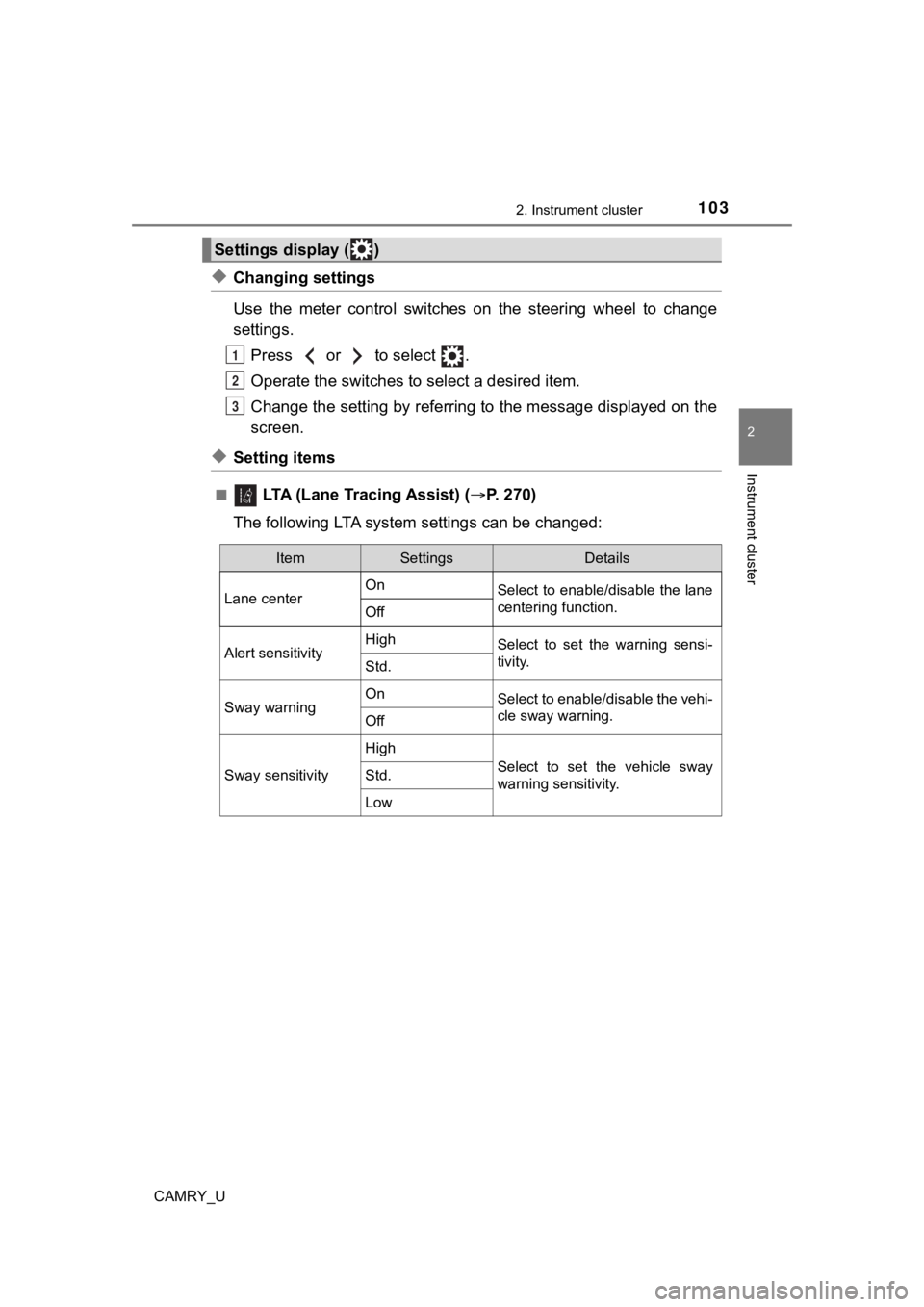
◆Changing settings
Use the meter control switches on the steering wheel to change
settings.Press or to select .
Operate the switches to select a desired item.
Change the setting by referring to the message displayed on the
screen.
◆Setting items
■ LTA (Lane Tracing Assist) ( P. 2 7 0 )
The following LTA syste m settings can be changed:
Settings display ( )
1
2
3
ItemSettingsDetails
Lane center On
Select to enable/disable the lane
centering function.
Off
Alert sensitivityHighSelect to set the warning sensi-
tivity.
Std.
Sway warningOnSelect to enable/disable the vehi-
cle sway warning.
Off
Sway sensitivity
High
Select to set the vehicle sway
warning sensitivity.Std.
Low
Page 112 of 664

1122. Instrument cluster
CAMRY_U
Content display area
A variety of information can be displayed by selecting a menu icon. Addi-
tionally, warning or suggestion/advice pop-up displays will be displayed in
some situations. • Menu icon content ( P. 114)
• Suggestion function ( P. 125)
• Warning message ( P. 538)
Odometer/trip meter ( P. 125)
Shift position ( P. 2 1 7 )
Outside temperature ( P. 9 4 )
Menu icons ( P. 11 4 )
“ODO/TRIP” switch ( P. 113)
Meter control switches ( P. 113)
7
8
9
10
11
12
13